Zilmori’s pink chests
English:
Changes the texture of the chest and its graphical interface
Русский:
Меняет текстуру сундука и его инвентарь
Changes the texture of the chest and its graphical interface
Меняет текстуру сундука и его инвентарь
– EN: **Zilibobka** is a popular Russian meme, which was also stimulated during post-ironic memes in 2017 on the social network VKontakte and Tiktok. Texture pack replaces Totem of Immortality with this meme
– RU: **Zilibobka (Зилибобка)** – популярный российский мем который также был зафоршен во времена постироничных мемов в 2017 году в соц сети ВКонтакте и Тиктоке. Текстурпак заменяет тотем бессмертия на этот мем
[ALL RESOURCEPACKS COLLECTION: MEMES + STREAMERS](https://modrinth.com/collection/sfDcDGAi)






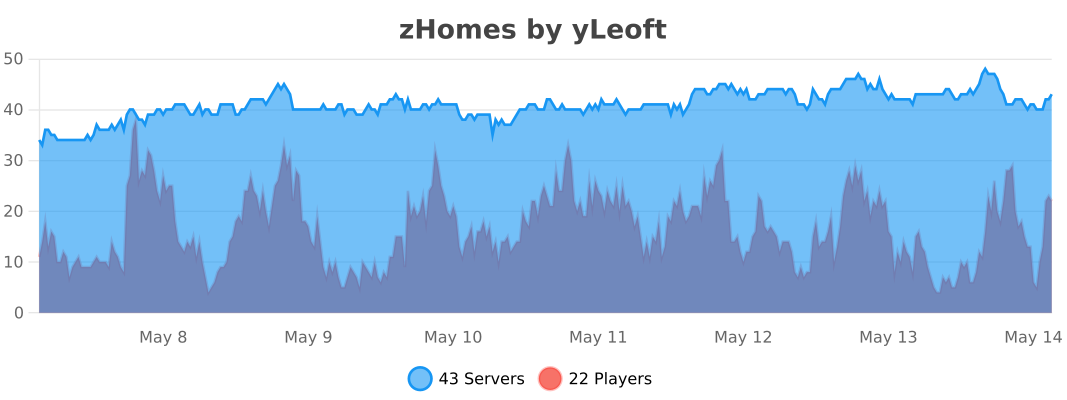
zHomes is a modern, fast and fully-configurable homes plugin for Spigot/Paper/Purpur/PufferFish servers. It focuses on simplicity, speed and customization so server owners can give players a familiar — but powerful — teleportation experience.
Some features:
– Create, delete and list homes
– Admin tools for managing and converting homes
– PlaceholderAPI support for message placeholders
– MiniPlaceholders support for minimessage placeholders
– Vault support for economy/command-costs
– GriefPrevention and WorldGuard integration for region checks
– Teleport warmup and safe-teleport checks
– Configurable commands, messages and permissions
– 100% configurable menus
– Uses SQL (H2/SQLite/MariaDB/MySQL) for storage (no local data/ directory)
Maintained by [yL3oft](https://github.com/yL3oft). This project is free and open-source.
—

Requirements
– Java 17+ (check release notes for exact JDK requirement)
– Paper, Spigot or a compatible fork
Installation
1. Download the latest JAR from Releases / Modrinth / Hangar / Spigot.
2. Place the JAR in your server’s `plugins/` folder.
3. Start the server once to generate config files (src/main/resources/config.yml defaults).
4. You’re done!
Quick test
– As a player: `/sethome home1` then `/home home1`
– As an admin: `/zhomes reload`
—

Admin
– `/zhomes info` — Shows plugin info and stats.
– `/zhomes reload` — Reloads plugin configuration and messages.
– `/zhomes version
– `/zhomes nearhomes [radius] <-u
– `/zhomes parse
– `/zhomes export` — Export all homes to a .json.gz file in the plugin folder.
– `/zhomes import
– `/zhomes converter
Player / Home commands
– `/sethome [name]` — Create a home (default name if omitted).
– `/delhome [name]` — Delete a home. Admins can use `/delhome
– `/home [name]` — Teleport to a home. Admins can use `/home
– `/homes [player]` — List homes. Admins can use `/homes
– `/home rename [oldName] [newName]` — Rename a home
Notes
– Command costs and vault integration require Vault to be installed.
– Some commands have admin-only variants (see Permissions below).
Full command list and usage: https://docs.yleoft.me/zhomes/commands-and-permissions
—

Below are the permission nodes and their default intent as defined in the plugin configuration (zHomes/config.yml). Use your permissions plugin to grant or deny these.
Command permissions
– zhomes.command.main — Main command (True by default)
– zhomes.command.main.help — Help SubCommand (Only OP by default)
– zhomes.command.main.version — Version SubCommand (True by default)
– zhomes.command.main.info — Info SubCommand (Only OP by default)
– zhomes.command.main.reload — Reload SubCommand (Only OP by default)
– zhomes.command.main.nearhomes – Nearhomes SubCommand (Only OP by default)
– zhomes.command.main.parse — Parse SubCommand (Only OP by default)
– zhomes.command.main.converter — Converter SubCommand (Only OP by default)
– zhomes.command.main.importexport — Import & Export SubCommand (Only OP by default)
– zhomes.command.sethome — `/sethome` (True by default)
– zhomes.command.delhome — `/delhome` (True by default)
– zhomes.command.delhome.others — `/delhome
– zhomes.command.homes — `/homes` (True by default)
– zhomes.command.homes.others — `/homes
– zhomes.command.home — `/home` (True by default)
– zhomes.command.home.others — `/home
– zhomes.command.home.rename — `/home rename` (True by default)
Bypass / misc permissions (as defined in config.yml)
– zhomes.bypass.limit — Bypass home limits (Only OP by default)
– zhomes.bypass.dimensionalteleportation — Bypass dimension restriction (Only OP by default)
– zhomes.bypass.safeteleport — Bypass safe-teleport checking (False by default)
– zhomes.bypass.warmup — Bypass teleport warmup (Only OP by default)
– %command_permission%.bypass.command-cost — Bypass command-cost (Only OP by default). Command-specific bypass permission is generated from the command permission string (see config.yml)
– %command_permission%.bypass.command-cooldown — Bypass commands cooldown (Only OP by default). Command-specific bypass permission is generated from the command permission string (see config.yml)
If you want to see the authoritative defaults and change them, open src/main/resources/config.yml in the repo or check the live docs: https://docs.yleoft.me/zhomes/commands-and-permissions
—

zHomes contains an inline converter to import homes from well-known plugins. The converter runs in-chat (not a GUI). See full converter details here: https://docs.yleoft.me/zhomes/commands-and-permissions/zhomes-converter-less-than-type-greater-than
—

Supported integrations:
– PlaceholderAPI — Message placeholders supported & custom [placeholders provided by zHomes](https://docs.yleoft.me/zhomes/hooks/placeholderapi).
– MiniPlaceholders – MiniMessage placeholders supported for advanced message formatting & custom [placeholders provided by zHomes](https://docs.yleoft.me/zhomes/hooks/miniplaceholders).
– Vault — for economy-based command-costs.
– GriefPrevention — region checks integration.
– WorldGuard — region and flag checks.
– MiniMessage — advanced message formatting.
– bStats — anonymous metrics (configurable).
Enable or disable integrations from config and ensure the third-party plugins are installed on the server when you expect integration behavior.
—

If you find zHomes helpful or need assistance:
– Discord: https://discord.gg/yCdhVDgn4K
– Issues: https://github.com/yL3oft/zHomes/issues
– Docs: https://docs.yleoft.me/zhomes
Support the project by starring the repo and joining the Discord!
—
[](https://minestrator.com/a/GROUPEZ)
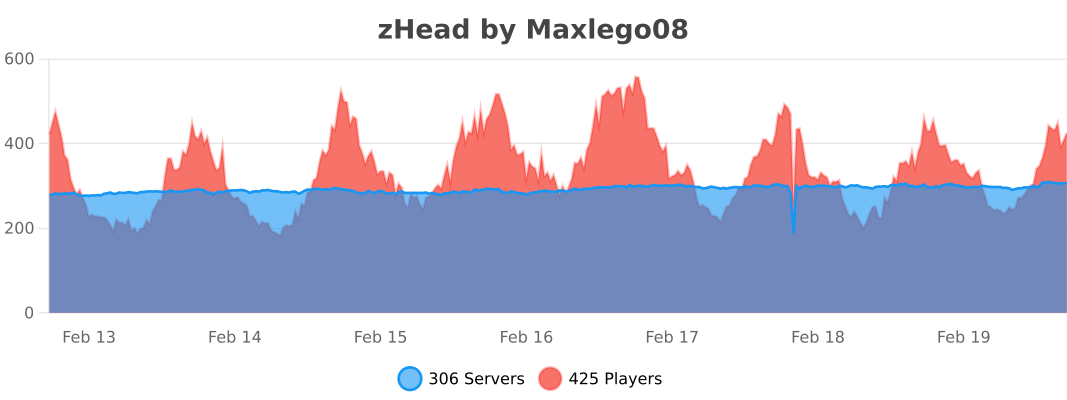
zHead is a swift and intuitive plugin enabling you to access thousands of custom Minecraft skulls with distinctive designs. This user-friendly skulls plugin opens the door to creative design possibilities, significantly improving your builds’ quality and offering creative liberty to both you and your players.
Should you seek additional methods to make your builds stand out with ease, zHead is the perfect solution!
Credit: [https://minecraft-heads.com/](https://minecraft-heads.com/)
## Commands:
– **/zhead** (aliases: /head, /zhd) – `zhead.use` – Display commands
– **/zhead reload** – `zhead.reload` – Reload configuration files
– **/zhead info** – `zhead.info` – Get head information
– **/zhead give
– **/zhead search
– **/zhead random [
– **/playerhead
## Inventory Permissions:
– `zhead.miscellaneous`
– `zhead.plants`
– `zhead.monsters`
– `zhead.humanoid`
– `zhead.humans`
– `zhead.food.drinks`
– `zhead.decoration`
– `zhead.blocks`
– `zhead.animals`
– `zhead.alphabet`
– `zhead.refresh`
## Placeholders:
– **%zhead_count%** – Displays the total number of heads
– **%zhead_count_format%** – Displays the total number of heads with a format
– **%zhead_category_count_
– **%zhead_category_count_format_
**API**: [https://github.com/Maxlego08/zHead?tab=readme-ov-file#api](https://github.com/Maxlego08/zHead?tab=readme-ov-file#api)
[](https://bstats.org/plugin/bukkit/zHead/21364)
## We would like to extend our heartfelt thanks to [Minecraft-Heads.com](https://minecraft-heads.com/) for providing their API, which has been an invaluable source of all the data used in our project.
Do u know the LOLCAT language? i made a Chinese version!
Causing many words to have spelling errors and pinyin
Taking Waxed Exposed Cut Copper Stairs as an example:
斑驳的涂蜡切制铜楼梯→班bo的涂辣切制铜楼梯
It can run normally in many versions so I’m too lazy to make any changes ‘-‘
(You still need to make changes on the language selection interface)
只是中文版的萌猫语
实际上它在1.18x~1.21x(好像)都能正常运行,但是我懒得改了0-o
加载了后还需在语言界面更改!
# Zet’s Grace: Recraft Equipment
## Notice
Part of [Zet’s Grace Collection](https://modrinth.com/collection/4Hmh13Uh).
## Description
Recipes for repairing equipment, added item data is lost.
_(Added item data means components such as Enchantments, Dyed Color, and Item Name.)_
### Details
– Equipment is replaced with new one.
## Features
Adds recraft recipe for each equimpment with durability.
## Usage
any **Equipment** with durability
**+** its main **Ingredient**
**=** recrafted **Equipmemt**
# Zet’s Grace: Craft Equipment
## Notice
Part of [Zet’s Grace Collection](https://modrinth.com/collection/4Hmh13Uh).
## Description
Recipes for uncraftable items, mostly equipment.
## Features
Adds recipes for:
– **Name Tag**
– **Enchanted Golden Apple**
– **Totem of Undying**
– **Elytra**
– **Trident**
– **Heavy Core** _(Since 24w18a ~ 1.21)_
– **Chainmail Armor**
– **Saddle** _(Before 25w20a ~ 1.21.6)_
– **Horse Armor** _(Except Leather one.)_
# Zet’s Grace: Beneficial Effects
_Data Pack 1.13–1.14.4 unavailable due to lack of predicates._
## Notice
Part of [Zet’s Grace Collection](https://modrinth.com/collection/4Hmh13Uh).
## Description
Commands for endless status effects.
### Details
– Each command triggers within 1-15 ticks ~ 0.375s.
– Given effects have reasonable duration time.
– Lost effects are restored within 1-15 ticks ~ 0.375s.
– Effects immunity clears effect the same tick it was gained.
– Effects concealment hides effect the same tick it was exposed.
– Stronger/other effects are untouched.
## Features
Adds 3 trigger commands with 4 inputs.
## Commands
“`
trigger activity set 10
trigger activity set 11
trigger activity set 12
trigger activity set 0
“`
“`
trigger mobility set 10
trigger mobility set 11
trigger mobility set 12
trigger mobility set 0
“`
“`
trigger security set 10
trigger security set 11
trigger security set 12
trigger security set 0
“`
## Effects
### activity 10-12
– **Mining Fatigue** _(Immunity)_
– **Weakness** _(Immunity)_
– **Darkness** _(Immunity)_
– **Night Vision** _(8m)_
– **Water Breathing** _(8m)_
### activity 11
– **Haste I** _(8m)_
– **Strenght I** _(8m)_
### activity 12
– **Haste II** _(4m)_
– **Strenght II** _(4m)_
### mobility 10-12
– **Slowness** _(Immunity)_
– **Levitation** _(Immunity)_
– **Slow Falling** _(Immunity)_
### mobility 11
– **Speed I** _(8m)_
– **Jump Boost I** _(8m)_
### mobility 12
– **Speed II** _(4m)_
– **Jump Boost II** _(4m)_
### security 10-12
– **Hunger** _(Immunity)_
– **Poison** _(Immunity)_
– **Wither** _(Immunity)_
– **Saturation** _(8m)_
– **Fire Resistance** _(8m)_
### security 11
– **Resistance I** _(2m)_
– **Regeneration I** _(2m)_
### security 12
– **Resistance II** _(1m)_
– **Regeneration II** _(1m)_
Zero Fog removes distance and dimensional fog for a clearer and sharper experience. Enjoy improved visibility in the Nether, End, and caves without altering the core aesthetic. Designed to stay lightweight and simple, this pack enhances exploration, building, and PvP by eliminating visual haze while keeping performance and compatibility in mind.
# **ZeroVision**
This is the very early alpha release of my pack
(since a lot of people on my discord wished for it)
In my pack i basically want to recreate everything cool i saw in resourcepacks in my own style!
Like 3D Flowers and Plants, or 3d Ores, or custom workbenches!
In my pack there is missing a lot of textures, animations, item-textures and basically the whole GUI, thats normal since this is the alpha of a work in progress resourcepack 🙂
**Note:**_You can load my pack on top of diffrent ones, if u want to have a textures for Items i didnt made so far!_ (The Resourcepack thats the highest in the list has the highest priority)
Heres some preview pictures:
3D-Ores: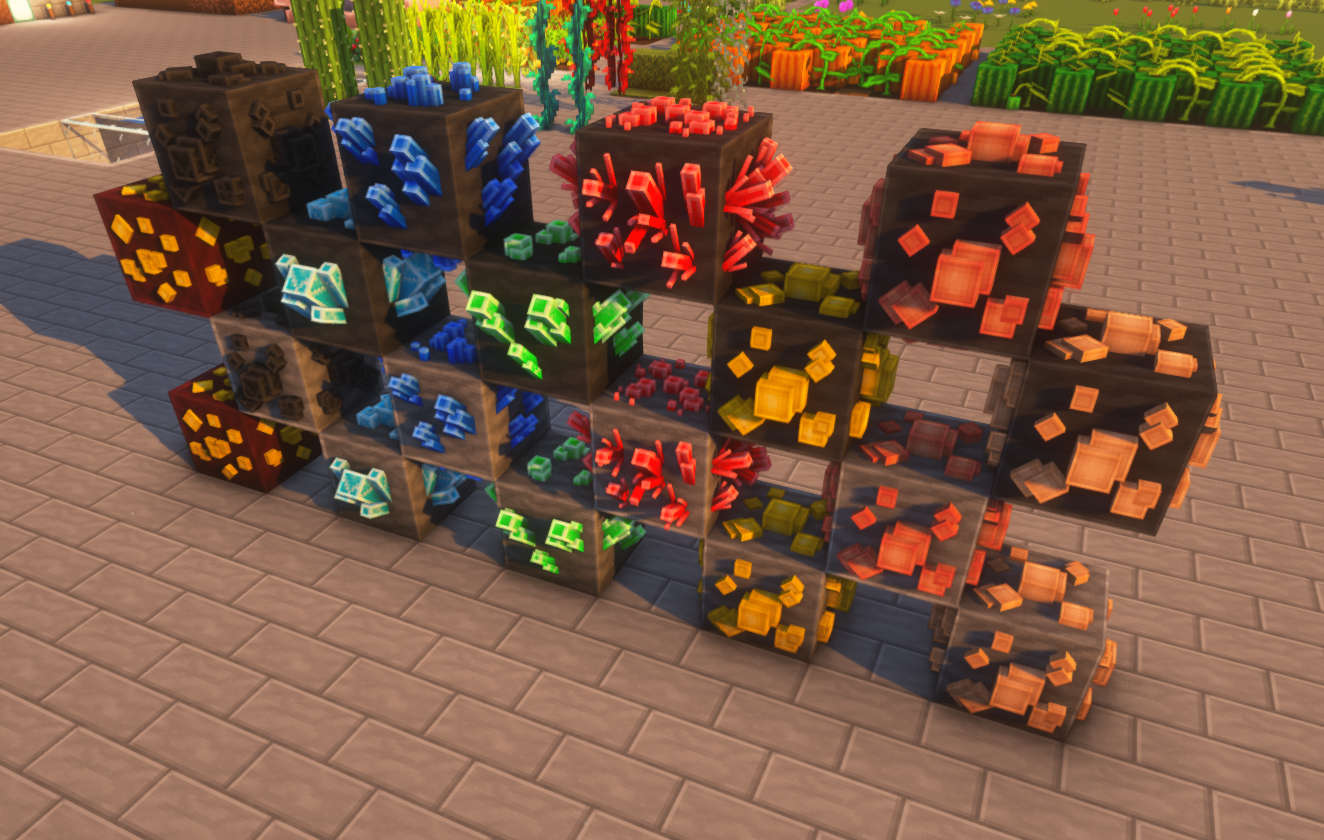
3D-Flowers: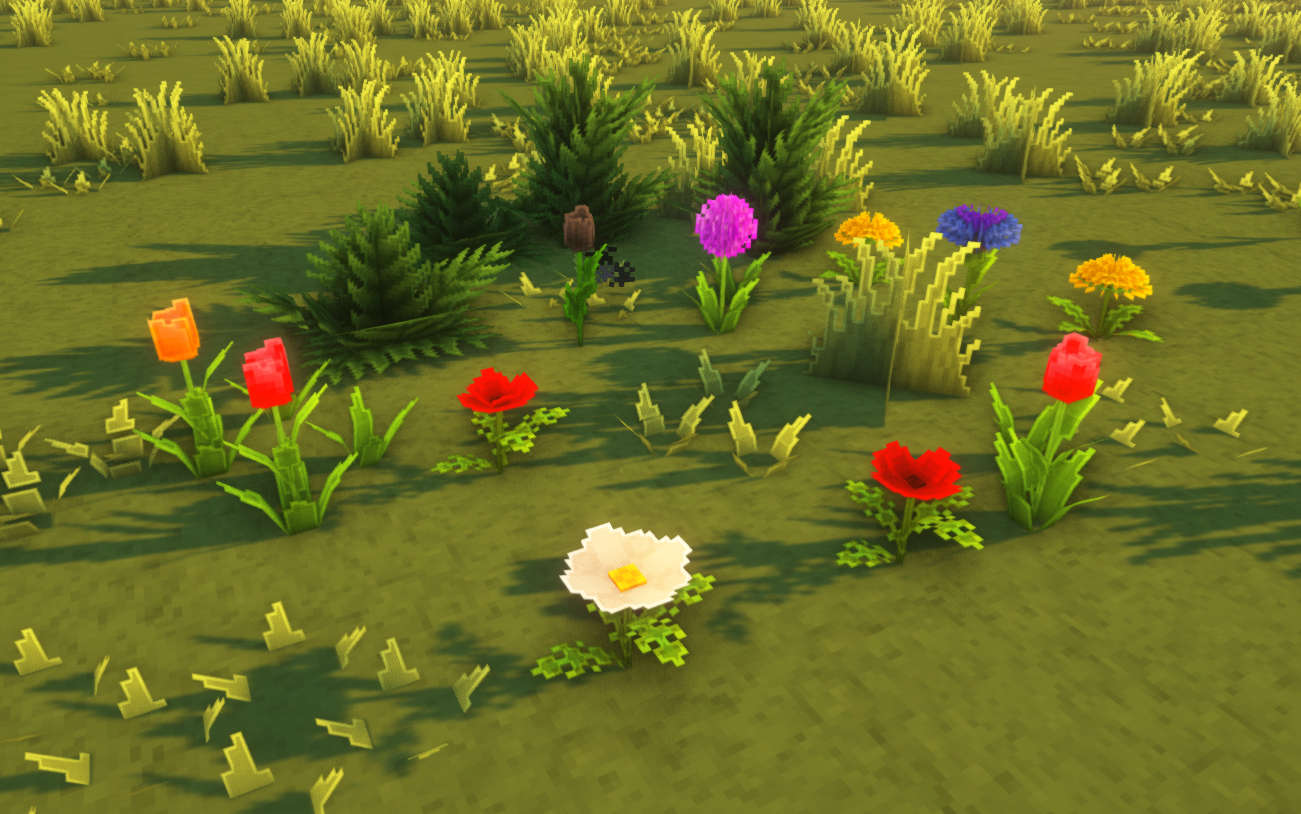
3D-Foliage: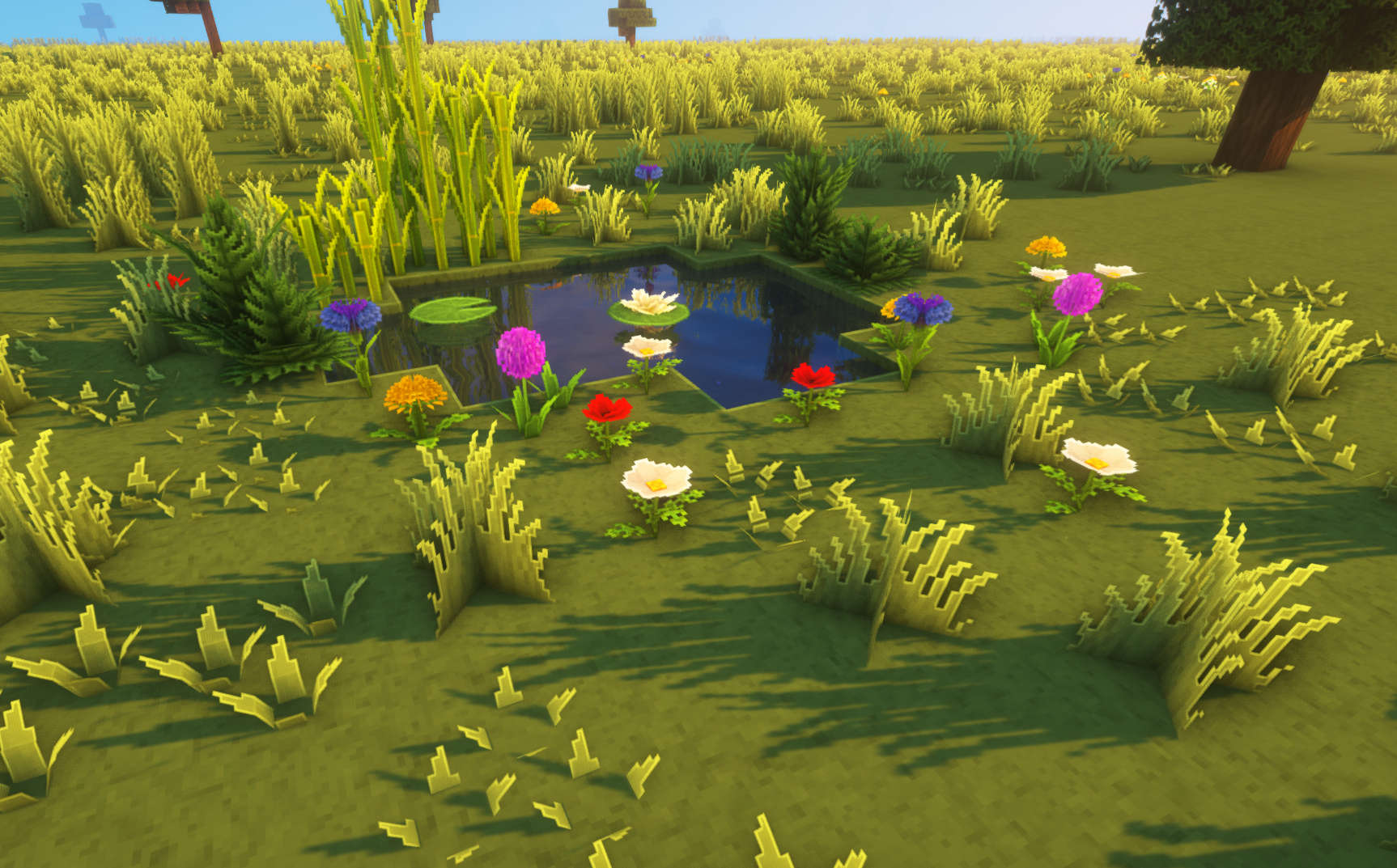
Other: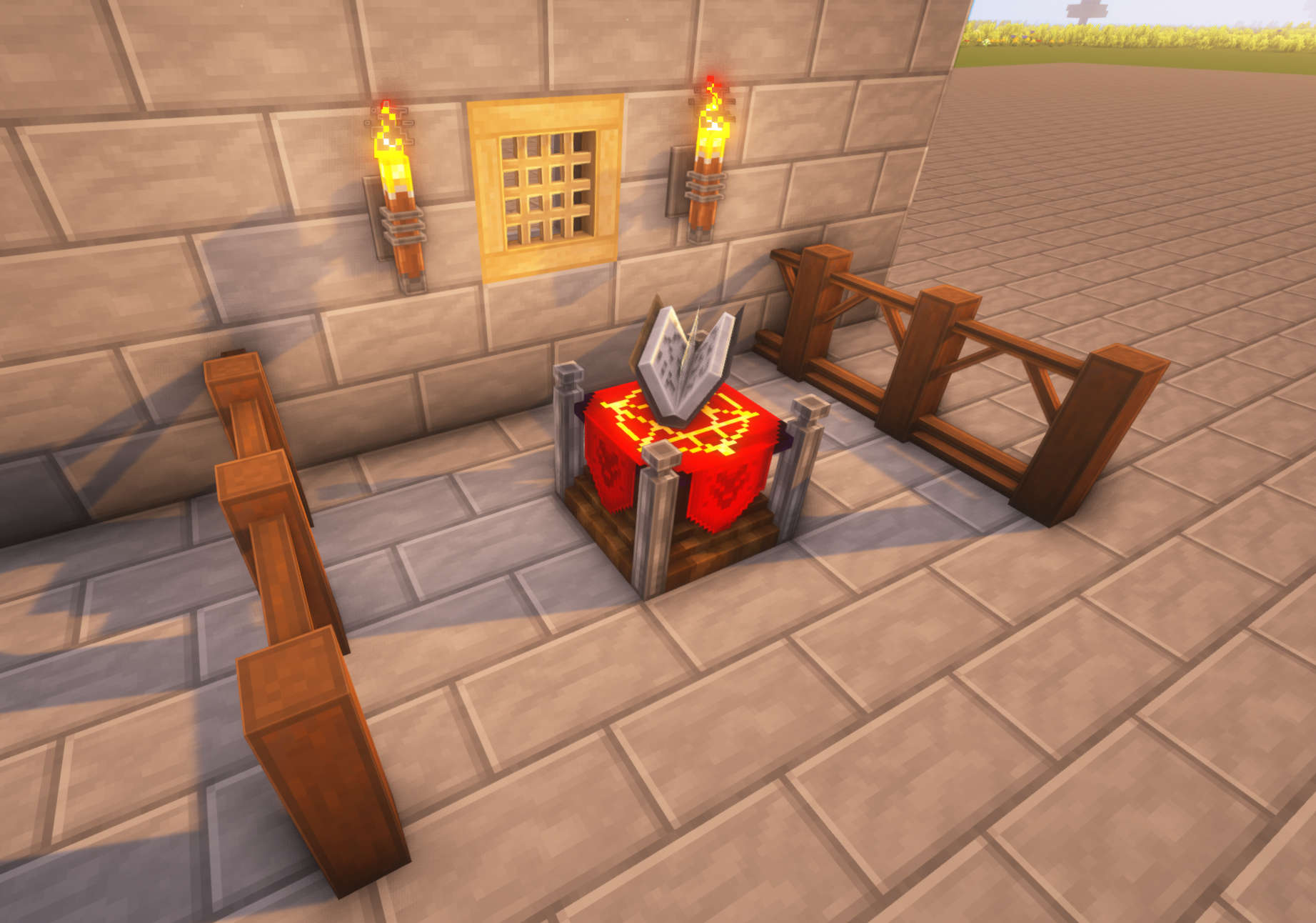
Preview: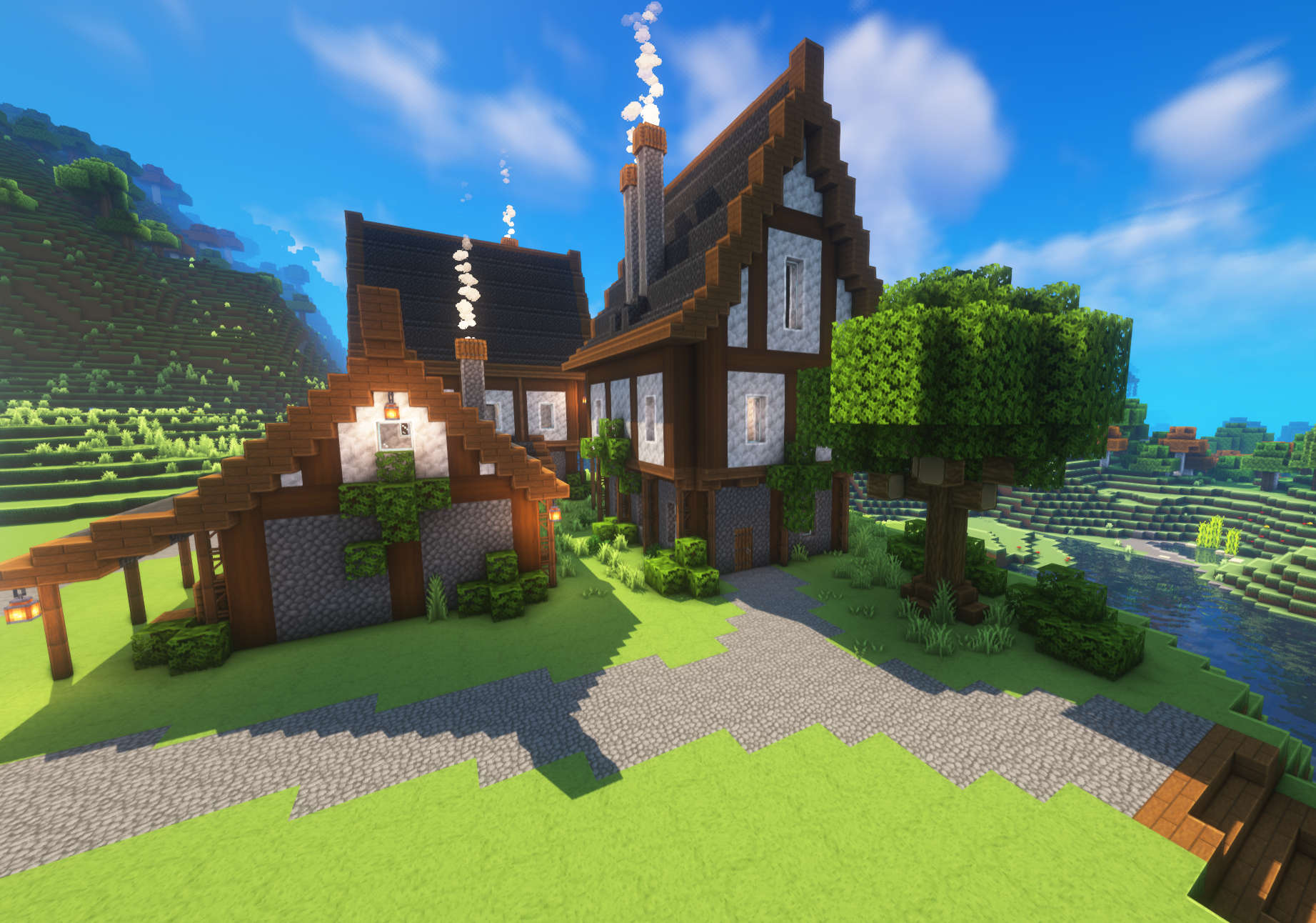
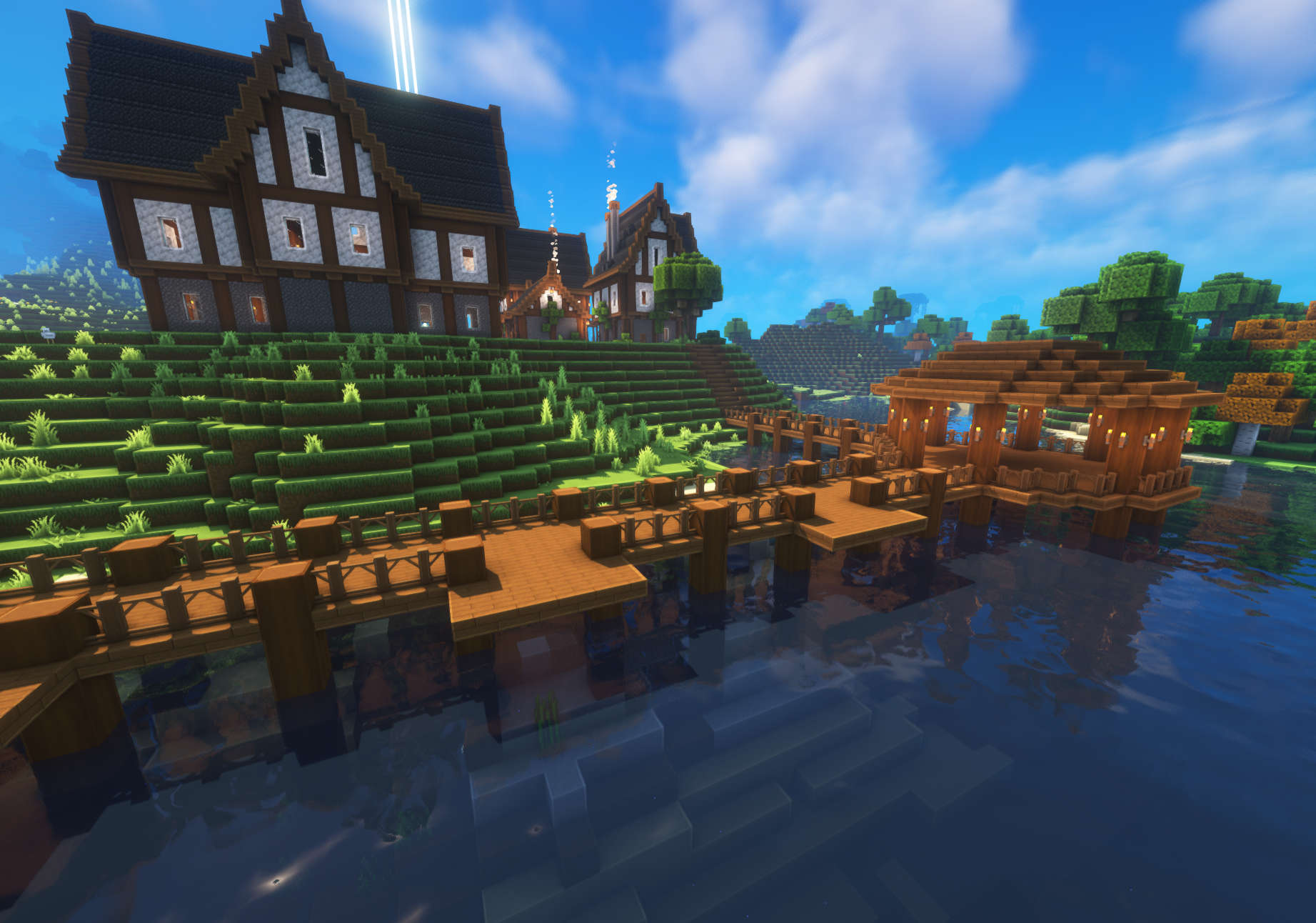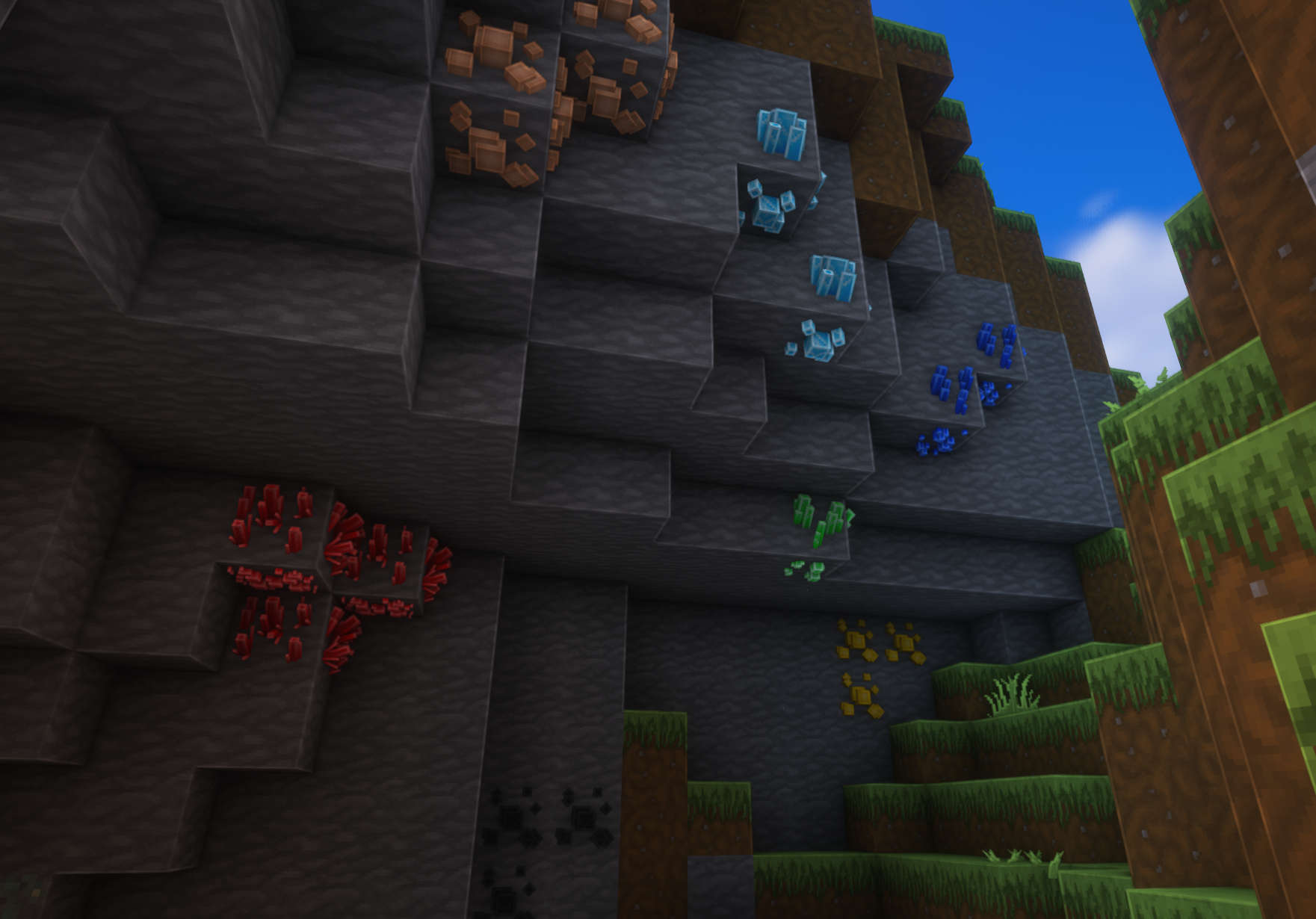
Im using Complementary Shaders in the screenshots!
