WorldAccessBlocker
# 🌍 WorldAccessBlocker


**WorldAccessBlocker** is a lightweight and highly configurable Minecraft plugin for **Bukkit**, **Spigot**, **Paper**, and **Folia** servers that lets you **restrict access to the Nether, the End, and elytra usage** until specific dates.
Perfect for managing **progression-based survival**, **seasonal events**, or **timed unlocks** — with multi-language support, date-based control, and live reloads.
—
## ✨ Features
– 🔥 **Restrict Nether Access**
Prevent players from entering the Nether until a specified date.
– 🚫 **Block End Portal Activation**
Disallow activation of End portals before a configured time.
– 🛑 **Disable Elytra Usage**
Cancels gliding and disables elytra flight until allowed.
– 🌍 **Multi-Language Support**
Includes `English` and `Russian` by default — customizable via `.yml`.
– 📅 **Date-Based Restrictions**
Set unlock dates using `YYYY-MM-DD HH:MM:SS` (UTC).
– ♻️ **Live Reload**
Instantly reload configs and language files with `/wabreload`.
– ⚠️ **Folia Compatibility Notices**
Alerts admins about partial feature support on Folia servers.
—
## 📦 Installation
1. Download `WorldAccessBlocker.jar`.
2. Place it in your server’s `/plugins` folder.
3. Start or reload the server.
4. Configure `config.yml` and language files in:
`plugins/WorldAccessBlocker/lang/`
—
## ⚙️ Configuration Example
“`yaml
# ===================================================================
# WorldAccessBlocker v0.7
# ===================================================================
# Message language: “ru” or “en”
language: “ru”
# Server time zone (important for recurring!)
# List: https://en.wikipedia.org/wiki/List_of_tz_database_time_zones
time-zone: “Europe/Moscow”
# ===================================================================
# Nether
# ===================================================================
nether:
disable: true
# If recurring is NO, this date is used (until when it is blocked)
restriction-date: “2025-03-10 00:00:00”
disable-portal-creation: true
disable-teleportation: true
# NEW: schedule by day and time
# If this block is present, restriction-date is IGNORED
recurring:
periods:
# Example 1: only on Sundays from 3:00 p.m. to 5:00 p.m.
– days: [SUNDAY]
start-time: “3:00 p.m.”
end-time: “5:00 p.m.”
# Example 2: all day on weekends
– days: [SATURDAY, SUNDAY]
# Example 3: every Monday from 6:00 p.m. to 11:59 p.m.
– days: [MONDAY]
start-time: “6:00 p.m.”
end-time: “11:59 p.m.”
“`
World Start Commands
# Overview #
**This Mod/Datapack can execute any command on starting a world**
The default way of the world counting as “started” is, when a player picks up any wooden log.
Once all players have done so, the commands get executed and you’re ready to play!
# Usage
This pack is intended to use for modpacks or other projects where a special setup has to be done before being able to properly play.
All commands which you want to have executed have to be written in the “setup.mcfunction” under data/world_start/functions. (Copy the file onto desktop, edit it, replace old one)
## Why two versions ##
I’ve decided to make two seperate versions of this pack. One, which is very simple and easy to use and another, fancier version. The fancy version keeps track of who has already “started” and once all players did, it will count down and then “start” the world. The two function identically, it’s just for personal preferrence if you like it simple or fancy.
## How to customize ##
You will have to edit the pack/mod to write the commands into it. Here is a detailed step by step guide for this:
**Mod version:**
1. Rename the mod file from .jar to .zip.
2. Follow instructions for datapack version.
3. Once you’re done, rename it back to .jar
**Datapack version:**
1. Open the .zip file and find the “setup.mcfunction” under data/world_start/functions .
2. Copy the file onto your desktop (out of the .zip archive).
3. Open the file with any text editor.
4. You should find the command “say setup complete”. This is the default example command.
5. For the fancy version, it has two more commands, which just clear a few displays. (Do not remove)
6. Delete the default command and add the commands you need to the file. Don’t include the slash. Command execution order is the top command first and bottom one last. All happen at the same time though.
7. Once all commands are written down, save it and place it back in the .zip folder. It will ask to if you wish to replace the old file which you do.
8. The pack is done! Now you just have to load it into Minecraft and you’re ready to go!
9. If the world is already running, you will have to do /reload to apply the changes to the game.
### Setting a different start
The way of detecting if a player has started to play is by an invisible advancement. It detects if the player has obtained any wooden log and gives a function if they have. This is of course also customizable. I recommend reading the wiki page about advancement triggers if you want to change the way the world starts. Just replace the “world_start” advancement in the pack.
### Other
Of course you can use this in your modpack. Feel free to edit this to your liking and include it. I just dont want you to publish this exact version with one tiny change and claim it as your own.
The datapack is marked as incompatible for some versions, but it should still work fine.
World Pre Generator
## Version 5.X.X
For older versions of the mod, check the wiki.
This Mod can pre generate the Minecraft dimensions per command.
The Mod is only needed on the server side, but can also be used on the client side.
—
You need a server to play with friends? You don’t know how to set up one? Just rent an already configured server!

Click on the picture above, select a plan (with recommended at least 6 GB),
use my code **agent** to get **25%** off your first month and enjoy playing with your friends!
—
## Support
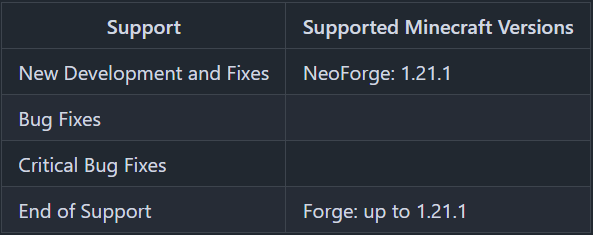
Minecraft versions, for which the mod is not released, are not supported.
You can find a text version here.
## Hints
The pre generation tasks are executed one after the other.
The pre generations are continued after restarts.
Chunks already generated are skipped on pre-generation, if the forced flag is not true.
If you run semi-parallel pre generation, you should set “max-tick-time” in the “server.properties”-file to -1 to prevent crashes, because the tick time gets too long.
In semi-parallel pre generation mode, multiple tasks for pre generation are started in parallel, but the execution is done the Minecraft way. As of 1.20.1, this means, that only one chunk can be generated at a time.
## Server Config
The config file can be found in the “serverconfig” folder in the “world” folder and is named “world_pre_generator-server.toml”. The name of the world folder is set for servers in the “server.properties” file and for clients it is the name of the world/save game in the world list, and it can be found in the “saves” folder in the “.minecraft” folder.
* **send_feedback**
Shall a pre generation feedback send to all online players?
* **generation**
Parameters for generation
* **type**
Type of generation
SERIAL: Every chunk one after another is generated.
SEMI_PARALLEL: Multiple chunk generation tasks are created, but the generation is still serial (speed up the chunk generation).
* **semi_parallel_task_count**
How many chunk generation tasks shall be start in parallel?
If the value is “0”, the number of processor cores is used.
* **delays**
Delays of the print and save tasks
* **print**
Time between 2 status prints
* **save**
Time between 2 saving events
## Commands
* `/pregen list` – Lists all running pre generation tasks.
* `/pregen gen start []` – Creates a pre generation task with the specified centre, radius and dimension. Optional, the force flag (true, false) can be set. If it is set to true, all chunks are loaded. If it is set to false, already generated chunks are skipped. If the force flag is absent, it is set to false.
* **block**: The center coordinates and the radius are in blocks.
If you want to generate a 4000×4000 (2000 in the positive and negative direction) from the center of the world, the command would be:
`/pregen gen minecraft:overworld start block 0 0 2000`
If you want to generate a 4002×4002 (2001 in the positive and negative direction) from x = 100, z = 150 of the world, the command would be:
`/pregen gen minecraft:overworld start block 100 150 2001`
Hint: In the pregeneration list it will show up, with the following center and radius data, because the block data are calculated to chunk data and back:
x = “round down”(100 / 16) * 16 = 96
z = “round down”(150 / 16) * 16 = 144
radius = “round up”(2001 / 16) * 16 = 2016
* **chunk**: The center coordinates and the radius are in chunks.
If you want to generate a 4000×4000 (2000 in the positive and negative direction) from the center of the world, the command would be:
`/pregen gen minecraft:overworld start chunk 0 0 125`
If you want to generate a 4002×4002 (2001 in the positive and negative direction) from x = 100, z = 150 of the world.
“chunk x” = “round down”(100 / 16) = 6
“chunk z” = “round down”(150 / 16) = 9
“chunk radius” = “round up”(2001 / 16) = 126
The command would be:
`/pregen gen minecraft:overworld start chunk 6 9 126`
* `/pregen gen resume` – Resumes the pre generation task of the dimension.
* `/pregen gen pause` – Pauses the pre generation task of the dimension.
* `/pregen gen cancel` – Cancels the pre generation task of the dimension.
* `/pregen clear` – Cancels all pre generation tasks.
* `/pregen sendFeedback` – Shows, if the progression feedback is enabled or disabled.
* `/pregen sendFeedback ` – Enables or disables progression feedback depending on isFeedbackEnabled. Generation start and finish feedback are not affected of that.
## Progression State
The progress state computed is in chunks.
You get the following information in the generation messages: “A B/C (D%) E chunks/s”
* **Dimension (A)**
* **Chunk generated (B)**
* **Total chunks to generate (C)**
* **Percentage of chunks for which generation is finished (D)**
* **Rate of Chunks per second generated between this and the last message (E)**
—
Thanks for the logo to Muse31.
You can use this mod in non-commercial modpacks without asking.
You can find more mods from me on CurseForge and Modrinth.

World PIDS-Pack [MTR 4/JCM]
Release Trailer:
This is a resource pack containing JavaScript scripts. It adds numerous custom PIDS to the Minecraft Transit Railway (MTR) Mod. It is only useable for MTR 4 and must be used with the Joban Client Mod (JCM), otherwise the pack will not work.
Version compatibility
| JCM-Version | WPP-Version |
| :—: | :—: |
| >= 2.2.0 | >= 1.11.1 |
| =< 2.1.2 | =< 1.11.0 |
The following PIDS are currently being added
Germany
– Munich S-Bahn
– Munich Subway
– Hamburg (Bus/Tram)
– Hamburg S-Bahn
– Hamburg Subway
– Hamburg Subway (colored)
– Hamburg Subway (new)
– Hanover (Light Rail)
– Frankfurt Subway
– Nuremberg S-Bahn
– Nuremberg Subway
– DB (2016)
– DB (big)
– Karlsruhe Light Rail
– Rostock Light Rail
– Berlin S-Bahn
– Berlin Subway
– DB DSA+
Austria
– ÖBB
– ÖBB (2022)
– ÖBB (arrival and departure board)
– ÖBB S-Bahn
– Vienna Subway
Sweden
– Stockholm Subway
– SJ (Statens Järnväg)
Switzerland
– SBB
Australia
– Sydney
Netherlands
– Dutch
– Dutch (Bus)
– Dutch (Tram)
– Rotterdam (Metro)
Hungary
– Hungary (departure board)
Turkey
– Izmir Subway
Greek
– Athen (Suburban)
– Thessaloniki (Metro)
Belgium
– SNCB (single line)
– SNCB (single line – old)
– SNCB (departure board)
Finland
– Finish VR
Portugal
– Portuguese (departure board)
United States of America
– WMATA
Poland
– Polish (PKP-Style)
Denmark
– Copenhagen (Metro)
Norway
– Norway
England
– Euston
– London (Bus)
Italy
– Trenitalia
Singapore
– North East Line
If you have whishes for PIDS, that should get added, then you can message me on discord or send a message in the “World PIDS Pack” Thread on the MTR Discord Server (Username: teampommes).
### Specials
the specials have moved to https://teamstar.pro/world_pids_pack/en/specials
Terms of Use
World PIDS-Pack [MTR 4/JCM]: Terms & Conditions
– By using this resource pack, you agree to the Terms of Use.
– TeamPommes is the creator and copyright owner of this resource pack.
– These Terms of Use may be modified by the owner at any time.
– These Terms of Use apply only if you use this resource pack yourself or publicly.
– The terms listed on the official Modrinth project page supersede any license, readme, or terms of use information provided elsewhere, including in the resource pack files.
– The owner has the final say on what terms of use apply to this resource pack and its elements.
With this resource pack, you MAY
– use (both private and on public servers) and edit the resource pack at any time.
– show the resourcepack in your videos, live streams, or blogs.
– show an edited version of the resource pack in your videos, live streams, or blogs if the resource pack version is not public.
With this resource pack, you MAY NOT
– include unedited elements of the resource pack in your own resource pack when publishing it unless you have permission from the owner.
WorldManager
# WorldManager
WorldManager is a simple plugin allowing worlds to be automatically reset on demand.
**NOTE:** The plugin is currently in beta, so please check out here to suggest features you’d like!
## Commands
### /worldmanager
This is the main command of the plugin, allows to have a list of the commands.
### /worlds
This command allows you to have information on worlds handled by WorldManager.
### /loadworld
This command allows you to load a world handled by WorldManager.
### /unloadworld
This command allows you to unload a world handled by WorldManager.
### /createworld
This command allows you to create a world reset option for the specified world.
## Permissions & Messages
WorldManager allows its users to modify the required permissions and messages to whatever they’d like. In order to do so, please head to the config
## API
WorldManager comes with an API allows you to use its features without the plugin.
[World Generator] Superflat++ World Generator
# Features as of Minecraft version 1.19:
* The overworld is unchanged compared to previous versions. Everything is working fine.
* The nether won’t generate many stuff if I flatten it so the best I could do was to remove the bedrock ceiling thus you can easily dig up to the flat surface of the world this way traversing the nether and getting flat surface for builds is still a viable thing.
* The end is untouched.
* Two editions: Regular, that only flattens the overworld and Plus that removes the bedrock ceiling in the nether too
# Features as of Minecraft version 1.18:
* Redone the data pack so now achieving flatness with different methods
* Now aquatic biomes spawn too!
* Jungle and desert pyramids are added back!
* Everything seem to be working in order in the overworld
* Mountainous biomes are obviously flat so there isn’t too much to them
* In plus version the nether and the end are both quite flattened, at least the top of them
* In achieving that I accidentally made the ender dragon easier to beat since there are no obsidian monoliths and crystals… Sorry?
* The nether is relatively safe to walk around but don’t go diving deep in lava while using the plus version. For some reason where there is lava lake there isn’t any bedrock. You might just… you know. Fall out of the world?
# Features up to Minecraft version 1.17.1:
* The world surface generates in only one plane, highly resembling to Mojang’s original superflat mode, except for it is not but tries to achieve it by sticking to a given height
* The world is still very ideal for both survival and creative modes for the majority of the world space is still empty as seen in the very first picture in the description
* With the exception of oceans, ocean monuments and desert pyramids everything works
* Ruined portals and stronghold still generate so you can “complete” the game if you wished so
* Two editions. One that makes the overworld superflat, the other makes the nether and the end superflat too
In the plus edition end biomes are a bit modified so chorus trees generate everywhere, giving the landscape a more dense look
[World Generator] Ocean Only Water World!
# Introduction:
So after 10 years of playing me and my friend wanted to spice up things a bit and play in an ocean only world where the whole gameplay would be different since the different available resources. We didn’t want to choose between all the available ocean biomes like frozen deep ocean or warm ocean since some of them are very different in terms of default blocks such as coral or ice.
# Changes since 1.21.5 release:
– Reverted back to stock world generation: Added back top layer of ice in most snowy/frozen biomes to make it easier for the player to navigate
– Added Underwater Potion to most village chests that grants the player 30 minutes of water breathing upon drinking
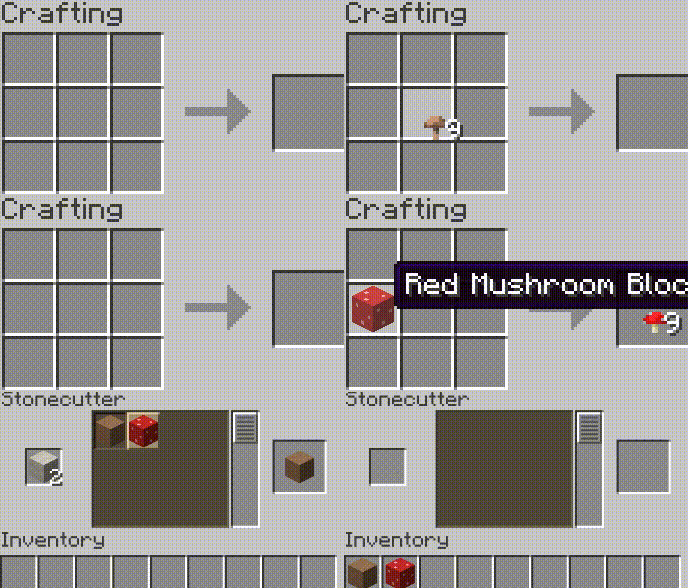
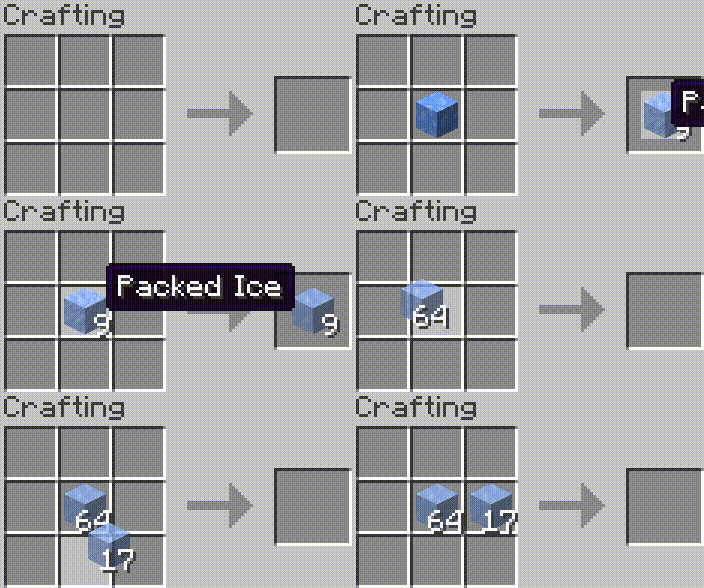
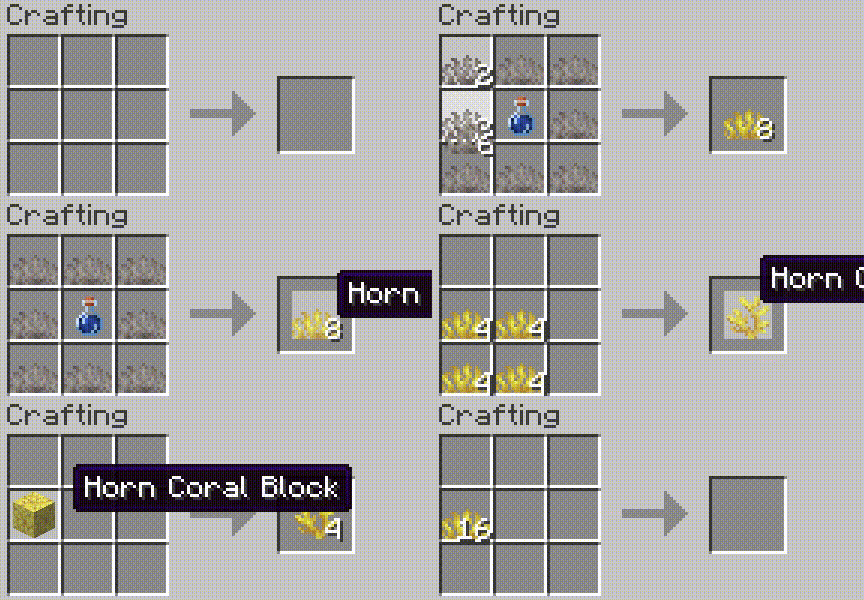
– Corals, budding amethyst, ice variants, mushroom blocks can be mined with simple tools without silk touch enchantment
– Reverse crafting ice, corals, mushroom blocks via crafting table or stonecutter is now possible
– Safe world spawn is still risky. Since I’m still horrible at coding and couldn’t come up with a fix platform generation during the first time the player spawns in the world, I’ll give you pre-tested seeds that have safe world spawn:
– Spawn on ice: 906182347964544722
– Spawn on abandoned ship: 6696165159819216322
– Spawn on a floating nether portal: 2589681248334255595
# Changes since 1.21 release:
– Set water limit to 208 as well as generated terrain.
– Most structures will generate in the world just fine, including villages, outposts, mansions, swamp huts, igloos, strongholds etc. but for some reason jungle and desert pyramids won’t?
– Dimensions were left untouched, only noise settings and the biomes were modified.
– Removed ice layer on top from all biomes to remove way too much free, flat surface from a water themed survival world to avoid too easy gameplay. I’ll add different editions for enhanced gameplay, such as modified villages, mansions and outposts to fit a water themed world.
# Changes since version 1.18 release:
Mojang/Microsoft drastically changed world generation and while there are more options for fine-tuning the vanilla gameplay they removed/altered several stuff so making custom world generators is still an unknown field. Also they’ve removed custom structure and structure start support so you cannot just tell the game to generate 10 biomes but put all sorts of structures such as villages, strongholds, mansions etc. on top of it. Meaning, structures are now hard-coded and will only generate in their respective biome. Dark oak forest->Mansion. Villages cannot generate in ocean biomes. I had to solve this issue and there weren’t many options for me. I increased sea level from 63 to 284. Telling the world to generate ocean biomes only was no longer an option for you’d be missing almost all and every structure including villages, outposts, swamp huts, buried treasures, mansions etc. Imagine it this way: The world is normal, every biome is there it’s just that they’re submerged like in the movie called Water World. According to my knowledge only desert and jungle pyramids are unable to generate this way and I’m unable to solve that. There are a few issues with this sudden increase of sea level and submerging biomes though. For some reason the player won’t care anymore if it’s a safe place to spawn or not. You can get lucky and the world will put your default spawn at an iceberg on top of the ocean or mansion, village, outposts etc. but you can also get buried in a cave suffocating or at the bottom of the sea 200 meters below… This needs fixing but at the current world generator settings I cannot do anything to fix this… So there are a few workarounds for this and I’ll talk about them in the features section.
# As of 1.18:
– Every biome generates now. They’re just submerged.
– Sea level increased from 63 to 284.
– You can play with sea level by modifying /data/minecraft/worldgen/noise_settings/overworld.json file in the data pack before generating the world and editing “sea_level”: 284″ to your desired value.
– Safe spawn in no longer an option. You can spawn on the bottom of the ocean or in a stone wall or a cave or if you’re lucky on the top of an iceberg, village, mansion, outpost etc. Thank Mojang for this.
– Most structures still spawn with the exception of desert and jungle pyramid and thankfully they’re still above the sea so you can find them relatively easily.
# Workarounds of getting default player spawn to a safe place:
– Enter the world in creative and find a safe place then use /setworldspawn command to place your default spawn to a safe location.
– Keep generating new worlds with the data pack until you get a safe spawn location. If you’re patient this could be best for you if you really don’t want to use creative mode.
# Up to 1.17.1:
– The world only generates ocean biomes such as: Ocean, Deep Ocean, Frozen Ocean, Deep Frozen Ocean, Cold Ocean, Deep Cold Ocean, Lukewarm Ocean, Deep Lukewarm Ocean, Warm Ocean, Deep Warm Ocean
– Villages as of 1.0.1 plus edition generate in their respective ocean biomes. Plains village in ocean, savannna in lukewarm, desert in warm, taiga in frozen ocean.
– The world still generates most structures (if allowed to) such as: ocean monuments, desert pyramids, villages, pillager outposts, ruined nether portals, shipwrecks, igloos
– Sadly strongholds and mansions don’t generate and I’m not good enough to make them do so
– Now that I rebuilt the data pack from scratch, not based on other sources strongholds, mansions, jungle temples, buried treasures and all sorts of villages can generate too!
– The player can set the wanted ocean depth before starting a new game by modifying sea_level line in overworld.json in the extracted zip files dataminecraftworldgennoise_settings location (default is 67 blocks. 222 is a very deep sea…
–
# Different versions:
Based the work on slicedlime Mojang developer’s vanilla worldgen and nate101thebattler’s Water World Datapack. (the old one, which you can silll download from the files. Beware, that version doesn’t generate strongholds so the end is unavailable)
Remade from scratch with the help of misode’s data pack editor.
# Older versions:
Here on Modrinth you can download the basic edition which only generates oceans with strongholds, buried treasures and ruined portals. More challenging and recommended gameplay.
There is the plus edition which generates all sorts of structures such as various villages, depending on the ocean type, mansions, jungle temples, pillager outposts, desert pyramids.
I’ve also made a resource pack that replaces the standard Minecraft overworld as well as the main menu music with more sailor like. You can download it in the files too.
World Colors
ENG
To add to the server you need: 1.Download zip archive 2.Open the server folder /world/datapacks 3. Drop the downloaded zip archive into the open folder and restart the server or write `/reload` to the console, if you do not have a paper or spigot server core, then write `/reload confirm`
To start using it, just turn it on and it will configure itself, 3 scoreboards will be automatically created, 1 for each world and they will tune in themselves, if you want, for example, in the ordinary world, write `scoreboard modifity overworld` and write what you want to change
Changes the color of your nickname in the tab depending on the world. For example, if one of the players is in the general world, then the nickname in the tab will be green, if it is in the lower world, then red, and if in the end, then purple. This can be seen in the screenshot: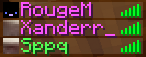
It shows that the first 2 people are in the end and the third in the ordinary world.
РУС
Что бы добавить на сервер нужно:
1.Скачать zip архив
2.Открыть папку сервера /world/datapacks
3.Перекиньте скачанный zip архив в открытую папку и перезапустите сервер или напишите в консоль `/reload` если у вас не ядро сервера paper или spigot то пишите `/reload confirm`
Что бы начать его использовать просто включите его и он сам настроится, автоматически создастся 3 таблицы счёта (scoreboard) по 1 на каждый мир и сами настроятся если вы хотите что бы например в обычном мире напишите `scoreboard modifity overworld` и пишите что вхотите изменить
Изменяет цвет вашего ника во вкладке в зависимости от мира. Например если кто-то из игроков будет в обычном мире то го никнейм в табе будет зелёным цветом , если будет в нижнем мире то красным а если в энде то пурпурным. Это видно на скриншоте:
На нём видно что первые 2 человека находятся в эндер мире а третий в обычном мире
World Color TAB
# WorldColor Teams
Overview
WorldColor Teams is a lightweight and vanilla-friendly datapack that automatically changes a player’s name color based on the dimension they are currently in. Perfect for RPG servers, SMPs, or just adding a touch of immersion to your world!
## Features
Automatic Synchronization: Your name color updates instantly as you pass through portals.
## Unique Colors for Each Dimension:
Overworld: Vibrant Green
The Nether: Fiery Red
The End: Mystical Purple
No Commands Needed: Once installed, everything works automatically in the background.
Vanilla System: Uses the native Minecraft /team system, ensuring compatibility with the Tab list and nameplates above heads.
# How it Works
The datapack creates three teams (overworld, nether, and end) and continuously checks the player’s location. As soon as you switch dimensions, the pack seamlessly moves you to the corresponding team.
## Installation
Download the datapack.
Place the .zip file (or folder) into your world’s datapacks folder.
Use /reload in-game or restart your server.
Enjoy your new dynamic identity!
Workstations Cubed
This is a silly resource pack that edits the Stonecutter and Grindstone to use full-block models, sort of like a lot of other older workstations did. The Stonecutter uses the textures from the older scrapped Stonecutter block, while the Grindstone textures are “custom” (edited from the furnace textures lol). It’s intended to be used with a resource pack like Golden Days, otherwise these will stick out like a sore thumb.
Note that while the have different models, the hitboxes aren’t changed, as such would be impossible for a resource pack. If you want to fix this, Nostalgic Tweaks has options in the Eye Candy > Block Candy > Custom Hitbox section that lets you *mostly* convert them to actual full blocks (aside from a LITTLE jank).