YegsPack
The YegsTv Texture Pack!
Features;
– Dark Mode EVERYTHING
– Smoother Font
– Blue -> Green Gradient XP Bar
– Black Bow
– Pullback Indicator
– Modern Paintings
– Visual Durability
other tiny things 🙂
– Maintained by **[Ark](https://www.twitch.tv/ark_mc)**
– For BEDROCK versions, join the **[Discord](https://discord.gg/DaGqzj67CA)**
**CREDITS**
– VanillaTweaks
– SpectreDount (Diminshing Durability)
YeeeesMOTD
Customized server motd and random icon, it can use player’s head as server icon,like this:
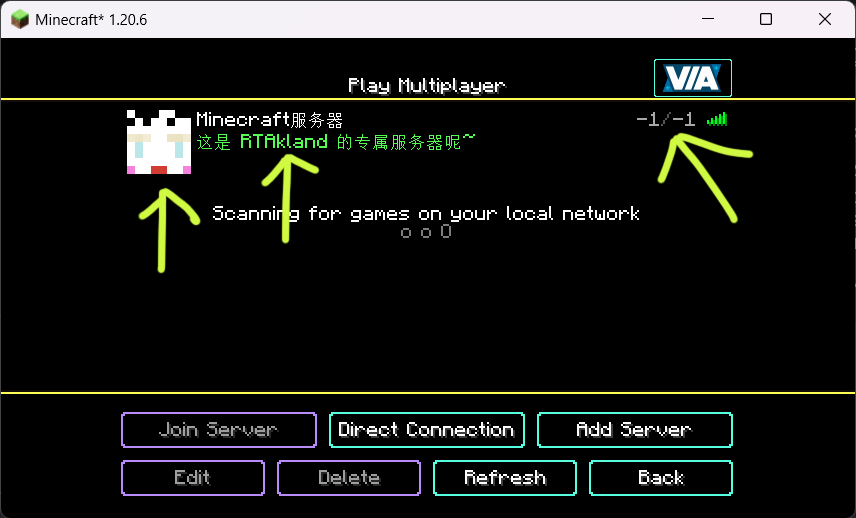)
also use player’s name as motd description, and random icon
everything is up to you
for more information please go to github: https://github.com/RTAkland/YeeeesMOTD
Years C
### Years C – Remastered Mod
#### (Forge)
A standalone mod that lets you choose your Age, and grow old.
Be sure to use the latest Forge version for each release!
#### Usage:
Press the V key to set your Age
Afterwards pressing the V key will open up your data sheet, showing your Age, and other information from the mod
Command:
/jycage
Sets the Age of a Player depending on how many Minecraft Days you have set.
#### Some Features:
Starting Age selector
You age as the game goes on
If you have Hair C installed as well, then your Hair will turn white as you become Old
Being too old will kill the player
#### Compatible Mod:
JinGames Hair C
#### Common Question(s):
Q: Will the mod be updated/downgraded to a newer/older Forge version?
A: Maybe, but there are no fixed plans on this yet.
Q: Is it possible to play with this mod in older forge versions?
A: You can find an older version for 1.7.10 on it’s official page here: main.jingames.net/jinryuus-years-c/ OR Here On CurseForge
#### Credits:
Creator: Tamás “JinRyuu” Nagy (Passed away)
Current developer: Benjámin “JinGames_Ben” Nagy
Contributor: YourDailyModder
#### Donate:
OUR PATREON: patreon.com/JinRyuu
SERVER DONATION: JinGames DBC Zero S Minecraft Server
JinGames is Sponsored by BisectHosting!
Need a Minecraft Server? BisectHosting is a super easy to use Server Hosting provider!
[Use our Link and promo code JinGames to get 25% OFF your first month.
](https://bisecthosting.com/jingames)
[](https://discord.gg/54mDQkf)
YDM’s Iceologer
#### YDM’s Iceologer
**For forge, neoforge and fabric**
This mod adds the Iceologer from the 2020 mob vote and an Ice Chunk Block
that is summoned by the Iceologer and you need to mine it with a tool that is enchanted with Silk Touch.
Currently it spawns in:
– Snowy taiga
– Snowy slopes
– Frozen peaks
-Jagged peaks
– Snowy beach
– Snowy plains
– Ice spikes
– Frozen Ocean
– Frozen river
Other mod biome compatibility!
You can set the spawning biomes for the Iceologer.
You can find the config for it in your run folder.
If you want the iceologer to spawn in another mods biome.
You have to change the biome_name line:
For example to:
biome_name = “modid:name_of_the_biome”
To let it spawn in more biomes you have to put a comma (,) between the biome names like this:
biome_name = “modid:name_of_the_biome,minecraft:snowy_plains”
Other options in the config is:
– spawn rate
– minimum number
– maximum number
– Time between Ice Chunk Summon (40 means -> 40 tick, 40 tick = 2 second)
In 1.19 the config for spawn settings was replaced with biome tag and biome modifier json files.
These can be found under the data folder in the jar.
Thanks for downloading this mod!
Carrotify
Carrots, are relatively useless, with only one use.
Why not go above and beyond with that? Maybe into armor terrritory or hell an alternative to gold tools with similar speeds.
The mod is mainly based around progression of farming carrots, it all starts with the basics.
Work your way up with new projectiles such as Unstable Carrots, many new food items and a whole new tier based around carrots.

> Believe! Even a farmer can fight back, with an arsenal of new weapons.
Requires Fabric API

YardWatch
# YardWatch (for server owners)
Implementation of [YardWatchAPI](https://github.com/YouHaveTrouble/YardWatchAPI) for common protection plugins. If any of supported plugins implements the API itself, then this plugin will stop providing its implementation to allow the
plugin to take over.
If you’re a developer looking for information how to implement YardWatchAPI in your plugin, see
[YardWatchAPI](https://github.com/YouHaveTrouble/YardWatchAPI)
## Requirements
– Java 17
– Minecraft 1.16+
## Implementations for:
– GriefPrevention (v16+)
– WorldGuard (7.0.0+)
– LWCX
– FactionsUUID
– SuperiorSkyBlock
– Towny
– PlotSquared (6.0.0+)
## Plugin you’re using is not implementing YardWatchAPI?
Contact the plugin developer and send them [here](https://github.com/YouHaveTrouble/YardWatchAPI/blob/master/readme.md)!
You can also request a temporary implementation within this plugin [here](https://github.com/YouHaveTrouble/YardWatch/issues/new?assignees=&labels=enhancement&projects=&template=implementation-request.yml&title=%5BNEW+IMPLEMENTATION%5D%3A+).
# YardWatchAPI (for developers)
API to unify protection plugins for minecraft bukkit servers to allow easy protection queries without having to import
10 different plugin apis with separate implementations.
Current version: [](https://jitpack.io/#YouHaveTrouble/YardWatchAPI)
If you’re looking for a plugin implementing YardWatchAPI for common protection plugins, see [YardWatch plugin](https://github.com/YouHaveTrouble/YardWatch).
# Usage
### Import the api using dependency manager
In any case of usage you will need to import the API. Replace `VERSION` with current version tag. You should also adjust your `` to `provided` if you’re not implementing the api and just querying it.
#### Maven
“`xml
jitpack.io
https://jitpack.io
com.github.YouHaveTrouble
YardWatchAPI
VERSION
compile
“`
#### Gradle
“`gradle
dependencyResolutionManagement {
repositoriesMode.set(RepositoriesMode.FAIL_ON_PROJECT_REPOS)
repositories {
mavenCentral()
maven { url ‘https://jitpack.io’ }
}
}
dependencies {
compileOnly ‘com.github.YouHaveTrouble:YardWatchAPI:VERSION’
}
“`
## For plugins wanting to see if something is protected
### Check if player can break a block
Example handling of block breaking check. There’s no need to depend on any plugins for this.
“`java
public boolean canBreakBlock(Player player, Block block) {
ServicesManager servicesManager = getServer().getServicesManager();
Collection> protections = servicesManager.getRegistrations(Protection.class);
for (RegisteredServiceProvider protection : protections) {
if (protection.getProvider().canBreakBlock(player, block.getState(true))) continue;
return false; // if any protection plugin disallowed breaking the block, return false
}
// If all protection plugins allowed breaking the block, return true
return true;
}
“`
## For protection plugins
### Depend on YardWatch plugin
You can optionally softdepend and check if YardWatch is present to add an optional integration.
“`yml
depend:
– “YardWatch”
“`
### Implement Protection interface
Implement all the methods required by the interface
“`java
public class YourPluginProtection implements Protection {}
“`
### Register your implementation as a service
“`java
@Override
public void onEnable() {
getServer().getServicesManager().register(
Protection.class,
new YourPluginProtection(),
this,
ServicePriority.Normal
);
}
“`
YAML Resources
Addon for [Simple Resources](https://github.com/Yorick-06/SimpleResources) based on
[jackson-dataformats-text](https://github.com/FasterXML/jackson-dataformats-text) which adds support for “`.yml“`/“`.yaml“` files
for both minecraft and custom-registered resources.
Simply place this mod in your mods folder (SimpleResources version 2.1.0 or higher required) and all resources can now
be specified in the YAML format.
YAML API

# YAML API
YAML API is a specialized library that simplifies working with YAML configuration files in Bukkit/Spigot/Paper plugins. It provides a robust and consistent interface for loading, saving, updating, and managing YAML-based configurations, along with advanced mapping capabilities for configuration sections and configurable units.
—
## Overview
The **YAML API** package offers a set of tools designed to handle YAML configuration files efficiently. It abstracts the complexity of file I/O and reflection-based configuration parsing, allowing you to focus on using configuration data in your plugin.
Key components include:
– **YAMLFile**: A class to load, save, and update YAML configuration files.
– **ResourceUtils**: Utility methods for handling resources and file operations.
– **Configurable & ConfigurableFile**: Interfaces and classes that provide easy access to the underlying `FileConfiguration`.
– **ConfigurableUnit**: An interface representing a configuration unit, useful for handling permissions or groups in the configuration.
– **Mappable, SectionMappable, UnitMappable & HashMappable**: A set of interfaces and classes for mapping configuration sections and units into Java collections.
– **YAMLUpdater**: A class that updates YAML files by merging default values and preserving comments.
—
## Key Features
– **Unified Configuration Management**:
Provides a consistent API for reading, writing, and updating YAML configuration files.
– **Dynamic Mapping and Conversion**:
Supports mapping configuration sections to custom units and collections, making it easier to work with complex configuration structures.
– **Resource and File Utilities**:
Includes helper classes to simplify file loading, resource saving, and directory management.
– **Comment Preservation and Updates**:
YAMLUpdater handles merging of default configuration values while preserving existing comments.
– **Reflection-Based Parsing**:
Uses reflection to dynamically access configuration sections and values, ensuring compatibility across server versions.
—
## Usage Example
Below is an example demonstrating how to use the YAML API to load, update, and work with configuration files.
### Example: Using ConfigurableFile and YAMLFile
“`java
package com.example.myplugin;
import me.croabeast.file.ConfigurableFile;
import me.croabeast.file.YAMLFile;
import org.bukkit.configuration.file.FileConfiguration;
import org.bukkit.plugin.java.JavaPlugin;
import java.io.IOException;
public class MyPlugin extends JavaPlugin {
private ConfigurableFile config;
@Override
public void onEnable() {
try {
// Create a new configuration file located in the “config” folder
config = new ConfigurableFile(this, “config”, “settings”)
// Optionally, override methods to control updatability or other behaviors
{
@Override
public boolean isUpdatable() {
// Retrieve the “update” key from the configuration to decide if updates are allowed
return get(“update”, false);
}
};
// Save the default configuration if not present
config.saveDefaults();
// Update the configuration file (merges defaults and preserves comments)
config.update();
} catch (IOException e) {
e.printStackTrace();
}
// Access configuration values
String prefix = config.get(“lang-prefix”, “&e MyPlugin »&7”);
getLogger().info(“Language prefix: ” + prefix);
}
}
“`
### Example: Working with Mappable and SectionMappable
“`java
package com.example.myplugin;
import me.croabeast.file.SectionMappable;
import me.croabeast.file.ConfigurableFile;
import org.bukkit.configuration.ConfigurationSection;
import org.bukkit.plugin.java.JavaPlugin;
public class MyPlugin extends JavaPlugin {
private ConfigurableFile config;
@Override
public void onEnable() {
try {
config = new ConfigurableFile(this, “config”, “settings”);
config.saveDefaults();
config.update();
} catch (Exception e) {
e.printStackTrace();
}
// Assume we have a configuration section “advancements”
ConfigurationSection section = config.getConfiguration().getConfigurationSection(“advancements”);
if (section != null) {
// Create a SectionMappable from the configuration section
SectionMappable.Set sectionMap = SectionMappable.asSet(section.getValues(false));
// Process the mapped configuration as needed
getLogger().info(“Loaded advancements: ” + sectionMap);
}
}
}
“`
—
## Maven / Gradle Installation
To include YAML API to the project, add the following repository and dependency to your build configuration. Replace `${version}` with the desired version tag.
### Maven
Add the repository and dependency to your `pom.xml`:
“`xml
croabeast-repo
https://croabeast.github.io/repo/
me.croabeast
YAML-API
${version}
compile
“`
### Gradle
Add the repository and dependency to your `build.gradle`:
“`groovy
repositories {
maven {
url “https://croabeast.github.io/repo/”
}
}
dependencies {
implementation “me.croabeast:YAML-API:${version}”
}
“`
Replace `${version}` with the appropriate module version.
—
## Conclusion
**YAML API** is a powerful library for managing YAML configurations in your Bukkit/Spigot/Paper plugins. It streamlines file operations, mapping, and updates while preserving comments and ensuring compatibility across server versions. Whether you are building simple configuration systems or working with complex, nested settings, YAML API provides the tools you need to efficiently manage your plugin’s configuration.
Happy coding!
— *CroaBeast*
Yamete Ghast
This texture pack makes the ghast make a funny face when it throws a fireball.
This pack does not require Optifine or EMF, ETF, or ETF to work.
It works on versions lower than 1.21.5.
Yamakashi skateboards
## For correct work you need Optifine or [CITResewn](https://modrinth.com/mod/cit-resewn)
Rename your sword “Огрызок”, “Алмаз”, “Кроссовок”, “Пивас” to make it a skateboard.
If you hold the object in your other hand, it will be behind your back.