xJumPads

🌌 xJumPads
xJumPads is a powerful and highly customizable plugin that introduces advanced jump pads to your Minecraft server. Whether you’re building immersive parkour courses, interactive lobbies, or creative minigames, xJumPads gives you all the tools you need to design unique gameplay experiences with style and precision.
Jump pads can be configured to launch players in any direction, add particle effects, play sounds, or trigger special actions. Everything is easily managed through a modern GUI system and fully supports HEX colors, PlaceholderAPI, and translations for any language.
✨ Key Features
✅ Supports Minecraft 1.16+ (regularly updated to stay compatible)
🎨 Full HEX color support for vibrant messages, GUIs, and placeholders
🌍 Multi-language support: suitable for global communities
🔧 PlaceholderAPI integration for dynamic customization
📑 Intuitive in-game menu system (/xjp) to create and manage jump pads easily
🎆 Customizable effects: particles, sounds, velocities, and more
🚀 Lightweight & optimized for both small and large networks
🛡️ User-friendly permissions system
🕹️ Common Use Cases
Parkour maps with spectacular jump mechanics
Server hubs and lobbies with interactive movement features
Minigames where jump pads add strategic depth and excitement
Creative builds that benefit from mobility and visual effects
📜 Commands
/xjp menu – Opens the main xJumPads menu (easy GUI setup and management).
/xjp help – Displays the full list of available commands and usage.
/xjp create – Create a new jump pad at your current location.
/xjp remove – Remove an existing jump pad.
/xjp list – View all existing jump pads on your server.
/xjp reload – Reload configuration files without restarting the server.
⚙️ Permissions
xjumpads.admin → Full access to all commands and menus
👉 With xJumPads, you can transform your server into a dynamic playground where movement is part of the fun. From parkour challenges to stylish hub navigation, this plugin gives you complete control over how players interact with your world.
📜 Config
“`yaml
# _____ __ _
## | / / ___ _ __ | |_ _ __ _
# | | / _ | ‘_ | _| |/ _` | Plugin By
# | __/ (_) | | | | | | | (_| | WillfryDev
# ____/___/|_| |_|_| |_|__, |
# __/ | .yml
#
# Particles that will constantly appear above the JumpPad block.
# Particle list: https://jd.papermc.io/paper/1.20/org/bukkit/Particle.html
# __
# ( _/ /_
#__)/(/((-
# /
idle-particles:
enabled: true
type: “ENCHANTMENT_TABLE”
count: 15
# Effects when using a JumpPad.
launch-effects:
sound:
# Sound list: https://hub.spigotmc.org/javapods/spigot/org/bukkit/Sound.html
type: “ENTITY_ENDER_DRAGON_FLAP”
volume: 1.0 # 0.1 – 2.0
pitch: 1.2 # 0.1 – 2.0
particles:
enabled: true
type: “PORTAL”
count: 50
# __♥__♥_____♥__♥___ Want To
# _♥_____♥_♥_____♥__ Work As
# _♥______♥______♥__ A
# __♥___________♥__ Translator?
# ___♥_________♥___ Join Our
# ____♥______♥_____ Discord At
# ______♥_♥_______ https://discord.gg/
# ________♥_________ AH5k9YE78b
“`
👑 Messanges (All editable, if you want configuration in Spanish open a ticket to discord) 🙂
“`yaml
# __ __
# | / |___ ______ __ _ _ _ __ _ ___ ___
# | |/| / -_|_-<_- ”
remove: “%prefix%Usage: &a/jp remove ”
help-menu:
– “&8&m———– &#FFD1DCxJumPads Help &8&m———–”
– “”
– “&#E0E0E0/jp set » &#AEC6CFCreate a JumpPad.”
– “&#E0E0E0/jp remove » &#AEC6CFRemove a JumpPad.”
– “&#E0E0E0/jp list » &#AEC6CFShow the list of JumpPads.”
– “&#E0E0E0/jp menu » &#AEC6CFOpen the JumpPads menu.”
– “&#E0E0E0/jp reload » &#AEC6CFReload the configuration.”
– “”
– “&8&m————————————”
menu:
title: “&#AEC6CF» &#FFD1DCJumpPads &#AEC6CF«”
item-name: “&#B8E986%name%”
item-lore:
– “&#E0E0E0Location:”
– “&#AEC6CF X: %x%, Y: %y%, Z: %z%”
– “”
– “&#FFD1DCClick to teleport!”
no-pads: “&cThere are no JumpPads to display.”
teleport: “%prefix%&aYou have been teleported to JumpPad &#B8E986%name%&a.”
“`
🏃Jumps (Data saver) 😀
“`yaml
# ____.
# | |__ ________ ______
# | | | ____ / ___/ ⋆˙
# /__| | | / |_> >___
# ________|____/| __/____ > ⋆˙⟡
# |__| / .yml
pads:
test:
location:
world: ‘world’
x: 100.0
y: 64.0
z: -250.0
pitch: 0.0
yaw: 0.0
power: 3.0
directionType: FORWARD
angle: 0.0
“`
Show/Hide Api :3
package com.example.soydev;
import jn.willfrydev.xjumpads.xJumPads;
import jn.willfrydev.xjumpads.api.xJumPadsAPI;
import org.bukkit.plugin.java.JavaPlugin;
public class SoyDev extends JavaPlugin {
private xJumPadsAPI jumpPadsAPI;
@Override
public void onEnable() {
// Comprobación de seguridad
if (getServer().getPluginManager().getPlugin(“xJumPads”) == null) {
getLogger().severe(“xJumPads no fue encontrado. El plugin SoyDev se desactivará.”);
getServer().getPluginManager().disablePlugin(this);
return;
}
this.jumpPadsAPI = xJumPads.getApi();
getLogger().info(“¡Conectado exitosamente con la API de xJumPads!”);
}
}
XItemsRemover
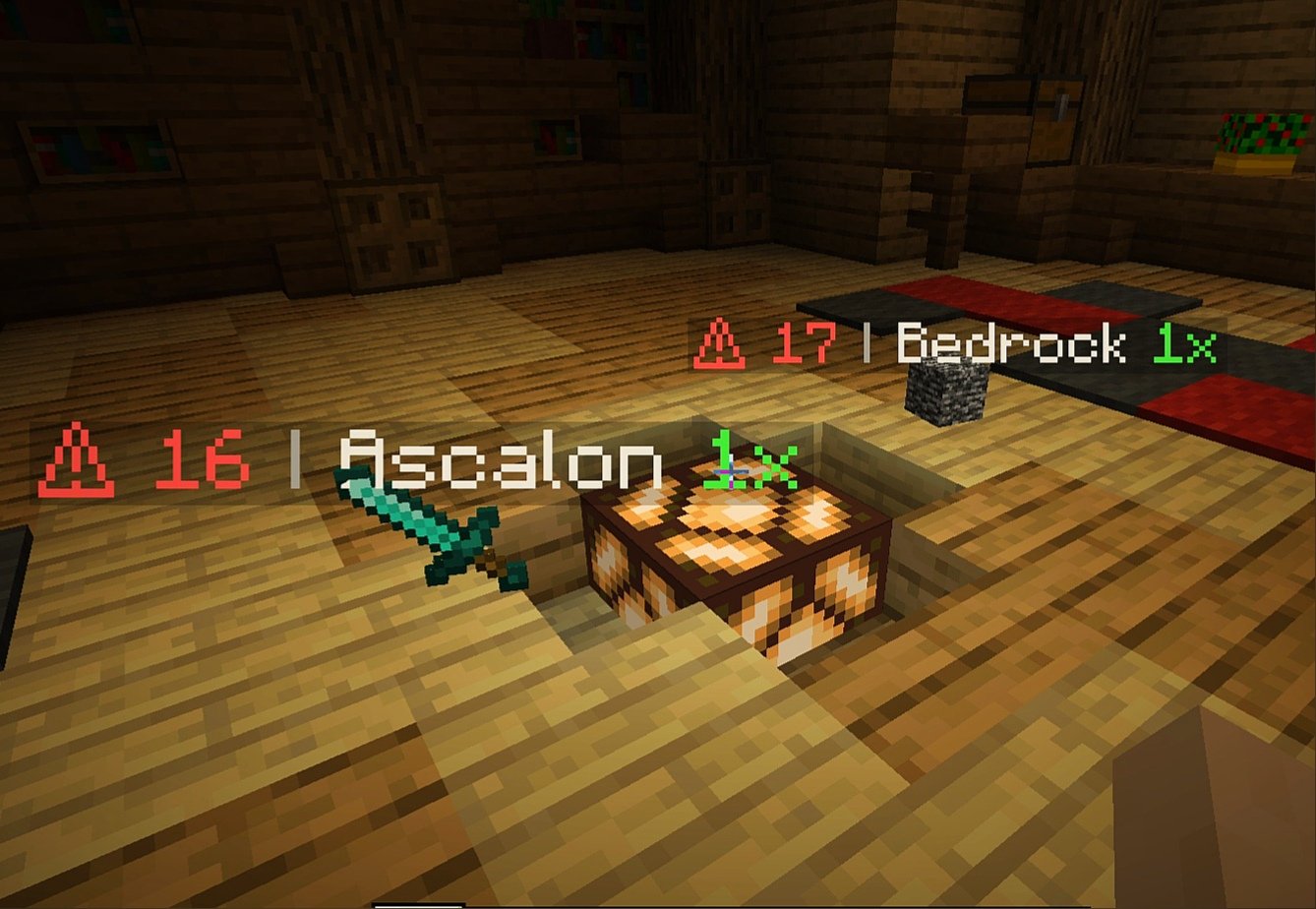
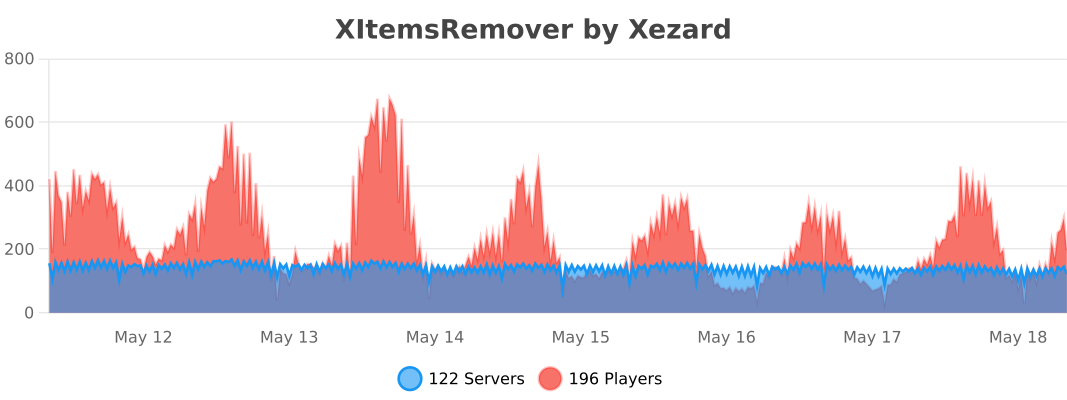
XItemsRemover – is a small plugin that automatically removes dropped items with a timer displayed on these items until they are removed. The time until deletion is configured in the plugin configuration.
IMPORTANT
If you have items with displayed name ‘AIR‘ – specify ‘api-version’ in plugin.yml with version of your server!
For example, if your server version is 1.16.5, add the following line to plugin.yml of XItemsRemover:
api-version: 1.16
### Configuration
“`
Items:
# Format:
# ‘‘: “”
# Available placeholders:
# {time} – time remaining before remove (in seconds)
# {display_name} – display name of itemstack (if empty – used localized material name}
# {amount} – itemstack amount
Display-name-formats:
‘1’: “§c⚠ {time} §7| §f{display_name} §a{amount}x”
’10’: “§c{time}”
Remove-timer:
# Timer for removing an item in seconds
Default: 30
After-player-death: 180
Async: true
# Section for specifying a unique timer or display name
# for certain materials
# Format:
# :
# : 15
# :
# :
#: false
# If you only need to edit one parameter
# (name or time) you can just delete the line with the second.
# If you need the plugin not to track a certain type of materials, then set ‘tracked: false’
Custom-materials:
COBBLESTONE:
Timer: 15
Display-name-formats:
’15’: “Cobblestone :D”
STONE:
Timer: 10
GRASS:
Display-name-formats:
’30’: “Grazz”
SAND:
Tracked: false
# Worlds in which plugin does not work
Restricted-worlds:
– “restricted_world”
“`
### Commands and permissions
Command | Permission
————- | ————-
‘**/itemsremover**’ [Alias: ‘**/ir**’] – prints all plugin commands. | items.remover.commands.help
‘**/itemsremover help**’ – prints all plugin commands. | items.remover.commands.help
‘**/itemsremover reload**’ – reloads plugin configurations. | items.remover.commands.reload
XinXinBotApi
## 兼容核心
插件只在下列核心进行测试,正常使用,其它服务端核心未知,请自行测试。
1.8.8版本:Paper、Spigot
1.12.2版本:CatServer、spigot
1.16.5版本:CatServer、spigot
1.19.2版本:paper、Spigot
1.20.2版本:mohist、arclight
## 插件简介
此插件可以通过WebSocket对接 OneBot 以及 Mirai 机器人框架
对接 Mirai 机器人请自行安装 mirai-api-http 插件
推荐使用 Mirai 机器人框架,若实在不会搭建可以使用 OneBot标准 的机器人
此插件因只作为一个前置Api使用所以只有一个绑定功能且默认关闭
为什么是对接而不是把机器人直接写入插件?
如果是直接将机器人写入插件可能会导致多服服主或多端服主头疼
因为这样你可能需要准备更多的QQ号
但如果是直接接入框架本身的话
首先你也能正常使用框架本身的插件并且还能对接服务器
## 插件功能
此插件使用 WebSocket 进行QQ消息操作
所以必须通过指令连接一次 WebSocket 才能正常使用
在配置文件中可以开启自动连接,但需要提前开启 OneBot 或 Mirai 机器人
绑定信息支持 MySQL 储存,若不开启则为本地文件储存
此插件作为单独使用的话只有一个绑定玩家功能
而这个绑定功能也没有任何实质性作用
但是可以通过其他附属插件达到想要的作用
## 指令权限&介绍
管理员指令介绍(所需权限:`XinxinBotApi.admin`)
`/xbot bind <玩家ID>` —— 手动绑定一个QQ
`/xbot unbind ` —— 删除一个QQ的绑定账号
`/xbot connect` —— 连接WebSocket
`/xbot close` —— 断开WebSocket
`/xbot reload` —— 重载插件
## 图片展示
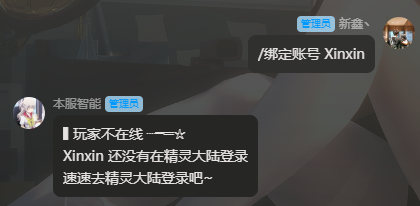
Api自带绑定功能(需要在配置文件手动开启SetBind项)
## 开发文档 & 安装教程
若将此插件作为开发前置即可让MC充满各种可能性
或许在这之前你开发群服互联插件会去找各种Api
现在你只需要把本插件添加为你的依赖
使用本插件作为前置开发请在 `Plugin.yml` 里加入 `depend: XinxinBotApi`
从而让本插件在你插件之前加载
[](http://wiki.mcxin.cn/zh/%E6%96%B0%E9%91%AB%E6%8F%92%E4%BB%B6%E6%95%99%E7%A8%8B/XinxinBotApi)
## 附属插件
绑定礼包 | 查询信息 | 进服验证 | 图片信息 | 群服注册 | 互联指令 | 我的精灵
(一个一个改链接太麻烦了,在[新鑫论坛](https://bbs.mcxin.cn/)搜索XinxinBot则可以浏览所有附属)
! 附属插件统计可能并不完全,更多附属插件自行开发或找他人定制
## 版权声明
本插件所用所有代码均为原创,不存在借用/抄袭等行为
本插件为非盈利性插件,免费发布,严禁销售和转卖
若需要开发任何与此插件相关的附属插件可以联系作者
### 转载声明
转载至[https://bbs.mcxin.cn/archives/216](https://bbs.mcxin.cn/archives/216)
已得到原作者授权

欢迎加入新鑫咕咕交流群:1124109145
[](http://bbs.mcxin.cn/?golink=aHR0cHM6Ly9naXRodWIuY29tL1hpbnhpbi1lbnQvWGlueGluQm90QXBp)
Xibao Plus Plus / 喜报++
[prosperity – Forge] (https://www.mcmod.cn/class/7186.html) Fabric transplantation.
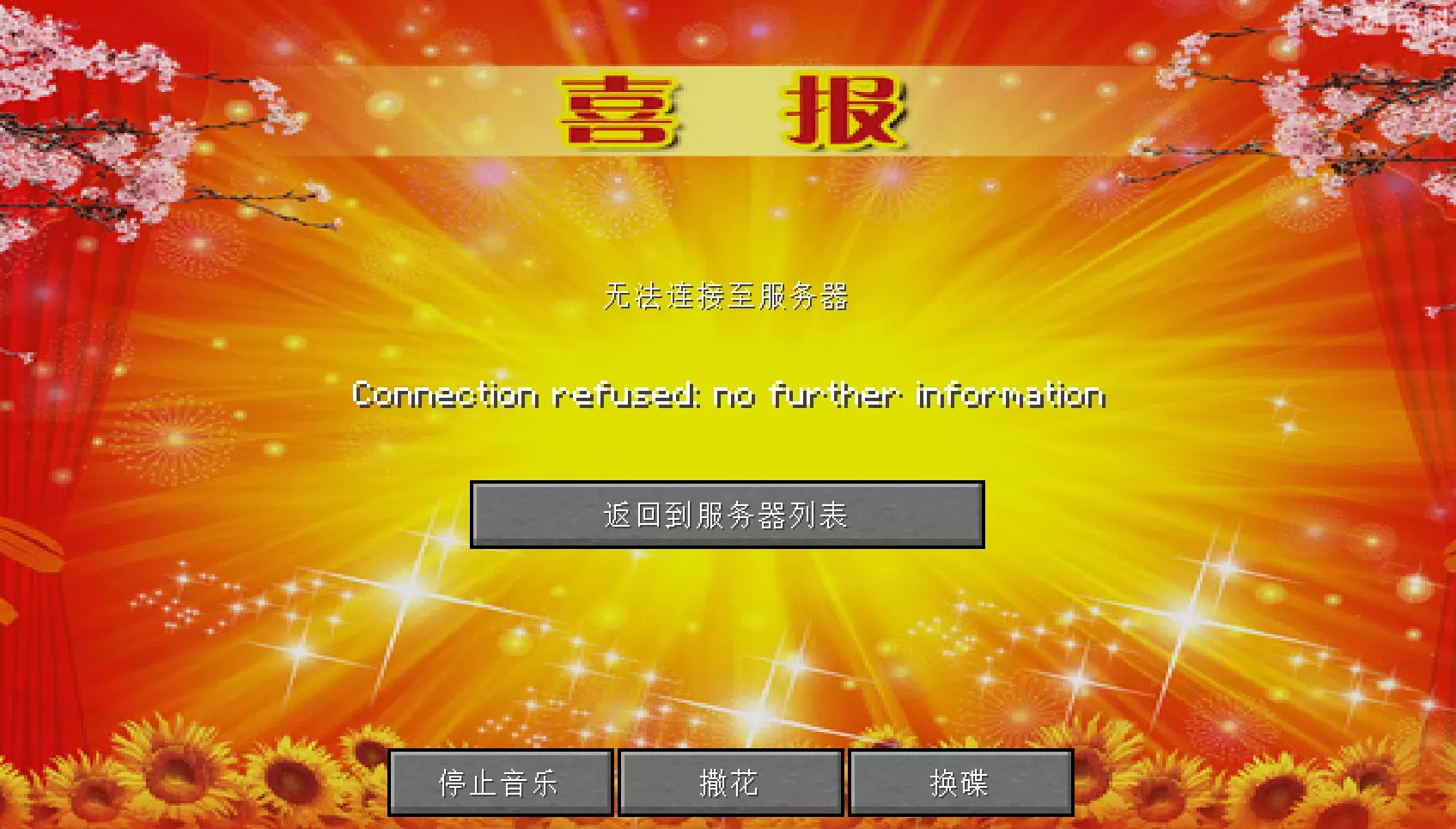
** In addition to the new 3 happy music and 1 sad ditty, will be released in the happy or sad news at the same time playing **
You can switch between good news and bad news.
You can configure the file xibao_plus_plus.properties in the directory
playMusic: Whether to play music. Enabled by default.
showPicture: displays happy news picture, enabled by default;
displaySnow: scatter flowers. This parameter is disabled by default.
type: (xibao | beibao) “happy news” or “sad news”, the default is happy news;
[喜报-Forge](https://www.mcmod.cn/class/7186.html) 的 Fabric 移植版。
**除此之外新增了3首喜庆的音乐以及1首悲伤的小曲,会在放出喜报或悲报的同时播放**
可以切换喜报或悲报。
可在目录下配置文件:`xibao_plus_plus.properties`
playMusic:是否播放音乐,默认开启;
showPicture:显示喜报图,默认开启;
displaySnow:撒花,默认关闭;
type:(xibao | beibao) “喜报”或“悲报”,默认为喜报;
Better Boss Bar
This is an interesting texture pack, it has changed a lot of boss health bars, and the author is working on adding more boss health bars (part of the update was decided by my vote on domestic social networking sites).
This material pack’s texture is made by me independently. You can’t borrow the texture without my permission,Special thanks to: naku。
Currently completed:
– Twilight Forest(Not all done)
– cataclysm:ignis,ender_guardian(Not loaded)
– vanlia:wither,enderdragon
– alex’s mobs
– mowzie’s mobs
– Fish’s Undead Rising
– whisperwoods
– stalwart-dungeons
– meetyourfight
[Thanks](https://www.curseforge.com/minecraft/texture-packs/enhanced-boss-bars/comments)
This resource pack uses a “wheel” from Enhanced Boss Bars, licensed to me by the author in the gallery.
curseforge:https://www.curseforge.com/minecraft/texture-packs/better-boss-bar
小赖字体 / 小賴字體 / シャオライ / Xiaolai Font
# 1
此资源包将小赖字体应用于 Minecraft,提供更为舒适的简体中文字体,并兼容所有语言。这款字体可以与任何资源包一起使用,只需置于顶部即可。需要注意的是,该字体需 Minecraft 1.13 及以上版本方可使用,无需进行任何修改。
小赖字体(/小賴字體/シャオライ/Xiaolai Font)是一款免费开源字体,其设计风格十分舒适,具有广泛的应用范围和开源特性。我仅根据许可重新分发该字体,并非其所有者。如需了解更多有关该字体的信息,[请访问其官方网站。](https://github.com/lxgw/kose-font?tab=readme-ov-file)
# 2
This resource pack applies Xiaolai font to Minecraft, providing a more comfortable simplified Chinese font and compatibility with all languages. This font can be used with any resource pack, just put it on top. Please note that this font requires Minecraft version 1.13 and above, without any modifications needed.
Xiaolai Font (/小賴字體/シャオライ/Xiaolai Font) is a free and open-source font with a very comfortable design style and wide range of applications and open-source features. I only re-distribute this font according to the license, I am not the owner. If you want to learn more about this font, [please visit its official website.](https://github.com/lxgw/kose-font?tab=readme-ov-file)
xHubBlocks
# 🧱 xHubBlocks V2
### The Ultimate Lobby Practice Plugin
**Infinite blocks. Auto-despawn. Database support.**
  
__UPDATE COMING SOON!__
—
## 👋 Overview
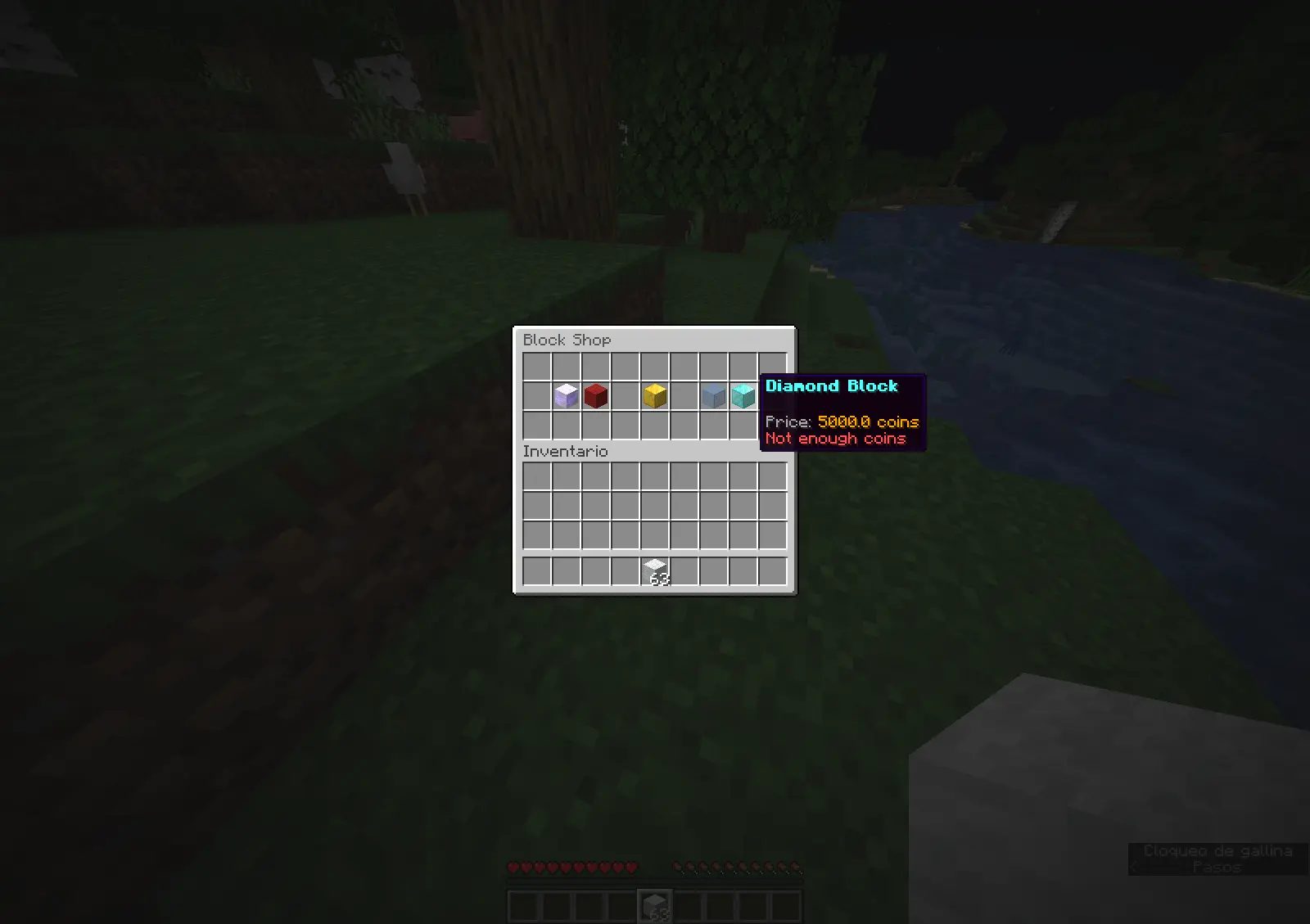
**xHubBlocks** is a lightweight but powerful plugin designed for Hubs and Lobbies. It gives your players an infinite stack of blocks to practice bridging, clutching, or building while waiting in the lobby.
The best part? **The blocks disappear automatically** after a configurable time, keeping your lobby clean and lag-free.
### 🔥 What’s New in V2?
We have completely rewritten the core to include professional features:
* **Persistent Data:** Blocks placed statistics are now saved forever.
* **Database Support:** Built-in support for **H2** (local, no setup) and **MySQL** (for networks).
* **Developer API:** Hook your own plugins into xHubBlocks.
* **High Performance:** Powered by HikariCP for database connections.
—
## ✨ Features
* **♾️ Infinite Items:** Players get a stack of blocks that never runs out.
* **✨ Auto-Despawn:** Blocks vanish after X seconds with a satisfying particle effect.
* **🔒 Secure:** Prevents players from dropping the block or moving it in their inventory.
* **🎨 Fully Configurable:** Customize the material, name, lore, slot, and messages.
* **📊 PlaceholderAPI:** Display stats on scoreboards or holograms.
* **⚡ Legacy Support:** Works flawlessly from **1.8.8** up to the latest versions.
—
## 💾 Database & Storage
xHubBlocks V2 supports two storage types defined in `config.yml`:
1. **H2 (Default):** Zero configuration required. Stores data in a local file. Perfect for single servers.
2. **MySQL:** Connect to an external database. Ideal for networks or if you want to display stats on a website.
“`yaml
storage:
type: H2 # Or MYSQL
mysql:
host: “localhost”
port: 3306
database: “xhubblocks”
# …
“`
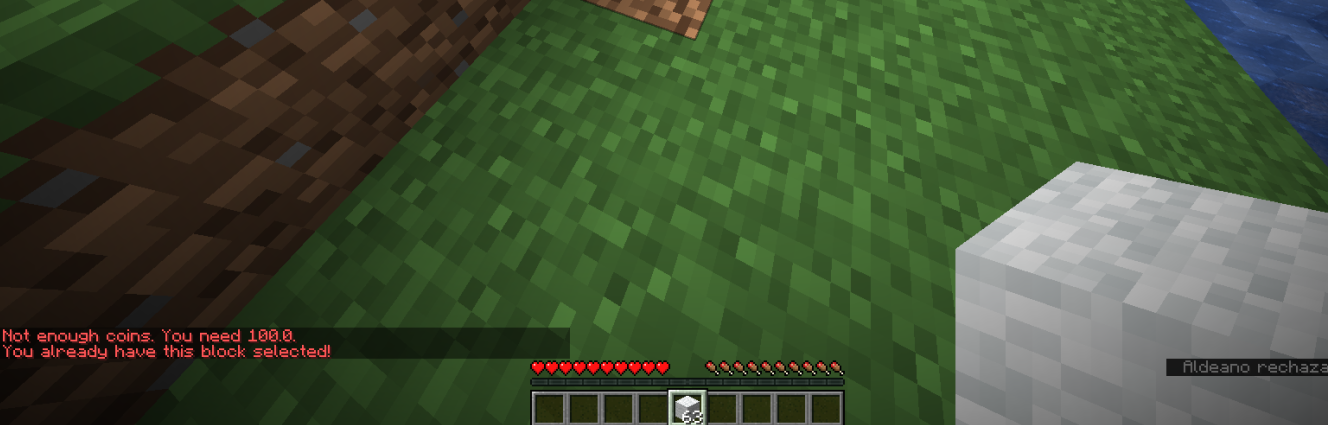
## 🏀Images

—
## 🚀 Commands & Permissions
*The commands are editable.*
| Command | Permission | Description |
| :— | :— | :— |
| `/xhubblocks` | `xhubblocks.admin` | View plugin info and help. |
| `/xhubblocks reload` | `xhubblocks.reload` | Reload the configuration file. |
| `/blocks shop` | `editable` | Block store. |
—
## 📊 Placeholders
Requires **PlaceholderAPI**.
* `%xhubblocks_placed_player%` – Total blocks placed by the player (Saved in DB).
* `%xhubblocks_placed_session%` – Blocks placed in the current session.
* `%xhubblocks_placed_total%` – Total blocks placed by everyone on the server.
—
## 👨💻 Developer API
Want to use xHubBlocks stats in your own plugin? It’s easy.
**1. Get the instance:**
“`java
if (Bukkit.getPluginManager().getPlugin(“xHubBlocks”) != null) {
xHubBlocksAPI api = xHubBlocksAPI.getApi();
// Get stats
int total = api.getPlayerTotalPlaced(player.getUniqueId());
}
“`
**2. Maven/Gradle:**
You can add the plugin as a dependency to your project.
—
## 📥 Installation
1. Download `xHubBlocks.jar`.
2. Drop it into your server’s `plugins` folder.
3. Restart your server.
4. (Optional) Edit `config.yml` to change the block style or database settings.
5. Enjoy!

Created with ❤️ by xPlugins
xHeadTurns
# 💀 xHeadTurns
### Advanced Floating Heads, Holograms & Animations

[](https://discord.gg/mNdxNVx6cU)
[](https://modrinth.com/plugin/xheadturns)
[]()
—
## 📝 Overview
**xHeadTurns** is the ultimate solution for decorating your server lobbies, hubs, and spawn areas. Bring your server to life with fully interactive **Floating Heads** that support custom textures, real-time rotation, scaling, and dynamic holographic displays.
Now with a **Full In-Game Editor**, you can modify every property of your heads without ever touching a configuration file.
## ✨ Key Features
* **🎮 Full In-Game Editor:** Modify scale, speed, textures, and hologram lines in real-time with `/xhte`.
* **🎨 Custom Textures:** Support for **Base64** values (Minecraft-Heads) and **Player Names**.
* **🔄 Dynamic Rotation:** Fully customizable rotation speed and manual angle (Yaw/Pitch) control.
* **💬 Advanced Holograms:**
* Multi-line support with **HEX Colors** (e.g., `&#a7c7e7`).
* **PlaceholderAPI** support (updates based on the nearest player).
* Customizable backgrounds (RGB + Opacity), billboards, and shadows.
* **✨ Particle Animations:** Styles like `HELIX` and `SPHERE` with custom particle types.
* **⚡ Interactivity:** Execute **Console** or **Player** commands on click with per-head cooldowns.
* **🌍 Multi-Language:** 100% translatable (English and Spanish included).
—
## 🛠️ Commands & Permissions
| Command | Description | Permission |
| :— | :— | :— |
| `/xht help` | Shows the help menu with all commands. | `xheadturns.help` |
| `/xht list` | Opens a GUI with all active floating heads. | `xheadturns.list` |
| `/xhtc ` | Spawns a head at your target location. | `xheadturns.create` |
| `/xhtd ` | Deletes a specific floating head. | `xheadturns.delete` |
| `/xhtm ` | Moves a head to your current target location. | `xheadturns.move` |
| `/xhte ` | **Advanced Editor:** Edit any property in-game. | `xheadturns.edit` |
| `/xht reload` | Reloads configurations and head data. | `xheadturns.reload` |
—
## ⚙️ Advanced Editing Examples
Using the new **Editor System**, you can customize your heads on the fly:
“`bash
# Change the scale of a head
/xhte MyHead head scale 2.0
# Add a new line to a hologram
/xhte MyHead hologram add &fVisit our &b/store
# Change hologram background to a semi-transparent blue
/xhte MyHead hologram background 0,0,255 100
# Update head texture to a player’s skin
/xhte MyHead head texture Dream
“`
> ## 🚀 Installation
1. Download the xHeadTurns .jar.
2. Upload it to your /plugins/ folder.
3. Requirement: Ensure you have PlaceholderAPI installed for dynamic names.
– Restart the server.
> Use /xhtc to start creating your first floating heads!
> ## 🤝 Support & Community
Need help? Found a bug? Join our Discord server!
Plugin developed with ❤️ by xPlugins x WillfryDev
Copyright © 2026 xPlugins. All rights reserved.
XGamemode

### “*You’re not switching modes, you’re switching dimensions.*”
~~*2000 Downloads?! Thanks!*~~
# 1 Feature
## 1.1 Offline Player
You can change the gamemode of a player, **even he (or she) was offline**.
## 1.2 Permissions
Allow permission group plugins (_like Luckperms_) to manage **which gamemodes can be switched to** and **which gamemodes cannot be switched to**.
_e.g. Allow to switch to survival mode but not to any other mode._
## 1.3 Alias
**/gamemode** is simplified to **/gm** and **/g**.
_(of course you can still use /gamemode)_
## 1.4 Cross-Server Storage
Support **MySQL** and **SQLite** storage backends. Player gamemodes are saved and synchronized across multiple servers in a network.
## 1.5 Folia Support
**Fully compatible with Folia servers** — using region-based scheduling for optimal performance.
## 1.6 Lightweight
The Plugin size is only **~25 KB** and has **almost no impact** on server performance!
# 2 Caution
## 2.1 Shortcut Keys
If you need to use shortcut keys such as **F3+F4**, please install another plugin **F3NPerm**.
## 2.2 Versions
**1.8.X +**
**All Bukkit based server** (Paper, Spigot, Purpur, Folia, etc.)
# 3 Commands
“`markdown
– /xgamemode
– /xgamemode reload
– /gm
– /gm
– /gm -all
– /gm -online
– /gm -offline
/g = /gm = /gamemode
/xg = /xgm = /xgamemode
“`
# 4 Permission Node
“`markdown
– xgamemode.survival
– xgamemode.creative
– xgamemode.adventure
– xgamemode.spectator
– xgamemode.others.survival
– xgamemode.others.creative
– xgamemode.others.adventure
– xgamemode.others.spectator
– xgamemode.reload
– xgamemode.admin
“`
# 5 Custom Config
## 5.1 Basic Settings
“`yaml
lang: en-US
“`
**Language** setting
“`yaml
default_gamemode: survival
“`
If a **new player joined your server**, **which gamemode should he (she) be**?
**survival**, **creative**, **adventure**, **spectator**
“`yaml
show_logo: true
“`
Show logo or not when plugin enabled.
**true**, **false**
“`yaml
debug: false
“`
Enable debug logging for troubleshooting.
**true**, **false**
## 5.2 Storage Configuration
“`yaml
storage:
type: yaml
“`
**Storage backend type**: **yaml**, **sqlite**, **mysql**
### SQLite Example
“`yaml
storage:
type: sqlite
# No additional config needed — data.db will be created automatically
“`
### MySQL Example
“`yaml
storage:
type: mysql
mysql:
host: localhost
port: 3306
database: minecraft
username: root
password: your_password
“`
## 5.3 Custom Messages
“`yaml
messages:
en-US: # Original en-US Language by Wind_Blood
reloaded: “&aXGamemode Reloaded!”
# ……
custom_lang: # Add Your Custom Language!
reloaded: “Thank you for using XGamemode!”
# ……
“`
**Customizable Messages**. You can add **your own new language** here!
## 5.4 An Example config.yml
“`yaml
lang: msgForMyServer
default_gamemode: survival
show_logo: false
debug: false
storage:
type: yaml
messages:
msgForMyServer:
reloaded: “很明显作者是中国人 会说中文很正常 然后我也不知道为什么我要在一堆英文里写一段中文 挺好笑的 哈哈哈 对了 看到我就是缘分 XGamemode 官方 QQ 反馈交流群:点击链接加入群聊【XGamemode 反馈群】:https://qm.qq.com/q/rpTk5LK7w4 欢迎加”
usage: “&cUsage: /gm [player/-all/-online/-offline]”
console_usage: “&cUsage: /gm ”
invalid_gamemode: “&cInvalid Gamemode!”
invalid_player: “&cInvalid Player!”
gamemode_self: “&aYour Gamemode Changed to {mode}!”
gamemode_all: “&aChanged All Player’s Gamemode to {mode}!”
gamemode_online: “&aAll Online Player’s Gamemode Changed to {mode}!”
gamemode_offline: “&aAll Offline Player’s Gamemode Changed to {mode}!”
no_permission: “&cYOU ARE NOT ALLOWED TO DO THAT!”
gamemode_other: “&a{player}’s Gamemode Changed to {mode}!”
gamemode_other_offline: “&a{player} (Offline)’s Gamemode Changed to {mode}!”
“`
# 6 Developer API (Async)
## Get Instance
“`java
Main plugin = Main.getInstance();
“`
## Get Player Gamemode
“`java
plugin.getPlayerMode(playerUUID).thenAccept(mode -> {
if (mode != null) {
// mode is GameMode.SURVIVAL, CREATIVE, ADVENTURE, or SPECTATOR
// Player is online or has saved data
} else {
// Player not found or no saved gamemode yet
}
});
“`
## Set Player Gamemode
“`java
plugin.setPlayerMode(playerUUID, GameMode.SURVIVAL).thenAccept(success -> {
if (success) {
// Gamemode changed and saved successfully
// Works for both online and offline players
} else {
// Failed to save (database error, etc.)
}
});
“`
## Listen to Gamemode Changes
“`java
@EventHandler
public void onGamemodeChange(GamemodeChangeEvent event) {
Player player = event.getPlayer(); // Online player only
GameMode oldMode = event.getOldMode();
GameMode newMode = event.getNewMode();
}
“`
> **Note:** All APIs are **fully async** and thread-safe. The `GamemodeChangeEvent` is only fired for **online players** when their mode is actually changed. The `getPlayerMode()` method returns `null` if the player has no saved gamemode data.
# 7 Reprint Post
www.minebbs.com/resources/xgamemode.11041
hangar.papermc.io/Wind_Blood/XGamemode
modrinth.com/plugin/xgamemode
# 8 Feedback
Just e-mail me with **[email protected]**. Thanks!
XGlow
**Works with Java 8 and above.**
(I noticed that the **GlowAPI** from the **inventivetalent** has been abandoned, has not been updated for a long time, has bad reviews and bugs, as well as a rather low-quality code – so I decided to make and publish my own version of the api for the glow)
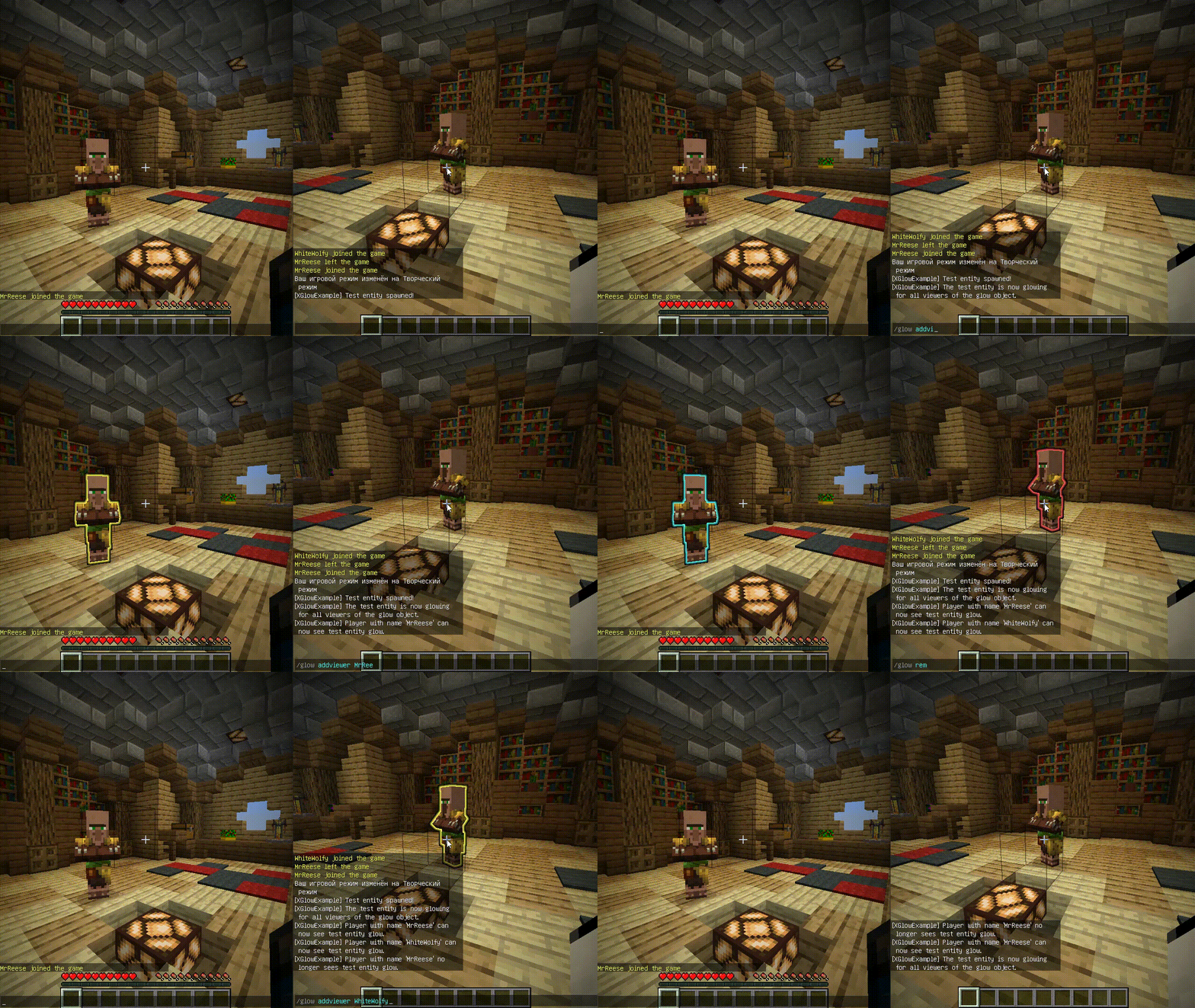
**XGlow** – is a simple, easy-to-use API to create glow on your entities. The plugin requires [ProtocolLib](https://github.com/dmulloy2/ProtocolLib) to work.
### Usage
First you need to create a Glow object:
(You can use a builder for this)
“`java
Glow glow = Glow.builder()
.сolor(ChatColor.GREEN)
.name(“test”)
.build();
“`
You can add entity to glow object holders,
to make this entity glow with glow object colors.
The glow of the entity will be seen by all viewers
which the glow object contains:
`glow.addHolders(entity);`
To remove the glow of an entity,
you can remove it from the glow object holders.
The entity’s glow will disappear for all viewers of the glow object:
`glow.removeHolders(entity);`
You can add a viewer to the glow object so that he immediately sees the glow of all holders of the glow object:
`glow.display(player);`
When the viewer is removed from the glow object,
all holders of the glow object will
no longer glow for removed viewer:
`glow.hideFrom(player);`
For more features check out XGlow wiki page on github: https://github.com/Xezard/XGlow/wiki