VyHub
VyHub, the comprehensive solution to build, manage and monetize Minecraft stores and communities. Easy integration of your Minecraft server and store. It’s the all-in-one management platform designed for your gaming community. VyHub offers a webshop, website, a donation store and bans and warnings.
Design and manage your Minecraft community through VyHub. We acknowledge that community management is hard work and takes a lot of time. With VyHub we automate your donation webstore fully. Furthermore, you can also save time on banning and warning players.
Create a professional community website and webstore in 5 minutes!
And there is more: VyHub provides you with an all-in-one solution to manage your community and gain valuable insights. Communicate, warn and ban players while maintaining good oversight of your community and its rules. With this resource you can make the best out of your community and server monetization.
The all-in-one system includes many features:
Ban and Warnings system (quick community management)
Sync groups/ranks (assign ranks through LuckPerms)
Ticketing system
Forums system
Shop system (unlimited categories, servers and packets)
Buy for a friend
Over 20 payment options (through: PayPal, Paysafecard, Stripe)
Multi language support
Discord roles and notifications
Quick support
Full API
And much more…
For more information and direct contact to the developers and the VyHub community visit our Discord (https://discord.gg/QZxQHtZnSB)
Pricing: VyHub can be used for free.
We take a small commission of 3 to 5% on purchases made through your VyHub store.
So you only pay when you make money.
Not yet convinced?
Check out the free VyHub Demo here: https://demo.vyhub.net/
Try out the different views, dashboards and customization options with VyHubs unique look and fell.
Lets go!
Create your account for FREE on https://vyhub.net, create your VyHub instance and add a Minecraft server.
Download addon for FREE and drag and drop the latest VyHub Plugin folder into your Gmod serveraddonsdirectory.
Restart your server and set your api-key through a simple command displayed in the setup process.
Congratulations your server is now connected! You can start selling products on your server!
For guides and further information visit: https://docs.vyhub.net
Vuurwerkshow Panorama

English version of the description
This is a project for a Dutch server but if you are really interested you can read the translation in English here.
# Fireworks show panorama
A panorama resource pack for the 2023-2024 New Year’s Eve fireworks show on the Torchcraft server!
## Explanation
Every year we organize a fireworks show at the end of the year with a number of players on the Dutch server Torchcraft to celebrate New Year’s Eve together. We start the evening with a speech, followed by the fireworks show that lasts about 10 minutes. Afterwards we have lots of fun activities such as giveaways, checkers, 4 in a row and much more! This year the show will take place on 27/12, announcement will follow soon.
Announcement ➤ https://torchcraft.nl/forums/topic/16285-🎇-vuurwerkshow-2023-2024/
## Support
If you have any issues, ideas, or other feedback about this project, please contact me via Discord or email. You can contact me on Discord by sending a friend request so you can message me.
Discord: tibodp
Email: [email protected]
# Vuurwerkshow panorama
Een panorama resourcepack voor de vuurwerkshow van 2023-2024 met oud & nieuw op de Torchcraft server!
## Uitleg
Elk jaar organiseren we met een aantal spelers op de Nederlands server Torchcraft een vuurwerkshow op het einde van het jaar om samen oud & nieuw te vieren. We beginnen de avond met een toespraak waarop daarna de vuurwerkshow volgt die zo een 10 minuten duurt. Daarna hebben we tal van leuke activiteiten zoals giveaways, dammen, 4 op een rij en nog veel meer! De show vindt dit jaar plaats op 27/12, aankondiging volgt binnenkort.
Aankondiging ➤ https://torchcraft.nl/forums/topic/16285-🎇-vuurwerkshow-2023-2024/
## Support
Als je problemen, ideeën of andere feedback hebt over dit project, neem dan contact met mij op via Discord of e-mail. Je kunt contact met mij opnemen op Discord door een vriendschapsverzoek te sturen, zodat je mij een bericht kunt sturen.
Discord: tibodp
Mail: [email protected]
## 🌟 My other projects:
– Torchcraft Lobby Panorama
– The Ultimate Creator
– Chromakey Blocks
– No Worldborder
– Vuurwerkshow Modpack
– Vuurwerkshow Panorama
– Vuurwerkshow Paintings
_Please only join the server if you speak Dutch because it is a Dutch-speaking server._
Vuurwerkshow Paintings

This resource pack turns all paintings into screenshots of the 2023-2024 fireworks show on the Dutch server Torchcraft.
## Support
If you have any problems, ideas, or other feedback about this project, please contact me via discord or email. You can contact me on Discord by sending a friend request, so you can send me a message.
Discord: tibodp
Mail: [email protected]
## 🌟 My other projects:
– Torchcraft Lobby Panorama
– The Ultimate Creator
– Chromakey Blocks
– No Worldborder
– Vuurwerkshow Modpack
– Vuurwerkshow Panorama
– Vuurwerkshow Paintings
_Please only join the server if you speak Dutch because it is a Dutch-speaking server._
Vunyx’s Redstone Pack
If you want to publish a project containing my work, please mention my username “Vunyx” somewhere. Also, a link to my project would be much appreciated.
# Description
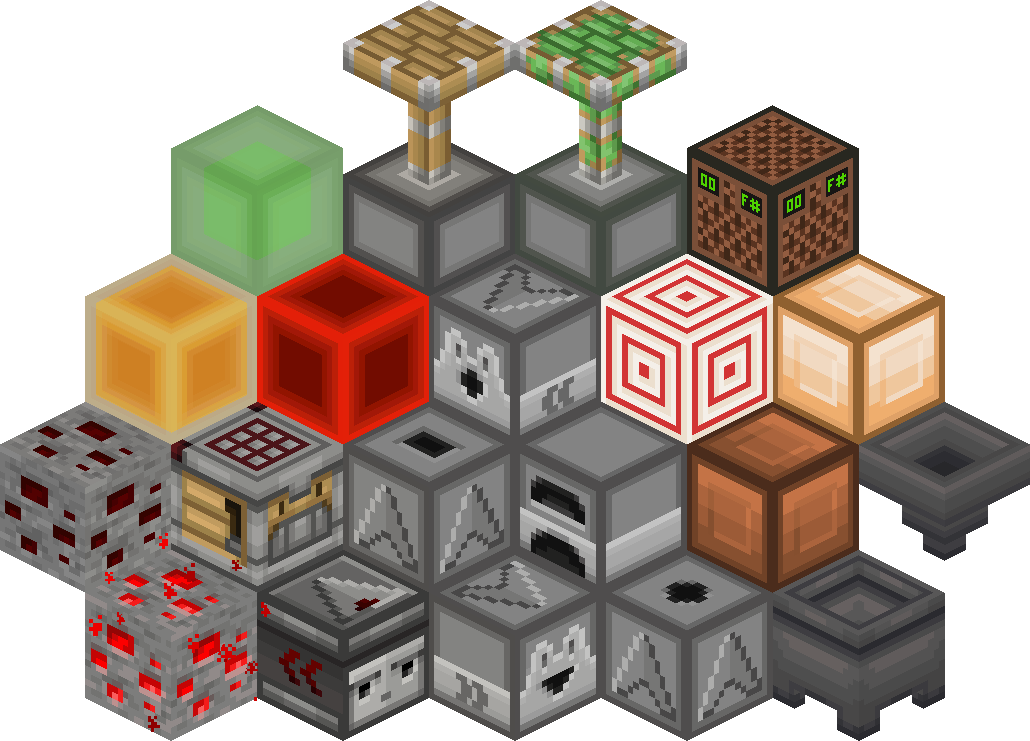
This resource pack gives a **clean look** to all redstone components, while keeping a **vanilla feel**. It brings features from Vanilla Tweaks, such as **directional indicators** for blocks like droppers or observers, and **visual block states** for blocks like note blocks.
List of current features:
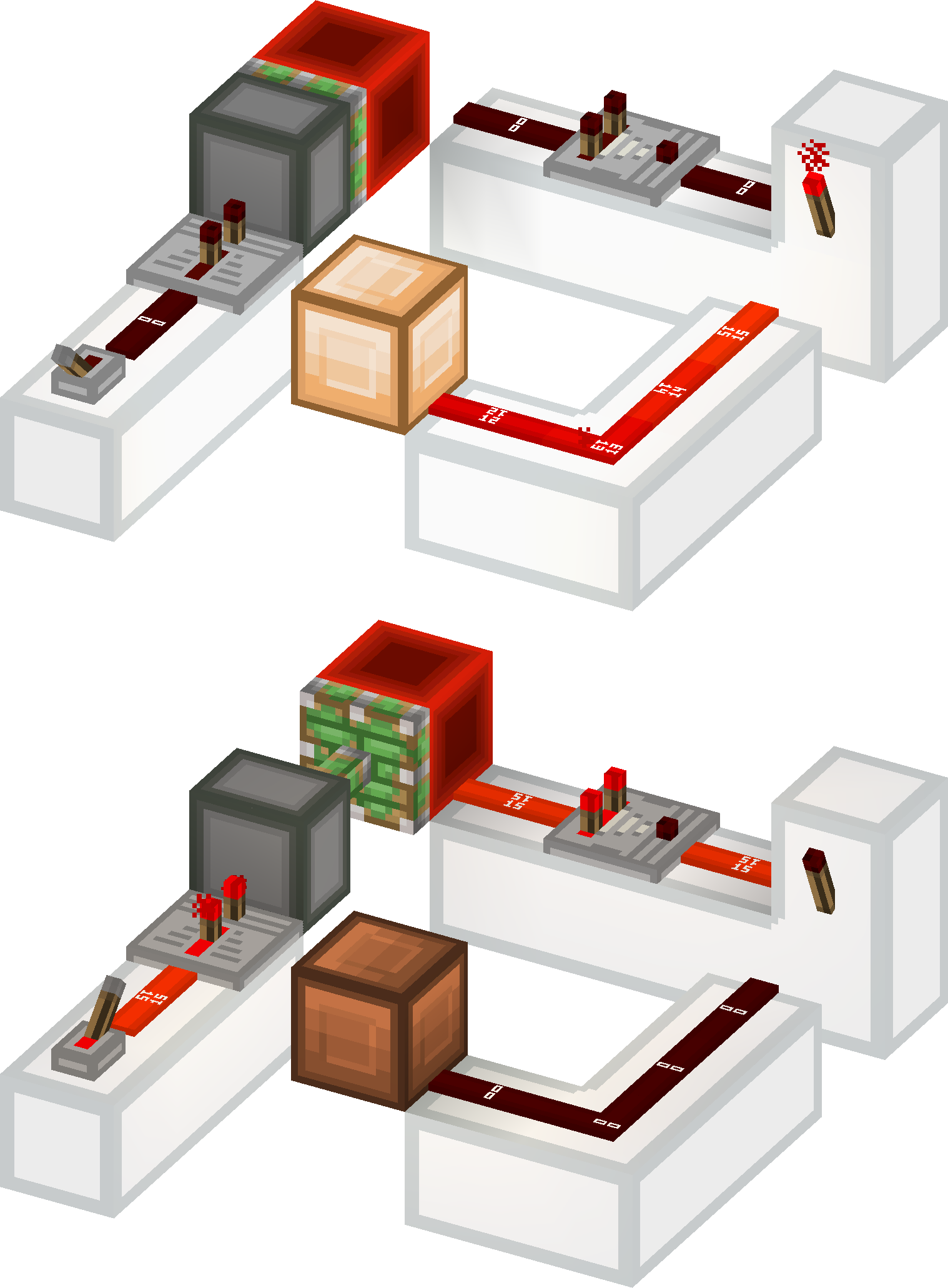
– **smooth clean look** for all redstone related blocks (including rails and minecarts too)
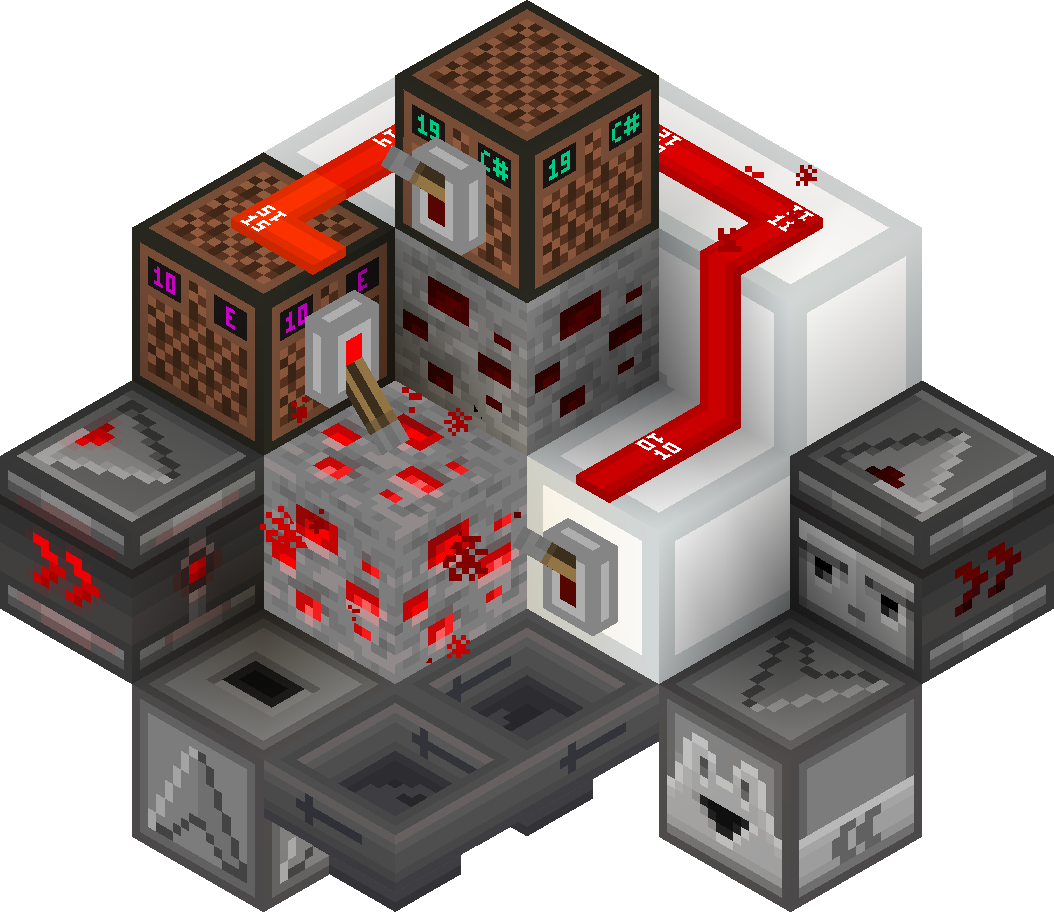
– **directional indicators** for dispensers, droppers, hoppers and observers
– **block states indicators** for redstone dust, redstone ore, levers and note blocks
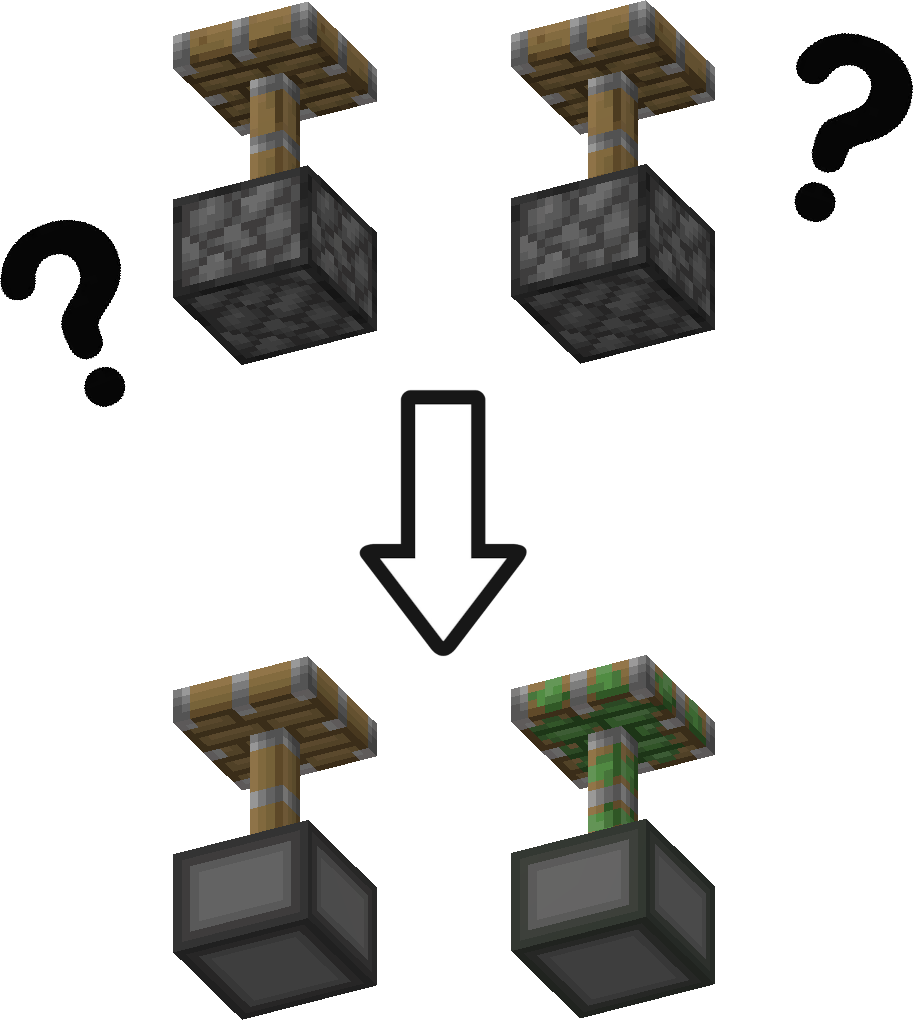
– removes ambiguity between normal and sticky pistons
– **connected outline** for all **wool and glass** blocks (you need Continuity or Optifine for the outlines to connect)
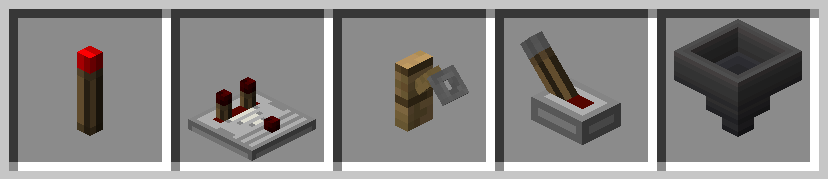
– **3D item models** for all types of torches, repeaters, comparators, levers, tripwire hooks, hoppers and cauldrons
Plans for the future:
– add indicators for cauldrons, composters, beehives and bee nests
– give a clean look to chests and barrels
– versions for 1.13 and older
– reduce file size
### Here is a quick overview of the pack:
### This is how your redstone circuits will look like:
### Block states and direction indicators:
### No ambiguity between normal and sticky pistons:
### 3D item models:
# How to install
After downloading the resource pack, go to **options -> resource packs** and click the **Open Pack Folder** button, or open `%appdata%.minecraftresourcepacks` directly. Put the resource pack in this folder. It should then show up under **Available**. Click the arrow to switch it to the **Selected** tab and click **Done**. That’s it, the pack should now be installed properly.
vSLS
# vSLS
**vSLS** is a Velocity plugin that integrates your network with the **SLS (Server Launch System)**.
It allows you to dynamically create and manage server instances directly in game using simple commands. vSLS automatically registers new servers with your Velocity proxy, routes players, and provides a lightweight matchmaking and queue system. Server instances are created and scaled based on demand, ensuring efficient resource usage and fast response times.
For installation and configuration instructions visit: vSLS Docs
Discord: 

—
## Requirements
* A properly configured SLS environment
* Velocity proxy
## Demo
A live demo **Minecraft** network is available if you want to try vSLS in action.
* **Server address:** `demo.protoxon.com`
This demo showcases how servers can be dynamically created and managed for minigames.
## About SLS
SLS is an open-source system for automating the deployment and scaling of containerized game servers. It is designed for networks that require fast, consistent, and reproducible server instances.
For full documentation and setup instructions, visit: SLS Docs
VServerInfo
# VServerInfo  
Get the information of each server in your Velocity network

## Requirements
– Velocity 3.3.0
– Java 17+
## Commands
#### Permission `vserverinfo.command`
### /vserverinfo
This command will give you information about all the servers you have in your Velocity network.
### /vserverinfo
Get the information about a single server
## How does this plugin differ from the Velocity(/glist) integrated command?
This plugin allows you to check the online/offline status of each of your servers, as well as to obtain additional information such as their MOTD and allows a complete customization of the plugin formats.
All messages are fully customizable from the configuration (config.conf)

## Tutorial
**Spanish**
VRealmsConnector
# VRealms Connector
This is a simple server connector I made for Velocity, because I couldn’t find one that suited my needs. Currently, you can only register and unregister Servers through a Command, later it’s also planned to do so through a Rest API.
For now, this is how to use the Commands:
– `/addserver
[port]`
– `/removeserver `
The port uses 25565 by default
## THIS PROJECTS SOURCE CODE WILL NOT BE MADE PUBLIC (FOR NOW)
If you need the Source, decompile it, or just make it yourself
VPlayerLimit
# VPlayerLimit

Limit how many players can join your server.
This is not a plugin to set the maximum number of players in motd, it simply limits the number of connected players.

## Installation
– Download VPlayerLimit from Modrinth
– Drag and drop on your plugins folder
– Start the server
– Configure the player limit and the expulsion message
VPingHost
# VPingHost


A simple Velocity plugin that allows you to get information about other servers instantly.
This plugin was born as a test from this Velocity pull request,
but I thought to make it a public test plugin to check the proxy server or backend servers connectivity or MOTD response.

## Installation
– Download VPingHost from Modrinth
– Drag and drop on your plugins folder
– Start the server
## Features
– Send a ping to any Minecraft server and get its corresponding motd
– Specifies the version to ping with
– Specifies the version with which to ping the server
## Command
`/pinghost [host] (protocol version)`
Permission: `pinghost.command`
Example: `/pinghost my.server.net 765`
If you need to specify a specific port, you can add it with the syntax `host:port`.
### Differences between this plugin and VServerInfo
VServerInfo allows you to display information about your servers that you have in your own network.
VPingHost allows you to display information about the motd of any available server.
VPacketLogger
# VPacketLogger




Simple Velocity plugin to log Packet executions

## Installation
– Install VPacketEvents
– Download VPacketLogger from Modrinth
– Drag and drop on your plugins folder
– Start the server
## How it works
VPacketLogger simply logs every packet sent or received between the proxy and the player.
It can only intercept packets that are handled by Velocity, whether they are native or logged by other plugins.
In the configuration you can set which placeholders to use, MiniMessage format is supported.