Wild Wolves

Make tamed wolves use the wild wolf texture. Download the “No Collars” version to remove collars on tamed dogs as well!

Supports all Minecraft versions from Beta 1.4 (when wolves were added!)

Includes all wolf variants from 1.20.5.

Compatible with Fresh Animations!
Must be loaded _above_ Fresh Animations resource pack.

**Note:** For versions before 1.6.1, this pack must be placed in the texturepacks folder, rather than the resourcepacks folder.

**Another Note:** In 1.8, the default colour of collars was changed to orange. This was reverted in 1.9. This is _not_ accounted for in this resource pack.

WildRTP

# WildRTP
– Algorithms CIRCLE & SQUARE
– Adjust teleport settings
– Multi Worlds Support
– Cooldown
– MoveTimer
– CustomRTP
– AutoRTP

### Please let me know if you have any issues

## Commands
– /wild – Teleport to a random location

Aliases: [/rtp /randomtp /randomteleport /wildrtp]
– /wild reload – Reloads the config
– /wild info – Display plugin information
– /wild updates – Checks for plugin updates
– /wild help – Display help message
– /customrtp [params…]

Note **<>** are **required arguments**, **[]** are only **optional arguments** and can be omitted.
%player% is a placeholder for the player that executed the command (only in /customrtp).

## Permissions
– wildrtp.rtp – Allows you to run /wild – Default
– wildrtp.reload – Allows you to run /wild reload
– wildrtp.updates – Allows you to run /wild updates
– wildrtp.custom – Allows you to run /customrtp
– wildrtp.cooldown.bypass – Bypass the cooldown, if enabled
– wildrtp.movetimer.bypass – Bypass the movetimer, if enabled
– wildrtp.list.bypass – Bypass the list of disallowed worlds
– wildrtp.list.bypass.world_name – Bypass a specific world from the list of disallowed worlds
(blacklist or whitelist, whichever is enabled)
– wildrtp.help – Allows you to run /wild help
– wildrtp.admin – Grants all WildRTP permissions

## Config

Show config

“`
# __ ___ _ _ _____ _______ _____
# / (_) | | | __ __ __| __
# / / / _| | __| | |__) | | | | |__) |
# / / / | | |/ _` | _ / | | | ___/
# / / | | | (_| | | | | | |
# / / |_|_|__,_|_| _ |_| |_|
#
# by Joni – Thank you for using this plugin

# Language setting
# Available: [en, de, ru]
# You can add/edit languages in the plugin folder (/lang)
lang: “en”

# Global RTP settings
# This section defines the main settings for random teleportation
# Custom settings per world can be defined in the custom section
# If ‘something: null’ is present, and you want to use that feature, remove null and add your settings
global:
# Min & max teleportation range
min: 1000
max: 2500

# Shape of the teleportation area [CIRCLE/SQUARE]
shape: CIRCLE

# Teleportation center
center:
player: false # If true, teleportation is centered on the player
x: 0 # X coordinate of center
z: 0 # Z coordinate of center

# Cooldown settings
cooldown:
enabled: true # Enable cooldown between RTP uses
time: 5 # Cooldown time in seconds

# Move timer settings
movetimer:
enabled: true # If true, no movement allowed before teleportation
time: 5 # Time in seconds
sound-canceled: ENTITY_VILLAGER_NO # Set to ‘false’ to disable.

# Message settings
messages:
start: false # Show message when RTP starts
end: true # Show message when RTP ends

# Title messages displayed when RTP starts/ends
titles:
start:
enabled: false
fadeIn: 0.5
stay: 2
fadeOut: 0.5
end:
enabled: true
fadeIn: 0.5
stay: 2
fadeOut: 0.5

# Sound settings
sound:
start: false # Play a sound when teleport starts. Set to ‘false’ to disable.
end: ENTITY_PLAYER_LEVELUP # Use any valid Bukkit Sound enum, e.g., ENTITY_PLAYER_LEVELUP.

# Blocks to avoid when teleporting
blocks:
– LAVA
– WATER
– AIR

# Y-limits for teleporting
y-min: null
y-max: null

# Biomes to avoid when teleporting
# Example: biomes: [OCEAN, DESERT, PLAINS, FOREST, TAIGA, MUSHROOM_FIELDS, JUNGLE]
# Set to ‘null’ to disable.
biomes: null

# Teleport to another world
# If set to a valid world name, players will be teleported to that world instead of their current one.
# Set to ‘false’ to teleport within the same world.
tp-in-other-world: false

# RTP generation strategy used to determine how safe locations are found.
# This controls the algorithm used to pick valid teleport positions.
#
# Available strategies:
# AUTO – Automatically chooses the best strategy based on world environment.
# HIGHEST_BLOCK – Uses the highest non-air block. Extremely fast. Perfect for normal Overworld and The End.
# BOTTOM_UP – Scans from minY upwards for a solid block with space above it. Essential for the Nether or Cave worlds.
# TOP_DOWN – Scans from maxY downward.
#
# Recommended: AUTO (handles most worlds correctly without configuration)
strategy: AUTO

# Auto-RTP settings
# Should the plugin teleport players automatically?
auto-rtp:
onfirstjoin: false # When a player first joins the server
onjoin: false # Every time a player joins the server
ondeath: false # After a player dies

# List mode: use ‘blacklist’ or ‘whitelist’
list: blacklist
# Set to ‘null’ to disable the blacklist.
blacklist: null # Add blocked worlds here
# – my_blacklisted_world
# Set to ‘null’ to disable the whitelist.
whitelist: null # Add allowed worlds here
# – my_whitelisted_world

# Uncomment and modify to customize settings for specific worlds
# YOU CAN remove any fields you don’t want to customize,
# BUT missing values will be set to the global values
# (e.g. max in global is 1000 and if not set here it will be 1000 as well)
# An example is shown below:
custom: null
# custom_world_name:
# min: 1000
# max: 2500
# shape: CIRCLE
# center:
# player: false
# x: 0
# z: 0
# cooldown:
# enabled: true
# time: 30
# movetimer:
# enabled: true
# time: 5
# sound-canceled: ENTITY_VILLAGER_NO
# messages:
# start: false
# end: true
# titles:
# start:
# enabled: false
# fadeIn: 0.5
# stay: 2
# fadeOut: 0.5
# end:
# enabled: true
# fadeIn: 0.5
# stay: 2
# fadeOut: 0.5
# sound:
# start: false
# end: ENTITY_PLAYER_LEVELUP
# blocks:
# – LAVA
# – WATER
# – AIR
# y-min: null
# y-max: null
# biomes: null
# tp-in-other-world: false
# strategy: AUTO

# Maximum attempts to find a safe location before failing
max-tries: 25

# If you want to change the prefix, you can do it here
prefix: “[&2WildRTP&f] &6”

# Hook settings for third-party plugins
hooks:
worldguard:
enabled: false # When enabled, checks if a location is inside any protected region and skips it if so
protectionstones:
enabled: false # When enabled, checks if a location is inside any protected region and skips it if so
towny:
enabled: false # When enabled, checks if a location is claimed and skips it if so
residence:
enabled: false # When enabled, checks if a location is claimed and skips it if so

# Check for updates
check-updates: true

# Notify admins about plugin updates when they join
notify-updates-on-join: true

# If I am allowed to collect anonymous data about your server and this plugin. So I can see how many servers are using this plugin 🙂
# Learn more https://bstats.org/
# And you can see the data as well here https://bstats.org/plugin/bukkit/WildRTP/17799
metrics: true

# Advanced settings
force-close-inventories: true
per-world-cooldowns: false

# Debug mode
debug: false

# Config version (do not change)
config-version: 10
“`

## Placeholders
To view both internal **placeholders** and **external placeholders**, please visit the [wiki](https://github.com/LasaJoniHD/WildRTP/wiki/Placeholders).

## Integrations
– WorldGuard
– ProtectionStones
– Towny
– Residence

## Performance
Using async chunk loading on paper servers should have no impact on the performance besides the time it takes to load a chunk async. You can use [Chunky](https://modrinth.com/plugin/chunky) to pre-generate chunks, which makes the teleporting maybe a bit faster.

## Need help?
If you need any help, feel free to join my discord support server, or if you have found a bug, you can also use the github issue system. If you have a feature request, you can also make a request via discord or github.

## bStats

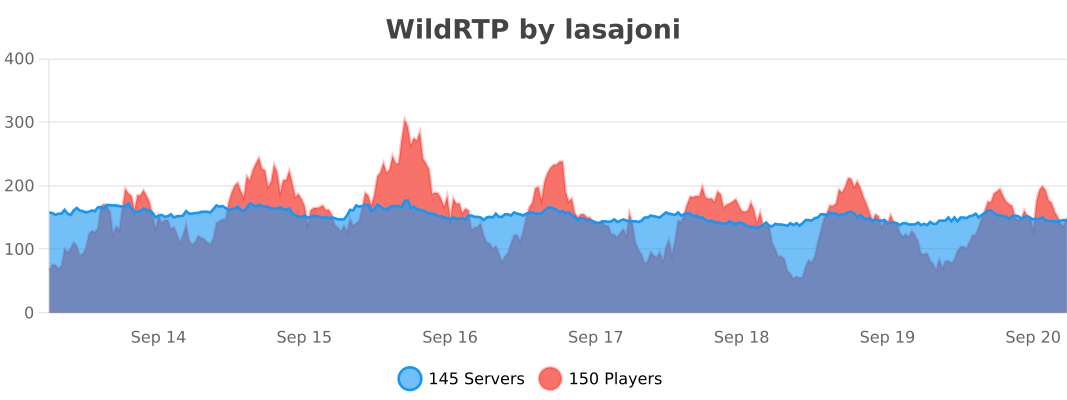
[![Loading…](https://bstats.org/signatures/bukkit/wildrtp.svg)](https://bstats.org/plugin/bukkit/WildRTP/17799)

Wild Warden Panorama

# Warden is Wilding!
Ancient cities are dangerous. Few return after delving too deep, too greedily for their treasures…

Why? Wardens, the ancient horrors of the deep wait for all adventurers unlucky enough to meet them.

But this one is harmless. And he will decorate your main menu. Pinky promise. He won’t bite.

![Wild Warden Panorama](https://cdn.modrinth.com/data/cached_images/7487418d34abbcc428daa998b2919fef2dc347d1.webp)

# Features
– Single prerendered panorama of the warden in an ancient city scene for your main menu

# Not your cup of tea?
Feel free to check out [other panoramas](https://modrinth.com/user/Lumora) that I made for you!

Wild Update Panorama

# Wild Wardens… Wild World… Wilding You!
The Wild Update brought both the joy of exploration as well as sense of dread back from Minecraft Beta.

Nothing is the same after the Wardens came to the game. Caves are scary again. Wardens give us no quarter.

Luckily we tamed a single one. And we captured its majesty. Just for you & your main menu.

![Wild Update Panorama](https://cdn.modrinth.com/data/cached_images/b1a2a6f4135bc6633a4c523919f62181798bf9aa.webp)

# Features
– Single prerendered panorama of a warden encounter scene for your main menu

# Not your cup of tea?
Feel free to check out [other panoramas](https://modrinth.com/user/Lumora) that I made for you!

Wild Mangroves Panorama

# Groove in the Mangrove!
Not all trees need dirt to survive. The mangrove laughs at it and grooves in mud and water.

Will you join it? Bonus for accepting is a frog… one very eager to photobomb this shot.

![Wild Mangroves Panorama](https://cdn.modrinth.com/data/cached_images/d4ec93cc0b06eb1d66c82ec749b949e4a78b0536.webp)

# Features
– Single prerendered panorama of the mangrove forest scene for your main menu

# Not your cup of tea?
Feel free to check out [other panoramas](https://modrinth.com/user/Lumora) that I made for you!

Wild Adventure Panorama

# Allay Adventu- err, Ahoy Adventure!
I allayed- I meant allowed myself to capture one of my favorite mobs in the game – The Allay.

It flies. It glows. It’s cute. And now?

You can grab it with you! Both on your adventures & in the main menu.

![Wild Adventure Panorama](https://cdn.modrinth.com/data/cached_images/e740e8028b54cabc3398e901911a649624f7a22c.webp)

# Features
– Single prerendered panorama of a player & allay adventuring for your main menu

# Not your cup of tea?
Feel free to check out [other panoramas](https://modrinth.com/user/Lumora) that I made for you!

WI Zoom

# WI Zoom (Wurst-Imperium Zoom)

The WI Zoom Minecraft mod lets you zoom in and out with the mouse wheel, providing up to 50x magnification without the need for a spyglass. This mod is fully compatible with OptiFine and Sodium, but unlike OptiFine’s zoom, WI Zoom lets the camera move in a logical way, without making it wobble around. WI Zoom supports all of the latest Minecraft versions, including snapshots.

comparison of no zoom, 3x zoom, and 50x zoom

## Features

– Up to 50x zoom!
– No spyglass needed!
– Zoom in and out with the mouse wheel!
– No wobbly camera nonsense!
– Dynamic mouse sensitivity! (since v1.1)
– Fully compatible with OptiFine / Sodium!

## How To Zoom

Hold down the V key to activate the zoom (this keybind can be changed).
While zooming, you can use the mouse wheel to zoom in further.

## Changing The Zoom Keybind

How to change the keybind (click to expand)

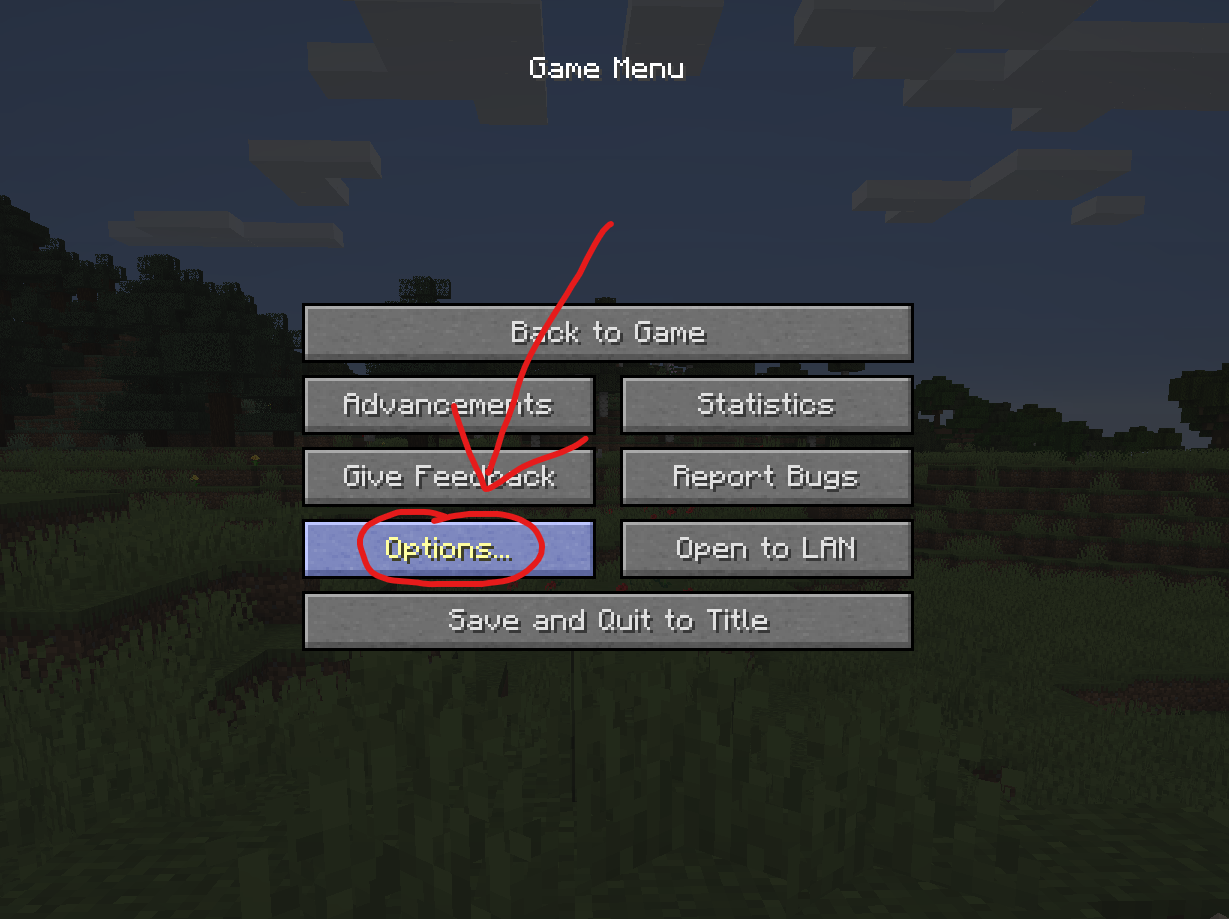
In the pause menu, click on “Options…”.

screenshot of the Game Menu with the Options button highlighted

In the Options menu, click on “Controls…”.

screenshot of the Options menu with the Controls button highlighted

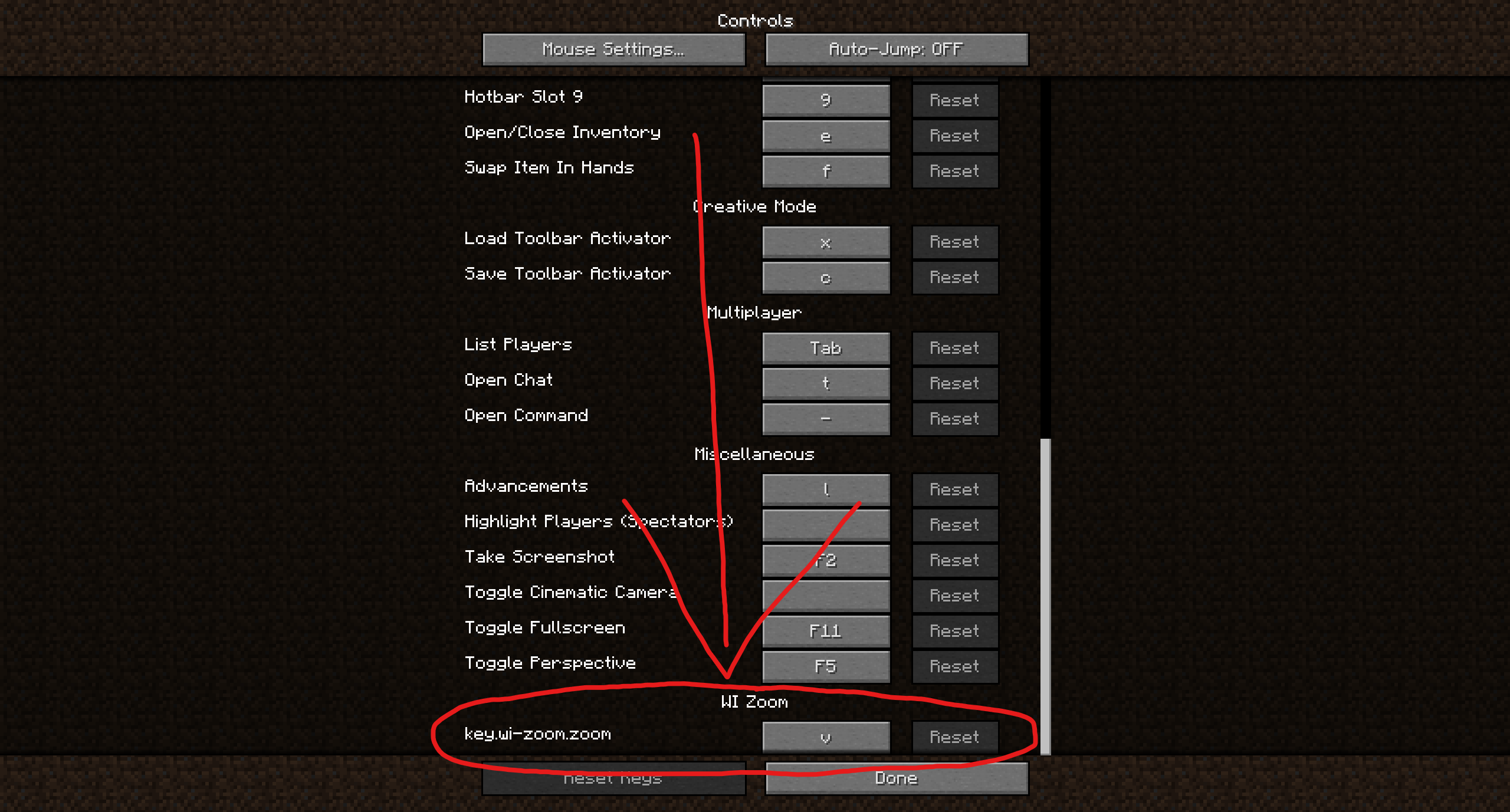
In the Controls menu, scroll down to the “WI Zoom” section. If you don’t have any other mods installed, you will find this section at the very bottom.

screenshot of the Controls menu with the WI Zoom keybind highlighted at the bottom

## Supported Languages
– Azerbaijani (Azerbaijan) (since v1.5)
– Chinese (Simplified/Mainland) (since v1.4)
– Chinese (Traditional/Taiwan) (since v1.4)
– Cantonese (Hong Kong) (since v1.4)
– Classical Chinese (since v1.4)
– Dutch (Netherlands) (since v1.5)
– English (US)
– Estonian (Estonia) (since v1.4)
– French (France) (since v1.4)
– German (Germany)
– Kurdish (since v1.5)
– Portuguese (Brazil) (since v1.5)
– Russian (Russia) (since v1.3)
– Turkish (Turkey) (since v1.5)
– Ukrainian (Ukraine) (since v1.5)

White Pumpkin

![About](https://cdn.modrinth.com/data/cached_images/19d332cdab77737cd016fd7c1ae13efef260cbc7_0.webp)

Many players requested white pumpkins when the Pale Garden was introduced. This resource pack makes pumpkins white when placed in the Pale Garden biome, using CTM. Rotten Pumpkins also naturally spawn, similar to the ones found in Minecraft Dungeons. All pumpkin top textures rotate now aswell.

![Limitations](https://cdn.modrinth.com/data/cached_images/aad3989a55a9ceae59bd8e4a35cbbbca73a1335b_0.webp)

CTM

White jack-o-lanterns aren’t able to be added properly.

![Dependencies](https://cdn.modrinth.com/data/cached_images/032b3169badbdce870ae6ae179be88f8150e0e9a_0.webp)

[Continuity](https://modrinth.com/mod/continuity)

White Screen / Florescent Light

A simple change that changes glowstone to just a white texture. Good for things like fluorescent lights or chroma key.

Type “Subsetg4ming” in your search bar to find everything by me!

White Monster

# ⚪ White Monster 32x PVP Texture Pack (Monster Edition)

**White Monster 32x** is a **high-quality optimized Minecraft PVP pack**, inspired by *Monster Energy Ultra (white edition)*, designed specifically for **1.9-1.21+**.
Created by **iTzDrakthar** ⚡

## 📦 Features

– ✨ **Custom Particles** – smooth and unique for clear combat visibility
– 🗡️ **Custom Weapon Textures** – clean & sharp designs for swords and tools
– 🐾 **Custom Entity Models** – mobs reworked with a White Monster-inspired style
– 🧱 **Custom Blocks** – optimized blocks for better gameplay performance
– 🎞️ **Custom Animations** – dynamic animations for an immersive feel
– 🌌 **Custom Day/Night Sky** – improved sky textures for atmosphere

## 🔧 Technical Info

– 🎮 **Game Version:** 1.7 – 1.8.9
– 🖼️ **Resolution:** 32x (detailed & polished)
– ⚡ **Optimized:** FPS BOOST ✔️

## 🎬 Preview Video