YFs – Snow & Rain
The texture pack removes the load on the PC by reducing rain and snow.
The texture pack removes the load on the PC by reducing rain and snow.
Hallo!
This texture pack improves your Minecraft by changing the background

**Yeth’s TPA is a Teletransportation Accept mod for Minecraft designed to be compatible, stable, and sufficient.**
## Commands
– **/tpa
– **/tpa accept
– **/tpa
– **/tpa cancel** Cancels an outgoing TPA request
– **/tpa ignore
– **/tpa help** Sends a list of all commands
– **/tpa disable** Disables TPA requests from being sent to you
– **/tpa enable** Enables TPA requests to be sent to you
– **/tpa setting
## Features
– Automatic expiry of TPA requests
– TP delay w/ countdown
– Multiple request handling
– Permissions for server owners
– Anti-TPA-traps
## Support
Yeth’s TPA supports the following mod loaders:
– Fabric
– Neoforge
– Forge
– Quilt
– Legacy Fabric
– Babric
– Ornithe
– BTA
– LiteLoader
For Minecraft versions 1.7.2 – 26.1.2
Make swords enchanted with knockback become yellow!
Requires CIT Resewn or Optifine
Simply drag into your resource pack folder, extract, and enable it and put it at the top of your packs.
Always Yellow Hearts
—
**Brighten up your Minecraft experience with yellow hearts!**
This resource pack transforms the default red heart textures into a cheerful yellow hue. Whether your hearts are full, half-full, or empty, they will always display in a vibrant yellow, offering a fresh visual twist to your health bar.
**Features:**
* All heart icons are changed to yellow.
* Consistent yellow appearance for full, half, and empty states.
* Purely aesthetic change – no gameplay modifications.
* Compatible with various Minecraft versions.
Enjoy a splash of sunshine on your health bar!
🟨Yellow Enchant Glint
–
Mostly suitable for 1.15~latest version, though can be used in earlier version with less effect, which could not fixed in resource pack way.
[Click this to view alternatives.](https://modrinth.com/collection/lR5x3kC0)
ℹStatement
–
This work is authorized for non-commercial purposes only.
Proper attribution to the original author and a clear link to the source must be provided.
Unauthorized reuploading, redistribution and commercial utilization are strictly prohibited.
Distortion, defamation or any act that damages reputation shall not be permitted.
Any disputes arising from improper use shall be solely borne by the user, and the original author shall bear no responsibility therefor.
All Rights Reserved.
– _In the event of discrepancies statements contained in older versions, the above statements shall prevail._
Check my profile if you want to view more Resource Pack Projects.<3
Changes the texture in minecraft/textures/block/cobweb.png to be yellow while keeping the three shades in the original cobweb texture.
Original shades:
– #FFFFFF (bright)
– #E4E9E9 (mid)
– #C4CED2 (dark)
New shades:
– #FFC700 (bright)
– #E7B400 (mid)
– #CC9F00 (dark)
Customized server motd and random icon, it can use player’s head as server icon,like this:
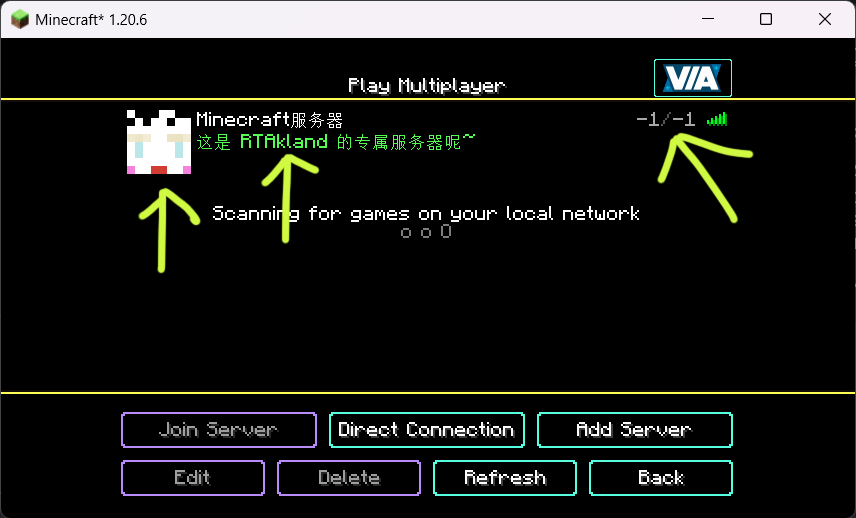)
also use player’s name as motd description, and random icon
everything is up to you
for more information please go to github: https://github.com/RTAkland/YeeeesMOTD
Addon for [Simple Resources](https://github.com/Yorick-06/SimpleResources) based on
[jackson-dataformats-text](https://github.com/FasterXML/jackson-dataformats-text) which adds support for “`.yml“`/“`.yaml“` files
for both minecraft and custom-registered resources.
Simply place this mod in your mods folder (SimpleResources version 2.1.0 or higher required) and all resources can now
be specified in the YAML format.
# YAML API
YAML API is a specialized library that simplifies working with YAML configuration files in Bukkit/Spigot/Paper plugins. It provides a robust and consistent interface for loading, saving, updating, and managing YAML-based configurations, along with advanced mapping capabilities for configuration sections and configurable units.
—
## Overview
The **YAML API** package offers a set of tools designed to handle YAML configuration files efficiently. It abstracts the complexity of file I/O and reflection-based configuration parsing, allowing you to focus on using configuration data in your plugin.
Key components include:
– **YAMLFile**: A class to load, save, and update YAML configuration files.
– **ResourceUtils**: Utility methods for handling resources and file operations.
– **Configurable & ConfigurableFile**: Interfaces and classes that provide easy access to the underlying `FileConfiguration`.
– **ConfigurableUnit**: An interface representing a configuration unit, useful for handling permissions or groups in the configuration.
– **Mappable, SectionMappable, UnitMappable & HashMappable**: A set of interfaces and classes for mapping configuration sections and units into Java collections.
– **YAMLUpdater**: A class that updates YAML files by merging default values and preserving comments.
—
## Key Features
– **Unified Configuration Management**:
Provides a consistent API for reading, writing, and updating YAML configuration files.
– **Dynamic Mapping and Conversion**:
Supports mapping configuration sections to custom units and collections, making it easier to work with complex configuration structures.
– **Resource and File Utilities**:
Includes helper classes to simplify file loading, resource saving, and directory management.
– **Comment Preservation and Updates**:
YAMLUpdater handles merging of default configuration values while preserving existing comments.
– **Reflection-Based Parsing**:
Uses reflection to dynamically access configuration sections and values, ensuring compatibility across server versions.
—
## Usage Example
Below is an example demonstrating how to use the YAML API to load, update, and work with configuration files.
### Example: Using ConfigurableFile and YAMLFile
“`java
package com.example.myplugin;
import me.croabeast.file.ConfigurableFile;
import me.croabeast.file.YAMLFile;
import org.bukkit.configuration.file.FileConfiguration;
import org.bukkit.plugin.java.JavaPlugin;
import java.io.IOException;
public class MyPlugin extends JavaPlugin {
private ConfigurableFile config;
@Override
public void onEnable() {
try {
// Create a new configuration file located in the “config” folder
config = new ConfigurableFile(this, “config”, “settings”)
// Optionally, override methods to control updatability or other behaviors
{
@Override
public boolean isUpdatable() {
// Retrieve the “update” key from the configuration to decide if updates are allowed
return get(“update”, false);
}
};
// Save the default configuration if not present
config.saveDefaults();
// Update the configuration file (merges defaults and preserves comments)
config.update();
} catch (IOException e) {
e.printStackTrace();
}
// Access configuration values
String prefix = config.get(“lang-prefix”, “&e MyPlugin »&7”);
getLogger().info(“Language prefix: ” + prefix);
}
}
“`
### Example: Working with Mappable and SectionMappable
“`java
package com.example.myplugin;
import me.croabeast.file.SectionMappable;
import me.croabeast.file.ConfigurableFile;
import org.bukkit.configuration.ConfigurationSection;
import org.bukkit.plugin.java.JavaPlugin;
public class MyPlugin extends JavaPlugin {
private ConfigurableFile config;
@Override
public void onEnable() {
try {
config = new ConfigurableFile(this, “config”, “settings”);
config.saveDefaults();
config.update();
} catch (Exception e) {
e.printStackTrace();
}
// Assume we have a configuration section “advancements”
ConfigurationSection section = config.getConfiguration().getConfigurationSection(“advancements”);
if (section != null) {
// Create a SectionMappable from the configuration section
SectionMappable.Set sectionMap = SectionMappable.asSet(section.getValues(false));
// Process the mapped configuration as needed
getLogger().info(“Loaded advancements: ” + sectionMap);
}
}
}
“`
—
## Maven / Gradle Installation
To include YAML API to the project, add the following repository and dependency to your build configuration. Replace `${version}` with the desired version tag.
### Maven
Add the repository and dependency to your `pom.xml`:
“`xml
“`
### Gradle
Add the repository and dependency to your `build.gradle`:
“`groovy
repositories {
maven {
url “https://croabeast.github.io/repo/”
}
}
dependencies {
implementation “me.croabeast:YAML-API:${version}”
}
“`
Replace `${version}` with the appropriate module version.
—
## Conclusion
**YAML API** is a powerful library for managing YAML configurations in your Bukkit/Spigot/Paper plugins. It streamlines file operations, mapping, and updates while preserving comments and ensuring compatibility across server versions. Whether you are building simple configuration systems or working with complex, nested settings, YAML API provides the tools you need to efficiently manage your plugin’s configuration.
Happy coding!
— *CroaBeast*
