WorldsMH Fast-smelter
Simple fast smelter — instantly smelt ores placed above a furnace, with optional auto pickup & XP in v2
🏗️ Overview
WorldsMH Fast-Smelter is a lightweight datapack / mod that accelerates vanilla furnace smelting operations.
Place smeltable items above a furnace and it will convert them immediately, bypassing the normal smelting time. It’s ideal for automation, factory setups, or just speeding up your gameplay.
🔧 Features
v1 – Core fast smelting (stable)
Instantly smelts any valid furnace input placed above the furnace.
No automatic insertion into inventory — you still pick up the output manually.
No XP gain from smelting in this version.
Works reliably across multiple versions of Minecraft.
v2 (Beta) – Enhanced usability
In addition to instant smelting, v2 adds auto pickup: the smelted output is placed directly into your inventory, and the actionbar notifies you which item was added.
Grants XP gain from smelted items, mimicking vanilla smelting rewards.
Because of those features, v2 may have compatibility limitations and may sometimes lose some ores during conversion (especially with precarious setups).
Tailored for versions where v2 support is viable.
⚠️ Important Notes & Limitations
V1 is more stable and compatible across many Minecraft versions; v2 is experimental and may not work in all worlds or with all modpacks.
The datapack may lose items in edge cases (especially in v1, but v2 also has some risk).
Because v2 performs inventory insertion, it can conflict with other mods/datapacks handling inventory.
You may not receive XP when using v1, and in v2 the XP mechanics attempt to mimic vanilla smelting but may differ slightly.
📦 Compatibility
Supports Minecraft Java Edition 1.20.x, 1.19.x, 1.18.x, 1.17, 1.16, and 1.15.
Modrinth
Functions as a datapack and in some setups as a mod, depending on version.
Modrinth
Licensed All Rights Reserved (ARR).
Modrinth
✅ Why Use It?
Great for speeding up ore processing in survival or factory worlds
Automates part of smelting runs, especially useful in bulk processing
Minimal overhead — drop it in and it works
V2 adds convenience features (XP, auto pickup) for smoother gameplay
WorldSaveBroadcast
# WorldSaveBroadcast
WorldSaveBroadcast is a plugin for [Bukkit](https://bukkit.org), [Spigot](https://spigotmc.org) or [Paper](https://papermc.io) that broadcasts a message to all players when the server is saving the world.
# About
This is a very simple plugin for your Minecraft server.
It sends a message to all players when the server saves a world.
It creates a configuration file with a default message that you can change.
The message also supports the placeholder `%name%`, which is replaced by the name of the world.
Please note that this plugin sends a message for each world / dimension that is saved.
This means, if you have `world`, `world_nether` and `world_the_end`, the message will be sent 3 times.
# Features
* Lightweight
* Easy to use
* Plug and play
* Customizable message
* Placeholder support
* Supports color codes and formatting codes
* Supports multiple worlds / dimensions
* Supports Bukkit, Spigot and Paper
* Works on pretty much all versions of Minecraft
* Open source and free
# How to use
* Download the plugin
* Put the plugin in your plugins folder
* (Re)start your server
* Open the config file to edit the message
* (Re)start or reload your server
# Config
“`yaml
message: “&o[Server: Saved the world %name%]”
“`
WorldRulesManage
# WorldRulesManage Plugin Overview
**WorldRulesManage** is a professional plugin for managing world rules. It allows you to freely configure player behavior (e.g., blocking block breaking, block triggering, block interaction, etc.) and world behaviors (e.g., blocking fire spread, liquid flow, etc.) in specific worlds. You can also define radius-based rules using coordinates to restrict player or world actions within a certain area.
**Use cases:** Server lobbies, spawn protection, and controlled world zones.
> English [README.md](https://github.com/MaddyJace/WorldRulesManage/blob/5.0/README.md)
> 中文简体 [CN-README.md](https://github.com/MaddyJace/WorldRulesManage/blob/5.0/CN-README.md)
—
## 📦 Plugin Features
– Supports global and radius-based world rules: prevent fire spread, prevent leaf decay, prevent block ignition (non-player), prevent entity block destruction, and block liquid flow (e.g., lava and water).
– Supports global and radius-based player rules: custom permission control, prevent block ignition, block breaking, block placing, item pickup/drop, bucket usage (e.g., collect water), hunger,
auto-restore hunger to full, prevent player damage, block all portals (overrides Nether/End), block Nether portal, block End portal, block specific item usage (configured by you),
block interaction with specific entities/blocks, block triggering of specific blocks.
– Radius rule shapes (for world and player): 2D Circle (ignores Y), 3D Sphere (includes Y), 2D Square (ignores Y), 3D Cube (includes Y), custom origin and radius values.
– Supports blacklist/whitelist configuration
– Supports multiple worlds
– Supports auto-hot-reload of configuration files
—
# ⚙️ WorldRulesManage Configuration Guide
> [config.yml](https://github.com/MaddyJace/WorldRulesManage/blob/5.0/src/main/resources/config.yml)
> [world.yml](https://github.com/MaddyJace/WorldRulesManage/blob/5.0/src/main/resources/world.yml)
> [radius.yml](https://github.com/MaddyJace/WorldRulesManage/blob/5.0/src/main/resources/radius.yml)
> [message.yml](https://github.com/MaddyJace/WorldRulesManage/blob/5.0/src/main/resources/message.yml)
### ✅ `worldName: ` # Name of the world (e.g., world)
### ✅ `globalRules:` # Rules applied to the world, regardless of player permissions
– `flameSpread: true` # Prevent fire from spreading
– `leavesDecay: true` # Prevent leaf decay
– `blockIgnite: true` # Prevent block ignition
– `entityBlockBreak: true` # Prevent entities from breaking blocks
– `liquidFlow: true` # Prevent liquid flow
### ✅ `playerRules:` # Rules applied to players without permission
– `permission: “wm.world”` # Permission node
– `blockIgnite: true` # Prevent players from igniting blocks
– `blockBreak: true` # Prevent players from breaking blocks
– `blockPlace: true` # Prevent players from placing blocks
– `itemPickup: false` # Prevent players from picking up items
– `itemDrop: false` # Prevent players from dropping items
– `usePail: true` # Prevent players from using buckets (e.g., to collect water)
– `food: true` # Prevent hunger
– `foodSatiety: true` # Restore hunger to full
– `playerDamage: true` # Prevent player damage
– `portalAll: false` # Prevent all portal access (overrides portalNether and portalEnder)
– `portalNether: false` # Prevent Nether portal access
– `portalEnder: false` # Prevent End portal access
######
– `🎯playerUseItem:` # Block item usage
– `type:` `BLACKLIST` / `WHITELIST`
– `list:`
– “EGG” # Egg
– “FLINT_AND_STEEL” # Flint and Steel
######
– `🧍PlayerInteractEntity:` # Block entity interaction
– `type:` `BLACKLIST` / `WHITELIST`
– `list:`
– “ITEM_FRAME” # Item Frame
– “PAINTING” # Painting
– “ARMOR_STAND” # Armor Stand
######
– `🧱PlayerInteractBlock:` # Block block interaction
– `type:` `BLACKLIST` / `WHITELIST`
– `list:`
– “LEVER” # Lever
– “FURNACE” # Furnace
######
– `🎛️PlayerTriggerBlock:` # Block block triggering
– `type:` `BLACKLIST` / `WHITELIST`
– `list:`
– “SOIL” # Farmland
– “TRIPWIRE” # Tripwire
—
### `This option only takes effect in radius.yml`
– `✅settingsRadius:`
– `type:` `2DRange`, `3DRange`, `2DCube`, `3DCube`
– `xyz:` # Starting coordinates (e.g., 0 0 0)
– `radius:` # Radius in blocks
## 📌 Case Sensitivity Warning
> ⚠️ **Important:** All configuration keys are case-sensitive. Misuse of uppercase/lowercase may result in errors or ignored settings.
—
## 🛠 Recommended Practices
– When using TNT near the radius edge, explosions may affect blocks just outside the protected area. To avoid this, expand the radius by 7 blocks for edge safety.
– Remove or comment out unused configuration sections to keep your setup clean and readable.
—
WorldResourcepacks
######  Made in Germany with love (and [beer](https://s.moep.tv/beer))
######

_Did you ever want to set a different server resource pack for your each of your worlds? Or switch your current resource pack with just one command? Then you came to the right place!
_
This plugin lets you set one Server Resource Pack for each of your worlds or event your whole server! It also allows you to specify packs that should be usable on multiple worlds!
It is also compatible with my [Bungee Resourcepacks](https://modrinth.com/plugin/bungeeresourcepacks) and [Velocity Resourcepacks](https://modrinth.com/plugin/velocityresourcepacks) plugin and will not make the player redownload a resource pack after server switching if it got already applied by Bungee/Velocity Resourcepacks on another server!
**Please check if there are newer [development builds](https://ci.minebench.de/job/resourcepacksplugins/) before reporting issues!**
> Please note that the Vanilla Minecraft client only applies server resource packs that are smaller than **250MiB**! (50MiB before 1.15, 100MiB before in 1.18)
>
> Also certain new **SSL certificates** for URLs (like Let’s Encrypt) do not work with the old Java version shipped with Minecraft (Java 1.8.0_51, [a bug report](https://bugs.mojang.com/browse/mc-143768) regarding that has been filed with Mojang) so you’ll have to either use a different certificate or a non encrypted download (not recommended!)
**Note:** This plugin does not work with older Minecraft versions above 1.8 that do not support server resourcepacks!
### **Features**
* Set different server resourcepacks per world or whole server
* Match world names with regex!
* Commands to configure the plugin ingame
* Language system with messages depending on the locale of the client
* Simplified compoment/json message formatting syntax ([MineDown](https://wiki.phoenix616.dev/library:minedown:syntax))
* Configurable delay before sending the pack to a player
* Remembers which pack a user has currently applied and doesn’t resend on world switch
* Let the user set the pack himself. The pack can be re-applied on each login and will be used for resets on servers that don’t have the pack
* Inform the user which pack the server send them if it was done automatically
* [ResourcePackSendEvent](https://docs.phoenix616.dev/resourcepacksplugins/de/themoep/resourcepacksplugin/bukkit/events/resourcepacksendevent.html) and [ResourcePackSelectEvent](https://docs.phoenix616.dev/resourcepacksplugins/de/themoep/resourcepacksplugin/bukkit/events/resourcepackselectevent.html) for developers to react on the sending or selecting of a pack in their own plugins
* Send the correct pack format depending on the client’s version (requires ViaVersion or ProtocolSupport) with pack-variants either via the version, protocol number or pack format id.
* Automatically generates the sha1 hashes!
* Compatible with [AuthMe Reloaded](https://www.spigotmc.org/resources/authme-reloaded.6269/), [OpenLogin](https://www.spigotmc.org/resources/openlogin-1-7x-1-19x.57272/), NLogin, [LibrePremium](https://www.spigotmc.org/resources/librepremium-proxy-authorization-plugin-automatic-login-2fa.101040/), JPremium.
Do you need it to be compatible with more plugins? [Contact me](https://github.com/phoenix616/resourcepacksplugins/issues/new)!
### **Statistics**
* [McStats.org](http://metrics.griefcraft.com/plugin/worldresourcepacks/)
* [bStats.org](https://bstats.org/plugin/bungeecord/worldresourcepacks)
### **Commands**
To execute every /wrp command you need the `worldresourcepacks.command` permission!
**/wrp reload [resend]** – `worldresourcepacks.command.reload` – Reloads the config file; resends the packs to every online player if the 2nd argument is “resend”
**/wrp version** – `worldresourcepacks.command.version` – Shows the version of this plugin
**/wrp generatehashes** – `worldresourcepacks.command.generatehashes` – Manually generate the resource pack hashes
**/wrp addpack ** – `worldresourcepacks.command.addpack` – Add a new pack
**/wrp pack ** – `worldresourcepacks.command.pack` – View and edit an existing pack
**/wrp listassignments** – `worldresourcepacks.command.listassignments` – View all world assignments
**/wrp deleteassignment ** – `worldresourcepacks.command.deleteassignment` – Delete a world assignment
**/wrp assignment ** – `worldresourcepacks.command.assignment` – View and edit a world assignment
**/wrp globalassignment** – `worldresourcepacks.command.globalassignment` – View and edit the global assignment
**/resetpack [] []** – `worldresourcepacks.command.resetpack` – Reset the pack (of a player) to the empty one or the stored pack. (Like what would happen if you joined a server without any pack) If is set to false the stored pack of the player is reset too.
To execute every /usepack command you need the `worldresourcepacks.command.usepack` permission!
To execute it for other players you need `worldresourcepacks.command.usepack.others`!
To have access to a specific pack a player needs the `worldresourcepacks.pack.` permission or the one defined for the pack in it’s config section!
**/usepack** – List all packs available to you
**/usepack []** – Send a specific pack to yourself or another player
### **Config**
The config.yml allows you to configure everything you can do set up via the commands and a lot more, take a look at the commands in the [file on GitHub](https://github.com/phoenix616/resourcepacksplugins/blob/master/bukkit/src/main/resources/config.yml) for an explanation on all options! (Some might only be available on the [latest development builds](https://ci.minebench.de/job/ResourcepacksPlugins/)!
### **About the client freeze**
> **This should no longer be an issue starting with 1.20.3!**
When a server resource pack is send to a client it will shortly freeze after the download is complete. (Same as manually applying a local pack) This happens because the client has to reload all resources, check which resources overlap and do some other calculation and manipulation with them. (Like stitching all the textures together to a single image like they were in the first texture pack format) It’s not a download issue as the client will locally cache the pack files and not re-download them if their hash didn’t change.
How long this takes generally depends on the PC’s performance and the size of the textures (HD packs take longer) that are used in all resource packs that the player has applied. (So even if the server resource pack doesn’t contain any HD textures or textures at all the client will still completely reload all locally applied resource packs) This is something that has to be fixed in the client by Mojang for example by only reloading resources that changed.
**1.14, 1.15 and 1.16 have some major improvements there and 1.20.3 basically fixed it all so suggest players to use these if they have issues with your server resourcepack!**
### **Dev-Resources**
The source is available on [GitHub](https://github.com/phoenix616/resourcepacksplugins) and licensed under the [GPLv3](https://github.com/phoenix616/resourcepacksplugins/blob/master/license).
Development builds can be found on the Minebench.de [Jenkins](http://ci.minebench.de/job/resourcepacksplugins/).
There are also some [Javadocs](http://docs.phoenix616.dev/resourcepacksplugins/) if you intend to develop plugins based on mine.
### **Support**
You can receive support in the [resource discussion thread on SpigotMC](https://www.spigotmc.org/threads/world-resourcepacks.125581/), the [GitHub issue tracker](https://github.com/phoenix616/resourcepacksplugins/issues), [my IRC channel](https://irc.phoenix616.dev/), or [my Discord](https://phoenix616.dev/discord).
### **Metrics**
This resource includes [bstats.org](https://bstats.org/) metrics. If you don’t want bstats to collect info on your server then you can disable it in the *bStats/config.yml* file. The license the used bStats-lite class is under can be found [here](https://github.com/btobastian/bstats-metrics/blob/master/license).
#####
*This resource is distributed without any warranty or liability by the author. Read more about it [here](https://github.com/Phoenix616/ResourcepacksPlugins/blob/master/LICENSE#L589-L610)*
WorldPreview
# World Preview
[](https://ko-fi.com/voidxwalker)
Minecraft mod that draws a preview of the world on the loading screen during chunk generation.
– **Legal** for the minecraft java edition leaderboards
– The **full chunk map** must be shown in the recording to get a run verified
– Switching to the F3 + Esc menu will make your run **count as f3**
– **Compatible** with all allowed mods
– **Compatible** with the newest releases of specnr’s multi-instance macros and with FinestPigeon’s spawn reset macro for ssg
**For macro
– World preview **doesn’t modify world generation** in any way. It simply takes already completed chunks, converts them to client chunks (Chunks minecraft can render) and then draws these chunks on the loading screen.
– There are **no server side modifications** besides minecraft getting the random value for the player spawn earlier (Random is Random so it doesn’t change anything)
– You will not be able to reset after ~ when the chunk map reaches 100%. This is intentional
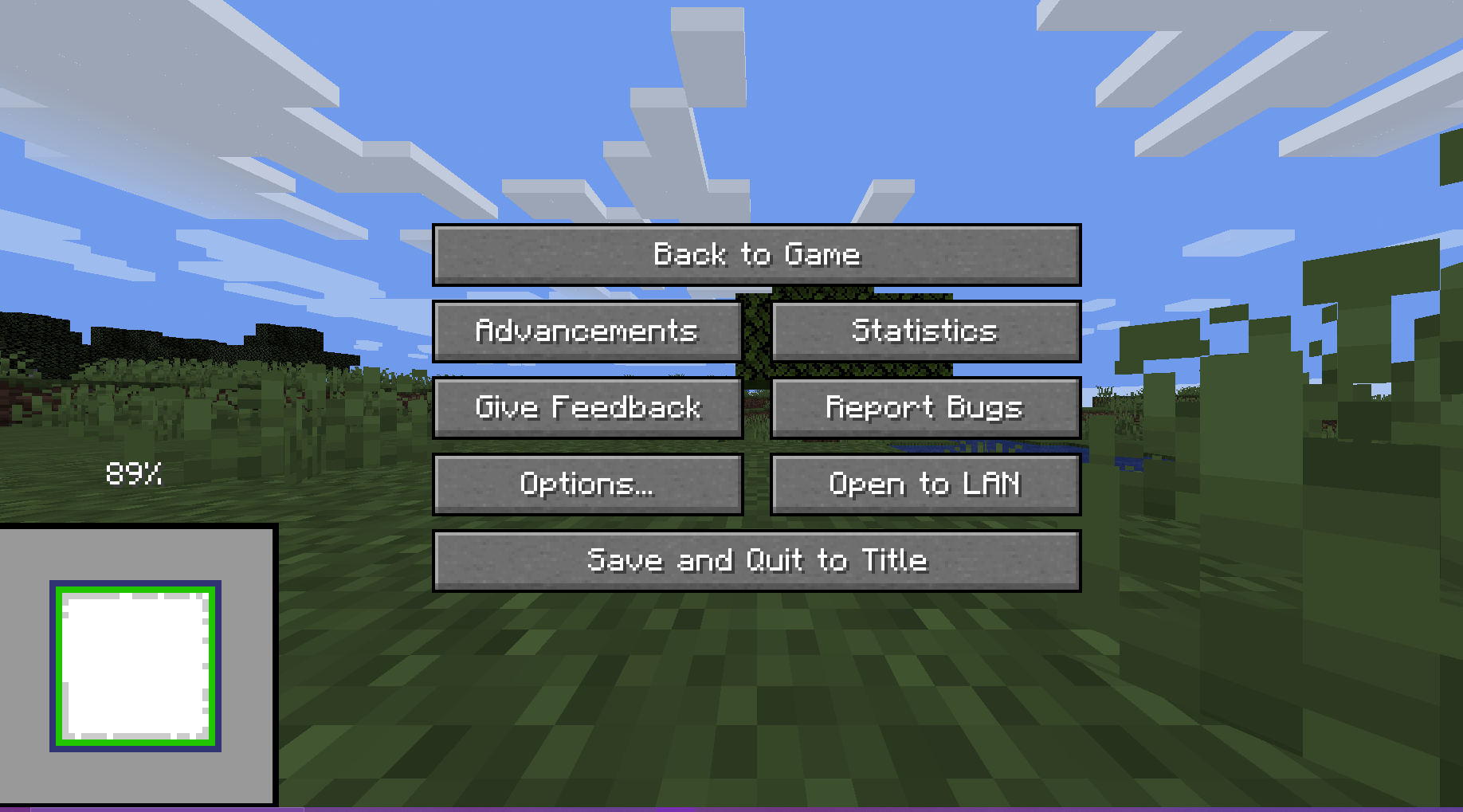
## Usage
The preview will always render when you create a world.
There are 5 ways the player can interact with the preview:
**Direct Inputs**
– Leave World Generation and Reset: Press the “Save and Quit to Title” button to instantly leave the World Generation to the title screen
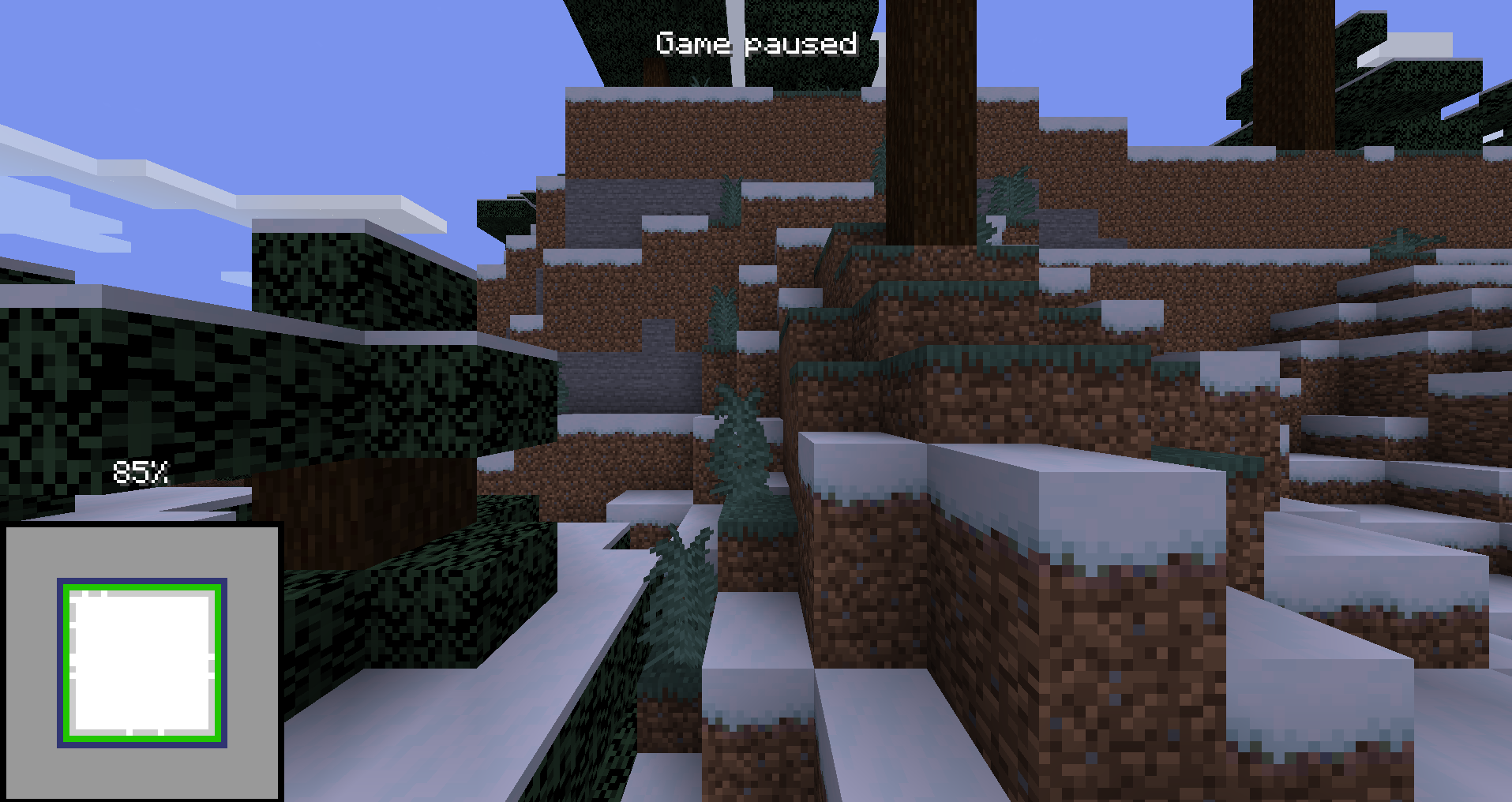
– F3 + Esc: Press F3 and Esc at the same time to switch the pause menu to the F3+Esc pause menu (shown below) and press Esc to switch back. This will make your run count as f3.
——–
**Hotkeys**
(These can be changed in the Controls Screen)
– Leave World Generation and Reset with Hotkey, default button “g” (English keyboard): Press the hotkey button to instantly leave the World Generation to the title screen
– Cycle Chunk Map, default button “h” (English keyboard): Cycle through the 4 positions of the chunk map
– Freeze Preview, default button “j” (English keyboard): Freezes the preview (helps with CPU performance)
## For Macro Makers
The mod prints 3 different log lines:
– “Starting preview at (x, y, z)” at the start of the preview (Reset buttons unlocked)
– “Leaving world generation” when leaving world generation (Reset buttons locked)
– “Freezing Preview / Unfreezing Preview” when the freezing / unfreezing the preview
You will not be able to reset after ~ when the chunk map reaches 100%. This is intentional.
## Authors
– [@Void_X_Walker](https://www.github.com/voidxwalker) (https://ko-fi.com/voidxwalker)
WorldMaster
WorldMaster
- Prefixes for players: [Player] + [Owner] (If enabled chat message won’t be signed and can’t be reported)
- New welcome text and join, leave message and chat style
- Player counter bossbar
- Elevators [/elevator]
Enable flying on server, if used in survival
- Chest Shops: See documentation
- Chunk loader [/chunk_loader]
May produce lag, if you have to many chunk loaders
- Inventory Managment System [/inventory]
- Mulitple Worlds [/world]
May produce lag, if world is created or regenerated
Every world has always loaded spawn chunks which may produce lag
Level-Name in server.properties has to be “world”
- Permission for all commands of the plugin + shop owner permission
Installation
Copy the .jar file into your plugins directory of your server.
Start the server. If the server was already started, type “/reload” in the server console.
Documentation
Documentation on GitHub
WorldLock

* [**BukkitOfUtils**](https://modrinth.com/plugin/bukkitofutils)

Please join the Streamline Hub Discord in order to get updates and for me to fully assist you with bugs, questions, or suggestions.
Discord: [**click here**](https://dsc.gg/streamline)

Block players from entering or teleporting to specified worlds — All configurable with commands.

This offers a very simple configuration and setup all while remaining very light-weight.

1. Download and install BukkitOfUtils. Found here: [BukkitOfUtils](https://modrinth.com/plugin/bukkitofutils)
2. Download the correct version of this plugin for you server version.
3. Place in your `plugins` folder.
4. Stop server.
5. Start server.
6. Use to your liking.

## How to block a world
1. Install plugin. (Shown above.)
2. `/manageworlds add ` – where `` is replaced with the world you want to block.
## Notes
Players with operator or the `*` permission can access all worlds by default.
To disable these players from bypassing the world block, set their permission for `worldlock.bypass.*` to false.
## Functions
* Block specified worlds from:
* Teleportation.
* Moving to.
* Portal-Warping to.
* List blocked worlds.
* Bypassable with permissions.
* Permission: `worldlock.bypass.`

## Commands
* `/manageworlds`
* `/manageworlds add `
* Adds a world to the blocked worlds.
* `/manageworlds remove `
* Removes a world from the blocked worlds.
* `/manageworlds list`
* Lists all worlds in the blocked worlds list.
WorldListTrashCan
## Allows players to customize their home world’s trash bin.
This cleaning plugin operates within a specific world (the player’s home) and, when cleaning items, gathers them into a trash bin that the player has personally set up in their home. It combines various features, supports Folia, boasts highly configurable settings, and is compatible with multiple languages.
(This plugin is more suitable for pairing a world with a team’s server, such as the Home server (using the PlayerWorldsPro plugin or other Home plugin servers). If you close the World Garbage can, its functions can also completely replace other cleaning plugins)
**Now, here’s a hellish joke for you:**
**Player** : Hey, my quantum solar panels got swept away by the cleaning plugin. Can you compensate me?
**OP** : No way, you can’t prove it, and my cleaning plugin doesn’t keep records.
**Player** : I just bought them!
**OP** : What if you hid them, and I compensate you, essentially doubling them?
**Player** : ***
**OP** : Even if there were public trash bins on the server, someone would snatch up those solar panels.
**OP** : What should I do?
And there you have it, this plugin was born.
When Foila supports multiple worlds, this cleaning plugin will benefit everyone
### Features:
—
– **Fully customizable tip**
Support multiple prompt messages
You can achieve fully customized prompts
For example, when there are three seconds left, let “bossbar”, “actionbar”, “chat”,and “title” prompt together,
Alternatively, you can have the bossbar change its style every second (solid, non solid, including its color, can be different every second)
After version 5.7.0, it supports switching between different prompt sounds per second, as well as setting different volumes and tones per second
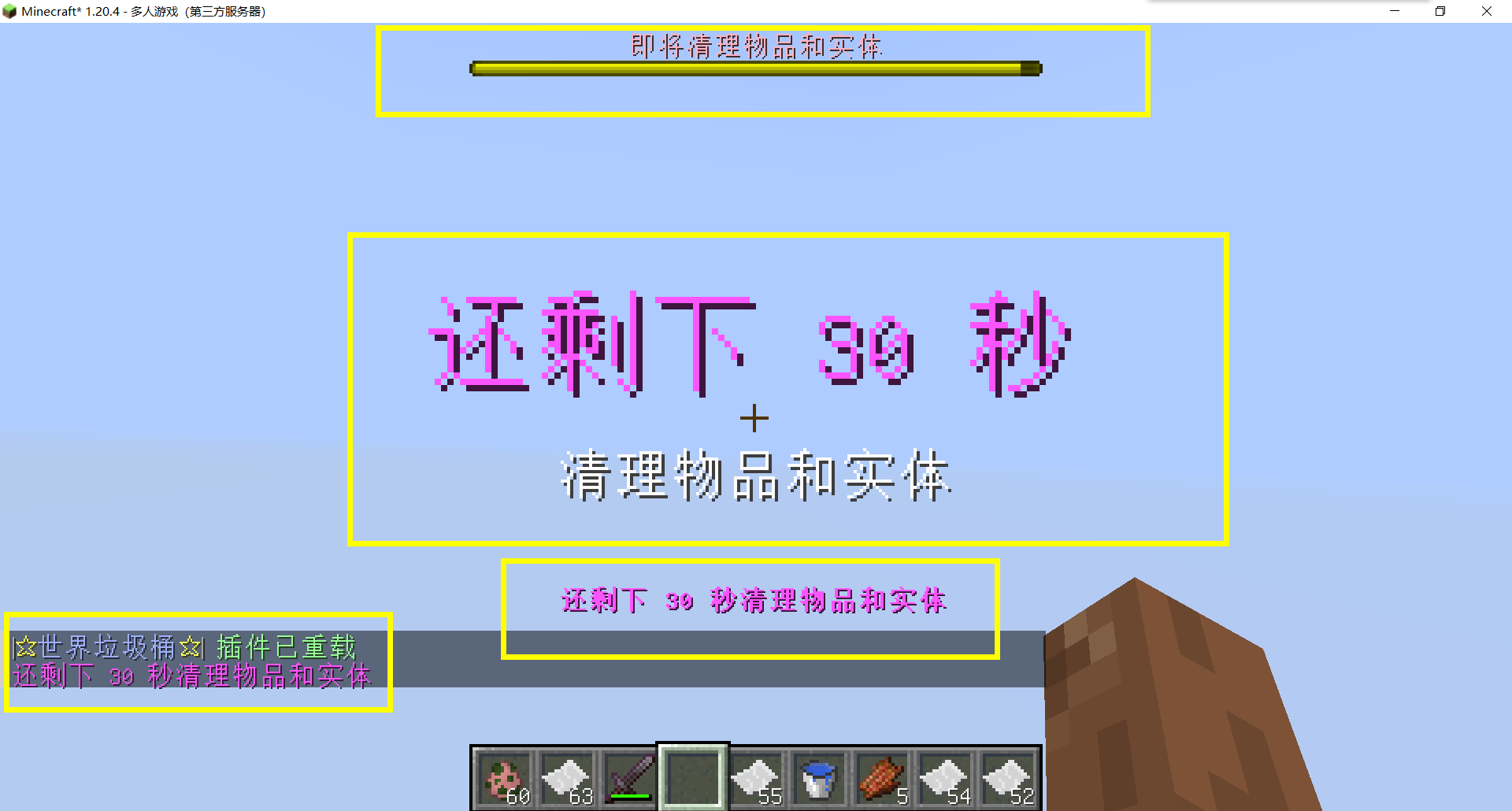
– Thank you to QQ 1664907770 (“笑脸猫”) for providing the material package for the “itemsadder” plugin (applicable to public trash cans) [Click here to download](https://www.hostize.com/zh/v/3TE06XKXx8) (IteamsAdder/WorldTrashCan config and resource)
– **Player-Created World Trash Bin:**
Players have the ability to create a trash bin in their world.
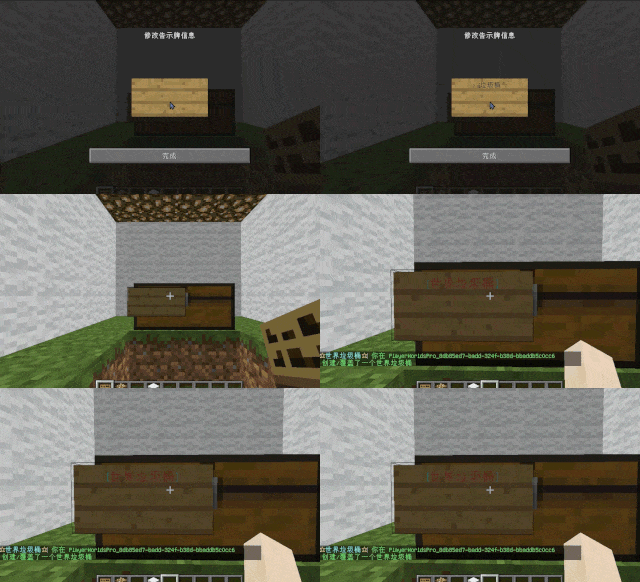
Similar to the mechanics of previous sign-locked chests, the font on the sign will undergo a
transformation after creation.
When the cleaning process is initiated, items will be automatically added to the home trash bin.
Configurable settings allow players to specify detection names and transformed names after cleaning.
“To meet the demands of a small number of people, here is a reminder”
How to create a world trash can:
Place the chest on the ground, hold the signboard and right-click on the chest. Enter [世界垃圾桶] in the configuration file (configured in Set. SighCheckName), and once the font is converted, it is created. Every time the garbage is cleaned, it will be placed in the marked chest
In the default configuration file, the names of the three worlds “world, dim-1, dim1” are disabled, creating a “world trash can” (excluding op)
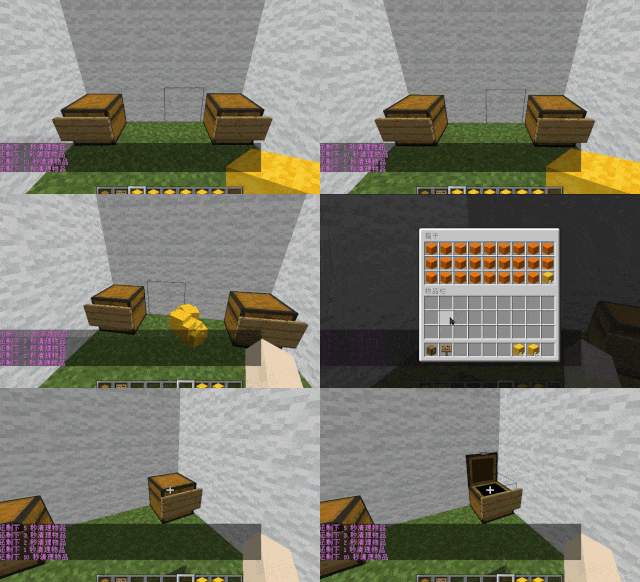
– **Support for Multiple Home Trash Bins:**
Players can use commands to grant special players the ability to place additional home trash bins.
Default quantities for home trash bins are configurable.
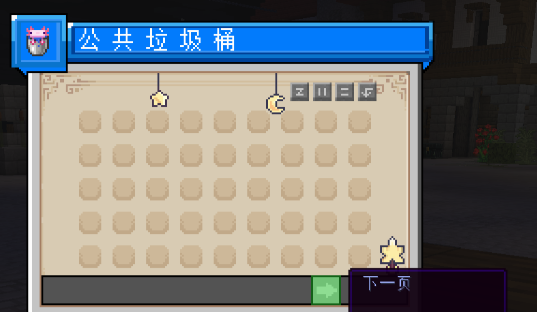
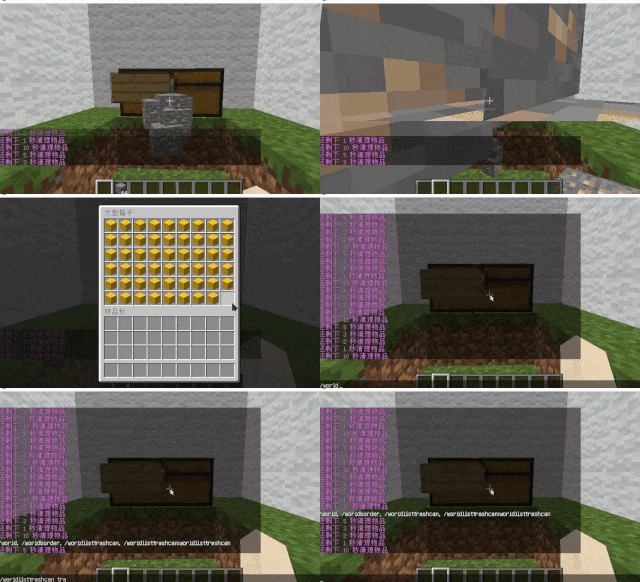
– **Home Trash Bin Overflow to Public Trash Bin:**
Items from home trash bins overflow into the public trash bin.
Public trash bins can have a configurable maximum page count and a blacklist.
– **Item Exclusion and Public Trash Bin Handling:**
Players can add items to the home trash bin blacklist to prevent their recycling.
Excluded items go directly to the public trash bin.
Configuration includes support for excluding items with special lore (e.g., items from the QS shop with
showLocation).
Public trash bins can either clear new items during each sweep or accumulate all trash without clearing.
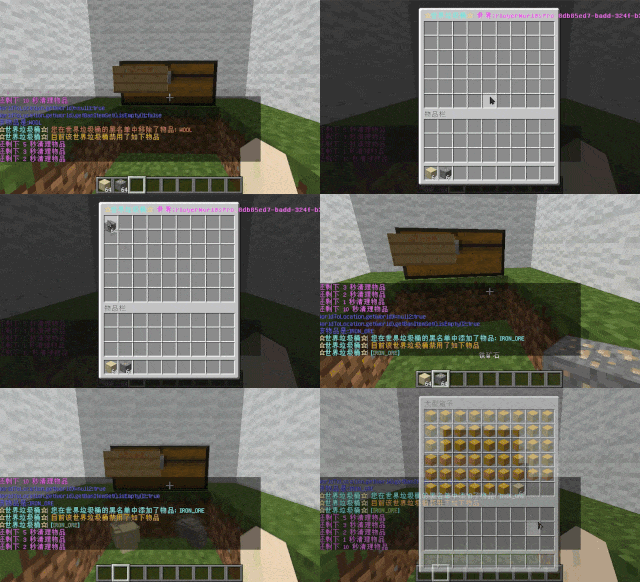
– **The public trash can can enable logging:**
Record what items the player took away

– **Entity Cleanup:**
Optional cleanup of all animals/monsters.
Command (/WorldListTrashCan Look) to view entity types and configure entity blacklists/whitelists.
Support for cleaning special entities from mod.
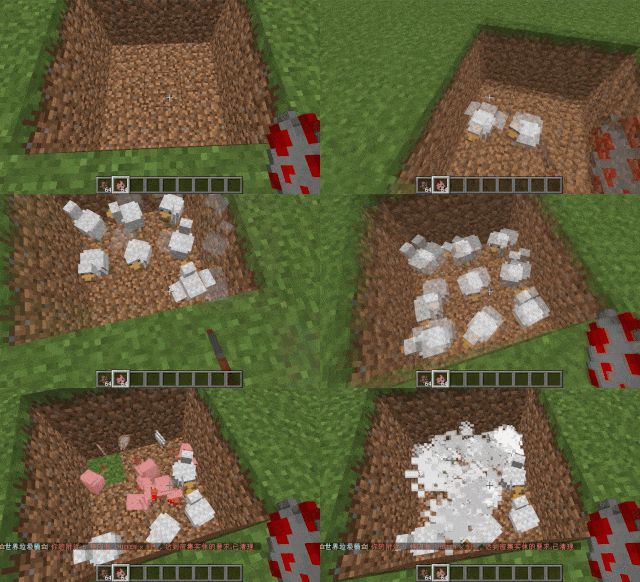
– **Dense Entity Cleanup:**
Configurable radius, target quantity, kill or remove options, and player notifications for dense entity
cleanup.
– **Spam/Command Limitations:**
Configurable chat/command intervals, whitelist commands, and informative messages.
Defense against item dropping.
Players can manually enable or disable the item-drop defense mode.
– **Performance Optimization:**
All optimizations have configurable options in the settings.
1. Quick removal of uncollectible arrows (e.g., arrows from skeletons or bows with infinite
enchantments).
2. Prohibit players from trampling on farmland
### How to Install
—
– **Throw it into the Plugins folder**
### Commands:
—
– **/wtc reload**
Reloads the plugin.
– **/wtc GlobalTrash**
Opens the public trash bin.
– **/wtc help**
Displays help information.
– **/wtc ban**
Opens the local world trash blacklist GUI.
– **/wtc Look**
Right-click to get entity type (useful for adding to the configuration blacklist/whitelist).
– **/wtc GlobalBan**
Opens the global world trash blacklist GUI.
– **/wtc add [WorldName] [Quantity]**
Sets the maximum quantity for the trash bin in the specified world (defaults to the world at your feet if not specified).
– **/wtc DropMode**
Opens or closes drop mode.
### Placeholders
—
– **%WTC_ClearTime%**:
Time until the next cleaning.
### Permission
—
– **WorldListTrashCan.BanGui**:
Permission to open the GUI for adding items to the player’s home trash bin blacklist.
– **WorldListTrashCan.GlobalTrashOpen**:
Permission to open the global trash bin.
– **WorldListTrashCan.help**:
Permission to access command help.
– **WorldListTrashCan.DropMode**:
Permission to open or close drop mode.
***(The above is available by default)***
– **WorldListTrashCan.GlobalBan**:
Permission to open the global trash bin blacklist GUI.
– **WorldListTrashCan.Look**:
Permission to right-click and query the entity type.
***(The above is not available by default)***
WorldEngine
# WorldEngine
WorldEngine is a powerful world management plugin for PaperMC servers, designed as a drop-in replacement for classic plugins like Multiverse and Multiworld. With its intuitive commands and simplified configuration, WorldEngine provides server administrators with full control over their worlds—whether you’re creating new worlds, managing existing ones, or simply looking for a cleaner way to organize your server’s environment.
## Features
– **Seamless World Management:** Create, load, unload, and delete worlds with a single, user-friendly interface.
– **Drop-In Replacement:** Built to be compatible with existing setups. Migrate from Multiverse or Multiworld with minimal effort.
– **Lightweight & Efficient:** Optimized for performance, ensuring minimal impact on server resources.
– **PaperMC Focused:** Specifically designed and tested for use on PaperMC, ensuring stability and ongoing compatibility.
## Getting Started
1. **Install the Plugin:**
Simply place the WorldEngine JAR file into your server’s `plugins` directory.
2. **Start the Server:**
Upon first startup, WorldEngine will generate a configuration file.
Customize this file to fit your server’s needs.
3. **Manage Your Worlds:**
Use the commands listed below to create, edit, and maintain worlds.
## Commands & Permissions
– **`/world`**
*Permission:* `worldengine.world`
The primary command for managing worlds — create/generate or load worlds quickly.
External generators supported
– **`/worldengine reload`**
*Permission:* `worldengine.manage`
Reload the plugin’s configuration without restarting the server.
– **`/worldinfo`**
View detailed information about currently loaded worlds, including environment, seed, and more. (*Soon*)
## Configuration
All configuration options can be found in the `config.yml` file generated on first run. Adjust world generation settings, default spawn locations, environment types, and other details as needed.
## Compatibility
– **Server Software:** PaperMC (1.19+ recommended)
– **Other Plugins:** Built to work alongside common world-management plugins, but best used as a standalone world controller.
## Contributing & Support
– **Issues & Bug Reports:** Please file issues on GitHub with clear steps to reproduce.
– **Feature Requests:** Open a suggestion ticket on GitHub if you’d like to see a new feature.
WorldEngine strives to provide a cleaner, more intuitive way to run multiple worlds on your PaperMC server. Get started today and simplify your server’s world management!
WorldEdit Hang Fix
A simple mod that prevents WorldEdit from hanging the Minecraft server when the server is stopping
It fixes https://github.com/EngineHub/WorldEdit/issues/2459. What it does:
– Shutdown `WorldEdit.getInstance().getExecutorService()` on dedicated server stop (or it will hang the server for maximum 60s)
– Ensure the singleton `java.util.Timer` object in `FutureProgressListener` runs on a daemon thread (or it will hang the server forever)
Supported environment
| Platform | Minecraft | WorldEdit |
|———-|————–|———–|
| fabric | MC >= 1.14 | >=7.0.0 |
| forge | MC >= 1.15 | >=7.0.0 |
| neoforge | MC >= 1.20.6 | >=7.0.0 |