White Anime Girl Totem
A clean and stylish Totem of Undying texture pack featuring a white-haired anime girl. This pack replaces the default Minecraft totem with a cute high-quality anime design while keeping the vanilla style smooth and lightweight. Perfect for PvP, survival, and aesthetic gameplay
WhereIDied
WhereIDied is a simple and easy to use Minecraft plugin that tells players the exact coordinates of their death in a custom message. Allows flexible text customization via config.yml.
When Pigs Fly 「猪萝纪」
## Remember to Download Resource Pack: 记得下载资源包:When Pigs Fly RP
### From 1.5 :
**Technoblade** joined the game
**Enchanted Golden Carrot** joined the game
## **Datapack Introduction: “When Pigs Fly”**
—— A wildly absurd adventure that completely defies the laws of gravity! Watch as Minecraft’s mounts, villagers, and even creepers break free from Earth’s pull and embark on a hilarious journey of airborne chaos!
### ✨ **Classic Features**
1. **Disturbing Dreams: Villagers Take Flight**
When you sneak up on **a sleeping villager**, they will instantly launch out of bed! Is it a prank or magic? Either way, they won’t be sleeping tonight…
2. **Teamwork Makes the Float Work**
When you approach **a teammate (or any other player)**, cooperative adventure? No—cooperative floating! Hold hands and enjoy the view from above!
3. **Mounts Hover Gracefully**
While **riding any creature (pigs, horses, llamas, even skeleton horses)**, both the mount and the player enter “light-step mode”—slow, floating movement! Say goodbye to running and hello to elegant aerial strolls!
4. **Floating Creeper: Explosions Leave Clouds**
If **a levitating creeper explodes**, it doesn’t just vanish—it leaves behind a **lingering area effect cloud**! Any creature (including players) touching this cloud will continue to float… triggering a chain reaction of airborne danger!
5. **And more…**
– Player approaches a pig → Both float (Pig: “**I’m flying, what about you?**”)
– Creature approaches player → Triggers levitation (Creeper: “**I look cooler exploding mid-air!**”)
– Creature hit by an arrow → Immediately ascends (Hit a Blaze? **It becomes a moving target!**)
### 🎯 **Advancement Overview**
| Advancement Name | Icon | Description |
| :— | :— | :— |
| **When Pigs Fly** | Pig Spawn Egg | That’s what’ll happen |
| **Pig Feed** | Carrot | Eat ’em all |
| **Rudder** | Carrot on a Stick | Why did you make that? |
| **UFO** | Creeper Head | Suspended Explosive |
| **Gold Rush** | Flint | All that glitters is not gold |
| **Sss…Sss…Sss…** | Gunpowder | BOOM!!! |
| **I’m Hit!** | Skeleton Skull | Tell my pig I love her… |
| **Bow** | Bow | Nothing special |
| **Arrow of Magic** | Arrow of Levitation | Recyclable |
Hidden Advancements
| Advancement Name | Icon | Description |
| :— | :— | :— |
| **The Wonderful Adventures of Nils** | Saddle | As you could imagine |
| **Chaos Combo** | Golden Carrot | Hit a Creeper when riding a pig |
| **Visiting Relatives** | Crimson Nylium | Ride a pig into the Nether |
| **Unwelcome Guest** | Piglin Head | Hit by Hoglins, Piglins, Piglin Brutes, Zoglins & Zombified Piglins |
| **Interstellar** | Damaged Elytra | Ride a pig into the End |
| **It doesn’t hurt at all** | Enchanted Golden Carrot | Hit by Shulkers when riding a Pig |
### 🌟 **Design Highlights**
– **Multiple Triggers**: Sleeping, riding, exploding, approaching… every interaction might send you skyward!
– **Physics Defied**: Villager wakefulness becomes lift, creeper explosions leave “float clouds”—science? Not here!
– **Multiplayer Mayhem**: Prank teammates, scare villagers, ride pigs into the sky—perfect for server shenanigans and explosive entertainment!
### 🐷 **Author’s Note**
> “This datapack proves it:
> In **Minecraft**, not only can’t **Newton’s coffin** stay closed—it gets **blown sky-high** by creepers!
> Welcome to the **absurd world** where everything can float!”
—
**Supported Versions**: Minecraft Java Edition 1.14+
**Installation**: Place the datapack into your world’s `datapacks` folder and restart the game.
**Warning**: Watch out for floating creepers—they might **explode on your roof**!
—
### 自1.5起:
**Technoblade**加入了游戏
**附魔金胡萝卜**加入了游戏
## 数据包介绍:**「猪萝纪」(When Pigs Fly)**
—— 一场彻底颠覆重力法则的荒诞冒险!让 Minecraft 的坐骑、村民甚至苦力怕都摆脱地心引力,开启空中乱舞的爆笑旅程!
### ✨ **经典特性**
1. **惊扰美梦:村民飞天**
当你悄悄靠近**正在睡觉的村民**,村民会瞬间从床上弹射起飞!是恶作剧还是魔法?反正今晚他不用睡觉了……
2. **队友同心,齐力升天**
当你接近**队友(或其他玩家)**,合作冒险?不,是合作飘浮!——快手拉手一起俯瞰大地吧!
3. **坐骑凌波微步**
**骑乘任意生物(猪、马、羊驼甚至骷髅马)** 时,坐骑与玩家将进入“凌波微步”模式——缓慢飘浮移动!从此代步不再是奔跑,而是优雅的空中漫步!
4. **漂浮苦力怕:爆炸留云**
如果**漂浮的苦力怕被引爆**,它不会普通消失——而是留下一片 **持续漂浮的区域效果云**!任何接触这片云的生物(包括玩家)都会继续飘浮……连锁反应,空中危机四伏!
5. **还有更多……**
– 玩家靠近猪 → 双方漂浮(猪:“**我飞了,你呢?**”)
– 生物靠近玩家 → 触发漂浮(苦力怕:“**我飘着炸更帅!**”)
– 生物被箭射中 → 立即升空(射中烈焰人?**它变身移动标靶!**)
### 🎯 **进度体系**
| 进度名称 | 图标 | 描述 |
| :— | :— | :— |
| **猪萝纪** | 猪刷怪蛋 | 命中注定 |
| **猪饲料** | 胡萝卜 | 全部吃掉 |
| **方向舵** | 胡萝卜钓竿 | 你为什么要做那个? |
| **不明飞行物** | 苦力怕头颅 | 悬浮爆炸物 |
| **淘金热** | 燧石 | 闪光的未必都是金子 |
| **嘶…嘶…嘶…** | 火药 | 砰!!! |
| **我中箭了!** | 骷髅头 | 告诉我的猪我爱她…… |
| **弓** | 弓 | 平常之物 |
| **魔法之箭** | 漂浮箭矢 | 可回收物 |
隐藏进度
| 进度名称 | 图标 | 描述 |
| :— | :— | :— |
| **尼尔斯骑猪旅行记** | 鞍 | 如你所愿 |
| **大杂烩** | 金胡萝卜 | 骑猪时击中苦力怕 |
| **走亲访友** | 绯红菌岩 | 骑猪进入下界 |
| **不速之客** | 猪灵头颅 | 被疣猪兽、猪灵、猪灵蛮兵、僵尸疣猪兽和僵尸猪灵攻击 |
| **星际穿越** | 损坏的鞘翅 | 骑猪进入末地 |
| **一点也不疼** | 附魔金胡萝卜 | 骑猪时被潜影贝攻击 |
### 🌟 **设计亮点**
– **多重触发机制**:睡眠、骑乘、爆炸、靠近……每种交互都可能让你离开地面!
– **物理法则崩坏**:村民起床气化作升力,苦力怕爆炸留下“浮力云”,科学?不存在的!
– **多人欢乐联动**:坑队友、吓村民、骑猪飞天——服务器整蛊必备,节目效果爆棚!
### 🐷 **作者吐槽**
> “这个数据包证明了:
> 在**Minecraft**,**牛顿的棺材板**不仅盖不上,还会被苦力怕**炸上天**!
> 欢迎来到——万物皆可浮空的**离谱世界**!”
—
**适用版本**:Minecraft Java版 1.14+
**安装方式**:将数据包放入存档的 `datapacks` 文件夹,重启游戏即可生效。
**注意**:小心漂浮的苦力怕——它们可能会**在你的屋顶上爆炸**!
What Language Is That?
### Consider joining the Discord server for updates!
**”What Language Is That?”** fixes one of Minecraft’s most confusing features by **converting the Standard Galactic Alphabet into readable English**.
The mysterious symbols used in enchanting tables are fully translated, so you can finally understand what you’re looking at instead of guessing like a wizard who skipped class.
This pack works directly on the Enchanting Table interface, making enchantment text clear and easy to read while keeping the original vanilla style intact.
No gameplay changes, no mods required — just a simple, clean upgrade that makes Minecraft make sense.
✔ Works with Enchanting Tables
✔ Translates Standard Galactic Alphabet
✔ Keeps vanilla style
✔ No mods required
What If Mobs Wore Pants?
## **What If Mobs Wore Pants?**
**What If Mobs Wore Pants?** is a **work-in-progress** resource pack that retextures all mobs to wear pants, inspired by a Twitter(X) post by the official Minecraft account https://x.com/Minecraft/status/1859284939809657154.
## **Progress**
Spoiler
V1.0.0
– Zombie
– Skeleton
– Creeper
– Enderman
WGRegionCount
# WGRegionCount
Adds a placeholder for number of players in a WorldGuard region.

Requires WorldGuard and PlaceholderAPI.
## Placeholders
– `%wgrc_players_%` – Number of players in the specified region.
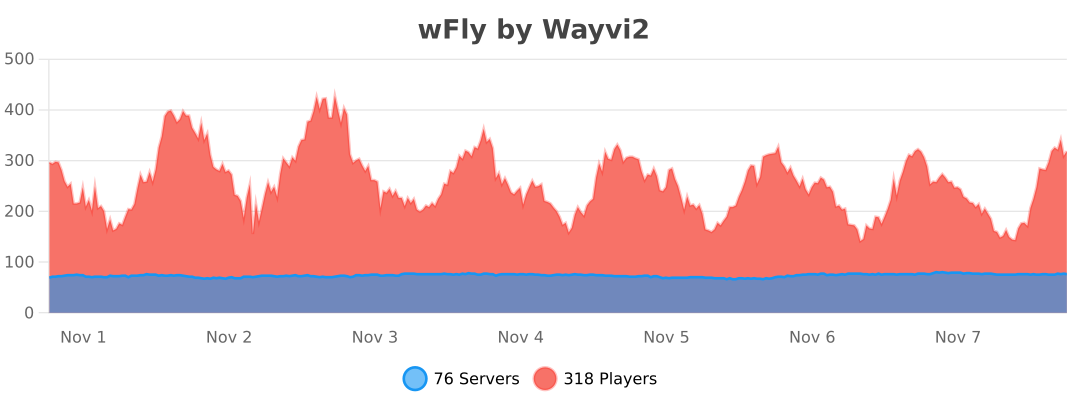
TempFly – wFly


WETS (WorldEdit Tick Spreader)
## WorldEdit Tick Spreader
Spread WorldEdit operations across multiple ticks.
That’s all.
Semi-configurable, single command `/wets` (`/worldedit-tick-spreader`), one permission (`wets`), two possible arguments:
* `/wets (sorted | not-sorted)` – whether blocks will be placed in a sorted arrangement or not. Sorted is default.
* `/wets ` – Changes the amount of blocks that will be placed per tick.
Negative numbers result in a lot of blocks per tick (9223372036854775807). Default is 1.
Sorted placing and block count per tick, affected by commands, are per-player.
WorldEditSelectionVisualizer
# WorldEditSelectionVisualizer
## Overview
WorldEditSelectionVisualizer (WESV) is essentially the famous WorldEditCUI mod in the form of a bukkit plugin, which means that players **don’t need to install anything on their client**.
## Features
* Spawns particles around WorldEdit selections so players can see them
* No client mod required
* Supports cuboid, sphere, ellipsoid, cylinder, polygon and convex selections
* Can display the current clipboard (use `/wesv toggle clipboard` to enable)
* Use `/wesv toggle` to toggle the visualizer
* Option to only show the selection when holding the selection item
* Configurable particle effect and view distance
* Prevent players from spawning too many particles when selecting huge regions
* Highly customizable for the performance of your server
* Supports both WorldEdit and FastAsyncWorldEdit
* Compatible with all Minecraft versions starting with 1.7.10
* PlaceholderAPI support (you can use the placeholders `%wesv_toggled_selection%`, `%wesv_toggled_clipboard%`, `%wesv_volume_selection%` and `%wesv_volume_clipboard%`)
* Support for RGB color codes in messages on Minecraft 1.16 and higher, with the `&#rrggbb` format
* Folia support for better performance
## Screenshots
| Cuboid selection | Cylinder selection | Convex selection |
|——————————————————|——————————————————–|——————————————————|
|  |  |  |
More screenshots
## Usage
### Commands
* `/wesv toggle` and `/wesv toggle clipboard`: toggle the selection/clipboard visualization
* `/wesv lock`: lock/unlock the origin of the clipboard visualization to your current location
* `/wesv lock tp`: teleport to the lock location (when clipboard visualization lock is enabled)
* `/wesv reload`: reload the configuration
### Permissions
* `wesv.toggle`: use the toggle command
* `wesv.use`: allows the visualizer to be turned on
* `wesv.reload`: allows the configuration of this plugin to be reloaded from the config.yml file
### Configuration
This plugin can be very resource expensive, try adjusting the configuration if you experience lag.
Configuration File
“`yaml
# WorldEditSelectionVisualizer configuration
# When enabled, if a new update is available it will display a message in the console on enable
check-updates: true
# You can edit the plugin messages here
messages:
no-permissions: “&cYou don’t have the permission to use this command.”
config-reloaded: “&aThe config was reloaded”
selection-too-large: “&6The visualizer only works with selections up to a size of %blocks% blocks.”
visualizer-enabled: “&6Your visualizer has been &eenabled.”
visualizer-disabled: “&6Your visualizer has been &cdisabled.”
visualizer-clipboard-enabled: “&6Your clipboard visualizer has been &eenabled&6.”
visualizer-clipboard-disabled: “&6Your clipboard visualizer has been &cdisabled&6.”
# When enabled, if a player disables the selection visualization and leaves the server, when he will
# come back, the selection visualization will be still disabled until he activates it again with /wesv toggle.
save-toggle: true
# Delay in ticks when the WorldEdit selection and clipboard are updated.
# This doesn’t affect particles spawning and players performances.
# The server impact is medium
selection-update-interval: 20
# When enabled, the particles are displayed only when holding the WorldEdit selection wand item (by default a wooden axe)
# You can change the WorldEdit wand item in the WorldEdit configuration
need-we-wand: false
# When enabled, top and bottom particles will be displayed for cuboid selections
cuboid-top-bottom: false
# Settings for visualization
# ‘selection’: The WorldEdit current selection
# ‘clipboard’: The WorldEdit clipboard (when you use //copy or //schem load )
# ‘primary’: The primary selection points (the region borders)
# ‘secondary’: The secondary selection points
# ‘fade-delay’: The number of seconds before the particles disappears. You can set it to 0 to remove the fade delay
# ‘max-selection-size’ : The maximum size of a selection to be display. A big value (> 1000000) can cause important lags
# ‘points-distance’: The distance between each particle. The higher this number is, fewer particles will be spawn
# ‘lines-gap’ (secondary selection only): The distance between each particles lines on cuboid and polygon. The higher this number is, fewer particles will be spawn. Set it to 0 to remove cuboid lines
# ‘update-interval’: The delay in ticks between particles spawn. This impact the players performances
# ‘view-distance’: The maximum distance in which players can see the particles. On 1.7.10 the particle distance is limited to 16 (Minecraft limitation)
# ‘particles’: The particles type and data. The data can be a color for redstone like in the form ‘r,g,b’ or a Material for block crack/item crack
# The particle types are available on https://hub.spigotmc.org/javadocs/spigot/org/bukkit/Particle.html
visualization:
selection:
fade-delay: 0
max-selection-size: 50000
primary:
points-distance: 1.0
update-interval: 12
view-distance: 64
particles:
type: “FLAME”
data: “”
secondary:
points-distance: 3.0
lines-gap: 5.0
update-interval: 18
view-distance: 32
particles:
type: “REDSTONE”
data: “RED”
clipboard:
fade-delay: 0
max-selection-size: 50000
primary:
points-distance: 1.0
update-interval: 12
view-distance: 64
particles:
type: “FLAME”
data: “”
secondary:
points-distance: 3.0
lines-gap: 5.0
update-interval: 18
view-distance: 32
particles:
type: “REDSTONE”
data: “BLUE”
“`
### Video
## Bugs & suggestions
Please don’t post bugs or suggestions in the review section, but please open an issue on GitHub.
If you just have a question, you can ask it on my Discord server.
And if you like this plugin you can leave a review or star the GitHub project.
## Original Author
WorldEditSelectionVisualizer (WESV) has been originally created by rojet601. Since this user’s gone inactive since November 2015 and the plug-in contains some errors, ZathrusWriter decided to release an 1.8. forward-compatible version with those errors fixed.
WERM
# WERM – Web Engine for Realm Monetization

The official Minecraft plugin for WERM – the future of game monetization. Global wallets, instant delivery, and powerful analytics—all with the lowest fees in the industry.
Website •
Dashboard •
Discord
—
## 🆕 What’s New in v1.0.4
### ⚡ Performance & Reliability Release
This release adds batch delivery confirmation and async file I/O to improve performance and reliability during high-load scenarios.
| Feature | Description |
|———|————-|
| 📦 **Batch Delivery Confirmation** | Up to 10 confirmations per API call for 90% reduction in network overhead |
| 🔄 **Async File I/O** | Non-blocking queue persistence with debounced writes prevents main thread blocking |
| 🛑 **Graceful Shutdown** | Proper executor termination ensures no data loss during server stops |
| ⚡ **Faster Bulk Deliveries** | Improved performance when multiple items need to be delivered at once |
**Technical Details:**
– Batch size: 10 confirmations per API call
– I/O thread: Daemon thread named `WERM-ConfirmationQueue-IO`
– Shutdown timeout: 5 seconds for graceful termination
– Debounced writes: 2-second delay to coalesce multiple queue changes
### Previous Releases:
v1.0.3 – Performance Optimization
| Feature | Description |
|———|————-|
| 🔗 **HTTP Connection Pooling** | New OkHttp-based connection manager with 5-connection pool and 5-minute keep-alive |
| 📉 **Smart Polling** | Dynamic polling with exponential backoff—reduces API calls by up to 75% during idle periods |
| ⚡ **Faster Response Times** | Keep-alive connections eliminate connection setup overhead |
| 🛠️ **Improved Resource Usage** | Connection reuse reduces memory footprint and CPU usage |
**Technical Details:**
– Connection pool: 5 max idle connections, 5-minute keep-alive
– Timeouts: 10s connect, 30s read, 10s write
– Backoff: Up to 4x base interval after consecutive empty responses
– Instant reset when player joins or delivery found
v1.0.2 – bStats Update
– **🔧 bStats Update** – Updated bStats plugin ID for proper metrics tracking
– All security hardening from v1.0.1 remains in place
v1.0.1 – Security Features
| Feature | Description |
|———|————-|
| 🛡️ **Command Validation** | Blocks dangerous commands (op, deop, ban, stop) from being executed via deliveries |
| 🔐 **TLS 1.2+ Enforcement** | All API connections now require modern TLS protocols |
| 📝 **Debug Redaction** | Sensitive data (tokens, UUIDs) automatically redacted in debug logs |
| 💾 **Confirmation Queue** | Pending delivery confirmations survive server restarts |
| ✅ **Input Sanitization** | Player names and UUIDs sanitized before command execution |
| 🌐 **Endpoint Validation** | HTTPS and domain whitelist enforcement for API endpoints |
| ⏱️ **Rate Limiting** | Verification attempts limited to prevent brute-force abuse |
| 🔄 **Auto-Discovery** | Project ID now auto-discovered from API (no hardcoding) |
—
## 🌐 What is WERM?

WERM is a modern, all-in-one monetization platform built specifically for Minecraft servers. Think of it as a **Tebex alternative**—but with better features, lower fees, and a focus on the modern server owner experience.
### Platform Features
| Feature | Description |
|———|————-|
| 🔍 **Server Discovery** | Get your server listed on our public directory where players can find, vote for, and join servers |
| 💰 **Global Wallet System** | Players have one wallet across all WERM-powered servers (1 credit = 1 USD cent) |
| 🛒 **Built-in Storefront** | Beautiful, customizable store pages with categories, sales, gifting, and wishlists |
| ⚡ **Instant Delivery** | Hybrid delivery system using webhooks + polling ensures items are delivered fast |
| 🗳️ **Voting System** | Integrated voting with Votifier/NuVotifier support to boost your server’s ranking |
| 💬 **Discord Integration** | Display your Discord member count on your server listing |
| 🌍 **Multi-Currency Support** | Accept payments globally with automatic currency conversion |
| 💸 **Lowest Fees** | Starting at just 3% platform fee (vs 5%+ competitors) |
### Why Choose WERM?
– **Free Tier Available** – Start monetizing with no monthly fees (up to $500/month revenue)
– **Modern Dashboard** – Clean, intuitive interface for managing your server and products
– **Real-time Analytics** – Track sales, player engagement, and revenue trends
– **Cross-Server Economy** – Players can use their wallet credits on any WERM server
– **Open & Transparent** – No hidden fees, no surprise charges
—
## ✨ Plugin Features

### 🔗 Account Verification
Players can securely link their Minecraft account to WERM using a simple 6-character verification code. Generate a code on the website, enter it in-game, and you’re connected!
### 📦 Automatic Delivery System
Automatically delivers purchased products to players using configurable console commands. Supports both immediate delivery and requiring players to be online.
### 💓 Server Heartbeat
Keeps your server status updated on the WERM dashboard with real-time player counts and server version information.
### 🎮 Player Join Detection
Automatically checks for and delivers pending purchases when players join the server.
### ⚡ Async Processing
All API calls are processed asynchronously to ensure zero impact on your server’s performance.
### 🛡️ Secure Authentication
Uses secure plugin token authentication to ensure only your server can manage deliveries.
### 📝 Fully Customizable
All messages are fully configurable with Minecraft color code support (`&` codes).
—
## 📜 Commands

| Command | Description | Permission |
|———|————-|————|
| `/werm verify ` | Link your Minecraft account with WERM | `werm.verify` (default: true) |
| `/werm help` | Display help information | None |
| `/werm status` | View plugin connection status | `werm.admin` (default: op) |
| `/werm reload` | Reload plugin configuration | `werm.admin` (default: op) |
**Aliases:** `/w`
---
## 🎯 Permissions
| Permission | Description | Default |
|------------|-------------|---------|
| `werm.verify` | Allows players to verify their Minecraft account | `true` |
| `werm.admin` | Admin commands (reload, status) | `op` |
---
## ⚙️ Configuration
```yaml
# WERM Plugin Configuration
# Generate your plugin token at https://wermpay.com/dashboard/servers
plugin-token: "werm_XXXXXXXX_XXXXXXXXXXXXXXXXXXXXXXXXXXXXXXXX"
# Enable debug logging for troubleshooting
debug: false
# Heartbeat Settings
heartbeat:
interval: 60 # Send status every X seconds
send-player-count: true # Include player count in heartbeat
# Delivery Settings
delivery:
interval: 15 # Check for deliveries every X seconds
# Customizable messages (supports & color codes)
messages:
prefix: "&8[&6WERM&8] &r"
verify-success: "&aYour Minecraft account has been linked successfully!"
verify-failed: "&cVerification failed: &7%reason%"
delivery-received: "&aYou received: &e{product} &ax{quantity}"
# ... and more customizable messages
```
---
## 📦 Delivery Placeholders
When configuring your product commands in the WERM dashboard, you can use these placeholders:
| Placeholder | Description |
|-------------|-------------|
| `{player}` or `{player_name}` | Player's username |
| `{uuid}` or `{player_uuid}` | Player's UUID |
| `{quantity}` | Quantity purchased |
| `{product_id}` | Product ID |
| `{product_name}` | Product name |
| `{order_id}` | Order ID |
| `{delivery_id}` | Delivery ID |
**Example Commands:**
```
give {player} diamond 64
lp user {player} parent add vip
eco give {player} 1000
```
---
## 🚀 Installation

1. **Download** the WERM plugin JAR file
2. **Place** it in your server's `plugins` folder
3. **Start/restart** your server
4. **Generate** a plugin token in your WERM Dashboard
5. **Edit** `plugins/WERM/config.yml` and add your plugin token
6. **Run** `/werm reload` or restart your server
7. ✅ Your server will now appear as **online** in the WERM dashboard!
---
## 📋 Requirements
- **Server Software:** Spigot, Paper, Purpur, or any Spigot-based fork
- **Minecraft Version:** 1.13+
- **Java Version:** 8+
- **WERM Account:** Create one here
---
## 🔧 How It Works
1. **Setup:** Configure the plugin with your unique plugin token from the WERM dashboard
2. **Heartbeat:** The plugin sends periodic heartbeats to keep your server status updated
3. **Purchases:** When a customer makes a purchase on your WERM store, a delivery is queued
4. **Delivery:** The plugin polls for pending deliveries and executes the configured commands
5. **Confirmation:** Successful deliveries are confirmed and marked as completed
---
## 💬 Support
Need help? Join our Discord Server for support and community discussions.
---
## 📄 License
This plugin is provided by WERM for use with the WERM monetization platform.
---
WERM - The Future of Game Monetization
© 2026 WERM | Made with ❤️ for the Minecraft community