Vunyx’s Redstone Pack
If you want to publish a project containing my work, please mention my username “Vunyx” somewhere. Also, a link to my project would be much appreciated.
# Description
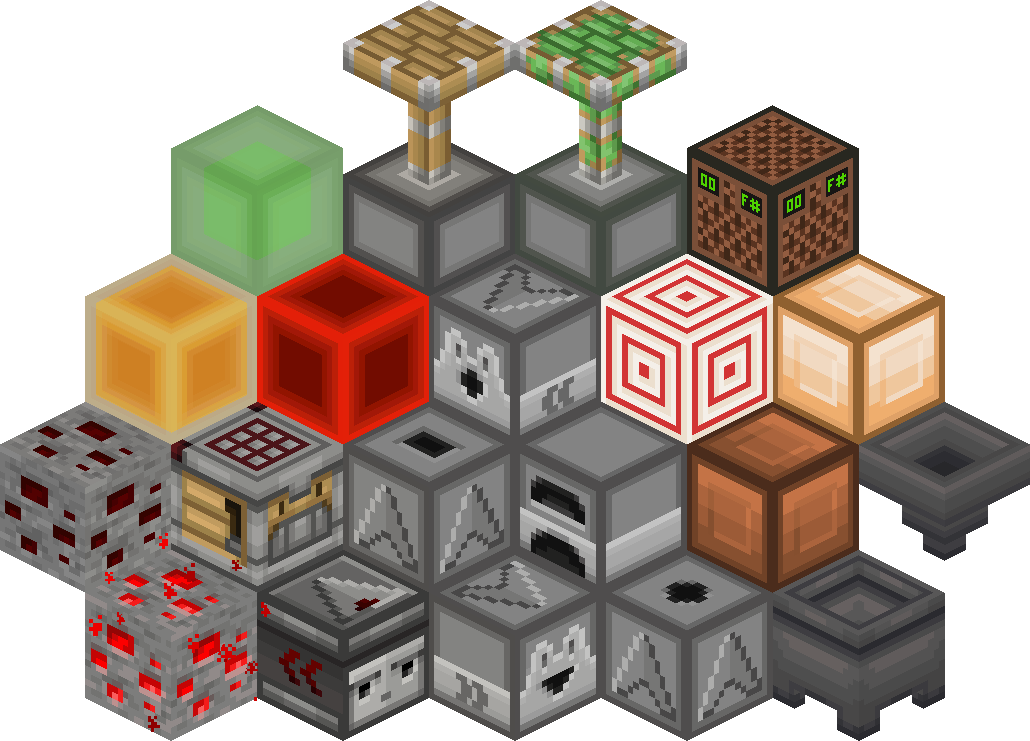
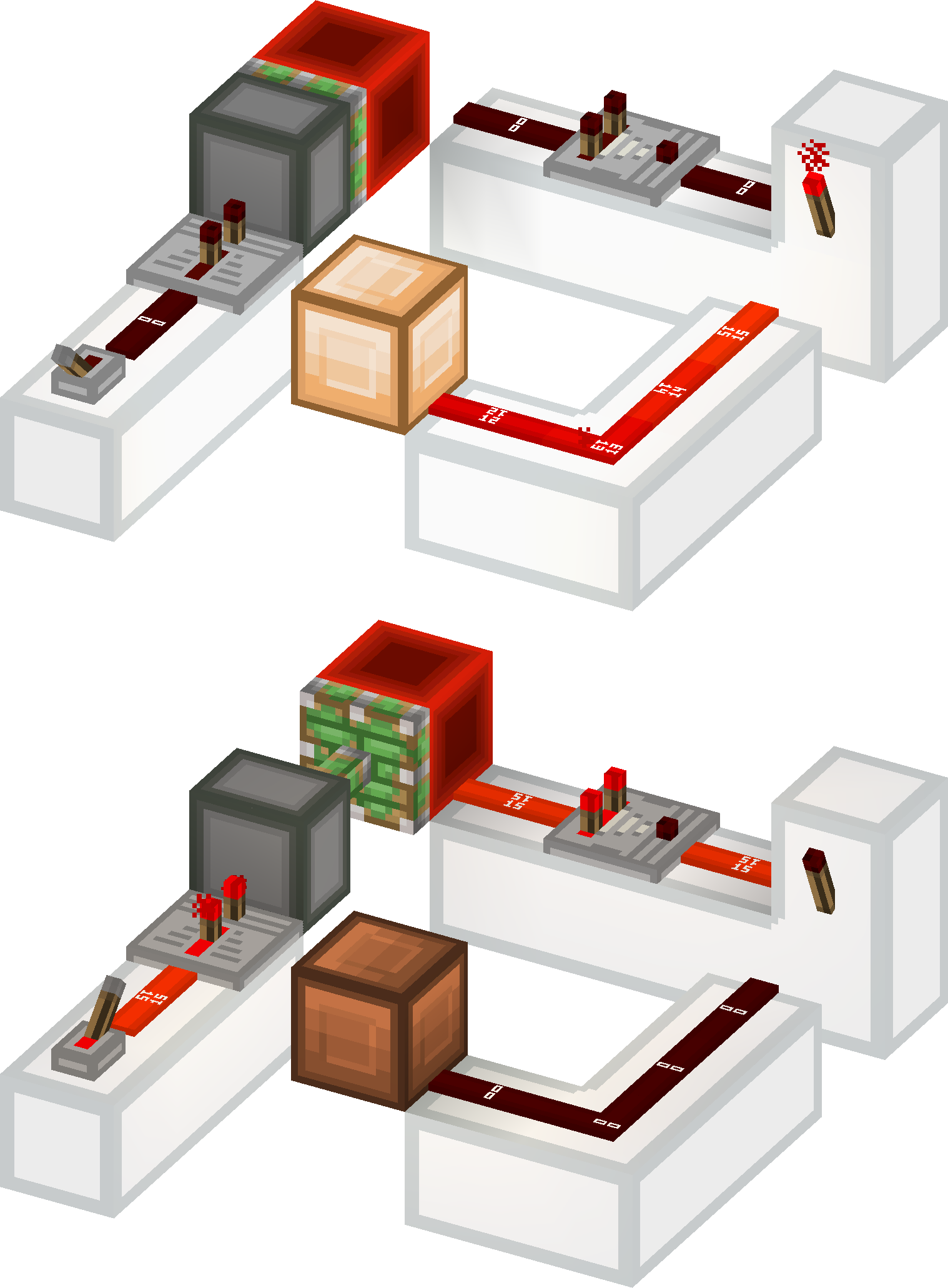
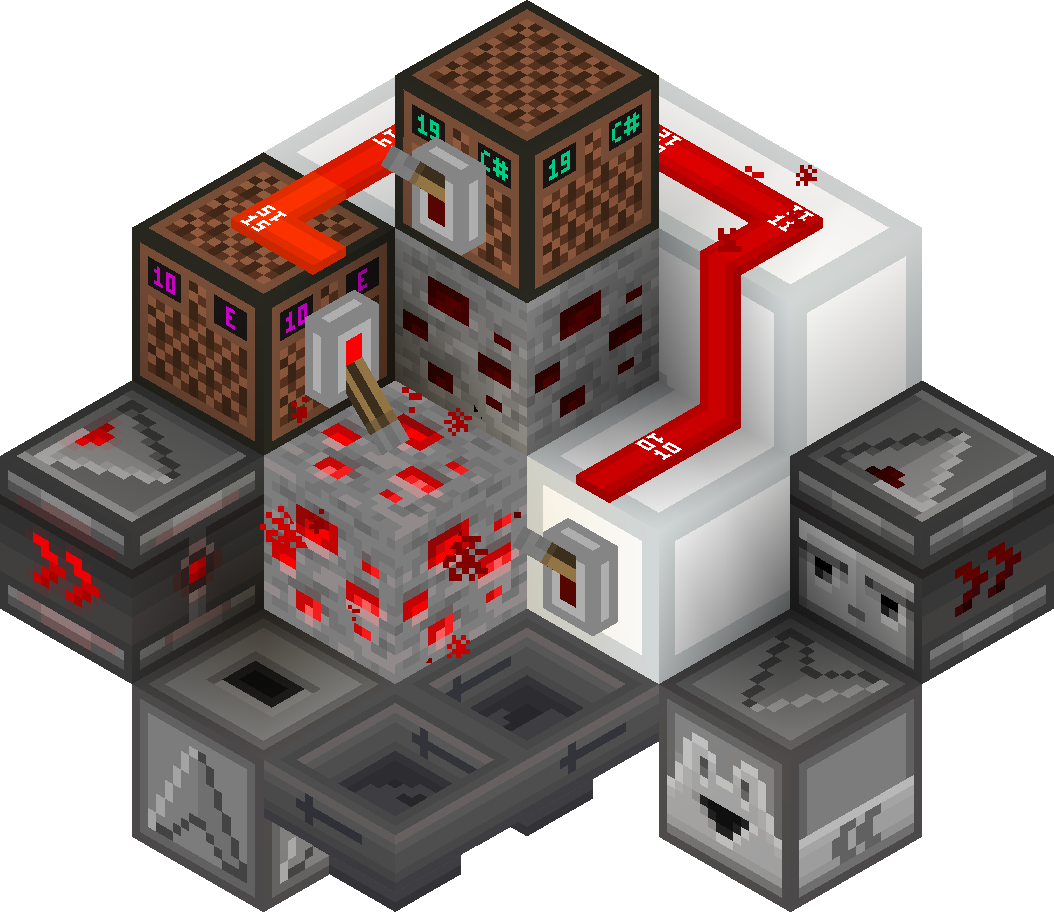
This resource pack gives a **clean look** to all redstone components, while keeping a **vanilla feel**. It brings features from Vanilla Tweaks, such as **directional indicators** for blocks like droppers or observers, and **visual block states** for blocks like note blocks.
List of current features:
– **smooth clean look** for all redstone related blocks (including rails and minecarts too)
– **directional indicators** for dispensers, droppers, hoppers and observers
– **block states indicators** for redstone dust, redstone ore, levers and note blocks
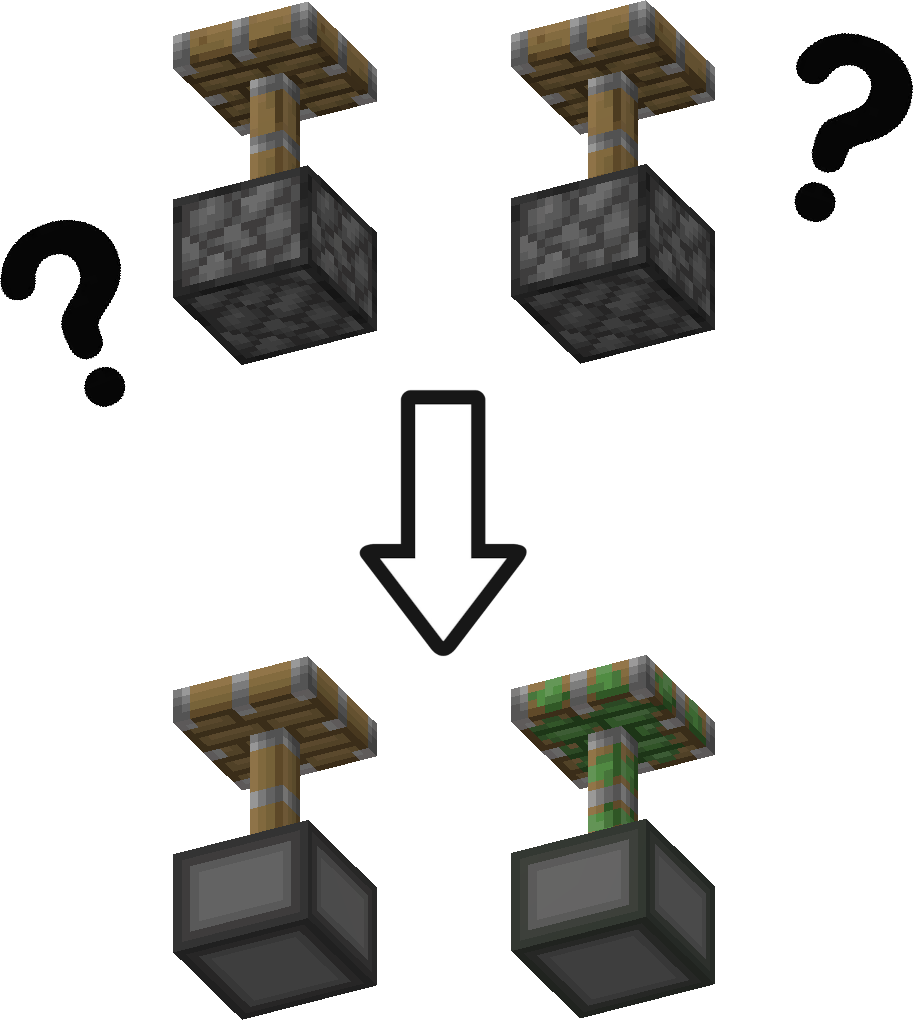
– removes ambiguity between normal and sticky pistons
– **connected outline** for all **wool and glass** blocks (you need Continuity or Optifine for the outlines to connect)
– **3D item models** for all types of torches, repeaters, comparators, levers, tripwire hooks, hoppers and cauldrons
Plans for the future:
– add indicators for cauldrons, composters, beehives and bee nests
– give a clean look to chests and barrels
– versions for 1.13 and older
– reduce file size
### Here is a quick overview of the pack:
### This is how your redstone circuits will look like:
### Block states and direction indicators:
### No ambiguity between normal and sticky pistons:
### 3D item models:

# How to install
After downloading the resource pack, go to **options -> resource packs** and click the **Open Pack Folder** button, or open `%appdata%.minecraftresourcepacks` directly. Put the resource pack in this folder. It should then show up under **Available**. Click the arrow to switch it to the **Selected** tab and click **Done**. That’s it, the pack should now be installed properly.
vSLS
# vSLS
**vSLS** is a Velocity plugin that integrates your network with the **SLS (Server Launch System)**.
It allows you to dynamically create and manage server instances directly in game using simple commands. vSLS automatically registers new servers with your Velocity proxy, routes players, and provides a lightweight matchmaking and queue system. Server instances are created and scaled based on demand, ensuring efficient resource usage and fast response times.
For installation and configuration instructions visit: vSLS Docs
Discord: 

—
## Requirements
* A properly configured SLS environment
* Velocity proxy
## Demo
A live demo **Minecraft** network is available if you want to try vSLS in action.
* **Server address:** `demo.protoxon.com`
This demo showcases how servers can be dynamically created and managed for minigames.
## About SLS
SLS is an open-source system for automating the deployment and scaling of containerized game servers. It is designed for networks that require fast, consistent, and reproducible server instances.
For full documentation and setup instructions, visit: SLS Docs
VServerInfo
# VServerInfo  
Get the information of each server in your Velocity network

## Requirements
– Velocity 3.3.0
– Java 17+
## Commands
#### Permission `vserverinfo.command`
### /vserverinfo
This command will give you information about all the servers you have in your Velocity network.
### /vserverinfo
Get the information about a single server
## How does this plugin differ from the Velocity(/glist) integrated command?
This plugin allows you to check the online/offline status of each of your servers, as well as to obtain additional information such as their MOTD and allows a complete customization of the plugin formats.
All messages are fully customizable from the configuration (config.conf)

## Tutorial
**Spanish**
VRealmsConnector
# VRealms Connector
This is a simple server connector I made for Velocity, because I couldn’t find one that suited my needs. Currently, you can only register and unregister Servers through a Command, later it’s also planned to do so through a Rest API.
For now, this is how to use the Commands:
– `/addserver
[port]`
– `/removeserver `
The port uses 25565 by default
## THIS PROJECTS SOURCE CODE WILL NOT BE MADE PUBLIC (FOR NOW)
If you need the Source, decompile it, or just make it yourself
VPlayerLimit
# VPlayerLimit

Limit how many players can join your server.
This is not a plugin to set the maximum number of players in motd, it simply limits the number of connected players.

## Installation
– Download VPlayerLimit from Modrinth
– Drag and drop on your plugins folder
– Start the server
– Configure the player limit and the expulsion message
VPingHost
# VPingHost


A simple Velocity plugin that allows you to get information about other servers instantly.
This plugin was born as a test from this Velocity pull request,
but I thought to make it a public test plugin to check the proxy server or backend servers connectivity or MOTD response.

## Installation
– Download VPingHost from Modrinth
– Drag and drop on your plugins folder
– Start the server
## Features
– Send a ping to any Minecraft server and get its corresponding motd
– Specifies the version to ping with
– Specifies the version with which to ping the server
## Command
`/pinghost [host] (protocol version)`
Permission: `pinghost.command`
Example: `/pinghost my.server.net 765`
If you need to specify a specific port, you can add it with the syntax `host:port`.
### Differences between this plugin and VServerInfo
VServerInfo allows you to display information about your servers that you have in your own network.
VPingHost allows you to display information about the motd of any available server.
VPacketLogger
# VPacketLogger




Simple Velocity plugin to log Packet executions

## Installation
– Install VPacketEvents
– Download VPacketLogger from Modrinth
– Drag and drop on your plugins folder
– Start the server
## How it works
VPacketLogger simply logs every packet sent or received between the proxy and the player.
It can only intercept packets that are handled by Velocity, whether they are native or logged by other plugins.
In the configuration you can set which placeholders to use, MiniMessage format is supported.
VPacketEvents
# VPacketEvents



Manage and register packets through Velocity’s native events

“`java
class PacketListener {
@Subscribe
public void onPacketReceive(PacketReceiveEvent event) {
final MinecraftPacket packet = event.getPacket();
if (packet instanceof KeyedPlayerCommand commandPacket) {
event.setResult(GenericResult.denied());
}
}
@Subscribe
public void onPacketSend(PacketSendEvent event) {
// some stuff
}
public void registerPacket() {
// UpdateTeamsPacket registration
PacketRegistration.of(UpdateTeamsPacket.class)
.direction(Direction.CLIENTBOUND)
.packetSupplier(UpdateTeamsPacket::new)
.stateRegistry(StateRegistry.PLAY)
.mapping(0x47, MINECRAFT_1_13, false)
.mapping(0x4B, MINECRAFT_1_14, false)
.mapping(0x4C, MINECRAFT_1_15, false)
.mapping(0x55, MINECRAFT_1_17, false)
.mapping(0x58, MINECRAFT_1_19_1, false)
.mapping(0x56, MINECRAFT_1_19_3, false)
.mapping(0x5A, MINECRAFT_1_19_4, false)
.register();
}
}
“`
## Installation
– Download VPacketEvents from Modrinth
– Drag and drop on your plugins folder
– Start the server
## Dev Setup
### Gradle
“`kotlin
repositories {
mavenCentral()
}
dependencies {
compileOnly(“io.github.4drian3d:vpacketevents-api:1.1.0”)
}
“`
## Javadocs
https://javadoc.io/doc/io.github.4drian3d/vpacketevents-api
unofficial translation of voxy
unofficial translation of voxy .You can share and save it to other websites.更多语言[准确性不知道]More languages [Accuracy unknown]_(:з)∠)_
译者:F光荣进退有度![More languages [Accuracy unknown]](https://cdn.modrinth.com/data/cached_images/b0b09b24ca82a7d3b6f7519328dec90b3ede2426.png)
– af_za.json-Afrikaans
– ar_sa.json-اللغة العربية
– ast_es.json-Asturianu
– az_az.json-Azərbaycanca
– ba_ru.json-Башҡортса
– bar.json-Boarisch
– be_by.json-Беларуская
– bg_bg.json-Български
– br_fr.json-Brezhoneg
– brb.json-Braobans
– bs_ba.json-Bosanski
– ca_es.json-Català
– cs_cz.json-Čeština
– cy_gb.json-Cymraeg
– da_dk.json-Dansk
– de_at.json-Österreichisches Deitsch
– de_ch.json-Schwiizerdutsch
– de_de.json-Deutsch
– el_gr.json-Ελληνικά
– en_au.json-English (Australia)
– en_ca.json-English (Canada)
– en_gb.json-English (United Kingdom)
– en_nz.json-English (New Zealand)
– en_pt.json-Pirate Speak
– en_ud.json-ɥsᴉꞁᵷuƎ (uʍoᗡ ǝpᴉsd∩)
– en_us.json-English (US)
– enp.json-Anglish
– enws.json-Shakespearean English
– eo_uy.json-Esperanto
– es_ar.json-Español (Argentina)
– es_cl.json-Español (Chile)
– es_ec.json-Español (Ecuador)
– es_es.json-Español (España)
– es_mx.json-Español (México)
– es_uy.json-Español (Uruguay)
– es_ve.json-Español (Venezuela)
– esan.json-Andalûh
– et_ee.json-Eesti
– eu_es.json-Euskara
– fa_ir.json-فارسی
– fi_fi.json-Suomi
– fil_ph.json-Filipino
– fo_fo.json-Føroyskt
– fr_ca.json-Français québécois
– fr_fr.json-Français
– fra_de.json-Frängisch
– fur_it.json-Furlan
– fy_nl.json-Frysk
– ga_ie.json-Gaeilge
– gd_gb.json-Gàidhlig
– gl_es.json-Galego
– haw_us.json-ʻŌlelo Hawaiʻi
– he_il.json-עברית
– hi_in.json-हिन्दी
– hr_hr.json-Hrvatski
– hu_hu.json-Magyar
– hy_am.json-Հայերեն
– id_id.json-Bahasa Indonesia
– ig_ng.json-Igbo
– io_en.json-Ido
– is_is.json-Íslenska
– isv.json-Medžuslovjansky
– it_it.json-Italiano
– ja_jp.json-日本語
– jbo_en.json-la .lojban.
– ka_ge.json-ქართული
– kk_kz.json-Қазақша
– kn_in.json-ಕನ್ನಡ
– ko_kr.json-한국어
– ksh.json-Kölsch/Ripoarisch
– kw_gb.json-Kernewek
– la_la.json-Latina
– lb_lu.json-Lëtzebuergesch
– li_li.json-Limburgs
– lmo.json-Lombard
– lo_la.json-ລາວ(ປະເທດລາວ)
– lol_us.json-LOLCAT
– lt_lt.json-Lietuvių
– lv_lv.json-Latviešu
– lzh.json-文言(華夏)
– mk_mk.json-Македонски
– mn_mn.json-Монгол
– ms_my.json-Bahasa Melayu
– mt_mt.json-Malti
– nah.json-Mēxikatlahtōlli
– nds_de.json-Platdüütsk
– nl_be.json-Vlaams
– nl_nl.json-Nederlands
– nn_no.json-Norsk nynorsk
– no_no.json-Norsk Bokmål
– oc_fr.json-Occitan
– ovd.json-Övdalsk
– pl_pl.json-Polski
– pt_br.json-Português (Brasil)
– pt_pt.json-Português (Portugal)
– qya_aa.json-Quenya
– ro_ro.json-Română
– rpr.json-Дореформенный русскій
– ru_ru.json-Русский
– ry_ua.json-руснацькый
– sah_sah.json-Сахалыы(Cаха Сирэ)
– se_no.json-Davvisámegiella
– sk_sk.json-Slovenčina
– sl_si.json-Slovenščina
– so_so.json-Af-Soomaali
– sq_al.json-Shqip
– sr_cs.json-Srpski
– sr_sp.json-Српски
– sv_se.json-Svenska
– sxu.json-Säggs’sch
– szl.json-Ślōnskŏ
– ta_in.json-தமிழ்
– th_th.json-ภาษาไทย
– tl_ph.json-Tagalog
– tlh_aa.json-tlhIngan Hol
– tok.json-toki pona
– tr_tr.json-Türkçe
– tt_ru.json-Татарча
– uk_ua.json-Українська
– val_es.json-Català (Valencià)
– vec_it.json-Vèneto
– vi_vn.json-Tiếng Việt
– yi_de.json-ייִדיש
– yo_ng.json-Yorùbá
– zh_cn.json-简体中文(中国大陆)
– zh_hk.json-繁體中文(香港特別行政區)
– zh_tw.json-繁體中文(台灣)
– zlm_arab.json-بهاس ملايو
–
Voxel Trains IR

## About
Voxel Trains is one of the largest Immersive Railroading content packs, it adds about 80 trains from many different countries, including Switzerland, Germany, the Netherlands, Portugal, the US, and more.
You can track our current progress both on our Discord and on our Trello.
## Important
– If none of our trains are appearing in game, make sure you’ve activated the pack in the resource packs menu.
– If your train items are broken, try turning off OptiFine’s FastRender option.
– If you want to drive trains without fueling them, you can enter IR’s config in-game by pressing `numpad /` -> balance -> FuelRequired = False
– If you need help with anything else feel free to ask on our discord in the #support channel
## Content
Rolling Stock
Deutsche Bahn
**Locomotives**
– BR 143
– BR 146.2 TRAXX 2
– BR 185.2 TRAXX 2
– BR 218 V160
– V320
– Köf II
**Multiple Units**
– BR 407 Velaro D ICE 3 MS
– BR 481
– VT 98
**Passenger Cars**
– n-Wagen Bnrbdzf 480 and Bnrz 451
– IC1
– Dosto 1 DABbuzfa 778 and Dbuza 747
Union Pacific
**Locomotives**
– ALCO S-4
– 3rd Gen GTEL Big Blow
– 4884-1 Big Boy
– FEF-1
**Passenger Cars**
– UPP Passenger Car
**Auxiliary Tenders**
– UPP #809 ‘Jim Adams’
– UPP #814 ‘Joe Jordan’
Comboios de Portugal
**Locomotives**
– 0180
– 1400
– 1800
– 2600 Nez-Cassé
– 5600 Eurosprinter
**Passenger Cars**
– ACDt 481
– Schindler
– Sorefame Regional
SBB CFF FFS
**Locomotives**
– Re 420
– Re 421
– Re 460 Lok 2000
– Re 482 TRAXX 2
– BR 193 Vectron
– Am 843
– Ee 922
– Eem 923
**Multiple Units**
– Re 450 and DPZplus
– RABe 501 Giruno
– RABe 511 KISS
– RABe 514 DTZ
– Transrapid (Fictional)
**Passenger Cars**
– HVZ
– EW-IV
– EC
– IC2000/IC 2020
Nederlandse Spoorwegen
**Locomotives**
– E 186 TRAXX 2E
– NS 1700
– NS 700 G 400 B
– NS 600
**Multiple Units**
– SLT
– VIRMm
– ICMm
**Passenger Cars**
– ICR
Société Nationale des Chemins de Fer Français
**Locomotives**
– BB 8500
**Multiple Units**
– X2200
Other
**Locomotives**
– Amtrak ACS-64 Cities Sprinter
– Railpool TRAXX 2E
– Hectorrail TRAXX 2
– MÁV TRAXX 2
– H.F. Wiebe V320
– BLS Re 465
– BLS Am 843
– Sersa Am 843
– DSB Traktor 57
**Multiple Units**
– CD 810
**Trams and Light Rail**
– VBZ Tram 2000 (All variants)
– VBZ Be 5/6 Cobra
– VBG Be 5/6 Cobra
– Forchbahn Be 4/6
– DVB NGT6DD
– Rheinbahn GT8S
– Rheinbahn B80D
Freight
**European**
– DB Eaos-x 051
– DB Falns 121
– DB Samms 710
– DB Sggrs 716
– CP Ekklo 40s
– CP Carga Sgnss 455
– SBB Cargo Hbbillnss
– SBB Cargo Tagnpps
– Schweizer Zucker Tagnpps 061
– GEFCO Laeks 427
– Franz Jäger Berlin Safe Wagon
**American**
– BNSF Rotary Gondola
– TTX 53′ Intermodal Well Car
There are also a few buffer stops that are technically freight cars so you can place them on the tracks.
Tracks
There is an assortment of Tracks of different types and conditions. Some of them also exist as a meter gauge variant.