Voxel Trains IR

## About
Voxel Trains is one of the largest Immersive Railroading content packs, it adds about 80 trains from many different countries, including Switzerland, Germany, the Netherlands, Portugal, the US, and more.
You can track our current progress both on our Discord and on our Trello.
## Important
– If none of our trains are appearing in game, make sure you’ve activated the pack in the resource packs menu.
– If your train items are broken, try turning off OptiFine’s FastRender option.
– If you want to drive trains without fueling them, you can enter IR’s config in-game by pressing `numpad /` -> balance -> FuelRequired = False
– If you need help with anything else feel free to ask on our discord in the #support channel
## Content
Rolling Stock
Deutsche Bahn
**Locomotives**
– BR 143
– BR 146.2 TRAXX 2
– BR 185.2 TRAXX 2
– BR 218 V160
– V320
– Köf II
**Multiple Units**
– BR 407 Velaro D ICE 3 MS
– BR 481
– VT 98
**Passenger Cars**
– n-Wagen Bnrbdzf 480 and Bnrz 451
– IC1
– Dosto 1 DABbuzfa 778 and Dbuza 747
Union Pacific
**Locomotives**
– ALCO S-4
– 3rd Gen GTEL Big Blow
– 4884-1 Big Boy
– FEF-1
**Passenger Cars**
– UPP Passenger Car
**Auxiliary Tenders**
– UPP #809 ‘Jim Adams’
– UPP #814 ‘Joe Jordan’
Comboios de Portugal
**Locomotives**
– 0180
– 1400
– 1800
– 2600 Nez-Cassé
– 5600 Eurosprinter
**Passenger Cars**
– ACDt 481
– Schindler
– Sorefame Regional
SBB CFF FFS
**Locomotives**
– Re 420
– Re 421
– Re 460 Lok 2000
– Re 482 TRAXX 2
– BR 193 Vectron
– Am 843
– Ee 922
– Eem 923
**Multiple Units**
– Re 450 and DPZplus
– RABe 501 Giruno
– RABe 511 KISS
– RABe 514 DTZ
– Transrapid (Fictional)
**Passenger Cars**
– HVZ
– EW-IV
– EC
– IC2000/IC 2020
Nederlandse Spoorwegen
**Locomotives**
– E 186 TRAXX 2E
– NS 1700
– NS 700 G 400 B
– NS 600
**Multiple Units**
– SLT
– VIRMm
– ICMm
**Passenger Cars**
– ICR
Société Nationale des Chemins de Fer Français
**Locomotives**
– BB 8500
**Multiple Units**
– X2200
Other
**Locomotives**
– Amtrak ACS-64 Cities Sprinter
– Railpool TRAXX 2E
– Hectorrail TRAXX 2
– MÁV TRAXX 2
– H.F. Wiebe V320
– BLS Re 465
– BLS Am 843
– Sersa Am 843
– DSB Traktor 57
**Multiple Units**
– CD 810
**Trams and Light Rail**
– VBZ Tram 2000 (All variants)
– VBZ Be 5/6 Cobra
– VBG Be 5/6 Cobra
– Forchbahn Be 4/6
– DVB NGT6DD
– Rheinbahn GT8S
– Rheinbahn B80D
Freight
**European**
– DB Eaos-x 051
– DB Falns 121
– DB Samms 710
– DB Sggrs 716
– CP Ekklo 40s
– CP Carga Sgnss 455
– SBB Cargo Hbbillnss
– SBB Cargo Tagnpps
– Schweizer Zucker Tagnpps 061
– GEFCO Laeks 427
– Franz Jäger Berlin Safe Wagon
**American**
– BNSF Rotary Gondola
– TTX 53′ Intermodal Well Car
There are also a few buffer stops that are technically freight cars so you can place them on the tracks.
Tracks
There is an assortment of Tracks of different types and conditions. Some of them also exist as a meter gauge variant.
Vouchers
Vouchers is a lightweight and highly customizable plugin for creating vouchers and consumable items!
**Require**: PlaceholderAPI
## Features
– Fully customizable
– Cooldown and usage limit *per permission*
– *Global* usage limit
– Customize your consumable items!
– Execute multiple rewards per item
– **Shift** to bulk open!
– PlaceholderAPI support
– RGB support for items and messages
– Offline player support
– JSON logging
## Wiki
Visit the wiki to see how to use the plugin


## Support
Join my Discord server for plugin support

Votiful
## A High-Performance Vote Listener for NuVotifier
This plugin is a lightweight, high-performance addon for NuVotifier, designed specifically to handle a massive number of concurrent votes without impacting your server’s performance.
## Why Choose This Plugin?
Does your server lag when many players vote at once? This plugin was built to solve that exact problem. After struggling with performance issues on our own server, we developed a robust system capable of processing votes with extreme efficiency. It’s battle-tested and stable under pressure, ensuring your server remains responsive even during peak voting hours. If you run a demanding server and need a reliable vote-processing solution, this is the plugin for you.
## Features
This plugin expands NuVotifier by adding two core, performance-focused features:
* **Vote Statistics:** Track essential voting data with provided placeholders. Easily display total votes, top voters, and more on scoreboards, in GUIs, or anywhere else PlaceholderAPI is supported.
* **Vote Event:** A dedicated system allows admins to easily and reliably hook into the voting process to create custom rewards, trigger server commands, or integrate with other systems.
## Video
VotePass
“`text
_ __ __ ____
| | / /___ / /____ / __ ____ ___________
| | / / __ / __/ _ / /_/ / __ `/ ___/ ___/
| |/ / /_/ / /_/ __/ ____/ /_/ (__ |__ )
|___/____/__/___/_/ __,_/____/____/
“`
README LANGUAGES [ [**English**](README.md) | [中文](README_CN.md) ]




# **VotePass**
> You have been **”Passed by Vote”** !
An efficient and fair verification plugin for whitelisted servers,
which supports players to submit whitelist requests by themselves
and be reviewed by all players who have passed.
> This plugin has been published on SpigotMC and Modrinth.

## Features & Advantages
– **Database Sync!** Based on database storage, data is safe and synchronized.
– **Easy to configure!** Simple and convenient configuration method, all content can be configured!
– **User-friendly GUI!** Full UI configuration, very easy for players to operate.
– **Player participation!** Players can participate in the management of the server, making them more involved.
## Screenshots


## Dependencies
– **[Recommend]** Placeholders based on PlaceholderAPI .
For development dependencies, please
see Dependencies .
## Extensions
> Have you developed an extension plugin related to this plugin?
> Welcome to submit your extension plugin in Issues
> and we will add it to the list!
### **VotePass-Mailer**
Support email notify for VotePass in game servers.
### **VotePass-QQNotify**
Support QQ notify for VotePass in lobby servers.
## Commands
The main command is `/VotePass` or `/vp`.
### Lobby side
“`text
# request
@ Player command
– Submit a whitelist request for a specific server.
– If the server has configured the rules, the rule agreement will be opened first;
– If not, the question-related GUI will be popped up directly for the player to fill in.
# accept
@ Player command
– Agree to the rules of the specified server and start filling in the answers to the questions.
# deny
@ Player command
– Refuse the rules of the specified server.
# reload
@ Admin command
– Reload the configuration file.
# toggle
@ Admin command
– Enable/Disable the vote application for the corresponding server.
“`
### Game side
“`text
# requests
@ Player command
– View all whitelist requests that have not been participated in.
# handle
@ Player command
– (Continue to) process the specified whitelist request.
# abstain
@ Player command
– Enable/Disable the auto abstain function.
# manage
@ Admin command
– Open the administrator operation GUI to directly operate the whitelist.
# reload
@ Admin command
– Reload the configuration file.
# sync
@ Admin command
– Synchronize the whitelist of the corresponding server to the database.
# migrate
@ Admin command
– Migrate the whitelist of the server from the “whitelist.json”.
# list
@ Admin command
– List all players in whitelist.
# add
@ Admin command
– Add a player to the whitelist.
– Player should joined the server(e.g lobby) at least once.
# remove
@ Admin command
– Remove a player from the whitelist.
“`
## Configurations
You can find configuration translations
at VotePass-Translations.
### Plugin Configuration (`config.yml`) .
Will be generated on the first boot up.
### Messages Configuration (`messages.yml`)
Will be generated on the first boot up.
### Server Application Configuration ([`servers/*.yml`](lobby/plugin/src/main/resources/servers/survival.yml))
All server’s application configuration are separate configuration files,
stored in the lobby’s `/servers/` for easy management.
You can edit the storage path of the server configuration file in the plugin configuration file.
## Permissions
“`text
# VotePass.admin
– The permissions for all admin commands and functions.
# VotePass.abstain
– The permission that allow user to toggle auto abstain.
“`
## Statistics


## Open Source Licence
The source code of this project adopts the GNU General Public License v3.0.
## Supports
This project is mainly developed by the Artfrom Games .

Many thanks to Jetbrains for kindly providing a license for us to work on this and other open-source projects.

VoteBan Players
# VoteBan
This plugin supports ANY ban or mute system since it uses custom commands.
Commands:
– /votemute [reason] – Start a vote mute for a player online.
– /voteban [reason] – Start a vote ban for a player online.
– /votekick [reason] – Start a vote kick for a player online.
– /addvote – Vote for a current ban/kick in progress.
Permissions:
– VOTEBAN.* – Access to all commands.
– VOTEBAN.VOTE – Use the /addvote command.
– VOTEBAN.STARTKICK – Use the /votekick command.
– VOTEBAN.STARTBAN – Use the /voteban command.
– VOTEBAN.STARTMUTE – Use the /votemute command.
– VOTEBAN.BYPASS – Not allow votes on players with this permission.
Images



VoodooDoll Wide
# VoodooDoll
A resource pack that changes the totem of undying into a plush toy version of the player’s model. No mods required!
## Comparision between versions
### Vanilla Custom:
**Pros:**
– all totems can be made unique (perfect for multiplayer)
– supports both the slim and wide player models
**Cons:**
– works only on Minecraft 1.21.5 and up
– a bit complicated to customize
### Vanilla Wide/Slim:
**Pros:**
– works with very old versions of Minecraft, from 1.11.0 and up
– easy to customize
**Cons:**
– every totem of undying will look the same (good enough on single-player)
– only supports either the slim or wide player models
You can use Vanilla Custom edition and either Vanilla Wide or Vanilla Slim edition alongside each other, if so desired.
## How to customize
By default, the resource pack only comes with a texture of Steve, so if you want to use your own skin, or someone else’s skin, you will have to follow these instructions.
1. Extract the content of the resource pack from the ZIP.
2. Go to `assets/minecraft/textures/item/totem_of_undying` folder (`assets/minecraft/textures/items/totem` for 1.11-1.12 version).
3. Copy your desired user’s skin texture into the folder and rename it to `totem_of_undying.png` (`totem.png` for 1.11-1.12 version).
4. Overwrite the original file if prompted.
5. Package the content of the resource pack back into ZIP.
6. Done. Have fun :3
VoodooDoll Slim
# VoodooDoll
A resource pack that changes the totem of undying into a plush toy version of the player’s model. No mods required!
## Comparision between versions
### Vanilla Custom:
**Pros:**
– all totems can be made unique (perfect for multiplayer)
– supports both the slim and wide player models
**Cons:**
– works only on Minecraft 1.21.5 and up
– a bit complicated to customize
### Vanilla Wide/Slim:
**Pros:**
– works with very old versions of Minecraft, from 1.11.0 and up
– easy to customize
**Cons:**
– every totem of undying will look the same (good enough on single-player)
– only supports either the slim or wide player models
You can use Vanilla Custom edition and either Vanilla Wide or Vanilla Slim edition alongside each other, if so desired.
## How to customize
By default, the resource pack only comes with a texture of Alex, so if you want to use your own skin, or someone else’s skin, you will have to follow these instructions.
1. Extract the content of the resource pack from the ZIP.
2. Go to `assets/minecraft/textures/item/totem_of_undying` folder (`assets/minecraft/textures/items/totem` for 1.11-1.12 version).
3. Copy your desired user’s skin texture into the folder and rename it to `totem_of_undying.png` (`totem.png` for 1.11-1.12 version).
4. Overwrite the original file if prompted.
5. Package the content of the resource pack back into ZIP.
6. Done. Have fun :3
Voodoo Doll of Undying
A small pack that allows you to change the totem of undying into a smaller version of your skin
for people who want to use their own skin:
– requires ability to use image editors like paint.net or blockbench (image editor option)
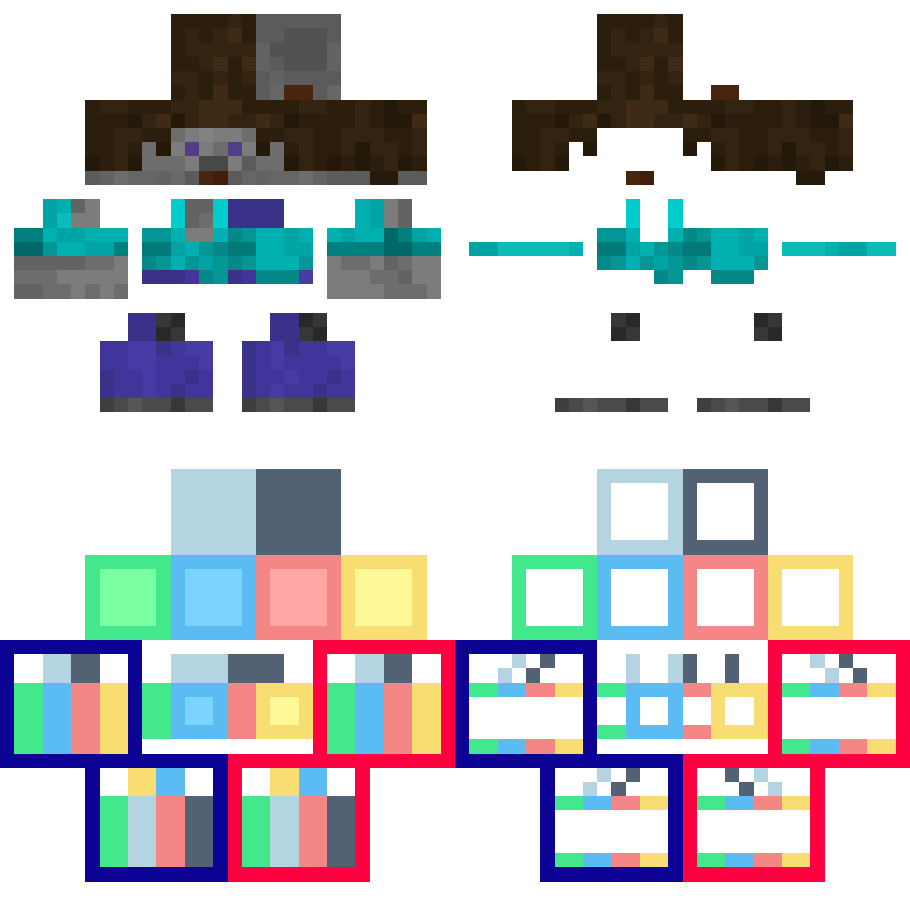
– the totem texture has a template of how a “steve” texture would look like when scaled down to the doll’s dimentions
# How to Customize?
1. open the resource pack and go to “assets/minecraft/textures/item“ and extract “totem_of_undying.png“
2. open “totem_of_undeying.png“ in image editing software
“`
[left side is for base right side is for outer layer]
[both left leg and left arm are on the left side of each section, same with right side but on right]
“`
3. edited “totem_of_undying.png“ put back in “assets/minecraft/textures/item“
4. reload the resource pack using debug shortcut “[F3] + [T]“
5. done
Vollkorn
This resource pack changes your Minecraft font to an higher quality one across all menus. You can use this along with any other resource pack, just move it to the top in activated resource packs’ order.
The font requires 1.13 or higher, no modifications necessary.
> Vollkorn Typeface is “the free and healthy typeface for bread and butter use”, an open font that has support for several languages and text variants (e.g. small caps). This resource pack includes the bold variant.
I do not claim any ownership to the font and have not made any changes to it’s appearance, it is only redistributed according to the owner’s license.
Read more about the font on its homepage.
Is your Minecraft <1.17 crashing with the pack? It's not my fault, see MC-180529 for help.
VCT – Voiid Countdown Timer

# Voiid Countdown Timer
As simple as the name implies. A customizable timer datapack & plugin.


## ❓ What is VCT?
Voiid Countdown Timer (VCT) is a fully customizable timer for Minecraft.
It works in two different versions:
– 📦 **Datapack** → The Lite version of VCT, ideal for single-player worlds or realms.
– 🔌 **Plugin** → The full version of VCT, perfect for multiplayer servers with Spigot/Paper.
With both versions, you can:
– 🎨 Create visual timers with a progress bar.
– 🖌️ Customize color styles.
– 🛠️ Run custom events when the timer starts or ends.
## ✨ Features
Voiid Countdown Timer includes:
– 🎨 Custom Colors Styles
– ⚙️ Quick and easy setup
– ⏳ Progressive Time Bar
– 🎈 Custom Events
– 👥 SinglePlayer and Multiplayer Compatible
– 💻 Open Source and constantly updated
## 📋 Requirements
### 📦 Datapack
– Version: `1.15+`
### 🔌 Plugin
– Version: `1.13+`
– Server: Spigot, Paper, or Purpur (not CraftBukkit)
## 🚀 Installation
### 📦 Datapack
1. Download the latest version here
2. Place the downloaded `.zip` file in the `datapacks` folder of your world.
3. Enter the world and you will receive a message confirming the installation! 🎉
### 🔌 Plugin
1. Download the latest version here
2. Place the downloaded `.jar` file in the `plugins` folder of your server.
3. Restart the server and the plugin will be ready. ⚡
## 📖 How to use it
### 📦 Datapack
– Execute the command `/function vct:book` to receive the configuration book.
– From the book you will be able to:
– ⏰ Set time
– 🎛️ Timer controls
– 🌈 Customize style of colors
– 🗣️ Change language
– ❌ Uninstall
### 🔌 Plugin
– Configuration using commands and configuration files (`config.yml`)
– To see all available commands, use `/vct help`.
– In `config.yml`, you can customize various timer options; all of them are detailed in the official documentation.
## 📚 Plugin Documentation
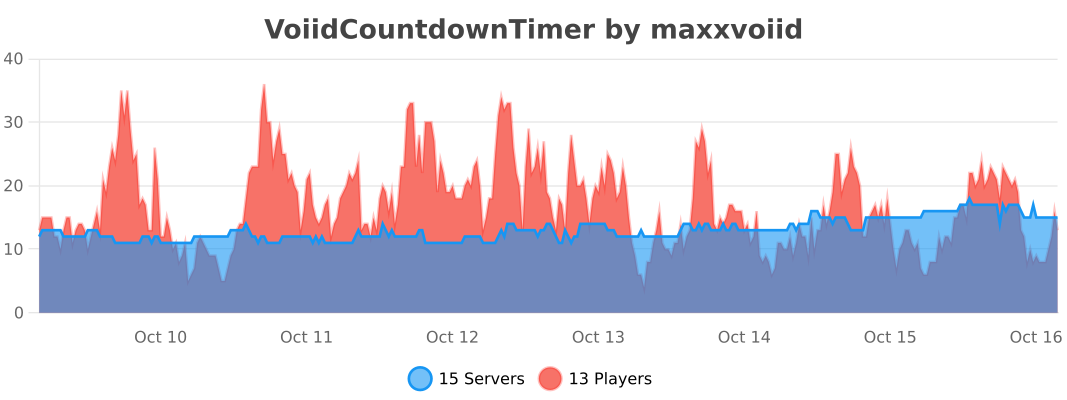
## 🔥 bStats