TempFly – wFly


WETS (WorldEdit Tick Spreader)
## WorldEdit Tick Spreader
Spread WorldEdit operations across multiple ticks.
That’s all.
Semi-configurable, single command `/wets` (`/worldedit-tick-spreader`), one permission (`wets`), two possible arguments:
* `/wets (sorted | not-sorted)` – whether blocks will be placed in a sorted arrangement or not. Sorted is default.
* `/wets ` – Changes the amount of blocks that will be placed per tick.
Negative numbers result in a lot of blocks per tick (9223372036854775807). Default is 1.
Sorted placing and block count per tick, affected by commands, are per-player.
WorldEditSelectionVisualizer
# WorldEditSelectionVisualizer
## Overview
WorldEditSelectionVisualizer (WESV) is essentially the famous [WorldEditCUI mod](http://www.minecraftforum.net/forums/mapping-and-modding/minecraft-mods/1292886-worldeditcui-1-11-2-version-available) in the form of a bukkit plugin, which means that players **don’t need to install anything on their client**.
## Features
* Spawns particles around WorldEdit selections so players can see them
* No client mod required
* Supports cuboid, sphere, ellipsoid, cylinder, polygon and convex selections
* Can display the current clipboard (use `/wesv toggle clipboard` to enable)
* Use `/wesv toggle` to toggle the visualizer
* Option to only show the selection when holding the selection item
* Configurable particle effect and view distance
* Prevent players from spawning too many particles when selecting huge regions
* Highly customizable for the performance of your server
* Supports both [WorldEdit](https://enginehub.org/worldedit) and [FastAsyncWorldEdit](https://www.spigotmc.org/resources/fastasyncworldedit.13932/)
* Compatible with all Minecraft versions starting with 1.7.10
* [PlaceholderAPI](https://placeholderapi.com/) support (you can use the placeholders `%wesv_toggled_selection%`, `%wesv_toggled_clipboard%`, `%wesv_volume_selection%` and `%wesv_volume_clipboard%`)
* Support for RGB color codes in messages on Minecraft 1.16 and higher, with the `&#rrggbb` format
* [Folia](https://github.com/PaperMC/Folia) support for better performance
## Screenshots
| Cuboid selection | Cylinder selection | Convex selection |
|——————————————————|——————————————————–|——————————————————|
|  |  |  |
[More screenshots](https://modrinth.com/plugin/wesv/gallery)
## Usage
### Commands
* `/wesv toggle` and `/wesv toggle clipboard`: toggle the selection/clipboard visualization
* `/wesv lock`: lock/unlock the origin of the clipboard visualization to your current location
* `/wesv lock tp`: teleport to the lock location (when clipboard visualization lock is enabled)
* `/wesv reload`: reload the configuration
### Permissions
* `wesv.toggle`: use the toggle command
* `wesv.use`: allows the visualizer to be turned on
* `wesv.reload`: allows the configuration of this plugin to be reloaded from the config.yml file
### Configuration
This plugin can be very resource expensive, try adjusting the configuration if you experience lag.
Configuration File
“`yaml
# WorldEditSelectionVisualizer configuration
# When enabled, if a new update is available it will display a message in the console on enable
check-updates: true
# You can edit the plugin messages here
messages:
no-permissions: “&cYou don’t have the permission to use this command.”
config-reloaded: “&aThe config was reloaded”
selection-too-large: “&6The visualizer only works with selections up to a size of %blocks% blocks.”
visualizer-enabled: “&6Your visualizer has been &eenabled.”
visualizer-disabled: “&6Your visualizer has been &cdisabled.”
visualizer-clipboard-enabled: “&6Your clipboard visualizer has been &eenabled&6.”
visualizer-clipboard-disabled: “&6Your clipboard visualizer has been &cdisabled&6.”
# When enabled, if a player disables the selection visualization and leaves the server, when he will
# come back, the selection visualization will be still disabled until he activates it again with /wesv toggle.
save-toggle: true
# Delay in ticks when the WorldEdit selection and clipboard are updated.
# This doesn’t affect particles spawning and players performances.
# The server impact is medium
selection-update-interval: 20
# When enabled, the particles are displayed only when holding the WorldEdit selection wand item (by default a wooden axe)
# You can change the WorldEdit wand item in the WorldEdit configuration
need-we-wand: false
# When enabled, top and bottom particles will be displayed for cuboid selections
cuboid-top-bottom: false
# Settings for visualization
# ‘selection’: The WorldEdit current selection
# ‘clipboard’: The WorldEdit clipboard (when you use //copy or //schem load )
# ‘primary’: The primary selection points (the region borders)
# ‘secondary’: The secondary selection points
# ‘fade-delay’: The number of seconds before the particles disappears. You can set it to 0 to remove the fade delay
# ‘max-selection-size’ : The maximum size of a selection to be display. A big value (> 1000000) can cause important lags
# ‘points-distance’: The distance between each particle. The higher this number is, fewer particles will be spawn
# ‘lines-gap’ (secondary selection only): The distance between each particles lines on cuboid and polygon. The higher this number is, fewer particles will be spawn. Set it to 0 to remove cuboid lines
# ‘update-interval’: The delay in ticks between particles spawn. This impact the players performances
# ‘view-distance’: The maximum distance in which players can see the particles. On 1.7.10 the particle distance is limited to 16 (Minecraft limitation)
# ‘particles’: The particles type and data. The data can be a color for redstone like in the form ‘r,g,b’ or a Material for block crack/item crack
# The particle types are available on https://hub.spigotmc.org/javadocs/spigot/org/bukkit/Particle.html
visualization:
selection:
fade-delay: 0
max-selection-size: 50000
primary:
points-distance: 1.0
update-interval: 12
view-distance: 64
particles:
type: “FLAME”
data: “”
secondary:
points-distance: 3.0
lines-gap: 5.0
update-interval: 18
view-distance: 32
particles:
type: “REDSTONE”
data: “RED”
clipboard:
fade-delay: 0
max-selection-size: 50000
primary:
points-distance: 1.0
update-interval: 12
view-distance: 64
particles:
type: “FLAME”
data: “”
secondary:
points-distance: 3.0
lines-gap: 5.0
update-interval: 18
view-distance: 32
particles:
type: “REDSTONE”
data: “BLUE”
“`
### Video
## Bugs & suggestions
Please don’t post bugs or suggestions in the review section, but please open an [issue on GitHub](https://github.com/MrMicky-FR/WorldEditSelectionVisualizer/issues).
If you just have a question, you can ask it on my [Discord server](https://discord.gg/q9uwabt).
And if you like this plugin you can leave a review or star the [GitHub project](https://github.com/MrMicky-FR/WorldEditSelectionVisualizer).
## Original Author
WorldEditSelectionVisualizer (WESV) has been originally created by [rojet601](https://dev.bukkit.org/members/rojet601). Since this user’s gone inactive since November 2015 and the plug-in contains some errors, [ZathrusWriter](https://www.spigotmc.org/members/zathruswriter.137995/) decided to release an 1.8. forward-compatible version with those errors fixed.
WERM
# WERM – Web Engine for Realm Monetization

The official Minecraft plugin for WERM – the future of game monetization. Global wallets, instant delivery, and powerful analytics—all with the lowest fees in the industry.
Website •
Dashboard •
Discord
—
## 🆕 What’s New in v1.0.4
### ⚡ Performance & Reliability Release
This release adds batch delivery confirmation and async file I/O to improve performance and reliability during high-load scenarios.
| Feature | Description |
|———|————-|
| 📦 **Batch Delivery Confirmation** | Up to 10 confirmations per API call for 90% reduction in network overhead |
| 🔄 **Async File I/O** | Non-blocking queue persistence with debounced writes prevents main thread blocking |
| 🛑 **Graceful Shutdown** | Proper executor termination ensures no data loss during server stops |
| ⚡ **Faster Bulk Deliveries** | Improved performance when multiple items need to be delivered at once |
**Technical Details:**
– Batch size: 10 confirmations per API call
– I/O thread: Daemon thread named `WERM-ConfirmationQueue-IO`
– Shutdown timeout: 5 seconds for graceful termination
– Debounced writes: 2-second delay to coalesce multiple queue changes
### Previous Releases:
v1.0.3 – Performance Optimization
| Feature | Description |
|———|————-|
| 🔗 **HTTP Connection Pooling** | New OkHttp-based connection manager with 5-connection pool and 5-minute keep-alive |
| 📉 **Smart Polling** | Dynamic polling with exponential backoff—reduces API calls by up to 75% during idle periods |
| ⚡ **Faster Response Times** | Keep-alive connections eliminate connection setup overhead |
| 🛠️ **Improved Resource Usage** | Connection reuse reduces memory footprint and CPU usage |
**Technical Details:**
– Connection pool: 5 max idle connections, 5-minute keep-alive
– Timeouts: 10s connect, 30s read, 10s write
– Backoff: Up to 4x base interval after consecutive empty responses
– Instant reset when player joins or delivery found
v1.0.2 – bStats Update
– **🔧 bStats Update** – Updated bStats plugin ID for proper metrics tracking
– All security hardening from v1.0.1 remains in place
v1.0.1 – Security Features
| Feature | Description |
|———|————-|
| 🛡️ **Command Validation** | Blocks dangerous commands (op, deop, ban, stop) from being executed via deliveries |
| 🔐 **TLS 1.2+ Enforcement** | All API connections now require modern TLS protocols |
| 📝 **Debug Redaction** | Sensitive data (tokens, UUIDs) automatically redacted in debug logs |
| 💾 **Confirmation Queue** | Pending delivery confirmations survive server restarts |
| ✅ **Input Sanitization** | Player names and UUIDs sanitized before command execution |
| 🌐 **Endpoint Validation** | HTTPS and domain whitelist enforcement for API endpoints |
| ⏱️ **Rate Limiting** | Verification attempts limited to prevent brute-force abuse |
| 🔄 **Auto-Discovery** | Project ID now auto-discovered from API (no hardcoding) |
—
## 🌐 What is WERM?

WERM is a modern, all-in-one monetization platform built specifically for Minecraft servers. Think of it as a **Tebex alternative**—but with better features, lower fees, and a focus on the modern server owner experience.
### Platform Features
| Feature | Description |
|———|————-|
| 🔍 **Server Discovery** | Get your server listed on our public directory where players can find, vote for, and join servers |
| 💰 **Global Wallet System** | Players have one wallet across all WERM-powered servers (1 credit = 1 USD cent) |
| 🛒 **Built-in Storefront** | Beautiful, customizable store pages with categories, sales, gifting, and wishlists |
| ⚡ **Instant Delivery** | Hybrid delivery system using webhooks + polling ensures items are delivered fast |
| 🗳️ **Voting System** | Integrated voting with Votifier/NuVotifier support to boost your server’s ranking |
| 💬 **Discord Integration** | Display your Discord member count on your server listing |
| 🌍 **Multi-Currency Support** | Accept payments globally with automatic currency conversion |
| 💸 **Lowest Fees** | Starting at just 3% platform fee (vs 5%+ competitors) |
### Why Choose WERM?
– **Free Tier Available** – Start monetizing with no monthly fees (up to $500/month revenue)
– **Modern Dashboard** – Clean, intuitive interface for managing your server and products
– **Real-time Analytics** – Track sales, player engagement, and revenue trends
– **Cross-Server Economy** – Players can use their wallet credits on any WERM server
– **Open & Transparent** – No hidden fees, no surprise charges
—
## ✨ Plugin Features

### 🔗 Account Verification
Players can securely link their Minecraft account to WERM using a simple 6-character verification code. Generate a code on the website, enter it in-game, and you’re connected!
### 📦 Automatic Delivery System
Automatically delivers purchased products to players using configurable console commands. Supports both immediate delivery and requiring players to be online.
### 💓 Server Heartbeat
Keeps your server status updated on the WERM dashboard with real-time player counts and server version information.
### 🎮 Player Join Detection
Automatically checks for and delivers pending purchases when players join the server.
### ⚡ Async Processing
All API calls are processed asynchronously to ensure zero impact on your server’s performance.
### 🛡️ Secure Authentication
Uses secure plugin token authentication to ensure only your server can manage deliveries.
### 📝 Fully Customizable
All messages are fully configurable with Minecraft color code support (`&` codes).
—
## 📜 Commands

| Command | Description | Permission |
|———|————-|————|
| `/werm verify ` | Link your Minecraft account with WERM | `werm.verify` (default: true) |
| `/werm help` | Display help information | None |
| `/werm status` | View plugin connection status | `werm.admin` (default: op) |
| `/werm reload` | Reload plugin configuration | `werm.admin` (default: op) |
**Aliases:** `/w`
---
## 🎯 Permissions
| Permission | Description | Default |
|------------|-------------|---------|
| `werm.verify` | Allows players to verify their Minecraft account | `true` |
| `werm.admin` | Admin commands (reload, status) | `op` |
---
## ⚙️ Configuration
```yaml
# WERM Plugin Configuration
# Generate your plugin token at https://wermpay.com/dashboard/servers
plugin-token: "werm_XXXXXXXX_XXXXXXXXXXXXXXXXXXXXXXXXXXXXXXXX"
# Enable debug logging for troubleshooting
debug: false
# Heartbeat Settings
heartbeat:
interval: 60 # Send status every X seconds
send-player-count: true # Include player count in heartbeat
# Delivery Settings
delivery:
interval: 15 # Check for deliveries every X seconds
# Customizable messages (supports & color codes)
messages:
prefix: "&8[&6WERM&8] &r"
verify-success: "&aYour Minecraft account has been linked successfully!"
verify-failed: "&cVerification failed: &7%reason%"
delivery-received: "&aYou received: &e{product} &ax{quantity}"
# ... and more customizable messages
```
---
## 📦 Delivery Placeholders
When configuring your product commands in the WERM dashboard, you can use these placeholders:
| Placeholder | Description |
|-------------|-------------|
| `{player}` or `{player_name}` | Player's username |
| `{uuid}` or `{player_uuid}` | Player's UUID |
| `{quantity}` | Quantity purchased |
| `{product_id}` | Product ID |
| `{product_name}` | Product name |
| `{order_id}` | Order ID |
| `{delivery_id}` | Delivery ID |
**Example Commands:**
```
give {player} diamond 64
lp user {player} parent add vip
eco give {player} 1000
```
---
## 🚀 Installation

1. **Download** the WERM plugin JAR file
2. **Place** it in your server's `plugins` folder
3. **Start/restart** your server
4. **Generate** a plugin token in your [WERM Dashboard](https://wermpay.com/dashboard/servers)
5. **Edit** `plugins/WERM/config.yml` and add your plugin token
6. **Run** `/werm reload` or restart your server
7. ✅ Your server will now appear as **online** in the WERM dashboard!
---
## 📋 Requirements
- **Server Software:** Spigot, Paper, Purpur, or any Spigot-based fork
- **Minecraft Version:** 1.13+
- **Java Version:** 8+
- **WERM Account:** [Create one here](https://wermpay.com)
---
## 🔧 How It Works
1. **Setup:** Configure the plugin with your unique plugin token from the WERM dashboard
2. **Heartbeat:** The plugin sends periodic heartbeats to keep your server status updated
3. **Purchases:** When a customer makes a purchase on your WERM store, a delivery is queued
4. **Delivery:** The plugin polls for pending deliveries and executes the configured commands
5. **Confirmation:** Successful deliveries are confirmed and marked as completed
---
## 💬 Support
Need help? Join our [Discord Server](http://discord.gg/ujFRXksUBE) for support and community discussions.
---
## 📄 License
This plugin is provided by WERM for use with the WERM monetization platform.
---
WERM - The Future of Game Monetization
© 2026 WERM | Made with ❤️ for the Minecraft community
Wembuufied
Wemmbuu? You Like Him? So Add Him To Your Weapons! Changes The Look Of Weapons To Wembuu!
All Swords All Axes And All Pickaxes Are Wembuufied!
We Are Focusing On Adding It To Armors Next!
So Stay Tuned!
WEM – White Entities Mask
Turns all entities completely white, allowing for overlaying screenshots later and easily masking out entities.
Well Rounded
A resource pack that simply changes the log textures to be more circular. It also changes the target block, beehive, and the bottom of the cactus (Along with recoloring the border of it to match the rest of the block better). I plan to add more mod support to this as time goes on.
Currently Supported Mods:
[Vanilla Backport](https://modrinth.com/mod/vanillabackport)
WelcomeTitle
# 📺 WelcomeTitle
**Elevate Your Server’s First Impression**
WelcomeTitle is a professional-grade Minecraft plugin designed for Spigot, Paper, and Purpur servers. It empowers server administrators to create cinematic join sequences that instantly captivate players. By combining high-definition titles, informative subtitles, and immersive spatial audio, you can ensure your server’s brand identity is established the second a player enters the world.
—
## ✨ Professional Features
### 🎬 Cinematic Join Titles
Create a visual impact with bold titles and subtitles.
– **Custom Branding**: Direct the player’s attention with beautiful, centered text.
– **Rich Color Support**: Full compatibility with **HEX Color Codes** (e.g., `&#FFAA00`) and legacy MiniMessage/Bukkit codes.
– **Precise Timings**: fine-tune the experience with tick-perfect control over **Fade-in**, **Stay**, and **Fade-out** durations.
### 🔊 Immersive Spatial Audio
Sound is half of the experience. WelcomeTitle lets you trigger any sound from the Minecraft sound registry.
– **Atmospheric Entry**: Use gentle plings for a modern feel or grand fanfares for a survival spawn.
– **Audio Control**: Set custom **Volume** and **Pitch** to refine how sounds are perceived by the player.
### 💬 Dynamic Chat Messaging
Take control of your server’s chat logs.
– **Personalized Greetings**: Replace generic system messages with vibrant, formatted join/leave announcements.
– **Clean Configuration**: Toggle custom messages on or off independently of the visual title system.
### 📋 Rich Placeholder System
Inject real-time information to make every welcome feel unique:
– `%player%`: Displays the player’s unique display name.
– `%servername%`: Shows the current world or server name.
– `%version%`: Displays the exact Minecraft server version.
– `%random%`: Pulls a random line from your `text.yml` for dynamic variety.
—
## 🎮 Pro Use Cases
– **Server Branding**: Use consistent colors and sound cues to welcome players to your unique community.
– **Orientation**: Instantly inform players which lobby or game mode they have joined.
– **Event Highlights**: Update your join title to announce seasonal events, new game releases, or community milestones.
– **Premium Feel**: Give your server a “Triple-A” polished feel that encourages player retention.
—
## ⚙️ Compatibility & Performance
– **Optimized Core**: Built for minimal resource usage, ensuring zero impact on server performance (MSPT).
– **Wide Compatibility**: Supported on **Bukkit, Spigot, Paper, and Purpur**.
– **Modern Support**: Native support for **Minecraft 1.13 through 1.21+**.
– **Java Requirements**: Optimized for **Java 11, 17, and 21**.
—
## 🛠️ Quick Setup
1. Drop the `welcometitle-{version}.jar` into your `plugins` folder.
2. Restart your server to generate the default configuration.
3. Edit `config.yml` to customize your titles, sounds, and messages.
4. Use `/welcometitle reload` to apply changes instantly without a restart!
—
_Developed with ❤️ for professional Minecraft Communities._
Welcomer
# Welcomer
Welcomer is a configerable plugin that sends a welcome message to players that join your server!
## Setup
Setup is as simple as downloading the plugin and putting it into your `plugins` folder.
## Configuration
After installing the plugin and running the server go to `plugins/Welcomer` in your server. In there you’ll see a file called `config.yml`
“`
# The message that will be sent to players when they join.
# Use %player% to insert the player’s name.
welcome-message: “u00a7bWelcome to Hunger Games, %player%!”
“`
simply edit `welcome-message:` to a message of your liking!
Welcome Mat
### A friendly way to roll out the welcome mat for your players!
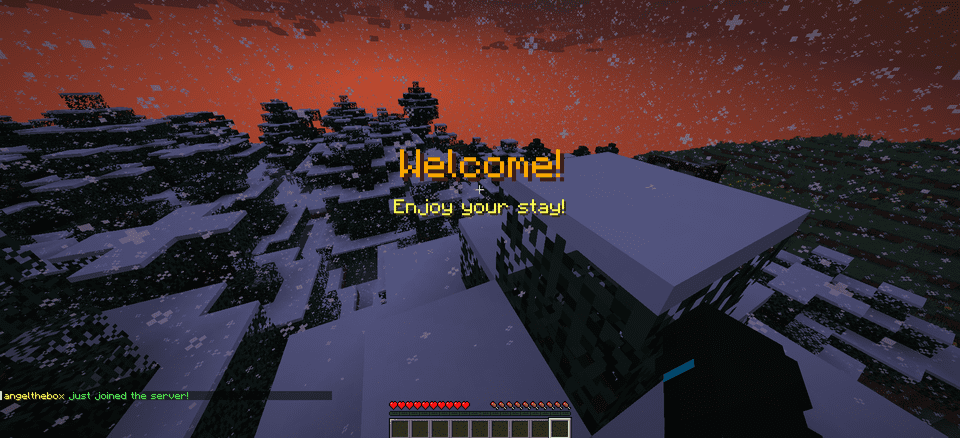
**WelcomeMat** is a lightweight, powerful plugin that enhances your server’s welcome experience. It provides customizable join/leave messages, titles, animations, and sounds to make players feel at home on every login.
## 🎉 What’s New!
### Version 1.3.1 (Latest)
– 🍃 **Folia-Ready Animations**: Visual effects now use the latest Folia entity schedulers (1.21.8+) with automatic signature detection, clamped delays, and no unsafe Bukkit fallbacks.
– 🧠 **Smarter Diagnostics**: If future Folia builds introduce new scheduler signatures, they’re logged automatically so you can keep running the same jar everywhere.
– 🧾 **Auto Version Metadata**: `plugin.yml` now inherits the Gradle version, guaranteeing accurate version strings inside the jar.
– 🌌 **Skyward & Copper Packs**: Two new message packs inspired by the 1.21 “Chase the Skies” and “Copper Age” updates, selectable right from the GUI.
### Version 1.2.x Highlights
– **Message Packs System**: Multiple themed collections (default, friendly, professional, funny, RPG) with GUI switching.
– **Multi-Language Support**: English and Spanish out of the box with easy CLI/GUI selection.
– **Improved Configuration Display**: Human-friendly display names and cleaner GUI organization.
—
## 🔄 Compatibility
– Fully tested on **Bukkit/Spigot, Paper, Purpur, and Folia** from **Minecraft 1.13 through 1.21.10**.
– Region-aware scheduler paths keep Folia’s watchdog happy while the same jar continues to run flawlessly on single-threaded servers.
—
## Features
– 🎨 **Customizable Messages**
– Rich join/leave text with color codes and placeholders
– Player-specific greetings and per-pack collections
– Display-name helpers and multi-language support (EN/ES)
– 📜 **Welcome Titles**
– Configurable title/subtitle timing and colors
– 🔊 **Interactive Sounds**
– Join/leave sounds with per-player toggles, volume, and pitch
– ✨ **Animation System**
– Fire Spiral, Green Spike Firework, and more join effects
– Folia-safe schedulers and per-player animation preferences
– ⚙️ **Extensive Configuration**
– Feature toggles, admin logging, instant `/wm reload`
– GUI-driven settings for packs, languages, sounds, and more
## 📋 Commands
– `/welcomemat` or `/wm` – Base command
– `/wm sound` – Toggle join/leave sounds for yourself
– `/wm reload` – Reload the plugin configuration
– `/wm help` – Show help message
– `/wm animation` – Toggle join animations for yourself
– `/wm language` – Change the plugin language
– `/wm pack` – Change the message pack
– `/wm config` – Modify plugin configuration
## 🔑 Permissions
– `welcomemat.reload` – Allow reloading the configuration (default: op)
– `welcomemat.bypass` – Bypass welcome messages (default: false)
– `welcomemat.sound.toggle` – Allow toggling sounds (default: true)
– `welcomemat.animation.toggle` – Allow toggling animations (default: true)
– `welcomemat.admin.log` – Receive admin log messages (default: op)
– `welcomemat.language` – Allow changing the plugin language (default: op)
– `welcomemat.pack` – Allow changing message packs (default: op)
– `welcomemat.config` – Allow modifying plugin configuration (default: op)
## 📦 Installation
1. Download the latest version of WelcomeMat
2. Place the `.jar` file in your server’s `plugins` folder
3. Restart your server
4. Configure the plugin in `plugins/WelcomeMat/config.yml`
## ⚙️ Configuration
“`yaml
features:
join-message: true
leave-message: true
join-title: true
join-sound: true
leave-sound: true
other-players-sounds: true
join-animation: true
admin-logging: true
messages:
join: “&e%player% &ajust joined the server!”
leave: “&e%player% &chas left the server!”
player-specific:
example-player:
join: “&6Welcome back, special player %player%!”
leave: “&eGoodbye, special player %player%!”
titles:
join:
title: “&6Welcome!”
subtitle: “&eEnjoy your stay!”
sounds:
join:
sound: ENTITY_PLAYER_LEVELUP
volume: 1.0
pitch: 1.0
leave:
sound: ENTITY_IRON_GOLEM_DEATH
volume: 0.5
pitch: 1.0
animations:
green-spike:
enabled: true
duration: 40
height: 2.0
# Message Packs
message-packs:
# Currently selected pack (default, friendly, professional, funny, rpg)
selected: “default”
# Default pack (original messages)
default:
join:
– “&e%player% &ajust joined the server!”
leave:
– “&e%player% &chas left the server!”
# Friendly pack
friendly:
join:
– “&d✨ &e%player% &ahas joined the party! &d✨”
– “&aWelcome back, &e%player%&a! We missed you! &d❤”
leave:
– “&e%player% &7had to go… &cSee you soon! &d💕”
– “&7Until next time, &e%player%&7! &d👋”
“`
## 🌐 Language Support
WelcomeMat now supports multiple languages:
“`yaml
# Available languages: english, spanish
selected-language: “english”
languages:
english:
name: “English”
messages:
reload:
success: “&aConfiguration reloaded successfully!”
sound:
enabled: “&aJoin/leave sounds enabled!”
disabled: “&cJoin/leave sounds disabled!”
spanish:
name: “Español”
messages:
reload:
success: “&a¡Configuración recargada con éxito!”
sound:
enabled: “&a¡Sonidos de entrada/salida activados!”
disabled: “&c¡Sonidos de entrada/salida desactivados!”
“`
## 🎵 Available Sounds
### Modern (1.13+)
– `ENTITY_PLAYER_LEVELUP`
– `ENTITY_IRON_GOLEM_DEATH`
– `BLOCK_NOTE_BLOCK_PLING`
– `BLOCK_NOTE_BLOCK_CHIME`
– `BLOCK_NOTE_BLOCK_BELL`
– And more…
### Legacy (1.8-1.12) (Under development)
– `LEVEL_UP`
– `IRONGOLEM_DEATH`
– `NOTE_PLING`
– `NOTE_PIANO`
– And more…
## 💡 Example Configurations
### Professional Server with Message Packs
“`yaml
# Use the professional message pack
message-packs:
selected: “professional”
# Set the language to English
selected-language: “english”
sounds:
join:
sound: BLOCK_NOTE_BLOCK_PLING
volume: 0.8
pitch: 1.5
animations:
green-spike:
enabled: true
duration: 30
height: 1.5
“`
### VIP Server with Custom Messages
“`yaml
messages:
join: “&d✨ &e%player% &ahas joined the party! &d✨”
leave: “&e%player% &7had to go… &cSee you soon!”
player-specific:
VIP_Player:
join: “&6⚡ The legendary &e%player% &6has arrived! ⚡”
leave: “&6The legend &e%player% &6must go… &7Until next time!”
sounds:
join:
sound: ENTITY_PLAYER_LEVELUP
volume: 1.0
pitch: 1.2
animations:
green-spike:
enabled: true
duration: 50
height: 2.5
“`
## 📝 Support
If you encounter any issues or have suggestions:
– Create an issue on our [GitHub repository](https://github.com/coffeeisle/welcome-mat)
– Join our [Discord server](https://discord.gg/cJ4uP2xF7h)
—
Made with ❤️ by angeldev0
[Download](https://modrinth.com/plugin/welcome-mat) • [Source](https://github.com/coffeeisle/welcome-mat) • [Discord](https://discord.gg/cJ4uP2xF7h)