ShiNeaL’s Simplacity

ShiNeaL’s Simplastic Pack:
This pack has been worked on for around 3 years now (Since 2019) and we have put a lot of time and effort into the pack, and we love to see that people enjoy it. I hope everyone enjoys the pack and we will continue to update the pack constantly!
“ShiNeaL’s Simplastic Pack is a pack of textures as its simple name suggests with a resolution of 16x with a soft or plastic style with very marked edges in all its blocks as well as keeping the original colors to preserve its style.”
– Random Site I Found #1
“With this pack, all the blocks in the game will become simple and smooth. Their textures will look as simple as possible, but easily recognizable and not devoid of detail. If you want to see simple, but not too simple, textures in the game, then this resource pack is perfect for you!”
– Random Site I Found #2
“Perfect for those who want a mix of simplicity, plastic, and default textures!”
– RobinTheTraveler, a “Loving Subscriber”
ShinyDragon96 – Owner, Founder, Textures, Models, Organizer
Tgw Creeper – Textures
pigeo – Just Here, the Usual
Swimmingturtle247 – “Simplastic” Idea
Mod Support Addon — [ShiNeaL’s Simplastic Mod Support](https://planetminecraft.com/texture-pack/shineal-s-simplastic-mod-support)
Bedrock Port — [ShiNeaL’s Simplastic Bedrock](https://planetminecraft.com/texture-pack/shineal-s-simplistic-pack-bedrock)
CTM Addon — [ShiNeaL’s Simplastic CTM](https://planetminecraft.com/texture-pack/shineal-s-simplastic-ctm)
All My Vanilla Packs In One – [Shiny’s Mashup Pack](https://planetminecraft.com/texture-pack/shiny-s-vanilla-overhaul)
Realistic Entities — [Shiny’s Entity Models Plus](https://planetminecraft.com/texture-pack/shiny-s-entity-models-plus-optifine)
ShiNeaL’s Simplastic Pack© 2020 by ShinyDragon96 and ShiNeaL’s Packs is licensed under CC BY-NC 4.0! – If you use this pack in a video, post, or anything else, it must be linked back to here & credited in my name – !
shea’s simple Totem x bare bones
# shea’s simple Totem x bare bones
## what does this pack does
### it takes Totems and cleans it up
This pack does not include any bare bones textures
**Bare Bones is required for the intended look**
disclaimer if you use this pack make sure to place this pack above bare Bones in your resource pack list for it to use its own instead of bare bones
i recomend using other shader and resource packs like [bliss](https://github.com/X0nk/Bliss-Shader) to improve looks but that is optional
**you can showcase this if you want just dont redistrabute it**
NAH I’D WIN (SATORU GOJO TOTEM)
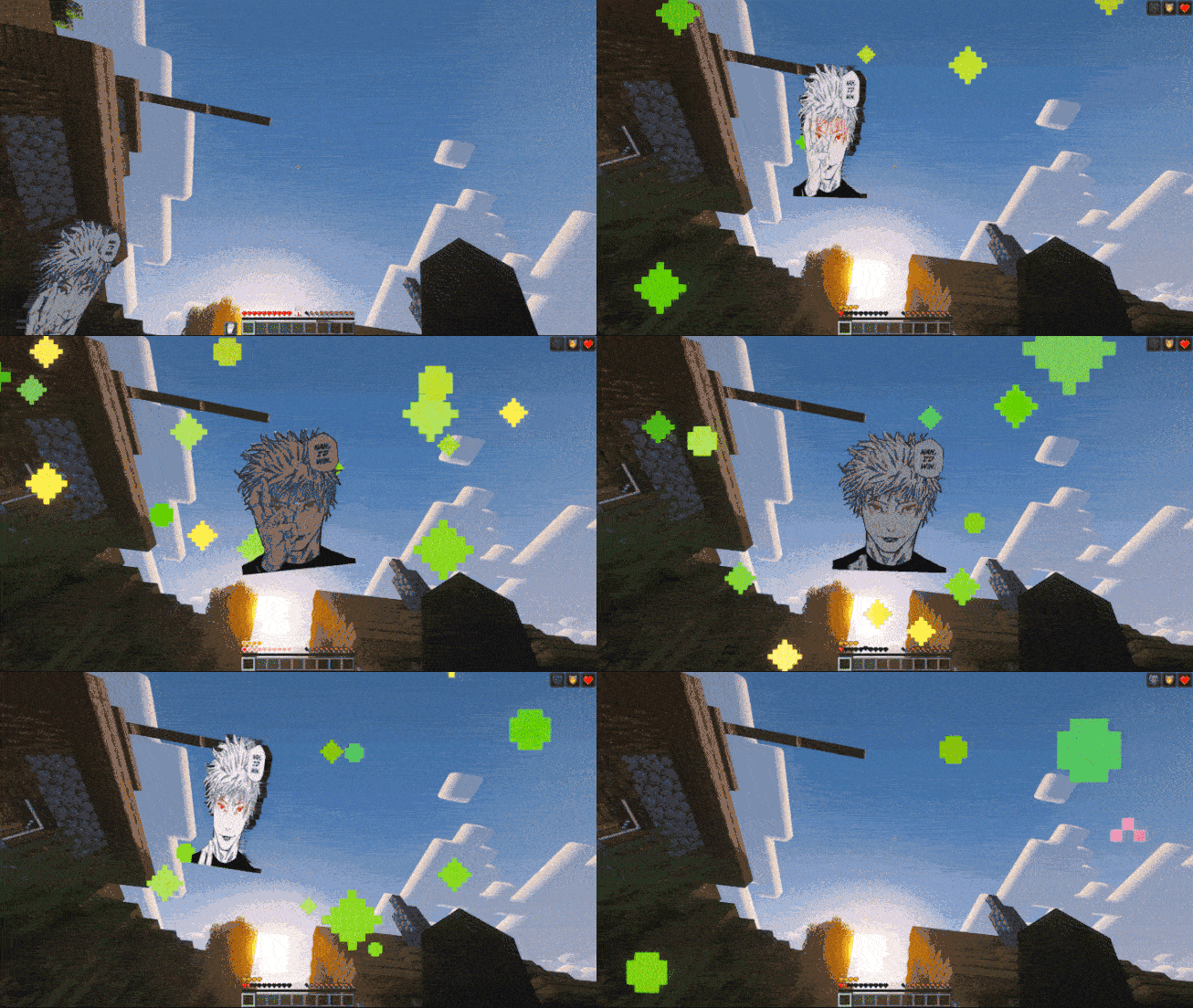
The Model Gap Fix mod might cause FPS drops/crashes with this resource pack. I recommend testing it first.
El mod Model Gap Fix podria tener bajones/crasheos con este resourcepack. Recomiendo probarlo primero.
# English [🇺🇸]
Bring the strongest sorcerer to your inventory! Replaces the boring Totem of Undying with Satoru Gojo from Jujutsu Kaisen, including his iconic phrase, the song Judas by Lady Gaga, and custom animations.
Main Features:
– Custom 3D Model: The item has thickness and depth (although I wish the thickness looked better but I couldn’t manage it).
– Perfect Positioning: Manually adjusted to look good in First Person, Third Person, and on the ground. (I spent like 6 hours lol).
– Animation: Gojo’s eyes glow with an animation while he performs his Domain Expansion.
– Song: When the totem activates, you will hear the song “Judas” by Lady Gaga.
**I TAKE REQUESTS**
> _This mod contains copyrighted musical material. All rights belong to their respective creators and legal owners:_
> – _Judas – Lady Gaga_
# Español [🇪🇸]
¡Trae al hechicero más fuerte a tu inventario! Reemplaza el aburrido Tótem de la Inmortalidad por Satoru Gojo de Jujutsu Kaisen, incluyendo su frase icónica, la canción Judas de Lady Gaga y animaciones personalizadas.
Características Principales:
– Modelo 3D Personalizado: El ítem tiene grosor y profundidad (aunque quisiera que se viera mejor el grosor pero no lo logré).
– Posicionamiento Perfecto: Ajustado manualmente para verse bien en Primera Persona, Tercera Persona y tirado en el suelo. (estuve como 6 horas lol)
– Animación: Los ojos de Gojo brillan con una animación a la vez que hace su expansión de dominio.
– Canción: Al activarse el tótem, escucharás la canción “Judas” de Lady Gaga.
**ACEPTO SUGERENCIAS**
> _Este mod contiene material musical protegido por derechos de autor. Todos los derechos pertenecen a sus respectivos creadores y titulares legales:_
> – _Judas – Lady Gaga_
RideableEnderPearls
# Rideable Ender Pearls!
Allows you to ride thrown ender pearls.
## Commands
| Command | Description | Permissions |
|—|:—:|—:|
|/trigger RidePearls|Start riding ender pearls!||
|/trigger StopRidingPearls|Stop riding ender pearls||
|/trigger ConfigurePearls|Opens interactive config menu|requires creative mode|
|/trigger PearlHelp|Opens the help screen||
## Configuration Options
| Option | If yes | If no |
|—|:—:|:—:|
|Allow Stasis Chambers|Dismount pearls upon contact with a bubble column (allows pearl stasis chambers)|Deletes pearls upon contact with a bubble column|
|Kill Pearls In Water|Kills pearls and dismounts player upon contact with water|ride pearls under water (**careful of drowning in the 1.19.3 version**)|
Red Shield
# Red Shield
This resource pack replaces the default shield with a custom 3D model.
The design uses a red theme.
No OptiFine required. Vanilla compatible.
## More Shield Themes
– [Black](https://modrinth.com/project/noire-shield)
– [Blue](https://modrinth.com/project/blue-shield)
– [Creeper](https://modrinth.com/project/creeper-shield)
– [Dark Red](https://modrinth.com/project/dark-red-shield)
– [Mirror](https://modrinth.com/project/mirror-shield)
– [Navy Blue](https://modrinth.com/project/navy-blue-shield)
– [Rabbit](https://modrinth.com/project/rabbit-shield)
Red Creepers
Are you tired of not seeing a creeper in the middle of a grass field? Just use this pack for more contrast between the creeper and the blocks around it.
– This [version](https://modrinth.com/resourcepack/red-creepers/version/1.0.0) is for [Fresh Animations](https://modrinth.com/project/50dA9Sha) and is not suitable for Vanilla Minecraft.
– This [version](https://modrinth.com/resourcepack/red-creepers/version/1.0.1) is for Vanilla Minecraft and is not suitable for [Fresh Animations](https://modrinth.com/project/50dA9Sha).
Rabbit Shield
# Rabbit Shield
This resource pack replaces the default shield with a custom 3D model.
The design uses a rabbit theme.
No OptiFine required. Vanilla compatible.
## More Shield Themes
– [Black](https://modrinth.com/project/noire-shield)
– [Blue](https://modrinth.com/project/blue-shield)
– [Creeper](https://modrinth.com/project/creeper-shield)
– [Dark Red](https://modrinth.com/project/dark-red-shield)
– [Mirror](https://modrinth.com/project/mirror-shield)
– [Navy Blue](https://modrinth.com/project/navy-blue-shield)
– [Red](https://modrinth.com/project/red-shield)
🗿QuiltGoSlightlyFasterLol🗿
Replaces KnotClassDelegate.getRawClassByteArray with a version that uses libdeflate so it goes slightly faster lmao.
Supported platforms:
* aarch64-linux-gnu
* aarch64-macos-none
* i386-linux-gnu
* i386-windows-gnu
* powerpc64le-linux-gnu
* x86_64-linux-gnu
* x86_64-macos-none
* x86_64-windows-gnu
Qube Pack
This resource pack gives some blocks more volume, while maintaining the original texture of the block.
QDAA
Implements really simple antialiasing via *super-sampling*, also known as SSAA.
## Huh?
Antialiasing is often implemented via “FXAA”, “TAA”, “MSAA”, etc. All of these methods are approximations, but they’re very fast. FXAA and TAA are basically just really fancy blurs, and MSAA can only smooth polygon edges; pixelated textures are totally missed out on, which is most of what Minecraft is.
Super-sampling is the most pure, accurate, and expensive form of antialiasing. The entire scene is rendered at a higher resolution, and then downscaled for presentation. It’s also the easiest to implement.

For example, if you’re playing in a 1280×720 window, then QDAA will render the game at *2560×1440* instead, and then resize it to 1280×720 before it’s drawn to the screen.
This mod reuses functionality in Minecraft that handles macOS Retina displays, so it should be quite compatible, except with other mods that modify how the framebuffer is drawn to the screen. It also technically optimizes the final render step, replacing a normal quad render with a blit.
Notably, due to how this works, **QDAA can even antialias GUIs**, improving readability of rotated text and smoothing the edges of 3D item models. Shaders only work on the world.
## Versions
2.0 is an xplat redesign of QDAA based on the old “Simple” version, which works on 1.21.1+. Historically, QDAA is available in both “Simple” and “Configurable” versions, which are v1.1 and v1.2 due to having no foresight.
### Simple
Really basic implementation of just the AA. ~~Works on any version with Blaze3D, pinky promise. Will likely never need updating. Remind me if I forget to tag new versions.~~ Mojang refactored how their framebuffer code works, so it broke. Yay. 2.0 exists to fix this.
**Note**: 1.16 and earlier only [*sorta*](https://blob.jortage.com/blobs/7/3d4/73d4a6b5e2bb3172856992ccddbdf281b17105075ad07be9f4919d75dea913d9a4f7249196e40ef061a653354dd617942f9897668e07dad5bd497f65c3bcceb9) work. Only 1.18 and higher is supported.
### Configurable
More “full-fledged” mod with a config screen and runtime toggling. Potentially useful to ship in modpacks off-by-default. Highly version-dependent due to usage of GUIs. Likely won’t receive updates, I regret it.