VoteBan Players
# VoteBan
This plugin supports ANY ban or mute system since it uses custom commands.
Commands:
– /votemute [reason] – Start a vote mute for a player online.
– /voteban [reason] – Start a vote ban for a player online.
– /votekick [reason] – Start a vote kick for a player online.
– /addvote – Vote for a current ban/kick in progress.
Permissions:
– VOTEBAN.* – Access to all commands.
– VOTEBAN.VOTE – Use the /addvote command.
– VOTEBAN.STARTKICK – Use the /votekick command.
– VOTEBAN.STARTBAN – Use the /voteban command.
– VOTEBAN.STARTMUTE – Use the /votemute command.
– VOTEBAN.BYPASS – Not allow votes on players with this permission.
Images



VoodooDoll Wide
# VoodooDoll
A resource pack that changes the totem of undying into a plush toy version of the player’s model. No mods required!
## Comparision between versions
### Vanilla Custom:
**Pros:**
– all totems can be made unique (perfect for multiplayer)
– supports both the slim and wide player models
**Cons:**
– works only on Minecraft 1.21.5 and up
– a bit complicated to customize
### Vanilla Wide/Slim:
**Pros:**
– works with very old versions of Minecraft, from 1.11.0 and up
– easy to customize
**Cons:**
– every totem of undying will look the same (good enough on single-player)
– only supports either the slim or wide player models
You can use Vanilla Custom edition and either Vanilla Wide or Vanilla Slim edition alongside each other, if so desired.
## How to customize
By default, the resource pack only comes with a texture of Steve, so if you want to use your own skin, or someone else’s skin, you will have to follow these instructions.
1. Extract the content of the resource pack from the ZIP.
2. Go to `assets/minecraft/textures/item/totem_of_undying` folder (`assets/minecraft/textures/items/totem` for 1.11-1.12 version).
3. Copy your desired user’s skin texture into the folder and rename it to `totem_of_undying.png` (`totem.png` for 1.11-1.12 version).
4. Overwrite the original file if prompted.
5. Package the content of the resource pack back into ZIP.
6. Done. Have fun :3
VoodooDoll Slim
# VoodooDoll
A resource pack that changes the totem of undying into a plush toy version of the player’s model. No mods required!
## Comparision between versions
### Vanilla Custom:
**Pros:**
– all totems can be made unique (perfect for multiplayer)
– supports both the slim and wide player models
**Cons:**
– works only on Minecraft 1.21.5 and up
– a bit complicated to customize
### Vanilla Wide/Slim:
**Pros:**
– works with very old versions of Minecraft, from 1.11.0 and up
– easy to customize
**Cons:**
– every totem of undying will look the same (good enough on single-player)
– only supports either the slim or wide player models
You can use Vanilla Custom edition and either Vanilla Wide or Vanilla Slim edition alongside each other, if so desired.
## How to customize
By default, the resource pack only comes with a texture of Alex, so if you want to use your own skin, or someone else’s skin, you will have to follow these instructions.
1. Extract the content of the resource pack from the ZIP.
2. Go to `assets/minecraft/textures/item/totem_of_undying` folder (`assets/minecraft/textures/items/totem` for 1.11-1.12 version).
3. Copy your desired user’s skin texture into the folder and rename it to `totem_of_undying.png` (`totem.png` for 1.11-1.12 version).
4. Overwrite the original file if prompted.
5. Package the content of the resource pack back into ZIP.
6. Done. Have fun :3
Voodoo Doll of Undying
A small pack that allows you to change the totem of undying into a smaller version of your skin
for people who want to use their own skin:
– requires ability to use image editors like paint.net or blockbench (image editor option)
– the totem texture has a template of how a “steve” texture would look like when scaled down to the doll’s dimentions
# How to Customize?
1. open the resource pack and go to “assets/minecraft/textures/item“ and extract “totem_of_undying.png“
2. open “totem_of_undeying.png“ in image editing software
“`
[left side is for base right side is for outer layer]
[both left leg and left arm are on the left side of each section, same with right side but on right]
“`
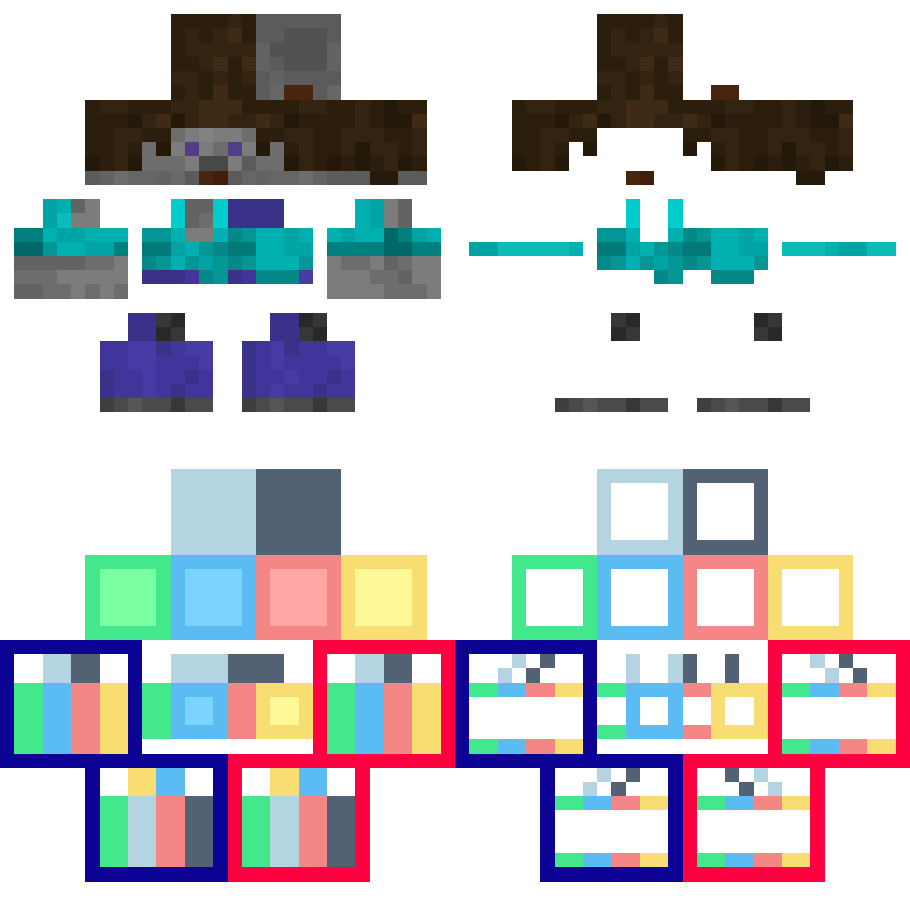
3. edited “totem_of_undying.png“ put back in “assets/minecraft/textures/item“
4. reload the resource pack using debug shortcut “[F3] + [T]“
5. done
Vollkorn
This resource pack changes your Minecraft font to an higher quality one across all menus. You can use this along with any other resource pack, just move it to the top in activated resource packs’ order.
The font requires 1.13 or higher, no modifications necessary.
> Vollkorn Typeface is “the free and healthy typeface for bread and butter use”, an open font that has support for several languages and text variants (e.g. small caps). This resource pack includes the bold variant.
I do not claim any ownership to the font and have not made any changes to it’s appearance, it is only redistributed according to the owner’s license.
Read more about the font on its homepage.
Is your Minecraft <1.17 crashing with the pack? It's not my fault, see MC-180529 for help.
VCT – Voiid Countdown Timer

# Voiid Countdown Timer
As simple as the name implies. A customizable timer datapack & plugin.


## ❓ What is VCT?
Voiid Countdown Timer (VCT) is a fully customizable timer for Minecraft.
It works in two different versions:
– 📦 **Datapack** → The Lite version of VCT, ideal for single-player worlds or realms.
– 🔌 **Plugin** → The full version of VCT, perfect for multiplayer servers with Spigot/Paper.
With both versions, you can:
– 🎨 Create visual timers with a progress bar.
– 🖌️ Customize color styles.
– 🛠️ Run custom events when the timer starts or ends.
## ✨ Features
Voiid Countdown Timer includes:
– 🎨 Custom Colors Styles
– ⚙️ Quick and easy setup
– ⏳ Progressive Time Bar
– 🎈 Custom Events
– 👥 SinglePlayer and Multiplayer Compatible
– 💻 Open Source and constantly updated
## 📋 Requirements
### 📦 Datapack
– Version: `1.15+`
### 🔌 Plugin
– Version: `1.13+`
– Server: Spigot, Paper, or Purpur (not CraftBukkit)
## 🚀 Installation
### 📦 Datapack
1. Download the latest version here
2. Place the downloaded `.zip` file in the `datapacks` folder of your world.
3. Enter the world and you will receive a message confirming the installation! 🎉
### 🔌 Plugin
1. Download the latest version here
2. Place the downloaded `.jar` file in the `plugins` folder of your server.
3. Restart the server and the plugin will be ready. ⚡
## 📖 How to use it
### 📦 Datapack
– Execute the command `/function vct:book` to receive the configuration book.
– From the book you will be able to:
– ⏰ Set time
– 🎛️ Timer controls
– 🌈 Customize style of colors
– 🗣️ Change language
– ❌ Uninstall
### 🔌 Plugin
– Configuration using commands and configuration files (`config.yml`)
– To see all available commands, use `/vct help`.
– In `config.yml`, you can customize various timer options; all of them are detailed in the official documentation.
## 📚 Plugin Documentation
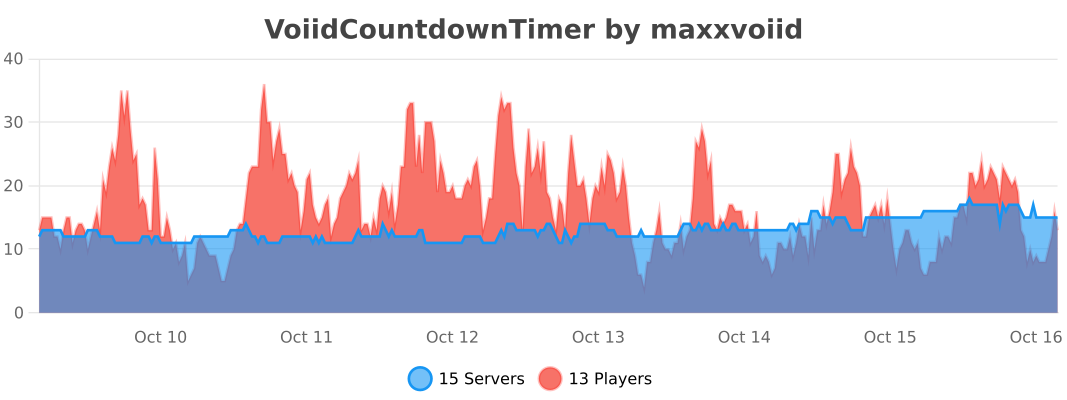
## 🔥 bStats


VoidSky
**VoidSky** is a very simple plugin that changes how the void works from falling to your death to teleporting you high in the sky to a world of your choice. There’s customization through the config or commands that make setup easy.
This plugin was inspired by how you fall in the Aether mod.
Void’s Potion Upgrade Overlay
Adds a redstone part to extended potions and a glowstone one to level 2 ones so you can easily tell what upgrade was applied to a potion without hovering over it.
VoidItemSaver
ItemVoidSaver is a lightweight utility plugin designed for servers which run plugins like Skyblock or SkyGrid. Instead of items being permanently deleted when they fall into the void, ItemVoid safely teleports them to a configurable recovery location.
# Features
1. Prevents item loss in the void
2. Works with thrown items and death drops
3. Simple command to set recovery location
4. Easy to configure
Requires only one permission: itemvoid.setloc
# Command (Usage | Description | Permission)
/itemvoid setloc – Sets the location of where items are teleported to – itemvoid.setloc
# Configuration
The plugin includes a simple configuration file allowing full control over where items spawn and when they teleport.
config.yml
“`
# Y level considered “the void”
void-y: 0
# Where items are sent when they fall into the void
recovery-location:
world: world
x: 0.0
y: 100.0
z: 0.0
yaw: 0.0
pitch: 0.0
“`
VoidItemControl
# 📦 VoidItemControl | Advanced Item Management System
**VoidItemControl** is a professional, high-performance item interaction management system designed for modern Minecraft servers. It allows administrators to have full control over which items can be placed or dropped, supporting unique quest items, currencies, and special server artifacts.
### 🛠️ Key Features
* **Action Restriction System** – Precisely block **PLACEMENT** or **DROP** actions for specific items based on their material type.
* **Metadata Sensitivity** – The system recognizes items not just by material, but also by their **Display Name** and **Lore**, allowing for unique restricted items.
* **Universal Compatibility** – Designed to run smoothly on **Spigot**, **Paper**, **Bukkit**, and **Folia** engines from versions **1.8** to **1.21.x**.
* **Void Give System** – Integrated `/vic give` command allows administrators to instantly grant players items defined in the config with all metadata preserved.
* **Bypass Permissions** – A flexible permission system allowing staff or specific player groups to ignore item restrictions.
—–
### 💻 Installation & Setup
1. Download the `.jar` file.
2. Drop the file into your server’s `/plugins` folder.
3. Restart your server to generate the configuration files.
4. Customize your restricted items list and system messages in `config.yml`.
—–
### 📜〢 Configuration Example
“`yaml
############################################################
# #
# VOIDITEMCONTROL – CREATED BY KUBA_121 #
# A professional item interaction management system #
# #
############################################################
############################################################
# #
# PERMISSIONS: #
# – voiditemcontrol.admin: Access to /vic reload/give #
# – voiditemcontrol.bypass: Immune to item restrictions #
# #
############################################################
# Should the plugin notify you about new updates?
update-check: true
# Define your restricted items here
restricted-items:
# Unique identifier for the restriction (used in /vic give)
bedrock_rule:
# Material name (Bukkit name)
material: “BEDROCK”
# Optional: Block only if the item has this specific name
display-name: “&b&lVOID BEDROCK”
# Optional: Block only if the item has this lore
lore:
– “&7This item is controlled”
– “&bby the void system.”
# Actions to block
prevent-placement: true
prevent-drop: true
# Should the player be notified when an action is blocked?
notify-player: true
magic_block:
material: “COMMAND_BLOCK”
display-name: “&d&lMAGICAL COMMAND BLOCK”
lore:
– “&7This is a block”
prevent-placement: true
prevent-drop: false
notify-player: true
messages:
# The global prefix for all system messages
prefix: “&b&lVoidControl &r&8»&7”
# Sent when a player tries to place a restricted block
placement-blocked: “%prefix% &7The &bvoid &7prevents you from placing this object.”
# Sent when a player tries to drop a restricted item
drop-blocked: “%prefix% &7This item is &bbound to your soul &7and cannot be dropped.”
# Standard system notifications
no-permission: “%prefix% You lack the &bvoid power &7to do this.”
reload-success: “%prefix% Configuration reloaded &bsuccessfully&7.”
# Structure for the /voiditemcontrol help command
help-menu:
– “&8&m——–&r &b&lVoidControl Help &8&m——–”
– “&7/vic help &8- &fDisplays this menu”
– “&7/vic give [amount] &8- &fGive item”
– “&7/vic reload &8- &fReloads the configuration”
– “&8&m—————————————-”
usage-command: “%prefix% Usage: &b/vic &8<&7help&8|&7reload&8|&7give&8>”
“`
—–
### 🛡️ Support & Community
Join our **Code Hub** for technical support, bug reports, and updates.
* **Discord:** [[Join Support Server]](https://discord.gg/jdWeSJbcKx)
* **Source:** [[GitHub]](https://github.com/kuba-121/VoidItemControl)