Dot Crosshair
# Just a dot crosshair.
Works on any 1.6.1+ verison of Minecraft.
# Just a dot crosshair.
Works on any 1.6.1+ verison of Minecraft.
# DockBridge
Velocity plugin to auto-register Docker-backed servers (e.g., Limbo) and check for updates on Modrinth.
## Features
– Auto-discovery: Containers with label `net.uebliche.dockbridge.autoregister=true` are registered as Velocity servers. Host from container name, port from label `net.uebliche.dockbridge.server_port` (fallback: first exposed port, else 25565).
– Name collisions: Default `suffix` → append short container id (`basename-abcdef`). Alternative `overwrite` → keep basename, last writer wins.
– `/dockbridge` command (permission `dockbridge.command`): Shows label filter, duplicate strategy, last scan stats, and registered servers (no sensitive data).
– Modrinth update check on proxy start; login hint for players with permission `dockbridge.update.notify`.
## Installation
1) Download the latest DockBridge release from Modrinth (jar file).
2) Place the jar into your Velocity `plugins/` folder.
3) (Optional) If Velocity runs in Docker, mount `/var/run/docker.sock` into the Velocity container so DockBridge can discover containers.
4) Start Velocity. On first start, the config file `dockbridge.conf` is created in the Velocity data folder; adjust settings and restart.
5) Permissions:
– `dockbridge.command` for `/dockbridge`
– `dockbridge.update.notify` for update hints on login
## Configuration
`dockbridge.conf` (created in the Velocity data folder on first start):
“`
docker.endpoint=unix:///var/run/docker.sock
docker.poll_interval_seconds=30
filters.proxy_group=default
docker.autoregister.label_key=net.uebliche.dockbridge.autoregister
docker.autoregister.label_value=true
docker.autoregister.name_label=net.uebliche.dockbridge.server_name
docker.autoregister.port_label=net.uebliche.dockbridge.server_port
docker.autoregister.duplicate_strategy=suffix # suffix | overwrite
“`
## Docker labels (example)
“`
net.uebliche.dockbridge.autoregister=true
net.uebliche.dockbridge.server_name=limbo
net.uebliche.dockbridge.server_port=30000
“`
## Local testing
### Gradle run
“`
./gradlew runVelocity
“`
Downloads Velocity, builds the plugin (shadowJar), and starts the proxy with the plugin loaded.
### Docker Compose (Limbo set)
“`
docker compose up –build # or: docker compose -f docker-compose.limbo.yml up –build
“`
Includes three Limbo backends (ports 30000/30001/30002) and Velocity on host port 26678. Velocity runs via `runVelocity` inside the container and mounts your sources/config.
## Commands & permissions
– `/dockbridge` (permission `dockbridge.command`): Status and registered servers.
– Update hint on login: permission `dockbridge.update.notify`.
## Troubleshooting
– No servers registered?
– Ensure your containers have the label `net.uebliche.dockbridge.autoregister=true` and a valid `net.uebliche.dockbridge.server_port`.
– Make sure Velocity can reach Docker: mount `/var/run/docker.sock` (or set `docker.endpoint` to a reachable TCP endpoint).
– Check `/dockbridge` output for last scan count and registered servers.
– Port mismatch or forwarding errors?
– Verify the Limbo (or other backend) port matches the label and the server properties.
– For Velocity forwarding, ensure forwarding secret/mode match on both ends.
– Duplicate names?
– Default strategy is `suffix`. Switch to `overwrite` via `docker.autoregister.duplicate_strategy` if you want last-writer-wins.
## Build
“`
./gradlew build
“`
Produces the shaded jar at `build/libs/DockBridge-
## Contributing
– Fork & PRs welcome. Keep code comments minimal but purposeful.
– Default Java 21, Gradle Kotlin DSL, Velocity API 3.4.0-SNAPSHOT for run task; 3.1.1 for compileOnly/annotationProcessor.
– Run `./gradlew build` before submitting; Docker-based tests are optional.
# 🎨 Dithering3D – Surface-Stable Fractal Dithering




—
## 🖼️ Screenshots
—
## ✨ A Revolutionary Visual Experience
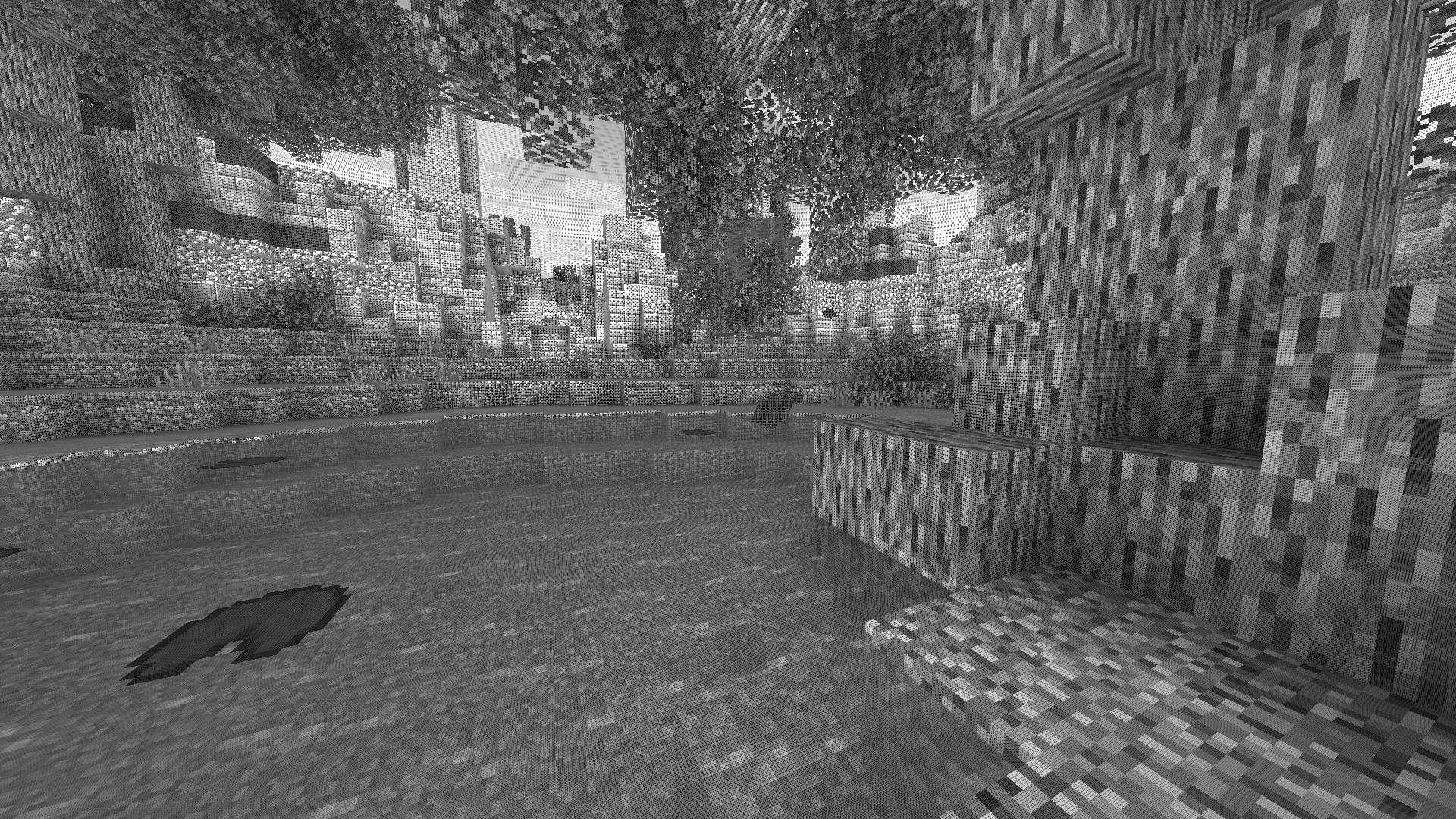
Transform your Minecraft world with **Surface-Stable Fractal Dithering** — a groundbreaking rendering technique where dither dots **stick to 3D surfaces** instead of the screen, creating a unique manga/comic book aesthetic that feels alive.
> 🎬 *Based on the innovative work by [Rune Skovbo Johansen](https://github.com/runevision/Dither3D)* — **[Watch the explainer video](https://youtu.be/HPqGaIMVuLs)**
—
## 🖼️ What Makes This Shader Special?
### 📌 **Surface-Stable Dots**
Unlike traditional dithering where patterns “swim” on screen, Dither3D anchors each dot to the actual 3D surface. Walk around blocks, and the dots stay perfectly attached!
### 🔄 **Fractal Scaling Magic**
As you move closer or farther from surfaces, dots dynamically split or merge to maintain **constant screen-space density**. It’s mesmerizing to watch!
### 🎨 **Three Color Modes**
| Mode | Description |
|:—-:|:————|
| **Grayscale** | Classic black & white dithering — clean, minimalist, timeless |
| **RGB** | Each color channel gets its own dot layer — vibrant and unique |
| **CMYK Halftone** | Authentic newspaper/comic print simulation with rotated dot angles |
—
## ⚡ Features at a Glance
| Feature | Description |
|:——–|:————|
| 🎯 **Precision Dithering** | SVD-based frequency analysis for mathematically perfect dot placement |
| 🌀 **Anti-Stretch Technology** | Anisotropic smoothing keeps dots circular even on oblique surfaces |
| 🎥 **Camera Stable** | Radial compensation prevents dot swimming during camera rotation |
| ⚙️ **Highly Configurable** | 10+ parameters to fine-tune your perfect look |
| 🚀 **Performance Optimized** | Efficient 3D texture sampling for smooth gameplay |
| 📱 **Universal Compatibility** | Works with OptiFine AND Iris on virtually any Minecraft version |
—
## 🎛️ Customization Options
Fine-tune every aspect of the dithering effect with our intuitive in-game sliders:
### 🔧 Dither Settings
| Parameter | Range | Effect |
|———–|:—–:|——–|
| **Dot Scale** | 2 – 10 | Control overall dot size (exponential) |
| **Size Variability** | 0 – 1 | 0 = Bayer pattern, 1 = Halftone style |
| **Dot Contrast** | 0 – 2 | Sharpen or soften dot edges |
| **Stretch Smooth** | 0 – 2 | Combat stretched dots on angled surfaces |
### 💡 Input Controls
| Parameter | Range | Effect |
|———–|:—–:|——–|
| **Exposure** | 0 – 5 | Brightness multiplier |
| **Offset** | -1 to 1 | Brightness offset adjustment |
### 🎮 Additional Options
– **Inverse Dots** — Flip dot colors for a negative effect
– **Radial Compensation** — Stabilize during camera rotation *(recommended!)*
– **Quantize Layers** — Prevent dot morphing for a more “classic” look
– **Debug Mode** — Visualize fractal layers for development
—
## 📦 Installation
### For OptiFine Users
1. Download and extract the shader pack
2. Place the `shaders` folder in `.minecraft/shaderpacks/`
3. Launch Minecraft → Options → Video Settings → Shaders
4. Select **Dithering3D** and enjoy!
### For Iris Users (Fabric/Quilt)
1. Install Iris Shaders mod (1.2.0+)
2. Download and extract the shader pack
3. Place the `shaders` folder in `.minecraft/shaderpacks/`
4. Press **O** in-game to open shader menu
5. Select **Dithering3D**
> 💡 **Tip:** Press `F3 + T` to quickly reload shaders after making changes!
—
## 🎨 Preset Profiles
Choose from pre-configured profiles for instant results:
| Profile | Color Mode | Dot Scale | Best For |
|:——-:|:———-:|:———:|:———|
| 🟢 **LOW** | Grayscale | 4.0 | Performance, retro feel |
| 🟡 **MEDIUM** | Grayscale | 5.0 | Balanced experience |
| 🟠 **HIGH** | RGB | 5.0 | Colorful, artistic |
| 🔴 **ULTRA** | CMYK | 6.0 | Maximum visual impact |
—
## 🌟 Perfect For
| 📸 Screenshot enthusiasts | Create unique, artistic captures |
|:————————:|:——————————–|
| 🎬 **Content creators** | Stand out with a distinctive visual style |
| 🎮 **Retro lovers** | Relive the charm of 1-bit graphics |
| 🎨 **Artists** | Manga, comic book, and newspaper aesthetics |
| 🧪 **Tech enthusiasts** | Experience cutting-edge rendering techniques |
—
## ❓ FAQ
**Q: Does this work with other shaders?**
> Dithering3D is a standalone shader pack. Combining with other shaders may cause conflicts.
**Q: Why do some surfaces look different?**
> The sky and some special effects may appear different as surface-stable dithering reveals flat geometry.
**Q: Performance impact?**
> Moderate. The 3D texture sampling is optimized but more demanding than vanilla rendering. Most GPUs handle it smoothly.
**Q: Can I use this in my modpack?**
> Yes! Under MPL-2.0 license. Credit appreciated.
—
## 🔬 The Science Behind It
Dithering3D uses **Singular Value Decomposition (SVD)** to analyze UV coordinate derivatives in real-time, determining the exact frequency and direction of surface textures. This mathematical approach enables:
“`
✅ Perfectly uniform dot density regardless of distance
✅ Seamless fractal transitions between detail levels
✅ Circular dots even on extremely angled surfaces
✅ Rotation-stable patterns that don’t “swim”
“`
—
## 📚 Credits & Resources
| Resource | Link |
|:———|:—–|
| 🔗 **Original Algorithm** | [Rune Skovbo Johansen](https://github.com/runevision/Dither3D) |
| 🎥 **Technique Explanation** | [YouTube Video](https://youtu.be/HPqGaIMVuLs) |
| 💬 **Technical Discussion** | [FAQ Thread](https://github.com/runevision/Dither3D/discussions/12) |
—
## 📄 License
“`
Mozilla Public License 2.0 (MPL-2.0)
“`
—
🎨 Transform your world. Experience Dithering3D. 🎨
If you enjoy this shader, consider leaving a ⭐ and sharing this shader page !
Deep Ocean Panorama replaces the Minecraft title-screen panorama with a high-quality, performance-conscious cube-mapped scene.
### Additional Information
Type:
`RELEASE`
Version:
`1.0.0`
MC Version:
`1.13.x, 1.14.x, 1.15.x, 1.16.x, 1.17.x, 1.18.x, 1.19.x, 1.20.x, 1.21.x`
# Dark Transparent GUI
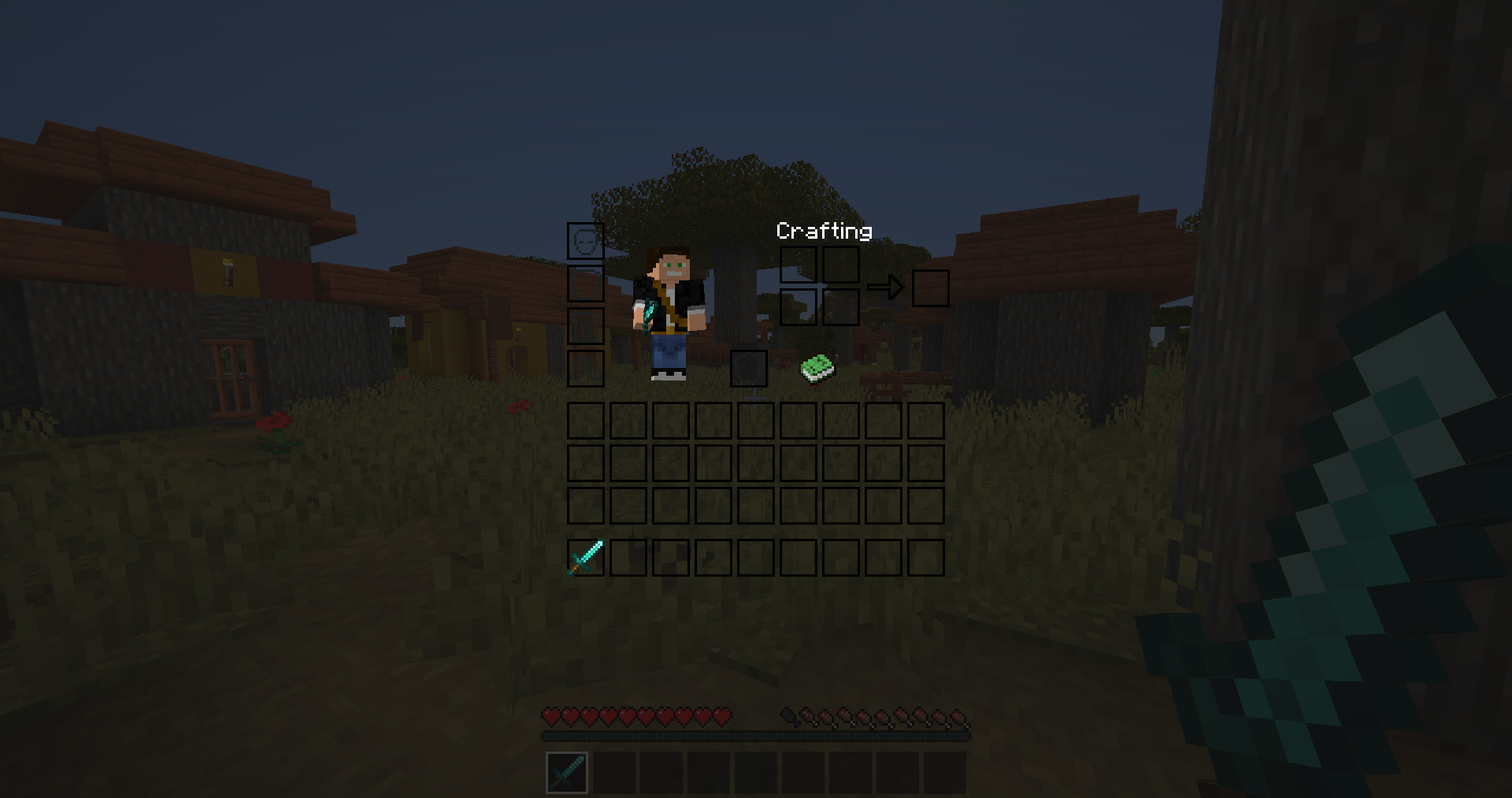
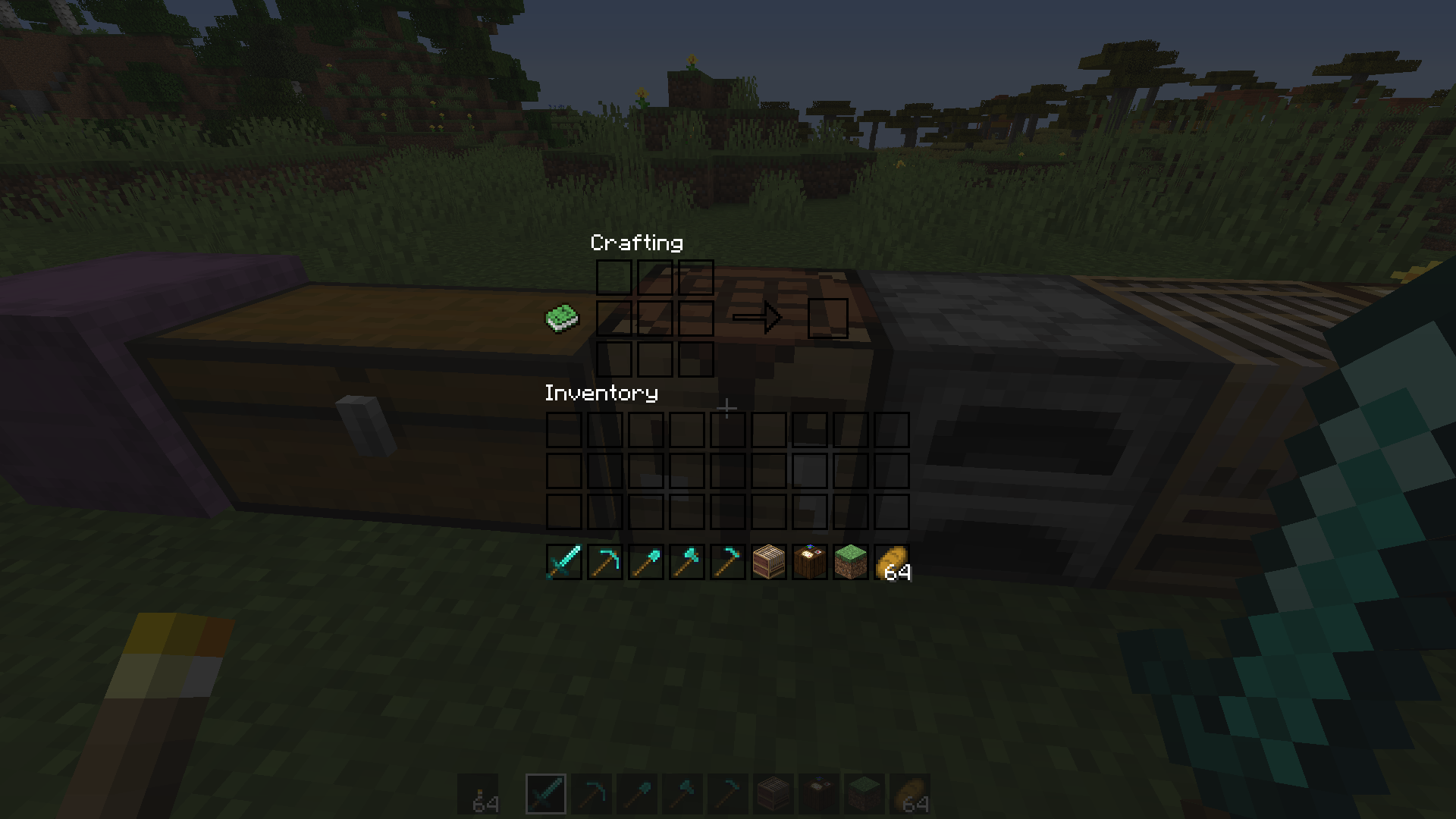
This texture pack turns all graphical user interface (GUIs and HUDs) clear and minimalistic with only black borders, offering an uninterrupted view of gameplay.
## Screenshots
[More Screenshots](https://modrinth.com/resourcepack/dark-transparent-gui/gallery)
Optional:
– Install [Respackopts](https://modrinth.com/mod/respackopts) (v2.3.0+) for config menu (DTG v3.0+) – you can choose different background menu image and disable some textures
– Install [OptiFine](https://optifine.net/) for black background on Mojang logo loading screen
The resurcepack is also available on [CurseForge](https://www.curseforge.com/minecraft/texture-packs/dark-transparent-gui)
# Dark Red Shield
This resource pack replaces the default shield with a custom 3D model.
The design uses a dark red theme.
No OptiFine required. Vanilla compatible.
## More Shield Themes
– [Black](https://modrinth.com/project/noire-shield)
– [Blue](https://modrinth.com/project/blue-shield)
– [Creeper](https://modrinth.com/project/creeper-shield)
– [Mirror](https://modrinth.com/project/mirror-shield)
– [Navy Blue](https://modrinth.com/project/navy-blue-shield)
– [Rabbit](https://modrinth.com/project/rabbit-shield)
– [Red](https://modrinth.com/project/red-shield)
# A font from an alternate timeline!
This font comes from a modified version of Minecraft that’s part of an **unfiction web series** centered around footage of the closed “16.05” branch from the Alpha stage of Minecraft’s development. **It’s basically the classic Minecraft font, but with rounded edges and some subtle differences.** I really like it, so I thought I’d go ahead and port it to modern versions!

Thank you to [the AlphaVer team](https://www.youtube.com/@MinecraftAlphaVersions) for making such a compelling story, and sparking my interest in modding Minecraft. If anyone involved would like for me to take this down, please don’t hesitate to contact me.
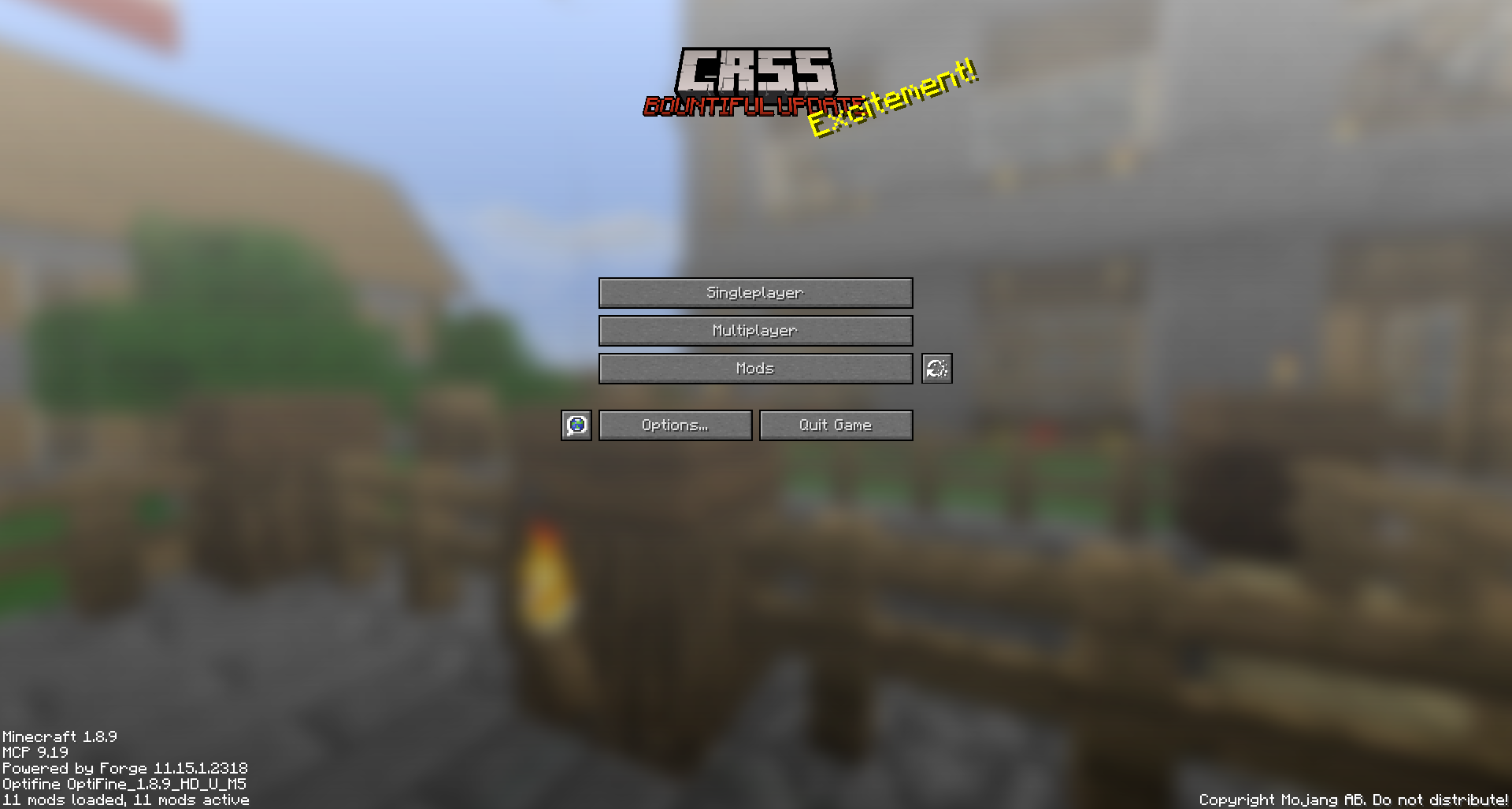
# CRSS Resource Pack
This was the resource pack used in CRSS’ modpack, which has a panorama of the spawn area in [ROP](https://crss.cc/nation/psf).
## CRSS Resource Pack is no longer being updated
I don’t really see a reason to keep updating this resource pack as the modpack is also discontinued.
# Creeper Shield
This resource pack replaces the default shield with a custom 3D model.
The design uses a creeper theme.
No OptiFine required. Vanilla compatible.
## More Shield Themes
– [Black](https://modrinth.com/project/noire-shield)
– [Blue](https://modrinth.com/project/blue-shield)
– [Dark Red](https://modrinth.com/project/dark-red-shield)
– [Mirror](https://modrinth.com/project/mirror-shield)
– [Navy Blue](https://modrinth.com/project/navy-blue-shield)
– [Rabbit](https://modrinth.com/project/rabbit-shield)
– [Red](https://modrinth.com/project/red-shield)
### What does this do?
This resource pack retextures all ores to resemble the face of a creeper.
### What versions does this support?
This resource pack works for versions 1.13 (1.13-pre3) and up.

