WorldEditSelectionVisualizer
# WorldEditSelectionVisualizer
## Overview
WorldEditSelectionVisualizer (WESV) is essentially the famous [WorldEditCUI mod](http://www.minecraftforum.net/forums/mapping-and-modding/minecraft-mods/1292886-worldeditcui-1-11-2-version-available) in the form of a bukkit plugin, which means that players **don’t need to install anything on their client**.
## Features
* Spawns particles around WorldEdit selections so players can see them
* No client mod required
* Supports cuboid, sphere, ellipsoid, cylinder, polygon and convex selections
* Can display the current clipboard (use `/wesv toggle clipboard` to enable)
* Use `/wesv toggle` to toggle the visualizer
* Option to only show the selection when holding the selection item
* Configurable particle effect and view distance
* Prevent players from spawning too many particles when selecting huge regions
* Highly customizable for the performance of your server
* Supports both [WorldEdit](https://enginehub.org/worldedit) and [FastAsyncWorldEdit](https://www.spigotmc.org/resources/fastasyncworldedit.13932/)
* Compatible with all Minecraft versions starting with 1.7.10
* [PlaceholderAPI](https://placeholderapi.com/) support (you can use the placeholders `%wesv_toggled_selection%`, `%wesv_toggled_clipboard%`, `%wesv_volume_selection%` and `%wesv_volume_clipboard%`)
* Support for RGB color codes in messages on Minecraft 1.16 and higher, with the `&#rrggbb` format
* [Folia](https://github.com/PaperMC/Folia) support for better performance
## Screenshots
| Cuboid selection | Cylinder selection | Convex selection |
|——————————————————|——————————————————–|——————————————————|
|  |  |  |
[More screenshots](https://modrinth.com/plugin/wesv/gallery)
## Usage
### Commands
* `/wesv toggle` and `/wesv toggle clipboard`: toggle the selection/clipboard visualization
* `/wesv lock`: lock/unlock the origin of the clipboard visualization to your current location
* `/wesv lock tp`: teleport to the lock location (when clipboard visualization lock is enabled)
* `/wesv reload`: reload the configuration
### Permissions
* `wesv.toggle`: use the toggle command
* `wesv.use`: allows the visualizer to be turned on
* `wesv.reload`: allows the configuration of this plugin to be reloaded from the config.yml file
### Configuration
This plugin can be very resource expensive, try adjusting the configuration if you experience lag.
Configuration File
“`yaml
# WorldEditSelectionVisualizer configuration
# When enabled, if a new update is available it will display a message in the console on enable
check-updates: true
# You can edit the plugin messages here
messages:
no-permissions: “&cYou don’t have the permission to use this command.”
config-reloaded: “&aThe config was reloaded”
selection-too-large: “&6The visualizer only works with selections up to a size of %blocks% blocks.”
visualizer-enabled: “&6Your visualizer has been &eenabled.”
visualizer-disabled: “&6Your visualizer has been &cdisabled.”
visualizer-clipboard-enabled: “&6Your clipboard visualizer has been &eenabled&6.”
visualizer-clipboard-disabled: “&6Your clipboard visualizer has been &cdisabled&6.”
# When enabled, if a player disables the selection visualization and leaves the server, when he will
# come back, the selection visualization will be still disabled until he activates it again with /wesv toggle.
save-toggle: true
# Delay in ticks when the WorldEdit selection and clipboard are updated.
# This doesn’t affect particles spawning and players performances.
# The server impact is medium
selection-update-interval: 20
# When enabled, the particles are displayed only when holding the WorldEdit selection wand item (by default a wooden axe)
# You can change the WorldEdit wand item in the WorldEdit configuration
need-we-wand: false
# When enabled, top and bottom particles will be displayed for cuboid selections
cuboid-top-bottom: false
# Settings for visualization
# ‘selection’: The WorldEdit current selection
# ‘clipboard’: The WorldEdit clipboard (when you use //copy or //schem load )
# ‘primary’: The primary selection points (the region borders)
# ‘secondary’: The secondary selection points
# ‘fade-delay’: The number of seconds before the particles disappears. You can set it to 0 to remove the fade delay
# ‘max-selection-size’ : The maximum size of a selection to be display. A big value (> 1000000) can cause important lags
# ‘points-distance’: The distance between each particle. The higher this number is, fewer particles will be spawn
# ‘lines-gap’ (secondary selection only): The distance between each particles lines on cuboid and polygon. The higher this number is, fewer particles will be spawn. Set it to 0 to remove cuboid lines
# ‘update-interval’: The delay in ticks between particles spawn. This impact the players performances
# ‘view-distance’: The maximum distance in which players can see the particles. On 1.7.10 the particle distance is limited to 16 (Minecraft limitation)
# ‘particles’: The particles type and data. The data can be a color for redstone like in the form ‘r,g,b’ or a Material for block crack/item crack
# The particle types are available on https://hub.spigotmc.org/javadocs/spigot/org/bukkit/Particle.html
visualization:
selection:
fade-delay: 0
max-selection-size: 50000
primary:
points-distance: 1.0
update-interval: 12
view-distance: 64
particles:
type: “FLAME”
data: “”
secondary:
points-distance: 3.0
lines-gap: 5.0
update-interval: 18
view-distance: 32
particles:
type: “REDSTONE”
data: “RED”
clipboard:
fade-delay: 0
max-selection-size: 50000
primary:
points-distance: 1.0
update-interval: 12
view-distance: 64
particles:
type: “FLAME”
data: “”
secondary:
points-distance: 3.0
lines-gap: 5.0
update-interval: 18
view-distance: 32
particles:
type: “REDSTONE”
data: “BLUE”
“`
### Video
## Bugs & suggestions
Please don’t post bugs or suggestions in the review section, but please open an [issue on GitHub](https://github.com/MrMicky-FR/WorldEditSelectionVisualizer/issues).
If you just have a question, you can ask it on my [Discord server](https://discord.gg/q9uwabt).
And if you like this plugin you can leave a review or star the [GitHub project](https://github.com/MrMicky-FR/WorldEditSelectionVisualizer).
## Original Author
WorldEditSelectionVisualizer (WESV) has been originally created by [rojet601](https://dev.bukkit.org/members/rojet601). Since this user’s gone inactive since November 2015 and the plug-in contains some errors, [ZathrusWriter](https://www.spigotmc.org/members/zathruswriter.137995/) decided to release an 1.8. forward-compatible version with those errors fixed.
WERM
# WERM – Web Engine for Realm Monetization

The official Minecraft plugin for WERM – the future of game monetization. Global wallets, instant delivery, and powerful analytics—all with the lowest fees in the industry.
Website •
Dashboard •
Discord
—
## 🆕 What’s New in v1.0.4
### ⚡ Performance & Reliability Release
This release adds batch delivery confirmation and async file I/O to improve performance and reliability during high-load scenarios.
| Feature | Description |
|———|————-|
| 📦 **Batch Delivery Confirmation** | Up to 10 confirmations per API call for 90% reduction in network overhead |
| 🔄 **Async File I/O** | Non-blocking queue persistence with debounced writes prevents main thread blocking |
| 🛑 **Graceful Shutdown** | Proper executor termination ensures no data loss during server stops |
| ⚡ **Faster Bulk Deliveries** | Improved performance when multiple items need to be delivered at once |
**Technical Details:**
– Batch size: 10 confirmations per API call
– I/O thread: Daemon thread named `WERM-ConfirmationQueue-IO`
– Shutdown timeout: 5 seconds for graceful termination
– Debounced writes: 2-second delay to coalesce multiple queue changes
### Previous Releases:
v1.0.3 – Performance Optimization
| Feature | Description |
|———|————-|
| 🔗 **HTTP Connection Pooling** | New OkHttp-based connection manager with 5-connection pool and 5-minute keep-alive |
| 📉 **Smart Polling** | Dynamic polling with exponential backoff—reduces API calls by up to 75% during idle periods |
| ⚡ **Faster Response Times** | Keep-alive connections eliminate connection setup overhead |
| 🛠️ **Improved Resource Usage** | Connection reuse reduces memory footprint and CPU usage |
**Technical Details:**
– Connection pool: 5 max idle connections, 5-minute keep-alive
– Timeouts: 10s connect, 30s read, 10s write
– Backoff: Up to 4x base interval after consecutive empty responses
– Instant reset when player joins or delivery found
v1.0.2 – bStats Update
– **🔧 bStats Update** – Updated bStats plugin ID for proper metrics tracking
– All security hardening from v1.0.1 remains in place
v1.0.1 – Security Features
| Feature | Description |
|———|————-|
| 🛡️ **Command Validation** | Blocks dangerous commands (op, deop, ban, stop) from being executed via deliveries |
| 🔐 **TLS 1.2+ Enforcement** | All API connections now require modern TLS protocols |
| 📝 **Debug Redaction** | Sensitive data (tokens, UUIDs) automatically redacted in debug logs |
| 💾 **Confirmation Queue** | Pending delivery confirmations survive server restarts |
| ✅ **Input Sanitization** | Player names and UUIDs sanitized before command execution |
| 🌐 **Endpoint Validation** | HTTPS and domain whitelist enforcement for API endpoints |
| ⏱️ **Rate Limiting** | Verification attempts limited to prevent brute-force abuse |
| 🔄 **Auto-Discovery** | Project ID now auto-discovered from API (no hardcoding) |
—
## 🌐 What is WERM?

WERM is a modern, all-in-one monetization platform built specifically for Minecraft servers. Think of it as a **Tebex alternative**—but with better features, lower fees, and a focus on the modern server owner experience.
### Platform Features
| Feature | Description |
|———|————-|
| 🔍 **Server Discovery** | Get your server listed on our public directory where players can find, vote for, and join servers |
| 💰 **Global Wallet System** | Players have one wallet across all WERM-powered servers (1 credit = 1 USD cent) |
| 🛒 **Built-in Storefront** | Beautiful, customizable store pages with categories, sales, gifting, and wishlists |
| ⚡ **Instant Delivery** | Hybrid delivery system using webhooks + polling ensures items are delivered fast |
| 🗳️ **Voting System** | Integrated voting with Votifier/NuVotifier support to boost your server’s ranking |
| 💬 **Discord Integration** | Display your Discord member count on your server listing |
| 🌍 **Multi-Currency Support** | Accept payments globally with automatic currency conversion |
| 💸 **Lowest Fees** | Starting at just 3% platform fee (vs 5%+ competitors) |
### Why Choose WERM?
– **Free Tier Available** – Start monetizing with no monthly fees (up to $500/month revenue)
– **Modern Dashboard** – Clean, intuitive interface for managing your server and products
– **Real-time Analytics** – Track sales, player engagement, and revenue trends
– **Cross-Server Economy** – Players can use their wallet credits on any WERM server
– **Open & Transparent** – No hidden fees, no surprise charges
—
## ✨ Plugin Features

### 🔗 Account Verification
Players can securely link their Minecraft account to WERM using a simple 6-character verification code. Generate a code on the website, enter it in-game, and you’re connected!
### 📦 Automatic Delivery System
Automatically delivers purchased products to players using configurable console commands. Supports both immediate delivery and requiring players to be online.
### 💓 Server Heartbeat
Keeps your server status updated on the WERM dashboard with real-time player counts and server version information.
### 🎮 Player Join Detection
Automatically checks for and delivers pending purchases when players join the server.
### ⚡ Async Processing
All API calls are processed asynchronously to ensure zero impact on your server’s performance.
### 🛡️ Secure Authentication
Uses secure plugin token authentication to ensure only your server can manage deliveries.
### 📝 Fully Customizable
All messages are fully configurable with Minecraft color code support (`&` codes).
—
## 📜 Commands

| Command | Description | Permission |
|———|————-|————|
| `/werm verify ` | Link your Minecraft account with WERM | `werm.verify` (default: true) |
| `/werm help` | Display help information | None |
| `/werm status` | View plugin connection status | `werm.admin` (default: op) |
| `/werm reload` | Reload plugin configuration | `werm.admin` (default: op) |
**Aliases:** `/w`
---
## 🎯 Permissions
| Permission | Description | Default |
|------------|-------------|---------|
| `werm.verify` | Allows players to verify their Minecraft account | `true` |
| `werm.admin` | Admin commands (reload, status) | `op` |
---
## ⚙️ Configuration
```yaml
# WERM Plugin Configuration
# Generate your plugin token at https://wermpay.com/dashboard/servers
plugin-token: "werm_XXXXXXXX_XXXXXXXXXXXXXXXXXXXXXXXXXXXXXXXX"
# Enable debug logging for troubleshooting
debug: false
# Heartbeat Settings
heartbeat:
interval: 60 # Send status every X seconds
send-player-count: true # Include player count in heartbeat
# Delivery Settings
delivery:
interval: 15 # Check for deliveries every X seconds
# Customizable messages (supports & color codes)
messages:
prefix: "&8[&6WERM&8] &r"
verify-success: "&aYour Minecraft account has been linked successfully!"
verify-failed: "&cVerification failed: &7%reason%"
delivery-received: "&aYou received: &e{product} &ax{quantity}"
# ... and more customizable messages
```
---
## 📦 Delivery Placeholders
When configuring your product commands in the WERM dashboard, you can use these placeholders:
| Placeholder | Description |
|-------------|-------------|
| `{player}` or `{player_name}` | Player's username |
| `{uuid}` or `{player_uuid}` | Player's UUID |
| `{quantity}` | Quantity purchased |
| `{product_id}` | Product ID |
| `{product_name}` | Product name |
| `{order_id}` | Order ID |
| `{delivery_id}` | Delivery ID |
**Example Commands:**
```
give {player} diamond 64
lp user {player} parent add vip
eco give {player} 1000
```
---
## 🚀 Installation

1. **Download** the WERM plugin JAR file
2. **Place** it in your server's `plugins` folder
3. **Start/restart** your server
4. **Generate** a plugin token in your [WERM Dashboard](https://wermpay.com/dashboard/servers)
5. **Edit** `plugins/WERM/config.yml` and add your plugin token
6. **Run** `/werm reload` or restart your server
7. ✅ Your server will now appear as **online** in the WERM dashboard!
---
## 📋 Requirements
- **Server Software:** Spigot, Paper, Purpur, or any Spigot-based fork
- **Minecraft Version:** 1.13+
- **Java Version:** 8+
- **WERM Account:** [Create one here](https://wermpay.com)
---
## 🔧 How It Works
1. **Setup:** Configure the plugin with your unique plugin token from the WERM dashboard
2. **Heartbeat:** The plugin sends periodic heartbeats to keep your server status updated
3. **Purchases:** When a customer makes a purchase on your WERM store, a delivery is queued
4. **Delivery:** The plugin polls for pending deliveries and executes the configured commands
5. **Confirmation:** Successful deliveries are confirmed and marked as completed
---
## 💬 Support
Need help? Join our [Discord Server](http://discord.gg/ujFRXksUBE) for support and community discussions.
---
## 📄 License
This plugin is provided by WERM for use with the WERM monetization platform.
---
WERM - The Future of Game Monetization
© 2026 WERM | Made with ❤️ for the Minecraft community
WEM – White Entities Mask
Turns all entities completely white, allowing for overlaying screenshots later and easily masking out entities.
WelcomeTitle
# 📺 WelcomeTitle
**Elevate Your Server’s First Impression**
WelcomeTitle is a professional-grade Minecraft plugin designed for Spigot, Paper, and Purpur servers. It empowers server administrators to create cinematic join sequences that instantly captivate players. By combining high-definition titles, informative subtitles, and immersive spatial audio, you can ensure your server’s brand identity is established the second a player enters the world.
—
## ✨ Professional Features
### 🎬 Cinematic Join Titles
Create a visual impact with bold titles and subtitles.
– **Custom Branding**: Direct the player’s attention with beautiful, centered text.
– **Rich Color Support**: Full compatibility with **HEX Color Codes** (e.g., `&#FFAA00`) and legacy MiniMessage/Bukkit codes.
– **Precise Timings**: fine-tune the experience with tick-perfect control over **Fade-in**, **Stay**, and **Fade-out** durations.
### 🔊 Immersive Spatial Audio
Sound is half of the experience. WelcomeTitle lets you trigger any sound from the Minecraft sound registry.
– **Atmospheric Entry**: Use gentle plings for a modern feel or grand fanfares for a survival spawn.
– **Audio Control**: Set custom **Volume** and **Pitch** to refine how sounds are perceived by the player.
### 💬 Dynamic Chat Messaging
Take control of your server’s chat logs.
– **Personalized Greetings**: Replace generic system messages with vibrant, formatted join/leave announcements.
– **Clean Configuration**: Toggle custom messages on or off independently of the visual title system.
### 📋 Rich Placeholder System
Inject real-time information to make every welcome feel unique:
– `%player%`: Displays the player’s unique display name.
– `%servername%`: Shows the current world or server name.
– `%version%`: Displays the exact Minecraft server version.
– `%random%`: Pulls a random line from your `text.yml` for dynamic variety.
—
## 🎮 Pro Use Cases
– **Server Branding**: Use consistent colors and sound cues to welcome players to your unique community.
– **Orientation**: Instantly inform players which lobby or game mode they have joined.
– **Event Highlights**: Update your join title to announce seasonal events, new game releases, or community milestones.
– **Premium Feel**: Give your server a “Triple-A” polished feel that encourages player retention.
—
## ⚙️ Compatibility & Performance
– **Optimized Core**: Built for minimal resource usage, ensuring zero impact on server performance (MSPT).
– **Wide Compatibility**: Supported on **Bukkit, Spigot, Paper, and Purpur**.
– **Modern Support**: Native support for **Minecraft 1.13 through 1.21+**.
– **Java Requirements**: Optimized for **Java 11, 17, and 21**.
—
## 🛠️ Quick Setup
1. Drop the `welcometitle-{version}.jar` into your `plugins` folder.
2. Restart your server to generate the default configuration.
3. Edit `config.yml` to customize your titles, sounds, and messages.
4. Use `/welcometitle reload` to apply changes instantly without a restart!
—
_Developed with ❤️ for professional Minecraft Communities._
Welcomer
# Welcomer
Welcomer is a configerable plugin that sends a welcome message to players that join your server!
## Setup
Setup is as simple as downloading the plugin and putting it into your `plugins` folder.
## Configuration
After installing the plugin and running the server go to `plugins/Welcomer` in your server. In there you’ll see a file called `config.yml`
“`
# The message that will be sent to players when they join.
# Use %player% to insert the player’s name.
welcome-message: “u00a7bWelcome to Hunger Games, %player%!”
“`
simply edit `welcome-message:` to a message of your liking!
Welcome Mat
### A friendly way to roll out the welcome mat for your players!
**WelcomeMat** is a lightweight, powerful plugin that enhances your server’s welcome experience. It provides customizable join/leave messages, titles, animations, and sounds to make players feel at home on every login.
## 🎉 What’s New!
### Version 1.3.1 (Latest)
– 🍃 **Folia-Ready Animations**: Visual effects now use the latest Folia entity schedulers (1.21.8+) with automatic signature detection, clamped delays, and no unsafe Bukkit fallbacks.
– 🧠 **Smarter Diagnostics**: If future Folia builds introduce new scheduler signatures, they’re logged automatically so you can keep running the same jar everywhere.
– 🧾 **Auto Version Metadata**: `plugin.yml` now inherits the Gradle version, guaranteeing accurate version strings inside the jar.
– 🌌 **Skyward & Copper Packs**: Two new message packs inspired by the 1.21 “Chase the Skies” and “Copper Age” updates, selectable right from the GUI.
### Version 1.2.x Highlights
– **Message Packs System**: Multiple themed collections (default, friendly, professional, funny, RPG) with GUI switching.
– **Multi-Language Support**: English and Spanish out of the box with easy CLI/GUI selection.
– **Improved Configuration Display**: Human-friendly display names and cleaner GUI organization.
—
## 🔄 Compatibility
– Fully tested on **Bukkit/Spigot, Paper, Purpur, and Folia** from **Minecraft 1.13 through 1.21.10**.
– Region-aware scheduler paths keep Folia’s watchdog happy while the same jar continues to run flawlessly on single-threaded servers.
—
## Features
– 🎨 **Customizable Messages**
– Rich join/leave text with color codes and placeholders
– Player-specific greetings and per-pack collections
– Display-name helpers and multi-language support (EN/ES)
– 📜 **Welcome Titles**
– Configurable title/subtitle timing and colors
– 🔊 **Interactive Sounds**
– Join/leave sounds with per-player toggles, volume, and pitch
– ✨ **Animation System**
– Fire Spiral, Green Spike Firework, and more join effects
– Folia-safe schedulers and per-player animation preferences
– ⚙️ **Extensive Configuration**
– Feature toggles, admin logging, instant `/wm reload`
– GUI-driven settings for packs, languages, sounds, and more
## 📋 Commands
– `/welcomemat` or `/wm` – Base command
– `/wm sound` – Toggle join/leave sounds for yourself
– `/wm reload` – Reload the plugin configuration
– `/wm help` – Show help message
– `/wm animation` – Toggle join animations for yourself
– `/wm language` – Change the plugin language
– `/wm pack` – Change the message pack
– `/wm config` – Modify plugin configuration
## 🔑 Permissions
– `welcomemat.reload` – Allow reloading the configuration (default: op)
– `welcomemat.bypass` – Bypass welcome messages (default: false)
– `welcomemat.sound.toggle` – Allow toggling sounds (default: true)
– `welcomemat.animation.toggle` – Allow toggling animations (default: true)
– `welcomemat.admin.log` – Receive admin log messages (default: op)
– `welcomemat.language` – Allow changing the plugin language (default: op)
– `welcomemat.pack` – Allow changing message packs (default: op)
– `welcomemat.config` – Allow modifying plugin configuration (default: op)
## 📦 Installation
1. Download the latest version of WelcomeMat
2. Place the `.jar` file in your server’s `plugins` folder
3. Restart your server
4. Configure the plugin in `plugins/WelcomeMat/config.yml`
## ⚙️ Configuration
“`yaml
features:
join-message: true
leave-message: true
join-title: true
join-sound: true
leave-sound: true
other-players-sounds: true
join-animation: true
admin-logging: true
messages:
join: “&e%player% &ajust joined the server!”
leave: “&e%player% &chas left the server!”
player-specific:
example-player:
join: “&6Welcome back, special player %player%!”
leave: “&eGoodbye, special player %player%!”
titles:
join:
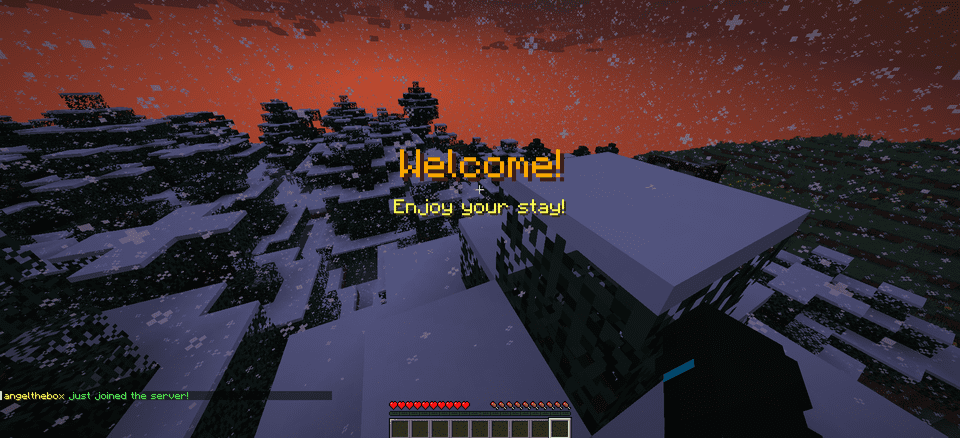
title: “&6Welcome!”
subtitle: “&eEnjoy your stay!”
sounds:
join:
sound: ENTITY_PLAYER_LEVELUP
volume: 1.0
pitch: 1.0
leave:
sound: ENTITY_IRON_GOLEM_DEATH
volume: 0.5
pitch: 1.0
animations:
green-spike:
enabled: true
duration: 40
height: 2.0
# Message Packs
message-packs:
# Currently selected pack (default, friendly, professional, funny, rpg)
selected: “default”
# Default pack (original messages)
default:
join:
– “&e%player% &ajust joined the server!”
leave:
– “&e%player% &chas left the server!”
# Friendly pack
friendly:
join:
– “&d✨ &e%player% &ahas joined the party! &d✨”
– “&aWelcome back, &e%player%&a! We missed you! &d❤”
leave:
– “&e%player% &7had to go… &cSee you soon! &d💕”
– “&7Until next time, &e%player%&7! &d👋”
“`
## 🌐 Language Support
WelcomeMat now supports multiple languages:
“`yaml
# Available languages: english, spanish
selected-language: “english”
languages:
english:
name: “English”
messages:
reload:
success: “&aConfiguration reloaded successfully!”
sound:
enabled: “&aJoin/leave sounds enabled!”
disabled: “&cJoin/leave sounds disabled!”
spanish:
name: “Español”
messages:
reload:
success: “&a¡Configuración recargada con éxito!”
sound:
enabled: “&a¡Sonidos de entrada/salida activados!”
disabled: “&c¡Sonidos de entrada/salida desactivados!”
“`
## 🎵 Available Sounds
### Modern (1.13+)
– `ENTITY_PLAYER_LEVELUP`
– `ENTITY_IRON_GOLEM_DEATH`
– `BLOCK_NOTE_BLOCK_PLING`
– `BLOCK_NOTE_BLOCK_CHIME`
– `BLOCK_NOTE_BLOCK_BELL`
– And more…
### Legacy (1.8-1.12) (Under development)
– `LEVEL_UP`
– `IRONGOLEM_DEATH`
– `NOTE_PLING`
– `NOTE_PIANO`
– And more…
## 💡 Example Configurations
### Professional Server with Message Packs
“`yaml
# Use the professional message pack
message-packs:
selected: “professional”
# Set the language to English
selected-language: “english”
sounds:
join:
sound: BLOCK_NOTE_BLOCK_PLING
volume: 0.8
pitch: 1.5
animations:
green-spike:
enabled: true
duration: 30
height: 1.5
“`
### VIP Server with Custom Messages
“`yaml
messages:
join: “&d✨ &e%player% &ahas joined the party! &d✨”
leave: “&e%player% &7had to go… &cSee you soon!”
player-specific:
VIP_Player:
join: “&6⚡ The legendary &e%player% &6has arrived! ⚡”
leave: “&6The legend &e%player% &6must go… &7Until next time!”
sounds:
join:
sound: ENTITY_PLAYER_LEVELUP
volume: 1.0
pitch: 1.2
animations:
green-spike:
enabled: true
duration: 50
height: 2.5
“`
## 📝 Support
If you encounter any issues or have suggestions:
– Create an issue on our [GitHub repository](https://github.com/coffeeisle/welcome-mat)
– Join our [Discord server](https://discord.gg/cJ4uP2xF7h)
—
Made with ❤️ by angeldev0
[Download](https://modrinth.com/plugin/welcome-mat) • [Source](https://github.com/coffeeisle/welcome-mat) • [Discord](https://discord.gg/cJ4uP2xF7h)
Welcome++
# 🎉 Welcome++ – The ULTIMATE Minecraft Plugin!
**Transform your server with 50+ incredible features in one lightweight plugin!**
Welcome++ is the most comprehensive server enhancement plugin available, packed with everything you need to create an amazing multiplayer experience. From custom welcome messages to advanced weapons, vehicles, economy systems, and mini-games – this plugin has it all!
## ✨ **Key Features**
### 🎯 **Core Features**
– **Custom Welcome & Leave Messages** – Personalized greetings with player placeholders
– **Fake Names** – Let players change their display names and nametags
– **Player Heads** – Get any player’s head as an item
– **Color Chat Support** – Use color codes in chat messages
### ⚔️ **Advanced Weapons System**
– **Laser Gun** – High-tech energy weapon with particle effects
– **Rocket Launcher** – Explosive projectile weapon
– **Sniper Rifle** – Long-range precision weapon
– **Shotgun** – Close-range spread damage
– All weapons have cooldowns and custom damage values
### 🚗 **Vehicle System**
– **Planes** – Flyable aircraft with upgrade system (3 levels)
– **Cars** – Ground vehicles for fast travel
– **Speed Boats** – Enhanced water transportation
– **Helicopters** – Advanced flying vehicles
– Upgradeable plane system with speed boosts
### 💰 **Complete Economy System**
– **Money Management** – Full player economy with balances
– **Player-to-Player Payments** – Send money to other players
– **Shop System** – Buy items with in-game currency
– **Money Display in Chat** – Show player balance in chat
– Configurable starting money and limits
### 🌍 **Teleportation & Navigation**
– **Home System** – Set and teleport to your home
– **Warp Points** – Create public teleportation points
– **Random Teleport** – Explore new areas instantly
– **Teleport Cooldowns** – Configurable with bypass permissions
– Safe teleportation with world boundaries
### 🐾 **Cosmetics & Pets**
– **Pet System** – Spawn loyal companions (wolves, cats, parrots, rabbits)
– **Particle Trails** – Fire, heart, star, and rainbow effects
– **Hat System** – Wear any item as a hat
– **Auto-following pets** with smart teleportation
### 🎮 **Mini-Games**
– **Parkour System** – Timed challenges with checkpoints
– **Racing** – Competitive gameplay modes
– **Leaderboards** – Track best times and scores
– **Rewards** – Earn money for completing challenges
### 🛠️ **Utility Commands**
– **Flight Toggle** – Creative-style flying
– **God Mode** – Invincibility toggle
– **Heal & Feed** – Instant health and hunger restoration
– **Speed Control** – Adjustable walk speed (1-10)
– **Admin Tools** – Comprehensive server management
### 🎆 **Fun Commands**
– **Fireworks** – Launch colorful explosions
– **Lightning Strikes** – Call down thunder
– **Explosions** – Create safe TNT-like effects
– **Particle Effects** – Visual enhancements everywhere
## 🔧 **Technical Details**
– **Minecraft Versions:** 1.13 – 1.21.x (Full compatibility)
– **Server Software:** Paper, Bukkit, Purpur, Spigot
– **Dependencies:** None required (ProtocolLib optional)
– **Performance:** Lightweight and optimized
– **Configuration:** Fully customizable via config.yml
## 📋 **Quick Setup**
1. **Download** WelcomePlusPlus-2.1.0.jar
2. **Upload** to your server’s `plugins/` folder
3. **Restart** your server
4. **Configure** messages: `/welcome “Welcome {player}!”`
5. **Enjoy** all 50+ features instantly!
## 🎯 **Command Examples**
“`
/welcome “🎉 Welcome to our server, {player}! 🎉”
/leave “👋 {player} left the server!”
/gun – Get a laser gun
/plane – Spawn a flyable plane
/sethome – Set your home location
/money – Check your balance
/pet wolf – Get a wolf companion
/trail fire – Enable fire particle trail
/fly – Toggle flight mode
/parkour start – Begin parkour challenge
“`
## 🔐 **Permissions System**
Comprehensive permission system with sensible defaults:
– **Players** get basic features (teleportation, pets, trails, parkour)
– **OPs** get advanced features (weapons, vehicles, admin commands)
– **Fully customizable** – adjust any permission as needed
## ⚙️ **Configuration**
Extensive configuration options:
– Custom welcome/leave messages
– Economy settings (starting money, limits)
– Weapon damage and cooldowns
– Teleportation cooldowns and distances
– Pet behavior settings
– Particle trail customization
– Shop prices and items
## 🚀 **Why Choose Welcome++?**
✅ **All-in-One Solution** – Replace 10+ plugins with one
✅ **Lightweight** – Optimized performance, minimal server impact
✅ **Regular Updates** – Active development and bug fixes
✅ **Easy Setup** – Works out of the box, no complex configuration
✅ **Extensive Features** – 50+ commands and features
✅ **Wide Compatibility** – Supports 1.13-1.21.x
✅ **Professional Quality** – Clean code, proper error handling
## 📊 **Perfect For**
– **Survival Servers** – Enhanced gameplay with economy and teleportation
– **Creative Servers** – Fun tools and cosmetic features
– **Mini-game Servers** – Built-in parkour and racing systems
– **PvP Servers** – Advanced weapons and combat features
– **Community Servers** – Social features and player interaction tools
## 🔄 **Version 2.1.0 Features**
This massive update includes:
– Complete economy system with money management
– Advanced weapon arsenal (4 different weapons)
– Full vehicle system with upgrades
– Comprehensive teleportation suite
– Pet and cosmetic systems
– Mini-game framework
– 30+ new commands
– Enhanced configuration options
## 📞 **Support**
Need help? Check out:
– In-game `/help` command for all features
– Comprehensive permission system
– Detailed configuration file
– Active community support
—
**Download Welcome++ today and transform your Minecraft server into the ultimate multiplayer experience!**
*Compatible with Minecraft 1.13 – 1.21.x | Works on Paper, Bukkit, Purpur, Spigot*
Weird and powerful weapons – Texture pack
**This ressource pack add custom textures on the items of the datapack [Weird and powerful weapons](https://modrinth.com/project/Jr3nq9JV)**
## Totem of protection

Weezer Albums
Replaces some music discs with songs from each Weezer album. The resource pack is client-side only. All music belongs to Weezer. WARNING: SOME SONGS ARE 18+ | New ideas? Email me at [email protected].
WeeklyLife
Weekly Life is lightweight plugin that gives players exactly one life per week. If a player dies they are automatically placed into spectator mode until their life resets.