Wither Fix
When the Datapack notices a Wither being trapped in Bedrock, it teleports the Wither to the nearest player
When the Datapack notices a Wither being trapped in Bedrock, it teleports the Wither to the nearest player
Withdrawer is a way for players to withdraw their money, exp, hp or others onto physical items, so they can redeem them, trade them, sell them or store them as they wish.
## Features
* Withdraw your money, exp or hp onto items!
* Use the API to implement a new item that fits your needs!
* Bulk-Redeeming while pressing down the Shift Key.
* Messages and Sounds are all configurable, such as plugin prefix.
* The items are all configurable.

Still playing older versions, but don’t want to exploit raid farms?
No problem!
Just drop this datapack into your world and build a witch farm to get insane amounts of redstone. Supports versions 1.13 – 1.20.6, in 1.21+ this is a Vanilla mechanic.
With this pack enabled, witches will drop 6 redstone on average, with 7.5 average if you have Looting III.

🎃 Witch Hat 🧙♀️✨
Get into the Halloween spirit with this magical texture pack! 👻
When you rename a carved pumpkin to “witch_hat”, it transforms into a stylish witch hat — perfect for spooky adventures and mystical builds! 🕯️💀
🧡 Features:
-Turn pumpkins into custom witch hats
-Great for Halloween decorations or themed outfits 🕸️
-Requires OptiFine to work properly 🧩

# Wispy Shaders V1.4
A performance-optimized shader pack initially based on Mellow Shaders and outperforms many other so claimed ‘potato’ shaders. Works on all major versions
## Credits
* **Original Shader**: [Mellow Shaders](https://www.curseforge.com/minecraft/shaders/mellow) by [TheCMK](https://www.curseforge.com/members/thecmk/)
* **Performance Optimizations**: [l_aggy](https://www.curseforge.com/members/l_aggy/projects)
## Features
(All information and statistics is based on V1.3)
* **Ultra-optimized** for integrated graphics (iGPUs)
* **40%+** improvement on Balanced compared to MakeUp-Ultrafast with all effects off
* **Color grading** and biome‑specific lighting for all dimensions.
* **Cinematic post‑processing**: bloom, sharpening, tonemapping, TAA, motion blur, film grain, vignette.
## To-do
1. More benchmarking
2. Adding features (Can’t really optimize more)
3. Bugfix some features
## Performance Profiles
* iGPU (8 Chunks) tested on i5-4570 (HD4600) on CachyOS
* dGPU (24 Chunks) tested on R9 8940HX (5060 Laptop=4060 desktop) on Windows 11
* Choose a profile in shader settings that matches your hardware:
| Profile |FPS (iGPU) |FPS (dGPU) |Description |
| —————– |———- |———- |—————————- |
| ULTRA_PERFORMANCE |190+ |440+ |Maximum FPS, minimal effects |
| PERFORMANCE |190+ |?? |Good balance for iGPU |
| BALANCED |180+ |?? |A mix of features |
| QUALITY |120+ |?? |More effects |
| ULTRA_QUALITY |120+ |380+ |Lowest FPS, All features |
## Installation
1. Install [Iris Shaders](https://irisshaders.dev/) or OptiFine
2. Download Wispy Shaders
3. Place the ZIP file in `.minecraft/shaderpacks/`
4. Select Wispy in Video Settings → Shaders
5. Choose a performance profile
## Optimizations
* ~~Disabled~~ Deleted expensive composite passes by default
* Fast gamma correction
* Simplified post-processing
* Optimized every composite pass and fog,lighting,sky,water,taa,bloom e.t.c
* Reduced shader complexity
* Too many to count now mainly faster math less calls,lookups and samples check [source](https://github.com/Epxlsol/Wispy-Shader) for more
[](https://ko-fi.com/M4M01S7TSM)
## Links
– Original Mellow: https://modrinth.com/shader/mellow
– Report Issues: https://github.com/epxlsol/wispy-shader/issues
—
**Note**: This is a performance-focused fork. For the original experience with all features, use [Mellow Shaders](https://modrinth.com/shader/mellow).
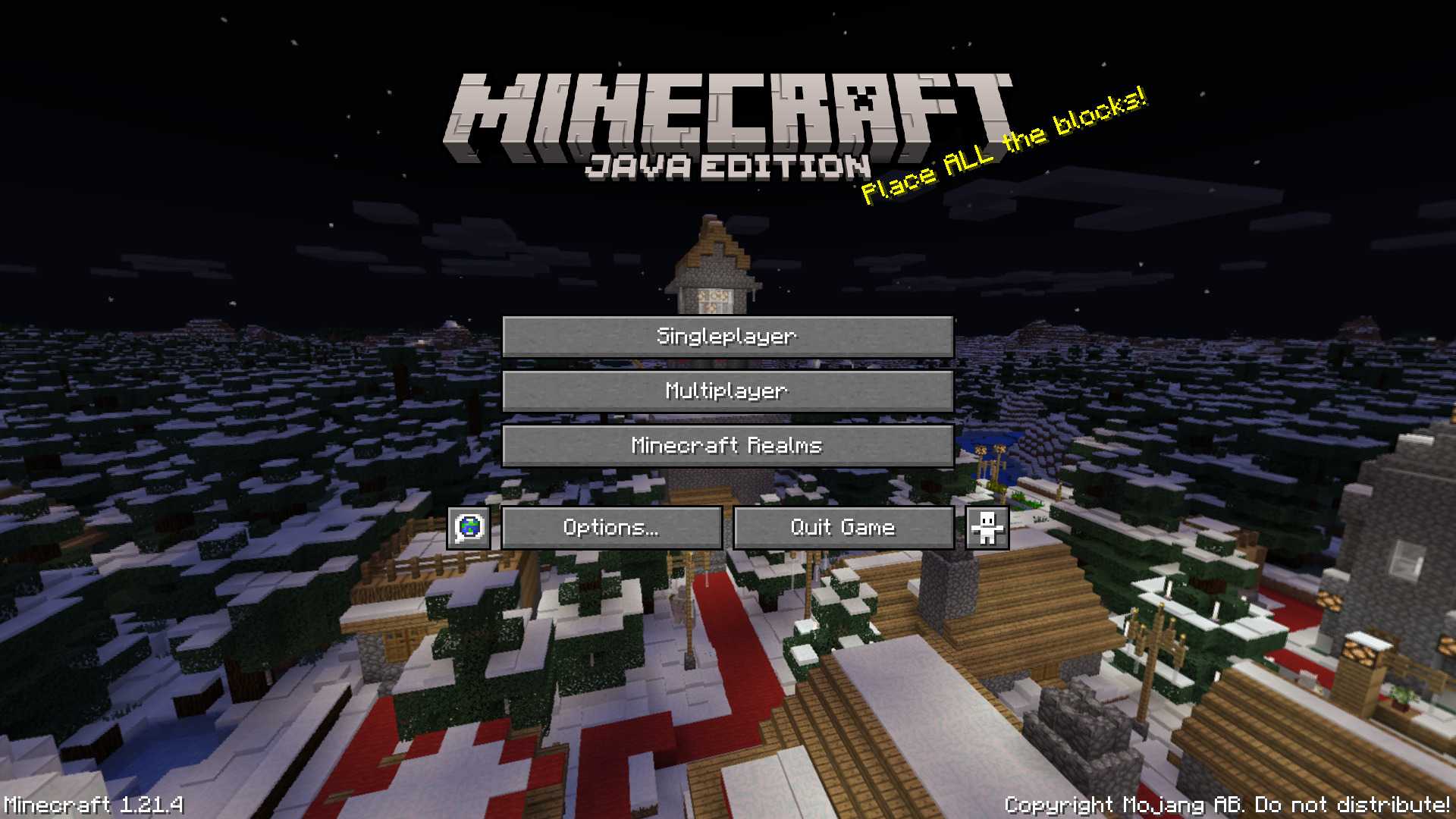
# Winter 2017 Panorama
This panorama was used in Bedrock Edition during the 2017 winter holiday season (1.2.7 to 1.2.8)
### Features:
Adds the Panorama from the Bedrock 2017 winter holiday season [(Gallery)](https://modrinth.com/resourcepack/winter-2017-panorama/gallery)
### Credits
The images were taken from the Minecraft Wiki [(Check it out!)](https://minecraft.wiki/w/Historical_panoramas#Holiday_2017)

[
](https://github.com/Elytrium)
# WingAuth
WingAuth is a modern Velocity authentication plugin for offline/hybrid networks.
## How it works
It runs login/register protection before players reach backend servers, using a Limbo-based auth flow.
Designed for server admins who want strong account protection with flexible setup.
## Key features
– Velocity-only architecture (runs the login on a virtual world)
– Session handling and brute-force protection
– Premium/hybrid and Floodgate-compatible scenarios (Bedrock support)
– Configurable messages and behavior
– Database-backed account storage (legacy-compatible migration path)
Make tamed wolves use the wild wolf texture. Download the “No Collars” version to remove collars on tamed dogs as well!
Supports all Minecraft versions from Beta 1.4 (when wolves were added!)
Includes all wolf variants from 1.20.5.
Compatible with Fresh Animations!
Must be loaded _above_ Fresh Animations resource pack.
**Note:** For versions before 1.6.1, this pack must be placed in the texturepacks folder, rather than the resourcepacks folder.
**Another Note:** In 1.8, the default colour of collars was changed to orange. This was reverted in 1.9. This is _not_ accounted for in this resource pack.
# WildRTP
– Algorithms CIRCLE & SQUARE
– Adjust teleport settings
– Multi Worlds Support
– Cooldown
– MoveTimer
– CustomRTP
– AutoRTP
### Please let me know if you have any issues
## Commands
– /wild – Teleport to a random location
Aliases: [/rtp /randomtp /randomteleport /wildrtp]
– /wild reload – Reloads the config
– /wild info – Display plugin information
– /wild updates – Checks for plugin updates
– /wild help – Display help message
– /customrtp
Note **<>** are **required arguments**, **[]** are only **optional arguments** and can be omitted.
%player% is a placeholder for the player that executed the command (only in /customrtp).
## Permissions
– wildrtp.rtp – Allows you to run /wild – Default
– wildrtp.reload – Allows you to run /wild reload
– wildrtp.updates – Allows you to run /wild updates
– wildrtp.custom – Allows you to run /customrtp
– wildrtp.cooldown.bypass – Bypass the cooldown, if enabled
– wildrtp.movetimer.bypass – Bypass the movetimer, if enabled
– wildrtp.list.bypass – Bypass the list of disallowed worlds
– wildrtp.list.bypass.world_name – Bypass a specific world from the list of disallowed worlds
(blacklist or whitelist, whichever is enabled)
– wildrtp.help – Allows you to run /wild help
– wildrtp.admin – Grants all WildRTP permissions
## Config
“`
# __ ___ _ _ _____ _______ _____
# / (_) | | | __ __ __| __
# / / / _| | __| | |__) | | | | |__) |
# / / / | | |/ _` | _ / | | | ___/
# / / | | | (_| | | | | | |
# / / |_|_|__,_|_| _ |_| |_|
#
# by Joni – Thank you for using this plugin
# Language setting
# Available: [en, de, ru]
# You can add/edit languages in the plugin folder (/lang)
lang: “en”
# Global RTP settings
# This section defines the main settings for random teleportation
# Custom settings per world can be defined in the custom section
# If ‘something: null’ is present, and you want to use that feature, remove null and add your settings
global:
# Min & max teleportation range
min: 1000
max: 2500
# Shape of the teleportation area [CIRCLE/SQUARE]
shape: CIRCLE
# Teleportation center
center:
player: false # If true, teleportation is centered on the player
x: 0 # X coordinate of center
z: 0 # Z coordinate of center
# Cooldown settings
cooldown:
enabled: true # Enable cooldown between RTP uses
time: 5 # Cooldown time in seconds
# Move timer settings
movetimer:
enabled: true # If true, no movement allowed before teleportation
time: 5 # Time in seconds
sound-canceled: ENTITY_VILLAGER_NO # Set to ‘false’ to disable.
# Message settings
messages:
start: false # Show message when RTP starts
end: true # Show message when RTP ends
# Title messages displayed when RTP starts/ends
titles:
start:
enabled: false
fadeIn: 0.5
stay: 2
fadeOut: 0.5
end:
enabled: true
fadeIn: 0.5
stay: 2
fadeOut: 0.5
# Sound settings
sound:
start: false # Play a sound when teleport starts. Set to ‘false’ to disable.
end: ENTITY_PLAYER_LEVELUP # Use any valid Bukkit Sound enum, e.g., ENTITY_PLAYER_LEVELUP.
# Blocks to avoid when teleporting
blocks:
– LAVA
– WATER
– AIR
# Y-limits for teleporting
y-min: null
y-max: null
# Biomes to avoid when teleporting
# Example: biomes: [OCEAN, DESERT, PLAINS, FOREST, TAIGA, MUSHROOM_FIELDS, JUNGLE]
# Set to ‘null’ to disable.
biomes: null
# Teleport to another world
# If set to a valid world name, players will be teleported to that world instead of their current one.
# Set to ‘false’ to teleport within the same world.
tp-in-other-world: false
# RTP generation strategy used to determine how safe locations are found.
# This controls the algorithm used to pick valid teleport positions.
#
# Available strategies:
# AUTO – Automatically chooses the best strategy based on world environment.
# HIGHEST_BLOCK – Uses the highest non-air block. Extremely fast. Perfect for normal Overworld and The End.
# BOTTOM_UP – Scans from minY upwards for a solid block with space above it. Essential for the Nether or Cave worlds.
# TOP_DOWN – Scans from maxY downward.
#
# Recommended: AUTO (handles most worlds correctly without configuration)
strategy: AUTO
# Auto-RTP settings
# Should the plugin teleport players automatically?
auto-rtp:
onfirstjoin: false # When a player first joins the server
onjoin: false # Every time a player joins the server
ondeath: false # After a player dies
# List mode: use ‘blacklist’ or ‘whitelist’
list: blacklist
# Set to ‘null’ to disable the blacklist.
blacklist: null # Add blocked worlds here
# – my_blacklisted_world
# Set to ‘null’ to disable the whitelist.
whitelist: null # Add allowed worlds here
# – my_whitelisted_world
# Uncomment and modify to customize settings for specific worlds
# YOU CAN remove any fields you don’t want to customize,
# BUT missing values will be set to the global values
# (e.g. max in global is 1000 and if not set here it will be 1000 as well)
# An example is shown below:
custom: null
# custom_world_name:
# min: 1000
# max: 2500
# shape: CIRCLE
# center:
# player: false
# x: 0
# z: 0
# cooldown:
# enabled: true
# time: 30
# movetimer:
# enabled: true
# time: 5
# sound-canceled: ENTITY_VILLAGER_NO
# messages:
# start: false
# end: true
# titles:
# start:
# enabled: false
# fadeIn: 0.5
# stay: 2
# fadeOut: 0.5
# end:
# enabled: true
# fadeIn: 0.5
# stay: 2
# fadeOut: 0.5
# sound:
# start: false
# end: ENTITY_PLAYER_LEVELUP
# blocks:
# – LAVA
# – WATER
# – AIR
# y-min: null
# y-max: null
# biomes: null
# tp-in-other-world: false
# strategy: AUTO
# Maximum attempts to find a safe location before failing
max-tries: 25
# If you want to change the prefix, you can do it here
prefix: “[&2WildRTP&f] &6”
# Hook settings for third-party plugins
hooks:
worldguard:
enabled: false # When enabled, checks if a location is inside any protected region and skips it if so
protectionstones:
enabled: false # When enabled, checks if a location is inside any protected region and skips it if so
towny:
enabled: false # When enabled, checks if a location is claimed and skips it if so
residence:
enabled: false # When enabled, checks if a location is claimed and skips it if so
# Check for updates
check-updates: true
# Notify admins about plugin updates when they join
notify-updates-on-join: true
# If I am allowed to collect anonymous data about your server and this plugin. So I can see how many servers are using this plugin 🙂
# Learn more https://bstats.org/
# And you can see the data as well here https://bstats.org/plugin/bukkit/WildRTP/17799
metrics: true
# Advanced settings
force-close-inventories: true
per-world-cooldowns: false
# Debug mode
debug: false
# Config version (do not change)
config-version: 10
“`
## Placeholders
To view both internal **placeholders** and **external placeholders**, please visit the [wiki](https://github.com/LasaJoniHD/WildRTP/wiki/Placeholders).
## Integrations
– WorldGuard
– ProtectionStones
– Towny
– Residence
## Performance
Using async chunk loading on paper servers should have no impact on the performance besides the time it takes to load a chunk async. You can use [Chunky](https://modrinth.com/plugin/chunky) to pre-generate chunks, which makes the teleporting maybe a bit faster.
## Need help?
If you need any help, feel free to join my discord support server, or if you have found a bug, you can also use the github issue system. If you have a feature request, you can also make a request via discord or github.
## bStats
[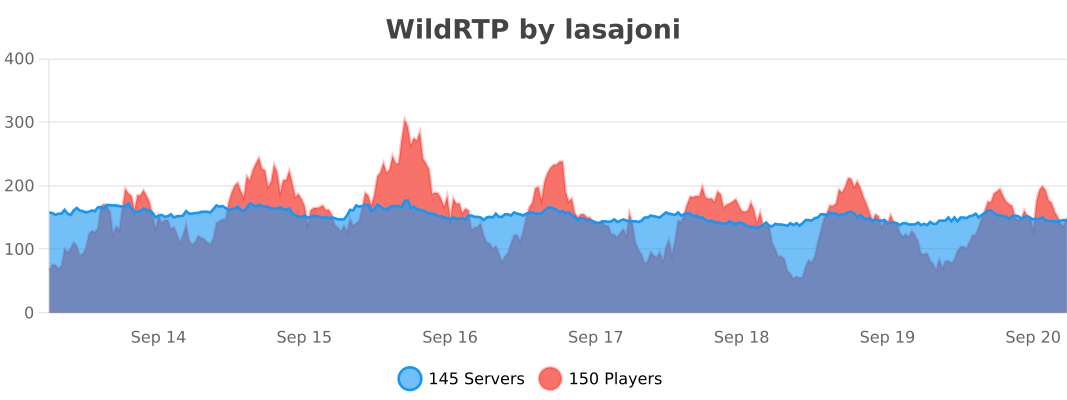](https://bstats.org/plugin/bukkit/WildRTP/17799)
A simple change that changes glowstone to just a white texture. Good for things like fluorescent lights or chroma key.
Type “Subsetg4ming” in your search bar to find everything by me!