WorldResourcepacks
######  Made in Germany with love (and [beer](https://s.moep.tv/beer))
######

_Did you ever want to set a different server resource pack for your each of your worlds? Or switch your current resource pack with just one command? Then you came to the right place!
_
This plugin lets you set one Server Resource Pack for each of your worlds or event your whole server! It also allows you to specify packs that should be usable on multiple worlds!
It is also compatible with my [Bungee Resourcepacks](https://modrinth.com/plugin/bungeeresourcepacks) and [Velocity Resourcepacks](https://modrinth.com/plugin/velocityresourcepacks) plugin and will not make the player redownload a resource pack after server switching if it got already applied by Bungee/Velocity Resourcepacks on another server!
**Please check if there are newer [development builds](https://ci.minebench.de/job/resourcepacksplugins/) before reporting issues!**
> Please note that the Vanilla Minecraft client only applies server resource packs that are smaller than **250MiB**! (50MiB before 1.15, 100MiB before in 1.18)
>
> Also certain new **SSL certificates** for URLs (like Let’s Encrypt) do not work with the old Java version shipped with Minecraft (Java 1.8.0_51, [a bug report](https://bugs.mojang.com/browse/mc-143768) regarding that has been filed with Mojang) so you’ll have to either use a different certificate or a non encrypted download (not recommended!)
**Note:** This plugin does not work with older Minecraft versions above 1.8 that do not support server resourcepacks!
### **Features**
* Set different server resourcepacks per world or whole server
* Match world names with regex!
* Commands to configure the plugin ingame
* Language system with messages depending on the locale of the client
* Simplified compoment/json message formatting syntax ([MineDown](https://wiki.phoenix616.dev/library:minedown:syntax))
* Configurable delay before sending the pack to a player
* Remembers which pack a user has currently applied and doesn’t resend on world switch
* Let the user set the pack himself. The pack can be re-applied on each login and will be used for resets on servers that don’t have the pack
* Inform the user which pack the server send them if it was done automatically
* [ResourcePackSendEvent](https://docs.phoenix616.dev/resourcepacksplugins/de/themoep/resourcepacksplugin/bukkit/events/resourcepacksendevent.html) and [ResourcePackSelectEvent](https://docs.phoenix616.dev/resourcepacksplugins/de/themoep/resourcepacksplugin/bukkit/events/resourcepackselectevent.html) for developers to react on the sending or selecting of a pack in their own plugins
* Send the correct pack format depending on the client’s version (requires ViaVersion or ProtocolSupport) with pack-variants either via the version, protocol number or pack format id.
* Automatically generates the sha1 hashes!
* Compatible with [AuthMe Reloaded](https://www.spigotmc.org/resources/authme-reloaded.6269/), [OpenLogin](https://www.spigotmc.org/resources/openlogin-1-7x-1-19x.57272/), NLogin, [LibrePremium](https://www.spigotmc.org/resources/librepremium-proxy-authorization-plugin-automatic-login-2fa.101040/), JPremium.
Do you need it to be compatible with more plugins? [Contact me](https://github.com/phoenix616/resourcepacksplugins/issues/new)!
### **Statistics**
* [McStats.org](http://metrics.griefcraft.com/plugin/worldresourcepacks/)
* [bStats.org](https://bstats.org/plugin/bungeecord/worldresourcepacks)
### **Commands**
To execute every /wrp command you need the `worldresourcepacks.command` permission!
**/wrp reload [resend]** – `worldresourcepacks.command.reload` – Reloads the config file; resends the packs to every online player if the 2nd argument is “resend”
**/wrp version** – `worldresourcepacks.command.version` – Shows the version of this plugin
**/wrp generatehashes** – `worldresourcepacks.command.generatehashes` – Manually generate the resource pack hashes
**/wrp addpack ** – `worldresourcepacks.command.addpack` – Add a new pack
**/wrp pack ** – `worldresourcepacks.command.pack` – View and edit an existing pack
**/wrp listassignments** – `worldresourcepacks.command.listassignments` – View all world assignments
**/wrp deleteassignment ** – `worldresourcepacks.command.deleteassignment` – Delete a world assignment
**/wrp assignment ** – `worldresourcepacks.command.assignment` – View and edit a world assignment
**/wrp globalassignment** – `worldresourcepacks.command.globalassignment` – View and edit the global assignment
**/resetpack [] []** – `worldresourcepacks.command.resetpack` – Reset the pack (of a player) to the empty one or the stored pack. (Like what would happen if you joined a server without any pack) If is set to false the stored pack of the player is reset too.
To execute every /usepack command you need the `worldresourcepacks.command.usepack` permission!
To execute it for other players you need `worldresourcepacks.command.usepack.others`!
To have access to a specific pack a player needs the `worldresourcepacks.pack.` permission or the one defined for the pack in it’s config section!
**/usepack** – List all packs available to you
**/usepack []** – Send a specific pack to yourself or another player
### **Config**
The config.yml allows you to configure everything you can do set up via the commands and a lot more, take a look at the commands in the [file on GitHub](https://github.com/phoenix616/resourcepacksplugins/blob/master/bukkit/src/main/resources/config.yml) for an explanation on all options! (Some might only be available on the [latest development builds](https://ci.minebench.de/job/ResourcepacksPlugins/)!
### **About the client freeze**
> **This should no longer be an issue starting with 1.20.3!**
When a server resource pack is send to a client it will shortly freeze after the download is complete. (Same as manually applying a local pack) This happens because the client has to reload all resources, check which resources overlap and do some other calculation and manipulation with them. (Like stitching all the textures together to a single image like they were in the first texture pack format) It’s not a download issue as the client will locally cache the pack files and not re-download them if their hash didn’t change.
How long this takes generally depends on the PC’s performance and the size of the textures (HD packs take longer) that are used in all resource packs that the player has applied. (So even if the server resource pack doesn’t contain any HD textures or textures at all the client will still completely reload all locally applied resource packs) This is something that has to be fixed in the client by Mojang for example by only reloading resources that changed.
**1.14, 1.15 and 1.16 have some major improvements there and 1.20.3 basically fixed it all so suggest players to use these if they have issues with your server resourcepack!**
### **Dev-Resources**
The source is available on [GitHub](https://github.com/phoenix616/resourcepacksplugins) and licensed under the [GPLv3](https://github.com/phoenix616/resourcepacksplugins/blob/master/license).
Development builds can be found on the Minebench.de [Jenkins](http://ci.minebench.de/job/resourcepacksplugins/).
There are also some [Javadocs](http://docs.phoenix616.dev/resourcepacksplugins/) if you intend to develop plugins based on mine.
### **Support**
You can receive support in the [resource discussion thread on SpigotMC](https://www.spigotmc.org/threads/world-resourcepacks.125581/), the [GitHub issue tracker](https://github.com/phoenix616/resourcepacksplugins/issues), [my IRC channel](https://irc.phoenix616.dev/), or [my Discord](https://phoenix616.dev/discord).
### **Metrics**
This resource includes [bstats.org](https://bstats.org/) metrics. If you don’t want bstats to collect info on your server then you can disable it in the *bStats/config.yml* file. The license the used bStats-lite class is under can be found [here](https://github.com/btobastian/bstats-metrics/blob/master/license).
#####
*This resource is distributed without any warranty or liability by the author. Read more about it [here](https://github.com/Phoenix616/ResourcepacksPlugins/blob/master/LICENSE#L589-L610)*
WorldLock

* [**BukkitOfUtils**](https://modrinth.com/plugin/bukkitofutils)

Please join the Streamline Hub Discord in order to get updates and for me to fully assist you with bugs, questions, or suggestions.
Discord: [**click here**](https://dsc.gg/streamline)

Block players from entering or teleporting to specified worlds — All configurable with commands.

This offers a very simple configuration and setup all while remaining very light-weight.

1. Download and install BukkitOfUtils. Found here: [BukkitOfUtils](https://modrinth.com/plugin/bukkitofutils)
2. Download the correct version of this plugin for you server version.
3. Place in your `plugins` folder.
4. Stop server.
5. Start server.
6. Use to your liking.

## How to block a world
1. Install plugin. (Shown above.)
2. `/manageworlds add ` – where `` is replaced with the world you want to block.
## Notes
Players with operator or the `*` permission can access all worlds by default.
To disable these players from bypassing the world block, set their permission for `worldlock.bypass.*` to false.
## Functions
* Block specified worlds from:
* Teleportation.
* Moving to.
* Portal-Warping to.
* List blocked worlds.
* Bypassable with permissions.
* Permission: `worldlock.bypass.`

## Commands
* `/manageworlds`
* `/manageworlds add `
* Adds a world to the blocked worlds.
* `/manageworlds remove `
* Removes a world from the blocked worlds.
* `/manageworlds list`
* Lists all worlds in the blocked worlds list.
WorldListTrashCan
## Allows players to customize their home world’s trash bin.
This cleaning plugin operates within a specific world (the player’s home) and, when cleaning items, gathers them into a trash bin that the player has personally set up in their home. It combines various features, supports Folia, boasts highly configurable settings, and is compatible with multiple languages.
(This plugin is more suitable for pairing a world with a team’s server, such as the Home server (using the PlayerWorldsPro plugin or other Home plugin servers). If you close the World Garbage can, its functions can also completely replace other cleaning plugins)
**Now, here’s a hellish joke for you:**
**Player** : Hey, my quantum solar panels got swept away by the cleaning plugin. Can you compensate me?
**OP** : No way, you can’t prove it, and my cleaning plugin doesn’t keep records.
**Player** : I just bought them!
**OP** : What if you hid them, and I compensate you, essentially doubling them?
**Player** : ***
**OP** : Even if there were public trash bins on the server, someone would snatch up those solar panels.
**OP** : What should I do?
And there you have it, this plugin was born.
When Foila supports multiple worlds, this cleaning plugin will benefit everyone
### Features:
—
– **Fully customizable tip**
Support multiple prompt messages
You can achieve fully customized prompts
For example, when there are three seconds left, let “bossbar”, “actionbar”, “chat”,and “title” prompt together,
Alternatively, you can have the bossbar change its style every second (solid, non solid, including its color, can be different every second)
After version 5.7.0, it supports switching between different prompt sounds per second, as well as setting different volumes and tones per second
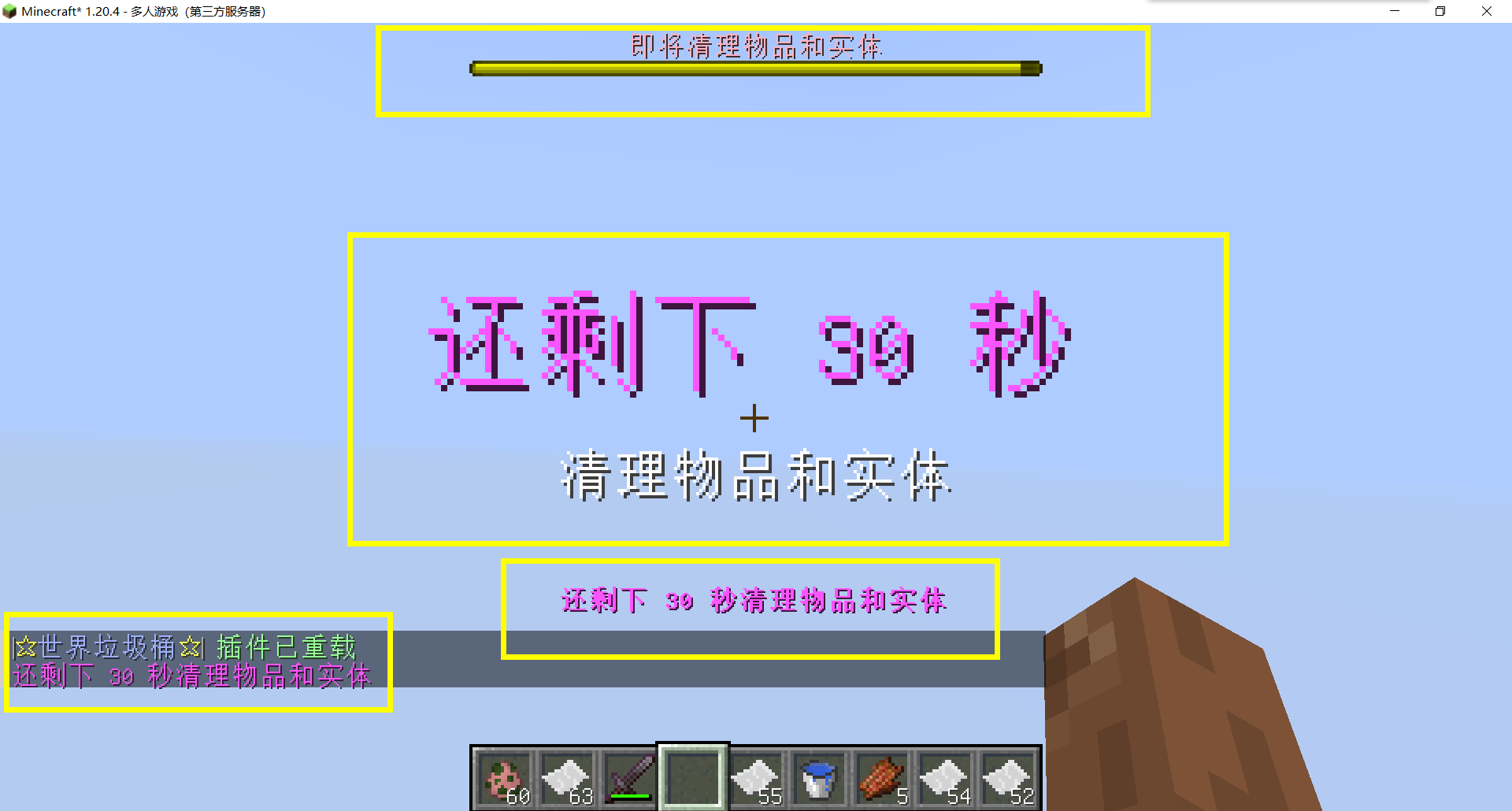
– Thank you to QQ 1664907770 (“笑脸猫”) for providing the material package for the “itemsadder” plugin (applicable to public trash cans) [Click here to download](https://www.hostize.com/zh/v/3TE06XKXx8) (IteamsAdder/WorldTrashCan config and resource)
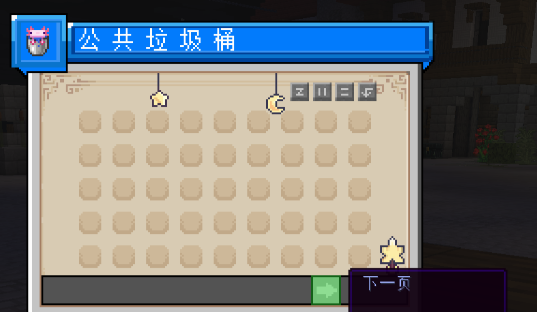
– **Player-Created World Trash Bin:**
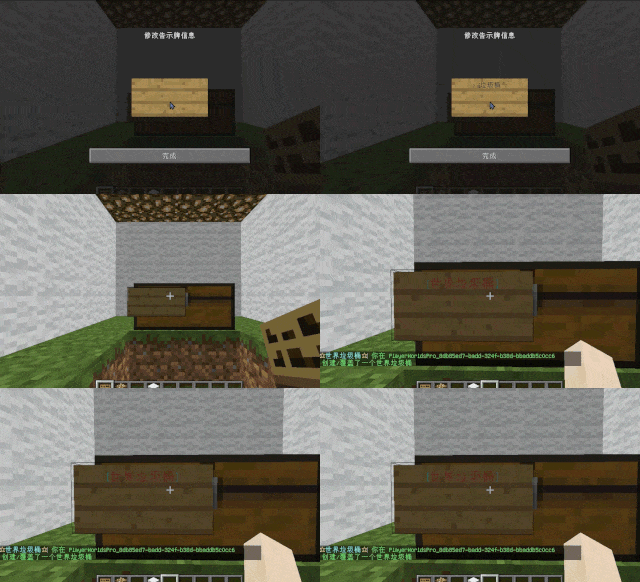
Players have the ability to create a trash bin in their world.
Similar to the mechanics of previous sign-locked chests, the font on the sign will undergo a
transformation after creation.
When the cleaning process is initiated, items will be automatically added to the home trash bin.
Configurable settings allow players to specify detection names and transformed names after cleaning.
“To meet the demands of a small number of people, here is a reminder”
How to create a world trash can:
Place the chest on the ground, hold the signboard and right-click on the chest. Enter [世界垃圾桶] in the configuration file (configured in Set. SighCheckName), and once the font is converted, it is created. Every time the garbage is cleaned, it will be placed in the marked chest
In the default configuration file, the names of the three worlds “world, dim-1, dim1” are disabled, creating a “world trash can” (excluding op)
– **Support for Multiple Home Trash Bins:**
Players can use commands to grant special players the ability to place additional home trash bins.
Default quantities for home trash bins are configurable.
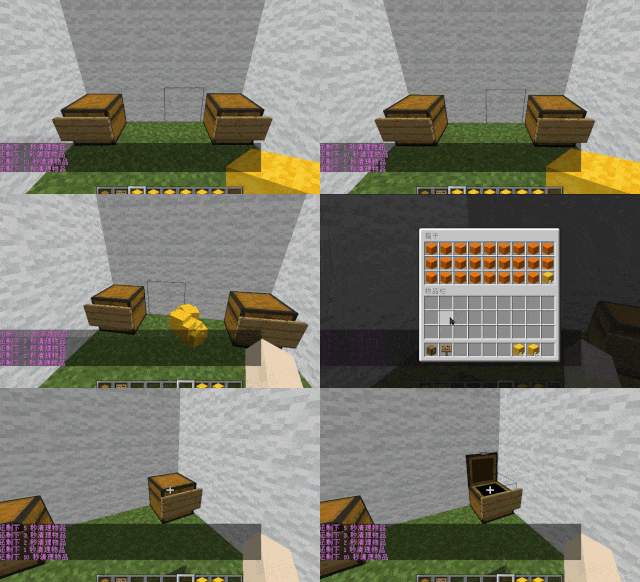
– **Home Trash Bin Overflow to Public Trash Bin:**
Items from home trash bins overflow into the public trash bin.
Public trash bins can have a configurable maximum page count and a blacklist.
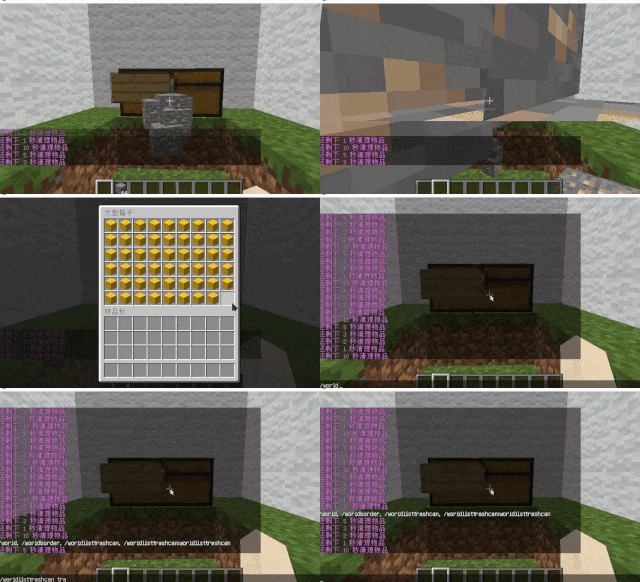
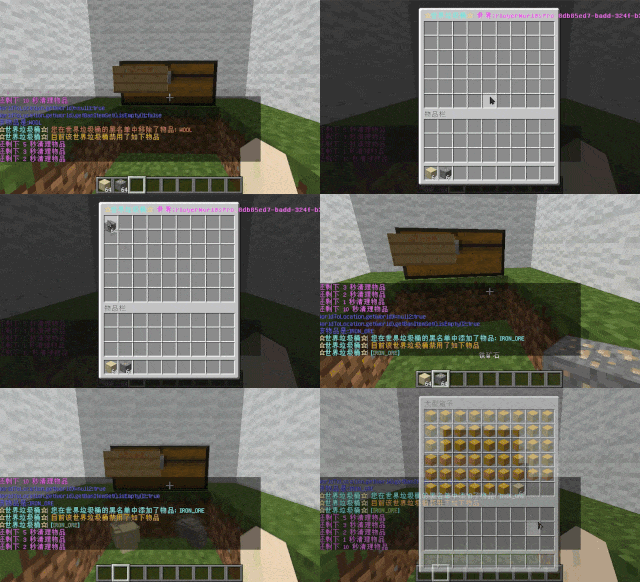
– **Item Exclusion and Public Trash Bin Handling:**
Players can add items to the home trash bin blacklist to prevent their recycling.
Excluded items go directly to the public trash bin.
Configuration includes support for excluding items with special lore (e.g., items from the QS shop with
showLocation).
Public trash bins can either clear new items during each sweep or accumulate all trash without clearing.
– **The public trash can can enable logging:**
Record what items the player took away

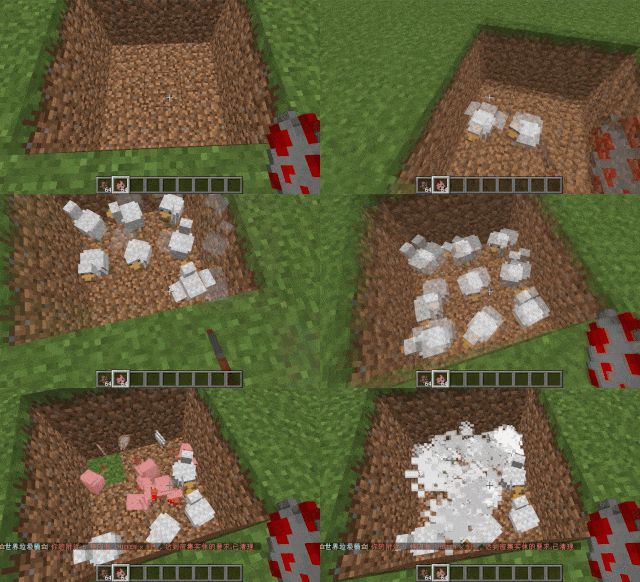
– **Entity Cleanup:**
Optional cleanup of all animals/monsters.
Command (/WorldListTrashCan Look) to view entity types and configure entity blacklists/whitelists.
Support for cleaning special entities from mod.
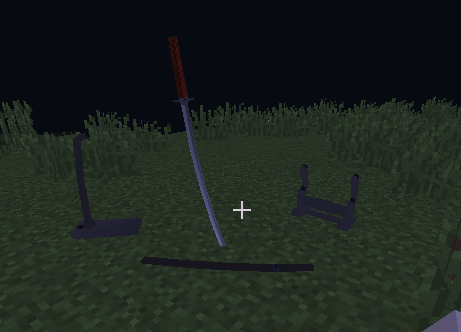
– **Dense Entity Cleanup:**
Configurable radius, target quantity, kill or remove options, and player notifications for dense entity
cleanup.
– **Spam/Command Limitations:**
Configurable chat/command intervals, whitelist commands, and informative messages.
Defense against item dropping.
Players can manually enable or disable the item-drop defense mode.
– **Performance Optimization:**
All optimizations have configurable options in the settings.
1. Quick removal of uncollectible arrows (e.g., arrows from skeletons or bows with infinite
enchantments).
2. Prohibit players from trampling on farmland
### How to Install
—
– **Throw it into the Plugins folder**
### Commands:
—
– **/wtc reload**
Reloads the plugin.
– **/wtc GlobalTrash**
Opens the public trash bin.
– **/wtc help**
Displays help information.
– **/wtc ban**
Opens the local world trash blacklist GUI.
– **/wtc Look**
Right-click to get entity type (useful for adding to the configuration blacklist/whitelist).
– **/wtc GlobalBan**
Opens the global world trash blacklist GUI.
– **/wtc add [WorldName] [Quantity]**
Sets the maximum quantity for the trash bin in the specified world (defaults to the world at your feet if not specified).
– **/wtc DropMode**
Opens or closes drop mode.
### Placeholders
—
– **%WTC_ClearTime%**:
Time until the next cleaning.
### Permission
—
– **WorldListTrashCan.BanGui**:
Permission to open the GUI for adding items to the player’s home trash bin blacklist.
– **WorldListTrashCan.GlobalTrashOpen**:
Permission to open the global trash bin.
– **WorldListTrashCan.help**:
Permission to access command help.
– **WorldListTrashCan.DropMode**:
Permission to open or close drop mode.
***(The above is available by default)***
– **WorldListTrashCan.GlobalBan**:
Permission to open the global trash bin blacklist GUI.
– **WorldListTrashCan.Look**:
Permission to right-click and query the entity type.
***(The above is not available by default)***
WorldEngine
# WorldEngine
WorldEngine is a powerful world management plugin for PaperMC servers, designed as a drop-in replacement for classic plugins like Multiverse and Multiworld. With its intuitive commands and simplified configuration, WorldEngine provides server administrators with full control over their worlds—whether you’re creating new worlds, managing existing ones, or simply looking for a cleaner way to organize your server’s environment.
## Features
– **Seamless World Management:** Create, load, unload, and delete worlds with a single, user-friendly interface.
– **Drop-In Replacement:** Built to be compatible with existing setups. Migrate from Multiverse or Multiworld with minimal effort.
– **Lightweight & Efficient:** Optimized for performance, ensuring minimal impact on server resources.
– **PaperMC Focused:** Specifically designed and tested for use on PaperMC, ensuring stability and ongoing compatibility.
## Getting Started
1. **Install the Plugin:**
Simply place the WorldEngine JAR file into your server’s `plugins` directory.
2. **Start the Server:**
Upon first startup, WorldEngine will generate a configuration file.
Customize this file to fit your server’s needs.
3. **Manage Your Worlds:**
Use the commands listed below to create, edit, and maintain worlds.
## Commands & Permissions
– **`/world`**
*Permission:* `worldengine.world`
The primary command for managing worlds — create/generate or load worlds quickly.
External generators supported
– **`/worldengine reload`**
*Permission:* `worldengine.manage`
Reload the plugin’s configuration without restarting the server.
– **`/worldinfo`**
View detailed information about currently loaded worlds, including environment, seed, and more. (*Soon*)
## Configuration
All configuration options can be found in the `config.yml` file generated on first run. Adjust world generation settings, default spawn locations, environment types, and other details as needed.
## Compatibility
– **Server Software:** PaperMC (1.19+ recommended)
– **Other Plugins:** Built to work alongside common world-management plugins, but best used as a standalone world controller.
## Contributing & Support
– **Issues & Bug Reports:** Please file issues on GitHub with clear steps to reproduce.
– **Feature Requests:** Open a suggestion ticket on GitHub if you’d like to see a new feature.
WorldEngine strives to provide a cleaner, more intuitive way to run multiple worlds on your PaperMC server. Get started today and simplify your server’s world management!
WorldChatter

# Security Features
### Anti-Swear
This helps to prevent any sensitive or inappropriate words from your chat to help keep it clean.
It has the ability to customize words (BlackList / WhiteList).
### Anti-Repeat
This prevents players from repeating the same words or letters over and over again.
### Anti-ADs
It will block any type of IPs or URLs from the player.
### Anti-Caps
This helps to prevent the player from sending large uppercased messages in the chat!
# Configurations!
### Detection Messages!
If anyone triggers one of the security settings, you will be alerted, and they will be alerted as well.
“`yaml
DetectedMessage: “&c%player_name%’s message got detected by the following flags &e[%flags%] n———-> &6%message%” # Change how the detection message is sent
DetectedPlayerMessage: “&cYou have been detected by the following flags &e[%flags%]” # Changes how the message is sent to the player (set it to “” if you don’t want to send it)
“`
### Switch Messages (For Proxies)
This will notify everyone in the server or the previous and current server when a player switches from one server to another!
“`yaml
# This switch message is only available for both BungeeCord & Velocity
SwitchSettings:
enabled: true
global: true # false is just the current server & previous server / true all the servers
premessage: “&a%player_name% &ehas switched from &6%previous_server% &eto &f%current_server%”
comessage: “&a%player_name% &ehas arrived from &6%previous_server%”
“`
### Others
“`yaml
SpamMessage: “&cYour message is blocked by the &eAnti-Spamn&7Remaining time: %duration% seconds” # Changes how the anti-spam message is sent (set it to “” if you don’t want to send it)
ChatClearMessage: “&eThe Chat has been cleared by &a%sender%” # Changes how the cleared chat message gets sent
NoPermissionMessage: “&eYou’re not allowed to use this command!”
“`
# Utilities Features!
### Aliases
This feature enhances WorldChatter’s placeholders by allowing customization of player and place names using two new placeholders: `{player_name}` and `{player_place}`.
“`yaml
aliases:
enabled: true
place:
world: “&aOverworld&r”
player:
OmarOmar93: “OmarOmar93 &o&eTest Omar Yes”
“`
### Chat Locking
This allows staff or console to lock or unlock the chat using `wc lock`!
“`yaml
ChatLockMessage:
enabled: true
public: true # TRUE | Shows the message to everyone or FALSE | just the sender
locked: “&eThe Chat is now &cLOCKED &eby &a%sender%”
unlocked: “&eThe Chat is now &aUNLOCKED &eby &a%sender%”
currently: “&eThe Chat is Currently &clocked”
“`
### Clear Chat!
Clear the chat with `wc clear`!
### Custom Join and Quit Messages!
Customize join and quit messages with special permissions for certain players.
“`yaml
Join:
enabled: true
level: 1 # 1 is just current place / 2 the whole server
place: “world” # place to send the message
message: “&a%player_name% &fhas joined the game!”
permmode: true # Checks to use the permissions mode to send messages / disabled will use default message
permissions:
“admin”:
permissions: [ “worldchatter.control”, “*” ]
message: “&a%player_name% &fhas joined the gamen&e[Teleport to %player_name%]”
Quit:
enabled: true
level: 1 # 1 is just current place / 2 the whole server
place: “world” # place to send the message – type %place% to make it the last player’s place
message: “&a%player_name% &fhas left the game!”
permmode: false # Checks to use the permissions below to show a different message or no!
permissions:
“admin”:
permissions: [ “worldchatter.control”, “*” ]
message: “&a%player_name% &fhas left the game &8You have nothing to do to that player :P”
“`
### Notifications
Customize notification sounds for detections.
“`yaml
notification:
enabled: true
staff: # notification detection for staff
sound: “BLOCK_NOTE_BLOCK_PLING” # the sound to play as the notification you can find it here by https://helpch.at/docs/SERVER_VERSION_GOES_HERE/index.html?org/bukkit/Sound.html
volume: 1 # volume of the sound
pitch: 1 # pitch of the sound
player: # notification detection to the player
sound: “BLOCK_NOTE_BLOCK_PLING”
volume: 1
pitch: 1
“`
### Channels
Introducing the new **Channels** Feature!
Add Places or Players **or both if you would like!** Into each other and priortize them from top to bottom according to the importance of each channel!
“`yml
GlobalSending: true
channels:
admin:
players:
– “OmarOmar93”
– “HoneySalted”
– “Notch”
places:
– “World”
– “Lobby”
main:
places:
– “world”
– “world_nether”
– “world_the_end”
“`
### Debug Mode – (Implemented in Channels only Currently)
The New Debug mode is what prints out more information about WorldChatter! like, Warnings, Errors and infos for each action happening inside the plugin!
“`yml
debug:
enabled: true
info: “&7[&9WorldChatter Debugger &r| Info&7]&r ”
warning: “&7[&9WorldChatter Debugger &r| &eWarning&7]&e ”
error: “&7[&9WorldChatter Debugger &r| &4Error&7]&4 ”
“`

# WorldChatterAPI
Learn more about the API and its capabilities by [Clicking here!](https://github.com/OmarOmar93/WorldChatterAddonChecker)
# Donate!
If you’d like to support the development of WorldChatter and other projects, consider donating!
[Buy me a Coffee!](https://www.paypal.com/paypalme/omaomar93)
# Other Projects!
[WorldCaster](https://modrinth.com/plugin/worldcaster)
Standalone Broadcast Add-on
# Supported Plugins!
– PlaceholderAPI
– Multiverse-Core
– ItemsAdder (With PlaceholderAPI)
– Luckperms
– And other plug-ins that have PlaceholderAPI’s placeholder!
# Massive thank you to:
– **Abdelaziz189356** – For the help with 2.0, 2.1, and 3.0 being possible, 3.0 Tester!
– **yousife_7aloly** – The tester for 2.0!
– **FastEverlast** – The Tester for 2.4!
– **Fabrizio Santana, 4zy** – 3.0 Testers
There are lots of additional features to explore!
Thank you for taking the time to read this and use the plugin!
World Start Commands
# Overview #
**This Mod/Datapack can execute any command on starting a world**
The default way of the world counting as “started” is, when a player picks up any wooden log.
Once all players have done so, the commands get executed and you’re ready to play!
# Usage
This pack is intended to use for modpacks or other projects where a special setup has to be done before being able to properly play.
All commands which you want to have executed have to be written in the “setup.mcfunction” under data/world_start/functions. (Copy the file onto desktop, edit it, replace old one)
## Why two versions ##
I’ve decided to make two seperate versions of this pack. One, which is very simple and easy to use and another, fancier version. The fancy version keeps track of who has already “started” and once all players did, it will count down and then “start” the world. The two function identically, it’s just for personal preferrence if you like it simple or fancy.
## How to customize ##
You will have to edit the pack/mod to write the commands into it. Here is a detailed step by step guide for this:
**Mod version:**
1. Rename the mod file from .jar to .zip.
2. Follow instructions for datapack version.
3. Once you’re done, rename it back to .jar
**Datapack version:**
1. Open the .zip file and find the “setup.mcfunction” under data/world_start/functions .
2. Copy the file onto your desktop (out of the .zip archive).
3. Open the file with any text editor.
4. You should find the command “say setup complete”. This is the default example command.
5. For the fancy version, it has two more commands, which just clear a few displays. (Do not remove)
6. Delete the default command and add the commands you need to the file. Don’t include the slash. Command execution order is the top command first and bottom one last. All happen at the same time though.
7. Once all commands are written down, save it and place it back in the .zip folder. It will ask to if you wish to replace the old file which you do.
8. The pack is done! Now you just have to load it into Minecraft and you’re ready to go!
9. If the world is already running, you will have to do /reload to apply the changes to the game.
### Setting a different start
The way of detecting if a player has started to play is by an invisible advancement. It detects if the player has obtained any wooden log and gives a function if they have. This is of course also customizable. I recommend [reading the wiki page](https://minecraft.wiki/w/Advancement_definition) about advancement triggers if you want to change the way the world starts. Just replace the “world_start” advancement in the pack.
### Other
Of course you can use this in your modpack. Feel free to edit this to your liking and include it. I just dont want you to publish this exact version with one tiny change and claim it as your own.
The datapack is marked as incompatible for some versions, but it should still work fine.
WorldManager
# WorldManager
WorldManager is a simple plugin allowing worlds to be automatically reset on demand.
**NOTE:** The plugin is currently in beta, so please check out [here](https://github.com/Zffu/WorldManager) to suggest features you’d like!
## Commands
### /worldmanager
This is the main command of the plugin, allows to have a list of the commands.
### /worlds
This command allows you to have information on worlds handled by WorldManager.
### /loadworld
This command allows you to load a world handled by WorldManager.
### /unloadworld
This command allows you to unload a world handled by WorldManager.
### /createworld
This command allows you to create a world reset option for the specified world.
## Permissions & Messages
WorldManager allows its users to modify the required permissions and messages to whatever they’d like. In order to do so, please head to the config
## API
WorldManager comes with an API allows you to use its features without the plugin.
Woolifyed
This texture pack makes everything in Minecraft wool while it is still in alpha I love this concept of everything being made or looking like it is made from wool it was inspired by the fake Minecraft videos. This texture pack is obviously themed to Minecraft wool I will work on it a lot and update it on Sundays!
Completion: 6/7/2025 882/3279 textures
You can support my other projects and builds/schematics on my [Patreon](https://www.patreon.com/c/rockninja32/posts)
Terms of Use:
By downloading and using this texture pack, you agree to use it for personal purposes only. You may showcase or feature it in videos or social media content (such as YouTube, Instagram, etc.) only if you provide clear credit to me rockninja32. Redistribution of this texture pack on any other website, marketplace, or platform is strictly prohibited—if you wish to share it, please link directly to the official download page. Personal modifications are allowed, but any modified versions must not be publicly shared. Failure to comply with these terms may result in necessary actions to protect the content. Thank you for respecting these terms and supporting my work!
I wont change text,gui or anything that impacts navigateing menus or chat for ease of use
Wool Revamped
# **Wool Revamped** by Lvminosity
**Wool Revamped** is a 16x resource pack with simple and cool wool textures, mainly for Bedwars / FPS Boost
Note: this pack is generally intended to be used as an overlay for many other bedwars texture packs, however it is still compatible with other packs
Wool Recipes
# WoolRecipes-Datapack

## Description
Inspiration comes from [Serilum’s Wool Tweaks](https://www.curseforge.com/minecraft/mc-mods/wool-tweaks “Wool Tweaks”)
This datapack adds various dyeing recipes for wool and its products, so you can dye the dyed products again.
Recipes for making wool into thread have also been added.
**Supported blocks:**
| TAG | Name |
|————————-|———|
| `wool_tweaks:wt_wool` | Wools |
| `wool_tweaks:wt_carpet` | Carpets |
| `wool_tweaks:wt_bed` | Beds |
—
## Icon Source
> Thank you **Hexakon#6724** for authorizing the use of
>