VLobby
# VLobby
  
Lobby plugin for Velocity

## Requirements
– Velocity 3.2.0+
– Java 17+
– MCKotlin
## Features
– Multi lobby support
– MiniMessage formatting
– Multiple Sending Modes
– You can set it to be able to teleport to each server with its own command. For example, if you have the “survival” server, the command to go to that server would be “/survival”. This is configurable in the CommandHandler section
## Commands
In VLobby there are 2 CommandHandlers
### REGULAR
It is the default operation of VLobby, you can set as many commands as you want to teleport to a group of Lobby servers (or to a single Lobby if you have only one Lobby).
### COMMAND_TO_SERVER
With this CommandHandler you can teleport to any server using its name as command.
For example, to teleport to the `survival` server, you would require the `vlobby.command.survival` permission and you would use the `/survival` command
VividHorizons
# VividHorizons by ilb0tta (1.6.1 – 26.1.2)

⚙️ Installation guide
– Go into the **Versions** tab of this page and download the resource pack for the version that you need.
– Now put the file you just downloaded into the Minecraft’s **resourcepacks** folder, which is situated in this directory.
“`
C:UsersYOUAppDataRoaming.minecraftresourcepacks
“`
– No need to unzip or changing file structure.
– Go into Minecraft –> Options –> Go into Resource packs and apply the resource pack you’ve just put in.
## 🎁 What is the point of this pack?
This simple resource pack aims to create a better and more enjoyable experience for all Minecraft players, by changing biomes, grass and foliage (e.g. leaves) colors to make them more vivid and colorful.
Ah, and **NO MODS OR OPTIFINE NEEDED**.
## ✨ Features
– Boosted Biomes colors,
– Boosted Grass colors,
– Boosted Foliage and Dry variant colors,
– Usable with other resource pack, such as 32x ones.
– Always (or near) up to date for the latest Minecraft version!
## ❤️ Support and Questions
If you have any kind of questions or run into issues with the resource pack, don’t hesitate to leave a comment or ask a question, and I’ll be happy to help.
Found a bug? / Report an issue. Click here.
Have a question or suggestion? Click Here.
## 📖 License and more…
This pack is licensed under **ARR**, which stands for “All Rights Reserved”.
What does this mean?
This means that this work is owned by me, **ilb0tta**, and you, the user, are allowed to download and use this pack **only from official sources where it has been published by me** (such as Modrinth.com).
Any other use is **strictly prohibited**, including, but not limited to:
– Reposting or redistributing the pack;
– Modifying the pack and sharing the modified version;
– Selling any part of this work;
– Using assets from this pack in other projects.
If you have any questions or doubts feel free to contact me.
Credits
– Resource Pack made by **ilb0tta**, All Rights Reserved;
– pack.png file **© ilb0tta**, All Rights Reserved;
– VividHorizons is an original name created by **ilb0tta**, All Rights Reserved.
My Goal
My goal is to provide the community with high-quality content that improves players’ gameplay. So please, don’t steal, copy or redistribute someone else’s work. Making something with your own hands makes you feel more confident and grateful towards yourself. ❤️
## 💎 Sponsors
### NextDNS
Browse safer with **_NextDNS_**, it automatically blocks ads, trackers, and malicious sites **before they can even load**, across all your sites, apps, devices and networks, with zero hassle.
Protect your family with **built-in parental controls** and manage everything easily from a simple, **real-time dashboard**. With **encrypted DNS servers** in multiple locations, your privacy stays secure wherever you are.
**Create an account through this link** and get **_unlimited protection on all your devices_** for **just $19.99 per year!**
### HidenCloud
Need a powerful **AMD-powered DDR5 RAM** Dedicated Minecraft Hosting platform that **doesn’t break the bank**? Check out **HidenCloud**, starting at just less than **50$/YEAR** for a good MC plan. **Try HidenCloud now with this link** to get a **5% DISCOUNT CODE** on your entire order. (And support my projects!)
NOTE: to get the discount simply click the link, scroll down and click “**set up**” a plan, then your discount code will be **already applied at your checkout!**
TIP: you can **stack** coupons!
Thank you for supporting my projects, I truly appreciate it!,
ilb0tta.
Vivian Totem
# ABOUT
**This texture pack replaces the standard Totem of Immortality with the character Vivian from Zenless Zone Zero in high quality and replaces the sound of using the totem with the phrase “Careful!” straight from the game when the character charges an attack. Enjoy using and playing!**
# IMPORTANT
– ### **Is there a port on the Bedrock Edition?**
This texture pack is designed exclusively for Java Edition. We do not plan to release a version for Bedrock Edition.
– ### **Want to use it on Bedrock Edition?**
You can port the texture pack yourself, as long as you comply with all license terms.
– ### **Pack version warning ?**
There is a high chance that resource packs will work with different versions of Minecraft without the need to change the version of the pack, unless there is a major update that breaks resource packs.
Vivecraft Spigot Extension
# Vivecraft Spigot Extensions
VSE is a companion plugin for Vivecraft, the VR mod for Java Minecraft.
VSE is for Spigot, Paper and Folia servers and adds several enhancements for VR players.
# Features
– Vivecraft players will see other Vivecraft players head, arm and leg movements.
– Support for Vivecraft 2-handed archery.
– Assign permission groups for VR players.
– Fixes projectiles and dropped items from VR players.
– Shrinks Creeper explosion radius for VR players from 3 to 1.75m (Configurable)
– Reduces Mobs melee attack radius for VR players ny -0.4m (Configurable)
– Support for Vivecraft Roomscale Blocking (Toggleable)
– Support for Vivecraft Dual Wielding (Toggleable)
– Support for Vivecraft Climbey Tools (Toggleable)
– Support for Vivecraft Arrow Headshots (Configurable)
– Support for faster block breaking (Toggleable)
– Option to limit server to Vivecraft players only.
See the config.yml when you run the plugin, or the Config wiki entry for all available configuration options.
# Versioning
The plugins version number is split into two parts, the first part is the Vivecraft version that the plugin supports the features of, and the second part is the release version, this increments with fixes or when adding support for new Minecraft versions.
Example:
`1.3.3-0`: This version supports the features of Vivecraft `1.3.3` and is the first release for that version
# Using Proxies
When using proxy servers you might need to add a compatibility plugin to your proxy server so that our data is correctly forwarded to the spigot/paper/folia server.
A this moment we have extensions for
– BungeeCoord: Vivecraft BungeeCord Extensions
– Velocity: Vivecraft Velocity Extensions
# Metadata
VSE provides Spigot metadata on `Player` objects so other plugins can provide special support for handed interactions or somesuch. If you aren’t sure what metadata is, check the Spigot documentation. The API supports multiple plugins using the same metadata key, so make sure you filter to our specific plugin name (`Vivecraft-Spigot-Extension`).
For details on available data see the wiki
# API
We also have an API to access more data, like the history of all available body parts, for more details on that see the wiki.
Vitelist

My Website

***

Vitelist is a simple, but useful Whitelist plugin for Velocity based on UUIDs, so it does not rely on player names.
***

– Vitelist runs on Velocity.
***

If you have any issues or find a bug, please remember to report it
here GitHub
***
Check out my other projects on my profile
visual corps
Visual Crops is a lightweight resource pack that replaces the default crop textures for wheat, carrots, potatoes and beetroot. Each growth stage is more visually distinct, making it easy to tell at a glance when your crops are ready to harvest — no more guessing!
Visible Effects
**A Texture Pack To Reveal Players Using Invisibility**
—
Where To Download?
—


—
**Q&A**
—
**Q: Why Should I Download It?**
—
A: This Pack Is So You Can Catch Players Using An Invisibility Potion.
—
**Q: What Does This Pack Change?**
—
A: This Pack Changes The Potion Partical Effect Texture Within The Game To Be Obvious.
—
**Q: Should I Download From A New Developer That Makes MC Packs And Why?**
—
A: Yes Absolutely, Downloading From A New Dev Can Help Support Them With Creating New And Better Content, You May Even Find Something That Has Low Downloads And Views But Is What You Really Needed (For Example Going In The Nether In 1.13 But With A Modern Texture Pack).
—
How To Install :
—
Drag and Drop The File You Downloaded Into Your Resourcepacks Folder.
—
How To Get To Resourcepacks Folder :
—
Way 1 : Go In Game And Click Onto “Options” Then “Resource Packs…” Then “Open Pack Folder”.
Way 2 : On Windows Click Win + R and Type %appdata% Then Click Onto “.minecraft” Then “resourcepacks”.
—
Usage
—
This Pack May Be Used Personaly And In Videos (Credit Would Be Nice To Support Me :D).
If This Pack Goes On To A Public Server, Credit Is Required.
Reuploading This Pack Is Prohibited Without Concent.
Visible Tripwires
# Visible Tripwires
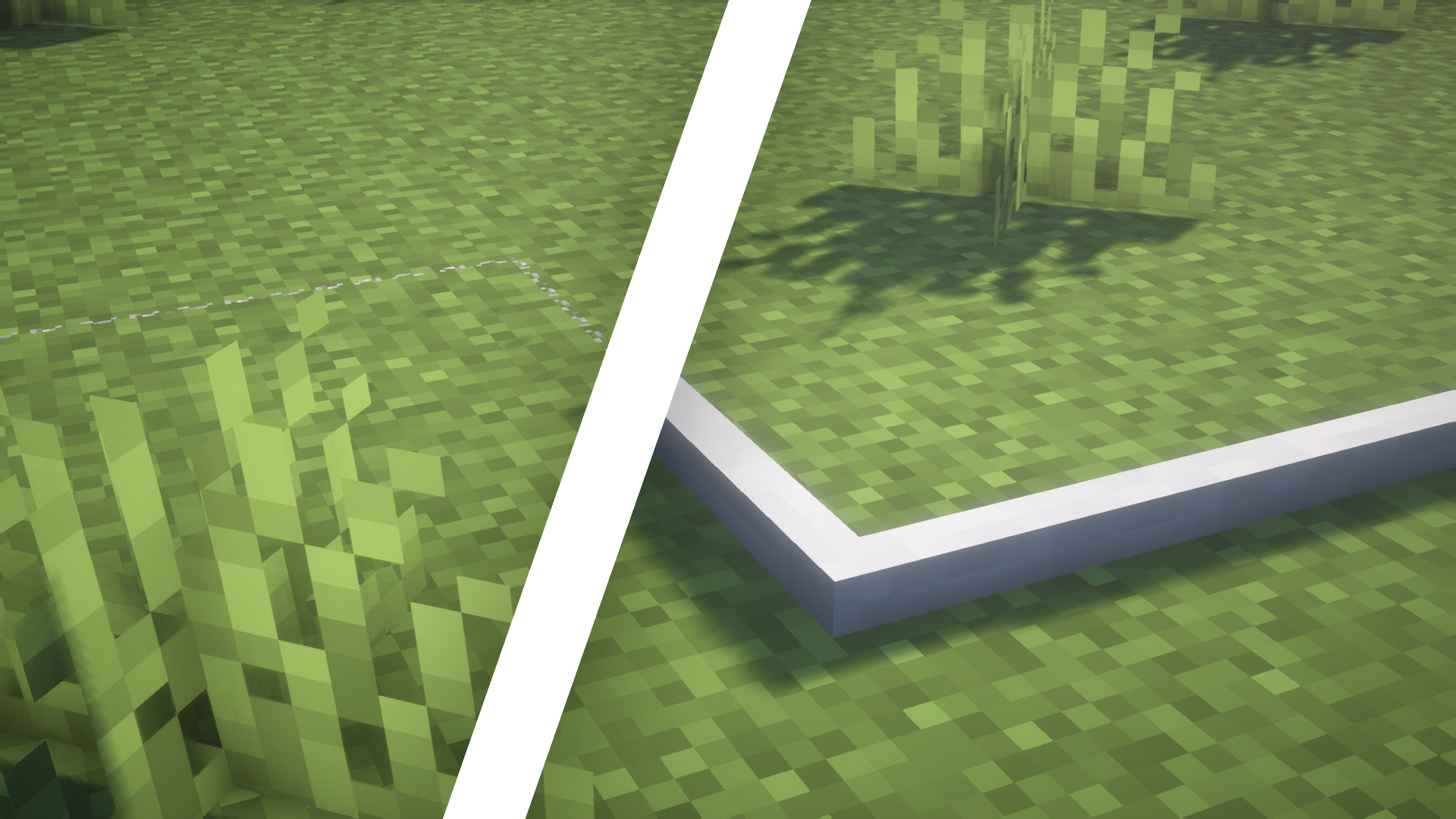
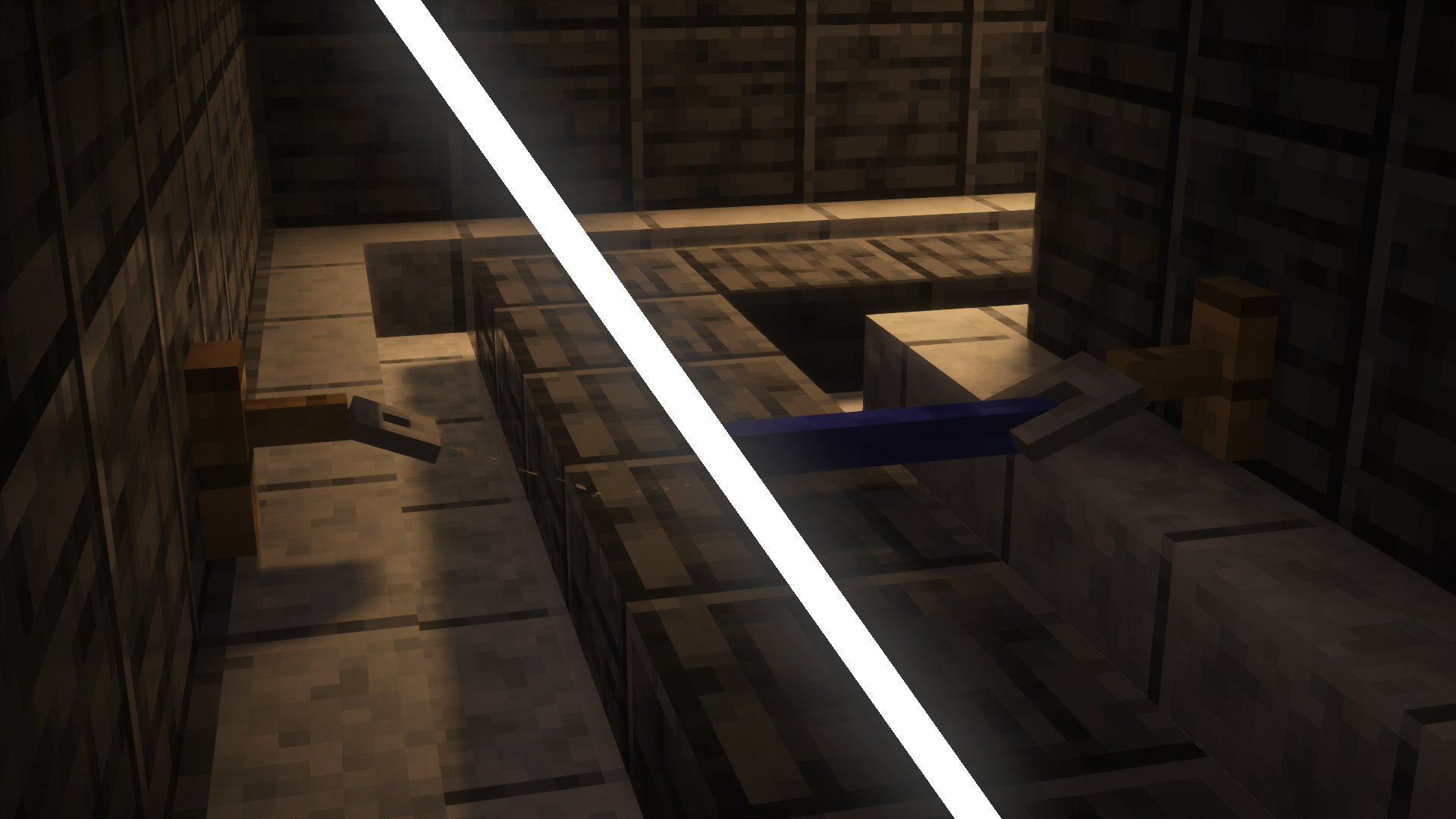
Visible Tripwires is a Minecraft resource pack that makes tripwires easier to see by changing their textures and models. It can really help players who want to spot tripwires more clearly.
The resource pack adds three different looks for tripwires:
1. **Normal State**: In this state, the tripwire lies on the ground and has a standard white texture.
2. **Attached State**: When stretched between two tripwire hooks, the wire lifts off the ground and turns blue.
3. **Powered State**: When something touches the wire after it’s been set up, it moves back down to the ground and turns red.
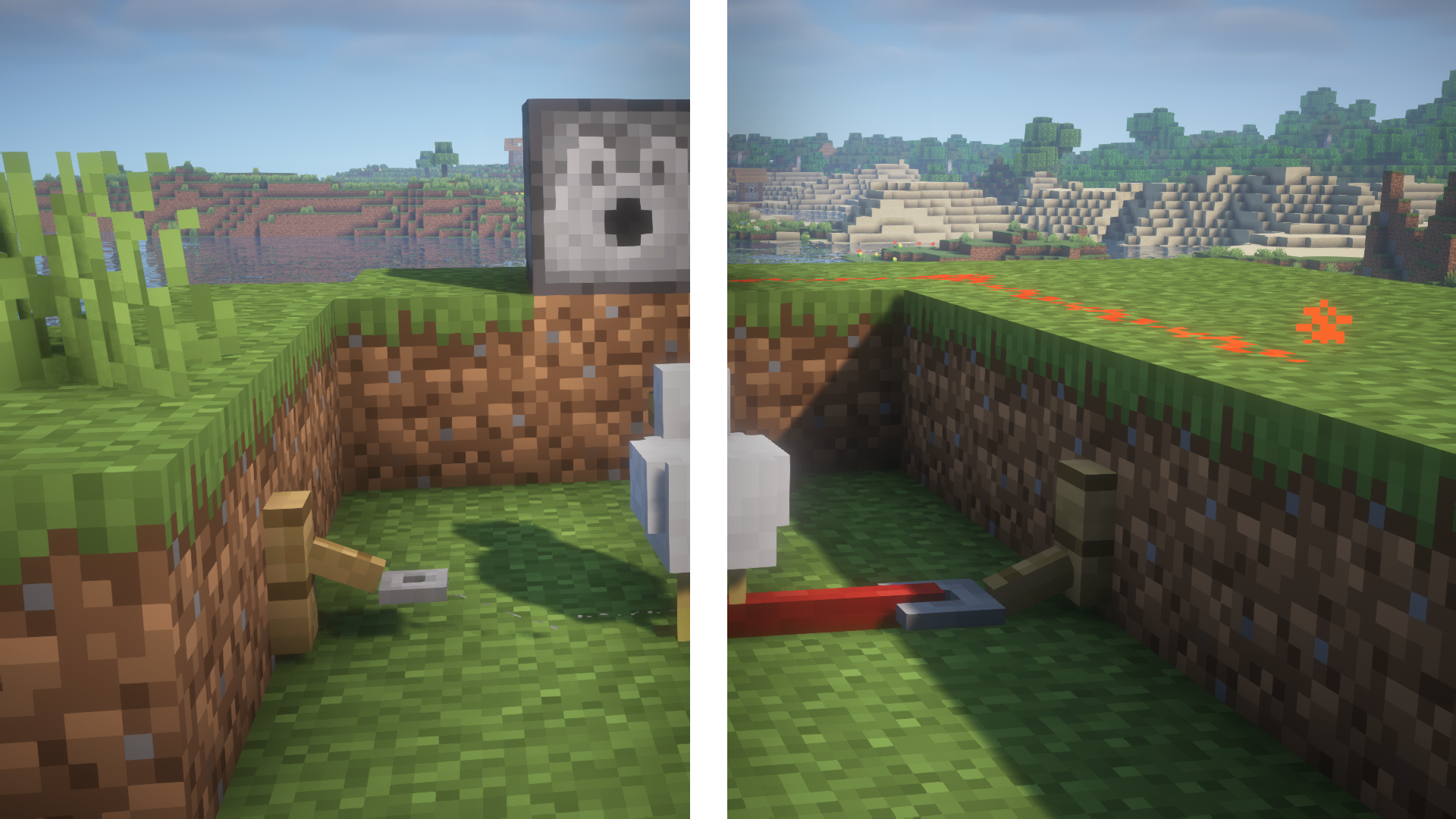
Also, the pack changes how the tripwire hooks look so they match the new style of the wires.
For more screenshots, check out the gallery here.
Visible Powdered Snow
**This texture pack makes powdered snow more visible by making it bluer.**
It was made by adding a translucent blue overlay to the vanilla minecraft powdered snow texture.
**Important: There are two versions in the versions tab, one is very visible, one is slightly visible and less protruding, the blue is less opaque in the former. Choose correctly when downloading the pack.**
Visible Powder Snow and Cobwebs
A simple resource pack that makes Powder Snow and Cobwebs more visible by tinting them cyan.
Helps you avoid getting trapped, making it useful for both PvP and general gameplay.