Watch of Fireworks
# Description
**Watch of Fireworks** is inspired by the [Watch of Undying](https://modrinth.com/resourcepack/watch-of-undying), a resource pack that transforms the Totem of Undying into a stylish watch. Similarly, the **Watch of Fireworks** gives fireworks a fresh look by turning them into a watch. And it doesn’t require optifine or any other mods!
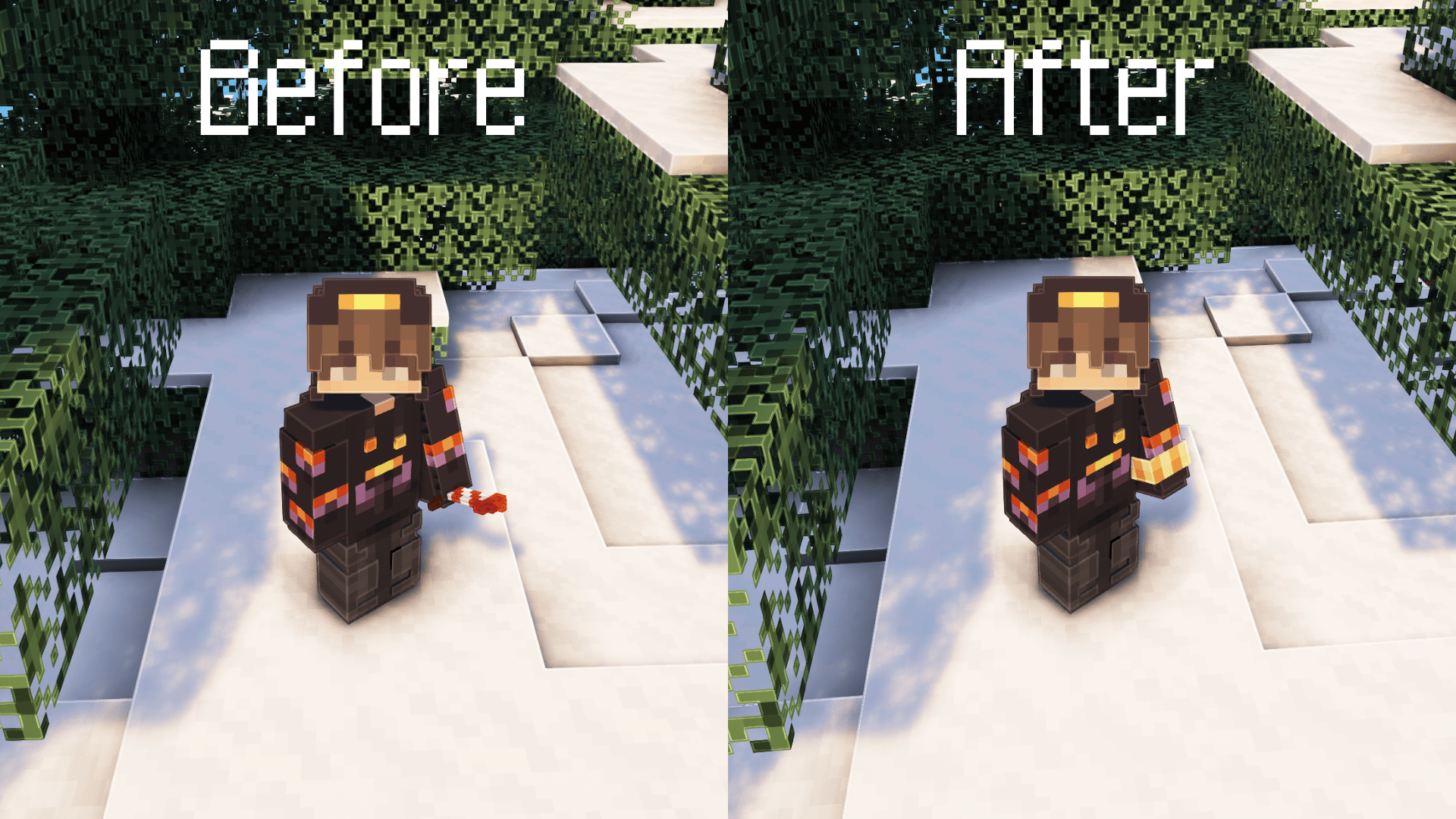

This pack uses the same module created by the original creator of the Watch of Undying, with modifications to the watch’s color and design to suit fireworks. I hope you enjoy the design! Don’t forget to check out the amazing [Watch of Undying](https://modrinth.com/resourcepack/watch-of-undying) too! <3
WasteLand Emeralds
# WasteLand Emeralds
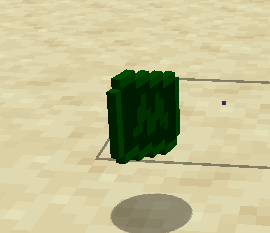
### This resource pack changes the texture of an emerald so that it looks like money
Warm Mojangles
This fontpack changes the color of the default font in Minecraft to be more pleasing to the eye.
To install it, make sure to select it in the resource packs screen and put it on top of other font packs.
# MY OTHER FONTS
– [Marga Font by SourAlien](https://modrinth.com/resourcepack/marga-font-by-souralien)
– [Paramita Font by SourAlien](https://modrinth.com/resourcepack/paramita-font-by-souralien)
– [PP Font](https://modrinth.com/project/pp-font)
– [Anicca Font by SourAlien](https://modrinth.com/resourcepack/anicca-font-by-souralien)
– [Tiny Bold Font](https://modrinth.com/resourcepack/tiny-bold-font)
– [SAS SMALL CAPS FONT](https://modrinth.com/resourcepack/sas-small-caps-font)
– [sas all lowercase font](https://modrinth.com/resourcepack/sas-all-lowercase-font)
– [Samsara Mono by SourAlien](https://modrinth.com/resourcepack/samsara-mono-font-by-souralien)
– [Ostrakon Font by SourAlien](https://modrinth.com/resourcepack/ostrakon-font-by-souralien)
– [Epsilon Font by SourAlien](https://modrinth.com/resourcepack/epsilon-font-by-souralien)
– [Alice Font](https://modrinth.com/resourcepack/alice-font)
– [Sleek DR](https://modrinth.com/resourcepack/sleek-dr)
– [Synesthete’s Dream](https://modrinth.com/resourcepack/synesthetes-dream)
– [HD B&W Font](https://modrinth.com/resourcepack/hd-bw-font)
WardSS
# WardSS 1.4
## Description:
A powerful Minecraft plugin for managing staff controls (ScreenShare) with advanced features.
## Features:
freeze_system:
– command: “/ss ”
description: “Freeze a player for screening”
– automatic_teleport: “Moves staff and player to a predefined location”
– custom_titles: “Display titles/subtitles when a player is frozen/unfrozen”
– automatic_return: “Player is returned to their original location after unfreeze”
## Private_chat:
– “Exclusive chat between staff and frozen players”
– “Customizable message format”
– “Invisible to other players”
## Report_system:
– command: “/ssreport ”
description: “Report a player for staff review”
– command: “/reportlist”
permission: “wardss.report”
description: “View the list of all reported players”
– “Staff notified when a report is sent”
– “Configurable report broadcasts”
– “Customizable report message format”
– “Improved tab completions for /ssreport ”
## Protections:
– “Block commands for frozen players”
– “Notify staff on command attempts”
– “Automatic ban if a player disconnects during screening”
– “Staff bypass mode for unrestricted movement”
## Commands:
– “/ss – Freeze/unfreeze a player”
– “/ss setlocation – Set teleport location for screenings”
– “/ss bypass – Toggle bypass mode for staff”
– “/ssreport – Report a player for staff review”
– “/reportlist – View all reported players”
permissions:
– “wardss.use – Use the /ss command”
– “wardss.notify – Receive notifications”
– “wardss.bypass – Use bypass mode”
– “wardss.setlocation – Set screening teleport location”
– “wardss.report – Access /reportlist command”
## Configuration:
messages:
– prefix: “&7[&c&lWardSS&7]”
– staff-freeze: “&aYou have frozen %player% for screening!”
– player-frozen: “&cYou have been frozen by %staff%!”
– staff-unfreeze: “&aYou have unfrozen %player%!”
– player-unfrozen: “&aThe screening is over, you have been unfrozen!”
– frozen-title: “&c&lYOU HAVE BEEN FROZEN”
– frozen-subtitle: “&7Do not disconnect or you will be banned!”
– unfrozen-title: “&a&lYOU HAVE BEEN UNFROZEN”
– unfrozen-subtitle: “&7Thank you for your cooperation!”
– no-permission: “&cYou don’t have permission!”
– player-not-found: “&cPlayer not found!”
– already-frozen: “&cThis player is already frozen!”
– not-frozen: “&cThis player is not frozen!”
– teleport-set: “&aThe teleport position has been set!”
– teleport-not-set: “&cThe teleport position has not been set!”
– teleport-usage: “&cUsage: /ss ”
– report-sent: “&aReport sent successfully!”
– report-received: “&7You have received a new report”
– report-broadcast: “&7New report: &c%report%”
– report-submitted: “&7Report submitted by &c%player%”
– bypass-active: “&aBypass mode activated”
– bypass-inactive: “&cBypass mode deactivated”
– private-chat-format: “&8[&cSS&8] &7%player%: &f%message%”
– player-quit: “&c%player% disconnected during screening!”
– command-blocked: “&cYou cannot use commands while frozen!”
– command-attempt: “&c%player% attempted to use command: %command%”
### settings:
– notify-staff: true
– prevent-commands: true
– prevent-movement: true
– prevent-interaction: true
– prevent-damage: true
– title-fade-in: 10
– title-stay: 100
– title-fade-out: 10
## Installation:
– “Download the JAR from the releases section”
– “Place it in your server’s plugins folder”
– “Restart the server”
– “Configure config.yml as needed”
– “Set the teleport location with /ss setlocation”
## Requirements:
– “Bukkit/Spigot Server 1.8+”
– “Java 8 or higher”
– “Properly configured permissions”
## Additional_notes:
– “Ensure permissions are correctly set in your permissions plugin”
– “Recommended: Set teleport location in a secure, enclosed area”
– “Check for updates regularly for new features and fixes”
## License: “All Rights Reserved – No part of this plugin, including source code and resources, may be used, copied, modified, or redistributed without the explicit permission of the author.”
Warden of Undying
Add a new totem of undying looks like warden looks very cool & nice can be used in servers as well as in singleplayer.
――――――――――――――Loved the texture pack? Check out more [here](https://modrinth.com/user/Orenxo)――――――――――――――
➙Join our discord server for fun community and get updates.
➙Follow my projects on modrinth.
[](https://discord.gg/xJzWcqmevf)
[](https://discord.gg/xJzWcqmevf)
Kid Named Finger Title Screen (Waltuh)
**Changes the Minecraft logo on the title screen (and the menu background) to a stupid shitpost I’ve had in my mind for a while.**
Two versions are available, one for 1.20 and up, and another for 1.19 and under. Make sure you download the correct version.
[](https://ko-fi.com/nanobuntv)
Special thanks to [Ewan Howell](https://ewanhowell.com) for making the [Blockbench plugin](https://www.blockbench.net/plugins/minecraft_title_generator) that made this possible.
This work is licensed under [CC BY-NC-SA 4.0](https://creativecommons.org/licenses/by-nc-sa/4.0)
🕑Waiting Screen🕒
# 🕒 Waiting Screen Plugin – BossBar & Titles! 🏆
Give your server a professional touch with a waiting screen system that is fully customizable! This plugin manages player waiting before a game or event, featuring an attractive and configurable visual interface.
—
## ✨ Features
– **📊 Custom BossBar** – Personalize the BossBar with colors, styles, and custom messages.
– **🏆 Titles & Subtitles** – Display customizable messages with adjustable timing.
– **⬆️ Dynamic BossBar** – The BossBar updates as players join (only counts non-OP players).
– **💫 Effects** – Apply potion effects to players while they wait, configurable in `config.yml`.
– **🔊 Sounds** – Play sound effects when players join or leave the waiting list.
– **🚷 Movement Restriction** – Enable or disable player movement while in the waiting screen.
—
## ⚙️ Configuration
The plugin includes a `config.yml` file where you can customize:
– 🎨 **BossBar colors and styles**
– 🏆 **Title and Subtitle messages**
– ⏳ **Potion effects and duration**
– 🔊 **Entry and exit sounds**
– 🚷 **Allow or block player movement**
—
## 🛠️ Commands
This plugin includes the following commands to help you manage the waiting screen system:
—
### **/waitingscreen**
– **Description**: Shows the list of available commands.
– **Usage**:
– `/waitingscreen` – Displays all the available commands for managing the waiting screen.
—
### **/toggleWaitScreen**
– **Description**: Toggles the waiting screen on or off.
– **Usage**:
– `/toggleWaitScreen` – Activates or deactivates the waiting screen manually.
—
## 🎃 Carved Pumpkin Feature
You can customize the carved pumpkin by adding a custom image. Supported resolutions: 16×16, 32×32, 64×64, 128×128, and 256×256.
We recommend using 64×64, 128×128, or 256×256 for better quality. 🖼️
## 🛠️ How to Use the Texture Pack?
Go to the misc folder inside your texture pack.
Replace the default image with your own custom image.
Rename your image to: pumpkinblur.png 🏷️
You can send the texture pack to your friends so they can install it manually, or set it up directly on your server. 🌍
📥 Texture Pack Download: [https://www.mediafire.com/file/82pmkh8mxtncif5/Custom_Pumpkin_Overlay.zip/file](https://www.mediafire.com/file/82pmkh8mxtncif5/Custom_Pumpkin_Overlay.zip/file)
Waguri pack
This is pvp project for anime lovers!
you can play pvp better because I added a lot of things
for pvp. for example: small totem small items no particles
waifu guis and custom items custom paints custom
music. Yes it is true I added phonk discs for you
You can listen phonks with jukebox and you can see
custom armor and tools and I added fullbright yes You
don’t need any resurcepack everything is here just
install and play 🙂
VyHub
VyHub, the comprehensive solution to build, manage and monetize Minecraft stores and communities. Easy integration of your Minecraft server and store. It’s the all-in-one management platform designed for your gaming community. VyHub offers a webshop, website, a donation store and bans and warnings.
Design and manage your Minecraft community through VyHub. We acknowledge that community management is hard work and takes a lot of time. With VyHub we automate your donation webstore fully. Furthermore, you can also save time on banning and warning players.
Create a professional community website and webstore in 5 minutes!
And there is more: VyHub provides you with an all-in-one solution to manage your community and gain valuable insights. Communicate, warn and ban players while maintaining good oversight of your community and its rules. With this resource you can make the best out of your community and server monetization.
The all-in-one system includes many features:
Ban and Warnings system (quick community management)
Sync groups/ranks (assign ranks through LuckPerms)
Ticketing system
Forums system
Shop system (unlimited categories, servers and packets)
Buy for a friend
Over 20 payment options (through: PayPal, Paysafecard, Stripe)
Multi language support
Discord roles and notifications
Quick support
Full API
And much more…
For more information and direct contact to the developers and the VyHub community visit our Discord (https://discord.gg/QZxQHtZnSB)
Pricing: VyHub can be used for free.
We take a small commission of 3 to 5% on purchases made through your VyHub store.
So you only pay when you make money.
Not yet convinced?
Check out the free VyHub Demo here: https://demo.vyhub.net/
Try out the different views, dashboards and customization options with VyHubs unique look and fell.
Lets go!
Create your account for FREE on https://vyhub.net, create your VyHub instance and add a Minecraft server.
Download addon for FREE and drag and drop the latest VyHub Plugin folder into your Gmod serveraddonsdirectory.
Restart your server and set your api-key through a simple command displayed in the setup process.
Congratulations your server is now connected! You can start selling products on your server!
For guides and further information visit: https://docs.vyhub.net
Vuurwerkshow Panorama
English version of the description
This is a project for a Dutch server but if you are really interested you can read the translation in English here.
# Fireworks show panorama
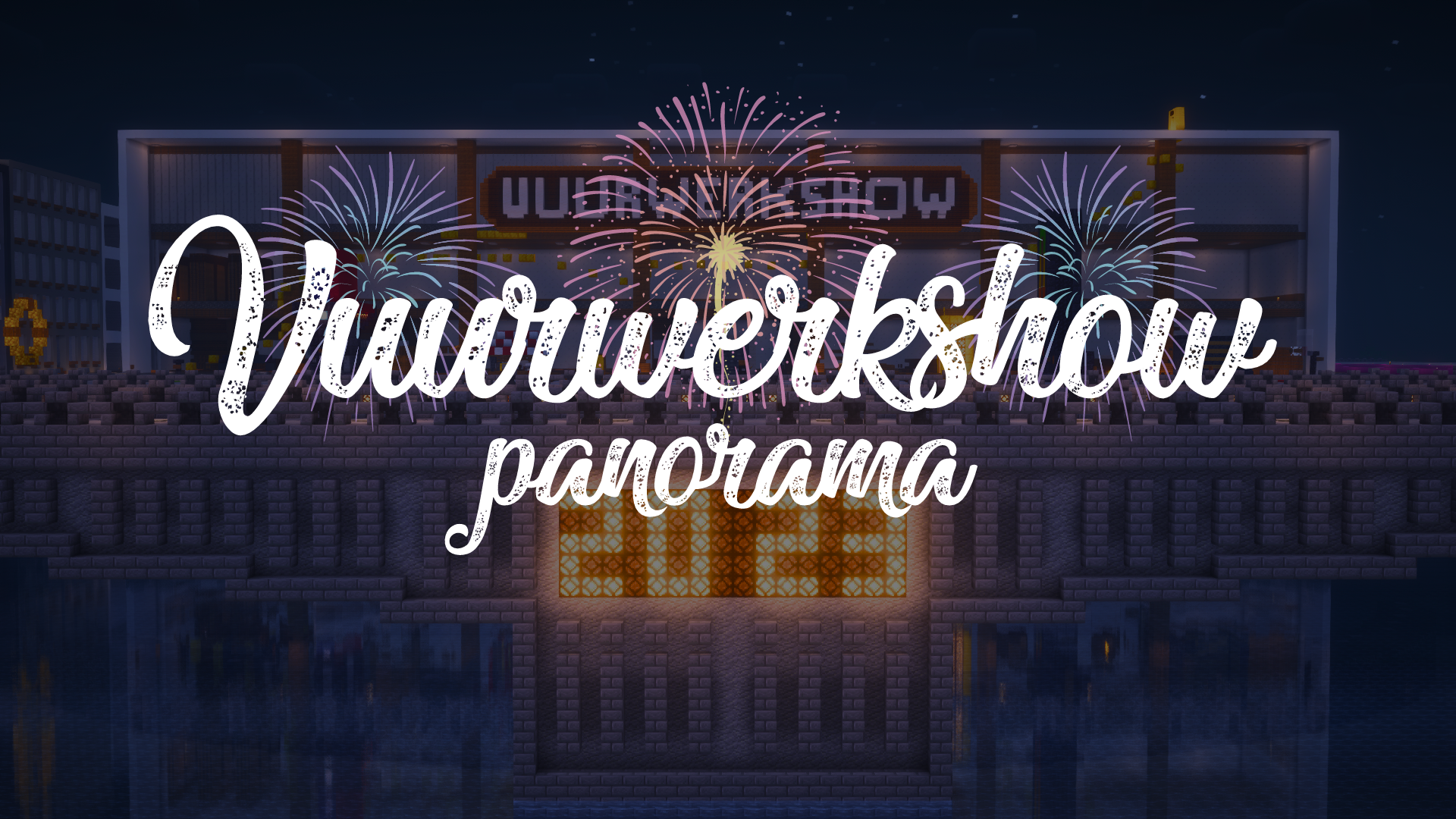
A panorama resource pack for the 2023-2024 New Year’s Eve fireworks show on the Torchcraft server!
## Explanation
Every year we organize a fireworks show at the end of the year with a number of players on the Dutch server Torchcraft to celebrate New Year’s Eve together. We start the evening with a speech, followed by the fireworks show that lasts about 10 minutes. Afterwards we have lots of fun activities such as giveaways, checkers, 4 in a row and much more! This year the show will take place on 27/12, announcement will follow soon.
Announcement ➤ [https://torchcraft.nl/forums/topic/16285-🎇-vuurwerkshow-2023-2024/](https://torchcraft.nl/forums/topic/16285-🎇-vuurwerkshow-2023-2024/)
## Support
If you have any issues, ideas, or other feedback about this project, please contact me via Discord or email. You can contact me on Discord by sending a friend request so you can message me.
Discord: tibodp
Email: [email protected]
# Vuurwerkshow panorama
Een panorama resourcepack voor de vuurwerkshow van 2023-2024 met oud & nieuw op de Torchcraft server!
## Uitleg
Elk jaar organiseren we met een aantal spelers op de Nederlands server Torchcraft een vuurwerkshow op het einde van het jaar om samen oud & nieuw te vieren. We beginnen de avond met een toespraak waarop daarna de vuurwerkshow volgt die zo een 10 minuten duurt. Daarna hebben we tal van leuke activiteiten zoals giveaways, dammen, 4 op een rij en nog veel meer! De show vindt dit jaar plaats op 27/12, aankondiging volgt binnenkort.
Aankondiging ➤ [https://torchcraft.nl/forums/topic/16285-🎇-vuurwerkshow-2023-2024/](https://torchcraft.nl/forums/topic/16285-🎇-vuurwerkshow-2023-2024/)
## Support
Als je problemen, ideeën of andere feedback hebt over dit project, neem dan contact met mij op via Discord of e-mail. Je kunt contact met mij opnemen op Discord door een vriendschapsverzoek te sturen, zodat je mij een bericht kunt sturen.
Discord: tibodp
Mail: [email protected]
## 🌟 My other projects:
– [Torchcraft Lobby Panorama](https://modrinth.com/resourcepack/torchcraft-lobby-panorama)
– [The Ultimate Creator](https://modrinth.com/modpack/the-ultimate-creator)
– [Chromakey Blocks](https://modrinth.com/modpack/the-ultimate-creator)
– [No Worldborder](https://modrinth.com/modpack/the-ultimate-creator)
– [Vuurwerkshow Modpack](https://modrinth.com/modpack/the-ultimate-creator)
– [Vuurwerkshow Panorama](https://modrinth.com/modpack/the-ultimate-creator)
– [Vuurwerkshow Paintings](https://modrinth.com/resourcepack/vuurwerkshow-paintings)
_Please only join the server if you speak Dutch because it is a Dutch-speaking server._