WebSenderReloaded
WebSender Reloaded, ready to help you!
Send a command to your Minecraft or Hytale server via DrawWEB or similar web scripts.
– Send command with PHP your Bungee, Velocity or Bukkit server!
– BungeeCord/Velocity and Spigot support!
– %100 Customizable config!
– Fast socket system!
– Multiple server support!
– /websender command. Perm: websender.admin
– Important: When you install the plugin, make sure to change the password, otherwise the plugin will not work. Also, if you change the websender port, enter a port that is not used elsewhere on your server.
**Important:** When you install the plugin, make sure to change the password, otherwise the plugin will not work. Also, if you change the websender port, enter a port that is not used elsewhere on your server.
**PHP EXAMPLE:**
If you downloaded version 1.0.1 or lower, the contents of the folder named “ExamplePHP” in the zip are incorrect, you can download version 1.0.2 or 1.2 to get the correct examples.
**Configuration for Plugin v1.5+ (Important)**
If you have installed version 1.5 or higher, you must configure your
“`
WebsenderAPI.php
“`
file according to your server’s Java version. Please follow the steps below.
**Step 1: Update the WebsenderAPI.php File**
1. Open the **.zip** archive you downloaded for the plugin.
1. Find the **WebsenderAPI.php** file located inside the ExamplePHP folder.
1. Replace the existing **WebsenderAPI.php** file on your website with this new one.
WebConsoleServer
# WebConsoleServer
A Minecraft plugin that exposes your server console through a WebSocket connection. Built for [groupez.dev](https://groupez.dev), a test server generator for paid plugins.
## Features
– Real-time console log streaming via WebSocket
– Password-protected authentication
– Log history persistence (loads previous logs on client connection)
– Support for both **Spigot/Paper** and **Velocity** platforms
– Included test web page for quick testing
## Supported Platforms
| Platform | Minecraft Version | Java Version |
|———-|——————-|————–|
| Spigot/Paper | 1.8.8+ | Java 8+ |
| Velocity | 3.3.0+ | Java 21+ |
## Test Web Page
A test web page is included in the `web/` folder. Open `web/index.html` in your browser to connect to the WebSocket server and view console logs in real-time.
## Installation
1. Download the appropriate JAR for your platform from [Modrinth](https://modrinth.com/project/webconsoleserver)
2. Place the JAR in your server’s `plugins` folder
3. Restart your server
4. Configure the plugin in `plugins/WebConsoleServer/config.properties` (Velocity) or `plugins/WebConsoleServer/config.yml` (Spigot)
## Configuration
“`properties
# IP address to bind the WebSocket server (use 0.0.0.0 for all interfaces)
websocket-host=0.0.0.0
# Port for the WebSocket server
websocket-port=8765
# Password for WebSocket authentication (leave empty for no authentication)
websocket-password=changeme
# Maximum number of log lines to keep in history
max-log-history=500
“`
## WebSocket Protocol
### Authentication Flow
1. Client connects to `ws://host:port`
2. Server sends `{“type”:”auth_required”}`
3. Client sends `{“type”:”auth”,”password”:”your_password”}`
4. Server responds with `{“type”:”auth_success”}` or `{“type”:”auth_failed”}`
5. On success, server sends log history followed by `{“type”:”history_complete”}`
### Message Types
| Type | Direction | Description |
|——|———–|————-|
| `auth_required` | Server → Client | Authentication is required |
| `auth` | Client → Server | Authentication request with password |
| `auth_success` | Server → Client | Authentication successful |
| `auth_failed` | Server → Client | Authentication failed |
| `log` | Server → Client | Console log message |
| `history_complete` | Server → Client | All historical logs have been sent |
### Log Message Format
“`json
{“type”:”log”,”message”:”[12:34:56] [INFO] [ServerName]: Your log message here”}
“`
## Building from Source
“`bash
# Build all modules
./gradlew build
# Output JARs are located in target/
# – WebConsoleServer-Spigot-1.0.jar
# – WebConsoleServer-Velocity-1.0.jar
“`
On Windows, use `gradlew.bat` instead of `./gradlew`.
## License
MIT License
## Links
– [groupez.dev](https://groupez.dev) – Test server generator for paid plugins
– [Github](https://github.com/GroupeZ-dev/WebConsoleServer) – Source code
WeazyLink
# **WeazyLink**
WeazyLink adds **/linkaccount** to your server and connects your Minecraft server with Discord, making it easier for moderators to manage the community. With WeazyLink, players can link their Minecraft accounts to their Discord profiles, which helps prevent impersonation and makes player identification much easier.
## Features
– Easy Account Linking: Players can use the /linkaccount command in-game to generate a unique code. This code can be used in your Discord server to link their Minecraft username with their Discord ID.
– Database support: WeazyLink uses json file by default. But for larger communities, you can use databases like MongoDB and MySQL too.
– Simple Setup: WeazyLink is easy to install and configure, so you can get started quickly without any hassle.
### Thank you!
Survival Weather Control
### DESCRIPTION
This data pack allows you to summon a thunderstorm using the classic altar used to summon herobrine! To do it, simply build the altar (place 9 gold blocks in a 3×3 arrangement with a lit netherrack block in the center surrounded by 4 redstone torches) and walk in the fire to “sacrifice” your health.

### INSTALLATION GUIDE
– go to your saves folder located here on Windows:
“`
C:Users(your name)AppDataRoaming.minecraftsaves
“`
put the zipped file in the data packs folder, and either restart your world or execute /reload
### OTHER THINGS TO NOTE
– gold blocks will turn into copper blocks upon usage
– for feedback, bug reports, or other help, join the [discord server](https://discord.gg/kk3j3ct6xk) from the links section of this page!
Wayland Fix
*Note: if you do not use Linux, this mod is not for you*
“[Wayland](https://wayland.freedesktop.org/) is a replacement for the X11 window system protocol and architecture with the aim to be easier to develop, extend, and maintain.”
With the increasing popularity of Wayland compositors on Linux, including several desktop environments switching to Wayland by default, application support for Wayland makes the Linux desktop experience all the better.
While Minecraft does run under XWayland, features like per-monitor HiDPI scaling do not function. If you experience problems related to XWayland, this mod is for you.
# Requirements
A Wayland-supported system GLFW installation and the following JVM flag is required:
“`
-Dorg.lwjgl.glfw.libname=/usr/lib/libglfw.so
“`
To install the proper GLFW on Arch Linux, run:
“`sh
sudo pacman -S glfw-wayland
“`
# Motivation
I wrote this mod after using [Sway WM](https://swaywm.org/) with a HiDPI display. All XWayland applications look blurry, so it is not an option. The community solution was to [patch the system glfw](https://github.com/Admicos/minecraft-wayland), but I’d rather not do that.
# Bug Reports
If you continue to experience problems with Minecraft on Wayland after installing this mod, file a bug report [on the issue tracker](https://github.com/StackDoubleFlow/MCWaylandFix/issues) if it hasn’t already been reported.
MelonPack
# Welcome to Melonpack
Do you like Melons? Do you like Minecraft texture packs? If so, this pack is for you!
This pack makes most things melon! Melons? MELON! tools? MELON! hotbar? MELON!
FEATURES INCLUDED ARE
- Watermelon tools
- Watermelon Armor
- Easy Brewing
- Melon Particles
- Melon Health
- AND MUCH MORE
# Info/Contact
Click here for discord!
Contact me at “[email protected]” OR “abstractmelon#0115”
We hope you enjoy the Pack:)
Waterlogged Beds
# Waterlogged Beds
You like building underwater but always felt like something was missing because there was that nasty pocket of air around your bed?
This mod solves the issue by allowing beds to be waterlogged.
### Usage
This mod is required on both the client & server to function correctly. Just add it to
both mods folders and you’re good to go, no dependencies are required. However we target Java 17 with this mod so you will need at least that.
As Fabric does not provide intermediaries for versions before 1.14 this mod works with [Ornithe](https://ornithemc.net) instead.
### License
This mod is licensed under the GNU Lesser General Public License (LGPL), version 3.0 or (at your opinion) any later version.
See the [LICENSE]() file for more information.
WaterBobbu
A cartoony water resprite! Pairs well with other resource packs that tweak terrain blocks and worldgen overhauls!
Made with love by us, The Bobbus, in Aseprite and with some assistance from our dear friend Kayla_the_Bee!
Water Sounds pack
**This is an underwater acoustic themed sound package designed around a 1.9+combat system.**
**The current version (0.3a) has been modified:**
– Bow and Arrow sound Effects
– Crossbow sound effects
– Strike sound effects
**FAQ:**
– Q:Will it be ported to an old version?
– A:No plan.
*Using machine translation
中文翻译:
**这是一个围绕 1.9+战斗系统 所制作的水声主题音效包**
**当前版本(0.3a)修改了**
– 弓箭音效
– 弩箭音效
– 打击音效
**常见问题:**
– 将会移植到旧版本吗?
– 目前没有计划
Watch of Undying
—


—
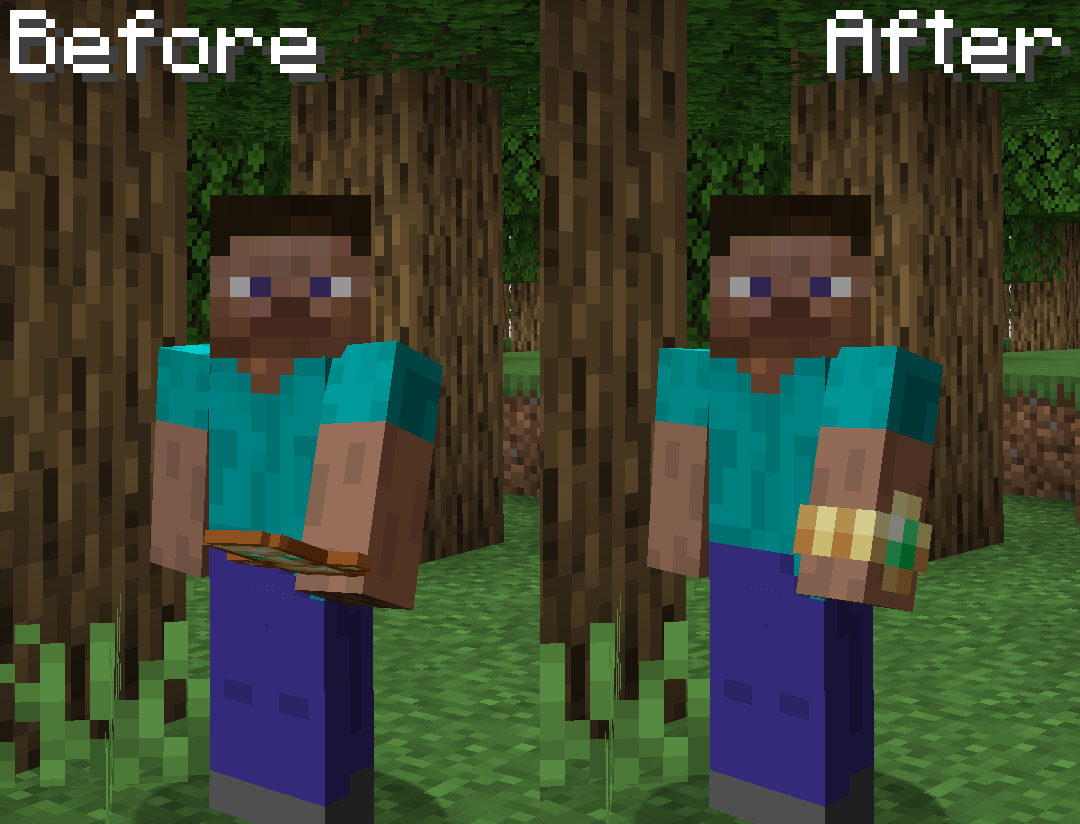
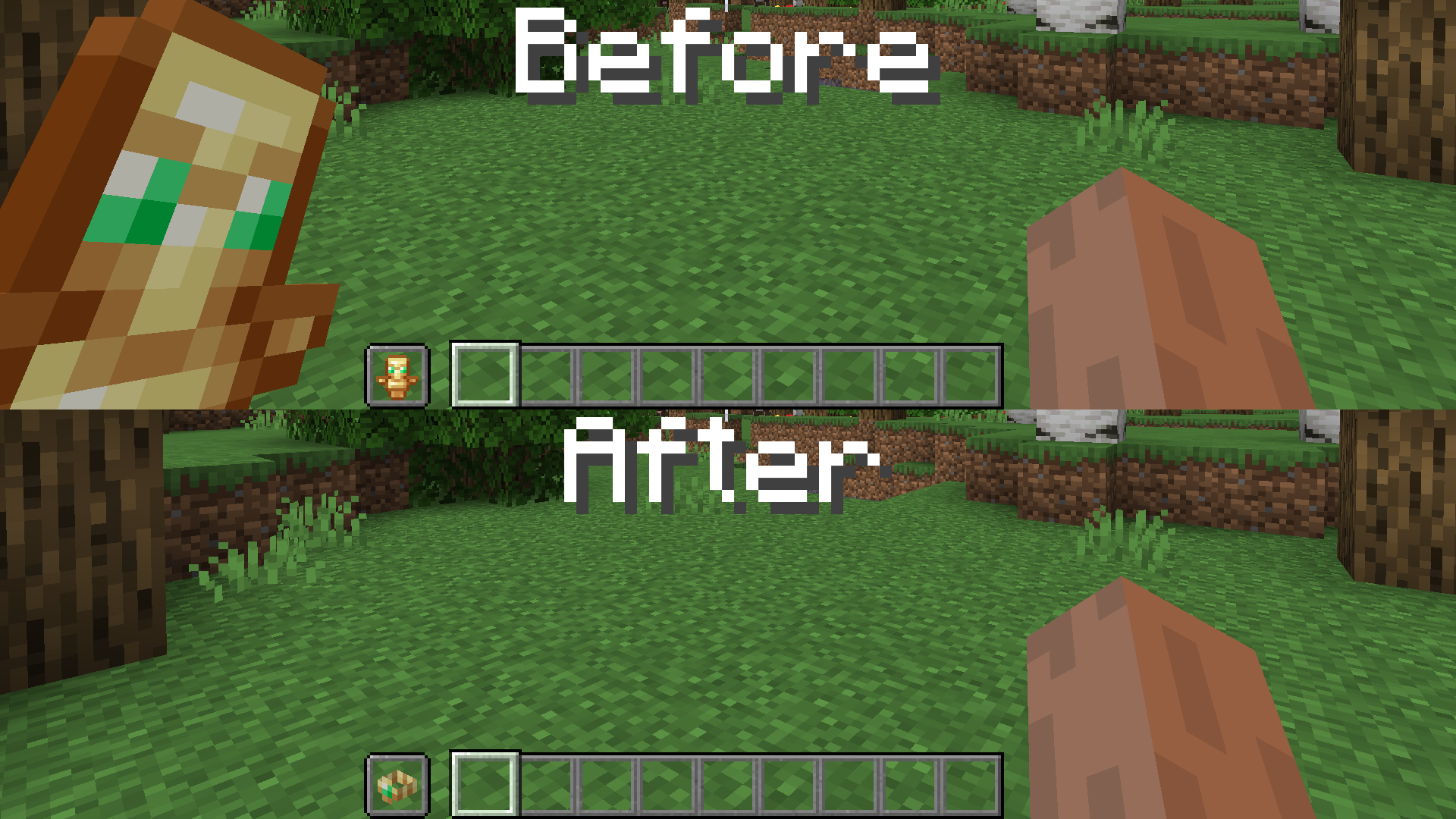
This resource pack replaces the Totem of Undying with a watch that your character wears. It also makes it invisible in first person. Doesn’t require Optifine or any other mods.
—