WEM – White Entities Mask
Turns all entities completely white, allowing for overlaying screenshots later and easily masking out entities.
Turns all entities completely white, allowing for overlaying screenshots later and easily masking out entities.
# 📺 WelcomeTitle
**Elevate Your Server’s First Impression**
WelcomeTitle is a professional-grade Minecraft plugin designed for Spigot, Paper, and Purpur servers. It empowers server administrators to create cinematic join sequences that instantly captivate players. By combining high-definition titles, informative subtitles, and immersive spatial audio, you can ensure your server’s brand identity is established the second a player enters the world.
—
## ✨ Professional Features
### 🎬 Cinematic Join Titles
Create a visual impact with bold titles and subtitles.
– **Custom Branding**: Direct the player’s attention with beautiful, centered text.
– **Rich Color Support**: Full compatibility with **HEX Color Codes** (e.g., `&#FFAA00`) and legacy MiniMessage/Bukkit codes.
– **Precise Timings**: fine-tune the experience with tick-perfect control over **Fade-in**, **Stay**, and **Fade-out** durations.
### 🔊 Immersive Spatial Audio
Sound is half of the experience. WelcomeTitle lets you trigger any sound from the Minecraft sound registry.
– **Atmospheric Entry**: Use gentle plings for a modern feel or grand fanfares for a survival spawn.
– **Audio Control**: Set custom **Volume** and **Pitch** to refine how sounds are perceived by the player.
### 💬 Dynamic Chat Messaging
Take control of your server’s chat logs.
– **Personalized Greetings**: Replace generic system messages with vibrant, formatted join/leave announcements.
– **Clean Configuration**: Toggle custom messages on or off independently of the visual title system.
### 📋 Rich Placeholder System
Inject real-time information to make every welcome feel unique:
– `%player%`: Displays the player’s unique display name.
– `%servername%`: Shows the current world or server name.
– `%version%`: Displays the exact Minecraft server version.
– `%random%`: Pulls a random line from your `text.yml` for dynamic variety.
—
## 🎮 Pro Use Cases
– **Server Branding**: Use consistent colors and sound cues to welcome players to your unique community.
– **Orientation**: Instantly inform players which lobby or game mode they have joined.
– **Event Highlights**: Update your join title to announce seasonal events, new game releases, or community milestones.
– **Premium Feel**: Give your server a “Triple-A” polished feel that encourages player retention.
—
## ⚙️ Compatibility & Performance
– **Optimized Core**: Built for minimal resource usage, ensuring zero impact on server performance (MSPT).
– **Wide Compatibility**: Supported on **Bukkit, Spigot, Paper, and Purpur**.
– **Modern Support**: Native support for **Minecraft 1.13 through 1.21+**.
– **Java Requirements**: Optimized for **Java 11, 17, and 21**.
—
## 🛠️ Quick Setup
1. Drop the `welcometitle-{version}.jar` into your `plugins` folder.
2. Restart your server to generate the default configuration.
3. Edit `config.yml` to customize your titles, sounds, and messages.
4. Use `/welcometitle reload` to apply changes instantly without a restart!
—
_Developed with ❤️ for professional Minecraft Communities._
# Welcomer
Welcomer is a configerable plugin that sends a welcome message to players that join your server!
## Setup
Setup is as simple as downloading the plugin and putting it into your `plugins` folder.
## Configuration
After installing the plugin and running the server go to `plugins/Welcomer` in your server. In there you’ll see a file called `config.yml`
“`
# The message that will be sent to players when they join.
# Use %player% to insert the player’s name.
welcome-message: “u00a7bWelcome to Hunger Games, %player%!”
“`
simply edit `welcome-message:` to a message of your liking!
### A friendly way to roll out the welcome mat for your players!
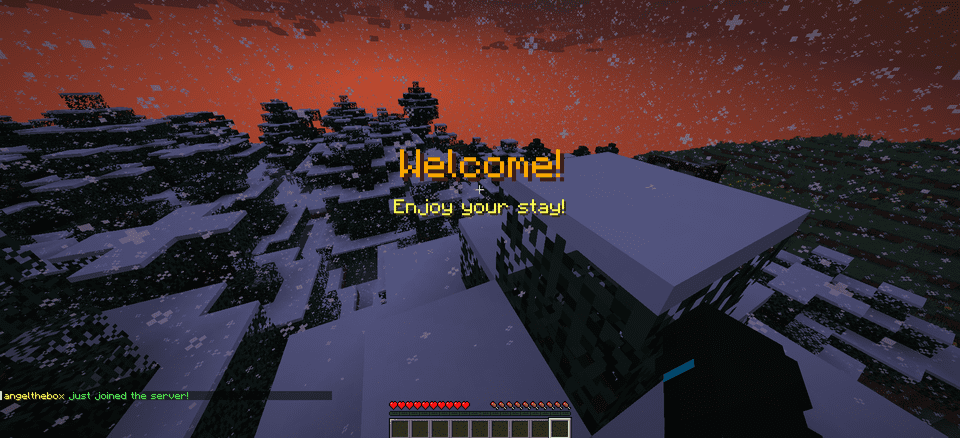
**WelcomeMat** is a lightweight, powerful plugin that enhances your server’s welcome experience. It provides customizable join/leave messages, titles, animations, and sounds to make players feel at home on every login.
## 🎉 What’s New!
### Version 1.3.1 (Latest)
– 🍃 **Folia-Ready Animations**: Visual effects now use the latest Folia entity schedulers (1.21.8+) with automatic signature detection, clamped delays, and no unsafe Bukkit fallbacks.
– 🧠 **Smarter Diagnostics**: If future Folia builds introduce new scheduler signatures, they’re logged automatically so you can keep running the same jar everywhere.
– 🧾 **Auto Version Metadata**: `plugin.yml` now inherits the Gradle version, guaranteeing accurate version strings inside the jar.
– 🌌 **Skyward & Copper Packs**: Two new message packs inspired by the 1.21 “Chase the Skies” and “Copper Age” updates, selectable right from the GUI.
### Version 1.2.x Highlights
– **Message Packs System**: Multiple themed collections (default, friendly, professional, funny, RPG) with GUI switching.
– **Multi-Language Support**: English and Spanish out of the box with easy CLI/GUI selection.
– **Improved Configuration Display**: Human-friendly display names and cleaner GUI organization.
—
## 🔄 Compatibility
– Fully tested on **Bukkit/Spigot, Paper, Purpur, and Folia** from **Minecraft 1.13 through 1.21.10**.
– Region-aware scheduler paths keep Folia’s watchdog happy while the same jar continues to run flawlessly on single-threaded servers.
—
## Features
– 🎨 **Customizable Messages**
– Rich join/leave text with color codes and placeholders
– Player-specific greetings and per-pack collections
– Display-name helpers and multi-language support (EN/ES)
– 📜 **Welcome Titles**
– Configurable title/subtitle timing and colors
– 🔊 **Interactive Sounds**
– Join/leave sounds with per-player toggles, volume, and pitch
– ✨ **Animation System**
– Fire Spiral, Green Spike Firework, and more join effects
– Folia-safe schedulers and per-player animation preferences
– ⚙️ **Extensive Configuration**
– Feature toggles, admin logging, instant `/wm reload`
– GUI-driven settings for packs, languages, sounds, and more
## 📋 Commands
– `/welcomemat` or `/wm` – Base command
– `/wm sound` – Toggle join/leave sounds for yourself
– `/wm reload` – Reload the plugin configuration
– `/wm help` – Show help message
– `/wm animation` – Toggle join animations for yourself
– `/wm language` – Change the plugin language
– `/wm pack` – Change the message pack
– `/wm config` – Modify plugin configuration
## 🔑 Permissions
– `welcomemat.reload` – Allow reloading the configuration (default: op)
– `welcomemat.bypass` – Bypass welcome messages (default: false)
– `welcomemat.sound.toggle` – Allow toggling sounds (default: true)
– `welcomemat.animation.toggle` – Allow toggling animations (default: true)
– `welcomemat.admin.log` – Receive admin log messages (default: op)
– `welcomemat.language` – Allow changing the plugin language (default: op)
– `welcomemat.pack` – Allow changing message packs (default: op)
– `welcomemat.config` – Allow modifying plugin configuration (default: op)
## 📦 Installation
1. Download the latest version of WelcomeMat
2. Place the `.jar` file in your server’s `plugins` folder
3. Restart your server
4. Configure the plugin in `plugins/WelcomeMat/config.yml`
## ⚙️ Configuration
“`yaml
features:
join-message: true
leave-message: true
join-title: true
join-sound: true
leave-sound: true
other-players-sounds: true
join-animation: true
admin-logging: true
messages:
join: “&e%player% &ajust joined the server!”
leave: “&e%player% &chas left the server!”
player-specific:
example-player:
join: “&6Welcome back, special player %player%!”
leave: “&eGoodbye, special player %player%!”
titles:
join:
title: “&6Welcome!”
subtitle: “&eEnjoy your stay!”
sounds:
join:
sound: ENTITY_PLAYER_LEVELUP
volume: 1.0
pitch: 1.0
leave:
sound: ENTITY_IRON_GOLEM_DEATH
volume: 0.5
pitch: 1.0
animations:
green-spike:
enabled: true
duration: 40
height: 2.0
# Message Packs
message-packs:
# Currently selected pack (default, friendly, professional, funny, rpg)
selected: “default”
# Default pack (original messages)
default:
join:
– “&e%player% &ajust joined the server!”
leave:
– “&e%player% &chas left the server!”
# Friendly pack
friendly:
join:
– “&d✨ &e%player% &ahas joined the party! &d✨”
– “&aWelcome back, &e%player%&a! We missed you! &d❤”
leave:
– “&e%player% &7had to go… &cSee you soon! &d💕”
– “&7Until next time, &e%player%&7! &d👋”
“`
## 🌐 Language Support
WelcomeMat now supports multiple languages:
“`yaml
# Available languages: english, spanish
selected-language: “english”
languages:
english:
name: “English”
messages:
reload:
success: “&aConfiguration reloaded successfully!”
sound:
enabled: “&aJoin/leave sounds enabled!”
disabled: “&cJoin/leave sounds disabled!”
spanish:
name: “Español”
messages:
reload:
success: “&a¡Configuración recargada con éxito!”
sound:
enabled: “&a¡Sonidos de entrada/salida activados!”
disabled: “&c¡Sonidos de entrada/salida desactivados!”
“`
## 🎵 Available Sounds
### Modern (1.13+)
– `ENTITY_PLAYER_LEVELUP`
– `ENTITY_IRON_GOLEM_DEATH`
– `BLOCK_NOTE_BLOCK_PLING`
– `BLOCK_NOTE_BLOCK_CHIME`
– `BLOCK_NOTE_BLOCK_BELL`
– And more…
### Legacy (1.8-1.12) (Under development)
– `LEVEL_UP`
– `IRONGOLEM_DEATH`
– `NOTE_PLING`
– `NOTE_PIANO`
– And more…
## 💡 Example Configurations
### Professional Server with Message Packs
“`yaml
# Use the professional message pack
message-packs:
selected: “professional”
# Set the language to English
selected-language: “english”
sounds:
join:
sound: BLOCK_NOTE_BLOCK_PLING
volume: 0.8
pitch: 1.5
animations:
green-spike:
enabled: true
duration: 30
height: 1.5
“`
### VIP Server with Custom Messages
“`yaml
messages:
join: “&d✨ &e%player% &ahas joined the party! &d✨”
leave: “&e%player% &7had to go… &cSee you soon!”
player-specific:
VIP_Player:
join: “&6⚡ The legendary &e%player% &6has arrived! ⚡”
leave: “&6The legend &e%player% &6must go… &7Until next time!”
sounds:
join:
sound: ENTITY_PLAYER_LEVELUP
volume: 1.0
pitch: 1.2
animations:
green-spike:
enabled: true
duration: 50
height: 2.5
“`
## 📝 Support
If you encounter any issues or have suggestions:
– Create an issue on our [GitHub repository](https://github.com/coffeeisle/welcome-mat)
– Join our [Discord server](https://discord.gg/cJ4uP2xF7h)
—
Made with ❤️ by angeldev0
[Download](https://modrinth.com/plugin/welcome-mat) • [Source](https://github.com/coffeeisle/welcome-mat) • [Discord](https://discord.gg/cJ4uP2xF7h)
# 🎉 Welcome++ – The ULTIMATE Minecraft Plugin!
**Transform your server with 50+ incredible features in one lightweight plugin!**
Welcome++ is the most comprehensive server enhancement plugin available, packed with everything you need to create an amazing multiplayer experience. From custom welcome messages to advanced weapons, vehicles, economy systems, and mini-games – this plugin has it all!
## ✨ **Key Features**
### 🎯 **Core Features**
– **Custom Welcome & Leave Messages** – Personalized greetings with player placeholders
– **Fake Names** – Let players change their display names and nametags
– **Player Heads** – Get any player’s head as an item
– **Color Chat Support** – Use color codes in chat messages
### ⚔️ **Advanced Weapons System**
– **Laser Gun** – High-tech energy weapon with particle effects
– **Rocket Launcher** – Explosive projectile weapon
– **Sniper Rifle** – Long-range precision weapon
– **Shotgun** – Close-range spread damage
– All weapons have cooldowns and custom damage values
### 🚗 **Vehicle System**
– **Planes** – Flyable aircraft with upgrade system (3 levels)
– **Cars** – Ground vehicles for fast travel
– **Speed Boats** – Enhanced water transportation
– **Helicopters** – Advanced flying vehicles
– Upgradeable plane system with speed boosts
### 💰 **Complete Economy System**
– **Money Management** – Full player economy with balances
– **Player-to-Player Payments** – Send money to other players
– **Shop System** – Buy items with in-game currency
– **Money Display in Chat** – Show player balance in chat
– Configurable starting money and limits
### 🌍 **Teleportation & Navigation**
– **Home System** – Set and teleport to your home
– **Warp Points** – Create public teleportation points
– **Random Teleport** – Explore new areas instantly
– **Teleport Cooldowns** – Configurable with bypass permissions
– Safe teleportation with world boundaries
### 🐾 **Cosmetics & Pets**
– **Pet System** – Spawn loyal companions (wolves, cats, parrots, rabbits)
– **Particle Trails** – Fire, heart, star, and rainbow effects
– **Hat System** – Wear any item as a hat
– **Auto-following pets** with smart teleportation
### 🎮 **Mini-Games**
– **Parkour System** – Timed challenges with checkpoints
– **Racing** – Competitive gameplay modes
– **Leaderboards** – Track best times and scores
– **Rewards** – Earn money for completing challenges
### 🛠️ **Utility Commands**
– **Flight Toggle** – Creative-style flying
– **God Mode** – Invincibility toggle
– **Heal & Feed** – Instant health and hunger restoration
– **Speed Control** – Adjustable walk speed (1-10)
– **Admin Tools** – Comprehensive server management
### 🎆 **Fun Commands**
– **Fireworks** – Launch colorful explosions
– **Lightning Strikes** – Call down thunder
– **Explosions** – Create safe TNT-like effects
– **Particle Effects** – Visual enhancements everywhere
## 🔧 **Technical Details**
– **Minecraft Versions:** 1.13 – 1.21.x (Full compatibility)
– **Server Software:** Paper, Bukkit, Purpur, Spigot
– **Dependencies:** None required (ProtocolLib optional)
– **Performance:** Lightweight and optimized
– **Configuration:** Fully customizable via config.yml
## 📋 **Quick Setup**
1. **Download** WelcomePlusPlus-2.1.0.jar
2. **Upload** to your server’s `plugins/` folder
3. **Restart** your server
4. **Configure** messages: `/welcome “Welcome {player}!”`
5. **Enjoy** all 50+ features instantly!
## 🎯 **Command Examples**
“`
/welcome “🎉 Welcome to our server, {player}! 🎉”
/leave “👋 {player} left the server!”
/gun – Get a laser gun
/plane – Spawn a flyable plane
/sethome – Set your home location
/money – Check your balance
/pet wolf – Get a wolf companion
/trail fire – Enable fire particle trail
/fly – Toggle flight mode
/parkour start – Begin parkour challenge
“`
## 🔐 **Permissions System**
Comprehensive permission system with sensible defaults:
– **Players** get basic features (teleportation, pets, trails, parkour)
– **OPs** get advanced features (weapons, vehicles, admin commands)
– **Fully customizable** – adjust any permission as needed
## ⚙️ **Configuration**
Extensive configuration options:
– Custom welcome/leave messages
– Economy settings (starting money, limits)
– Weapon damage and cooldowns
– Teleportation cooldowns and distances
– Pet behavior settings
– Particle trail customization
– Shop prices and items
## 🚀 **Why Choose Welcome++?**
✅ **All-in-One Solution** – Replace 10+ plugins with one
✅ **Lightweight** – Optimized performance, minimal server impact
✅ **Regular Updates** – Active development and bug fixes
✅ **Easy Setup** – Works out of the box, no complex configuration
✅ **Extensive Features** – 50+ commands and features
✅ **Wide Compatibility** – Supports 1.13-1.21.x
✅ **Professional Quality** – Clean code, proper error handling
## 📊 **Perfect For**
– **Survival Servers** – Enhanced gameplay with economy and teleportation
– **Creative Servers** – Fun tools and cosmetic features
– **Mini-game Servers** – Built-in parkour and racing systems
– **PvP Servers** – Advanced weapons and combat features
– **Community Servers** – Social features and player interaction tools
## 🔄 **Version 2.1.0 Features**
This massive update includes:
– Complete economy system with money management
– Advanced weapon arsenal (4 different weapons)
– Full vehicle system with upgrades
– Comprehensive teleportation suite
– Pet and cosmetic systems
– Mini-game framework
– 30+ new commands
– Enhanced configuration options
## 📞 **Support**
Need help? Check out:
– In-game `/help` command for all features
– Comprehensive permission system
– Detailed configuration file
– Active community support
—
**Download Welcome++ today and transform your Minecraft server into the ultimate multiplayer experience!**
*Compatible with Minecraft 1.13 – 1.21.x | Works on Paper, Bukkit, Purpur, Spigot*
**This ressource pack add custom textures on the items of the datapack [Weird and powerful weapons](https://modrinth.com/project/Jr3nq9JV)**
## Totem of protection

Replaces some music discs with songs from each Weezer album. The resource pack is client-side only. All music belongs to Weezer. WARNING: SOME SONGS ARE 18+ | New ideas? Email me at [email protected].
Weekly Life is lightweight plugin that gives players exactly one life per week. If a player dies they are automatically placed into spectator mode until their life resets.
# Please read the “how do I install it” section! Otherwise the pack won’t work correctly.
A resource pack for use with shaders supporting PBR materials. Aims to replicate the 128x pack included with Minecraft RTX for Bedrock, as that pack is encrypted and therefore cannot be converted to Java format for use.
Several packs of this nature are already on the market. So why did I set out to make another, and why should you use it? Well, I have tried all those packs, and all of them lack consistency, correctness (specifically as outlined in [this guide](https://creativecloud.adobe.com/cc/learn/substance-3d-designer/web/the-pbr-guide-part-2)), or both. And I grew dissatisfied with having to give the least problematic option to people asking for recommendations. Since this is not a particularly difficult art style to replicate, I felt I could do better, and by taking advantage of batch generation techniques I was able to fully complete all blocks in well under a week.
Note: it’s been a couple years since I wrote the above. I am no longer sure of the state of other resource packs. Use whatever you like most!
## Which version do I download?
Use the LABpbr version for shaderpacks listed [here](https://wiki.shaderlabs.org/wiki/LabPBR_Supported_Packs), otherwise use the OLDpbr version. Both have the pack formats for 1.18, but they should work fine down to 1.13, just ignore the warning. For 1.13 you should resize (see next section) the Jappa textures from 1.14 instead of the old textures from 1.13, as they use the same format the resized pack will still load.
## How do I install it?
IMPORTANT PLEASE READ
The vanilla textures need to be upscaled to 128x for this to work. I haven’t included these, since they technically violate Mojang’s EULA. The other aforementioned packs do, so Mojang apparently doesn’t care about enforcement, but I want to err on the careful side. The recommended way to get these is to use [this script](https://drive.proton.me/urls/41WEA57PVC#Mmt98UKetnPS) which was kindly made for me by Bálint (you can find his work [here](https://github.com/BalintCsala/VanillaPuddingTart), if you want you can try this pack with his shaders by running it through his converter). Unzip the download, run the bat file for Windows or sh for macOS/Linux, use 8 for the upscaling factor, and paste the resulting zip in your resourcepacks folder. You can load this pack above or below mine, it doesn’t matter.
## Why is it called Weed Eater?
It’s parodying [this meme](https://www.youtube.com/watch?v=j4Ph02gzqmY). See also my pack description, “in the future, resource packs will be automatically generated!”

**View statistics from the scoreboard, PlaceholderAPI placeholders and other plugins in a web page!**
## Features
– **Multiple sources:** WebStats can combine statistics from these sources:
– **Scoreboard** objectives
– **Placeholders** (requires [PlaceholderAPI](https://www.spigotmc.org/resources/placeholderapi.6245/))
– **MySQL database:** with a customisable configuration, you can gather statistics from any plugin
– **Discord integration:** You can add WebStats as a webhook to your Discord server.
– **SkinsRestorer integration:** When present, WebStats will display player heads from SkinsRestorer (also for offline-mode and bedrock players).
– **Player head display:** The plugin uses the service provided by mc-heads.net to automatically display player heads next to the names.
– **Objective sorting:** Click on the column headers to sort on that objective. Clicking again reverses the sort.
– **Automatic data updates:** By default, WebStats refreshes the data every 10 seconds, though this is configurable and can also be disabled.
– **Online / AFK status:** When [EssentialsX](https://modrinth.com/plugin/essentialsx) is present, WebStats uses it to mark AFK players. Otherwise, you will still be able to see who is online.
– **Online player filter:** You can filter to only display online players for if you have many players.
– **Pagination:** For webpage performance, max 100 players are displayed by default with next/previous page controls.
– **Objective filtering:** In the config file, you can filter which scoreboard objectives should be visible on the webpage. By default, the filter only contains `’*’`, which means all objectives.
– **Custom column order:** By default, columns are displayed in alphabetical order. You can set your own order and select which columns should be shown.
– **Statistics export:** Save the statistics in a `.csv` file so you can make nice graphs.
## Installation
There are two ways to use WebStats: with your own server (more customisable) or with an integrated server (easier). The download contains the plugin jar plus a javascript file, you only need the javascript file for when you are using your own webserver.
For both methods, you need to open a port on the Minecraft server for the plugin to communicate over. Make sure to change the port number in config.yml (and in the web client initialisation when using your own server).
### Using integrated web server
Set `serve-webpage` in the config file to `true` and restart. That’s it.
### Using own web server
Copy the Javascript file from the zip file and import it as a Javascript module. You also need to initialise WebStats when the page loads, more detailed information and an example are present [on Github](https://github.com/Dantevg/WebStats/wiki/Getting-Started#set-up-webpage-front-end).
Please refer to the [Github wiki](https://github.com/Dantevg/WebStats/wiki/Config-file) for more information about the configuration file. It also has pages with more detailed information for some features.
## More info
I have made a simple demo page with dummy data for you to try out: [demo](https://dantevg.nl/mods-plugins/WebStats/demo/)
For more in-depth information, please see the [Github wiki](https://github.com/Dantevg/WebStats/wiki).
If you need help, or for bug reports, feedback and suggestions, please open an issue on https://github.com/Dantevg/WebStats/issues, or post in the [Spigotmc forum thread](https://www.spigotmc.org/threads/web-stats.492833/).