xali’s Enchanted Books – Fix
This project is fan made and not directly related to any of xali’s works. Xali owns all the rights to “xali’s Enchanted Books”
Click the banner below to download original “xali’s Enchanted Books”.
Original file is required for this pack to operate correctly!
## What does this pack “fix”?
**If there are mods present that increase enchantments’ max levels like Apotheosis, those books would have missing textures. So, with this Apotheosis examle, there are books like “Sharpness VII”, that won’t have a custom texture without this pack. The fix makes it so any level above vanilla maximum will use the texture of max level enchantment. This pack does not include any textures that are already included in “xali’s Enchanted Books” and only adds those which are missing, so you need to install both: this fix and the original pack.**
DOWNLOAD ORIGINAL AND ADDON:
[](https://www.modrinth.com/resourcepack/xalis-enchanted-books)
[](https://modrinth.com/resourcepack/xalis-enchanted-books-addon)
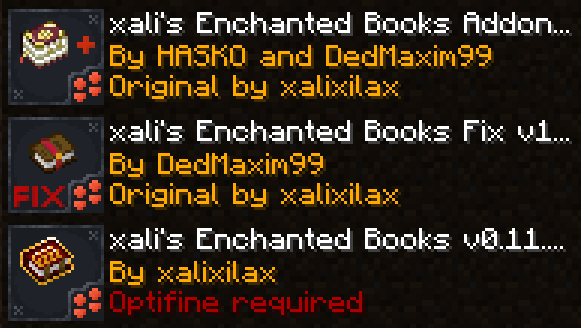
**[Below 1.21.5]** Resource packs must be installed in the following order:
**[1.21.5+]** Starting 1.21.5, if you use xali’s Enchanted Books – Addon you DO NOT need to use this pack. The “fix” is now integrated into the Addon pack!
—
**ATTENTION!**
You are **required** to install any mod that can work with custom CIT resource packs for the pack to be able to operate: [Optifine](https://optifine.net/home), [CIT Resewn](https://modrinth.com/mod/cit-resewn), [Forge CIT](https://www.curseforge.com/minecraft/mc-mods/forge-cit), [CIT Reforged](https://www.curseforge.com/minecraft/mc-mods/cit-reforged), [[CIT] CustomItemTextures](https://modrinth.com/mod/cit), etc. The pack should work on any Minecraft version with any mentioned mods. Ignore the “Incompatible” warning.
**ATTENTION!** At the moment of writing, 04 Jul 2024, CIT Reforged has a [bug](https://github.com/Tfarcenim/CIT-Reforged/issues/16) that prevents this pack from operating! Use Optifine or try to launch Fabric version, CIT Resewn, using Sinytra Connector
—
Anybody is free to use this pack anywhere. Just do not rename the pack, please.
Contact me:
My [YouTube channel](https://www.youtube.com/channel/UCrMHx89X71br0aDlzwsLDHQ)
My [Twitch channel](https://www.twitch.tv/dedmaxim99)
My [VK page](https://vk.com/id728112150)
My [Telegram](https://t.me/DedMaxim99)
xali’s Enchanted Books Backported
**Backport of the popular resource pack xali’s Enchanted Books to version 1.12.2**
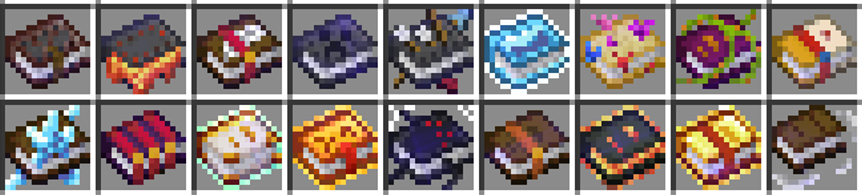
This resource pack will change the textures of enchantment books to unique options for each enchantment. Most books have unique textures, even depending on the enchantment level!
Original resource pack: [xali’s Enchanted Books](https://modrinth.com/resourcepack/xalis-enchanted-books)
xali’s Enchanted Books – Addon
This project is fan made and not directly related to any of xali’s works. Xali owns all the rights to “xali’s Enchanted Books”
Click the banner below to download original “xali’s Enchanted Books”. Original file is required for this pack to operate correctly!
The purpose of this pack is to provide additional mod support to “xali’s Enchanted Books”. This pack does not include any textures that are already included in “xali’s Enchanted Books” and only adds those which are missing. This pack probably won’t be updated with any more additional mods in the future because it was made just for our own personal experience that I decided to share.
[](https://www.modrinth.com/resourcepack/xalis-enchanted-books)
^ Click it ^
Resource packs must be installed in the following order:

### **ATTENTION!**
**[1.21.5+]** Since vanilla Minecraft now has support for custom item models, no additional mods are required!
Additionally, now [xali’s Enchanted Books – Fix]([https://modrinth.com/resourcepack/xalis-enchanted-books-fix](https://modrinth.com/resourcepack/xalis-enchanted-books-fix)) is integrated into the Addon due to how custom models for enchanted books are implemented by Mojang.
**[Below 1.21.5]** You are **required** to install any mod that can work with custom CIT resource packs for the pack to be able to operate: [Optifine](https://optifine.net/home), [CIT Resewn](https://modrinth.com/mod/cit-resewn), [Forge CIT](https://www.curseforge.com/minecraft/mc-mods/forge-cit), [CIT Reforged](https://www.curseforge.com/minecraft/mc-mods/cit-reforged), [[CIT] CustomItemTextures](https://modrinth.com/mod/cit), etc. The pack should work on any Minecraft version with any mentioned mods. Ignore the “Incompatible” warning.
Mods supported by this pack:
– Supplementaries
– Combat Roll
– Endless Biomes
– Kobolds
– Undergarden
– Farmer’s Delight
—
All the art is done by HASKO, pack assembled by DedMaxim99
HASKO [VK page](https://vk.com/hasko_arts)
Anybody is free to use this pack anywhere. Just do not rename the pack, please.
Contact me (DedMaxim99):
My [YouTube channel](https://www.youtube.com/channel/UCrMHx89X71br0aDlzwsLDHQ)
My [Twitch channel](https://www.twitch.tv/dedmaxim99)
My [VK page](https://vk.com/id728112150)
My [Telegram](https://t.me/DedMaxim99)
xah0b Twitch Totem
– **Xah0b** (XAHOB) is a famous twitch streamer on Twitch/Kick Platforms playing Minecraft and just chatting. Use this and you get totem of undying with xah0b and unqie sound when you die in game
– **Xah0b** (XAHOB) известный стример на платформах Twitch/Kick, играющий в Minecraft и просто общающийся в чате. Используйте его, и вы получите тотем бессмертия с Xah0b и уникальный звук при смерти в игре.
[Check collection with all memes + streamers Totems ](https://modrinth.com/collection/sfDcDGAi)
XaeroSupport

Please join my Discord to get
updates and for me to fully assist you with bugs,
questions, or suggestions.
Discord: [**click here**](https://drak.gg/discord)

## XaeroSupport
Adds XaeroMinimap and XaeroWorldMap support to your Minecraft server!
## Definitions
**Xaero Server-Specifics**:
– How filled out your maps are on a specific world. (The loaded/filled in chunks when you open your map for a specific world.)
– Waypoints.
**Backend Server**:
– A Minecraft server behind a Minecraft proxy that is also not a Minecraft proxy.
**Minecraft Proxy**:
– Such as:
– Velocity and forks.
– BungeeCord and forks.
**Server Id**:
– A unique identifier (that is a number) that tells players’ Xaero mods (on the client) that your server is your server.
## FAQ
**Q**: Does this affect performance?
**A** (Simple): No.
**A** (Full): Most plugins won’t affect performance, even if they are bigger plugins. What effects performance is how the plugins do operations with your server. This plugin does no operations, it is all just packets and it only sends packets when a player joins.
**Q**: Is this a `1:1` (`1 to 1`) replacement of the Xaero **mods** (server-side), but as a **plugin**?
**A** (Simple): No, but eventually yes.
**A** (Full): Right now, all this does is add support for `Xaero Server-Specifics` (look in the `Definitions` to define). Eventually, I will add more `1:1` functionality from the Xaero mods.
**Q**: Why would I use this if it is not a `1:1` replacement?
**A** (Full): Well, keep in mind that eventually it will be. But, in the mean time, this is extremely useful for `Minecraft Proxies` because it makes it so each of your `Backend Servers` can have their own `Xaero Server-Specifics` (look in the `Definitions` to define) — this is very helpful due to how Xaero stores these in your game’s files.
**Q**: What would happen if I don’t use this, or something like this and I have players who use Xaero’s mod join my server?
**A** (Full): Xaero used to keep `Xaero Server-Specifics` defined per world/server name. Which is an issue if you have multiple servers you join with the same name (i.e. if you have all your server’s named `Minecraft Server` — which is the default). Xaero recently added functionality to look at the IP that players used to join your server to differentiate the `Xaero Server-Specifics`, but this only works if you have an updated mod and if your server isn’t behind a `Minecraft Proxy`. **If the players’ mod thinks you are on the same server/world *when you are not*, it will overwrite/reset the map data it already has filled out, or even delete or add some way points. This plugin fixes that.**

– No more need for Paper forks!
– Some paper forks (such as `Leaf` and `DivineMC`) add exactly what this plugin does directly into your server software, this plugin adds it as a plugin so you don’t need to rely on `Leaf` or `DivineMC` to be stable.
– Easy set up! (Drag and drop!)
– It automatically generates a `Server Id` for your server.
Xaero’s Vanilla GUI
This resource pack customizes Xaero’s Minimap to seamlessly blend with Minecraft’s vanilla aesthetic. Enjoy a minimalistic design with colors and icons that match the base game, bringing a consistent and immersive feel to your adventures. Ideal for players who want the functionality of Xaero’s Minimap without straying from the classic Minecraft look.
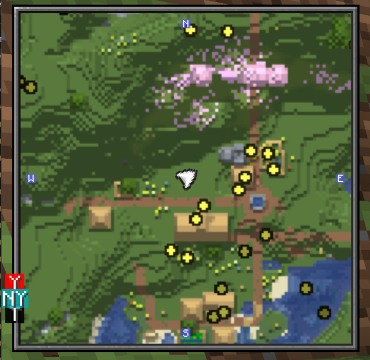
### USE XAEROPLUS TO FIX THE CURSOR PLACEMENT!
Further more with this resourcepack, I suggest [Xaero’s Map Frame](https://modrinth.com/resourcepack/xaeros-map-frame) highly to go along with the aesthetic!
Xaero’s Minimap (Fair-Play)
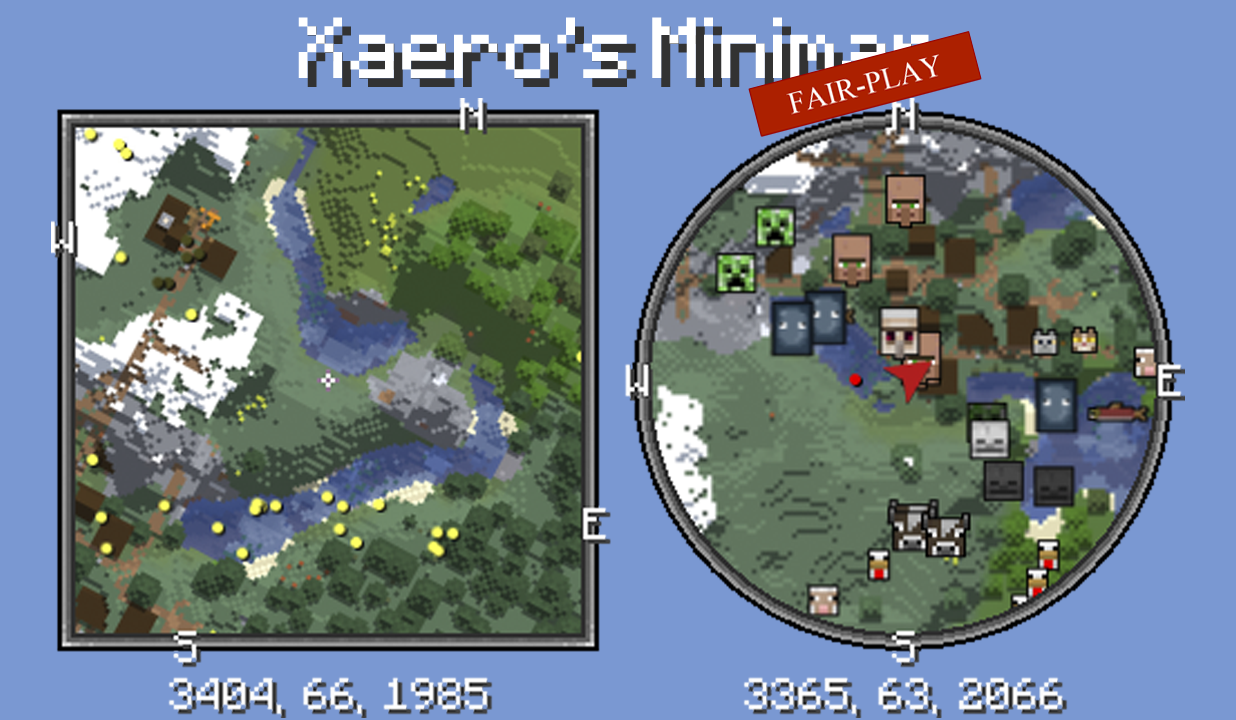
Unlike many other minimap mods, Xaero’s minimap keeps the aesthetic of vanilla Minecraft. This is the FAIR-PLAY version of the mod designed for fair PVP. Features like cave maps and entity radar are disabled in this version of the mod. Read more about the mod here.
Get full mod
XaeroPlus
# XaeroPlus
XaeroPlus is a client-side Minecraft mod that depends on and modifies the Xaero’s WorldMap and Minimap mods with extra
features and performance improvements – particularly for use on anarchy servers like 2b2t.
XaeroPlus is not affiliated or endorsed by xaero96. Please report issues to XaeroPlus’s [Github](https://github.com/rfresh2/XaeroPlus/issues) or [discord server](https://discord.gg/nJZrSaRKtb).
Example Map

# Xaero Versions
Each XaeroPlus release is only compatible with a specific version of Xaero’s WorldMap and Minimap.
Xaero’s Minimap can be swapped out for [BetterPVP](https://chocolateminecraft.com/betterpvp2.php)
Download and include these mods **in addition** to XaeroPlus (3 jars total).
You can find download links to Xaero’s mods here:
* [Xaero’s World Map](https://modrinth.com/mod/xaeros-world-map/versions)
* [Xaero’s Minimap](https://modrinth.com/mod/xaeros-minimap/versions)
# Modifications
* [1.5-3x your FPS by limiting the framerate the minimap is rendered at!](https://youtu.be/hIG-VyGQLao)
* Tip: For least visual impact, lock the minimap’s north
* [Adjustable minimap scaling that increases how many chunks are visible](https://youtu.be/dNqxGzGAHyk)
* [NewChunks Highlighting in MiniMap and WorldMap.](https://youtu.be/n-Tf6TJSsiA)
* [Baritone](https://github.com/cabaletta/baritone) integration
* Baritone Goals synced as temporary waypoints
* [Point and Click Travel](https://youtu.be/gbguyfXLgi0)
* [Waystones](https://legacy.curseforge.com/minecraft/mc-mods/waystones) and [Fabric Waystones](https://legacy.curseforge.com/minecraft/mc-mods/fabric-waystones) integration
* Syncs Waystones as temporary waypoints
* [WorldTools](https://modrinth.com/mod/worldtools/) World Downloader integration
* [Highlights saved chunks while downloading](https://youtu.be/mtCqwJ_RGcc)
* [Portals Highlighting in Minimap and WorldMap](https://youtu.be/zstGVfVRrAs)
* [Portal Skip Highlighting in Minimap and WorldMap](https://youtu.be/g_yQ8D95RY0). Detects chunks where a portal could have been loaded.
* OldChunks Highlighting in Minimap and WorldMap.
* Intended for use on 2b2t. Highlights chunks that were generated in 1.12.2 or lower in the Overworld and Nether based on the natural blocks present in the chunk.
* [Transparent minimap background instead of wasted black screen space.](https://imgur.com/a/jGgHqL4)
* [Fast map region writes](https://youtu.be/B5d7FaHXDCk). Prevent missed chunks in map while traveling at very high speeds.
* Allow multiple MC instances to read/write to the same map concurrently
* Transparent obsidian roof. Useful for mapping 2b2t spawn.
* Setting to always view and create waypoints in the Overworld when in Nether.
* [Render server view distance square around the player.](https://youtu.be/iY_JTGFK6Yg)
* [Dimension hot-switching on WorldMap and Minimap.](https://youtu.be/hXZQtX2df3I)
* Recommended: Create keybinds for Minimap dimension switching.
* WorldMap GUI:
* WorldMap zoom unlocked
* GUI on WorldMap to pan the map to user entered coordinates.
* WorldMap Follow mode and GUI button
* F1 on WorldMap hides GUI and overlays
* Waypoints GUI:
* [Search](https://youtu.be/7DRMUsmZDxc)
* Display distance to waypoints on Waypoints GUI
* Always sort enabled waypoints before disabled waypoints
* GUI button to enable/disable all waypoints
* [Waypoint Beacons](https://imgur.com/a/jGgHqL4)
* Minecraft world always renders in background while in a Xaero GUI for client travel mods compatibility
* Minimap entity dot fix. Hides the entity dot when arrow mode is selected.
* WorldMap and Waypoint directories optionally indexed by:
* Multiplayer server list name.
* Base Server Domain Name
* Server IP (Xaero’s default)
* **Changing this setting requires you to manually rename existing folders in `.minecraft/XaeroWaypoints/` and `.minecraft/XaeroWorldMap/`**
* Overworld dimension optionally stored in the “DIM0” directory instead of “null”
* **Changing this setting requires you to manually rename existing folders in `.minecraft/XaeroWorldMap/Multiplayer_/`**
* WorldMap 1.30.0 added cave data saving and rendering. There is a setting on by default in XaeroPlus that changes how the nether is rendered with cave mode off to be as it was previously.
* This removes the need to manually move existing world data files.
Configurations are in the Xaero WorldMap and Minimap settings GUI.
Toggleable settings support keybinds through the standard Minecraft Controls GUI.
# Language Translations
PR’s are welcomed for language translations.
Language files are located in `src/main/resources/assets/xaeroplus/lang/`
# Other Useful Tools
* Convert JourneyMap World Files to Xaero: [JMToXaero](https://github.com/Entropy5/JMtoXaero)
* Convert JourneyMap Waypoints to Xaero: [JMWaypointsToXaero](https://github.com/rfresh2/JMWaypointsToXaero)
* 2b2t Atlas Waypoints to Xaero: [JMWaypointsToXaero/atlas](https://github.com/rfresh2/JMWaypointsToXaero/tree/atlas)
* Convert MC Region Files to Xaero: [JMToXaero/Region-Scripts](https://github.com/Entropy5/JMtoXaero/blob/Region-Scripts/src/main/java/com/github/entropy5/RegionToXaero.java)
* 2b2t 256k WDL Xaero Map (20GB): [mc-archive](https://data.mc-archive.org/s/eFDEy2XKof83Kez)
* Xaero World
Merger: [JMToXaero/Region-Scripts](https://github.com/Entropy5/JMtoXaero/blob/Region-Scripts/src/main/java/com/github/entropy5/XaeroRegionMerger.java)
* Can be used to merge 256k WDL into an existing world. With optional darkening only on tiles from 256K
XaeroLib
This is a library mod that contains code that is used and required by both Xaero’s Minimap and Xaero’s World Map starting with versions 25.3.2 (minimap) and 1.40.2 (world map).
The map mods themselves along with detailed descriptions of what they do can be found here:
[Xaero’s Minimap](https://modrinth.com/mod/xaeros-minimap)
[Xaero’s World Map](https://modrinth.com/mod/xaeros-world-map)
It is only necessary to install this mod on Forge on Minecraft versions 1.16.5 and 1.12.2. **_The map mods will not work without the library._**
The library is already included in the map mods by default on newer Minecraft versions and on Fabric/Quilt, so you do not need to install it separately, which is why you won’t find such files here.
## For Developers:
Please read the “For Developers” section on the map mod pages.
Xaero map RU-UA
## Xaero map RU-UA
**RU Это полный перевод(кроме разовых, тестовых функций) мода Xaero world map, если у вас с ним будут проблемы пишите в наш трекер проблем**
**UA Це повний переклад (крім разових, тестових функцій), мода Xaero world map, якщо у вас з ним будуть проблеми пишіть у наш трекер проблем**