XGlow
**Works with Java 8 and above.**
(I noticed that the **GlowAPI** from the **inventivetalent** has been abandoned, has not been updated for a long time, has bad reviews and bugs, as well as a rather low-quality code – so I decided to make and publish my own version of the api for the glow)
**XGlow** – is a simple, easy-to-use API to create glow on your entities. The plugin requires [ProtocolLib](https://github.com/dmulloy2/ProtocolLib) to work.
### Usage
First you need to create a Glow object:
(You can use a builder for this)
“`java
Glow glow = Glow.builder()
.сolor(ChatColor.GREEN)
.name(“test”)
.build();
“`
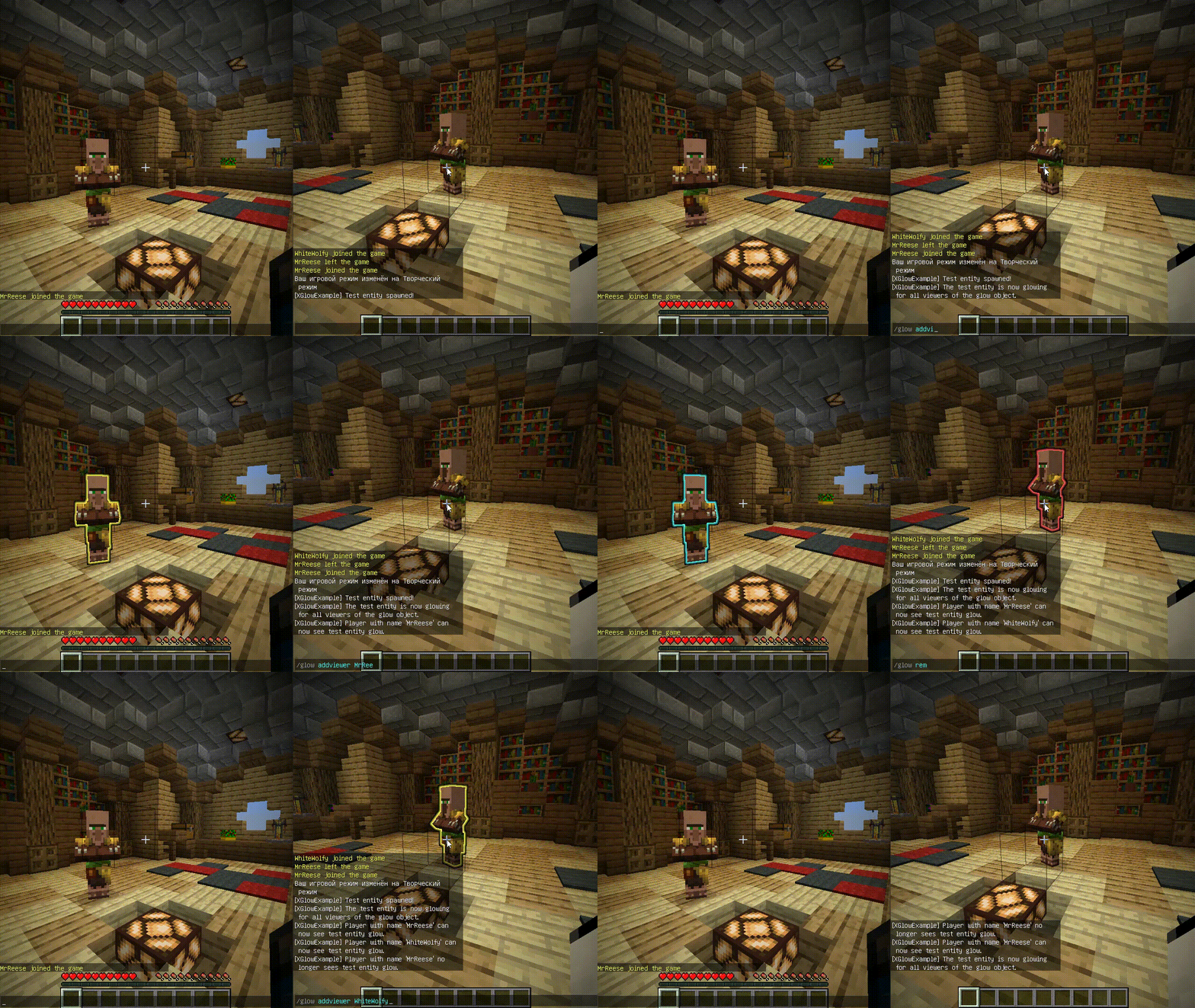
You can add entity to glow object holders,
to make this entity glow with glow object colors.
The glow of the entity will be seen by all viewers
which the glow object contains:
`glow.addHolders(entity);`
To remove the glow of an entity,
you can remove it from the glow object holders.
The entity’s glow will disappear for all viewers of the glow object:
`glow.removeHolders(entity);`
You can add a viewer to the glow object so that he immediately sees the glow of all holders of the glow object:
`glow.display(player);`
When the viewer is removed from the glow object,
all holders of the glow object will
no longer glow for removed viewer:
`glow.hideFrom(player);`
For more features check out XGlow wiki page on github: https://github.com/Xezard/XGlow/wiki
XG7Lobby
# I’ll record it again…
# This plugin depends on a core! Download it below:
https://modrinth.com/plugin/xg7plugins
—
# XG7Lobby – Complete Lobby/Hub System
## 📖 What is XG7Lobby?
**XG7Lobby** is a powerful lobby/hub management plugin designed to revolutionize the server join experience. With a wide range of configurable options, the plugin offers **more than 20 customizable features**, including: **Global PVP**, **interactive menus**, **animated scoreboard/tablist**, **custom forms for Geyser**, and much more!
—
## ⚡ Main Features
### 🏰 Multi-Lobby System
Configure **as many lobbies as you want**, including cross-server locations with SQL database support! Players can easily teleport using the `/lobby` command, with a configurable cooldown system and the option to teleport to a specific lobby ID.
### 🎨 Advanced Menu System
Improve your lobby experience with XG7Lobby’s menu system. You can use custom Geyser forms, personalized GUIs, and configurable hotbars — all adjustable to your liking!
### 📊 Scoreboard, Tablist, Bossbar & More
Bring your server to life with **fully animated** scoreboards, tablists, and bossbars. Display useful information such as player statistics, server status, or events in a visually appealing and dynamic way.
### 🎉 Join, Quit & First Join Events
Customize what happens when players join or leave the server, and make a great first impression on new players with a special welcome. Add messages, sounds, effects, or even rewards to make joining and leaving more memorable.
### ⚔️ Global PVP System
Does the lobby sometimes feel boring? With the global PVP system, that won’t be a problem anymore! Let players fight each other in the lobby with the powerful system provided by XG7Lobby, including full statistics for kills, deaths, and KDR.
### 🦘 Multi-Jump System
Go beyond the classic double jump! Configure triple jumps, infinite jumps, or unique jump effects to add fun mechanics to your server.
### 🚀 LaunchPad
Add excitement with customizable launchpads that throw players into the air. Perfect for hubs, lobbies, or minigame arenas with a fun and interactive touch.
### 🛡️ Complete Moderation System
Keep your server safe with robust moderation tools, including warning systems, mute, kick, ban, IP-ban, and automatic punishments based on configurable infraction levels.
### 💬 Advanced Chat Protection
A complete protection system including anti-swearing, anti-spam, and blocking unwanted commands. Keep your chat clean and organized automatically.
### 🔧 Build System
Control who can build in the lobby using the `/build` command, with full protection against block breaking and placing.
### 👻 Vanish System
Allows staff members to become invisible to other players using the `/vanish` command.
### ⚙️ Custom Commands
Add your own commands to fit your server’s style. Customize shortcuts, actions, and utilities without needing extra plugins.
### 👤 NPC & Hologram System
Create user interaction by taking advantage of the new NPC and hologram creation features!

—
## 📋 Full Feature List
* Fully configurable
* Multiple lobbies
* Global PVP system
* Custom menus (GUI, forms, and hotbar)
* Animated scoreboard, tablist, and bossbar
* Multi-jump system
* Launchpad
* Moderation system
* World-based lobby
* Join and quit events
* First join events
* Repeating events
* Auto broadcast
* Customizable MOTD
* Build system
* Custom commands
* Vanish system
* Anti-swearing
* Anti-spam
* NPCs and holograms
* Action queue system
* Preferences menu
* Hide chat
XercaMod
This mod adds a lot of content to the game. For detailed information, please visit this page.

The additions include:
- Food, especially fast food and desserts
- Tea!
- Unique tools and weapons with enchantments including Warhammer, Grab Hook, Knife, Scythe, etc.
- “Ender Flask” that can be filled with multiple charges of potion
- And Potion Launcher for throwable potions
- Cushions that you can sit on
- A bookshelf that works and shows how many books it holds
- Spyglass (removed in 1.17, since Mojang added it to the base game)
- Confetti and Confetti Balls
- Carved wood with cool designs
- Terracotta tiles, roof material of every color
- Rope that you can climb
- Omni chest, a global ender chest for the whole universe
- Other decorative blocks and items
Configuration
You can edit the xercamod-common.toml file in the config directory to enable/disable each feature in the mod independently.


New in 1.17.1-2.1
Omni Chest

Omni Chest is like Ender Chest, but for the whole universe. It holds a global inventory that anyone can access from anwhere in any dimension. It is everyone’s chest, and yet noone’s at the same time. Get collaborative with your server mates and use this unique logistical ability to your advantage.
Devour

There is a new combat enchantment for the Scythe! It lets you drop little hearts out of the enemy you strike, which you can pick up to replensish health! There is a chance to drop a heart at each hit depending on the Devour level, and a certain amount of heart drops at the killing blow, that again vary depending on the enchantment level.
Food
Cheese and Pizza


You can make cheese to use in recipes or eat as is. The process of making cheese is as follows:
- Craft a curdling vat as in the recipe, using copper and iron ingots.
- Pour milk into the vat.
- Wait as the protein in the milk solidifies into cheese. It should take around 1 minute on average.
- Right click on the vat to retrieve the cheese wheel, then place it on a surface.
- You can eat the cheese in pieces directly from the wheel, or slice it using a knife.

We have wheat, tomatoes, and now cheese. The logical conclusion to all of this is Pizza, of course.
You can prepare a base pizza using these three ingredients, and then either bake it as is to get a margherita pizza, or add toppings of your choosing to create the pizza of your dreams.
The ingredients you can use are sausage, mushroom, chicken, cod fish and doner. You can add up to three ingredients in total. There are 56 variations in total, so go ham with it.
Pizza is eaten in “circular” slices in a way similar to cheese.


Soda

After gulping down all the greasy foodstuff you can get your hands on, there is nothing like carbonated sugar water to wash down your throat. All of the fizzy drinks have a nice, fizzy animation.
You can use an empty glass on a bubbling soul sand to acquire sparkling water. From there, getting to a generic soda is a matter of adding sugar and a snowball to your drink.

Making cola is a little more involved, since it requires processing secret ingredients in a secret procedure:
- Craft the secret cola formula powder using warped roots, rotten flesh, spider eye and three units of sugar.
- Brew the powder into water bottles to get the extract.
- Combine the extract and two snowballs with six glasses of sparkling water to get six glasses of cola.
Drinking cola gives you a Haste effect to reward your efforts.


New Food Items
A few new cheesy and glowy food items are added. Also, the top part of ultimate burger is updated to contain cheese now. Eating glow berry cupcake and glow squid ink paella will make you glow as well.


In addition, the textures of many old food items are updated now!

Nether Carved Wood


There are now carved wood variants for nether stems, namely Crimson Stem and Warped Stem. Differing from their overworld counterparts, these blocks have netherly animations!
Rope with Pistons

Rope now acts like slime block when interacting with pistons!
Credits:
Credits to LuchadorMickey for most of the graphics (good looking ones).
Credits to chechnyacool488 for the Russian translation
Credits to junshengxie for the Chinese translation
Notes:
- Use the one for the latest Minecraft version to get all the features. Older versions may not have newer features.
Xearo地图汉化(MiniMap+WorldMap+PVP)
Xearo 地图汉化(MiniMap + WorldMap + PVP)🇨🇳
## 概览 🚀
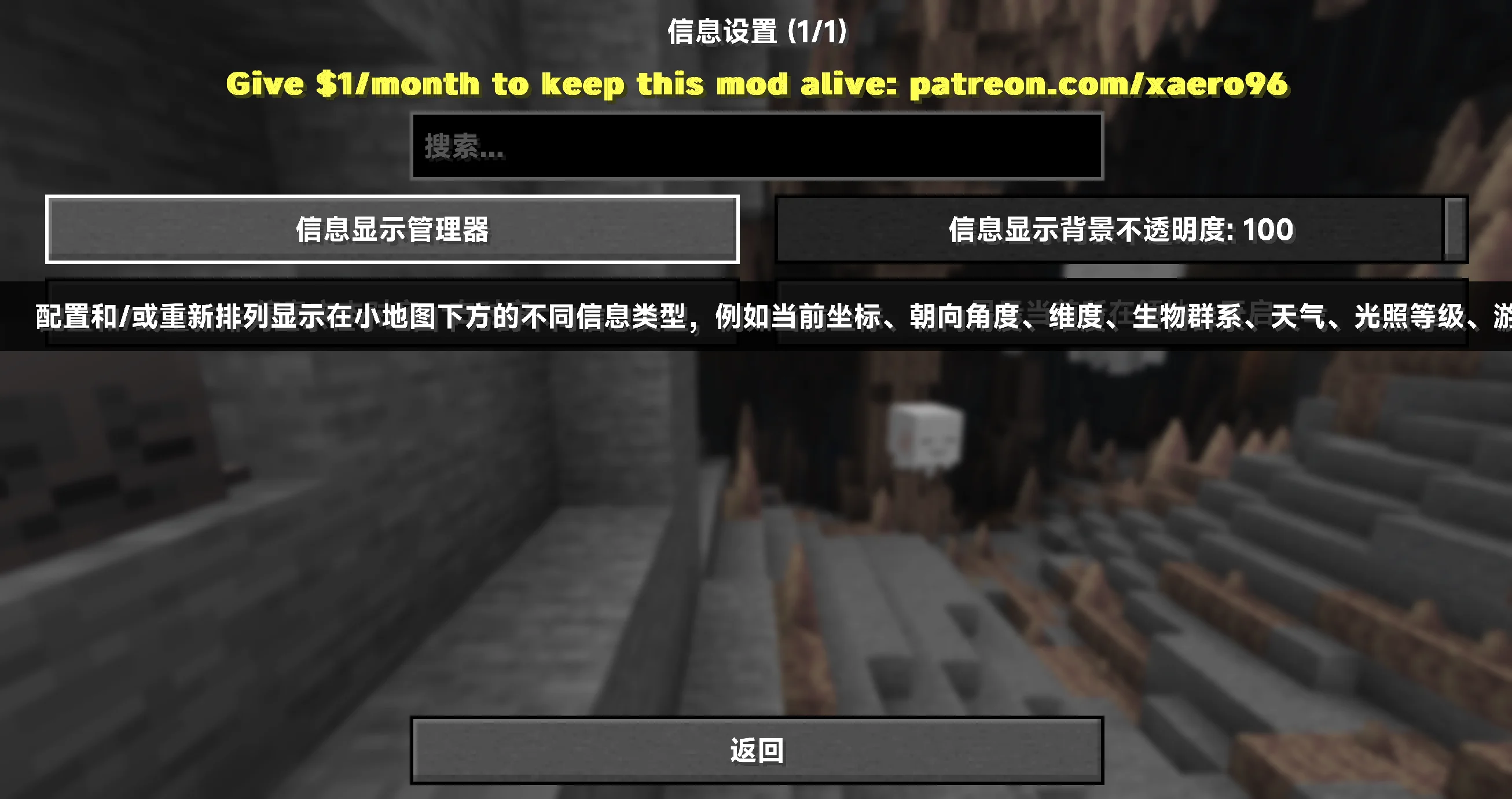
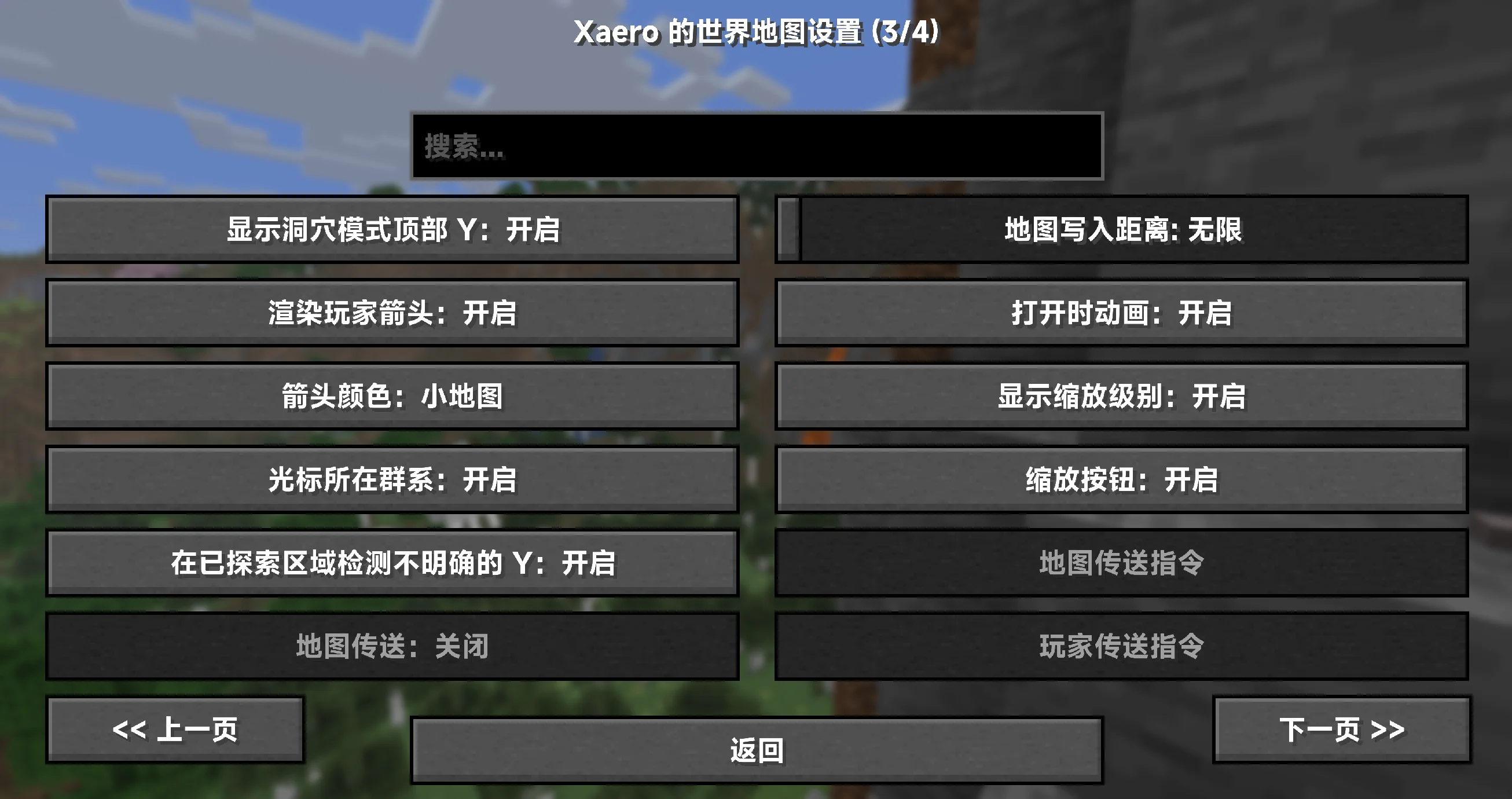
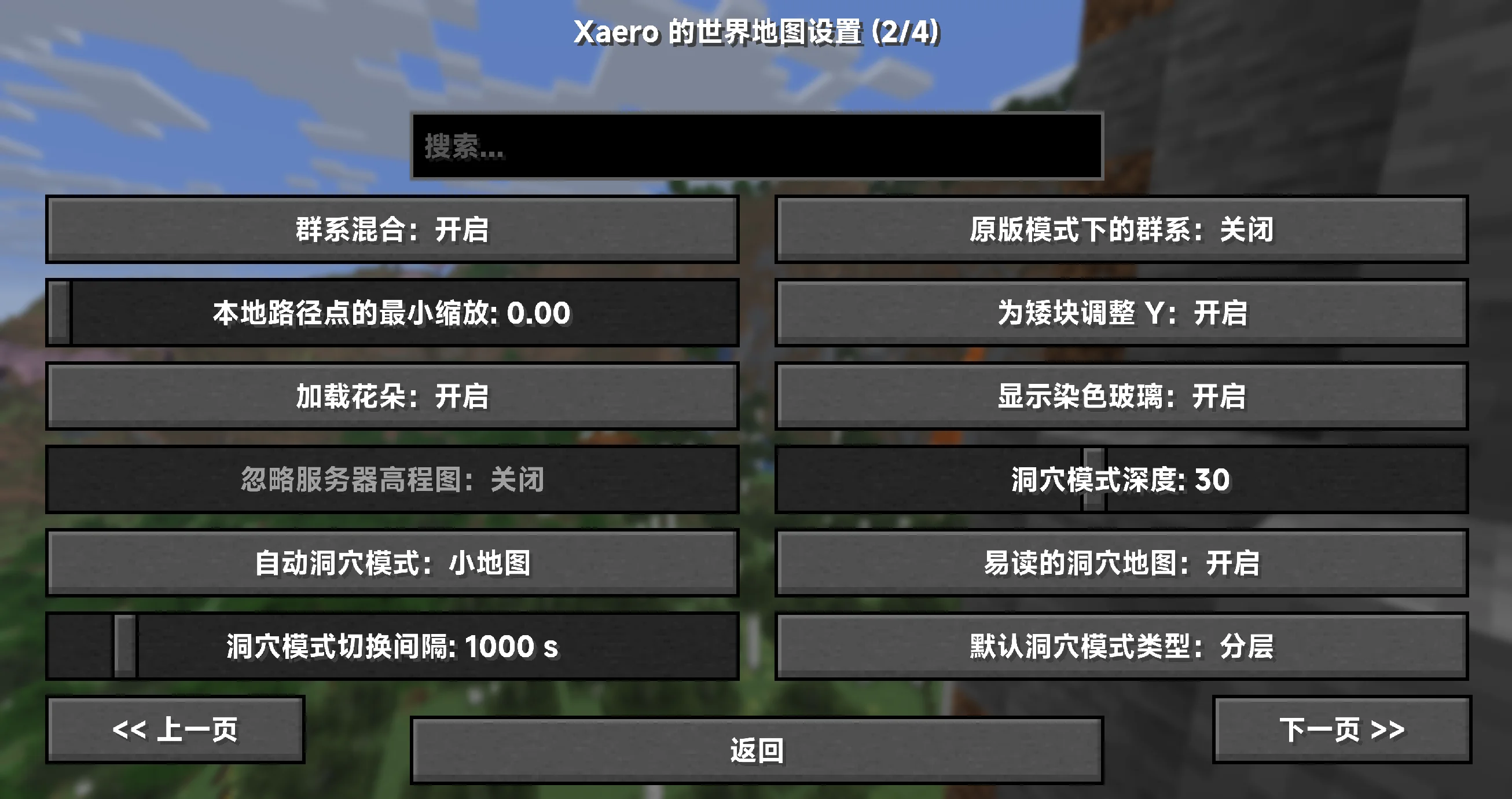
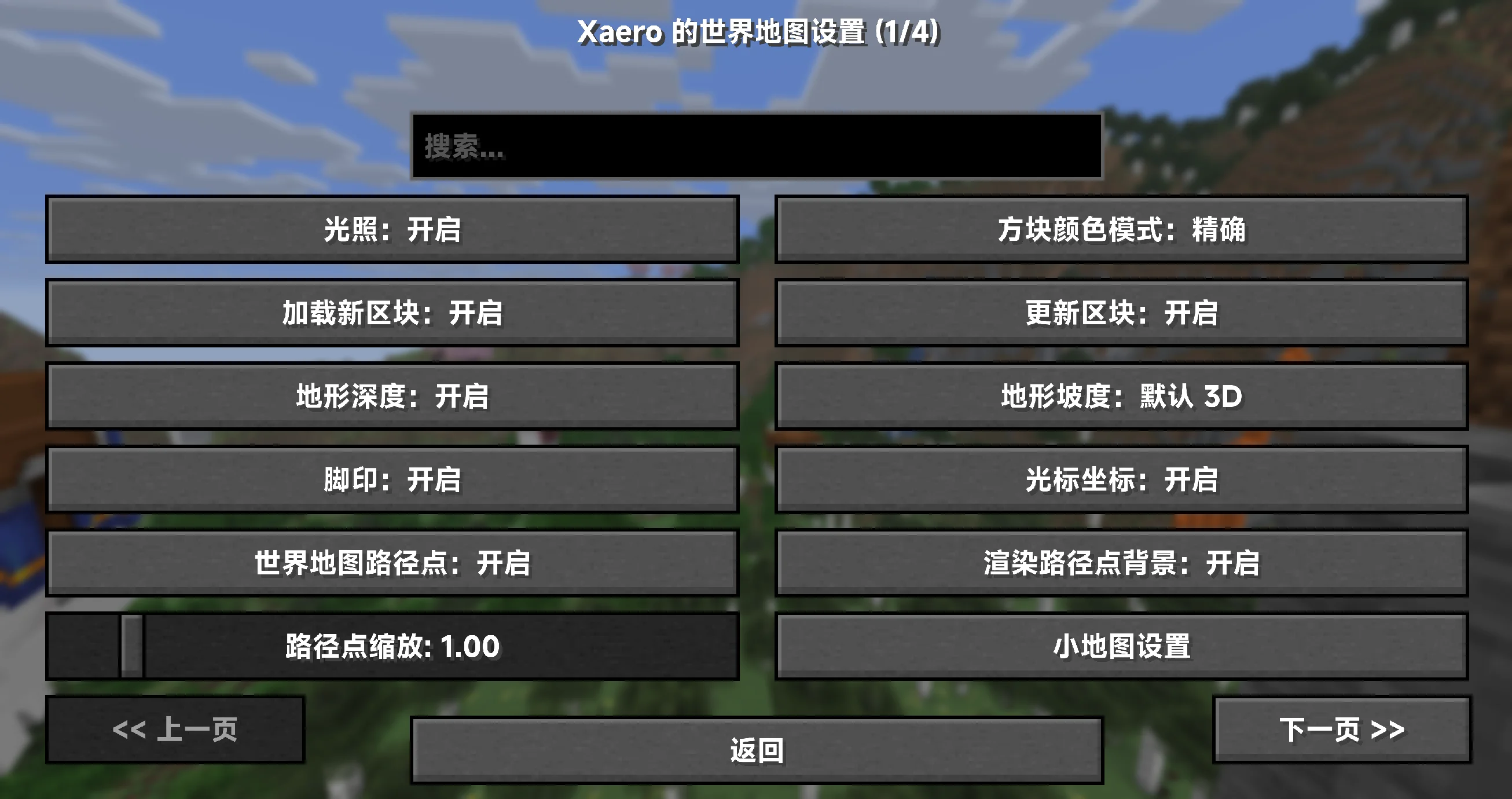
– 100% 覆盖小地图、世界地图与 PVP 地图相关的设置项、提示与界面文本(以已知键为准)✅
– 资源包形态,装上即用;无需任何前置或修改模组文件 🎒
– 持续更新,紧跟上游版本变动,确保术语统一与说明准确 🔄
– 仅客户端生效,不影响服务器与性能(只替换文本,不改动逻辑)🧘
## 适配范围与前提 ⚙️
– 目标模组版本:所有版本适配(以官方发布版本为基准维护)
– 覆盖对象:小地图(Minimap)、世界地图(World Map)、PVP 地图(Better PVP 系功能)
– 语言代码:zh_cn(简体中文)
## 覆盖内容 📝
– 设置类目与条目名称、详细说明与工具提示
– 键位绑定与界面按钮、浮层/叠加层说明(Overlay)
– 错误/警告/兼容性提示、状态信息与对话框
– 术语统一(示例,实际以包内为准):
– Waypoint → 路径点
– Deathpoint → 死亡点
– Chunk Grid → 区块网格
– Entity Radar → 实体雷达
– Biome → 生物群系
– Slime Chunks → 史莱姆区块
– Zoom / Zoom Steps → 缩放 / 缩放步进
– Dimension → 执行维度(主世界/下界/末地等)
– Overlay → 叠加层
## 安装与使用 📦
1. 下载本汉化资源包,将压缩包放入游戏目录的 resourcepacks 文件夹。
2. 启动游戏 → 选项 → 资源包,启用本资源包,并将其移动到更高优先级(置顶以覆盖其他语言包)。
3. 语言设置切换为 简体中文(zh_cn)。
4. 如未立即生效,请使用 F3+T 刷新资源或重启游戏。
小贴士:建议与优质平滑字体资源包搭配使用,获得更清晰的地图与界面文本显示 👓
## 常见问题(FAQ) 💬
– Q:为什么还有少量英文?
A:可能是上游新版本新增/更名的键位,或极少数硬编码字符串。请等待下一次更新,或提交反馈协助定位。
– Q:是否会影响服务器或性能?
A:不会。仅客户端文本资源,不参与渲染或网络处理。
– Q:需要装在服务器上吗?
A:不需要。把资源包放在客户端即可,在任意服务器里都能生效。
– Q:路径点命名/导入导出与我语言有关吗?
A:汉化不改变存档/配置结构,仅影响界面文本;你的航点数据与原版兼容。
## 许可证与授权 📜
– 汉化文本与打包:CC BY-SA 4.0(署名-相同方式共享)
– 说明:本汉化仅包含文本与相关配置,不包含任何原模组代码或美术资源。
允许随整合包分发与二次分发,但需保留署名与相同许可。感谢理解与支持!🤝
## 非官方声明与致谢 🙏
– 本项目为非官方汉化,与原作者及其团队无从属关系。
– 致谢:感谢原作者提供功能强大的地图与 PVP 拓展!
– 原模组主页(供玩家参考):
– [Xaero’s Minimap](https://modrinth.com/mod/xaeros-minimap)
– [Xaero’s World Map](https://modrinth.com/mod/xaeros-world-map)
XD’s Utils
## Description
XD’s Utils is a plugin and mod that provides a custom web interface that you can monitor the whole server, create backups to restore points of your server with a simple script to restore to a backup, an API to get and modify data of the server and plugin through sending web requests, and more!
## Features
| Feature | Implementation |
|——————-|—————-|
| Invsee | ✅ |
| AFK Detector | ✅ |
| Bounties | ✅ |
| Custom Shops | ✅ |
| Economy | ✅ |
| Chat Muting | ✅ |
| Chat Censoring | ✅ |
| Disabled Commands | ✅ |
| Disabled Items | ✅ |
| Custom Messages | ✅ |
| Backups | ✅ |
| Web Interface | ✅ |
| Commands | ✅ |
> ✅ : Implemented
>
> 🚧 : Work in Progress
>
> ❌ : Not implemented
## Config
Config Example
“`yml
# /$$ /$$ /$$$$$$$ /$$
# | $$ / $$| $$__ $$| $/
# | $$/ $$/| $$ $$|_//$$$$$$$
# $$$$/ | $$ | $$ /$$_____/
# >$$ $$ | $$ | $$ | $$$$$$
# /$$/ $$| $$ | $$ ____ $$
# | $$ $$| $$$$$$$/ /$$$$$$$/
# |__/ |__/|_______/ |_______/
# /$$ /$$ /$$ /$$ /$$
# | $$ | $$ | $$ |__/| $$
# | $$ | $$ /$$$$$$ /$$| $$ /$$$$$$$
# | $$ | $$|_ $$_/ | $$| $$ /$$_____/
# | $$ | $$ | $$ | $$| $$| $$$$$$
# | $$ | $$ | $$ /$$| $$| $$ ____ $$
# | $$$$$$/ | $$$$/| $$| $$ /$$$$$$$/
# ______/ ___/ |__/|__/|_______/
# ============================ #
# WEB #
# ============================ #
# Enabled (true/false)
enable_web: true
# Hosted Port (1000-99999)
port: 8080
# ============================ #
# BACKUPS #
# ============================ #
# Enabled (true/false)
enable_backups: true
# Folders to back up & Backup interval (Folder Names: Minutes)
folders:
– world: 120
– world_nether: 240
– world_the_end: 240
– plugins/XDs-Utils: 300
# Max folder size (MB) (-1/0 for unlimited)
max_size: 1024
# Max backups (Int) (-1/0 for unlimited)
max_backups: 10
# Compression level (0-9)
compression_level: 7
# ============================ #
# MESSAGES #
# ============================ #
# Message to send when a player joins for the first time (true/false)
enable_first_join_message: true
# %player% – Player’s name
# %message% – Message to send
first_join_message: “%yellow%Welcome %gray%%player% %yellow%to the server!”
# Message to send when a player joins (true/false)
enable_custom_join_message: true
# %player% – Player’s name
# %message% – Message to send
join_message: “%green%+ %gray%%player%”
# Message to send when a player leaves (true/false)
enable_custom_leave_message: true
# %player% – Player’s name
# %message% – Message to send
leave_message: “%red%- %gray%%player%”
# Custom player messages (true/false)
enable_custom_message_format: true
# %player% – Player’s name
# %message% – Message to send
custom_message_format: “%gray%%player% %dark_gray%» %gray%%message%”
# ============================ #
# DISABLED ITEMS #
# ============================ #
# Items to disable (Item IDs)
disabled_items:
# – minecraft:item_1
# – minecraft:item_2
# – minecraft:item_3
# Method to disable items
# 1 – Removes Recipe
# 2 – Removes Recipe & Clears Item
disable_method: 1
# ============================ #
# DISABLED COMMANDS #
# ============================ #
disabled_commands:
# – “/command_1”
# – “/command_2”
# – “/command_3”
# ============================ #
# CHAT CENSORING #
# ============================ #
# Words to censor
censored_words:
# – “censored_word1”
# – “censored_word2”
# – “censored_word3”
# Regex patterns to censor
censor_regex_patterns:
# – “censored_regex_pattern1”
# – “censored_regex_pattern2”
# – “censored_regex_pattern3”
# Method to censor words
# 0 – Do nothing (Only logs)
# 1 – Replaces Words with ‘*’
# 2 – Removes Words from message
# 3 – Do not send message
censor_method: 1
# ============================ #
# ECONOMY #
# ============================ #
# Enable the shop (true/false)
enable_shop: true
# Allow anyone to create shops (true/false)
anyone_create_shops: true
# Enable bounties (true/false)
enable_bounties: true
# Bounty you gain when you kill a player (Int/Float/Double)
kill_reward: 100.00
# Amount of money to give to players when join the next day (Int/Float/Double)
daily_balance: 100.00
# Items in the default shop (Item ID: Cost, Amount, Slot)
shop_items:
– minecraft:elytra:
cost: 50000
amount: 1
slot: 0
– minecraft:netherite_ingot:
cost: 25000
amount: 1
slot: 1
– minecraft:diamond:
cost: 2500
amount: 1
slot: 2
– minecraft:emerald:
cost: 2500
amount: 1
slot: 3
– minecraft:gold_ingot:
cost: 50
amount: 1
slot: 4
– minecraft:iron_ingot:
cost: 50
amount: 1
slot: 5
“`
XD’s Library
### XD’s Library
#### XDPXI’s library for numerous tasks.
—
### Features
> Please view the [Documentation](https://xdlib.xdpxi.dev/) for the correct features for your version
—
### Building from Source
#### To build the mod from source follow the steps below:
– Clone the [Git repository](https://github.com/XDPXI/XDLib)
– Run `gradlew build` or `build.ps1` in your terminal in the cloned repository
#### The compiled mod will be in `build/libs`
X-Clearlag
[](https://www.spigotmc.org/resources/x-clearlag-custom-cleaning-1-8-1-21-11.132713/) [](https://wiki-x-proyects.vercel.app/) [](https://discord.com/invite/Yb6GsfGWmd)
# **X-ClearLag**
*Next-generation entity cleanup with Folia support, proximity protection, and multi-language modular tasks*
—
## 📄 Description
**X-ClearLag** is the ultimate, professional-grade entity management solution for modern servers. Completely rebuilt from the ground up, it offers **native Folia compatibility**, wall-clock precision tasks, and advanced performance optimizations. Protect your players’ experience with the brand-new **Proximity Protection system**, automatically intervene during lag spikes with **TPS-based emergency cleanups**, and monitor your world smoothly using the **Interactive Chunk Inspector**.
All of this without a single annoying console warning. Supports **Spigot, Paper, Purpur, and Folia (1.8.x – 26.1)**.
## ⚡ Main Commands
**`/xcl [subcommand]`** (*Aliases: `/clearlag`, `/xclearlag`*)
– **`help`** – Shows the interactive help menu.
– **`reload`** – Hot-reloads configuration and language files.
– **`clear`** – Manually triggers the main cleanup tasks instantly.
– **`inspect`** – Opens the **Interactive Chunk Inspector** to hunt down entity clusters.
– **`clearchunk `** – Wipes all entities from a targeted chunk.
– **`tpchunk `** – Teleports instantly to a specific chunk coordinate.
– **`update`** – Checks for the latest X-ClearLag updates.
## ⭐ Key Features
– **Folia & Next-Gen Support** — 100% compatible with Folia’s regional threading model. Built for elite performance.
– **Player Proximity Protection** — Smartly ignores dropped items and entities that are right next to your active players.
– **TPS Monitor & Auto-Cleanup** — Server lagging? X-ClearLag detects TPS drops and automatically triggers an emergency surgical cleanup.
– **Batch Processing & Anti-Spike** — Removes thousands of entities in controlled batches over multiple ticks, preventing the classic “clearlag server freeze”.
– **Interactive Chunk Inspector** — View the Top 12 busiest chunks and manage them through interactive chat clicks.
– **Internal Notifications & PAPI** — Use `[TITLE], [ACTIONBAR], [BROADCAST], [SOUND]` directly in config. Full PlaceholderAPI support.
– **BossBar Countdown** — Elegant visual countdown bar for players during the last 60s (Requires 1.9+).
– **Task-Based Architecture** — Create unlimited independent cleanup tasks. Make one run every 5 mins for drops, and another every 30 mins to run `save-all`.
– **Granular Protection** — Secure mobs by name-tag, leash state, type whitelist, or world blacklists.
## 🌐 Multi-Language Support
– **English** — `en`
– **Español** — `es`
– **Português** — `pt`
– **日本語** — `ja`
– **Русский** — `ru`
– **Custom** — `custom`
## 🔑 Permissions
– **`xclearlag.admin.*`** — Grants all admin permissions (Default: OP).
– **`xclearlag.admin.reload`** — Access to `/xcl reload`.
– **`xclearlag.admin.clear`** — Access to `/xcl clear`.
– **`xclearlag.admin.inspect`** — Access to `/xcl inspect`.
– **`xclearlag.admin.clearchunk`** — Access to `/xcl clearchunk`.
– **`xclearlag.admin.tpchunk`** — Access to `/xcl tpchunk`.
– **`xclearlag.admin.update`** — Access to `/xcl update`.
– **`xclearlag.bypass`** — Bypass countdown messages (Default: false).
– **`xclearlag.notify`** — Receive cleanup notifications (Default: true).
## 🧩 Developer API
X-ClearLag provides a lightweight API for other plugins to interact with the cleanup engine. Support for custom events like `XPreClearEvent` (cancellable) and `XPostClearEvent` allows you to prevent cleanups during critical moments or track performance metrics easily. Full **PlaceholderAPI** support included!
## ⚙️ Configuration Example
> [!TIP]
> This is a basic example. For a full explanation of every setting and module, please visit our [Official Wiki](https://wiki-x-proyects.vercel.app/).
“`yaml
prefix: “&8[&bX-ClearLag&8] &7”
language: “en”
tps-check:
enabled: true
threshold: 16.0
interval: 60
task-to-run: [“clearlag”]
bossbar:
enabled: false
color: “RED”
style: “SOLID”
tasks:
clearlag:
enabled: true
interval: 300
min-players: 3
remove-drops: true
protect-named: true
protect-leashed: true
protect-near-player: false
near-player-radius: 16
countdown: [60, 30, 10, 5, 3, 2, 1]
countdown-commands:
60:
– ‘[TITLE] &b&lX-ClearLag’
– ‘[SUBTITLE] &7Cleanup in &c60s’
– ‘[SOUND] NOTE_PLING’
10:
– ‘[ACTIONBAR] &eEntities removed in &c10s&e!’
entities: [ARROW, SNOWBALL, EXPERIENCE_ORB]
protected-entities: [PLAYER, VILLAGER, ARMOR_STAND]
commands: []
optimizations:
batch-size: 100
chunks-per-tick: 40
“`
—
Xavier Optimized

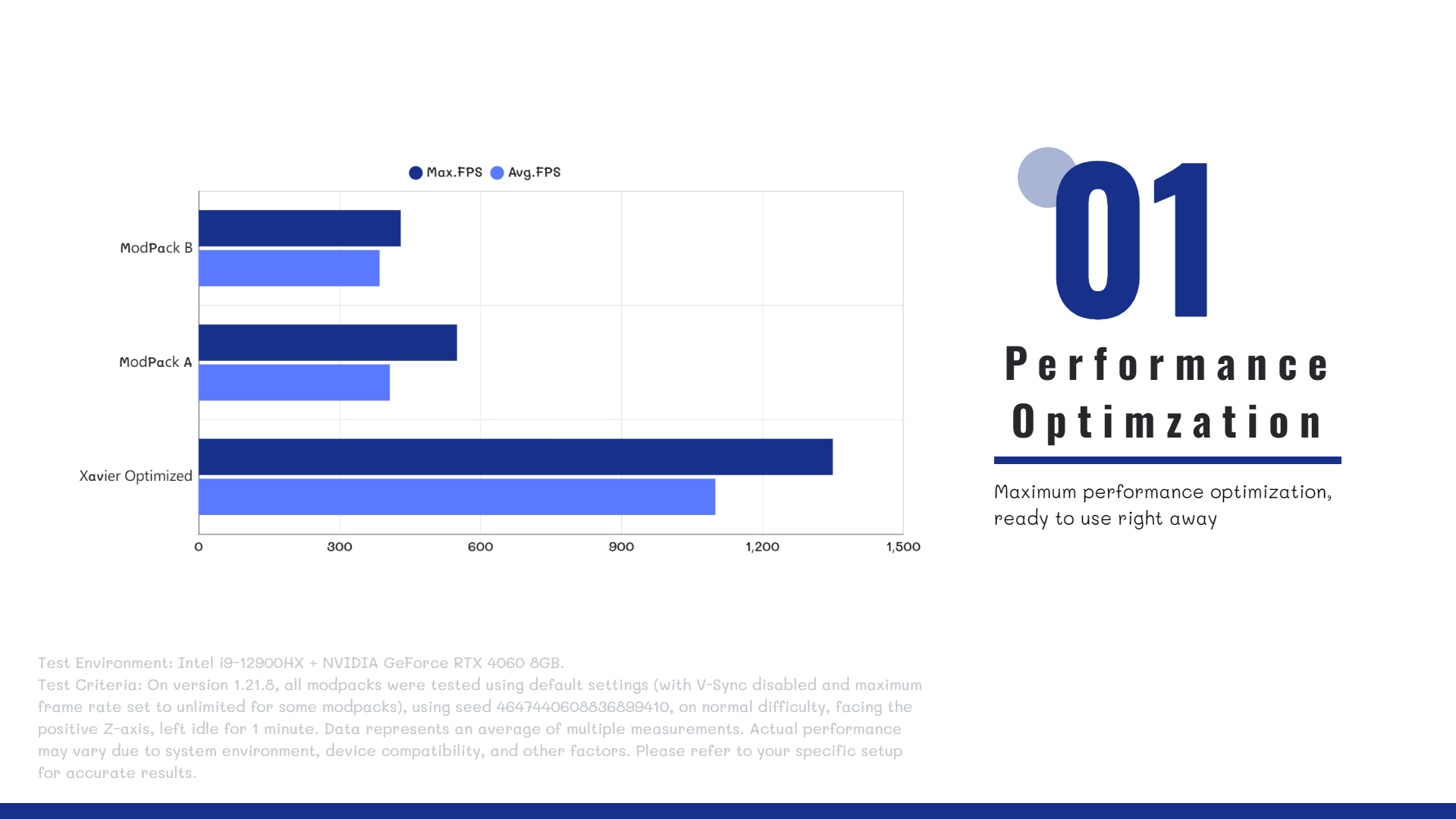
**Xavier Optimized** is a **highly optimized Minecraft** modpack designed to deliver **higher FPS gains** than ordinary optimization packs. The modpack’s ultimate goal is to **maximize the vanilla survival experience** without altering the game’s core mechanics. It features **FPS/MSPT optimization**, **enhanced mod compatibility**, and **survival utility tools**.
[Downloading and using this modpack means that you have agreed to the Terms of Service and Disclaimer.](https://docs.xaviermc.top/wiki/XavierOptimized/disclaimers)
[简体中文](https://www.mcmod.cn/modpack/1209.html) | [Wiki](https://docs.xaviermc.top/)
> Notice: Work in Progress
>
>This introduction is currently incomplete and actively being updated. Check back later for more details.
—
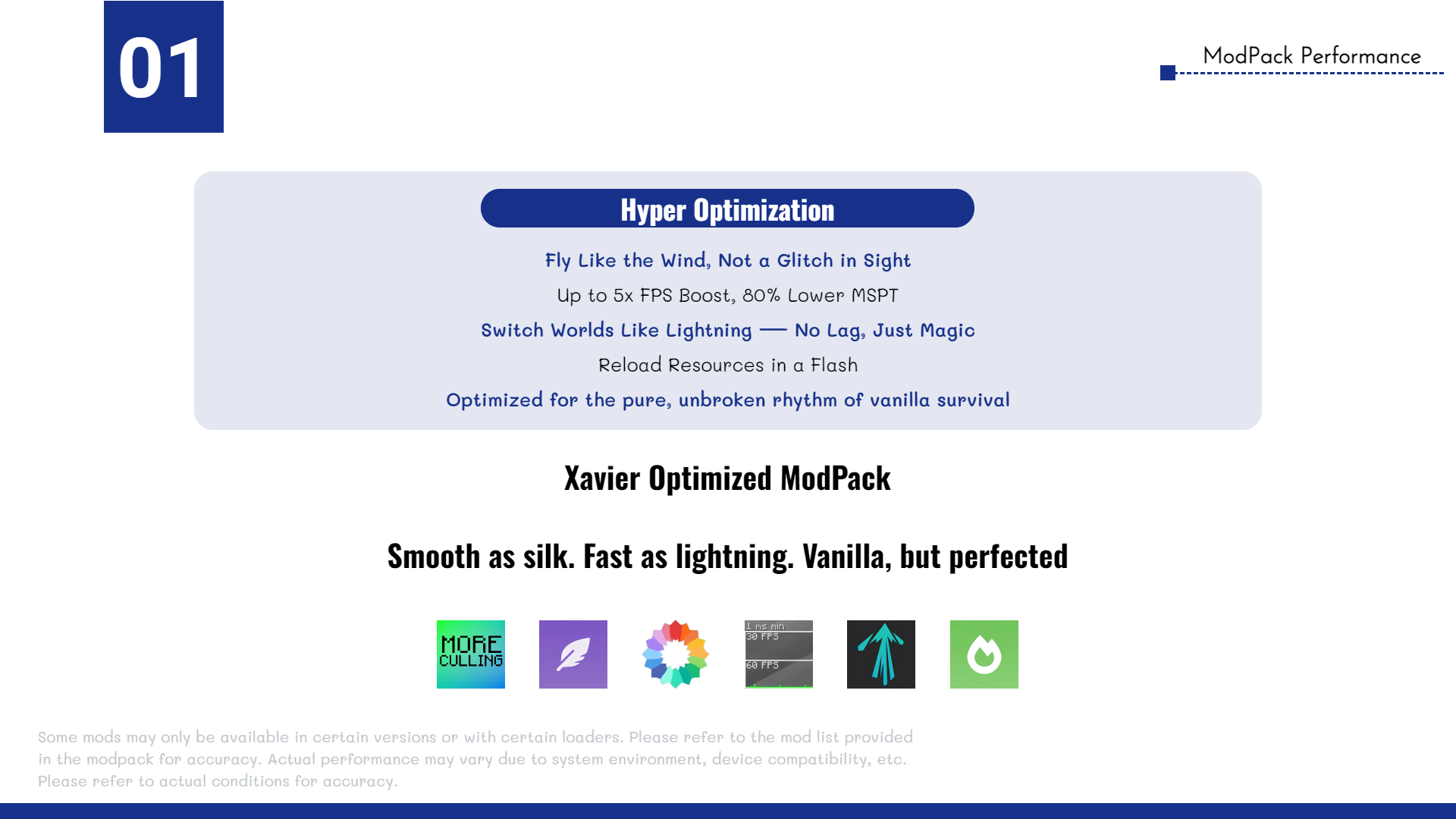
**⭐Hyper Optimization**
The **Xavier Optimized** modpack includes a wide range of high-performance optimization mods, such as **Sodium**, **Lithium**, **More Culling**, and more, ensuring **maximum efficiency**, **stability**, and **smooth gameplay**. All selected mods are carefully tested to be **safe for both single-player worlds and multiplayer servers**.
Whether you’re running the game on a modern high-end PC or a previous-generation entry-level device, **Xavier Optimized** delivers **significant performance improvements**.
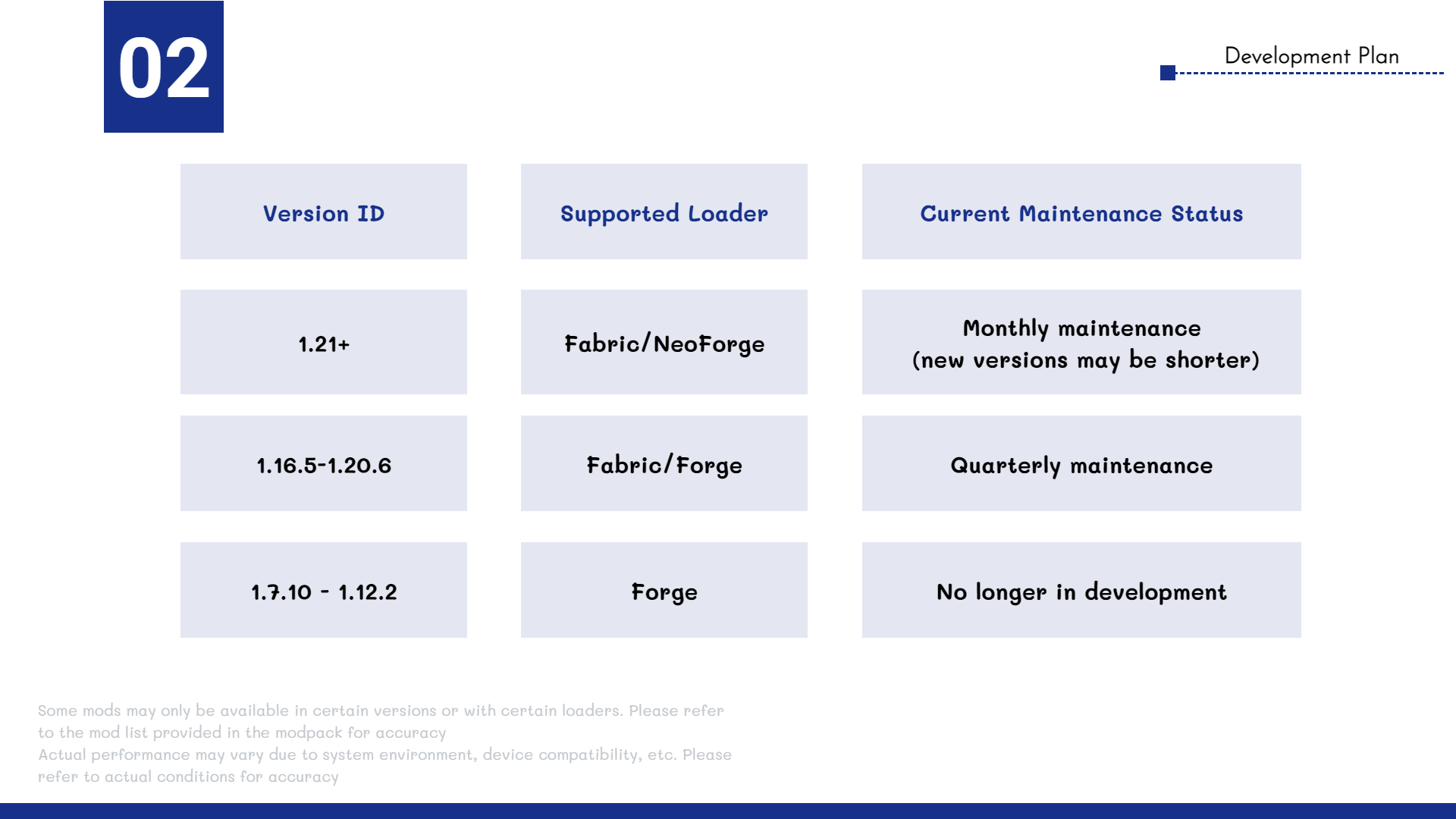
—
**🤔FAQ**
>**Q**: Does the modpack support multiplayer?
>
>**A**: Yes! Xavier Optimized is compatible with most servers and allows vanilla clients to connect seamlessly.
>**Q**: What mods are included in the pack?
>
>**A**: To see the full list of mods, go to the **Versions** tab, select a version, and scroll down to view the included mods.
>**Q**: Do I need to install the modpack on the server?
>
>**A**: No. The modpack is client-side only and works on any server that accepts vanilla clients.
—
**🔗 Author Link**
Email: [email protected]
xali’s Potions Backported
**Backport of the popular resource pack xali’s Potions to version 1.12.2**
This resource pack changes the textures of all potions to new, unique textures for each individual potion.

Original resource pack: [xali’s Potions](https://modrinth.com/resourcepack/xalis-potion)
xali’s Potions – Addon
This project is fan made and not directly related to any of xali’s works. Xali owns all the rights to “xali’s Potions”
Click the banner below to download original “xali’s Potions”. Original file is required for this pack to operate correctly!
[](https://www.modrinth.com/resourcepack/xalis-potion)
^ Click it ^
Resource packs must be installed in the following order:

### **1.21.5+** Updating the pack to 1.21.5+ right now is not possible due to [this Minecraft bug](https://report.bugs.mojang.com/servicedesk/customer/portal/2/MC-305269). As soon as this issue is fixed, I’ll update the pack to the next supported version
—
**ATTENTION!**
You are **required** to install any mod that can work with custom CIT resource packs for the pack to be able to operate: [Optifine](https://optifine.net/home), [CIT Resewn](https://modrinth.com/mod/cit-resewn), [Forge CIT](https://www.curseforge.com/minecraft/mc-mods/forge-cit), [CIT Reforged](https://www.curseforge.com/minecraft/mc-mods/cit-reforged), [[CIT] CustomItemTextures](https://modrinth.com/mod/cit), etc. The pack should work on any Minecraft version with any mentioned mods. Ignore the “Incompatible” warning.
The purpose of this pack is to provide additional mod support to “xali’s Potions”. This pack does not include any textures that are already included in “xali’s Potions” and only adds those which are missing. This pack probably won’t be updated with any more additional mods in the future because it was made just for our own personal experience that I decided to share.
Mods supported by this pack:
– Nether’s Exoticism
– Kobolds
– Undergarden
– Alex’s Mobs
– Upgrade Aquatic
– Removed Content Revival
– Phantasm
—
All the art is done by HASKO, pack assembled by DedMaxim99
HASKO [VK page](https://vk.com/hasko_arts)
Anybody is free to use this pack anywhere. Just do not rename the pack, please.
Contact me (DedMaxim99):
My [YouTube channel](https://www.youtube.com/channel/UCrMHx89X71br0aDlzwsLDHQ)
My [Twitch channel](https://www.twitch.tv/dedmaxim99)
My [VK page](https://vk.com/id728112150)
My [Telegram](https://t.me/DedMaxim99)