Velocitab

GitHub — Setup — Discord — Docs
**Velocitab** is a super-simple Velocity TAB menu plugin that uses scoreboard team client-bound packets to actually sort player lists without the need for a backend plugin. Supporting modern RGB formatting, animations, comprehensive placeholder support and defining multiple TAB menus for different groups of servers, Velocitab is a versatile plugin, useful for any Velocity-based proxy network.
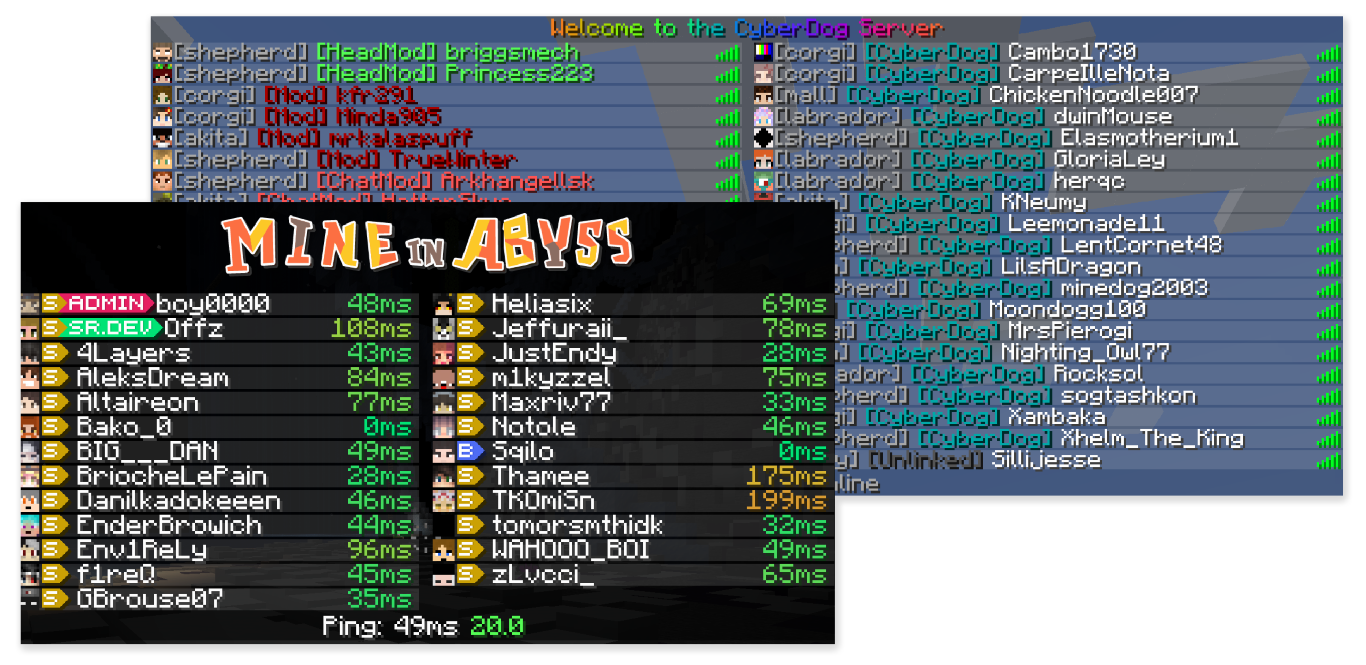

### **⭐ Flexible list sorting**
Customizable TAB list sorting based on user role, server, placeholder, and more.
### **⭐ Versatile formatting support**
Make your TAB list beautiful with full RGB color support, supporting MiniMessage, MineDown and legacy formatting modes.
### **⭐ Multiple TAB menus for different servers**
Create server groups and configure different TAB lists to show for each group!
### **⭐ Animations support**
Add extra flair to your TAB list or display additional information by creating pretty looking animations.
### **⭐ Player nametags**
Customize how over-the-head nametags look to help players stand out in-game.
### **⭐ Full placeholder support**
Comes with a robust set of built-in placeholders, MiniPlaceholders support, as well as PAPIProxyBridge for PlaceholderAPI support
**Ready?** Get started in a new TAB…

* A Velocity 3.3.0 proxy running the latest version
* Backend servers running MC 1.12.2 or newer, or MC 1.8-1.8.9
* Java 17

Helpful links to get you started:
* **Website** — Visit my website!
* **Docs** — Read the plugin docs!
* **Discord** — Get support, ask questions!
* **bStats** — Check out the plugin metrics!
* **GitHub** — Check out the plugin source code!
* **Setup** — Read the setup instructions!

velocit
# velocit
A playit.gg plugin for Velocity servers
# Getting Started
1. Setup a Velocity Server
2. Install the plugin’s latest release
3. Click the link in the console window to link your playit account to the server
4. Done!
# What’s supported?
Pretty much anything that’s TCP will work right now.
Feature | Description | Supported
— | — | —
Minecraft TCP | The TCP port for Velocity | ✔️
UDP Ports | UDP Ports (for things like Geyser) | ❌
Extra TCP Ports | Any extra TCP ports to expose | ✔️
IP Forwarding | The actual IP address of the client | ❌
*any feature listed is planned*
# How to Build?
1. Pull the repo
2. Open with your favorite Java IDE
3. Refresh maven packages
4. `mvn install`
Velocircon


# Velocircon
**Velocircon** is a plugin for Velocity that adds RCON support, allowing you to connect to your Velocity proxy and execute commands remotely.
## About
Velocircon enables administrators and automation systems to connect to Velocity via the RCON (Remote Console) protocol and securely execute any commands supported by the proxy. This greatly improves management and automation capabilities for Minecraft servers using Velocity as their proxy.
## Features
– Standard RCON protocol support
– Execute any Velocity command via RCON
– Secure password authentication
– Easy setup and integration
## Installation
1. Download the latest Velocircon release.
2. Place the `.jar` file in the `plugins` directory of your Velocity server.
3. Restart the server.
## Configuration
After the first launch, the plugin will generate a configuration file `rcon.yml` in the `plugins/velocircon` directory.
**You must set a password and enable RCON (`enable: true`), otherwise the plugin will not work!**
Default configuration:
“`yaml
enable: false
host: 0.0.0.0
port: 25575
password: PASSWORD
colors: true
console-output: true
permissions:
luck-perms:
enable: false
group: ‘*’
regex:
enable: false
regex: minecraft.(.*)
“`
### Environment Variables
Configuration options can also be overridden using **environment variables**. This is useful when running Velocity in Docker or other container environments.
Environment variables use the following format:
“`
VELOCIRCON__
“`
Rules:
* The prefix **`VELOCIRCON__`** is required.
* Use **double underscores `__`** to separate configuration levels.
* Replace `-` with `_`.
* Variable names are case-insensitive, but uppercase is recommended.
### Options
– `enable` (`VELOCIRCON__ENABLE`): Set to `true` to activate RCON support.
– `host` (`VELOCIRCON__HOST`): Address to bind the RCON server (default: `0.0.0.0` for all interfaces).
– `port` (`VELOCIRCON__PORT`): Port for RCON connections.
– `password` (`VELOCIRCON__PASSWORD`): Set a strong password for authentication.
– `colors` (`VELOCIRCON__COLORS`): Enables color codes in command output (recommended).
– `console-output` (`VELOCIRCON__CONSOLE_OUTPUT`): Redirects RCON output to the console.
– `permissions`: RCON connection permissions. If all `enable: false` – all permissions are allowed.
– `luck-perms`: Use LuckPerms group to control connection permissions.
– `enable` (`VELOCIRCON__PERMISSIONS__LUCK_PERMS__ENABLE`): Enable usage `LuckPerms` permissions filter.
– `group` (`VELOCIRCON__PERMISSIONS__LUCK_PERMS__GROUP`): ‘`*`’ or an empty string – all permissions are allowed.
– `regex`: Use Regex (regular expression) to control connection permissions.
– `enable` (`VELOCIRCON__PERMISSIONS__REGEX__ENABLE`): Enable usage `Regex` permissions filter.
– `regex` (`VELOCIRCON__PERMISSIONS__REGEX__REGEX`): `Regex` string.
### Examples
Config file:
“`yaml
port: 25575
console-output: true
permissions:
luck-perms:
enable: false
“`
Environment variables:
“`bash
VELOCIRCON__PORT=25580
VELOCIRCON__CONSOLE_OUTPUT=false
VELOCIRCON__PERMISSIONS__LUCK_PERMS__ENABLE=true
“`
Resulting configuration:
“`yaml
port: 25580
console-output: false
permissions:
luck-perms:
enable: true
“`
Environment variables **override values from `rcon.yml`**.
## Usage
To connect to Velocity via RCON, use any compatible client.
We recommend itzg/rcon-cli for its flexibility and ease of use.
Example connection command:
“`sh
rcon-cli –host –port 25575 –password
“`
Once connected, you can send any Velocity command as if you were using the Velocity console.
## Requirements
– Java 21 or higher (recommended by Velocity documentation)
– Velocity Proxy
## License
This project is licensed under the GNU General Public License v3.0. See the LICENSE file for details.
## Feedback & Contributions
Found a bug or want to suggest an improvement? Please open an issue or submit a pull request!
—
**Author:** @code-lime

VeloAuth

# VeloAuth


**Complete Velocity authentication plugin** with intelligent nickname protection, premium auto-login, and secure offline player management.
## What is VeloAuth?
VeloAuth is a comprehensive authentication system for Velocity proxy that handles all player authorization before they reach your backend servers. It works with any limbo server to provide a smooth login experience while protecting nickname ownership through intelligent conflict resolution.
## Key Features
– 🔒 **Intelligent Nickname Protection** – Premium nicknames are reserved unless already registered by cracked players
– ⚡ **Premium Auto-Login** – Mojang account owners skip authentication automatically
– 🔄 **Automatic Nickname Change Detection** – Detects when a premium player renames their Mojang account and updates the database record automatically
– 🛡️ **Secure Offline Auth** – BCrypt password hashing with brute-force protection
– 📱 **Optional Floodgate Support** – Bedrock players can bypass the auth server when Floodgate integration is enabled
– 🗺️ **Forced Hosts Support** – Players connect via custom domains (e.g., `pvp.server.com`) and are properly routed to their intended server *after* authentication
– 🚫 **Smart Command Hiding** – Authentication commands (`/login`, `/register`) are completely hidden from tab-completion once the player is logged in
– 🚀 **High Performance** – Three-layer premium resolution cache: in-memory → database → external API, with 24-hour premium status retention
– 🔄 **Conflict Resolution** – Smart handling of premium/cracked nickname conflicts
– 📊 **Admin Tools** – Complete conflict management with `/vauth conflicts`
– 🗄️ **Multi-Database** – MySQL, PostgreSQL, H2, SQLite
– 🌍 **17 Languages** – EN, PL, DE, FR, RU, TR, SI, FI, ZH_CN, ZH_HK, JA, HI, VI, KO, TH, ID, PT_BR
– 🔄 **LimboAuth Compatible** – 100% database compatibility (no migration needed)
– 📢 **Discord Alerts** – Webhook notifications for security events
– 🧵 **Virtual Threads** – Built on Java 21 for maximum performance
– 📈 **bStats Analytics** – Anonymous usage statistics via bStats
## Requirements
– **Java 21 or newer**
– **Velocity proxy** (API 3.4.0+)
– **Limbo server**: NanoLimbo, LOOHP/Limbo, LimboService, PicoLimbo, hpfxd/Limbo, or any other
– **Database**: MySQL, PostgreSQL, H2, or SQLite
## Quick Setup
### Installation
1. Download VeloAuth from Modrinth
2. Place the file in your Velocity `plugins/` folder
3. Start Velocity – the plugin will create a `config.yml` file
4. Stop Velocity and configure your database and auth server name in `plugins/VeloAuth/config.yml`
5. Restart Velocity
**Note:** Floodgate support is disabled by default. Enable it only if you actually use Geyser/Floodgate.
### Velocity Config
Configure your `velocity.toml` with your limbo/auth server and backend servers:
“`toml
[servers]
limbo = “127.0.0.1:25566” # Auth/limbo server (NanoLimbo, LOOHP/Limbo, etc.)
lobby = “127.0.0.1:25565” # Typical backend server
survival = “127.0.0.1:25567” # Another backend server
try = [“lobby”, “survival”] # Order matters. Do NOT put ‘limbo’ here.
[forced-hosts]
# VeloAuth fully respects Velocity’s forced hosts!
# Players connecting via this IP will be sent to limbo to login,
# and then seamlessly transferred to ‘survival’ instead of ‘lobby’.
“survival.example.com” = [“survival”]
“`
**Important:** The `try` configuration controls where authenticated players are redirected by default. VeloAuth automatically skips the `limbo` server and selects the first available backend server, **unless** the player used a `forced-host` domain, in which case they are natively routed to their intended destination!
### Discord Webhooks
VeloAuth supports Discord notifications for security events (failed login bursts, brute-force attempts, premium resolution failures). Configure the webhook URL in `config.yml` under `alerts.discord`.
### Database Config
Supported: H2 (out-of-box), MySQL, PostgreSQL, SQLite
## Player Commands
| Command | Description | Restrictions |
|———|————-|————–|
| `/register ` | Create new account | Hidden after login. No premium nicknames |
| `/login ` | Login to your account | Hidden after login. Works for all players |
| `/changepassword ` | Change your password | Must be logged in |
## Admin Commands
| Command | Permission | Description |
|———|————|————-|
| `/unregister ` | `veloauth.admin` | Remove player account (resolves conflicts) |
| `/vauth reload` | `veloauth.admin` | Reload configuration |
| `/vauth cache-reset [player]` | `veloauth.admin` | Clear authorization cache |
| `/vauth stats` | `veloauth.admin` | Show plugin statistics |
| `/vauth conflicts` | `veloauth.admin` | List nickname conflicts |
## How It Works
### Authentication Flow
1. **Player connects** to Velocity
2. **VeloAuth checks** in-memory authorization cache (instant, no I/O)
3. If **not in memory**, checks **database premium cache** (persistent across restarts)
4. If **not in DB cache**, resolves via **Mojang/Ashcon API** in parallel using virtual threads
5. If **not premium**, player is sent to the **auth server** (unless Floodgate Bedrock bypass applies)
6. Player types **/login** or **/register**
7. **VeloAuth verifies** credentials with BCrypt
8. Player is **redirected to backend server** via `try` configuration
### Premium Resolution (3 layers)
“`
Connect → [In-memory cache] → [Database cache] → [Mojang/Ashcon API]
~0ms ~1ms ~200-500ms
“`
All API calls run in parallel on virtual threads. Results are cached in the database and survive proxy restarts.
### Nickname Change Detection
When a premium player logs in with a different username than what is stored (Mojang account rename), VeloAuth automatically detects the mismatch and updates the database record, keeping the UUID-to-username mapping accurate without any admin intervention.
### Nickname Protection System
– **Premium nicknames are reserved** unless already registered by cracked players
– **Conflict resolution** when premium players use cracked-registered nicknames
– **Admin tools** for managing nickname conflicts
– **Automatic blocking** of cracked players trying premium nicknames
## LimboAuth Migration
VeloAuth is **100% compatible** with LimboAuth databases:
1. Stop LimboAuth on your backend servers
2. Install VeloAuth on Velocity
3. Configure VeloAuth to use the same database as LimboAuth
4. Start Velocity – all existing accounts will work automatically
## Contributing
Contributions are welcome! Please open an issue or PR.
## Support
Need help? Found a bug? Open an issue on GitHub or join our Discord server.
## License
This project is licensed under the **MIT License**
Veinminer+
# Veinminer+
Veinminer+ allows you to mine ores that are connected all at once. This as well applies to trees (soon) and is made mainly for 1.12.2! With actual support unlike most veinminer plugins made for older versions not working or just striaght up crashing your server!
## Other features
This plugins has support for enchantment sided pickaxes so your Unbreaking will work and same with Fortune! Allowing enchantments to be actually useful unlike some other plugins do!
Being able to cut down logs with one click is also able to do that allowing you to break an entire tree in one click! Pretty much a one plugin two package deal (Soon..)
### Why should you use this plugin
It’s open source and all of the code updates go to github! So you can see the code yourself. Including this veinminer plugin ACTUALLY works for 1.12.2 and doesn’t break the server any other way. Including actual support for it as well!
[Immersive Vehicles/IV/MTS] VEB Automobilwerke Schwikau


Description
Humongous shoutout to Blaze Wolf for handing me the power of spring. Without his input the entire suspension system for both military and civilian vehicles would have been much, much worse. So thank you, kind person.
Special thanks to Hashim, Nax, Blaze, Laura and everyone else who have helped make this mod what it is today.
Codeveloped with Wartich.
Asking us “when will you update?” will not get you anywhere. So just wait patiently, it’s being worked on
Requires
IAV Parts pack: https://modrinth.com/mod/iav
Immersive Engineering for crafting: https://modrinth.com/mod/immersiveengineering
Immersive Vehicles core mod: https://modrinth.com/mod/immersive-vehicles
Any requests or complaints should come to me over Discord. I don’t check the comments here much.
This is an extention to Immersive Vehicles, working to add (mostly) soviet-era vehicles.
This mod Requires weapons and ammunition from the IAV pack, under the tab “AMCI Parts” This also includes
-RPG-7
-K.AM-55 (groza assault rifle)
-SVU sniper rifle
-Nagant revolver
-Mg08
# Includes
### Military
-BTR-40 with 4 and 6 wheel variants and a halftrack
-BTR-70
-BMP-1/2
-T-72/80/90 Variations on the same chassis
-Concept MBT. Inspired by student’s project and T-90M
-T62
-2A36 Giatsint-B Artillery gun
-AT-T Artillery Tractor
-MI-24 “hind” helicopter
-MiG-21 “fishbed” Jet
-MiG-23 “flogger” Jet
-SU-25 “frogfoot” Ground attack aircraft
### Civilian
-Trabant 601 Sedan and Wagon variants
-UAZ 452
-Trolleybus
-GAZ-24 Volga Sedan and Wagon variants
-GAZ-3102
-GAZ-3102 based EV concept car
-FSO Polonez
-DT-75 Tractor
-IFA W50
-Zastava Yugo
### Historical
-Neubaufahrzeug based WW1 era tank
-Albatross based WW1 era biplane
-T-34-85
-Generic airship
The [Immersive Vehicles/IV/MTS] VEB Automobilwerke Schwikau Military/Civilian Tanks, Helicopters, Planes, and more! Team
VCustomBrand
# VCustomBrand

Customize the brand to display to players on your Velocity network with MiniPlaceholders support

## Installation
– Download VCustomBrand from Modrinth
– Drag and drop on your Velocity plugins folder
– Optionally install MiniPlaceholders together with any expansion
– Start the server
## Command
### `/vcustombrand reload`
Permission: `vcustombrand.command`
## Demonstration
This video makes use of the Expressions and Player expansions of MiniPlaceholders
## Limitations
The brand field in the client only supports plain text, not components, so no HEX colors or gradients can be used
VConsoleLinker
# VConsoleLinker


Link your Velocity console to a Discord channel via WebHooks

## Installation
– Download VConsoleLinker from Modrinth
– Drag and drop on your plugins folder
– Start the server
– Configure the Channel ID and the WebHook token in the settings
*Library used for Discord webhooks* JDWebHooks
## Discord WebHook Configuration

1. Copy the URL of the WebHook.
2. Extract the ID and Token from the URL as shown in the image.
3. Put those fields in the specific configuration options.
4. Restart your proxy
VelocityChatClear
# Velocity Clear Chat
An extremely simple and lightweight plugin, designed to clear chat on the proxy side.
You are also able to clear on server swap, which may be useful to some users. Read the configuration for more info. Default configuration can be found here:
“`hocon
# Velocity Clear Chat Configuration
# This file contains settings for the chat clearing plugin.
# Modify these values as needed.
#
# If there is a message, you can set it to “” to disable it, you can use MiniMessage too.
# If velocity returns invalid information, this message will be displayed.
chat-clear-failed-message=”Failed to get server info”
# The message to send when the chat is cleared by an admin.
# You can use if you would like to display who cleared the chat.
chat-cleared-message=”Chat has been cleared by an admin”
# On player swap, should we clear the chat history?
clear-on-server-swap=true
# The message to display if “clear-on-server-swap” is enabled
clear-on-server-swap-message=””
# The permission an admin needs to clear the chat.
clear-permission=”lncvrt.velocityclearchat.clear”
# The number of lines the chat clearer will send.
lines=100
“`
**If you are wondering why this *velocity plugin* is not supported on BungeeCord/Waterfall, WaterFall is EOL and BungeeCord is obsolete. Velocity is the best server proxy solution out there at the moment.**
VaultUnlocked
# What is Vault Unlocked?
**Note this is a fork of the original Vault, see the Enhanced Functionality section for what this provides over the original Vault**
VaultUnlocked is a versatile API designed to streamline the integration of permissions, chat, and economy systems for plugins. It provides developers with a unified interface, eliminating the need to individually hook or depend on each plugin. This tool was created as a response to the shortcomings of existing APIs like Register and other Permissions systems, which often suffer from either a lack of necessary features or overly complex implementations. VaultUnlocked’s goal is to simplify the process, making it more intuitive for developers to support various systems seamlessly.
With its user-friendly approach, VaultUnlocked offers extensive support for different systems, allowing plugins to operate smoothly within diverse environments. The API’s design prioritizes simplicity and effectiveness, addressing the frustrations developers faced with previous solutions. By providing a cohesive and easy-to-use platform, VaultUnlocked enhances the functionality of plugins, ensuring that they can easily connect with permissions, chat, and economy systems without the need for cumbersome workarounds or dependencies.
If you’re wondering if the plugin you use supports the extended VaultUnlocked functionality, including multiple currencies, look for the VaultUnlocked badge on the plugin page! If you’re a developer and looking to have your project review to get the VaultUnlocked Economy badge, please open a ticket here: Github Badge Review.
Badge:

## Enhanced Functionality(What VaultUnlocked Provides that Vault doesn’t):
VaultUnlocked offers significant improvements over the existing plugin, particularly for those that implement the updated API. It brings a range of enhanced functionalities, making it a more powerful and flexible tool for developers.
### Why VaultUnlocked
Choosing VaultUnlocked over Vault offers a range of benefits that make it a superior choice for plugin developers and server administrators. VaultUnlocked builds upon the foundation of Vault but introduces enhanced features, such as multicurrency support, better compatibility with popular plugins, and the ability to work seamlessly with advanced server frameworks like Folia. Additionally, VaultUnlocked is actively developed, ensuring that it stays up-to-date with the latest advancements and provides more reliable, precise operations, especially in complex economic systems. This combination of modern features and ongoing support makes VaultUnlocked the more robust and future-proof option for managing permissions, chat, and economy systems in your server environment.
### Additional Functionality:
– **Multicurrency Support:** Allows for the management of multiple currencies within the same environment.
– **Active Development:** Ensures continuous improvements and updates to the API.
– **Folia Support:** Provides compatibility with the Folia server framework.
– **Better Compatibility:** Improved integration with plugins like Towny, enhancing overall performance.
– **UUID Support:** Facilitates the use of universally unique identifiers, thanks to contributions from LlmDl.
– **BigDecimal Support:** Enables precise and accurate currency calculations, also contributed by LlmDl.
### Multicurrency Support
VaultUnlocked introduces multicurrency support, allowing servers to manage and operate with multiple currencies simultaneously. This functionality is particularly useful in complex economic systems where different regions or factions might use different types of currency. By providing a seamless way to handle various currencies, VaultUnlocked ensures that economic transactions are both flexible and accurate, catering to diverse gameplay needs.
### Active Development
One of the key strengths of VaultUnlocked is its ongoing active development. The developers behind VaultUnlocked are committed to continuously improving and updating the API, ensuring it remains compatible with the latest plugins and server frameworks. This active development approach guarantees that users benefit from the latest features, bug fixes, and optimizations, keeping the API relevant and reliable in the ever-evolving landscape of Minecraft plugins.
### Folia Support
VaultUnlocked also provides compatibility with Folia, a server framework known for its enhanced performance and scalability. Folia support means that plugins using VaultUnlocked can fully leverage the advanced capabilities of this framework, resulting in smoother and more efficient server operations. This makes VaultUnlocked an ideal choice for servers that prioritize high performance and stability.
### Better Compatibility
Improved compatibility with popular plugins, such as Towny, is another standout feature of VaultUnlocked. By ensuring better integration with these plugins, VaultUnlocked enhances the overall performance and user experience. This compatibility means fewer conflicts and smoother interactions between different plugins, allowing server administrators to build more cohesive and stable server environments.
### UUID Support
VaultUnlocked includes support for Universally Unique Identifiers (UUIDs), thanks to contributions from LlmDl. UUID support is crucial for modern Minecraft servers, as it ensures that player data remains consistent and accurate, even when players change their usernames. This feature enhances the reliability of player identification across various systems within the server, reducing the risk of errors or data loss.
### BigDecimal Support
VaultUnlocked introduces BigDecimal support, also contributed by LlmDl. This feature allows for precise and accurate currency calculations, which is essential in servers with complex economies. By using BigDecimal, VaultUnlocked can handle large numbers and fractional values with high precision, ensuring that all financial transactions within the server are accurate and reliable.
## **License**
VaultUnlocked is licensed under the LGPLv3 License. You can find more here.
## Configurations/Permissions
**Config:**
* update-check
* turns the update checker on/off
**Permissions:**
* vault.admin
* Allows access to vault info, and conversion commands
* Defaults to OP
## API/Source
* VaultUnlocked Source: https://github.com/TheNewEconomy/VaultUnlocked
* VaultUnlocked API Source: https://github.com/TheNewEconomy/VaultUnlockedAPI
## bStats Collection
VaultUnlocked utilizes bStats to collect various metrics similar to the original Vault plugin. These include:
* A unique identifier
* The server’s version of Java
* Whether the server is in offline or online mode
* Plugin’s version
* Server’s version
* OS version/name and architecture
* core count for the CPU
* number of players online
* Metrics version
* Which Chat, Economy, and Permission hook is currently being used
You may opt out of the bStats metrics collection by editing plugins/bstats/config.yml and changing opt-out to true.
**Linking VaultUnlocked**
For information on implementing VaultUnlocked please refer to: https://github.com/TheNewEconomy/VaultUnlockedAPI