# What does this resource pack add?
This resource pack takes the font from a PvP resource pack called “Purple Haze” and puts it in a seperate resource pack.
Here is a showcase video of the resource pack “Purple Haze” by OmnicronGaming
## Other details.
– This resource pack just takes the font from an already existing resource pack, if you are using this somewhere and want to credit someone, credit TerribleChoices, the creator of “Purple Haze”.
– You can use this resource pack in a modpack without my permission, thats alright.
– This resource pack works on ANY version below 1.8.9, even snapshots.
A new plugin designed to **transfer players’ data between names or UUIDs**. I didn’t find any other plugin can handle this problem before, so I made my own one and uploaded it to here to help anyone who needs this feature for his/her server.
Transfers all vanilla player data:
– Player inventory and Ender Chest (`playerdata/`)
– Statistics (`stats/`)
– Advancements (`advancements/`) for 1.13+
## 1.3 Safe & Reliable
– Creates automatic backups before overwriting
– Kicks online players to prevent data overwrite (configurable)
– Asynchronous file operations – no server lag!
# 2 Commands and Permission Nodes
## 2.1 Commands
“`markdown
– /xtransfer – Show version info
– /xtransfer transfer – Transfer by player names
– /xtransfer transferuuid – Transfer by UUIDs
– /xtransfer list – List all player data files
– /xtransfer list – Show files for specific player
– /xtransfer reload – Reload configuration
– /xtransfer help – Show the help message
/xtf = /transfer = /xtransfer
“`
## 2.2 Permission Nodes
“`markdown
– xtransfer.manage – Allows using all XTransfer commands (default: op)
“`
# 3 Config
“`yaml
# Show logo when plugin enabled
show_logo: true
# World settings
world:
# Manual world name (only used if auto-detect is false)
name: “world”
# Automatically detect world name from server
auto-detect: true
# Transfer settings
transfer:
# Transfer statistics files
stats: true
# Transfer advancements files (1.13+)
advancements: true
# Backup settings
backup:
# Create backup of existing files before overwriting
create: true
# Suffix for backup files
suffix: “.old”
# Online player handling
# If true, kick online players before transfer
# If false, show warning but continue
kick-online-player: true
# Language settings
language: “en”
# Debug mode (enable only for troubleshooting)
debug: false
# Messages – You can customize all messages here
messages:
# English messages
en:
no-permission: “&cYou don’t have permission!”
usage-header: “&9&lX&f&lTransfer &f&lHelp”
usage-transfer: “&7/xtransfer transfer &f”
usage-transferuuid: “&7/xtransfer transferuuid &f”
usage-list: “&7/xtransfer list &f[player]”
usage-reload: “&7/xtransfer reload”
usage-help: “&7/xtransfer help”
reload-success: “&a✓ Configuration reloaded!”
transfer-start: “&eStarting async transfer…”
looking-up: “&eLooking up UUIDs for &f{old} &eand &f{new}&e…”
uuid-not-found: “&cCould not find UUID for: &f{name}”
try-uuid: “&7Try using /xtransfer transferuuid with direct UUIDs”
invalid-uuid: “&cInvalid UUID format! Use: /xtransfer transferuuid ”
uuid-example: “&7Example: 12345678-1234-1234-1234-123456789012”
source-data-missing: “&cSource player {name} ({uuid}) has no data file!”
transfer-from: “&7From: &f{name} &7({uuid})”
transfer-to: “&7To: &f{name} &7({uuid})”
transfer-file: “&7File: &f{file}”
backup-created: “&7Backed up existing file to: &f{file}”
transfer-success: “&a✓ Successfully transferred player data!”
transfer-stats: “&7✓ Transferred stats file”
transfer-advancements: “&7✓ Transferred advancements file”
transfer-error: “&cError during transfer: {error}”
folder-not-found: “&cPlayer data folder not found: {path}”
source-not-found: “&cSource file not found: {file}”
source-location: “&7Looked in: {path}”
player-online-warning: “&e⚠ Warning: Player {player} is online! Data may be overwritten when they log out.”
player-kicked: “&e✓ Player {player} has been kicked for data transfer.”
kick-message: “&cYour data is being transferred. Please rejoin in a few seconds.”
no-files: “&eNo player data files found”
list-header: “&6=== Player Data Files ({count}) ===”
list-more: “&7… and {count} more”
list-entry: “&7{name} &8- {uuid}”
list-unknown: “&8{uuid} &7(unknown)”
X-Socials is a professional and highly optimized solution for managing your server’s social networks. From 1.8 to 1.26.1, provide your players with a **Premium GUI Editor**, **Interactive Links**, **Automatic Rewards**, **Custom Cooldowns**, **Statistics**, and **Rich Text Formatting**. Runs natively on **Folia**, **Paper**, **Purpur**, and **Spigot**.
—
### 🚀 Premium Features
– **🪄 Auto-Config Updater** — Configs stay up-to-date automatically with every new version.
– **🖥️ Professional GUI Editor** — Create, edit and delete social networks from an intuitive in-game interface.
– **💬 Interactive Links** — Clickable URLs with hover tooltips via Bungee Chat API.
– **🎁 Reward System** — Console commands executed on first visit (UUID-based, one-time).
– **⏱️ Custom Cooldowns** — Per-social network cooldown configuration.
– **🔊 Custom Sounds** — Play different sounds for each social network.
– **📺 Custom Titles** — Show titles when players use social commands.
– **📊 Statistics System** — Track total and per-social network usage with placeholders.
– **🎨 Rich Text** — RGB colors, gradients, MiniMessage support.
– **🌍 Universal Compatibility** — Native support for Folia, Paper, Purpur, Spigot, and Bukkit.
– **🌐 Multi-Language** — Bundled support for ES, EN, PT, JA, RU.
– **📡 Broadcast System** — Automatic multi-line announcements.
– **🧩 PlaceholderAPI** — Native expansion with multiple placeholders.
—
### 💻 Commands
| Command | Description | Permission |
| :— | :— | :— |
| `/xs -gui` | Open the premium GUI editor | `xsocials.gui` |
| `/xs reload` | Reload configurations | `xsocials.admin` |
| `/xs list` | List all social networks | `xsocials.use` |
| `/xs update` | Check for updates | `xsocials.admin` |
| `/xs version` | Show plugin version | `xsocials.use` |
**Dynamic Social Commands** — `/discord`, `/youtube`, `/[your-network]`…
| Placeholder | Description |
| :— | :— |
| `%xsocials_total_uses%` | Total uses |
| `%xsocials__uses%` | Uses for specific network |
| `%xsocials__enabled%` | Enabled status |
| `%xsocials__link%` | Network link |
| `%xsocials__command%` | Network command |
—
**[Join our Discord for Support & Updates](https://discord.com/invite/Yb6GsfGWmd)**
X-SetWarps
[](https://www.spigotmc.org/resources/132480/)
[](https://modrinth.com/plugin/x-setwarps)
[](https://discord.gg/Yb6GsfGWmd)
# X-SetWarps
*Efficient and simple warp management for your Minecraft server*
—
## 📋 Description
**X-SetWarps** is a lightweight and efficient warp plugin designed for simplicity and ease of use. Create, manage, and teleport to warps with minimal configuration. It features **PlaceholderAPI** integration and a **Dual-Color engine** supporting both MiniMessage and Legacy codes.
—
## ⚡ Commands
### Administration
– **`/xsetwarp reload`** – Reloads configuration and language files.
– **`/xsetwarp update`** – Checks for plugin updates.
– **`/xsetwarp version`** – Shows the current version.
### Warping
– **`/setwarp [description]`** – Creates a warp with optional description.
– **`/warp `** – Teleports you to a warp (supports delay/cooldown).
– **`/delwarp `** – Deletes an existing warp.
– **`/warps`** – Lists all available warps.
– **`/warpinfo `** – Shows technical details about a warp.
—
## 🔐 Permissions
| Permission | Description | Default |
|————|————-|———|
| `xsetwarps.admin` | Access to `/xsetwarp` commands | OP |
| `xsetwarps.setwarp` | Access to `/setwarp` | OP |
| `xsetwarps.delwarp` | Access to `/delwarp` | OP |
| `xsetwarps.warp` | Access to `/warp` | true |
| `xsetwarps.warps` | Access to `/warps` list | true |
| `xsetwarps.warpinfo` | Access to `/warpinfo` | true |
| `xsetwarps.warp.` | Per-warp permission (if enabled) | OP |
—
## ✨ PlaceholderAPI
| Placeholder | Description |
|————-|————-|
| `%xsetwarps_total%` | Total amount of warps created |
| `%xsetwarps_last_warp%` | Last warp name used by the player |
| `%xsetwarps_cooldown_%` | Time left for specific warp cooldown |
| `%xsetwarps_warp_desc_%` | Specific warp description |
| `%xsetwarps_warp_world_%` | World name of a specific warp |
– ✅ **Dual-Color Engine** – Supports MiniMessage (``) and Legacy (`&`).
– ✅ **Secure Teleport** – Delay system with move cancelation and cooldowns.
– ✅ **Folia Support** – Optimized for modern multi-threaded servers.
– ✅ **Universal Compatibility** – Supports 1.8.8 up to the latest versions.
# **X-SetSpawn**
### *Manage your server’s spawn point professionally*
### 📝 **Description**
X-SetSpawn is a lightweight, feature-rich plugin designed to manage spawn points on your server. From simple global spawns to premium visual effects, economy integration, and proxy network support — all packed into one plugin. Compatible with Minecraft 1.8.8 to 26.1+.
### ✨ **Features**
– **Fireworks on arrival:** Launch a firework when a player teleports to spawn. Color and power configurable.
– **Combat & Falling checks:** Block `/spawn` while in combat or falling. Supports CombatLogX, PvPManager, DeluxeCombat.
– **Multi-database storage:** Save spawns to YAML (local), MySQL, MariaDB, H2 or MongoDB for cross-server sync.
– **Custom command aliases:** Define `/hub`, `/lobby` or any alias directly from `config.yml` — no need to edit `plugin.yml`.
– **Economy Integration (Vault):** Charge players to use `/spawn`. Money only deducted if the teleport completes.
– **First-Join Spawn:** Set a unique spawn point for newly joining players with `/setspawn firstjoin`.
– **Smart Respawn:** On death, respects the player’s Bed or Respawn Anchor before falling back to spawn.
– **Void-Teleport:** Automatically teleport players who fall below a configurable Y-level.
– **Post-Teleport Protection:** Temporary invulnerability after teleporting while chunks load.
– **Advanced Proxy Sync:** Dedicated lightweight plugins for Velocity and BungeeCord. Use `/setlobby` to sync your lobby server automatically.
– **Intelligent Proxy Teleport:** Automatically detects if a player is already on the target server and performs a local teleport.
– **Visual Countdown:** ActionBar, BossBar, Titles and particle effects during the delay — each individually toggleable.
– **Countdown sounds:** “Tic-Tac” click sounds each second during the teleport delay.
– **PlaceholderAPI:** Full PAPI support. Exposes `%xsetspawn_cooldown%`, `%xsetspawn_delay%`, `%xsetspawn_is_pending%`, `%xsetspawn_spawn_set%`.
– **Config auto-updater:** Detects outdated configs, creates a backup and rebuilds automatically.
– **100% Customizable:** 6 language files (EN, ES, JA, PT, RU, CUSTOM), per-world spawns, and full config control.
**`/spawn`**
Teleports the player to the established spawn point.
**`/setspawn [x y z] [world] [yaw pitch]`**
Sets the spawn point. Use without arguments for your location, or specify coordinates (supports `~`). Console compatible.
**`/delspawn `**
Deletes a specific named spawn point if named spawns are enabled.
**`/back`**
Teleports the player back to their last location before using a spawn command.
**`/setlobby`**
Sets the lobby coordinates for the proxy network and syncs the configuration with BungeeCord/Velocity.
**`/xss [subcommand]`**
– **`help`** – Shows the help menu.
– **`reload`** – Reloads the plugin configuration.
– **`version`** – Shows the current version info.
– **`update`** – Manually check for updates.
– **`setspawn`** – Sets the spawn point (alias for /setspawn).
– **`delspawn`** – Deletes a spawn (alias for /delspawn).
### 🛡️ **Permissions**
– **`xsetspawn.spawn`** – Use `/spawn`. *(default: everyone)*
– **`xsetspawn.setspawn`** – Use `/setspawn`. *(default: op)*
– **`xsetspawn.admin`** – Admin commands and update notifications. *(default: op)*
– **`xsetspawn.reload`** – Reload the configuration. *(default: op)*
– **`xsetspawn.update`** – Check for updates. *(default: op)*
– **`xsetspawn.bypass.cooldown`** – Skip the teleport cooldown. *(default: op)*
– **`xsetspawn.bypass.delay`** – Skip the teleport delay. *(default: op)*
– **`xsetspawn.bypass.economy`** – Teleport for free. *(default: op)*
> **Tip:** Explicitly denying a node (`-xsetspawn.spawn`) will block the player even if they are OP.
Need help? Join our [Discord](https://discord.com/invite/Yb6GsfGWmd) or report issues in the discussion section.
# **X-Rooms**
### *Advanced BoxPVP room management for your server*
### 📝 **Description**
X-Rooms is a powerful, all-in-one plugin for creating and managing PvP rooms (BoxPVP) on your server. Define combat zones with WorldEdit, set up custom kits, potion effects, rewards, holograms and winner destinations — all from an intuitive in-game GUI. Compatible with Minecraft 1.8.8 to 1.21.x+.
### ✨ **Features**
– **WorldEdit Integration:** Select a region with WorldEdit/FAWE and instantly create a PvP room with `/xr create`.
– **Full GUI Management:** Edit every room property (name, sounds, abilities, equipment, rewards) from a clean visual interface — no config editing needed.
– **10 Configurable Abilities:** Strength, Speed, Resistance, Haste, Regeneration, Fire Resistance, Jump Boost, Saturation, Absorption, and Fly — each with adjustable levels per room.
– **Ability Level Limits:** Set global maximum levels for each ability in `config.yml` to prevent overpowered setups.
– **Custom Equipment & Rewards:** Define kit items players receive on match start and reward items for the winner, all via GUI.
– **Automatic Inventory Management:** Player inventories are backed up and restored automatically. No items lost.
– **Combat Logging Protection:** Configurable punishment for players who disconnect during PvP — keep or delete their backup inventory.
– **Winner Teleport Location:** Set a custom destination for the match winner per room, or let them stay in the room.
– **Configurable End Delay:** A customizable delay after the match ends before players are teleported out. Players are invulnerable and locked in the room during this period.
– **PvP Countdown:** Visual countdown (Titles + Sounds) before combat begins with a configurable timer.
– **Hologram Support:** Automatic holograms showing room name, player count and time remaining. Supports DecentHolograms and HolographicDisplays.
– **Per-Room Permissions:** Enable or disable permission requirements per room. Rooms are public by default.
– **Anti-Escape System:** Players cannot walk or teleport out of a room during active PvP.
– **Barrier Material:** Configure a visible or invisible barrier material during countdowns.
– **Entry Titles & Sounds:** Custom welcome titles, subtitles and sounds when entering a room region.
– **PlaceholderAPI:** Full PAPI integration for holograms and messages. Supports both internal and global placeholders.
– **HEX Color Support:** Use `&#RRGGBB` colors in messages and titles (1.16+). Falls back gracefully on older versions.
– **Multi-Language:** 3 built-in language files (English, Spanish, French) with automatic config updater.
– **Folia Support:** Full compatibility with Folia’s regionized threading — all teleports and tasks use async-safe methods.
– **Config Auto-Updater:** Detects outdated configs and updates them automatically without losing your settings.
🚤 X-Ray Boat lets you see straight through the boat and into the ocean below.
The main idea of this texture is simple and useful: with a transparent/open boat, you can clearly see the seafloor, corals, ruins, and underwater terrain while sailing. 🌊👀
It keeps a clean, vanilla-friendly look, but adds a practical and immersive detail that makes ocean exploration way more enjoyable. Perfect for discovering what’s beneath the water without leaving your boat. 🌿✨
Lightweight, simple, and visually pleasing — a small tweak that changes how you explore the seas. 🚣♂️
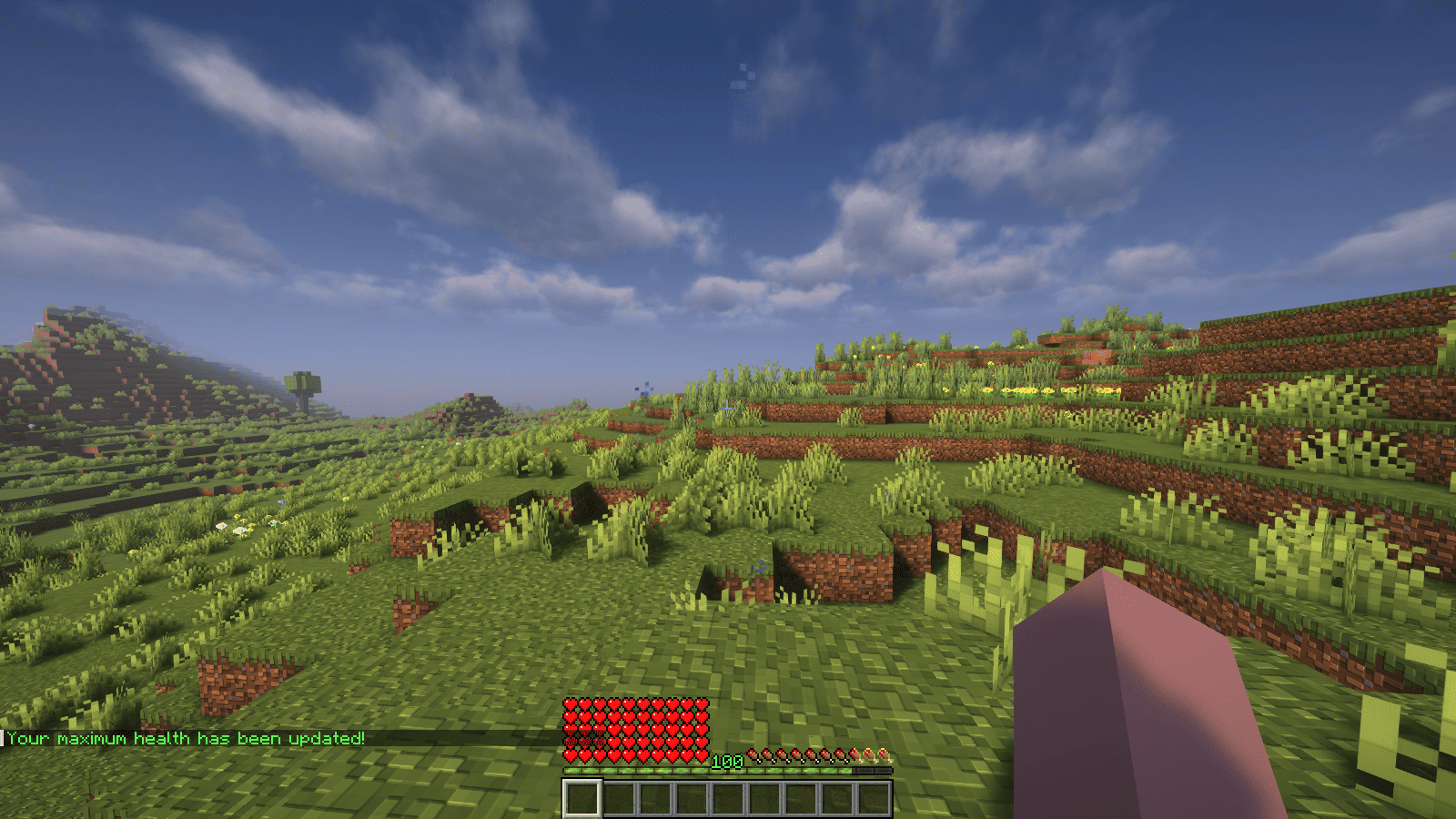
XPHearts is a plugin that automatically adjust maximum hearts/health depending on your experience level. You can configure the amount of experience level needed in the configuration file.
### Features
– Automatically adjust the player’s maximum hearts/health when they reach the experience level specified in the configuration.
– Easy to understand config.
– Lightweight.
### Commands
| Command | Description | Permission |
|—————-|————————————-|—————–|
| `/xh` | Get the information about the plugin. | `xh.use` |
| `/xh reload` | Reloads the config file. | `xh.admin` |
| Command aliases| **xh, xpheart, xphearts** |
### Issues and Suggestions
Suggest and report issues on [Github](https://github.com/seyviyer2/XPHearts/issues).
XP Stacker
🎉 **XPStacker: Let Your Server Breathe!** 🎉
Is your server slowing down because of all the scattered XP orbs? 🐢 XPStacker offers a sleek and effective solution to this problem. This lightweight plugin automatically merges nearby XP orbs into a single one, significantly reducing server load while providing a smoother experience for players.
✨ **Key Features:**
– **Lag Reduction:** 💨 Drastically reduces server lag by merging hundreds of scattered XP orbs into a single orb.
– **Automatic Merging:** 🤝 New XP orbs automatically merge with nearby ones. No player action is required.
– **Configurable Radius:** ⚙️ Easily adjust the merge radius of XP orbs in the config.yml file.
– **Lightweight and Stable:** 🔋 Operates with minimal resource usage and does not affect your server’s other features.
Add XPStacker to your server now and let your players collect XP without any lag! 💎
✨ **Check Out Our Other Plugins!** ✨
If you enjoy the **XPStacker** plugin, don’t forget to check out our other high-quality plugins for your server!
**XP-like HUD** (or wixewsky’s XP-like HUD) will change in-game HUD (health, food, armor, etc) to use colored experience-like bars, being very vanilla-friendly.
Originally I made this HUD for Better than Adventure! and published it on Planet Minecraft, but came up porting this to vanilla Minecraft with some improvements and publishing here, on Modrinth.
You can download XP-like HUD for BTA! [here](https://modrinth.com/resourcepack/xp-like-hud-for-bta!)!
## Mod Support
This Resource Pack supports 182 mods in total! ≈143 with custom assets and ≈39 tested out*. Currently supported mods:
Expand to see
– [AppleSkin](https://modrinth.com/mod/appleskin) by squeek502.
– [Amarite](https://modrinth.com/mod/amarite) by AmyMialee.
– [Armor Toughness Bar](https://modrinth.com/mod/armor-toughness-bar) by pbone64.
– [Armor Toughness Bar, Again](https://modrinth.com/mod/armor-toughness-bar,-again) by paypur.
– [Armor Chroma for Fabric](https://modrinth.com/mod/armor-chroma-for-fabric) by A5b84.
– [Armor Chroma](https://www.curseforge.com/minecraft/mc-mods/armor-chroma) by jobicade.
– [Farmer’s Delight](https://modrinth.com/mod/farmers-delight) by vectorwing.
– [Brewin’ And Chewin’](https://modrinth.com/mod/brewin-and-chewin) by Torty.
– [More Heart Types](https://modrinth.com/mod/more-heart-types) by Oth3r.
– [Heartache](https://modrinth.com/mod/heartache) by spzla.
– [Detail Armor Bar](https://modrinth.com/mod/detail-armor-bar) by RedLime.
– [Detail Armor Bar Reconstructed](https://modrinth.com/mod/detail-armor-bar-reconstructed) by Coredex.
– [Pick Your Poison](https://modrinth.com/mod/pick-your-poison) by Ladysnake.
– [Raised](https://modrinth.com/mod/raised) by yurisuika.*
– [Colorful Hearts](https://modrinth.com/mod/colorful-hearts) by Terrails.
– [Nostalgic Tweaks](https://modrinth.com/mod/nostalgic-tweaks) by rjxkenshin.
– [Heart Effects](https://modrinth.com/mod/heart-effects) by Doublea06_.
– [Victus](https://modrinth.com/mod/victus) by glisco.
– [Stamina](https://modrinth.com/mod/insane-stamina) by Insane96.
– [PartialHearts](https://modrinth.com/mod/partialhearts/versions) by DialingSpoon527.*
– [ArmorSkin](https://modrinth.com/mod/armorskin) by IzzyDotExe.
– [Extra Armor Info](https://modrinth.com/mod/extra-armor-info) by mrmelon54.
– [Insane’s Survival Overhaul (aka IguanaTweaks Reborn)](https://www.curseforge.com/minecraft/mc-mods/iguanatweaks-reborn) by Insane96.
– [Thirst Was Taken](https://modrinth.com/mod/thirst-was-taken) by ghen-git and mlus.
– [Thirst Bar](https://modrinth.com/datapack/thirst-bar) by 3geE.
– [It’s Thirst](https://modrinth.com/mod/its-thirst) by capybaro.
– [Tough As Nails](https://modrinth.com/mod/tough-as-nails) by Adubbz and Forstride.
– [Survive](https://modrinth.com/mod/survive) by Stereowalker.
– [Simple Hydration](https://modrinth.com/datapack/simple-hydration) by Boid.
– [uku’s Armor HUD](https://modrinth.com/mod/ukus-armor-hud) by uku.*
– [Auto HUD](https://modrinth.com/mod/autohud) by Crendgrim.*
– [Homeostatic](https://modrinth.com/mod/homeostatic) by wendall911.
– [Energy Bar Indicator](https://modrinth.com/datapack/stamina-bar-indicator) by Diesse.
– [Dehydration](https://modrinth.com/mod/dehydration) by Globox1997.
– [Bewitchment](https://modrinth.com/mod/bewitchment) by MoriyaShiine and cybercat5555.
– [Upgrade Aquatic](https://modrinth.com/mod/upgrade-aquatic) by Team Abnormals.
– [The Aether](https://modrinth.com/mod/aether) by The Aether Team.
– [Njol’s HUD](https://modrinth.com/mod/njols-hud) by Njol.
– [Fancy Health Bar](https://modrinth.com/mod/fancy-health-bar) by efekos.*
– [Armor Hud](https://modrinth.com/mod/armor-hud) by SaolGhra.
– [SpiffyHUD](https://modrinth.com/mod/spiffyhud) by Keksuccino.*
– [Melancholic Hunger & HUD](https://modrinth.com/mod/melancholic_hunger) by antigers.
– [Mediumcore](https://modrinth.com/mod/alexs-mediumcore) by AlexModGuy.
– [NutritionZ](https://modrinth.com/mod/nutritionz) by xR4YM0ND and Globox1997.
– [Health Indicators](https://modrinth.com/mod/health-indicators) by AdyTech99.
– [Dietary Statistics](https://modrinth.com/mod/dietary_statistics) by Rikka-Kitani.
– [Quark](https://modrinth.com/mod/quark) by Vazkii.
– [Water Source 2](https://modrinth.com/mod/watersource2) by Koiro.
– [Mantle](https://modrinth.com/mod/mantle) by KnightMiner.
– [BedrockIfy](https://modrinth.com/mod/bedrockify) by juancarloscp52.*
– [Bedrock Hotbar](https://modrinth.com/mod/bedrock-hotbar) by BizCub.*
– [Malum](https://modrinth.com/mod/malum) by SammySemicolon.
– [Energizer](https://modrinth.com/mod/energizer) by Gauraaaaaaaa.
– [Arthritis](https://modrinth.com/mod/arthritis) by ProstStuff and Bloxedzero.
– [Hydration](https://modrinth.com/mod/hydration) by Exzotic.
– [Hydration](https://modrinth.com/mod/hydration-mod) by BlackVault.
– [Armor Points ++](https://modrinth.com/mod/armorpoints) by Cheos and SopsyHallow.
– [ParCool!](https://modrinth.com/mod/parcool) by alRex_U.
– [Scaling Health](https://modrinth.com/mod/scaling-health) by SilentChaos512.
– [Legacy4J](https://modrinth.com/mod/legacy4j) by Kyubion Studios.
– [Feathers](https://modrinth.com/mod/feathers) by Elenai.
– [Verticality](https://modrinth.com/mod/verticality) by KrLite.*
– [HUDTweaks](https://modrinth.com/mod/hudtweaks) by burgerindividual.*
– [Crim’s Party GUI](https://modrinth.com/mod/crims-party-gui) by Crim and Favouriteless.*
– [Hunger Remover](https://modrinth.com/mod/hunger-remover) by SmushyTaco.*
– [Overflowing Bars](https://modrinth.com/mod/overflowing-bars) by Fuzs.
– [Mindful Eating](https://www.curseforge.com/minecraft/mc-mods/mindful-eating) by camcam_burger.
– [Botania](https://modrinth.com/mod/botania) by Vazkii.
– [Cracker’s Wither Storm Mod](https://modrinth.com/mod/crackers-wither-storm-mod) by nonamecrackers2.
– [Frostbyte’s Improved Inventory](https://modrinth.com/mod/frostbytes-improved-inventory) by FrostbyteGames.
– [Totem Bar](https://modrinth.com/mod/totem-bar) by Yomna.
– [I ❤ TFC (I Heart TFC)](https://modrinth.com/mod/ihearttfc) by alekiponi.
– [Leave My Bars Alone](https://modrinth.com/mod/leave-my-bars-alone) by Fuzs.*
– [Colorful ui](https://modrinth.com/mod/cui) by pustoykishka.*
– [Overloaded Armor Bar](https://modrinth.com/mod/overloaded-armor-bar) by Tfarcenim.*
– [Crumbling Hearts](https://modrinth.com/mod/crumbling-hearts) by KreaDex.*
– [Scorchful](https://modrinth.com/mod/scorchful) by TheDeathlyCow.
– [Frostiful](https://modrinth.com/mod/frostiful) by TheDeathlyCow.
– [Mana Attributes](https://modrinth.com/mod/mana-attributes) by TheRedBrain.
– [Life Fruits](https://modrinth.com/mod/life-fruits) by super_okina.
– [ArmorHUD](https://modrinth.com/mod/armorhud-fabric) by kyh148.
– [Vampirism](https://modrinth.com/mod/vampirism) by maxanier and cheaterpaul.
– [Would you Rather](https://modrinth.com/mod/wyr) by EightSidedSquare.
– [Chococraft](https://modrinth.com/mod/chococraft) by clienthax and Mrbysco.
– [Hudless](https://modrinth.com/mod/hudless) by ZipeStudio.*
– [Withered Hearts](https://modrinth.com/mod/withered-hearts) by Ramixin.*
– [Extended Hotbar](https://modrinth.com/mod/extended-hotbar) by DenWav and unilock.*
– [Double Hotbar](https://modrinth.com/mod/double-hotbar) by sidezbros.*
– [RemoveHUD](https://modrinth.com/mod/removehud) by IzzyDotExe.*
– [Better GUI Scaling](https://modrinth.com/mod/betterguiscaling) by yeahimrose.*
– [Granular Hunger](https://modrinth.com/mod/granular-hunger) by Tetro48.
– [Blue Skies](https://modrinth.com/mod/blue-skies) by Modding Legacy.
– [Extra RPG Attributes](https://modrinth.com/mod/extra-rpg-attributes) by cleannrooster.
– [RunicLib](https://modrinth.com/mod/runiclib) by Yirmiri and BackupCup.
– [Cold Sweat](https://modrinth.com/mod/cold-sweat) by Mikul.
– [Dungeon’s Delight](https://modrinth.com/mod/dungeons_delight) by Yirmiri and Betwixer.
– [Additional Saturation](https://modrinth.com/mod/additional-saturation) by wet_noodles90.
– [Advanced UI Scaling](https://modrinth.com/mod/advanced-ui-scale) by qendolin.*
– [Head-down Display Continuation](https://modrinth.com/mod/hdd-continuation) by The_Computerizer.*
– [Vehicle Hunger Bar](https://modrinth.com/mod/vehicle-hunger-bar) by CrownSheep.*
– [Hexed](https://modrinth.com/mod/hexed) by BackupCup.
– [Better Bubbles](https://modrinth.com/mod/betterbubbles) by IllagerCaptain.
– [Vampire’s Delight](https://modrinth.com/mod/vampires-delight) by GridExpert.
– [Meulti’s Backrooms](https://modrinth.com/mod/meultis-backrooms) by Meulti and hacone.
– [Extended Armor Bars](https://www.curseforge.com/minecraft/mc-mods/extended-armor-bars) by RebelKeithy.
– [Elytra Bar HUD](https://www.curseforge.com/minecraft/mc-mods/elytra-bar-hud) by Fotatata.
– [Advanced Armor Bar](https://modrinth.com/mod/advanced-armor-bar) by Sygikal.
– [Saturative](https://modrinth.com/mod/saturative) by emilahmaboy.*
– [More Offhand Slots](https://modrinth.com/mod/more-offhand-slots) by TkkynaA.*
– [Giacomo’s HUD Overlays Configurator](https://www.curseforge.com/minecraft/mc-mods/giacomos-hud-overlays-configurator) by zacomat.*
– [Cyra](https://modrinth.com/mod/cyra) by Le_Keko.
– [Ametrine](https://modrinth.com/mod/ametrine) by nickfluffingfox and Buff_sheep.
– [LemonSkin](https://modrinth.com/mod/lemonskin) by myxazaur.
– [Haema](https://modrinth.com/mod/haema) by will_bl.
– [Spells & Shields](https://modrinth.com/mod/spells-shields) by CAS_ual_TY.
– [Oreganized](https://modrinth.com/mod/oreganized) by TeamGalena.
– [Fantazia](https://modrinth.com/mod/fantazia) by ArkadiyHimself.
– [Secrets of the Void](https://modrinth.com/mod/secrets-of-the-void) by the_destiny.
– [Horseman](https://modrinth.com/mod/horseman) by mortuusars.*
– [Offhand Hotbar](https://modrinth.com/mod/offhand-hotbar) by ThePotatoArchivist.*
– [Bountiful Fares](https://modrinth.com/mod/bountiful-fares) by Hecco.
– [FireHud](https://modrinth.com/mod/firehud) by LordEnder_Kitty.
– [WinWeapons](https://modrinth.com/mod/winweapons) by Lumineade and TheTrueYak.
– [Etherology](https://modrinth.com/mod/etherology) by Faradey and Feytox.
– [Fright’s Delight](https://modrinth.com/mod/frights-delight) by ChefMooon.
– [Metabolism](https://modrinth.com/mod/metabolism) by lilypuree.
– [Just Another Witchery Remake](https://modrinth.com/mod/just-another-witchery-remake) by mrsterner and anatevka.
– [Toxony](https://modrinth.com/mod/toxony) by MrFrostyDev.
– [SmartHUDReheated](https://modrinth.com/mod/smarthudreheated) by deflatedpickle.*
– [CustomHealthHUD](https://modrinth.com/mod/customhealthhud) by POHH.*
– [Ecological Replenishment Station](https://modrinth.com/mod/ecological-replenishment-station) by niannianan and mlus.
– [Eternal Starlight](https://modrinth.com/mod/eternal-starlight) by LeoMinecraftModding.
– [Eidolon:Repraised](https://modrinth.com/mod/eidolonrepraised) by Alexthw46.
– [Stellarity](https://modrinth.com/mod/stellarity) by kohara.
– [Trailier Tales](https://modrinth.com/mod/trailier-tales) by FrozenBlock.
– [Sweet Calamity](https://modrinth.com/mod/sweet-calamity) by Valent and Valend.
– [Better Flight](https://modrinth.com/mod/betterflight) by ArkVeil and rejahtavi.
– [Illager Revolution](https://modrinth.com/mod/illager-revolution) by SangreBK and AstianBK.
– [Unusual End](https://modrinth.com/mod/unusual_end) by Sweetygamer2 and SashaKYotoz.
– [BITE](https://modrinth.com/mod/bite) by KevReTV.
– [Stamina Attributes](https://modrinth.com/mod/stamina-attributes) by TheRedBrain.
– [ExtendedHotbarRebared](https://modrinth.com/mod/extendedhotbarrebared) by deflatedpickle.*
– [Eleron](https://modrinth.com/mod/eleron) by Sindercube.
– [Aileron](https://modrinth.com/mod/aileron) by Lodestar.
– [Overhauled Damage](https://modrinth.com/mod/overhauled-damage) by TheRedBrain.
– [Combat Roll](https://modrinth.com/mod/combat-roll) by ZsoltMolnarrr.
– [ArmorWeight](https://modrinth.com/mod/armorweight) by ptayur.
– [Goety – The Dark Arts](https://modrinth.com/mod/goety) by Polarice3.
– [Chai’s Better HUD](https://modrinth.com/mod/chais-better-hud) by Chai.*
– [Axiom](https://modrinth.com/mod/axiom) by Moulberry.*
– [Rats](https://modrinth.com/mod/rats) by AlexModGuy and GizmoTheMoonPig.
– [The Undergarden](https://modrinth.com/mod/the-undergarden) by quek and GizmoTheMoonPig.
– [Galosphere](https://modrinth.com/mod/galosphere) by Orcinus, Ninni and lunarbunten.
– [Aylyth](https://modrinth.com/mod/aylyth) by cybercat5555.
– [Burnt](https://modrinth.com/mod/burnt) by pxlbnk.
– [JCRAFT: Eyes of Ender](https://modrinth.com/mod/jojo-eyes-of-ender) by Arna and more.
– [L_Ender’s Cataclysm](https://modrinth.com/mod/l_enders-cataclysm) by mcl_ender.
– [Unusual Prehistory](https://modrinth.com/mod/unusual-prehistory-forge) by peeko322131 and crydigo.
– [WitherUtils](https://modrinth.com/mod/witherutils) by klangzwang.
– [Sanity: Descent Into Madness](https://modrinth.com/mod/sanity-descent-into-madness) by croissantnova.
– [StaminaZ](https://modrinth.com/mod/staminaz) by Globox1997.*
– [Sprint O’ Meter](https://modrinth.com/mod/sprintometer) by PaperScorpio.*
– [Goblins & Dungeons](https://modrinth.com/mod/goblins-dungeons) by superlord9362 and Weastiann.
– [Exotelcraft](https://modrinth.com/mod/exotelcraft) by TKD_Kedis.
– [Euphorics](https://modrinth.com/mod/euphorics) by TalonMinecraft and EightSidedSquare.
– [Enigmatic Legacy](https://modrinth.com/mod/enigmatic-legacy) by Aizistral.
– [Legendary Survival Overhaul](https://www.curseforge.com/minecraft/mc-mods/legendary-survival-overhaul) by krampus_there, armkath and Alex_Hashtag.
– [Hardcore Survival](https://modrinth.com/mod/hardcore-survival) by AFrozenRain.
– [Nycto](https://modrinth.com/mod/nycto) by MoriyaShiine and cybercat5555.
– [TerraFirmaCraft](https://modrinth.com/mod/terrafirmacraft) by eerussianguy, Therighthon, dries007 and alcatrazEscapee.
– [Enlightend](https://modrinth.com/mod/enlightend) by lixir and hhumanoid.
– [Jaden’s Nether Expansion](https://modrinth.com/mod/jadens-nether-expansion) by ThatJadenXgamer.
– [GD656MotionHUD](https://modrinth.com/mod/gd656motionhud) by Minecraft_GD656.*
– [Inventorio](https://modrinth.com/mod/inventorio) by RubixDev and LizardOfOz.
– [Supplementaries](https://modrinth.com/mod/supplementaries) by MehVahdJukaar and Plantkillable.
– [Mutant More](https://modrinth.com/mod/new-mutant-more) by AlexandersFunAndGames.
– [Confluence: Otherworld](https://modrinth.com/mod/confluence) by Magic_Team.Jvav.
– [Embers Rekindled](https://modrinth.com/mod/embers) by RCXcrafter.
– [Obscure API](https://modrinth.com/mod/obscure-api) by Obscuria.
– [Frozify](https://modrinth.com/mod/frozify) by XZX.
– [Defile](https://modrinth.com/mod/defile) by RAT and more.
– [Slotted Armor HUD](https://modrinth.com/mod/slotted-armor-hud) by poqbox.*
| * — _mods that already work but were tested for some issues_.
**This count will grow with updates.** If you want to see your favorite mod in this list, DM me on Discord or Telegram (read Contact). Some mods not included in this list can work without issues, but it is not guaranteed. Forks of included mods must work fine, if textures and texture structuring was not affected by the fork. I recommend use mod versions that were released before XP-like HUD’s update since some mods may add more content in the HUD or change it with updates.
Due to the rounded corners, some mods, like hunger removal or HUD flipping mods, may cause some visual problems. You can download sharp or circular corner variant to fix these compatibility issues. Just download additional (supplementary) file by selecting it on download page, since it is not the main version of this Resource Pack. Also you can find an addon for flipped armor bar inside .zip file.
## Variants and Addons
This Resource Pack comes in three variants:
– **Rounded**: The main variant, rounds only the left or right side of bars, depending on its position.
– **Sharp**: No corners of the bars are rounded.
– **Circular**: Every corner of the bars is rounded.
This Resource Pack includes four optional addons inside .zip file:
– **Pre-hunger Addon**. Flips armor and oxygen bars for better experience with hunger removal mods.
– **Numbered Hotbar Addon**. Adds numbers on hotbar for better accessibility.
– **Alpha and Beta Addon**. Extends XP-like HUD’s support to every single Minecraft version.
– **Armor Chroma Addon**. Adds full compatibility for Armor Chroma and Armor Chroma for Fabric.
Due to some limitations with assets count, some XP-like HUD versions on Minecraft 1.20.3 and below can crash your game because it has too much folders inside assets. Delete useless mods, update your game, use version with less content, or use older Resource Pack versions, there is nothing I can do (except stop adding more and more mod support) (Minecraft 1.20.X and below worked fine on my end while I was testing mods ever since I added “CRASH FIX” and “Vanilla” versions inside main .zip btw).
You can leave a comment on [Planet Minecraft](https://www.planetminecraft.com/texture-pack/xp-like-hud/)!
## Contact
If you want contact me, ask a question, help with development, suggest a mod to support, or report a bug, DM me on Discord **[@wixewsky](https://discord.com/users/372017357222313987)** or Telegram **[@wixewsky](https://t.me/wixewsky)**.
License and Legal
You are **NOT allowed** to:
– Publish this Resource Pack or its modifications on third-party websites and platforms without permission AND original [Modrinth link](https://modrinth.com/resourcepack/xp-like-hud).
– Steal or modify this Resource Pack unless it is for personal use or help with develepment.
– Port and publish this Resource Pack to the Bedrock Edition or BE’s Marketplace.
– Sell this Resource Pack.
– Share this Resource Pack as a file on your media, like Telegram channels.
You are allowed to do anything not included in this list, like including this Resource Pack to your modpacks or use it in your videos or livestreams.
If you are not sure what you are allowed or disallowed to do, feel free to DM me on Discord or Telegram.
This Resource Pack officially published **ONLY** on Modrinth and Planet Minecraft, if you downloaded it from somewhere else, you have been scammed and you shouldn’t use these websites ever again. **They deprive authors of revenue, overtake traffic and adding virues in their reuploads**.
This list can be changed at any moment. LICENSE.txt can be different from this section.
A stable and bug-free experience is not guaranteed, especially with old Minecraft versions or a modded client. **In my experience**, vanilla and modded Minecraft 1.20.1, 1.21.1 and 1.21.8 worked perfectly fine. Modded Minecraft 1.21.8 with a few supported mods worked fine as well.
 XP-like HUD**