UltraSpeedLimit
# UltraSpeedLimit
Limit the speed at which players can switch between servers.
## Required
– Java 17+
– Velocity 3.3.0+
– [Plugin|Lib] MavenLoaderAPI 1.2-SNAPSHOT+
## Config
“`yaml
connections: 2 #The number of times that can be switched between the server during the expiration time+1
expired-connections: 30 #Expired time, unit: second
connect-failed-message: The connection speed limit has been reached! Please come back
later!
“`
Ultra PvP Manager
# Ultra PvP Manager
**The ultimate 1v1 PvP solution for your server.**
Ultra PvP Manager brings competitive combat to the next level with dynamic arenas, Elo-based matchmaking, custom kits, and full economy integration.
—
## Key Features
– **Elo Rating System**: Track player skill with a fully functional Elo ranking system.
– **Dynamic Arenas**: Create arenas once, and let the plugin handle multiple matches simultaneously.
– **Economy Integration**: Charge for arena entry or kit usage (Vault required).
– **Custom Kits**: Create and edit kits directly in-game with an intuitive GUI.
– **Party & Invites**: Challenge friends or queue up for random matchmaking.
– **PlaceholderAPI Support**: Display stats on scoreboards, chat, and tablists.
– **Lightweight & Optimized**: Designed for performance on high-traffic servers.
—
## Installation
1. Download the `.jar` file.
2. Install Vault and an economy plugin (required for economy features).
3. Install PlaceholderAPI (optional, for stats).
4. Drop the `.jar` into your server’s `plugins` folder.
5. Restart your server.
—
## Commands & Permissions
| Command | Description | Permission |
| :— | :— | :— |
| `/1v1` | Open the main PvP menu | `ultrapvp.use` |
| `/1v1 join ` | Join a specific arena queue | `ultrapvp.use` |
| `/1v1 duel ` | Challenge a player to a duel | `ultrapvp.invite` |
| `/1v1 adminmenu` | Open the admin menu (setup/manage) | `ultrapvp.admin` |
| `/ultrapvpmanager reload` | Reload configuration | `ultrapvp.admin.reload` |
—
## Placeholders (PlaceholderAPI)
| Placeholder | Description |
| :— | :— |
| `%ultrapvp_kills%` | Total player kills |
| `%ultrapvp_deaths%` | Total player deaths |
| `%ultrapvp_wins%` | Total matches won |
| `%ultrapvp_losses%` | Total matches lost |
| `%ultrapvp_elo%` | Current Elo rating |
| `%ultrapvp_rank%` | Rank name based on Elo |
—
## Configuration
The plugin is highly configurable. You can adjust messages, arena settings, Elo calculations, and more in `config.yml`.
“`yaml
# Example config snippet
economy:
enabled: true # Enable/Disable economy features
settings:
elo-k-factor: 32 # Adjust Elo calculation sensitivity
“`
—
## Support
If you find a bug, please report it on our GitHub Issues page.
—
*Developed with ❤️ by Abelosky*
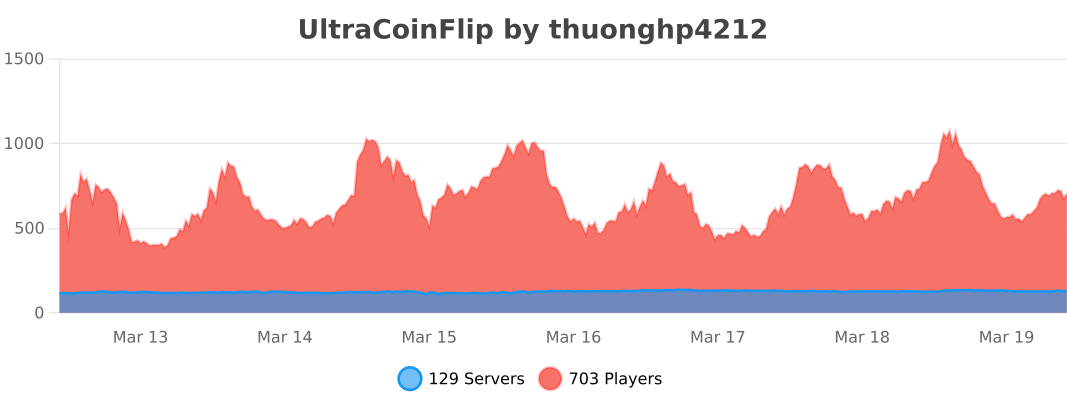
UltraCoinFlip

**★ DISCORD SUPPORT ★**
**UltraCoinFlip** is the most advanced and feature-rich **coinflip gambling plugin** for Minecraft servers.
Bring the thrill of **high-stakes gambling** to your server. Players create and join coinflip games, betting their in-game currency against each other. Every flip is powered by a **cryptographically secure random algorithm**, guaranteeing provably fair outcomes. Ideal for **economy, survival, skyblock, factions, prison**, and any server looking to boost player engagement.
*Why choose UltraCoinFlip over other coinflip plugins?*
– **Most feature-rich** coinflip plugin available
– **Optimized performance** with smart caching and async operations
– **Actively maintained** with regular updates and new features
– **17 languages** ready to use
– **Free & Fastest support** via Discord
—
## ⭐ Features
– **Multi-currency support**: Vault, PlayerPoints, TokenManager, BeastTokens, CoinsEngine, and PlaceholderAPI with unlimited custom currencies
– **Database support**: SQLite and MySQL with HikariCP connection pooling
– **Comprehensive statistics**: Track wins, losses, profit, net profit, and winstreaks with 60+ PlaceholderAPI placeholders
– **Leaderboard system**: Top 15 players with customizable GUI, filter by wins/losses/profit/largest win/winstreak
– **Winstreak tracking**: Consecutive wins for each player, resets on loss
– **Dynamic tax system**: Tier-based tax rates based on bet amount
– **Fully customizable GUI**: Layout, items, colors, animations, all visual elements
– **Discord webhook integration**: Send game results to your Discord server
– **Folia compatible**: Full support for Paper’s Folia server software
– **High performance**: Smart caching, batch updates, async operations, minimal resource usage
– **Game history**: Complete game history with custom GUI and advanced filtering
– **Security features**: Anti-exploit protection, automatic refunds, backup system, transaction safety
– **Anvil GUI input**: Alternative to chat input for better user experience
– **Multiple notifications**: Title, ActionBar, BossBar, and Sound notifications
– **Per-currency config**: Enable/disable tax, min/max bets, settings per currency
– **World restrictions**: Restrict currencies by world (whitelist/blacklist) and permissions
– **Amount formatting**: Supports k, M, B, T (thousands, millions, billions, trillions)
– **Player settings**: 17 toggleable settings for messages and notifications
– **Play with Bot**: Play against server bot with customizable name, head, and animations
– **Betting limits**: Daily/weekly limits per player per currency with permission bypass
– **Earnings & loss limits**: Cap cumulative win/loss per period with smart auto-tune from real activity data
– **Public developer API**: Other plugins can integrate via JitPack with events, queries, and custom currency hooks
– **Smart update notifications**: Severity-aware GitHub release alerts, [CRITICAL] fixes stand out from cosmetic ones
– **Admin dashboard**: Real-time monitoring GUI for server status and active transactions
– **17 Languages**: 🇬🇧 English, 🇻🇳 Vietnamese, 🇫🇷 French, 🇳🇱 Dutch, 🇷🇺 Russian, 🇨🇳 Chinese (Simplified), 🇹🇼 Chinese (Traditional), 🇪🇸 Spanish, 🇩🇪 German, 🇸🇦 Arabic, 🇮🇹 Italian, 🇱🇹 Lithuanian, 🇧🇷 Portuguese (Brazil), 🇵🇱 Polish, 🇹🇷 Turkish, 🇰🇷 Korean, 🇯🇵 Japanese
—
## 📝 Commands
| Command | Description |
|———|————-|
| `/coinflip` | Open the coinflip menu |
| `/coinflip help` | Display all available commands |
| `/coinflip create ` | Create a new coinflip game |
| `/coinflip create bot` | Play against the server bot |
| `/coinflip delete` | Cancel your active coinflip game |
| `/coinflip reload` | Reload plugin configuration |
| `/coinflip history` | View your game history |
| `/cf settings` | Open player settings GUI |
| `/cf leaderboard` | View top players leaderboard |
| `/cf stats [player]` | View player coinflip statistics |
| `/cf limit me` | View your earnings/loss limits and current usage |
| `/cf limit player ` | Staff: view another player’s limits |
| `/cf limit reset ` | Admin: reset a player’s earnings in the current period |
| `/cf limit auto-tune ` | Admin: suggest cap values from your last 30 days of activity |
| `/cf audit` | Admin dashboard (real-time monitoring) |
—
## 🔑 Permissions
| Permission | Description | Default |
|————|————-|———|
| `ultracoinflip.use` | Use basic coinflip commands | true |
| `ultracoinflip.reload` | Reload plugin configuration | op |
| `ultracoinflip.admin` | Access admin commands | op |
| `ultracoinflip.command.menu` | Use `/cf` (open the main menu) | true |
| `ultracoinflip.command.create` | Use `/cf create` | true |
| `ultracoinflip.command.delete` | Use `/cf delete` | true |
| `ultracoinflip.command.history` | Use `/cf history` | true |
| `ultracoinflip.command.leaderboard` | Use `/cf leaderboard` | true |
| `ultracoinflip.command.settings` | Use `/cf settings` | true |
| `ultracoinflip.command.stats` | Use `/cf stats` | true |
| `ultracoinflip.command.help` | Use `/cf help` | true |
| `ultracoinflip.silent` | Disable notifications | false |
| `ultracoinflip.bypass.tax` | Bypass tax, receive full winnings | false |
| `ultracoinflip.bypass.bettinglimit` | Bypass daily/weekly betting limits | false |
| `ultracoinflip.limit.me` | View your own earnings/loss limits | true |
| `ultracoinflip.limit.staff` | View other players’ earnings/loss limits | op |
| `ultracoinflip.admin.limit` | Reset / auto-tune earnings limits | op |
| `ultracoinflip.house.use` | Use “play with bot” feature | true |
| `ultracoinflip.house.bypass.limit` | Bypass daily bot game limit | false |
| `ultracoinflip.house.bypass.delay` | Bypass delay between bot games | false |
| `ultracoinflip.stats.others` | View other players’ stats | false |
| `ultracoinflip.settings.bypass` | Bypass all player settings | false |
—
## 📊 PlaceholderAPI Placeholders (60+)
### Basic Statistics
– `%coinflip_wins%` — Total wins
– `%coinflip_losses%` — Total losses
– `%coinflip_total_games%` — Total games played
– `%coinflip_winstreak%` — Current winstreak
### Win Percentage
– `%coinflip_winrate%` — Overall win percentage
– `%coinflip_winrate_formatted%` — Win percentage with % symbol
– `%coinflip_winrate_%` — Winrate for specific currency
– `%coinflip_winrate__formatted%` — Winrate for specific currency with % symbol
*Supported currencies: `money`, `playerpoints`, `tokenmanager`, `beasttokens`, and custom placeholder currencies.*
### Profit Tracking
– `%coinflip_profit_%` — Total profit
– `%coinflip_loss_%` — Total loss
– `%coinflip_net_profit_%` — Net profit (profit – loss)
– `%coinflip_profit__formatted%` — Formatted profit
– `%coinflip_loss__formatted%` — Formatted loss
– `%coinflip_net_profit__formatted%` — Formatted net profit
*Currencies: `money` (alias: `m`), `playerpoints` (`pp`), `tokenmanager` (`tm`), `beasttokens` (`bt`).*
### Combined Statistics
– `%coinflip_total_profit%` — Total profit across all tracked currencies
– `%coinflip_total_loss%` — Total losses across all tracked currencies
– `%coinflip_total_net%` — Total net profit across all tracked currencies
### Player Ranking
– `%coinflip_position%` — Player’s rank by wins (default)
– `%coinflip_position_wins%` — Player’s rank by wins
– `%coinflip_position_losses%` — Player’s rank by losses
– `%coinflip_position_winstreak%` — Player’s rank by winstreak
– `%coinflip_position_profit_%` — Player’s rank by profit
– `%coinflip_position_largest-win_%` — Player’s rank by largest win
– `%coinflip_position_worst-profit_%` — Player’s rank by worst profit
### Leaderboard
– `%coinflip_top____name%` — Top player name
– `%coinflip_top____value%` — Top player value
– `%coinflip_top____value_formatted%` — Formatted value
– `%coinflip_top__wins_name%` — Top player by wins
– `%coinflip_top__losses_name%` — Top player by total losses
– `%coinflip_top__winstreak_value%` — Top player’s winstreak
– `%coinflip_leaderboard_refresh_in%` — Live countdown to the next leaderboard cache refresh (e.g. `2m20s`). Format customizable in `config.yml`
*Filters: `wins`, `losses`, `profit`, `largest-win`, `worst-profit`, `winstreak`.*
### Custom Currency Placeholders
– `%coinflip_coinsengine__unit%` — CoinsEngine currency unit
– `%coinflip_coinsengine__display%` — CoinsEngine currency display name
– `%coinflip_placeholder__unit%` — Custom currency unit
– `%coinflip_placeholder__display%` — Custom currency display name
– `%coinflip__unit%` — Custom currency unit (short format)
– `%coinflip__display%` — Custom currency display name (short format)
– `%coinflip_winrate_%` — Winrate for custom placeholder currency
– `%coinflip_winrate__formatted%` — Winrate with % symbol
—
## 🔌 Developer API
Other plugins integrate via JitPack:
“`xml
com.github.hiiamken
UltraCoinFlip-API
5.0.0
provided
“`
Full integration guide (Gradle, listener examples, all 9 events, API stability promise): github.com/hiiamken/UltraCoinFlip-API
—
## 📋 Requirements
| Requirement | Version |
|————-|———|
| **Java** | 8 or higher |
| **Server** | 1.8.x – 26.1.2 (Spigot / Paper / Folia) |
| **Required** | Vault + Economy plugin (EssentialsX, CMI, etc.) |
| **Optional** | PlaceholderAPI, PlayerPoints, TokenManager, BeastTokens, ExcellentEconomy (CoinsEngine) |
—
UltraBackup
### UltraBackup – Minecraft Server Backup Plugin
A comprehensive Minecraft Bukkit/Spigot/Paper plugin for automated server backups with cloud upload support (Google Drive, SFTP, FTP).
**(By default google drive is active in config.yml)
Supports Paper/spigot 1.8-1.21.**
## 📋 Features
– ✅ Automatic World Saving – Saves all worlds before backup
– ✅ Progress Tracking – Real-time backup progress updates
– ✅ Cloud Upload Support:
Google Drive (OAuth 2.0)
SFTP
FTP
– ✅ Restore System – Easy backup restoration
– ✅ Exclusion List – Exclude specific files/folders
– ✅ Async Operations – Non-blocking backups
## 📦 Installation
1. Download UltBackup.jar
2. Place it in your plugins/ folder
3. Restart your server
4. Configure plugins/UltBackup/config.yml
## 🎮 Commands
/backup – Create a backup
Permission: ultbackup.backup
/backup login – Start Google Drive OAuth
Permission: ultbackup.login
/backup code – Complete Google Drive OAuth
Permission: ultbackup.login
/restore – Restore a backup
Permission: ultbackup.restore
Schedules a backup restoration. Server will automatically shut down to perform the restore.
/restore backup-2024-12-16_19-30-45.zip
⚠️ WARNING: This will:
Shut down the server immediately
Replace all server files with the backup
You must manually restart the server after
## 🔄 Complete Usage Flow
First Time Setup (Google Drive)
Install the plugin and configure config.yml
Set up Google Drive credentials (follow steps above)
Restart your server
Run: /backup login
Click the link and authorize in your browser
Copy the code from Google
Run: /backup code
Success! You’ll see: “Google Drive linked successfully!”
Run your first backup: /backup
Regular Backup
/backup
What happens:
Server saves all worlds
Disables auto-save temporarily
Counts total files
Shows progress: “Backup progress: 25%”
Creates ZIP file in backups/ folder
Uploads to Google Drive (if enabled)
Deletes old backups (keeps last 10 by default)
Re-enables auto-save
Shows: “Backup completed: backup-2024-12-16_19-30-45.zip”
Restore a Backup
/restore backup-2024-12-16_19-30-45.zip
⚠️ Server will shut down immediately!
On next server start, the backup will be automatically restored.
## Wiki link (including Google Drive steps)
Wiki
UltimateServerProtector
• This is an incredibly lightweight plugin, that add an “admin-password” to your server.
• The main features should be considered the function of adding rights to check and creating a personal admin password for each player! All together, this creates an almost insurmountable barrier for the “hackers”.
Each admin login attempt can be recorded in logs in a separate file in the plugin folder. Each activation and deactivation of the plugin can also be logged.
You can add a list of admin IP addresses and if someone wants to hack the admin’s account, punishment will be applied to him.
It is also possible to add commands that the player can write even before entering the admin password, which is convenient if you use plugins like AuthMe.
It is worth saying that if a player is not recorded in the config, but has admin rights, then with the punish function enabled, you can punish a player who illegally obtained admin permissions as you like.
• Advantages over others “sequrity plugins”
1) Plugin regularly checks players for admin’s permissions. Not just for OP and not just on join.
2) Large and fully customizable functionality that is not available in any other plugin
3) Asynchrony and multithreading, which ensure high performance. Plugin does not load the server at all.
• Permissions
*serverprotector.protect* – if available, asks the player to enter the admin password. Inserted into the plugin so that you don’t have to specify an extra permission in the config.
*serverprotector.admin* – allows you to use the /usp command and see notifications about successful/failed password entry attempts.
• Commands
/pas – you need to have admin rights or OP to enter it. (you can change this command in the config)
/usp reload – config reload command
/usp reboot – plugin restart command
Admin commands that can be included in the config:
/usp setpass (nickname) (pass) – add a player and his pass to the config
/usp addop (nickname) – add a player to the list of operators
/usp addip (ip) – add IP to adminipwhitelist
/ultimateserverprotector and /serverprotector – analogs of the /usp command
UltimateAntiBot

# INFORMATION
This is a plugin that works on both bungeecord and spigot!
Remember that being just a plugin it can’t work wonders!
If you have a server with underpowered hardware or with a free host, don’t expect great performances!
Also, although spigot support has been introduced, remember that bungeecord is a better choice for handling large attacks and that on spigot it could cause slowdowns!
When installing the plugin remember that if you have a bungeecord server you will have to put the plugin ONLY in the bungeecord plugin folder! If you use only spigot instead you have to put it in the spigot plugins folder then just reboot and the server!
# GEYSER INFORMATION
The plugin supports the entry of players via geyser however there are some changes you need to make in the config to ensure that there are no problems!
First you have to deactivate the packet check, then you have to modify the legalname check by making it allow players with names containing the charater that geyser adds to the minecraft base name to enter, if the charater is the dot (“.”) then you don’t have to do anything, otherwise you have to change the regex (you can ask for help in my discord server for this by opening a ticket).
# PROTECTS FROM
– **FAST JOIN**
– **SLOW JOIN (BYPASSABLE USE A CAPTCHA PLUGIN ON THE LOBBY SERVER INSTEAD)**
– **PING ATTACK**
– **COMBINED**
– **BAD PACKET (ONLY ON BUNGEECORD / WATERFALL / VELOCITY)**
# FEATURES
– Fully customizable (config & messages)
– VPN system for detecting slow attacks.
– Hook to IPSet & IPTables for handling large attacks.
– A great variety of checks to detect as many bots as possible.
– An intelligent filter that activates only during attacks to avoid filtering important server errors.
– An easy verification system for non-bot players during attacks.
– An ID based blacklist system that will allow you to manage your blacklist more easily!
– Automatic notifications when there is an attack.
– Automatic attack logging system!
– An autopurger for blacklist, whitelist and attack logs.
# COMMANDS
– /uab help – displays help message
– /uab toggle actionbar/title/bossbar – toggle notification
– /uab stats – displays antibot stats
– /uab clear blacklist/whitelist – will clean up one of the two
– /uab whitelist add/remove – manage whitelist
– /uab blacklist add/remove – manage blacklist
– /uab logs list/info – manage attack logs
– /uab cache status/clear – manage uab cache
– /uab firewall – displays firewall stats
– /uab check – checks for a blacklisted player
– /uab reload – reload messages
– /uab dump – used for support assistance
# PERMISSIONS
– /uab help – uab.command.help
– /uab toggle actionbar/title/bossbar – uab.command.toggle
– /uab stats – uab.command.stats
– /uab clear blacklist/whitelist – uab.command.clear
– /uab whitelist add/remove – uab.command.whitelist
– /uab blacklist add/remove – uab.command.blacklist
– /uab firewall – uab.command.firewall
– /uab logs list/info – uab.command.logs
– /uab cache status/clear – uab.command.cache
– /uab firewall – uab.command.firewall
– /uab check – uab.command.check
– /uab reload – uab.command.reload
– /uab dump – uab.command.dump
– Automatic notification – uab.notification.automatic
– ANTI-VPN bypass permission – uab.bypass.vpn
# SOME VIDEOS
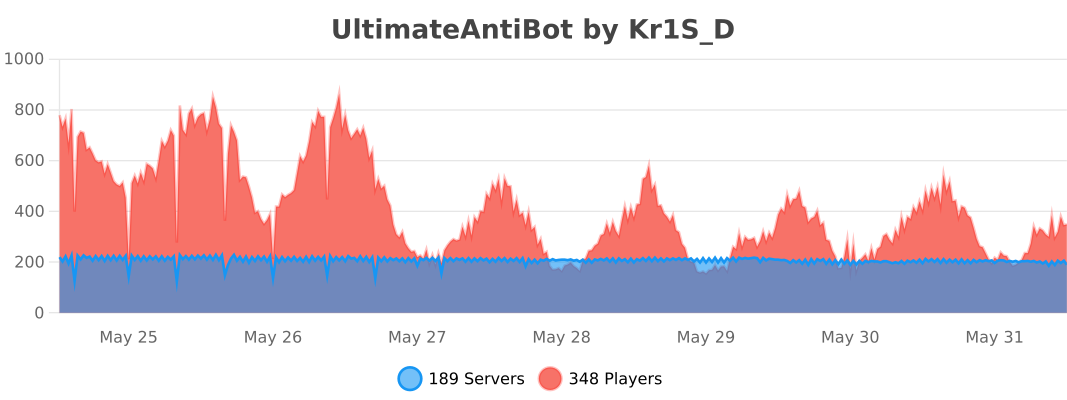
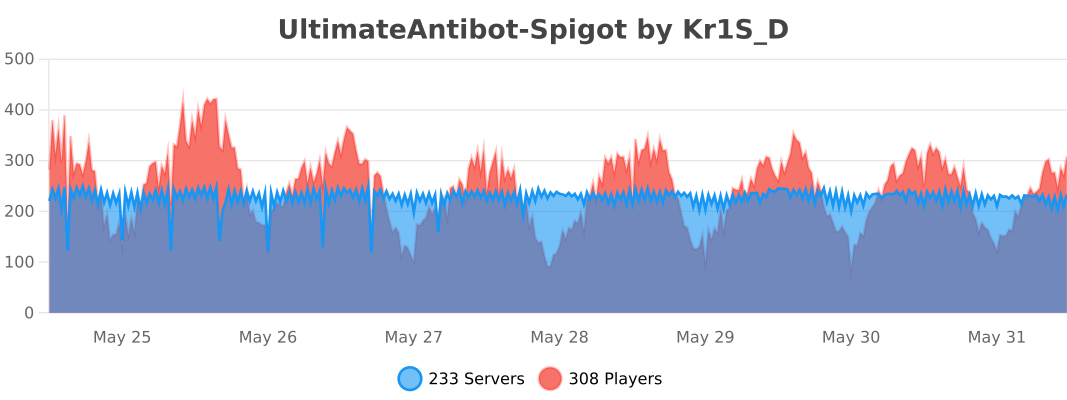
# PLUGIN STATS
Ultimate Car Mod-Custom Models Pack
A resource pack for Ultimate Car Mod That makes the cars less blocky.

This Resource pack eplaces the car models with custom models, and also makes a few changes to item graphics.
**This is a Resource Pack! it requires Ultimate Car Mod To Function!**
the models might break on first applying, try restarting the game.
if you have another resource pack(such as Adelink’s ultimate Car textures) installed, you will need to un-apply that pack, and apply this pack, for it to function. same for the opposite direction.
Ukrainian Texts
English
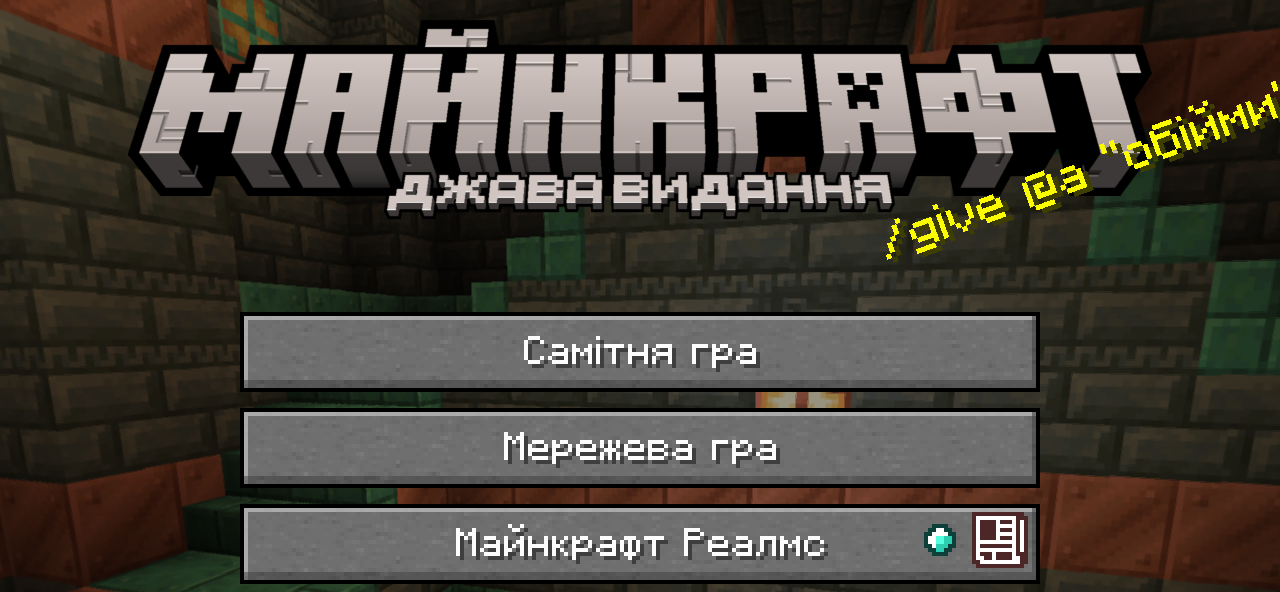
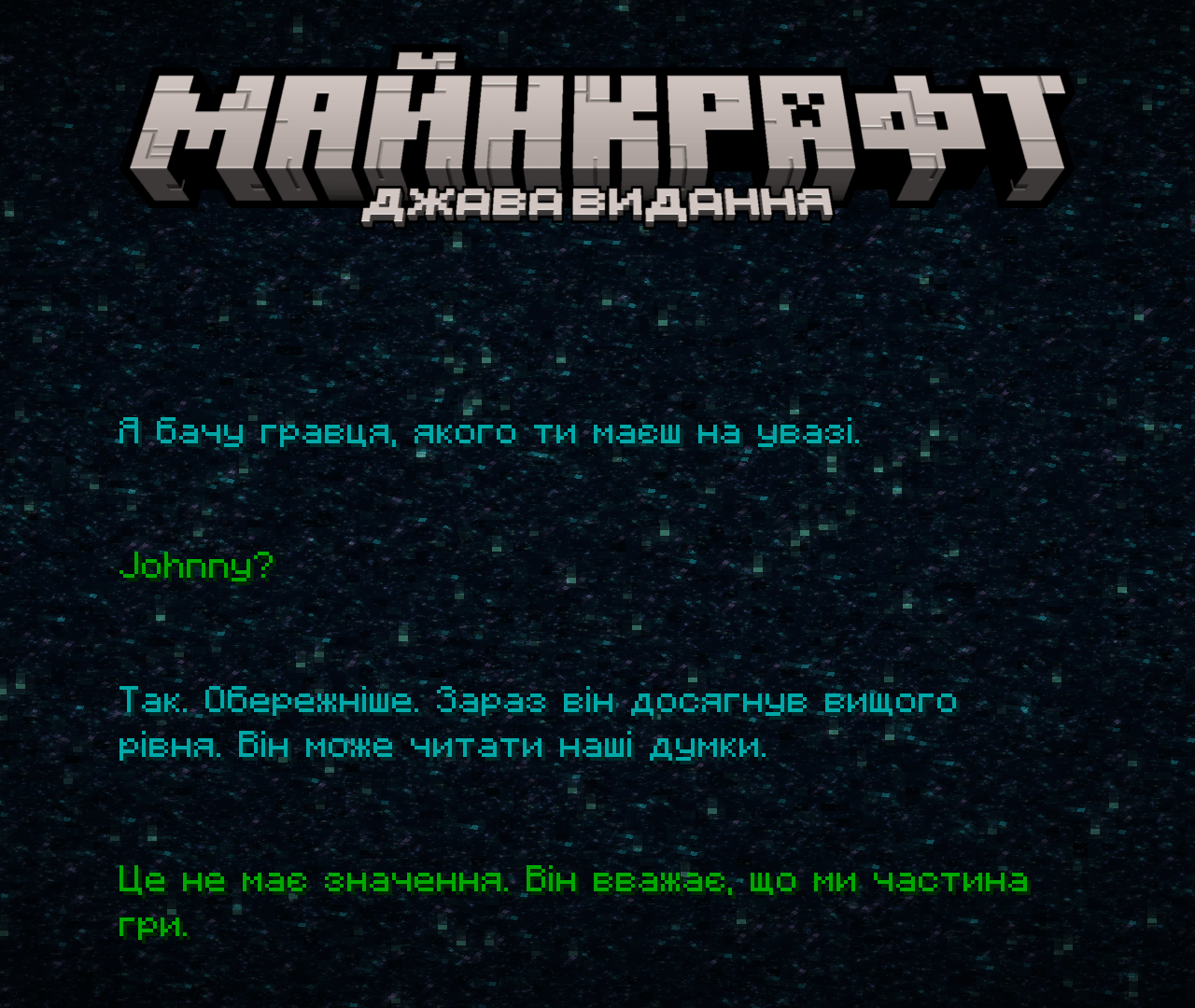
## **This Resource Pack translates into Ukrainian language:**
– “Minecraft” and “Java Edition” menu logo
– “Minecraft Realms” logo
– Splashes (adapted, also addes some exclusive splashes)
– End Poem
– Postcredits citation (maybe, you even don’t know what is that)
– Some pictures names
– A few other minor changes
### The current version of the resource pack – **2.0**
### Optifine/Puzzle is desirable
## **Menu Logo**
### If your splash don’t changed – you need to rejoin in Minecraft or enter the any world and return to Menu
## **End Poem**

## “Mojang Studios” Logo (Requires Optifine/Puzzle)

## **Цей Ресурспак перекладає українською:**
– “Minecraft” та “Java Edition” логотипи в меню
– “Minecraft Realms” логотип
– Сплеші (адаптовані, також додає кілька ексклюзивних)
– Поему Енду
– Цитату після титрів (можливо, ви навіть не знаєте що це)
– Назви кількох картин
– Кілька інших незначних змін
### Актуальна версія ресурспаку – **2.0**
### Бажано мати Optifine/Puzzle
## **Логотип у Меню**

### Якщо ваші сплеші не локалізувалися –
вам потрібно перезайти в гру або зайти та вийти з якогось світу
## **Поема Енду**


## Логотип “Mojang Studios” (Потрібен Optifine/Puzzle)

Ukrainian elytra
Ukrainization for elytra)
Its look like vanilla elytra, but with lines in the colors of the Ukrainian flag.
UK English Cookie Fix
In the UK, cookies and biscuits are different things. Biscuits are a generic term, and a cookie is a type of biscuit. It’s technically not incorrect, but it sounds a bit strange. It’d be like if “beef” was called “meat” ingame. This resource pack corrects it in UK English and makes it sound more natural and normal.
That’s it.
(this texture pack was made for 1.20.2 but will 99.999999999% work for everything after)