VoiceServer
🎙️ VoiceServer – Powerful Group Management for Simple Voice Chat
VoiceServer is a lightweight yet advanced plugin that makes managing
Simple Voice Chat groups effortless.
With intuitive commands offering full tab completion, you can organize, secure,
and monitor voice chat groups in real time — perfect for servers hosting events,
teams, or dynamic player structures.
Fully compatible with Folia, Paper,
Spigot and Bukkit, supporting Minecraft versions from
1.8.8 up to 1.21.x.
Open Source:
https://github.com/Jakomi1/VoiceServer
🚀 Key Features
-
📋 List all voice chat groups
View all active Simple Voice Chat groups, including those with password protection.
Groups with passwords show [locked] instead of revealing the password.
-
🆕 Create new groups with optional persistence or password protection
Groups can be created as persistent or non-persistent.
Persistent groups may optionally be secured with a password.
-
🧑🤝🧑 Join players to existing groups
The join command supports selectors like
@a, @s, @r, and @p.
The internal playerGroupMap ensures group state consistency.
-
❌ Remove players from groups
Players can be removed from their current group using selectors.
The kick subcommand no longer requires an explicit group argument.
-
🗑️ Safely delete groups
Non-persistent groups are automatically deleted when empty.
Persistent groups remain until manually removed.
-
🛡️ Access control via permissions
All group management commands are protected by
voicechat.group.manage.
-
⚡ Full tab completion support
Commands, players, selectors, group names, and quoted arguments support
Folia-safe tab completion.
-
📌 Persistent groups
Persistent groups remain available even after all members leave,
making them ideal for staff, admin, or permanent team channels.
-
🔁 Persistent groups across restarts (optional)
A new configuration option
persistent-groups-should-survive-restart
allows persistent groups to survive restarts or reloads
(default: false).
-
➖ Create empty groups
Using @null with
/vcgroup create
allows creating a group without any players initially.
-
🐞 Debug logging and safe error handling
Clear messages and robust error handling ensure high stability.
-
ℹ️
/vcgroup info command
Displays the group type, persistence, lock status, and current members.
-
⚙️ Automatic handling of empty non-persistent groups
Non-persistent groups are removed automatically when the last player leaves.
-
🔧 Per-player VoiceChat permission system (
/vcpermission)
Fully custom per-player permission management for Simple Voice Chat:
listen — listen in voice chatspeak — speak in voice chatgroup — create or join voice groups
Permissions support give, remove,
default, and reset,
are stored in config.yml,
survive restarts, and are applied live.
-
✅ Fixed
/vcpermission command
The permission system is now fully functional and reliably enforced.
-
🔌 Broad platform compatibility
Fully compatible with Bukkit, Spigot, Paper, and Folia
from Minecraft 1.8.8 up to 1.21.x.
🧭 Commands
/vcgroup list
Lists all voice chat groups and marks password-protected groups with [locked].
/vcgroup create <player|@a|@s|@r|@p|@null> <type> "<group_name>" [persistent|not-persistent] ["password"]
Creates a new group. Using @null creates an empty group.
/vcgroup join <player|@a|@s|@r|@p> "<group_name>"
Moves players into an existing group.
/vcgroup kick <player|@a|@s|@r|@p>
Removes players from their current group.
/vcgroup remove "<group_name>"
Deletes a voice group and removes all members.
/vcgroup info "<group_name>"
Shows detailed information about a group.
🔐 /vcpermission — Voice permission management
/vcpermission give <player> <listen|speak|group>
Grants a voice permission and applies it live.
/vcpermission remove <player> <listen|speak|group>
Revokes a voice permission and updates the player instantly.
/vcpermission default <listen|speak|group> <true|false>
Sets global default values (defaults are true).
/vcpermission reset
Resets the entire permission system to factory defaults.
⚙️ Configuration
No setup required. Install VoiceServer alongside
Simple Voice Chat and start using it immediately.
All permission data and persistent group settings are stored in config.yml.
The plugin automatically migrates old keys and ensures a stable config structure.
⚠ Requirements
- Minecraft: 1.8.8 – 1.21.x
- Server: Folia, Paper, Spigot, Bukkit
- Dependency: Simple Voice Chat (Mod + API)
- The plugin must load after Simple Voice Chat.
💡 Example Use Cases
- Create dynamic voice groups for events, PvP, or minigames.
- Maintain permanent staff or admin voice channels.
- Use password-protected private groups without exposing passwords.
- Control who may listen, speak, or join groups on a per-player basis.
🧑💻 Developer Notes
- Developed by Jakomi1.
- Fully open source and community-friendly.
- Direct integration with
VoicechatServerApi.
- Single PermissionAttachment per player (no duplication or leaks).
- Live permission updates without reloads.
- Folia-safe scheduling, selectors, and tab completion.
- Automatic creation of a minimal
config.yml if missing.
Voicechat WorldGuard
[Modrinth](modrinth.com/project/voicechat-worldguard)
|
[Discord](https://discord.gg/yCdhVDgn4K)
|
[Wiki](https://docs.yleoft.me/voicechat-worldguard)
# Voicechat WorldGuard
Add custom WorldGuard flags for [Simple Voice Chat](https://modrinth.com/plugin/simple-voice-chat).
This small plugin provides WorldGuard region flags to control Simple Voice Chat behaviour per-region. It is intended for server software based on Bukkit APIs: Bukkit, Spigot, Paper and Folia. It does NOT support mod loaders (Fabric, Forge, etc.).
## Features
– Per-region control of voice chat behaviour for players inside WorldGuard regions.
– Simple, focused set of flags:
– voicechat-enabled — enable/disable voice in the region (boolean)
– voicechat-distance — set voice range in blocks (integer) (Voicechat 2.6.0+ required)
– voicechat-muted — mute voice in the region (boolean)
(Flags and names may be extended or changed in future versions — check the plugin’s documentation or changelog.)
## Requirements
– Java 17 or above
– WorldGuard (installed and working)
– Simple Voice Chat plugin 2.1.12 or above
– Server platforms supported: Bukkit, Spigot, Paper, Folia
## Usage
Set flags on a WorldGuard region with the standard WorldGuard commands. Examples:
– Disable voice chat in a region:
– /region flag voicechat-enabled deny
– or: /rg flag voicechat-enabled false
– Set a custom voice distance for a region:
– /region flag voicechat-distance 30
– Mute voice inside a region:
– /region flag voicechat-muted allow
– or: /rg flag voicechat-muted true
Note: WorldGuard accepts values in slightly different formats depending on version. If “allow/deny” does not work, try “true/false” for boolean flags.
## Permissions
– voicechatworldguard.bypass.* — Allows players to bypass all region voice chat restrictions.
– voicechatworldguard.bypass. — Allows players to bypass a specific flag restriction (e.g., voicechatworldguard.bypass.voicechat-enabled).
## Reporting Issues
If you find a bug or have a feature request, please open an issue on this repository: https://github.com/yL3oft/VoicechatWorlguard/issues
When reporting, include:
– Server platform & version (Spigot/Paper/Folia/etc.)
– Versions of WorldGuard and Simple Voice Chat
– Plugin version and server logs if available
Voice Hits
This resource pack makes the hit sounds literal voicelines that say “critical hit,” “knockback attack,” “strong attack, “sweep attack,” and “weak attack,” all voice by me. There are 3 of each sound, except for sweep attack which is 2 because I didn’t like one and I don’t want to record another.
Resource pack format is stupid. Just add it and ignore any warnings.
Version Numbering Converter
# VNC (Version Numbering Converter)
Version Numbering Converter (VNC) is a Java library for working with Minecraft versions across both numbering families:
– Classic Java-style versions such as `1.20.6` and `1.21.11`
– Year-based drop versions such as `24.1`, `25.4`, and `26.1.1`
It covers two use cases:
– Pure version modeling and conversion through `MinecraftVersion`, `VersionScheme`, and `MappingTable`
– Bukkit/Paper runtime detection through `VNC`, including server constants, player version resolution, protocol lookup, and version comparisons
## Highlights
– Exact historic mappings from `1.0.0` through `1.21.11`
– Drop support for current lines such as `25.4`, `26.1`, and `26.1.1`
– Protocol lookup for exact releases and published snapshots
– A runtime bridge for Bukkit/Paper with legacy-compatible constants like `SERVER_VERSION`
– String-based comparisons that correctly handle patch-sensitive boundaries like `1.20.5`
## Core API
### 1. Parse and inspect versions
“`java
MinecraftVersion classic = MinecraftVersion.parse(“1.21.11”);
MinecraftVersion drop = MinecraftVersion.parse(“26.1”);
classic.isClassic(); // true
classic.getVersion(); // “1.21.11”
classic.getProtocol(); // 774
classic.supportsHex(); // true
drop.isClassic(); // false
drop.getVersion(); // “26.1”
drop.getProtocol(); // 775
“`
### 2. Convert between numbering schemes
“`java
String dropName = VersionScheme.MOJANG.toDrop(“1.20.3”); // “23.2”
String classicName = VersionScheme.MOJANG.toClassic(“25.2.2”); // “1.21.8”
String customClassic = VersionScheme.CROA_CUSTOM.toClassic(“25.4”); // “1.22”
String customDrop = VersionScheme.CROA_CUSTOM.toDrop(“1.22.1”); // “25.4.1”
“`
### 3. Create your own mapping scheme
“`java
MappingTable table = new MappingTable()
.registerLine(30, 1, “1.50”, “1.50.1”)
.registerMapping(“1.51”, “30.2”);
VersionScheme scheme = VersionScheme.mapped(table);
scheme.toDrop(“1.50.1”); // “30.1.1”
scheme.toClassic(“30.2”); // “1.51”
“`
### 4. Resolve protocols
“`java
Integer protocol = MinecraftVersion.protocolForIdentifier(“1.20.6”); // 766
Integer snapshot = MinecraftVersion.protocolForIdentifier(“26.2-snapshot-3”);
MinecraftVersion newest = MinecraftVersion.fromProtocol(754); // 1.16.5
List all = MinecraftVersion.versionsForProtocol(767); // 1.21, 1.21.1
“`
## Bukkit / Paper runtime API
`VNC` exposes a runtime snapshot of the current server:
“`java
MinecraftVersion server = VNC.SERVER_MINECRAFT_VERSION;
String classic = VNC.SERVER_CLASSIC_VERSION;
String drop = VNC.SERVER_DROP_VERSION;
int protocol = VNC.SERVER_PROTOCOL;
double legacy = VNC.SERVER_VERSION;
boolean modernRegistry = VNC.isAtLeast(“1.20.5”);
boolean legacyCommands = VNC.isBefore(“1.13”);
boolean inRange = VNC.isBetween(“1.19”, “1.21.11”);
“`
Player version resolution uses ViaVersion when present and falls back to the server version otherwise:
“`java
MinecraftVersion playerVersion = VNC.player(player);
if (playerVersion.supportsHex()) {
// Safe to send RGB formatting to this player
}
“`
## Why use the string helpers?
`SERVER_VERSION` is still available for compatibility with older plugins, but patch-sensitive checks should prefer:
“`java
VNC.isAtLeast(“1.20.5”);
VNC.isBefore(“1.21.9”);
VNC.compare(VNC.SERVER_MINECRAFT_VERSION, “26.1”);
“`
That avoids the common limitations of comparing versions only as `double`.
## Requirements
– Java 8+
– For the Bukkit runtime helpers: a Bukkit/Paper-compatible runtime on the classpath
– Optional: ViaVersion, if you want `VNC.player(…)` to resolve the effective client version instead of the server version
vMessage
# vMessage
    
> 🆕 Hey, I’m SzymON/OFF! If you found **vMessage** useful please don’t hesitate to also try [vHubs](https://modrinth.com/plugin/vhubs)! It allows you to create multiple hub servers accesible with player commands (e.g. `/hub`, `/lobby`, `/survival`).
**vMessage** is the best Velocity plugin for synchronizing chat and player events across your entire proxy network! It is designed for server administrators who want seamless, reliable, and configurable message syncing without unnecessary complexity.
## Features
– **Global Chat Sync:** Instantly syncs chat messages across all servers connected to your Velocity proxy.
– **Join/Leave/Change-Server Broadcasts:** Notifies all players network-wide when someone joins, leaves, or switches servers.
– **Silent Permissions:** Players with a special silent permission can prevent their join, leave, and server change messages from being announced.
– **Powerful Configuration:** Comes with a robust, easy-to-use config file so you can tailor the plugin to your network’s needs.
– **Lightweight & Fast:** No unnecessary features or bloat—just efficient, reliable message syncing.
## Installing
1. Place `vMessage.jar` into your Velocity `plugins` folder.
2. Install the appropriate versions of [SignedVelocity](https://modrinth.com/plugin/signedvelocity) on your proxy AND backends.
3. Start or restart your Velocity proxy.
4. Edit the generated configuration file (`plugins/vMessage/config.yml`) to suit your preferences.
Once installed and configured, vMessage will automatically:
– Sync chat messages across all servers
– Broadcast join, leave, and server switch events to all players (unless the player has the silent permission)
No commands or permissions are required for basic functionality.
## Updating
To update vMessage, replace the existing `vMessage.jar` in your `plugins` folder with the latest version and restart your Velocity proxy.
If new configuration options are introduced, your config.yml will be migrated automatically.
## Commands
vMessage provides several administrative commands for advanced usage and configuration:
– `/vmessage say `
Sends a message as the specified player across the network.
**Permission:** `vmessage.command.say`
– `/vmessage fake [player] [old-server]`
Sends a fake join, leave, or server change message as if the specified player performed that action.
**Permission:** `vmessage.command.fake`, `vmessage.command.fake.join`, `[…].leave`, `[…].change`
– `/vmessage reload`
Reloads the plugin configuration without restarting the proxy.
**Permission:** `vmessage.command.reload`
– `/vmessage help`
Displays the help message with available commands.
**Permission:** `vmessage.command.help`
– `/broadcast `
Broadcasts a custom message on the network.
**Permission:** `vmessage.command.broadcast`
**Aliases:** `/bc`, `/bcast`, `/shout`
– `/message `
Sends a private message to a specific player across the network.
**Permission:** `vmessage.command.message`
**Aliases:** `/msg`, `/tell`, `/whisper`, `/w`
– `/reply `
Replies to the last player who sent you a private message.
**Permission:** `vmessage.command.reply`
**Aliases:** `/r`
You can also use `/vmsg` or `/vm` as an alias for `/vmessage` for convenience.
Make sure to assign the appropriate permissions to your staff or admin roles in your Velocity configuration.
For `/broadcast`, `/message`, and `/reply`, you can set `allow-by-default` to `true` in the config file to let all players use these commands without needing explicit permissions.
## Configuration
vMessage provides a powerful and easy-to-use configuration file. You can customize message formats, toggle features, and more. Look at the wiki for detailed configuration options: [vMessage Wiki](https://github.com/szymon-off/vMessage/wiki/Configuration-(config.yml))
## Why vMessage?
– **Purpose-built for Velocity:** Designed specifically for Velocity, making it the most reliable and feature-rich solution for network-wide messaging.
– **Simple Setup:** Drop it in, configure, and go. No complicated dependencies or setup steps.
– **Actively Maintained:** Built with modern best practices and open to community feedback.
## Contributing
Contributions are welcome! Please open issues or submit pull requests for improvements or bug fixes.
## Building from Source
If you want to build vMessage yourself:
– Prerequisites: Java 17 or higher
– Clone the repository and build:
“`bash
git clone https://github.com/szymon-off/vMessage.git
cd vMessage
./gradlew build
“`
– The built jar file will be in the `build/libs/vMessage-0.0.0-UNKNOWN.jar`.
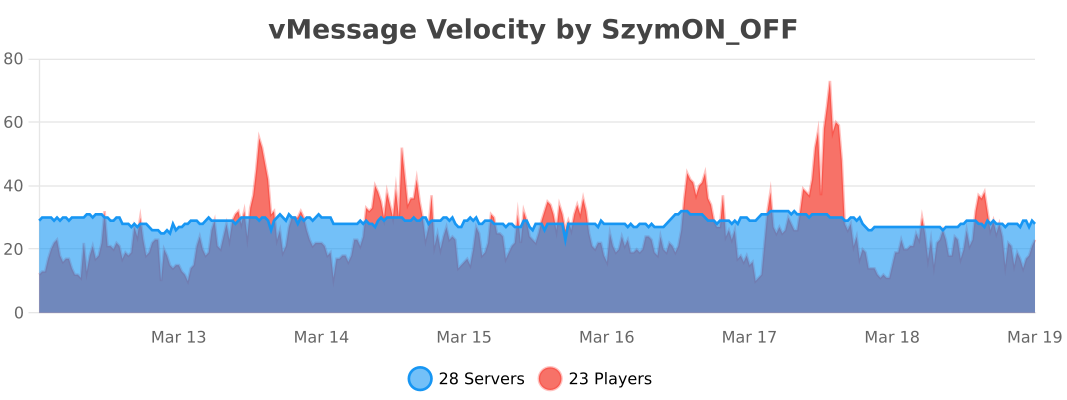
## Usage Statistics
## License
– Versions **≤ 1.6.1** are licensed under the **MIT License**.
– Versions **≥ 1.7.0** are licensed under the **GNU General Public License v3.0** (GPL-3.0).
You can find the full text of each license in the corresponding release archive, or in the repository under the `LICENSE` file for that version.
VulkanMod Just for Chinese
# Hello! This translation pack for VulkanMod just for Chinese!
It is for people just need Chinese translation,it can’t support you any other problem.
It are not VulkanMod,if you need,Please go to [there](https://modrinth.com/mod/vulkanmod) for VulkanMod!
# 欢迎使用VulkanMod专属中文翻译包!✨
## 有何不同🤔
只支持中文翻译,简便实用!⚡
## 安装🔨
这是一个 资源包 文件,请放置在resourcepacks文件夹中。这通常会在游戏目录下方(开启版本隔离),也可以在游戏中的“资源包…”界面选择右下角“打开包文件夹”打开。
## 可以将其内置于整合包中吗🤨
当然,您可以将其内置于资源包中。
顺带一提,您也可以修改包文件,只是请不要将作者私自标注为您!
## 翻译不准/遇到问题🛠️
请反馈至评论区或QQ 3564937130。
VLowFire
🔥 VLow Fire PvP Pack 🔥
A clean and optimized Low Fire texture pack designed for PvP players.
⚡ About
This texture pack reduces the height of fire animations to improve visibility during combat.
Perfect for PvP, BedWars, SkyWars, Practice, Survival PvP, and competitive gameplay.
The pack keeps the default Minecraft style while making fights cleaner and easier to see.
✨ Features
- 🔥 Optimized Low Fire textures
- ⚔ Better visibility during fights
- 🎮 Smooth PvP experience
- 🧼 Clean vanilla-style design
- ⚡ Lightweight and performance friendly
- 📦 Easy to install
📌 Compatibility
- ✅ Minecraft 1.7 → 1.21.6
- ✅ PvP Servers
- ✅ Survival & Minigames
- ✅ Vanilla & Forge/Fabric compatible
🖼 Preview

📥 Installation
- Download the texture pack
- Open Minecraft
- Go to Options → Resource Packs
- Select the pack
- Enjoy improved PvP visibility
💬 Notes
This pack only modifies fire textures and is intended to provide a cleaner combat experience
without changing the overall Minecraft look.
Made for PvP players who want maximum visibility.
vLobbyConnect
# vLobbyConnect – The Ultimate Lobby Manager for Velocity Proxy
vLobbyConnect is a **powerful and lightweight Velocity plugin** designed to seamlessly manage lobby connections for **players using different Minecraft protocol versions**. Whether your server supports multiple Minecraft versions or needs efficient load balancing, vLobbyConnect ensures players are sent to the **correct lobby** every time.
## 🚀 Why Use vLobbyConnect?
– **Version-Specific Lobby Assignment** – Automatically sends players to the appropriate lobby based on their Minecraft version.
– **Seamless Load Balancing** – Distributes players evenly across multiple lobbies, preventing overcrowding and lag.
– **Failsafe Mechanisms** – If a lobby is misconfigured or full, players are redirected to an available fallback lobby.
– **Easy Setup & Configuration** – Just drop the plugin into Velocity, configure the lobbies, and you’re good to go!
## Setup
1. Place the plugin jar in your Velocity plugins folder.
2. Configure your lobbies in two places:
### Plugin Config (config.yml)
This file is located in `src/main/resources/config.yml` (it will be copied to `plugins/vLobbyConnect/config.yml` on first run):
“`yaml
lobbies:
1.20lobby1: “name1”
1.20lobby2: “name2”
1.8lobby1: “name3”
1.8lobby2: “name4”
# To add more lobbies, follow the pattern “VERSIONlobbyX”
# Example:
# 1.13lobby8: “name5”
“`
### Velocity Server Configuration (velocity.toml)
In your `velocity.toml`, configure the servers with the required modifications. For example:
“`toml
[servers]
name1 = “ip”
name2 = “ip”
name3 = “ip”
name4 = “ip”
try = [] # keep fallback empty
“`
## ⚡ Commands
– **/lobby**
– **/hub**
These 2 Instantly teleports the player to the appropriate lobby.
message @kmaba on discord for quick assistance
## 🛡️ Future Enhancements (Planned Features)
– **Customizable Messages** – Modify join/fallback messages in `config.yml`.
– **Priority Lobbies** – Assign preferred lobbies based on player rank or permissions.
## 🎮 Conclusion
vLobbyConnect is the **ultimate lobby management solution** for Velocity servers, ensuring a smooth, version-compatible experience for all players. Download it today and **enhance your network’s performance and player experience!** 🚀
Test this plugin out on play.craftium.ro!
VLobby
# VLobby
[](https://github.com/4drian3d/VLobby/actions/workflows/gradle.yml) [](https://discord.gg/5NMMzK5mAn) 
Lobby plugin for Velocity
[](https://www.bisecthosting.com/4drian3d?r=ModVLobby)
## Requirements
– Velocity 3.2.0+
– Java 17+
– [MCKotlin](https://modrinth.com/plugin/mckotlin)
## Features
– Multi lobby support
– MiniMessage formatting
– Multiple Sending Modes
– You can set it to be able to teleport to each server with its own command. For example, if you have the “survival” server, the command to go to that server would be “/survival”. This is configurable in the CommandHandler section
## Commands
In VLobby there are 2 CommandHandlers
### REGULAR
It is the default operation of VLobby, you can set as many commands as you want to teleport to a group of Lobby servers (or to a single Lobby if you have only one Lobby).
### COMMAND_TO_SERVER
With this CommandHandler you can teleport to any server using its name as command.
For example, to teleport to the `survival` server, you would require the `vlobby.command.survival` permission and you would use the `/survival` command
VKChunksLoader – Chunk Pre-Generator

**VKChunksLoader Chunk Pre-Generator / Anti-Exploration-Lag Plugin**
1.8.x, 1.9.x, 1.10.x, 1.11.x, 1.12.x, 1.13.x, 1.14.x, 1.15.x, 1.16.x, 1.17.x, 1.18.x, 1.19.x, 1.20.x, 1.21.x
**VKChunksLoader** is a powerful Spigot/Paper chunk pre-generation plugin designed to completely eliminate lag spikes caused by on-demand terrain generation during player exploration.
Instead of generating chunks when players move into new areas, VKChunksLoader allows server owners to pre-generate chunks safely and efficiently, ensuring stable TPS, smooth gameplay, and predictable server performance.
### Join our Discord for free plugins, updates & exclusive releases!
### Community, support & sneak peeks included.
## https://discord.gg/qTqhQ8uTpY
### Official Website:
## https://vkcodings.net
**Key Features**
Chunk pre-generation tasks (runs gradually every tick until completed)
Multiple selection modes:
Radius-based (square or circle)
Two-corner selection
WorldBorder presets
Detailed progress tracking:
Processed / Total chunks
Percentage
ETA
Generation rate (chunks/sec)
TPS, ping and online players
Auto-Save system:
Safely stop and resume generation at any time
Progress stored in tasks.yml
Pause / Continue / Stop functionality
**TPS safety system:**
Automatically slows down or pauses generation if TPS drops below a configured threshold
Speed profiles:
low, medium, high (configurable chunks per tick and concurrency)
Fully configurable messages and settings

**⚙️ Commands & Permissions**
“`
/vkchunks help | Shows all available commands | vkchunksloader.use
/vkchunks tutorial | Step-by-step guide to configure and start chunk generation | vkchunksloader.use
/vkchunks world | Selects the world where generation will run | vkchunksloader.use
/vkchunks shape | Sets the selection shape (square or circular) | vkchunksloader.use
/vkchunks radius | Sets the selection radius in blocks | vkchunksloader.use
/vkchunks start confirm | Starts chunk generation using the current selection | vkchunksloader.admin
/vkchunks pause | Pauses generation and saves progress | vkchunksloader.admin
/vkchunks continue | Resumes generation from saved tasks | vkchunksloader.admin
/vkchunks reload | Reloads configuration and messages | vkchunksloader.admin
Permissions | Description
vkchunksloader.use | Allows access to basic selection and progress commands
vkchunksloader.admin | Allows managing generation tasks and plugin settings
vkchunksloader.* | Grants full access to all VKChunksLoader features
“`
**Auto-Save interval formats supported:**
30s, 10m, 2h, 1d
(backwards compatible with seconds-based configs)
Saved Progress
All generation progress is safely stored in: “**tasks.yml**” file.

**Support & Updates:**
Join our Discord server for help, updates, and support.
Please open a ticket in Discord if you need assistance.
Link: https://discord.gg/qTqhQ8uTpY
For support requests, please open a ticket in our Discord server so we can help you as efficiently as possible.