VPingHost
# VPingHost
[](https://discord.gg/5NMMzK5mAn)
[](https://t.me/Adrian3dUpdates)
[](https://t.me/Adrian3dSupport)
A simple Velocity plugin that allows you to get information about other servers instantly.
This plugin was born as a test from this [Velocity pull request](https://github.com/PaperMC/Velocity/pull/1180),
but I thought to make it a public test plugin to check the proxy server or backend servers connectivity or MOTD response.
[](https://www.bisecthosting.com/4drian3d)
## Installation
– Download VPingHost from Modrinth
– Drag and drop on your plugins folder
– Start the server
## Features
– Send a ping to any Minecraft server and get its corresponding motd
– Specifies the version to ping with
– Specifies the version with which to ping the server
## Command
`/pinghost [host] (protocol version)`
Permission: `pinghost.command`
Example: `/pinghost my.server.net 765`
If you need to specify a specific port, you can add it with the syntax `host:port`.
### Differences between this plugin and VServerInfo
VServerInfo allows you to display information about your servers that you have in your own network.
VPingHost allows you to display information about the motd of any available server.
VPacketLogger
# VPacketLogger
[](https://github.com/4drian3d/VPacketLogger/actions)

[](https://discord.gg/5NMMzK5mAn)


Simple Velocity plugin to log Packet executions
[](https://www.bisecthosting.com/4drian3d?r=ModVPacketLogger)
## Installation
– Install [VPacketEvents](https://modrinth.com/plugin/vpacketevents)
– Download VPacketLogger from [Modrinth](https://modrinth.com/plugin/vpacketlogger)
– Drag and drop on your plugins folder
– Start the server
## How it works
VPacketLogger simply logs every packet sent or received between the proxy and the player.
It can only intercept packets that are handled by Velocity, whether they are native or logged by other plugins.
In the configuration you can set which placeholders to use, MiniMessage format is supported.
VPacketEvents
# VPacketEvents
[](https://discord.gg/5NMMzK5mAn)


Manage and register packets through Velocity’s native events
[](https://www.bisecthosting.com/4drian3d?r=ModVPacketEvents)
“`java
class PacketListener {
@Subscribe
public void onPacketReceive(PacketReceiveEvent event) {
final MinecraftPacket packet = event.getPacket();
if (packet instanceof KeyedPlayerCommand commandPacket) {
event.setResult(GenericResult.denied());
}
}
@Subscribe
public void onPacketSend(PacketSendEvent event) {
// some stuff
}
public void registerPacket() {
// UpdateTeamsPacket registration
PacketRegistration.of(UpdateTeamsPacket.class)
.direction(Direction.CLIENTBOUND)
.packetSupplier(UpdateTeamsPacket::new)
.stateRegistry(StateRegistry.PLAY)
.mapping(0x47, MINECRAFT_1_13, false)
.mapping(0x4B, MINECRAFT_1_14, false)
.mapping(0x4C, MINECRAFT_1_15, false)
.mapping(0x55, MINECRAFT_1_17, false)
.mapping(0x58, MINECRAFT_1_19_1, false)
.mapping(0x56, MINECRAFT_1_19_3, false)
.mapping(0x5A, MINECRAFT_1_19_4, false)
.register();
}
}
“`
## Installation
– Download VPacketEvents from Modrinth
– Drag and drop on your plugins folder
– Start the server
## Dev Setup
### Gradle
“`kotlin
repositories {
mavenCentral()
}
dependencies {
compileOnly(“io.github.4drian3d:vpacketevents-api:1.1.0”)
}
“`
## Javadocs
https://javadoc.io/doc/io.github.4drian3d/vpacketevents-api
Voxel Trains IR

## About
Voxel Trains is one of the largest [Immersive Railroading](https://www.modrinth.com/mod/immersive-railroading) content packs, it adds about 80 trains from many different countries, including Switzerland, Germany, the Netherlands, Portugal, the US, and more.
You can track our current progress both on [our Discord](https://discord.gg/6RafZxJzTU) and on [our Trello](https://trello.com/b/EIGfPwbC/voxel-trains).
## Important
– If none of our trains are appearing in game, make sure you’ve activated the pack in the resource packs menu.
– If your train items are broken, try turning off OptiFine’s FastRender option.
– If you want to drive trains without fueling them, you can enter IR’s config in-game by pressing `numpad /` -> balance -> FuelRequired = False
– If you need help with anything else feel free to ask on [our discord](https://discord.gg/6RafZxJzTU) in the [#support channel](https://discord.com/channels/488046889933996043/489018239540789258)
## Content
Rolling Stock
Deutsche Bahn
**Locomotives**
– BR 143
– BR 146.2 TRAXX 2
– BR 185.2 TRAXX 2
– BR 218 V160
– V320
– Köf II
**Multiple Units**
– BR 407 Velaro D ICE 3 MS
– BR 481
– VT 98
**Passenger Cars**
– n-Wagen Bnrbdzf 480 and Bnrz 451
– IC1
– Dosto 1 DABbuzfa 778 and Dbuza 747
Union Pacific
**Locomotives**
– ALCO S-4
– 3rd Gen GTEL Big Blow
– 4884-1 Big Boy
– FEF-1
**Passenger Cars**
– UPP Passenger Car
**Auxiliary Tenders**
– UPP #809 ‘Jim Adams’
– UPP #814 ‘Joe Jordan’
Comboios de Portugal
**Locomotives**
– 0180
– 1400
– 1800
– 2600 Nez-Cassé
– 5600 Eurosprinter
**Passenger Cars**
– ACDt 481
– Schindler
– Sorefame Regional
SBB CFF FFS
**Locomotives**
– Re 420
– Re 421
– Re 460 Lok 2000
– Re 482 TRAXX 2
– BR 193 Vectron
– Am 843
– Ee 922
– Eem 923
**Multiple Units**
– Re 450 and DPZplus
– RABe 501 Giruno
– RABe 511 KISS
– RABe 514 DTZ
– Transrapid (Fictional)
**Passenger Cars**
– HVZ
– EW-IV
– EC
– IC2000/IC 2020
Nederlandse Spoorwegen
**Locomotives**
– E 186 TRAXX 2E
– NS 1700
– NS 700 G 400 B
– NS 600
**Multiple Units**
– SLT
– VIRMm
– ICMm
**Passenger Cars**
– ICR
Société Nationale des Chemins de Fer Français
**Locomotives**
– BB 8500
**Multiple Units**
– X2200
Other
**Locomotives**
– Amtrak ACS-64 Cities Sprinter
– Railpool TRAXX 2E
– Hectorrail TRAXX 2
– MÁV TRAXX 2
– H.F. Wiebe V320
– BLS Re 465
– BLS Am 843
– Sersa Am 843
– DSB Traktor 57
**Multiple Units**
– CD 810
**Trams and Light Rail**
– VBZ Tram 2000 (All variants)
– VBZ Be 5/6 Cobra
– VBG Be 5/6 Cobra
– Forchbahn Be 4/6
– DVB NGT6DD
– Rheinbahn GT8S
– Rheinbahn B80D
Freight
**European**
– DB Eaos-x 051
– DB Falns 121
– DB Samms 710
– DB Sggrs 716
– CP Ekklo 40s
– CP Carga Sgnss 455
– SBB Cargo Hbbillnss
– SBB Cargo Tagnpps
– Schweizer Zucker Tagnpps 061
– GEFCO Laeks 427
– Franz Jäger Berlin Safe Wagon
**American**
– BNSF Rotary Gondola
– TTX 53′ Intermodal Well Car
There are also a few buffer stops that are technically freight cars so you can place them on the tracks.
Tracks
There is an assortment of Tracks of different types and conditions. Some of them also exist as a meter gauge variant.
Votiful
## A High-Performance Vote Listener for NuVotifier
This plugin is a lightweight, high-performance addon for NuVotifier, designed specifically to handle a massive number of concurrent votes without impacting your server’s performance.
## Why Choose This Plugin?
Does your server lag when many players vote at once? This plugin was built to solve that exact problem. After struggling with performance issues on our own server, we developed a robust system capable of processing votes with extreme efficiency. It’s battle-tested and stable under pressure, ensuring your server remains responsive even during peak voting hours. If you run a demanding server and need a reliable vote-processing solution, this is the plugin for you.
## Features
This plugin expands NuVotifier by adding two core, performance-focused features:
* **Vote Statistics:** Track essential voting data with provided placeholders. Easily display total votes, top voters, and more on scoreboards, in GUIs, or anywhere else PlaceholderAPI is supported.
* **Vote Event:** A dedicated system allows admins to easily and reliably hook into the voting process to create custom rewards, trigger server commands, or integrate with other systems.
## Video
VoteBan Players
# VoteBan
This plugin supports ANY ban or mute system since it uses custom commands.
Commands:
– /votemute [reason] – Start a vote mute for a player online.
– /voteban [reason] – Start a vote ban for a player online.
– /votekick [reason] – Start a vote kick for a player online.
– /addvote – Vote for a current ban/kick in progress.
Permissions:
– VOTEBAN.* – Access to all commands.
– VOTEBAN.VOTE – Use the /addvote command.
– VOTEBAN.STARTKICK – Use the /votekick command.
– VOTEBAN.STARTBAN – Use the /voteban command.
– VOTEBAN.STARTMUTE – Use the /votemute command.
– VOTEBAN.BYPASS – Not allow votes on players with this permission.
Images



VoidSky
**VoidSky** is a very simple plugin that changes how the void works from falling to your death to teleporting you high in the sky to a world of your choice. There’s customization through the config or commands that make setup easy.
This plugin was inspired by how you fall in the Aether mod.
VoidItemControl
# 📦 VoidItemControl | Advanced Item Management System
**VoidItemControl** is a professional, high-performance item interaction management system designed for modern Minecraft servers. It allows administrators to have full control over which items can be placed or dropped, supporting unique quest items, currencies, and special server artifacts.
### 🛠️ Key Features
* **Action Restriction System** – Precisely block **PLACEMENT** or **DROP** actions for specific items based on their material type.
* **Metadata Sensitivity** – The system recognizes items not just by material, but also by their **Display Name** and **Lore**, allowing for unique restricted items.
* **Universal Compatibility** – Designed to run smoothly on **Spigot**, **Paper**, **Bukkit**, and **Folia** engines from versions **1.8** to **1.21.x**.
* **Void Give System** – Integrated `/vic give` command allows administrators to instantly grant players items defined in the config with all metadata preserved.
* **Bypass Permissions** – A flexible permission system allowing staff or specific player groups to ignore item restrictions.
—–
### 💻 Installation & Setup
1. Download the `.jar` file.
2. Drop the file into your server’s `/plugins` folder.
3. Restart your server to generate the configuration files.
4. Customize your restricted items list and system messages in `config.yml`.
—–
### 📜〢 Configuration Example
“`yaml
############################################################
# #
# VOIDITEMCONTROL – CREATED BY KUBA_121 #
# A professional item interaction management system #
# #
############################################################
############################################################
# #
# PERMISSIONS: #
# – voiditemcontrol.admin: Access to /vic reload/give #
# – voiditemcontrol.bypass: Immune to item restrictions #
# #
############################################################
# Should the plugin notify you about new updates?
update-check: true
# Define your restricted items here
restricted-items:
# Unique identifier for the restriction (used in /vic give)
bedrock_rule:
# Material name (Bukkit name)
material: “BEDROCK”
# Optional: Block only if the item has this specific name
display-name: “&b&lVOID BEDROCK”
# Optional: Block only if the item has this lore
lore:
– “&7This item is controlled”
– “&bby the void system.”
# Actions to block
prevent-placement: true
prevent-drop: true
# Should the player be notified when an action is blocked?
notify-player: true
magic_block:
material: “COMMAND_BLOCK”
display-name: “&d&lMAGICAL COMMAND BLOCK”
lore:
– “&7This is a block”
prevent-placement: true
prevent-drop: false
notify-player: true
messages:
# The global prefix for all system messages
prefix: “&b&lVoidControl &r&8»&7”
# Sent when a player tries to place a restricted block
placement-blocked: “%prefix% &7The &bvoid &7prevents you from placing this object.”
# Sent when a player tries to drop a restricted item
drop-blocked: “%prefix% &7This item is &bbound to your soul &7and cannot be dropped.”
# Standard system notifications
no-permission: “%prefix% You lack the &bvoid power &7to do this.”
reload-success: “%prefix% Configuration reloaded &bsuccessfully&7.”
# Structure for the /voiditemcontrol help command
help-menu:
– “&8&m——–&r &b&lVoidControl Help &8&m——–”
– “&7/vic help &8- &fDisplays this menu”
– “&7/vic give [amount] &8- &fGive item”
– “&7/vic reload &8- &fReloads the configuration”
– “&8&m—————————————-”
usage-command: “%prefix% Usage: &b/vic &8<&7help&8|&7reload&8|&7give&8>”
“`
—–
### 🛡️ Support & Community
Join our **Code Hub** for technical support, bug reports, and updates.
* **Discord:** [[Join Support Server]](https://discord.gg/jdWeSJbcKx)
* **Source:** [[GitHub]](https://github.com/kuba-121/VoidItemControl)
VoidGen










# VoidGen


VoidGen is a Minecraft plugin that enables server owners to create countless custom void worlds with a powerful and lightweight generator system. The plugin is made to handle all aspects of how you create void worlds. If you find any bug or have crashed because of the plugin, please report it at the [official Discord server](https://discord.gg/Q7yj32FMFh).
# Disclaimer
This is a fork of the original plugin, [VoidGen](https://www.spigotmc.org/resources/voidgen.25391/). This fork was created because the original developer has been inactive on GitHub, and SpigotMC. This new plugin supports the latest Minecraft versions.
# How To
Find out how to setup and use the plugin on the [Tutorial Page](https://github.com/NicoNekoDev/VoidGen/blob/master/docs/tutorial.md#tutorial-section).
# License
VoidGen is licensed under the [GNU General Public License v3.0](https://github.com/NicoNekoDev/VoidGen/blob/master/LICENSE.md).
## World Management
If you are using VoidGen for your default world and are not using any world management plugins like Multiverse, you are done here. Reload your server and the plugin should function as intended.
In case you are running a world management plugin like [Multiverse](https://modrinth.com/plugin/multiverse-core) this is important for you. If you are not using Multiverse use the corresponding commands from your plugin of choice.
You have three different choices, **Create** a world, **Import** a world and/or use the **Default world**.
### **Create**
**Use the following command, when creating a new World:**
“`html
/mv create -g VoidGen: -t FLAT
“`
– – This is the name of the world you want the plugin to work in.
– – represents the environment of the world, use “`/mv env“` to see a list of all possible environments. Most common ones are “`NORMAL“` and “`NETHER“`.
– – see [Tutorial Page](https://github.com/NicoNekoDev/VoidGen/blob/master/docs/tutorial.md#parameters) for an explanation.
– Void darkness start at around Y=64, if you want them to start at Y=0, set the “`level-type“` in the “`server.properties“` file to “`FLAT“`.
“`properties
level-type=FLAT
“`
### **Import**
**Use the following command, when creating a new World:**
“`html
/mv import -g VoidGen: -t FLAT
“`
– represents the name of the world you want to generate.
– represents the environment of the world, use “`/mv env“` to see a list of all possible environments. Most common ones are “`NORMAL“` and “`NETHER“`.
– – see [Tutorial Page](https://github.com/NicoNekoDev/VoidGen/blob/master/docs/tutorial.md#parameters) for an explanation.
### **Default world**
– We already specified the generator in the “`bukkit.yml“` file. But we also need to change the generator in our multiverse world file to:
“`yaml
generator: VoidGen:
“`
– – see [Tutorial Page](https://github.com/NicoNekoDev/VoidGen/blob/master/docs/tutorial.md#parameters) for an explanation.
Note: 🏳️🌈 This project stands firmly against any government, institution, or entity that seeks to suppress LGBTQ+ identities, deny basic human rights, or undermine the principles of freedom and dignity for all. Equality and self-expression are non-negotiable human rights, and any attempt to diminish them—whether through legislation, censorship, or social discrimination—must be recognized as a violation of justice and opposed without compromise. 🏳️🌈
Void Fog
[ ](https://curseforge.com/minecraft/mc-mods/void-fog)
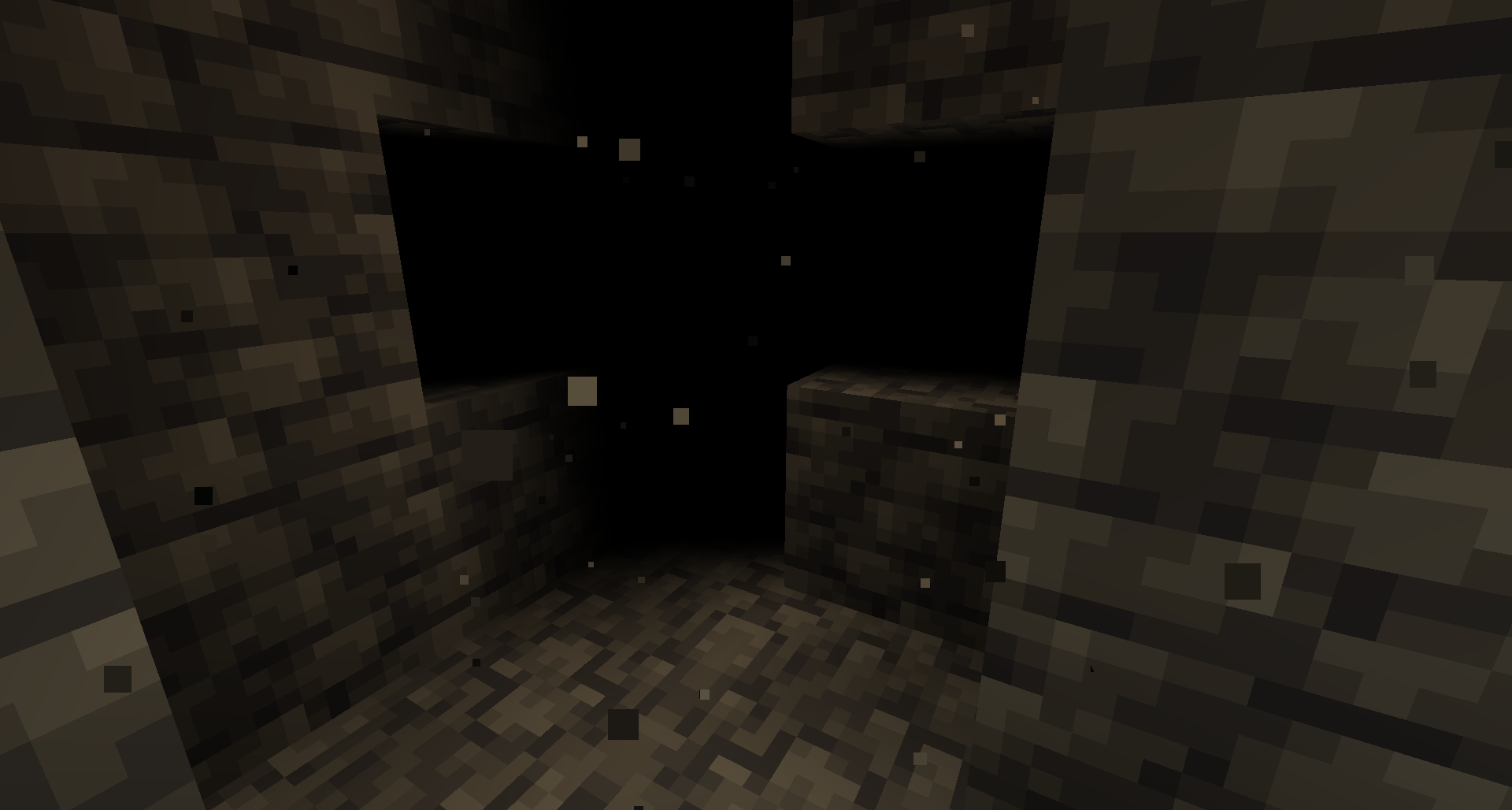
Brings back the void fog effect that was removed in Minecraft 1.8
* * *
##### **This is a client side only mod, you do not need to place it onto dedicated servers**
* * *
* * *
[ ](https://www.patreon.com/Tamaized)
[ ](https://ko-fi.com/tamaized)
[ ](https://discord.gg/FgefzeUQvj)