UnSignedVelocity2
# UnSignedVelocity2




Allow your moderation plugins to work again for users with versions 1.19.1 or higher
This plugin works by removing signed information from commands and messages sent by clients 1.19.1 or higher, allowing plugins that cancel proxy messages, such as ChatRegulator or AuthMeVelocity, to work again
This is a fork of the original UnSignedVelocity made by 4drian3d, updated to work with newer Minecraft versions
## Requirements
– Velocity 3.4.0+
– Java 17+
– PacketEvents 2.4.0+
## Metrics

Unreal Portal Engine
U.P.E. aka Unreal Portal Engine – is a resource engine designed to visually improve the portal(s) in Minecraft Java Edition.
Do you remember the colored portals from the 20w14infinite snapshot and jeb_ the sheep? I created resource packs using CIT (Custom Item Textures), in which I implemented the ability to paint portals using renamed leather armor and dye, and to apply absolutely any image to them.
Resource packs? Why not a resource pack? During development, I encountered difficulties due to the final resource pack size, model limitations in Minecraft, and name length limitations in older versions and in the OS itself. Therefore, I had to split the resource packs into separate components.
Core Engine (for all game versions)
Add-ons (for Optifine versions from 1.9 to 1.21.4 and for versions starting from 1.21.5 and all future versions, including snapshots)
Connector (for add-ons for game versions 1.21.5 and all future versions, including snapshots)
The core engine doesn’t do anything on its own. It’s just a collection of models. So, enabling it in-game won’t change anything.
Addons work alongside the engine. With them, you can paint portals or use any PNG image (or GIF after proper conversion). Or you can use any image and color it with a dye. It’s all up to your imagination.
Connector was created due to the priority of resource packs in the list. It’s needed to allow addons to work together on versions 1.21.5+.
Where is a resource pack useful? In singleplayer and on servers.
Since these are resource packs with item renaming, all visual changes will be visible to everyone who has them installed.
You can color-code portals to help you remember which one leads where or which one is connected to which.
You can create a portal gallery.
It’s all up to your imagination.
FAQ
Question 1: what does the engine do?
Answer: adds a set of .json models that, after renaming an item, can do the following:
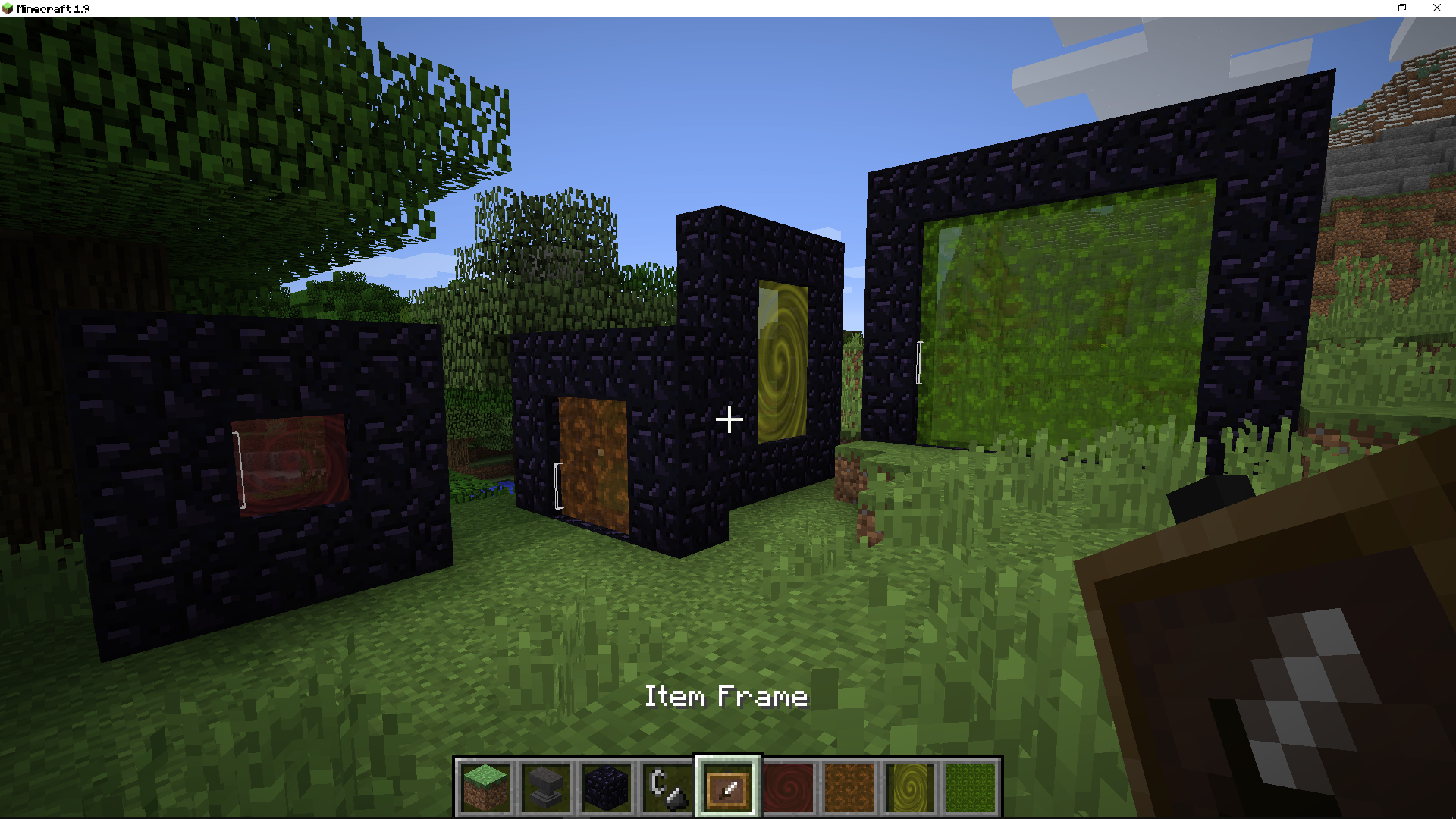
But if you just enable the resource pack, nothing will change in the game, since it is just a set of models.
Question 2: what is needed for the engine to work?
Answer: you need to create an addon for it using CIT (Custom Item Textures) technology, which is available in Optifine, in third-party mods like CIT Resewn, and starting with 1.21.5+, in the vanilla game.
Question 3: will addons work on the server too?
Answer: yes, because CIT (Custom Item Textures) is used exclusively on the game client and not on the server.
Question 4: how to create your own addon?
Answer: you need knowledge of resource packs, scripts for mass file renaming, and Notepad++ for mass character changes.
Question 5: what do you mean by mass renaming?
Answer: portal sizes. This engine supports all portal sizes, from the impossible 1×1 to the maximum 21×21.
Unrandom Textures
Minecraft version 1.8 added the “Alternate Blocks” setting which, when toggled on, gave certain blocks a random orientation. Minecraft 1.9 removed the option, making certain blocks always have a random orientation.
Thanks to resource packs, the previous non-random state for those blocks can be restored. Because this doesn’t touch the textures directly, this is compatible with any resource pack that doesn’t modify the block states.
If you’re playing on a server and take screenshots, but have people decode the random block rotations to find and grief your build, this pack will hinder their ability to find your build. *Note: this won’t prevent users from decoding based on blocks this pack does NOT unrandomize (such as Lily Pads) nor natural features in the screenshot (such as where flowers spawn).*
Pack version numbers coincide with format numbers for ease of tracking. Snapshots are *not* directly supported (in some cases, version numbers will skip to keep in line with format numbers). In most cases, you can use an existing pack with a different version. In my experience, Minecraft tends to deselect your resource packs that are out of date, but there are rarely changes that break using an older version with whichever version you are playing. Check the changelog for (known) breaking changes.
The blocks this pack affects are:
– bedrock
– black concrete powder
– blue concrete powder
– brown concrete powder
– cyan concrete powder
– deepslate
– dirt
– dirt path
– grass block
– gray concrete powder
– green concrete powder
– infested deepslate
– infested stone
– light blue concrete powder
– light gray concrete powder
– lime concrete powder
– magenta concrete powder
– mycelium
– netherrack
– orange concrete powder
– pink concrete powder
– podzol
– purple concrete powder
– red concrete powder
– red sand
– rooted dirt
– sand
– sculk
– stone
– white concrete powder
– yellow concrete powder
If you find an error in the pack, hop on my Discord and let me know about it.
If you see a block I missed, hop on my Discord and let me know about it.
(Discord link in sidebar)
Devin’s Unobtrusive Grass
This pack shortens grass, ferns and more to make them less obtrusive.
*Works well with GrassKiss*
## 📥 Installation guide
Simply download the zip file and drop it into your `.minecraft/resourcepacks` folder. After that, enable it in your resource packs menu. If you are using other resource packs, you may need to move this one to the top for the textures to be applied.
## 🔧 Modified blocks
– Grass
– Tall grass
– Rose bush
– Fern
– Large fern
Unobtrusive Armor
Removes parts of the armor textures so you can see your friends’ skins! (If you have any…)
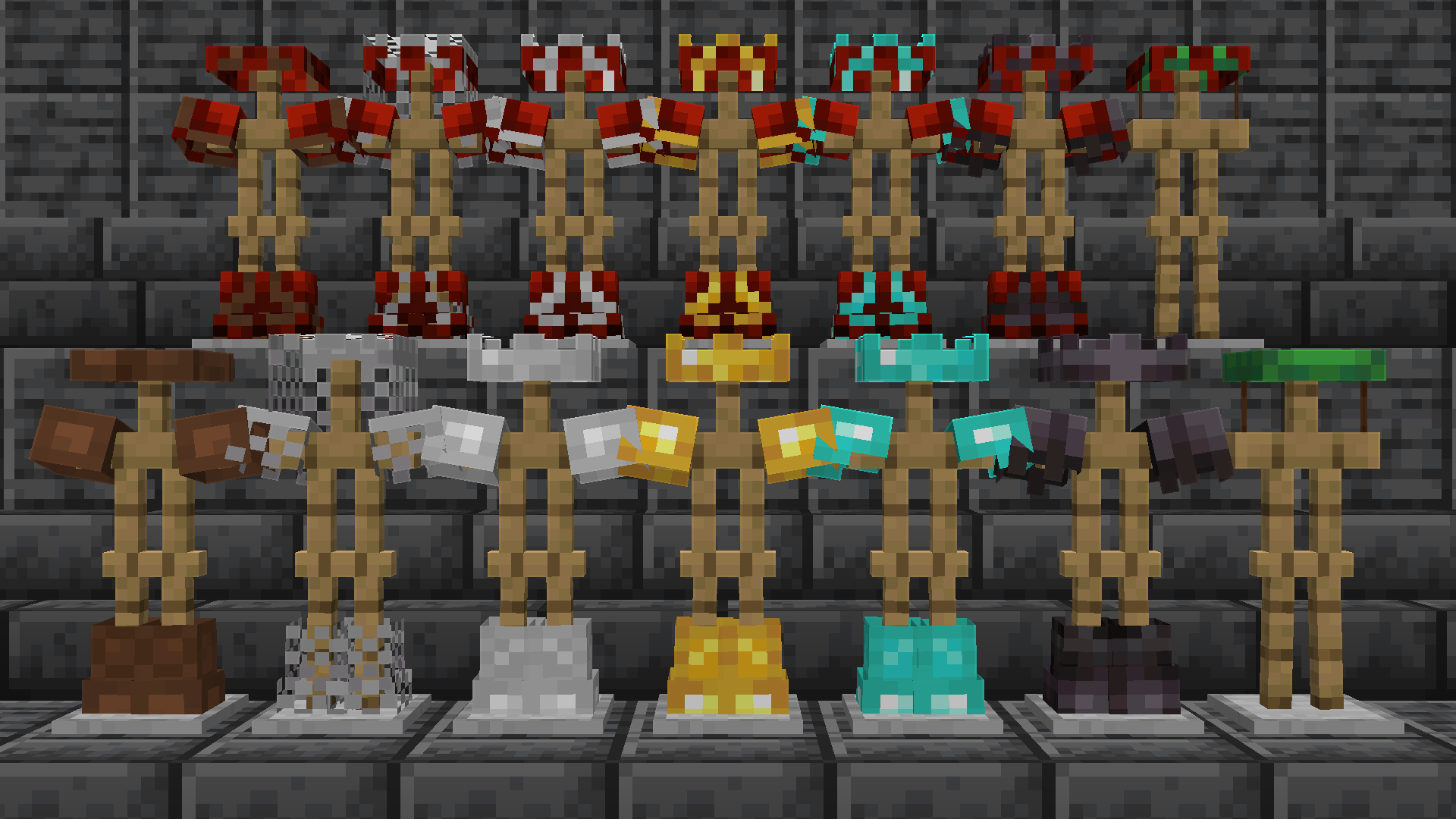
*Note: copper armor is also included as of v3.0, I’m just too lazy to retake this picture.*
Inspired from the **Limited Life Series** by **Grian**
Unobstructive Armor
# Unobstructive Armor
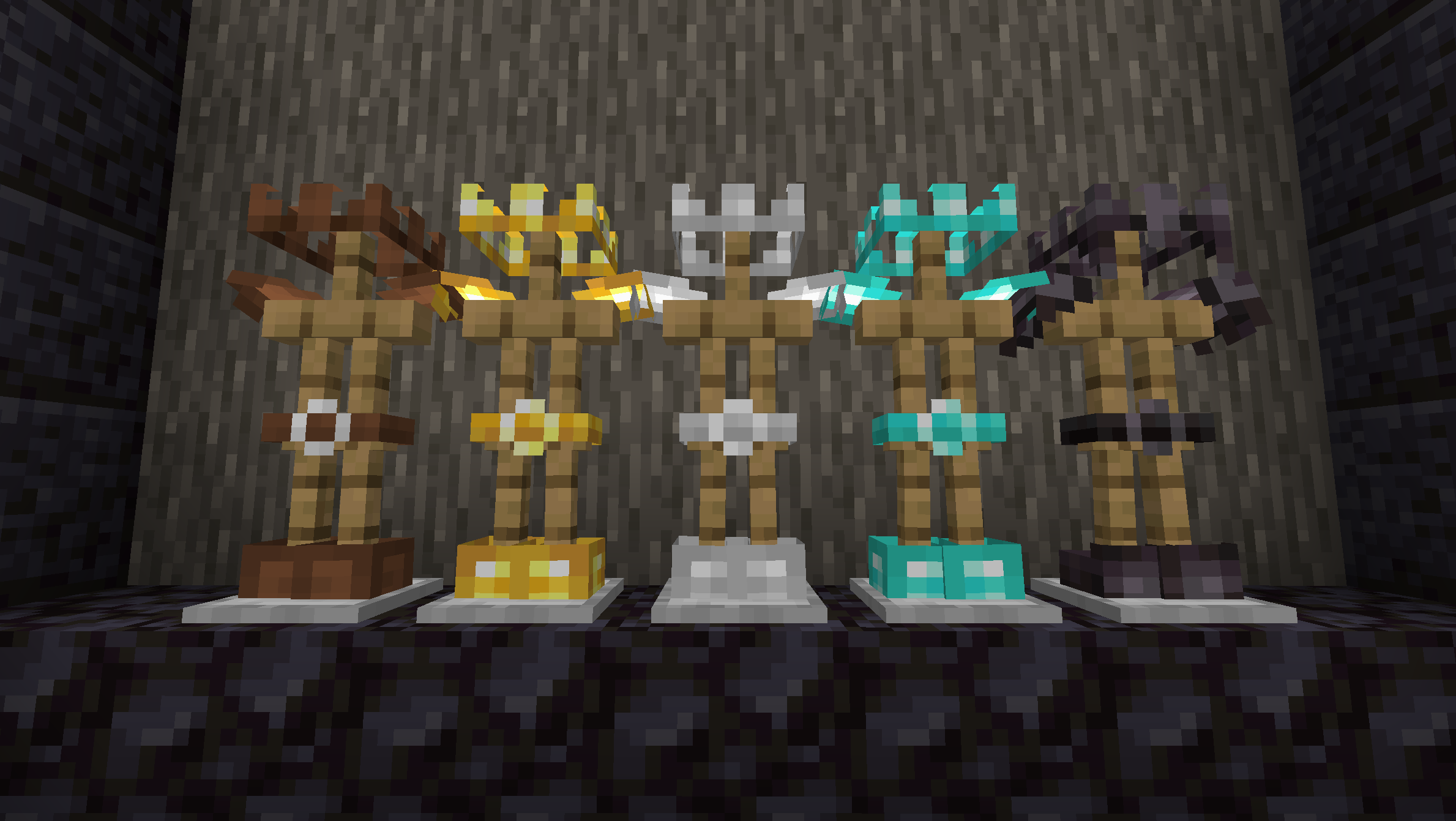
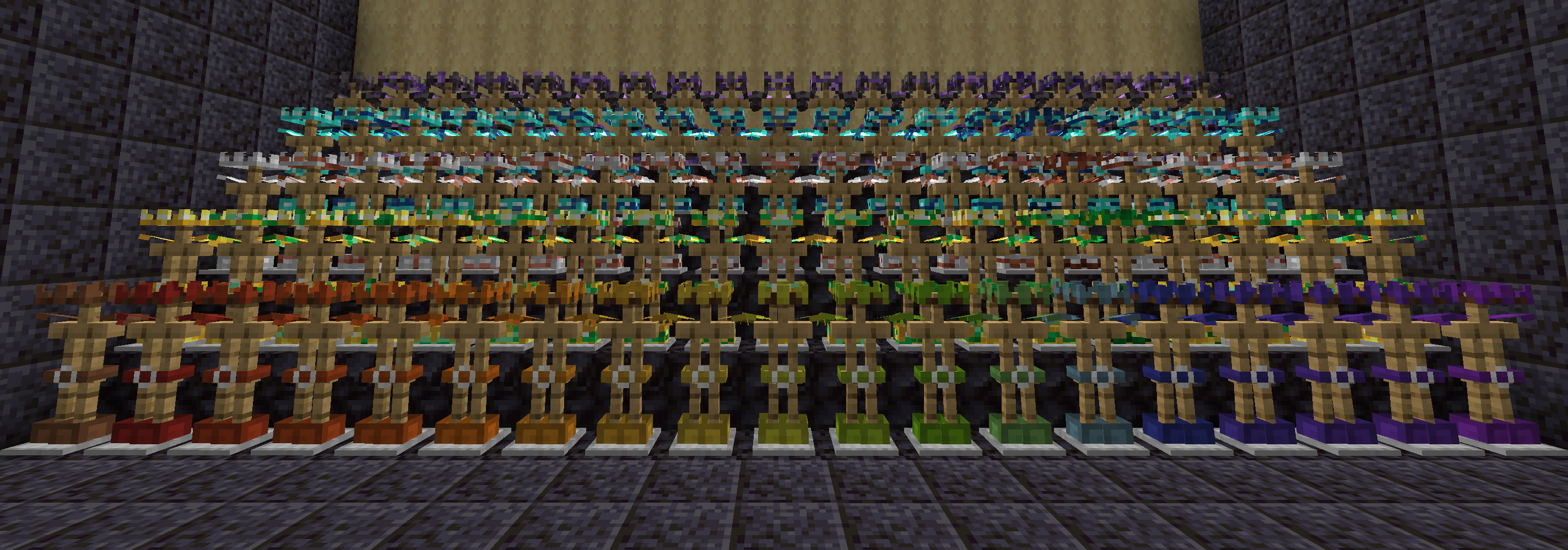
Unobstructive Armor retextures helmets, chestplates, leggings, and boots into crowns, shoulder pads, belts, and shorter boots so that less of players’ skins are hidden by armor while still keeping worn armor identifiable.
### Armor types
Leather, gold, iron, diamond, and netherite armor have been retextured with the new shapes.
### Armor trims
Every armor trim has been tweaked to fit with the retextured armor shapes.
### Helmet items
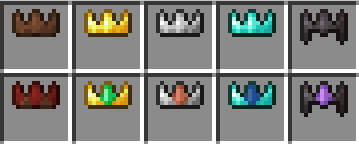
The helmet items are retextured to represent their crown presentation instead. The other armor pieces haven’t been retextured because I found that they weren’t as easily recognisable as armor in the inventory.
### Visible player skins
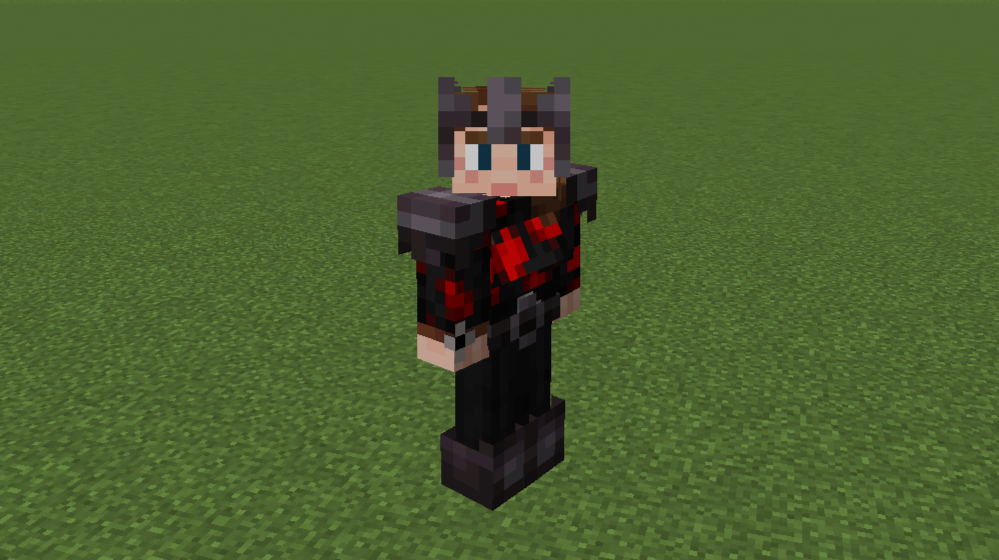
The majority of each player’s skin is visible while wearing full armor.
**Note:** My skin used in the screenshots and resource pack icon uses Ears to modify the chest. This resource pack only changes armor textures – it makes no modifications to player models or skins.
### Similar packs
After creating this resource pack I discovered that another exists with a similar concept and name: Unobtrusive Armor. While I came to the same idea indepdenently, I want to acknowledge that I was not the first to implement this idea. Feel free to check out Unobtrusive Armor and see which resource pack you prefer.
UNO TOTEM
This ResoucePack is the result of minutes of Modeling, and is made possible thanks to players like you. If you would like to show a token of your appreciation for my work, and help support the development of This ResourcePack in the process, Then follow me
This ResourcePack changes the Totem of undying from the boring texture into an UNO Card.
Вряд ли (Unlikely) Totem Of Undying
– ENG: It’s unlikely (doubtful, 50-50) – a series of pictures with colorful birds, on which expressions conveying doubt are written. The meme went viral in December 2025 on TikTok.
– RU: Вряд ли (сомнительно, 50 на 50) – серия картинок с разноцветными птицами, на которых написаны выражения, передающие сомнение. Мем завирусился в декабре 2025 года в Тиктоке
ALL RESOURCEPACKS COLLECTION: MEMES + STREAMERS
Unlerp
# Make your game “””Smoother”””!
## Unlerp V3!
Version 3 adds something that may actually be useful for once! You can now configure the amount of ticks over which entity movements are interpolated. This means that for people playing on servers that send more updates than vanilla (you know who you are), gameplay will be much smoother. The mod’s default configuration has also been changed to be more convenient for aforementioned situations.
—
V2
Tired of constantly triggering anticheats? Want your game to be even “””smoother”””? Well now you can! Introducing Unlerp 2, the latest and greatest in the unlerping scene. Double the version number, double the amount of options, double the “””smoothness””” and double the fun! You can now make the client’s tickDelta have a custom interpolation curve as well, letting you experience the bleeding edge of “””smoothness” in more places (without setting off anticheats), like your player’s model!
—
Have you ever wanted to play the game without the unsmooth, ugly, and terrible linear interpolation? Well, now you can! This mod lets you change the behaviour of the game’s `lerp()` function, used for almost everything in the game, going as far as to let you change it to any easing curve from easings.net!
You need midnightlib to use this mod. Run `/unlerp` to open the configuration menu if your GUI goes offscreen.
Be careful playing on servers with this mod, as it could trigger anticheats.
UnknownCommand
This plugin changes the unknown command message!
Config.yml:
“`yml
messages:
message1: §c§lHey! §7The command §c
message2: §7doesn’t exist!
command:
show: true
“`