Block Helper
# Block Helper
A direct WAILA port for old versions of Minecraft, with almost the same API and many, many additional fixes!
## Download
[**Download on CurseForge**](https://www.curseforge.com/minecraft/mc-mods/block-helper)
[**Download on Modrinth**](https://modrinth.com/mod/block-helper) (More versions are available here)
### Fixers
Some Minecraft versions have bugs. That’s normal. In order to fix some of them, you can install the following fixers:
– [Class Loader Fixer](https://modrinth.com/mod/class-loader-fixer)
– [Font Fixer](https://modrinth.com/mod/font-fixer)
## Old source code
This repository hosts the source code for BlockHelper versions 2.x and onwards.
The source code for older versions (0.x and 1.x), has moved [here](https://github.com/ThexXTURBOXx/BlockHelper-old).
## Installation
### Forge (all versions) / ModLoaderMP (≤ 1.2.3)
#### Client
Just drop the mod into the `mods` folder. Done! 🙂
#### Server
If you are running a server on MC 1.3.x or newer, just copy the Block Helper jar file into the `mods` folder.
On older versions, you need to download the dedicated server build of the mod.
It can be found under “Additional files” both on Modrinth and CurseForge.
In MC b1.5_02 and older, you need to copy all the files from this jar into the server jar.
In all newer versions, it is sufficient to just copy the jar file into the `mods` folder.
#### MCPC+/Cauldron/Bukkit
If you are running a server on MC 1.3.x or newer, just copy the Block Helper jar file into the `mods` folder.
On older versions, you need to download the dedicated Bukkit/MCPC+ build of the mod.
It can be found under “Additional files” both on Modrinth and CurseForge.
In MC b1.7.3 and older, you need to copy all the files from this jar into the Bukkit jar.
In all newer versions, it is sufficient to just copy the jar file into the `mods` folder.
### Fabric
Drop the mod into the `mods` folder and install [Apron](https://github.com/BetterThanUpdates/Apron) or [BetaLoader](https://github.com/paulevsGitch/BetaLoader) (for b1.7.3)
or [Fabricated Forge](https://github.com/arthurbambou/Fabricated-Legacy-Forge) (for 1.3.2+).
## Features
### Mod Compatibility
Next to Vanilla blocks, integration modules for the following mods are in place (list updated only irregularly!):
– Advanced Machines
– Advanced Solar Panels
– Applied Energistics 1
– Barrels
– BuildCraft 2 and 3
– ChickenChunks
– Ender Storage
– Equivalent Exchange 1, 2 and 3
– Factorization
– Falling Meteors
– Flora & Soma / Natura
– Forestry
– Forge Multipart
– GregTech
– IC²
– Immibis’s Microblocks
– IndustrialCraft
– InfiCraft
– NEI
– Pam’s Mods
– Project Zulu
– Railcraft
– Red Power
– Thaumcraft
– Thermal Expansion
– Total Panels
– Twilight Forest
Some of these mods still host downloads to this day.
If you cannot find downloads for some of these,
chances are that they are still downloadable via [MCModArchive](https://mcmodarchive.femtopedia.de/).
### API
Block Helper features WAILA’s API (with minimal changes) from version 2.x onwards.
Since there are many resources online on how to use the API, I will keep this as simple as possible here and just list a few “good” examples:
– [Block Helper’s own plugins](https://github.com/ThexXTURBOXx/BlockHelper/tree/1.5.2/src/main/java/mcp/mobius/waila/addons)
– [BlockHelperAddons](https://github.com/VintageModsReforged/BlockHelperAddons)
Just try to follow these examples and you will succeed. To safely register your plugin, use the code snippet from the
JavaDoc of the `mod_BlockHelper#registerPlugin` function.
### Other features
Yes, Block Helper has a few additional features and integrations you probably have not seen before 🙂
On the Modrinth and CurseForge page, there are a few images of most of these features in action!
_Please note that not every feature is available for every Minecraft version due to modding limitations._
#### NEI/AMI/HMI integration
– Two new keybinds (default: NUM3 and NUM4), which show all the recipes for or using the
block currently looked at
– Show the mod an item is from in the item’s tooltip [this also works without NEI/AMI/HMI in Apron]
– Another keybind specific for NEI (default: I), which shows all the applicable enchantments for the
currently highlighted item in the inventory
#### World Overlays
Just like NEI in MC 1.4.7 and onwards, Block Helper features a light level overlay and chunk border overlay. The default
keybinds for these are F7 and F9, respectively.
## Source Code
Block Helper is being developed for:
– [a1.2.6](https://github.com/ThexXTURBOXx/BlockHelper/tree/a1.2.6)
– [b1.1_01/b1.1_02](https://github.com/ThexXTURBOXx/BlockHelper/tree/b1.1_02)
– [b1.2_02](https://github.com/ThexXTURBOXx/BlockHelper/tree/b1.2_02)
– [b1.3_01](https://github.com/ThexXTURBOXx/BlockHelper/tree/b1.3_01)
– [b1.4_01](https://github.com/ThexXTURBOXx/BlockHelper/tree/b1.4_01)
– [b1.5/b1.5_01](https://github.com/ThexXTURBOXx/BlockHelper/tree/b1.5_01)
– [b1.6.5/b1.6.6](https://github.com/ThexXTURBOXx/BlockHelper/tree/b1.6.6)
– [b1.7-b1.7.3](https://github.com/ThexXTURBOXx/BlockHelper/tree/b1.7.3)
– [b1.8/b1.8.1](https://github.com/ThexXTURBOXx/BlockHelper/tree/b1.8.1)
– [b1.9p5](https://github.com/ThexXTURBOXx/BlockHelper/tree/b1.9p5)
– [1.0/1.0.1](https://github.com/ThexXTURBOXx/BlockHelper/tree/1.0)
– [1.1](https://github.com/ThexXTURBOXx/BlockHelper/tree/1.1)
– [1.2.3](https://github.com/ThexXTURBOXx/BlockHelper/tree/1.2.3)
– [1.2.4/1.2.5](https://github.com/ThexXTURBOXx/BlockHelper/tree/1.2.5)
– [1.3.2](https://github.com/ThexXTURBOXx/BlockHelper/tree/1.3.2)
– [1.4](https://github.com/ThexXTURBOXx/BlockHelper/tree/1.4)
– [1.4.1/1.4.2](https://github.com/ThexXTURBOXx/BlockHelper/tree/1.4.2)
– [1.4.3](https://github.com/ThexXTURBOXx/BlockHelper/tree/1.4.3)
– [1.4.4/1.4.5](https://github.com/ThexXTURBOXx/BlockHelper/tree/1.4.5)
– [1.4.6/1.4.7](https://github.com/ThexXTURBOXx/BlockHelper/tree/1.4.7)
– [1.5.x](https://github.com/ThexXTURBOXx/BlockHelper/tree/1.5.2)
Blinding Pumpkin Overlay
You ever wanted to completely blind your foes with a curse of binding pumpkin? Then this is the resource pack for you!
Should work for every version.
It just makes the pumpkin overlay completely black, thats it.
[Alternative Download [PlanetMinecraft]](https://www.planetminecraft.com/texture-pack/blinding-pumpkin-overlay)
Black Hole Moon
# 
Thanks for checking out Black Hole Moon! This Resource Pack will change the boring moon to a Black Hole. Great to prank your friends, or just to change the moon to something else.
## FAQ
### Does this require any external mods?
Nope. This Resource Pack does not need any external mods for it to function properly.
### Can you put this pack on CurseForge?
I do not plan to put this pack on CurseForge, and probably never will.
### On some versions of Minecraft it either says “The pack is too new” or “The pack is too old”
On these versions “supported_formats” in pack.mcmeta was not introduced yet, because of that it looks at “pack_format” and says on the lines of “Pack format 5? (pack format for 1.15.2) That is old. This pack must not work on me anymore” even though the pack supports that version. Best you can do is just ignore it and enable the pack anyway, do the same if it says “pack is too new”.
### Did you make the Pixel Art yourself?
Yes! and you are free to use it on whatever project your working on. Credit would be appreciated, but its not mandatory, just dont copy the Resource Pack outright and publish it claiming its your own.
BetterNetherwartGrowth
This resource pack provides a vital quality-of-life upgrade for alchemists and farmers by recoloring each growth stage of Nether Wart. Gone are the days of squinting at dark red pixels to see if your crop is ready; now, you can distinguish stages at a glance.
Stage 0 is a bright yellow to indicate it has just been planted, Stage 1 transitions into a vibrant orange as it matures, and the final stage remains a classic deep red so you know exactly when to harvest. This high-contrast color progression is perfect for massive soul sand farms, ensuring you never accidentally waste time harvesting early again!
Better Homes
# Better Homes
**Better Homes** is a complete, configurable and professional homes plugin for Bukkit, Spigot and Paper servers.
Created by **Vit Theo**, Better Homes gives players a clean home system with commands, GUI menus, teleport safety, cooldowns, permissions, public/shared homes and a solid YAML storage backend.
## Highlights
– Complete homes system with named homes
– Modern inventory GUI with pagination
– Safe teleport checks
– Teleport delay and cooldown
– Cancel teleport on movement, damage or combat
– Configurable home limits
– Per-world home support
– Public and shared homes
– Admin commands for player home management
– Fully configurable messages
– Configurable GUI items, titles, sounds and effects
– YAML storage by default
– Clean architecture ready for future SQLite/MySQL support
– Built for broad Bukkit/Spigot/Paper compatibility
## Player Commands
| Command | Description |
| — | — |
| `/sethome [name]` | Create a home at your current location |
| `/home [name]` | Teleport to one of your homes |
| `/home :` | Teleport to a public/shared home |
| `/delhome [name]` | Delete one of your homes |
| `/homes [page]` | List homes and open the GUI |
## Admin Commands
| Command | Description |
| — | — |
| `/betterhomes reload` | Reload configuration and messages |
| `/betterhomes info` | Display plugin information |
| `/betterhomes sethomeplayer ` | Create a home for another player |
| `/betterhomes delhomeplayer ` | Delete a player’s home |
| `/betterhomes listhomes ` | List a player’s homes |
| `/betterhomes clearhomes ` | Clear all homes of a player |
| `/betterhomes givehome ` | Create a home for a player from your position |
| `/betterhomes rename ` | Rename one of your homes |
| `/betterhomes move ` | Move a home to your current position |
| `/betterhomes share ` | Share a home with a player |
| `/betterhomes unshare ` | Remove shared access |
| `/betterhomes public ` | Toggle public access |
## Permissions
| Permission | Description |
| — | — |
| `betterhomes.use` | Allows basic plugin usage |
| `betterhomes.sethome` | Allows `/sethome` |
| `betterhomes.home` | Allows `/home` |
| `betterhomes.delhome` | Allows `/delhome` |
| `betterhomes.gui` | Allows GUI usage |
| `betterhomes.bypass.cooldown` | Bypasses teleport cooldown |
| `betterhomes.bypass.limit` | Bypasses home limits |
| `betterhomes.admin` | Grants admin permissions |
| `betterhomes.reload` | Allows `/betterhomes reload` |
| `betterhomes.others` | Allows managing other players’ homes |
| `betterhomes.rename` | Allows renaming homes |
| `betterhomes.list` | Allows listing homes |
| `betterhomes.teleport.instant` | Bypasses teleport delay |
| `betterhomes.teleport.safely` | Allows safe teleport adjustment |
| `betterhomes.world.` | Allows homes in a specific world |
| `betterhomes.limit.` | Gives a custom home limit |
## GUI Features
Better Homes includes a clean inventory interface designed for regular server use:
– Main homes menu
– Page selector menu
– Home edit menu
– Delete confirmation menu
– Buttons for teleport, move, rename, public toggle and delete
– Configurable icons and item lore
– Configurable rows, titles, sounds and filler items
– Pagination for players with many homes
## Teleport Safety
The teleport system is designed to prevent common home-related issues:
– Configurable warmup delay
– Configurable cooldown
– Movement cancellation
– Damage cancellation
– Combat cancellation
– Safe destination search
– Block danger checks for lava, fire, cactus and similar hazards
– World whitelist/blacklist support
– Optional per-world permission checks
## Storage
Better Homes uses YAML storage by default. Player homes are saved automatically and loaded on startup.
The internal storage layer is interface-based, making it easy to add SQLite or MySQL support later without rewriting the home system.
## Configuration
The plugin generates:
– `config.yml`
– `messages.yml`
– `homes.yml`
You can configure:
– Home limits
– Teleport delay
– Teleport cooldown
– Safe teleport behavior
– GUI layout
– GUI icons
– Sounds
– Effects
– Messages
– Allowed or blocked worlds
– Shared/public home behavior
– Command behavior
## Compatibility
Better Homes is compiled against the Bukkit 1.8.8 API and avoids direct usage of modern-only API calls.
Material, sound, title and effect handling uses compatibility helpers and fallback names, which makes the plugin suitable for a wide range of Bukkit, Spigot and Paper versions.
## Installation
1. Download `BetterHomes.jar`.
2. Put it in your server’s `plugins` folder.
3. Restart your server.
4. Edit `plugins/BetterHomes/config.yml` and `messages.yml`.
5. Run `/betterhomes reload` or restart the server again.
## Why Better Homes?
Better Homes is built for server owners who want more than a basic `/home` command. It provides a complete home management experience with a professional structure, strong configuration options and a user-friendly GUI.
It is lightweight, dependency-free and designed to stay stable on active servers.
## Support
If you need help, find a bug or want to suggest a feature, contact the author or open a discussion on the resource page.
## Author
**Vit Theo**
Better3DSwords
# ⚔️ **Better3DSwords** ⚔️
I redesigned the classic swords in Minecraft, giving them a nice 3D look and optimizing their size for PvP.

*The handles look oversized because the swords are intentionally small!*
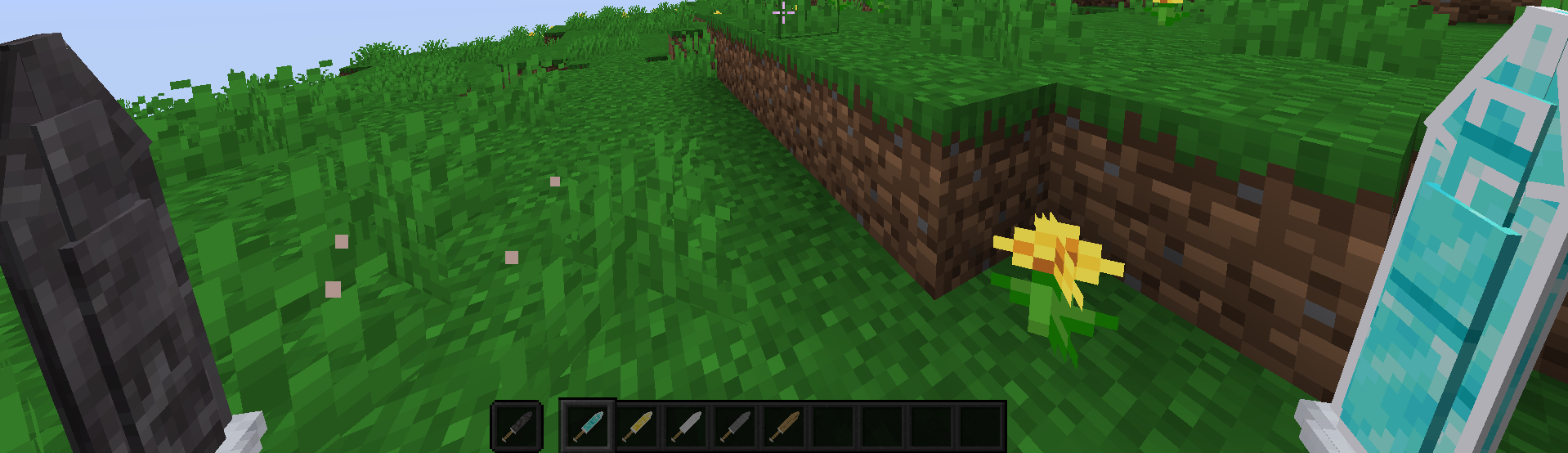
More images coming soon! Stay tuned!
## 🚧 **Planned Updates**
– **Improved Handles** *(DONE)*
– **Enchantment Support** *(DONE)*
– **Enhanced Gold Sword Texture** *(DONE)*
– **Option for Long Swords** *(Coming soon)*
## 💡 **Feedback Welcomed!**
This is my **first time** modeling and texturing with Blockbench!
Your feedback can help me improve this pack further.
### 📬 **Get in Touch**
Feel free to contact me via Discord to give feedback: **`DrMatickHD`**
Thank you for checking out my work!
Better Zombie X Herobrine
Transform your Minecraft experience with Better Zombie X Herobrine A terrifying and unique texture pack that completely reimagines the classic zombies.
Every zombie you encounter is replaced with a haunting Herobrine version
featuring glowing white eyes that pierce through the darkness creating an unsettling atmosphere for your worlds.
Perfect for adventure maps, horror-themed servers
or just adding a creepy twist to vanilla gameplay. This pack focuses on entity and model textures
Altering the visual appearance of zombies while keeping Minecraft’s vanilla feel intact. With a resolution of 16x–32x, it balances clarity and performance
Ensuring smooth gameplay on most systems. Whether you’re exploring dungeons, fighting mobs, or building eerie landscapes Better Zombie X Herobrine adds a chilling and memorable visual
If the menu looks strange or is missing textures, that’s normal, but it won’t affect your gameplay.
Element that will keep players on edge. Experience the horror… if you dare.
Better Together Panorama
This resource pack replaces the default panorama in Minecraft with the one from the Better Together Update. It features a new landscape that includes a nice lake and a more detailed landscape, providing a fresh backdrop for your gameplay. The updated panorama aims to enhance the overall aesthetic of the game, creating a more immersive environment as you start your adventures. Download this resource pack to enjoy a different visual experience in your Minecraft title screen.
Better Than Wolves

Better Than Wolves is a “total conversion”. This differs from most mods that you are probably used to in that it changes many of the rules of play to provide a richer experience, rather than just adding in new stuff. What makes it special however, is that it always attempts to do so in a way that retains the original spirit of the game, perhaps even more so than the newer official releases.
It focuses both on challenging survival play, and player creativity in terms of never providing “magic block” solutions to in game problems. Instead, it provides basic tools and leaves it to the player to figure out how to use them to get the job done.
In short, Better Than Wolves is a vision of what Mincraft could have been, designed by a very serious player, for other like minded individuals.
All credit goes towards the creator, FlowerChild. And to the BTW Community.
**VERSIONS 4.84+ DO NOT USE A MODLOADER!!!**
**PERMISSION** : FlowerChild officially declared BTW open source CC BY 4.0 and allowed redistribution. — https://sargunster.com/btwforum/viewtopic.php?t=9863 —
**TO BE UPLOADED**: Versions 3.63, 3.72, 4.85 when Modrinth allows uploading out of order to not mess up the changelog
**NOTE: Better Than Wolves IS NO LONGER ACTIVELY DEVELOPED.**
It has been superseded by Better Than Wolves: Community Edition
MCF: https://www.minecraftforum.net/forums/mapping-and-modding-java-edition/minecraft-mods/3117153-better-than-wolves-community-edition-v2-0-4-may
Github: https://github.com/BTW-Community/BTW-Public
Better Piston Sounds
# ⚠️ Loud Volume Warning ⚠️
### This resourcepack makes pistons sound even better!
(subjective opinion)