MC New Textures
# MC New Textures
Backport Jappa Styles to legacy version.Or backport the unupgrade textures.Re-imagine modern textures.
Mod Compatibility ONLY have 1.7.10 version and 1.12.2 version.
Most of the texture are not mine, so you will need to check up the changelog from the last updates to know the mods, then you need find out the owner.
This is the wiki.[Website](https://minecraft.wiki/w/Texture_Update).
Also include the resources, which the same in the upper version, was updated and mod resources or texture. And it also re-imagine the modern vanilia resources.
# About Project
Here is the full list of the series of MC New Textures.
From the top to the bottom is a recommended resourcepack loading order.
If this resource pack haven’t had a version that support your currently playing version, ignore this pack.
| Textures Pack | Support Version (1.X) | Link | Description | Note |
| ————————: | :——————–: | :————————————————————————: | :——————————————————–: | :—————————– |
| Base Pack | B7.3,0 – 4.7, 6 – 20.x | MC New Textures (Here) | Update textures to jappastyled textures. | |
| Blue Water | 6 – 12 | [Aquatic](https://modrinth.com/resourcepack/mcnt-aqua) | Fix your milky aqua. | |
| Seamless Glass | 7 – 13 | [Seamless Glass & Color](https://modrinth.com/resourcepack/mcnt-tintverre) | Seamless glass and colorful contemporary feeling. | Optifine **Required** ! |
| Mod Addon | 7.10, 12.2 | [Mod Addon](https://modrinth.com/resourcepack/mcnt-mod) | Supports of mods. | Partly Optifine **Required** ! |
| Sound | 7 – 13 | [Sound Pack](https://modrinth.com/resourcepack/mcnt-sound) | Archive the sound pack for MC New Textures. | |
| Random Work | 7.10, 12.2, 17 | [Random Work](https://modrinth.com/resourcepack/mcnt-randomwork) | Some random thinks for new textures. | Optifine **Required** ! |
| Wolfy | 6 – 13 | [Wolfy](https://modrinth.com/resourcepack/mcnt-wolfy) | Backport modern wolf and two special dogs. (Bluey & Bingo) | Optifine **Required** ! [1.7.10: Optifine HD U E5 and above] |
| Cloudy | 0 – 21.6 | Coming soon… | Backport modern cloud and vibrant visual cloud | |
| Animal & Dye & Eggy Addon | 6 – 20 | Coming soon… | Backport modern dyes & animal & spawn eggs. | Partly Optifine **Required** ! |
# Notification
If you want more mod compatibility (ONLY 1.7.10 or 1.12.2) you can click [here](https://github.com/song682/MC-New-Textures/issues) to have more compatibility.
After v1.5.5(For 1.7.10),I will add a pack which called as .cache-[packname], to give you the chance to create more things.
A lot of contents(e.g.:modern water color) required optifine/continuity installed. I highly recommands that you install them.
# FAQ
– **Does this resourcepack have a direct relationship to [Modernity](https://modrinth.com/resourcepack/modernity)?**
In actually…NO.Because I create this resourcepack before I know about it. So it had no link to Modernity.
– **Can I use it in my video/modpack/resoursepack?**
Yeah,you can.You can use them just like you want.These are under MIT licence.
– **What about add more compatibility about (mod name)?**
If it has 1.12.2/1.7.10, I’ll do that.If not, it won’t. If you wanna, you can post some textures by yourself.
– **What about add the (vanilla content)?**
Don’t ask me about more silly things, for example, why not add recipe books in 1.7.10? (1.7.10 don’t have any recipe books)
If it was too hard for me right now, I’ll add it to the to-do-list.
– **Full meaning of this pack naming?**
[VersionType/MinecraftVersion]MCNewTextures-Type[VersionNum]
# Special Thanks! !
A very BIG thanks to [Jasper “JAPPA” Boerstra](https://twitter.com/JasperBoerstra).
[DTFuel](https://center.mcmod.cn/209068/) helps me to make out the EnderIO Ingot.
These two pack help me found some inspirations, [The First Pack](https://www.curseforge.com/minecraft/texture-packs/new-textures), [The Second Pack](https://www.curseforge.com/minecraft/texture-packs/ingots-template).
[Rainvay](https://mcprofile.net/profile/9ae83379-6681-4071-8f1f-89e50e364411/) inspired me the modern bed icon.
[tdstress](https://www.curseforge.com/members/tdstress)make the modern Immersive Engneering items.
[Updated Engineering](https://www.curseforge.com/minecraft/texture-packs/updated-engineering)
[Rainvay](https://mcprofile.net/profile/9ae83379-6681-4071-8f1f-89e50e364411/) inspired me the modern bed icon.
[Omgise](https://github.com/Omgise) helped tofind out sometexture problems.[Rainvay](https://mcprofile.net/profile/9ae83379-6681-4071-8f1f-89e50e364411/) inspired me the modern bed icon.
[tdstress](https://www.curseforge.com/members/tdstress)make the modern Immersive Engneering items.
[Updated Engineering](https://www.curseforge.com/minecraft/texture-packs/updated-engineering)
[Rainvay](https://mcprofile.net/profile/9ae83379-6681-4071-8f1f-89e50e364411/) inspired me the modern bed icon.
[Omgise](https://github.com/Omgise) helped tofind out sometexture problems.
MC-237017 Fix
# MC-237017 FIX
Minecraft mod to fix [MC-237017](https://bugs.mojang.com/browse/MC-237017) (All caves are filled with lava at and below Y value -54)
This mod is server-side only, and does not require anything on the client. Should work on all versions of Minecraft where this bug is present (1.18+, starting at snapshot 21w37a)
Lunar Staff
## ***REQUIRES DEPENDENCY, CHECK BELOW***
# Lunar Staff Mod Plugin
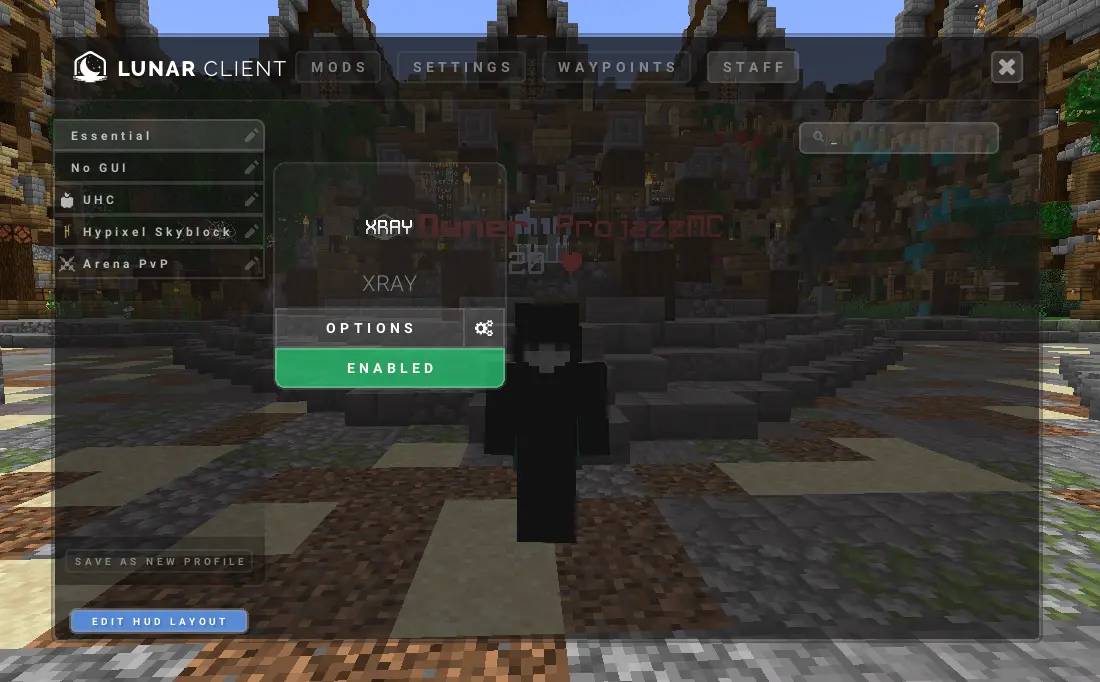
A Simple Plugin that enables the staff mod (Xray) for specified player using Lunar Client,
This plugin requires **Apollo**, See below to download.
This plugin is aimed to improve staff moderation in servers.
## Spigot Commands
– /lunarstaff
## Spigot Permissions
– lunarstaff.command.enable
– lunarstaff.command.disable
## Velocity Commands
– /lsv
– /lsv transfer
## Velocity Permissions
– lunarstaffvelocity.command.enable
– lunarstaffvelocity.command.disable
– lunarstaffvelocity.command.transfer
## Screenshot
## _REQUIREMENTS_
1. Java 21+ is required.
2. Spigot version 1.20+ is required.
3. Apollo plugin is required: https://modrinth.com/plugin/lunar-client-apollo
low fire 32×32
[**eng**]
The Low Fire 32×32 resource pack for Minecraft actually reduces the size and intensity of the displayed fire. This allows players to have a cleaner and less intrusive view of the playing field, especially during battles and PvP battles. Reduced fire can also help improve game performance, especially on weak computers or devices with limited resources.
[**ru**]
Ресурспак Low Fire 32×32 для Minecraft фактически уменьшает размер и интенсивность отображаемого огня. Это позволяет игрокам иметь более чистый и менее мешающий взгляд на игровое поле, особенно во время сражений и PvP-сражений. Уменьшенный огонь также может помочь улучшить производительность игры, особенно на слабых компьютерах или устройствах с ограниченными ресурсами.
Login Shield
# Loading Protection
**Tired of dying while your world or server is still loading?**
Loading Protection gives players a short, configurable period of safety when they join a world or server. While protected, they cannot take damage, hostile mobs will ignore them, and to prevent abuse, they also cannot deal damage.
Protection ends when the timer expires or as soon as the player moves.
## Features
– **Join Protection**
Players are immune to damage for a configurable amount of time after joining.
– **Mob Safety**
Hostile mobs will not target protected players.
– **Anti-Abuse System**
Protected players cannot damage mobs or other players.
– **Adaptive Protection Timer**
Protection lasts up to the configured maximum, but ends immediately when the player moves.
– **Optional Countdown Messages**
Players can receive chat updates showing how much protection time remains, plus a notice when protection ends.
### Countdown Message Notes
– Messages are only shown to the affected player.
– Messages appear at most once every 5 seconds.
– A warning is also shown if protection ends early because of movement.
## Requirements
### Fabric
– Fabric API
## Configuration
The mod generates this config file:
`config/loadingprotection-common.toml`
### Settings
– `protectionDuration`
Duration of protection in seconds after joining.
**Default:** `60`
**Range:** `1–300`
– `showMessages`
Enables countdown and expiration messages in chat.
**Default:** `true`
## Summary
Loading Protection helps prevent unfair deaths during login by giving players temporary invulnerability while the world or server finishes loading.
Lime Food
Makes some foods a nice lime green color (i like lime green)
Lightingless



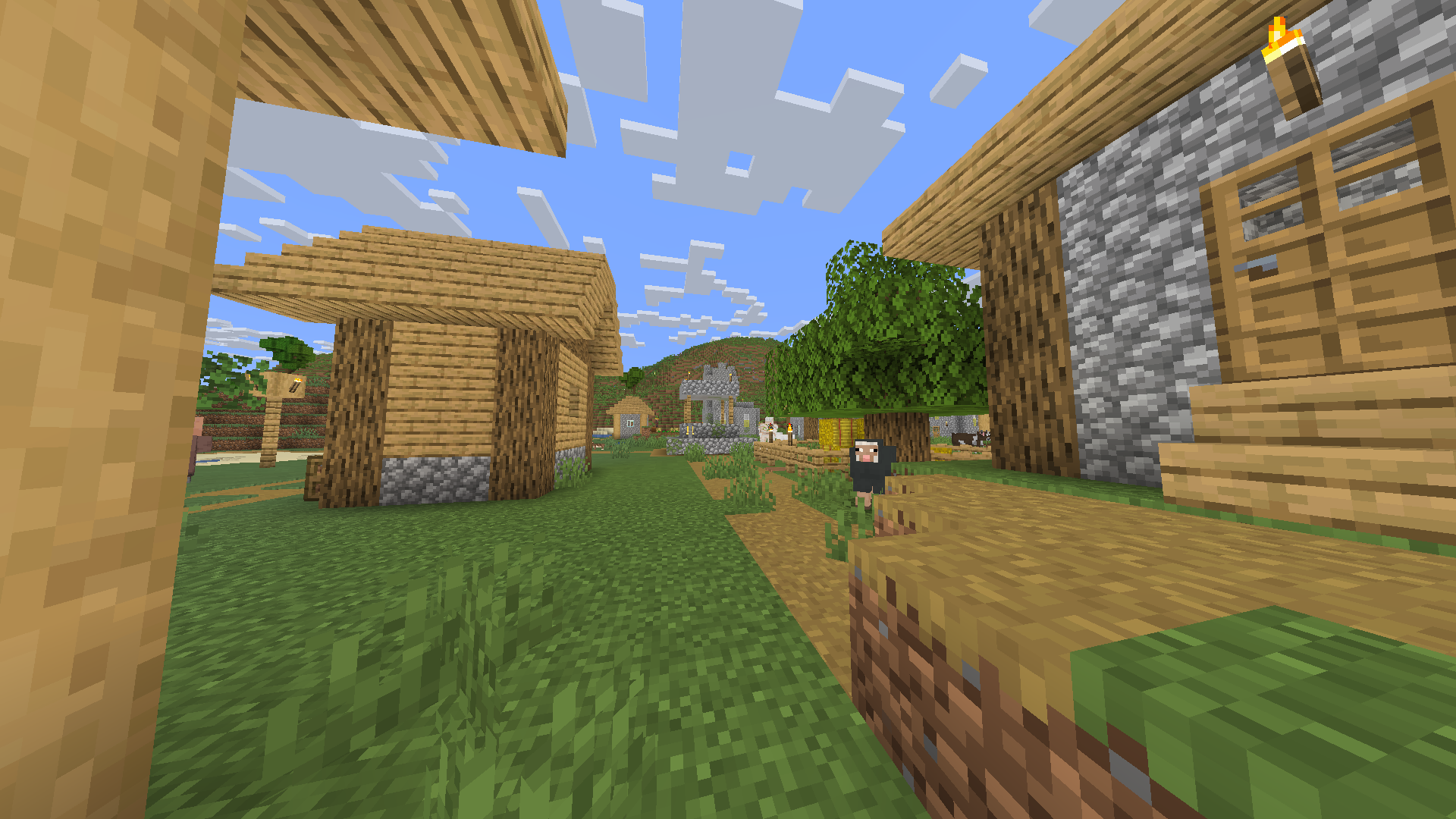
## Removes the shading engine
every texture has a little gamma however it does still have support for dark areas/night
## Probably the worlds smallest shader!
it makes the game like some youtuber shaders
ex. MumboJumbo
LegacyVoiceChat
# LegacyVoiceChat
**LegacyVoiceChat** adds proximity voice chat to legacy — including **Ornithe**, **StationAPI**, **Better than Adventure!**, **Project Poseidon**, **Risugami Modloader** and **More!**.
## ⚠️ WARNING
> **LegacyVoiceChat is currently a WIP mod.**
> Expect bugs, UI changes, and protocol changes at any time.
## Features
### Proximity Voice Chat
– 3D positional audio
– Directional sound based on player orientation
– Dynamic volume fading with distance
### Audio Device Management
– Choose custom **input** and **output** devices
– **Push-to-Talk** or **Voice Activation** modes
– Adjustable mic sensitivity
### Groups / Parties
– Create or join voice groups
– Talk privately with teammates (ignores distance)
### Mute & Deafen
– Mute specific players or yourself
– Deafen to silence all incoming voice
Looking for the raw jar file for MultiMc or Prism Launcher? [Click Here](https://legacyvoicechat.com/)
### Server Notes
Make sure to port forward “`25566 UDP“` or change the port in the server config
Legacy OptiFabric
**for mcsr**: use [mods.tildejustin.dev](https://mods.tildejustin.dev/)
If you’re looking for OptiFabric for 1.14 to 1.15.2 for regular Fabric instead of Ornithe, check out [OptiFabric Origins](https://modrinth.com/mod/optifabric-origins)
## Legacy OptiFabric
OptiFabric for Legacy Fabric (1.3.1-1.13.2) and Ornithe (b1.7.3-1.14.4)
– Legacy Fabric installer and official MultiMC instances: https://legacyfabric.net/downloads.html
– Ornithe installer (can generate MultiMC instances): https://ornithemc.net
– Legal speedrunning MultiMC instances for Ornithe and Legacy Fabric (vanilla LWJGL, no extra libraries or mods): [Minecraft-Java-Edition-Speedrunning/legacy-fabric-instance-generator/releases](https://github.com/Minecraft-Java-Edition-Speedrunning/legacy-fabric-instance-generator/releases)
based on the work of [RedLime’s OptiFabric-Pre1.14](https://github.com/RedLime/OptiFabric-Pre1.14), a fork of [hYdos’s OptiFabric 1.8.9](https://github.com/hYdos/OptiFabric) which
in turn is a derivative of [modmuss’ original OptiFabric](https://github.com/modmuss50/OptiFabric)
## installing
this mod requires an optifine jar in the mods folder alongside optifabric. for 1.7.2 and onwards this can be sourced
from [OptiFine’s official website](https://optifine.net/downloads), and older versions these can be retrieved either
from [SpeedyCube64’s Pre-1.9 Optifine Archive](https://github.com/speedycube64/Complete_OptiFine_Archive_Pre_1.9) or on
the [OptiFine history thread](https://www.minecraftforum.net/forums/mapping-and-modding-java-edition/minecraft-mods/1286605-b1-4-1-9-optifine-history).
## how it works
this mod uses [Minecraft-Java-Edition-Speedrunning/fabric-asm](https://github.com/Minecraft-Java-Edition-Speedrunning/fabric-asm), a minor derivative
of [Cat Core’s Fabric-ASM/no-guava](https://github.com/thecatcore/Fabric-ASM/tree/no-guava) which itself is an updated version
of [Chocohead’s fabric-asm](https://github.com/Chocohead/Fabric-ASM). fabric asm allows more extreme asm modification and the fork used has no dependency on guava or apache
commons, which older minecraft versions don’t provide.
### steps
1. the mod looks for an optifine installer or mod jar or zip in the current mods folder
2. if it finds an installer jar it runs the extract task in its own throwaway classloader
3. the optifine mod jar is a set of classes that need to replace the ones that minecraft provides
4. optifine’s replacement classes change the name of some lambda methods, so it take a good guess at the old name (using the original minecraft jar)
5. remap optifine to intermediary
6. move the patched classes out as they won’t do much good on the classpath twice
7. add optifine to the classpath
8. register the patching tweaker for every class that needs replacing
9. replace the target class with the class that was extracted, also do some more fixes to it, and make it public (due to access issues)
10. hope it works
## notes
– this mod does not really work in dev or named environments. In Legacy Fabric’s case the yarn builds are corrupted in some versions so this cannot work atm, feather is better but still has issues.
– the accessWideners are created based on the output of tiny remapper’s checkPackageAccess option, but they are unlikely to ever be 100% complete. if you have a crash that has to do with and invalid access, report it and it may be able to be fixed.
## class excluder
this is a kind of hidden feature that is occasionally useful to remove files when remapping the jar. to do this, it reads the `optifabric-excluded-classes.json` file
in `.minecraft/config/` if it exists, and expects the file to contain a mapping of versions (field names) to an array of removable classes (or textures or anything else, it’s just
a filename).
an example file contents to revert the removal of the profiler for 1.3.2 light is provided below. if the optifine version you are trying to make an excluder extry for has already
been loaded before in your instance, delete its folder in the `.optifine` folder in `.minecraft` to force a recache.
“`json
{
“OptiFine_1.3.2_L_B2”: [
“ik.class”
]
}
“`
Legacy Minigames Lobby Panorama
Makes ur panorama the og Minecraft Minigames lobby (new)