RedPower 2 World

See [RedPower 2 Core](https://modrinth.com/mod/redpower2-core) for a full description.
### Modules
– [Core](https://modrinth.com/mod/redpower2-core)
– [Logic](https://modrinth.com/mod/redpower2-logic)
– [Wiring](https://modrinth.com/mod/redpower2-wiring)
– [Array](https://modrinth.com/mod/redpower2-array)
– [Lighting](https://modrinth.com/mod/redpower2-lighting)
– [World](https://modrinth.com/mod/redpower2-world)
– [Machine](https://modrinth.com/mod/redpower2-machine)
– [Control](https://modrinth.com/mod/redpower2-control)
## Archival disclosure
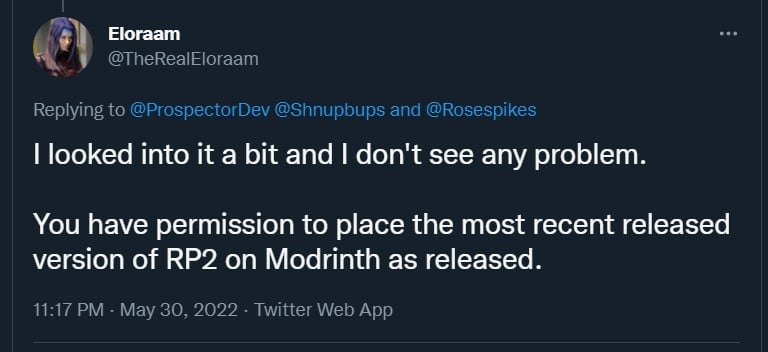
**This mod is abandoned and has been uploaded for archival purposes. It was [originally created](http://www.eloraam.com/) Jun 6, 2011 by [Eloraam](https://twitter.com/TheRealEloraam). It has been uploaded to Modrinth under the ModrinthArchives account with permission from the original author.**
[](https://twitter.com/TheRealEloraam/status/1531520289280077825)
RedPower 2 Wiring

See [RedPower 2 Core](https://modrinth.com/mod/redpower2-core) for a full description.
### Modules
– [Core](https://modrinth.com/mod/redpower2-core)
– [Logic](https://modrinth.com/mod/redpower2-logic)
– [Wiring](https://modrinth.com/mod/redpower2-wiring)
– [Array](https://modrinth.com/mod/redpower2-array)
– [Lighting](https://modrinth.com/mod/redpower2-lighting)
– [World](https://modrinth.com/mod/redpower2-world)
– [Machine](https://modrinth.com/mod/redpower2-machine)
– [Control](https://modrinth.com/mod/redpower2-control)
## Archival disclosure
**This mod is abandoned and has been uploaded for archival purposes. It was [originally created](http://www.eloraam.com/) Jun 6, 2011 by [Eloraam](https://twitter.com/TheRealEloraam). It has been uploaded to Modrinth under the ModrinthArchives account with permission from the original author.**
[](https://twitter.com/TheRealEloraam/status/1531520289280077825)
RedPower 2 Machine

See [RedPower 2 Core](https://modrinth.com/mod/redpower2-core) for a full description.
### Modules
– [Core](https://modrinth.com/mod/redpower2-core)
– [Logic](https://modrinth.com/mod/redpower2-logic)
– [Wiring](https://modrinth.com/mod/redpower2-wiring)
– [Array](https://modrinth.com/mod/redpower2-array)
– [Lighting](https://modrinth.com/mod/redpower2-lighting)
– [World](https://modrinth.com/mod/redpower2-world)
– [Machine](https://modrinth.com/mod/redpower2-machine)
– [Control](https://modrinth.com/mod/redpower2-control)
## Archival disclosure
**This mod is abandoned and has been uploaded for archival purposes. It was [originally created](http://www.eloraam.com/) Jun 6, 2011 by [Eloraam](https://twitter.com/TheRealEloraam). It has been uploaded to Modrinth under the ModrinthArchives account with permission from the original author.**
[](https://twitter.com/TheRealEloraam/status/1531520289280077825)
RedPower 2 Logic

See [RedPower 2 Core](https://modrinth.com/mod/redpower2-core) for a full description.
### Modules
– [Core](https://modrinth.com/mod/redpower2-core)
– [Logic](https://modrinth.com/mod/redpower2-logic)
– [Wiring](https://modrinth.com/mod/redpower2-wiring)
– [Array](https://modrinth.com/mod/redpower2-array)
– [Lighting](https://modrinth.com/mod/redpower2-lighting)
– [World](https://modrinth.com/mod/redpower2-world)
– [Machine](https://modrinth.com/mod/redpower2-machine)
– [Control](https://modrinth.com/mod/redpower2-control)
## Archival disclosure
**This mod is abandoned and has been uploaded for archival purposes. It was [originally created](http://www.eloraam.com/) Jun 6, 2011 by [Eloraam](https://twitter.com/TheRealEloraam). It has been uploaded to Modrinth under the ModrinthArchives account with permission from the original author.**
[](https://twitter.com/TheRealEloraam/status/1531520289280077825)
RedPower 2 Lighting
### This mod is abandoned and has been uploaded for archival purposes. It was [originally created](http://www.eloraam.com/) Jun 6, 2011 by [Eloraam](https://twitter.com/TheRealEloraam). It has been uploaded to Modrinth under the ModrinthArchives account with permission from the original author.
[](https://twitter.com/TheRealEloraam/status/1531520289280077825)

See [RedPower 2 Core](https://modrinth.com/mod/redpower2-core) for a full description.
### Modules
– [Core](https://modrinth.com/mod/redpower2-core)
– [Logic](https://modrinth.com/mod/redpower2-logic)
– [Wiring](https://modrinth.com/mod/redpower2-wiring)
– [Array](https://modrinth.com/mod/redpower2-array)
– [Lighting](https://modrinth.com/mod/redpower2-lighting)
– [World](https://modrinth.com/mod/redpower2-world)
– [Machine](https://modrinth.com/mod/redpower2-machine)
– [Control](https://modrinth.com/mod/redpower2-control)
Red Creepers
Are you tired of not seeing a creeper in the middle of a grass field? Just use this pack for more contrast between the creeper and the blocks around it.
– This [version](https://modrinth.com/resourcepack/red-creepers/version/1.0.0) is for [Fresh Animations](https://modrinth.com/project/50dA9Sha) and is not suitable for Vanilla Minecraft.
– This [version](https://modrinth.com/resourcepack/red-creepers/version/1.0.1) is for Vanilla Minecraft and is not suitable for [Fresh Animations](https://modrinth.com/project/50dA9Sha).
Red Chest
This texture pack changes the appearance of chests by turning them bright red, which makes them much easier to spot from a distance, especially in cluttered or dark environments
[Discontinued]
[Discontinued]
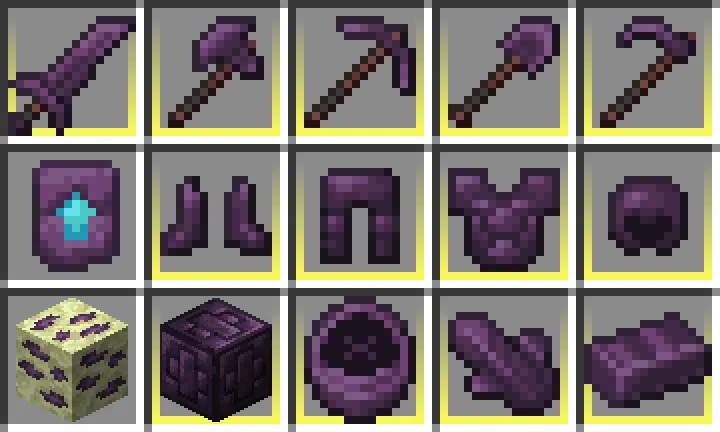
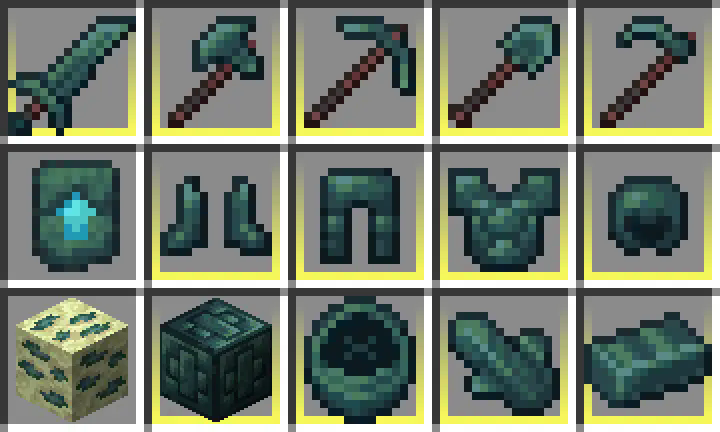
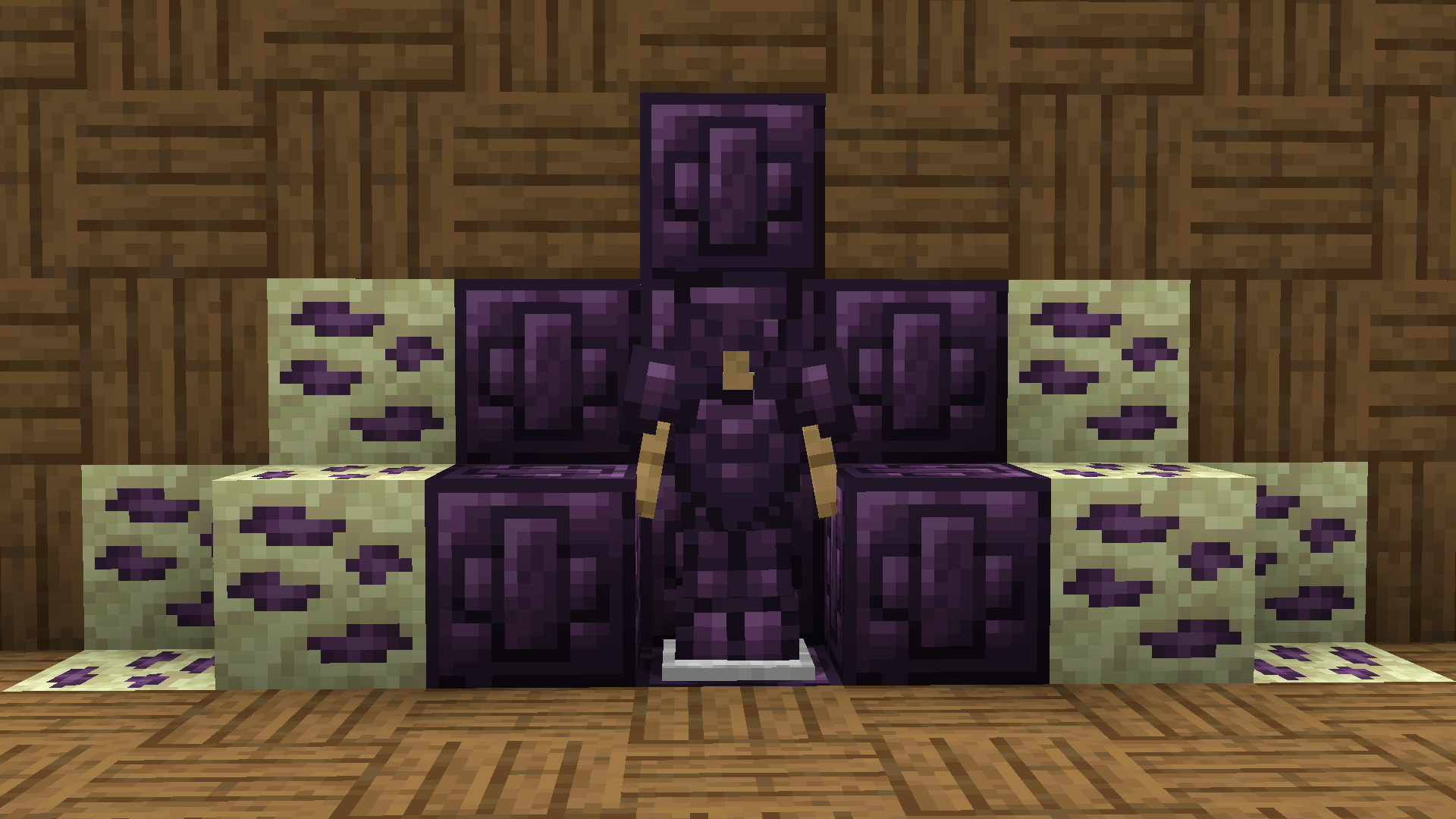
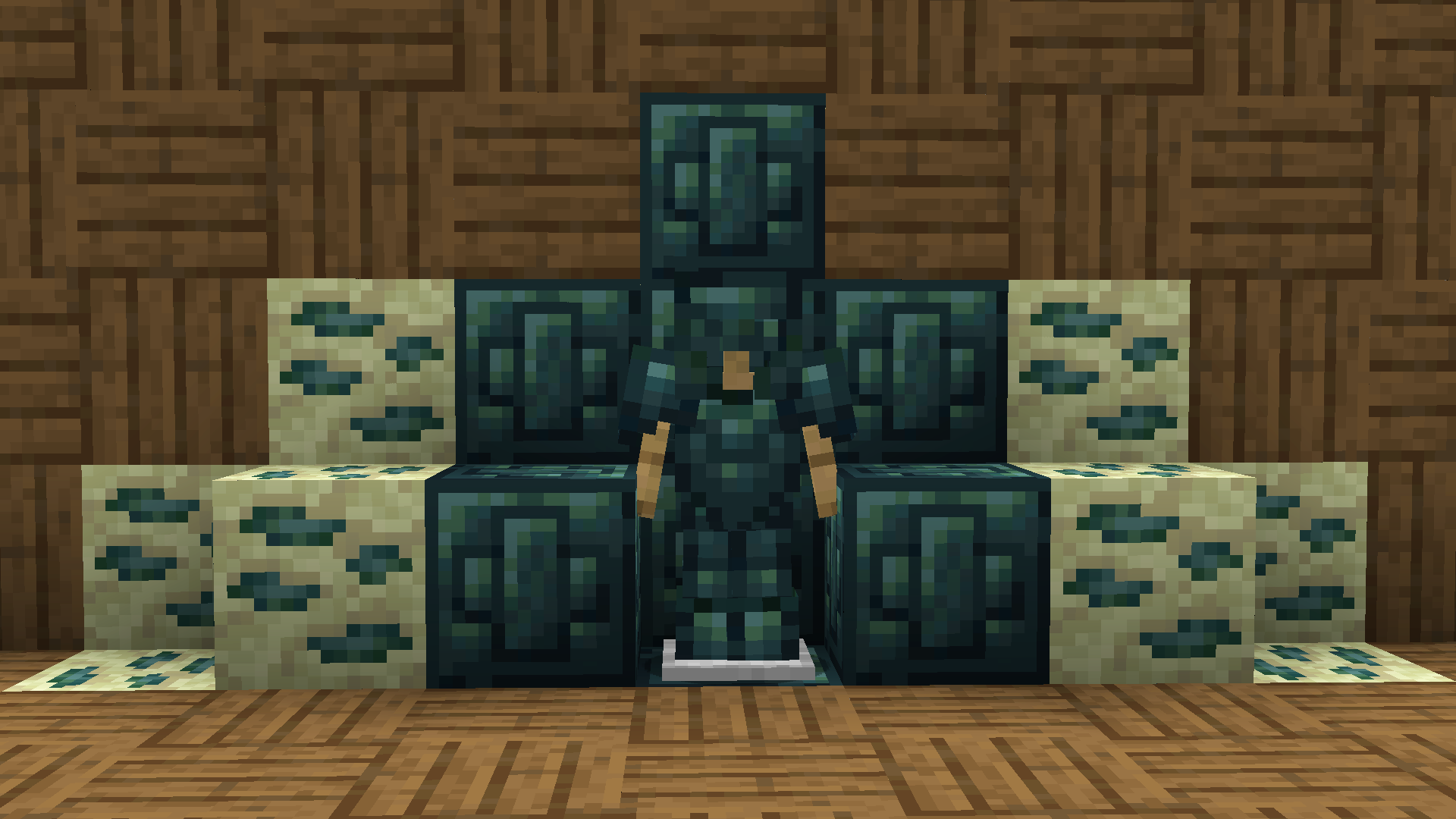
Recolored Enderium Majrusz’s Progressive Difficulty
**Recolored Enderium [Majrusz’s Progressive Difficulty](https://modrinth.com/mod/majruszs-progressive-difficulty)**
## Without the texture pack (Before)
## With the texture pack (After)
## Without the texture pack (Before)
## With the texture pack (After)
QUIPT
# QUIPT [](https://github.com/Quipt-Minecraft/quipt/actions/workflows/gradle-publish.yml)
[](https://github.com/QuickScythe/QUIPT)
[](https://www.modrinth.com/plugin/QUIPT)
[](https://discord.gg/EhfMJmjTXh)
[](https://papermc.io/downloads/paper)


QUIPT is a multi-module toolkit for Minecraft servers and developers. It provides:
– Paper and Fabric integration layers
– An embedded HTTP server (Jetty) for callbacks/resources
– Resource pack auto-updates via webhooks
– A Discord bot integration with plugin loading
– Developer APIs for events, registries, messaging, placeholders, and ephemeral advancements
Quick Links
– Overview: docs/OVERVIEW.md
– Installation: docs/INSTALLATION.md
– Configuration Reference: docs/CONFIGURATION.md
– Modules: docs/MODULES.md
– Developer Guide: docs/DEVELOPER.md
– Contributing: docs/CONTRIBUTING.md
Getting Started (Paper)
1) Download a release from Modrinth or GitHub and place the JAR in plugins/.
2) Start your server once to generate default configs.
3) Edit configs under plugins/quipt-paper/ (see docs/CONFIGURATION.md).
4) Restart the server. QUIPT will start the embedded web server and Discord bot if enabled.
Server Owner Features
– Resource Pack Management: Configure resources.json with your pack repo and server IP. Trigger updates via /resourcepack update or a webhook to http://:/resources/update/.
– Teleportation Management: Simple P2P teleports and configurable warps/homes.
Developer Features
– Events and Listeners: Ready-to-use listeners and an event system to hook into.
– Ephemeral Advancements: Send toast-like updates to players using Bukkit advancements under the hood.
– Embedded Web Server: Mount your own handlers at custom routes.
– Discord Integration: Post server status and extend via bot plugins.
Building From Source
– Requirements: Java 21, Git
– Windows PowerShell: .gradlew.bat build
– Other platforms: ./gradlew build
– Artifacts are available under each module’s build/libs directory.
Support and Community
– Discord: https://discord.gg/EhfMJmjTXh
– Issues: https://github.com/Quipt-Minecraft/quipt/issues
Versioning
– See gradle.properties for project_version and supported_minecraft_versions.
License
– Copyright © QuickScythe.
– See repository license file for details.