Spicy Cheeseburgers
Turn Magma Cubes into cheeseburgers! It additionally changes magma cream into spicy meatballs.
If the top and bottom of the mob’s slices look weird, blame Mojang/Notch for the bad UV map.
Turn Magma Cubes into cheeseburgers! It additionally changes magma cream into spicy meatballs.
If the top and bottom of the mob’s slices look weird, blame Mojang/Notch for the bad UV map.
# Common Library for Leralix’s Plugins
SphereLib is a common Java library designed to centralize key methods from multiple projects, reducing code duplication and speeding up development
### Current uses :
– Command manager
– Sound library
– Config file auto-updater
– Common plugin version check
– Common vector handling
– GUI element creation
### Included in :
– [Towns and Nations](https://modrinth.com/plugin/towns-nations)
– [Towns and Nations – Dynmap](https://modrinth.com/plugin/towns-and-nations-dynmap)
– [Towns and Nations – Squaremap](https://modrinth.com/plugin/towns-and-nations-squaremap)
– [Towns and Nations – Bluemap](https://modrinth.com/plugin/towns-and-nations-bluemap)
– [Exotic Trades](https://modrinth.com/plugin/exotic-trades)
– [Exotic Trades – Dynmap](https://modrinth.com/plugin/exotictrades-dynmap)
– [Exotic Trades – Squaremap](https://modrinth.com/plugin/exotictrades-squaremap)
– [Exotic Trades – Bluemap](https://modrinth.com/plugin/exotictrades-bluemap)
Straightforward, pure ASM (SpASM)
Allows registering class transformers that process all classes, without specifying the class’s names like in FabricASM.
Entrypoint – `spasm:transformer`
Interface – `net.mine_diver.spasm.api.transform.ClassTransformer`
## Recourse pack features
– smaller item models
– small totem and totem pop.
– low fire
– clear water
– no spyglass, pumpkin overlay
– visible ore
– less obstructive rain, snow
## Screenshots


### [My other projects](https://modrinth.com/user/Scroutop)
🗡️ Smaller Swords – PvP Optimized Texture Pack
Tired of bulky swords blocking your view in combat? This texture pack replaces the default Minecraft swords with sleeker, shorter versions—giving you a clearer line of sight, faster reaction time, and a cleaner look for competitive PvP.
🔧 Features:
– 🔪 Reduced sword size without losing detail or readability
– 👀 Improved visibility in close combat and tight spaces
– 🎨 Compatible with most resource packs – just load it on top!
– 👑 Support for 1.8.9 and newer versions like 1.21.8 and above
[YouTube Channel](https://youtube.com/@modsinth?si=WjByvH1jdxuJLdVc)

🪓 Small Pickaxes – A Minimalist Tool Overhaul
Tired of giant tools blocking your view? Small Pickaxes is a lightweight texture pack that shrinks pickaxe models to be more compact and less intrusive while mining. Perfect for players who want a cleaner HUD and better visibility without changing the core Minecraft aesthetic.
✅ Features:
✔️ Smaller pickaxe models for all materials (wood, stone, iron, gold, diamond, netherite)
✔️ Consistent with vanilla textures and style
✔️ Great for PvP, building, or casual survival
✔️ Works with the newest Minecraft version
📦 Compatibility:
Minecraft Java Edition
**Part of the series small tools, small swords is already available for download**
Resource-pack friendly
No mods required
Whether you’re speedrunning, building, or just mining in peace, Small Pickaxes brings clarity to your game without compromising style.
# 🪓 Small Axes
Big axes getting in your way? Small Axes is a minimalist texture pack that reduces the size of all axe models, giving you a clearer view while chopping trees, fighting mobs, or building. Stay efficient and stylish with a cleaner, less intrusive HUD.
✅ Features:
✔️ Smaller axe models for every tier (wood, stone, iron, gold, diamond, netherite)
✔️ Faithful to the vanilla Minecraft art style
✔️ Ideal for PvP, survival, or aesthetic gameplay
✔️ Compatible with other resource packs
📦 Compatibility:
Minecraft Java Edition
No mods required
**Part of the small tools series**
# **Sky Blue Nether Portal**
***Sky Blue Nether Portal*** is a **lightweight resource pack** that reworks the *Minecraft* Nether portal by replacing the **classic purple texture** with a **clean sky blue portal** inspired by the *Minecraft Movie portal*. The new design keeps the **vanilla style** intact while making the portal **less visually loud** and more refined.
*Perfect for players who want a fresh Nether portal without changing how Minecraft feels.*

### **Features**
– **Sky blue Nether portal texture**
– *Vanilla friendly visuals*
– **Frame adapts to any portal size**
– *No performance impact*
– **No mods required**
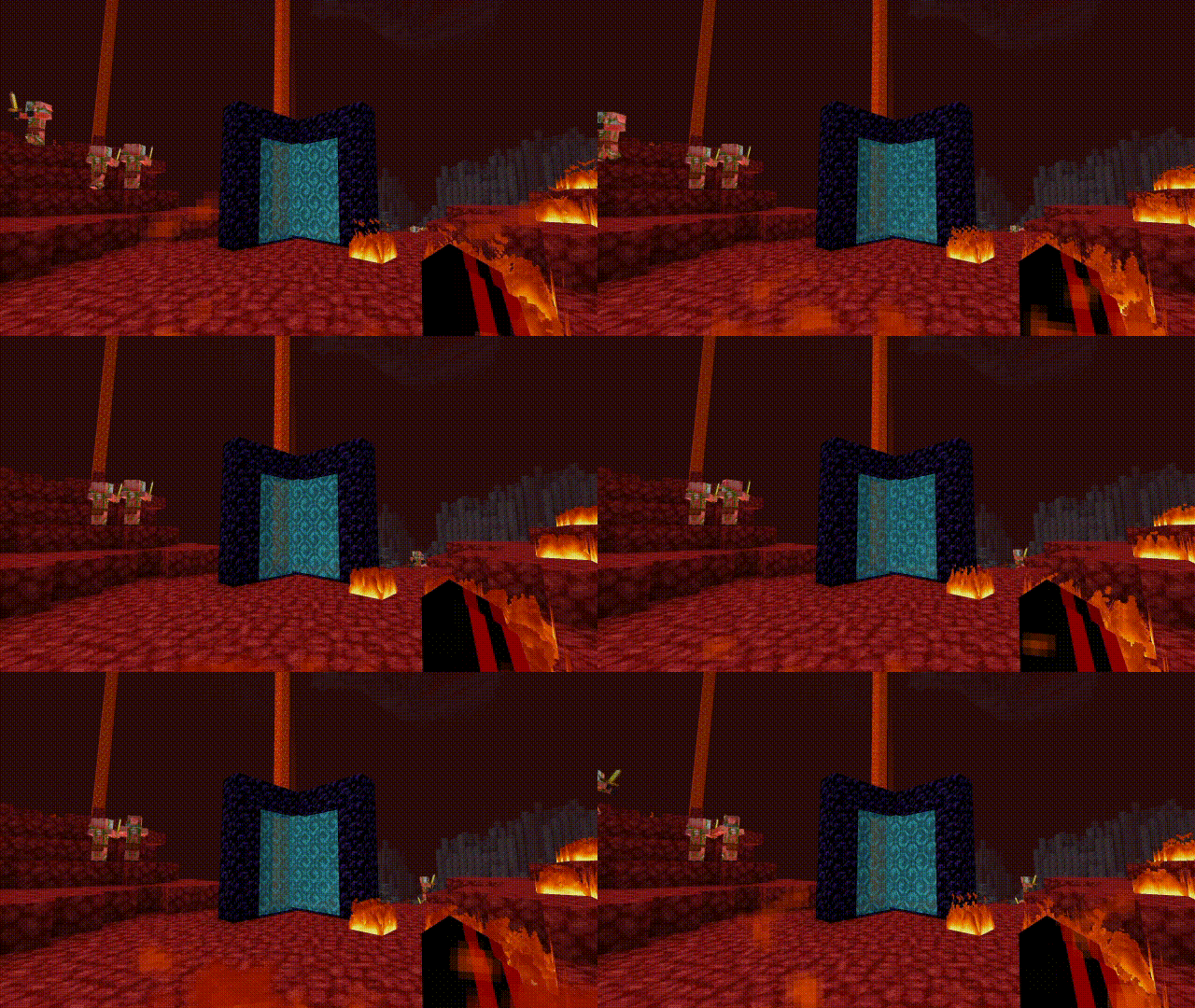
This resource pack fully reworks the Nether portal texture. The portal no longer uses a purple nether texture on each block. Instead, it features a **skyblue** with increased transparency and no size limitation, allowing it to adapt naturally to any portal shape.
Other texture packs used in these pictures: **[Saturated Mc](https://modrinth.com/resourcepack/saturated-mc)** and **[Smooth Low fire](https://modrinth.com/resourcepack/smooth-low-fire)**
—
### **Compatibility**
– **Minecraft Java Edition**
– *Fully compatible with most resource packs*
– **Uses vanilla style textures and models**
—
If you enjoy ***Sky Blue Nether Portal*** and want to support **future updates**, consider supporting me on **PayPal**.
# Advanced Synkai IP Limiter
A powerful Velocity proxy plugin that prevents multiple accounts from joining your server using the same IP address. Includes account binding, alt-account detection, and Discord webhook notifications.
—
## Features
– 🔒 **IP-Based Player Limiting** – Restrict concurrent connections per IP address
– 🔐 **Account Binding** – Bind player accounts to their IP address
– 🚫 **Alt-Account Detection** – Automatically detect and prevent alt accounts
– 🔑 **Permission-Based Bypass** – Allow ops and VIPs to bypass restrictions
– 📢 **Customizable Messages** – Color code support (&c, &4, etc.)
– 🔔 **Discord Webhook Support** – Get real-time notifications of violations
– ⚪ **IP Whitelist** – Configure trusted IPs with custom limits
– ⏰ **Binding Expiration** – Set binding duration (never, 1 week, 1 month)
– 🐛 **Debug Mode** – Enhanced logging for troubleshooting
—
## Installation
1. Download the latest compiled JAR file from the build directory
2. Place it in your Velocity proxy’s `plugins/` directory
3. Restart your Velocity proxy server
4. Configuration file will be auto-generated at `plugins/IPLimit/config.yml`
—
## Configuration
Edit `plugins/IPLimit/config.yml` to customize the plugin:
“`yaml
# IP Limit Configuration
# Max players allowed per IP (This limits concurrent sessions for the valid account)
max-players-per-ip: 1
# Permission to bypass checks (Ops usually have this)
bypass-permission: “iplimit.bypass”
# Message shown when kicked due to IP limit/Binding (Supports Color Codes like &c, &4)
kick-message: “&cYou are not allowed to join with this IP! 1 Account per IP limit.”
# Message shown when kicked for using an Alt account
alt-kick-message: “&cAlt accounts are not allowed! This IP is bound to another account.”
# Binding expiration policy (never, 1w, 1m)
binding-expiration: “never”
# Discord webhook settings (optional)
discord-webhook-enabled: false
discord-webhook-url: “webhookurl here”
discord-webhook-username: “Advanced Synkai IP limiter”
discord-webhook-embed-color: 16711680
# Whitelisted IPs (These IPs bypass all checks)
whitelisted-ips:
– “192.168.1.1”
– “10.0.0.1”
# Optional limits for whitelisted IPs (overrides normal max)
whitelisted-ip-limits:
“127.0.0.1”: 3
# Debug mode (prints more info to console)
debug: false
“`
### Configuration Options
| Option | Type | Description | Default |
|——–|——|————-|———|
| `max-players-per-ip` | Integer | Maximum players allowed per IP | 1 |
| `bypass-permission` | String | Permission node to bypass checks | `iplimit.bypass` |
| `kick-message` | String | Message when player hit IP limit | Customizable |
| `alt-kick-message` | String | Message for alt accounts | Customizable |
| `binding-expiration` | String | Binding duration: `never`, `1w`, `1m` | `never` |
| `discord-webhook-enabled` | Boolean | Enable Discord notifications | `false` |
| `discord-webhook-url` | String | Discord webhook URL | `webhookurl here` |
| `discord-webhook-username` | String | Bot username for webhooks | Advanced Synkai IP limiter |
| `discord-webhook-embed-color` | Integer | Embed color (RGB decimal) | 16711680 |
| `whitelisted-ips` | List | IPs that bypass all checks | – |
| `whitelisted-ip-limits` | Map | Custom limits for specific IPs | – |
| `debug` | Boolean | Enable debug console output | `false` |
—
## Permissions
| Permission | Description | Default |
|———–|————-|———|
| `iplimit.bypass` | Bypass IP limit and binding checks | Ops |
| `iplimit.admin` | Access admin commands | Ops |
—
## Commands
“`bash
/iplimit [subcommand]
“`
### Subcommands
– `info` – Show player IP binding information
– `reload` – Reload configuration from disk
– `unbind
– `whitelist
– `debug [on|off]` – Toggle debug mode
—
## Discord Webhook Setup
To get real-time notifications of IP violations:
1. Create a Discord webhook in your server settings
2. Copy the webhook URL
3. Edit `config.yml`:
“`yaml
discord-webhook-enabled: true
discord-webhook-url: “https://discord.com/api/webhooks/YOUR_WEBHOOK_ID/YOUR_WEBHOOK_TOKEN”
“`
4. Customize the webhook username and embed color as desired
5. Reload the plugin with `/iplimit reload`
—
## How It Works
1. **First Connection** – Player joins with their IP, account is bound to that IP
2. **Same IP, Same Account** – ✅ Allowed (logged in again)
3. **Same IP, Different Account** – ❌ Kicked (alt account detected)
4. **Different IP, Same Account** – ⚠️ Allowed (new IP, rebinding)
5. **Whitelisted IP** – ✅ Always allowed
6. **Bypass Permission** – ✅ Ops and VIPs bypass all checks
—
## Features in Detail
### Account Binding
Once a player joins, their account is bound to their IP address. This prevents other accounts from using the same IP.
### Binding Expiration
Configure how long bindings remain active:
– `never` – Bindings are permanent
– `1w` – Bindings expire after 1 week
– `1m` – Bindings expire after 1 month
### IP Whitelist
Add trusted IPs (proxy, testing, corporate networks) to bypass all checks:
“`yaml
whitelisted-ips:
– “192.168.1.1”
– “10.0.0.1”
“`
Set custom limits for whitelisted IPs:
“`yaml
whitelisted-ip-limits:
“127.0.0.1”: 5 # Allow 5 players from localhost
“`
### Debug Mode
Enable debug logging to troubleshoot issues:
“`yaml
debug: true
“`
Check console for detailed information about:
– Player connections
– IP bindings
– Permission checks
– Webhook requests
—
## Troubleshooting
### Players Getting Kicked Unexpectedly
1. Check the player’s IP: `/iplimit info
2. Verify whitelisted IPs if needed
3. Check if player has `iplimit.bypass` permission
4. Enable debug mode for more info
### Discord Webhook Not Working
1. Verify the webhook URL is correct
2. Check `discord-webhook-enabled: true`
3. Ensure the webhook hasn’t been deleted from Discord
4. Check console for error messages with debug enabled
### Config Not Updating
1. Use `/iplimit reload` to reload configuration
2. Ensure YAML formatting is valid
3. Check file permissions on config.yml
# Simple AutoClicker
A simple AutoClicker for Minecraft fabric that can perform some actions instead of the player
# Auto-clicks
Actions that an autoclicker can perform instead of the player:
– Walk Forward
– Walk Backward
– Walk Right
– Walk Left
– Jump
– Sneak
– Use Item
– Attack entity/Break blocks
– Sptint
– Drop
– Pick Block
– Change the item in the second hand
– Sreenshot
– Toggle Perspective
– Any of the nine hotbar slots
# How to use the mod?
You can open the mod’s config through modmenu or in the game by pressing F4.
In the config, you can customize the operation of a separate auto-click.
You can change:
– Autoclick functionality (enable or disable)
– Autoclick name
– Waiting period (in ticks)
– Autoclick usage time (in ticks)
– Delete this autoclick
# Working with ticks
The entire mod works on ticks of the internal client, not on seconds. This should be taken into account when setting your delay.
There is also a spam mode. This is a mode where the waiting time is set to 0, and the action is repeated every tick without stopping