Project: Maintenance Universal

## 🎉 Project: Maintenance Universal
### ✅ Core Features
– Basic maintenance mode (enable/disable/toggle)
– Whitelist system with add/remove/list/clear
– Permission system with bypass support
– Database support (SQLite, MySQL, PostgreSQL)
– Statistics tracking (sessions, kicks, blocked connections)
– Configuration system with reload command
### 📦 Platform Support
**Paper/Spigot/Purpur:** 1.14 – 1.21.1
**Velocity:** 3.0.0 – 3.4.0
**BungeeCord/Waterfall:** All versions
**Folia:** 1.19.4+ (thread-safe operations)
### 🎮 Commands Available
– `/maintenance enable [reason]` – Enable maintenance mode
– `/maintenance disable` – Disable maintenance mode
– `/maintenance toggle` – Quick toggle
– `/maintenance status` – View current status
– `/maintenance whitelist ` – Manage whitelist
– `/maintenance stats` – View statistics
– `/maintenance reload` – Reload configuration
### 🔐 Permissions
– `maintenance.admin` – Full access
– `maintenance.bypass` – Bypass maintenance mode
– `maintenance.command` – Use basic commands
– `maintenance.toggle` – Enable/disable maintenance
– `maintenance.whitelist` – Manage whitelist
– `maintenance.stats` – View statistics
– `maintenance.reload` – Reload config
### 🗄️ Database Options
– SQLite (default, zero config)
– MySQL with HikariCP connection pooling
– PostgreSQL support
### 🎨 Customization
– Custom kick messages
– Configurable MOTD during maintenance
– Message customization in config.yml
### 📝 Notes
– Redis sync: Planned for future release
– Timer scheduling: Planned for future release
– PlaceholderAPI: Planned for future release
– Fabric/Forge versions: Planned for future release
**Download the correct JAR for your platform:**
– **Paper/Spigot/Purpur/Folia** → Use Paper JAR
– **Velocity** → Use Velocity JAR
– **BungeeCord/Waterfall** → Use BungeeCord JAR
PlumBot
English
# PlumBot–a plugin can connect your server to QQ/Kook
QQ’s group:[825894832](https://qm.qq.com/cgi-bin/qm/qr?_wv=1027&k=-PcufP7TIjLBMOte4H8bHoNmMkP5xZT0&authKey=aPKkGldknKtdCUfX7hhWMFkAOuOpOUYuNZihsUZi9DXvIHVzJhuIRLVfTdCsobZt&noverify=0&group_code=825894832)

[](https://github.com/RegadPoleCN/PlumBot/actions/workflows/maven.yml)
[](https://github.com/RegadPoleCN/PlumBot/actions/workflows/maven-dev.yml)
[](https://github.com/RegadPoleCN/PlumBot/releases)

[](https://modrinth.com/plugin/plumbot)
Applicable Minecraft Java versions: All versions
(For low version, please check config.yml first if you get database error)
### Capabilities
1. message interoperability
2. Whitelisting
3. Death message forwarding
4. query online population
5. query tps
6. Send commands to server in group
7. custom replies
8. custom commands
### Commands
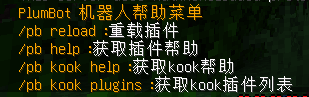
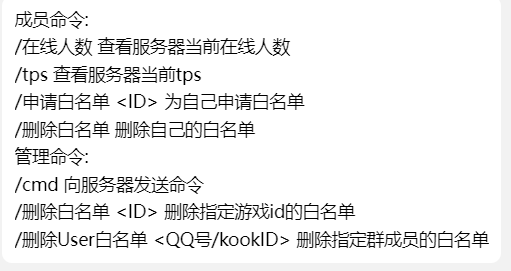
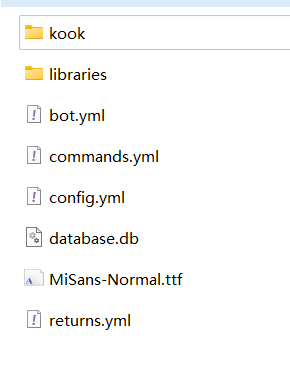
### Configs
Configs
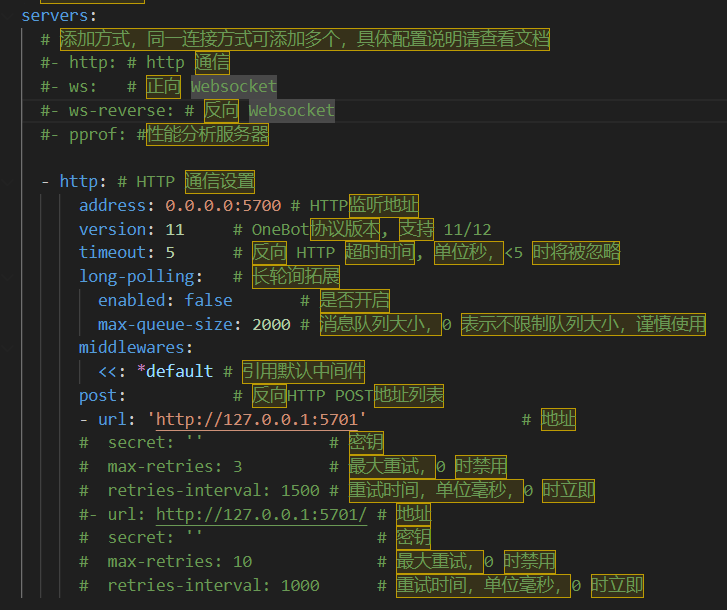
go-cqhttp’s config:
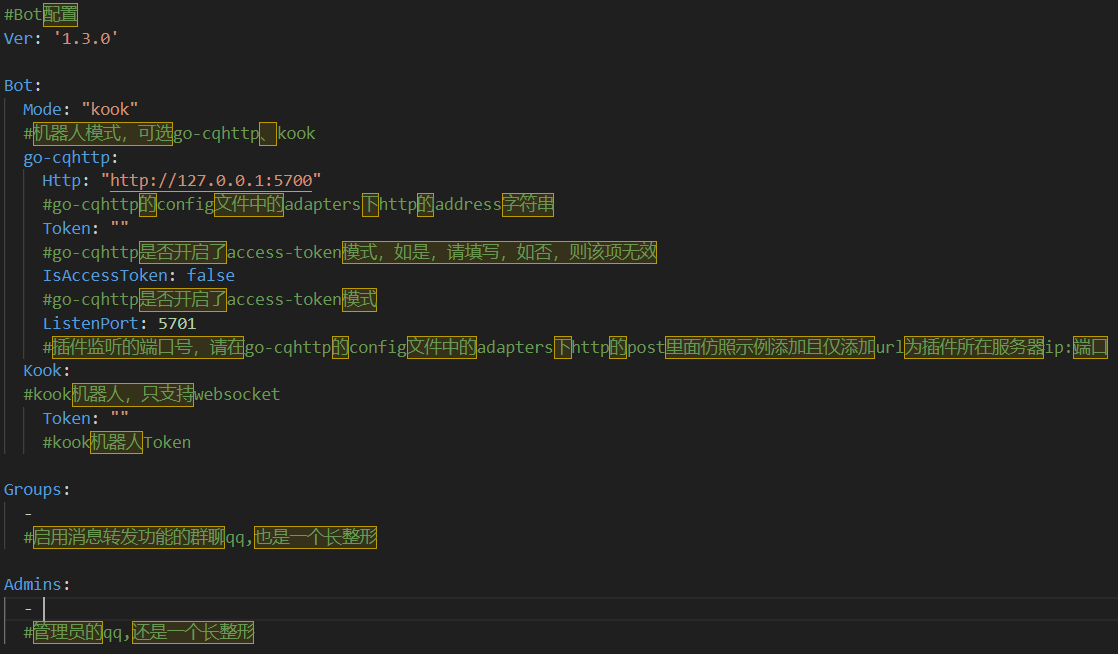
bot.yml’s config:
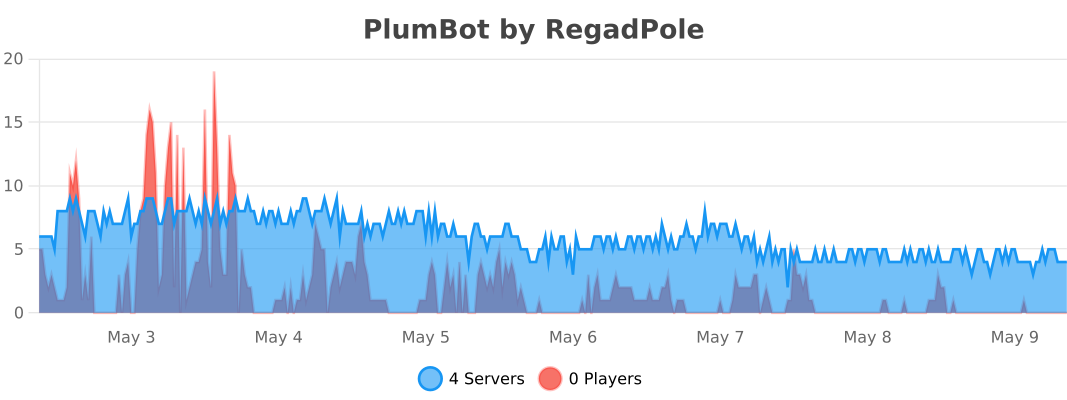
### Pictures

### Update Log
Update Log
v1.3.2(2024.7.12):
1. supported BungeeCord
2. fixed some bugs
v1.3.1(2024.2.20):
1. fix the bug that custom commands don’t work
2. adapted to bukkit versions 1.7.10~1.20.X
(tested versions: 1.7.10, 1.8.8, 1.12, 1.13, 1.20.2, 1.20.4)
v1.3.0(2024.2.9):
1. Add support for Kook bot
2. Add whitelist for deleting group members
3. Fixed the bug that whitelist can’t kick out players.
4. fixed the bug that /cmd can’t return normally.
5. fix in-game /reload command.
### Tips
When upgrading the version, please backup the configuration file in advance to prevent data loss.
QQ’s group:[825894832](https://qm.qq.com/cgi-bin/qm/qr?_wv=1027&k=-PcufP7TIjLBMOte4H8bHoNmMkP5xZT0&authKey=aPKkGldknKtdCUfX7hhWMFkAOuOpOUYuNZihsUZi9DXvIHVzJhuIRLVfTdCsobZt&noverify=0&group_code=825894832)
github:https://github.com/RegadPoleCN/PlumBot
Download release:https://github.com/RegadPoleCN/PlumBot/releases
Download development version:https://github.com/RegadPoleCN/PlumBot/actions/workflows/maven.yml
This project uses the GNU AGPL3.0 protocol, the use of please comply with the open source agreement
# PlumBot 多功能qq/kook互通机器人插件
本插件可以安装在Bukkit等服务端上,它能将你的mc服务器与QQ群或kook频道联通,支持消息转发,死亡转发等功能
插件交流群:[825894832](https://qm.qq.com/cgi-bin/qm/qr?_wv=1027&k=-PcufP7TIjLBMOte4H8bHoNmMkP5xZT0&authKey=aPKkGldknKtdCUfX7hhWMFkAOuOpOUYuNZihsUZi9DXvIHVzJhuIRLVfTdCsobZt&noverify=0&group_code=825894832)
本插件适用于go-cqhttp中的http通信模式 和 kook的websocket模式
测试环境:[go-cqhttp1.1.0](https://github.com/Mrs4s/go-cqhttp/releases/tag/v1.1.0) / [kook机器人](https://developer.kookapp.cn/app/index)+[paper1.20](https://papermc.io/downloads/paper)+[zulujdk17](https://www.azul.com/downloads)

[](https://github.com/RegadPoleCN/PlumBot/actions/workflows/maven.yml)
[](https://github.com/RegadPoleCN/PlumBot/actions/workflows/maven-dev.yml)
[](https://github.com/RegadPoleCN/PlumBot/releases)

[](https://modrinth.com/plugin/plumbot)
适用Minecraft Java版本:全版本
(低版本如果出现数据库报错请先检查config.yml)
### 插件功能
1. 服务器消息互通
2. 白名单
3. 死亡信息转发
4. 查询在线人数
5. 查询tps
6. 在群内将命令发送至服务器
7. 自定义回复
8. 自定义命令
### 插件命令


### 配置文件
配置文件

go-cqhttp端配置:

bot.yml配置:

其余配置文件可依据文件内示例进行配置
### 使用图片

### 更新日志
更新日志
v1.3.2(2024.7.12):
1. 更新对BungeeCord的支持
2. 修复部分bug
v1.3.1(2024.2.20):
1. 修复自定义命令无法使用的bug
2. 适配bukkit版本1.7.10~1.20.X
(已测试版本:1.7.10, 1.8.8, 1.12, 1.13, 1.20.2, 1.20.4)
v1.3.0(2024.2.9):
1. 新增对Kook客户端的支持
2. 新增删除群成员白名单
3. 修复白名单无法踢出玩家
4. 修复/cmd无法正常返回的bug
5. 修复游戏内/reload命令
### 作者的话
升级版本时请提前备份配置文件,以防数据丢失
插件交流群:[825894832](https://qm.qq.com/cgi-bin/qm/qr?_wv=1027&k=-PcufP7TIjLBMOte4H8bHoNmMkP5xZT0&authKey=aPKkGldknKtdCUfX7hhWMFkAOuOpOUYuNZihsUZi9DXvIHVzJhuIRLVfTdCsobZt&noverify=0&group_code=825894832)
如果有使用上的问题或者bug,欢迎进群讨论
关于mod+插件形式的服务端,本插件暂时提供支持,在未来可能会取消对其用户的维护
github地址:https://github.com/RegadPoleCN/PlumBot
下载地址:https://github.com/RegadPoleCN/PlumBot/releases
开发版:https://github.com/RegadPoleCN/PlumBot/actions/workflows/maven.yml
本项目使用GNU AGPL3.0协议,使用时请遵守开源协议

制作不易,给个评分再走吧
Plastic+
Fullpack from 1.0.0 to 1.21.X will take time.
# About:
Plastic+ is a continuation of the Legacy Console Edition Plastic texture pack, preserving its original simplistic design and bright colours.
This pack adds plastic-themed textures to blocks, items, entities and the UI.
_Originally created by 4J for the Legacy Console edition._
**How to install:**
————————————————————————————-
On Modrinth App simply click the “Install” or “Add to an instance” button.
For Minecraft 1.5.2 and below:
1. Download Plastic+
2. Go to %appdata%
3. Copy .zip to /Roaming/.minecraft/texturepacks
4. Launch Minecraft and select Plastic+
For Minecraft 1.6.1 and above:
1. Download Plastic+
2. Go to %appdata%
3. Copy .zip to /Roaming/.minecraft/resourcepacks
4. Launch Minecraft and select Plastic+
**Mods supported::**
————————————————————————————-
N/A
## FAQ:
**Can I use this in a video/modpack?**
Yes just credit me.
**Any issues?**
Let us know in the [Discord](https://discord.gg/EaFmMmy884)
### **NOTE: This pack is still being updated (I forgot about it but im back). So be sure to download the latest version for bug fixes.**
PixelMine | Smooth Operator
This resource pack is clean simple with chunky details and subtle fine details and highlights.
It is meant to be a 3D version of my own art style, but in keep with in the Vanilla style and colours so it still “feels” like minecraft, just a bit better 🙂
-Kalvin
PipeBlocker
# PipeBlocker
### A mod that protects against [BleedingPipe](https://blog.mmpa.info/posts/bleeding-pipe) by filtering ObjectInputStream
For more info, visit https://blog.mmpa.info/posts/bleeding-pipe.
Pink background

When equiped the Carved Pumpkin is pink. Great for using as a “green” screen for UI screenshots.
This pack was originally made for [Colourful containers](https://modrinth.com/resourcepack/colourful-containers-gui) (by [Kingybu](https://modrinth.com/user/Kingybu)), but also works with every other resourcepack that changes the UI (Some examples: [Recolourful Containers GUI + HUD](https://modrinth.com/resourcepack/recolourful-containers-gui), [BeagleNF404’s UI Pack](https://modrinth.com/resourcepack/beaglenf404s-ui-pack), [Shrimp’s Immersive Interfaces](https://modrinth.com/resourcepack/shrimps-immersive-interfaces), …)
Colourful containers and other custom GUI packs rarely use pink in their UI, which is why pink was chosen.
**Ingame usage**
1. Set GUI size to 3x
2. Put on the Carved Pumpkin block
3. Open any GUI
4. Take a screenshot using your preferred method
5. import the screenshot into Photoshop (Or another prefered software like Paint.net)
PC Gamer Cow
It is the cow from the PC Gamer Demo! But with a slightly modified logo and it uses the new cow texture from 1.14
OSRKM
**Картины для всех, даром, и пусть никто не уйдёт обиженный!**
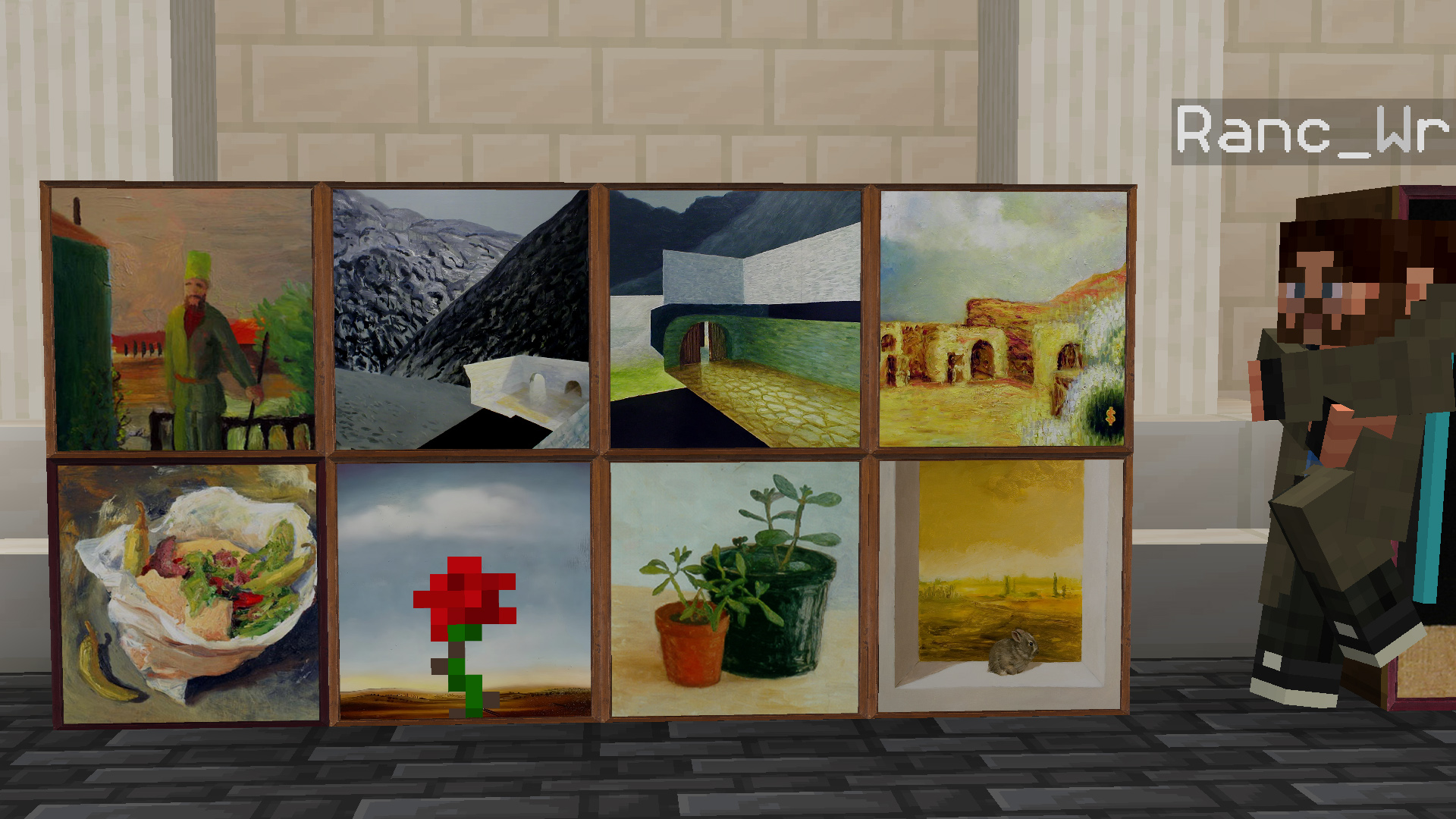
– RU: Дело было вечером, делать было нечего… Вот и решил сделать ресурспак с оригинальными и слегка изменёнными вариантами картин в высоком разрешении, пару картин пришлось переделывать вручную. Версия для бедрока в [Телеге](https://t.me/OSRKM)
> В данный момент веду поиск вариаций в высоком разрешении таких картин как:
> 1. Baroque
> 2. Bouquet
> 3. Sunflowers
> 4. Cavebird
> 5. Fern
**Paintings for everybody, free, and nobody will go away unsatisfied!**
– ENG: It was evening, there was nothing to do… So I decided to make a resource pack with original and slightly modified versions of the paintings in high resolution, a couple of the paintings had to be redone manually. Version for bedrock in [Telegram](https://t.me/OSRKM)
> Currently searching for high resolution variations of such paintings as:
> 1. Baroque
> 2. Bouquet
> 3. Sunflowers
> 4. Cavebird
> 5. Fern
Ornithe Standard Libraries
Ornithe Standard Libraries (OSL) provides tools for modding with Ornithe.
## Libraries
### Core API
The Core API provides common utilities used by other modules, such as an events system and registries.
### Branding API
This module patches the title screen with mod loader information in 16w05a and below, emulating what you would see in 16w05b and above. This is done by parsing the run args for the `versionType` option.
### Config API
The Config API provides a framework for building and storing mod configs.
### Entrypoints API
The Entrypoints API allows mod developers to submit entrypoints that are called before the game is initialized.
### Keybinds API
The keybinds API provides events for registering keybinds.
### Lifecycle Events API
The Lifecycle Events API provides events to track the lifecycle of the Minecraft client and server.
### Networking API
The Networking API provides a framework for client-server communication.
### Resource Loader API
The Resource Loader API allows mods to load their own resources into the game.
## Information for developers
Our [Ploceus gradle plugin](https://github.com/OrnitheMC/ploceus) provides helper methods for adding OSL dependencies to your projects:
“`groovy
dependencies {
…
ploceus.dependOsl(‘0.17.1’)
}
“`
You can also add dependencies on individual OSL modules:
“`groovy
dependencies {
…
ploceus.dependOslModule(‘0.17.1’, ‘core’)
ploceus.dependOslModule(‘0.17.1’, ‘entrypoints’)
}
“`
Ore Outlines Revamped
# SUPPORTS LITERALLY EVERY SINGLE VERSION FROM ALPHA 1.2.2 TO 1.21.8
this is not a joke lol it actually works on every version that has texture/resource packs
on versions from 1.8 to 1.20.1 ignore the “incompatible made for a newer version” warning
there’s no way for me to get rid of that warning but it does work on those versions
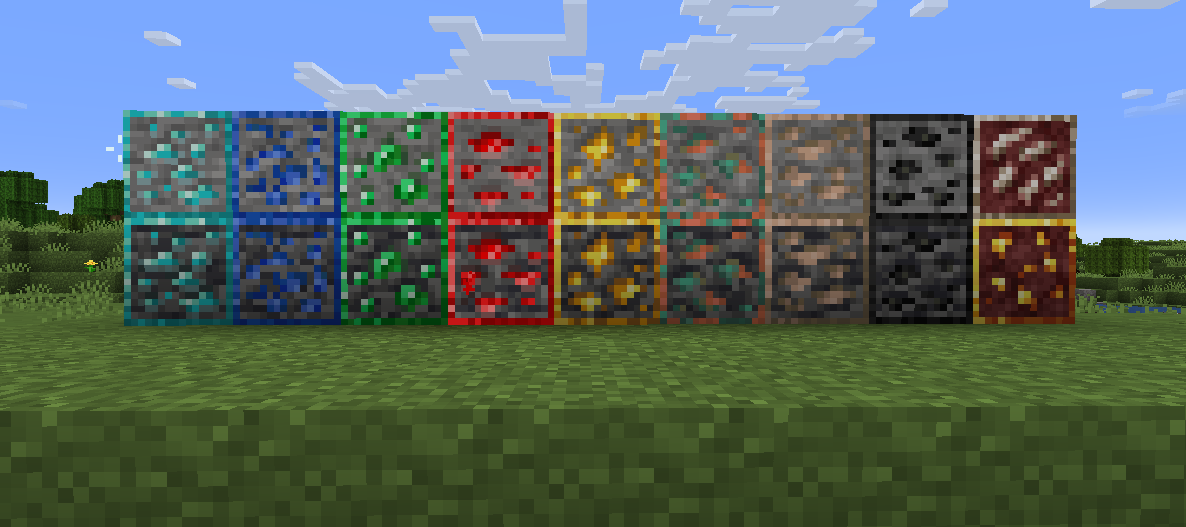
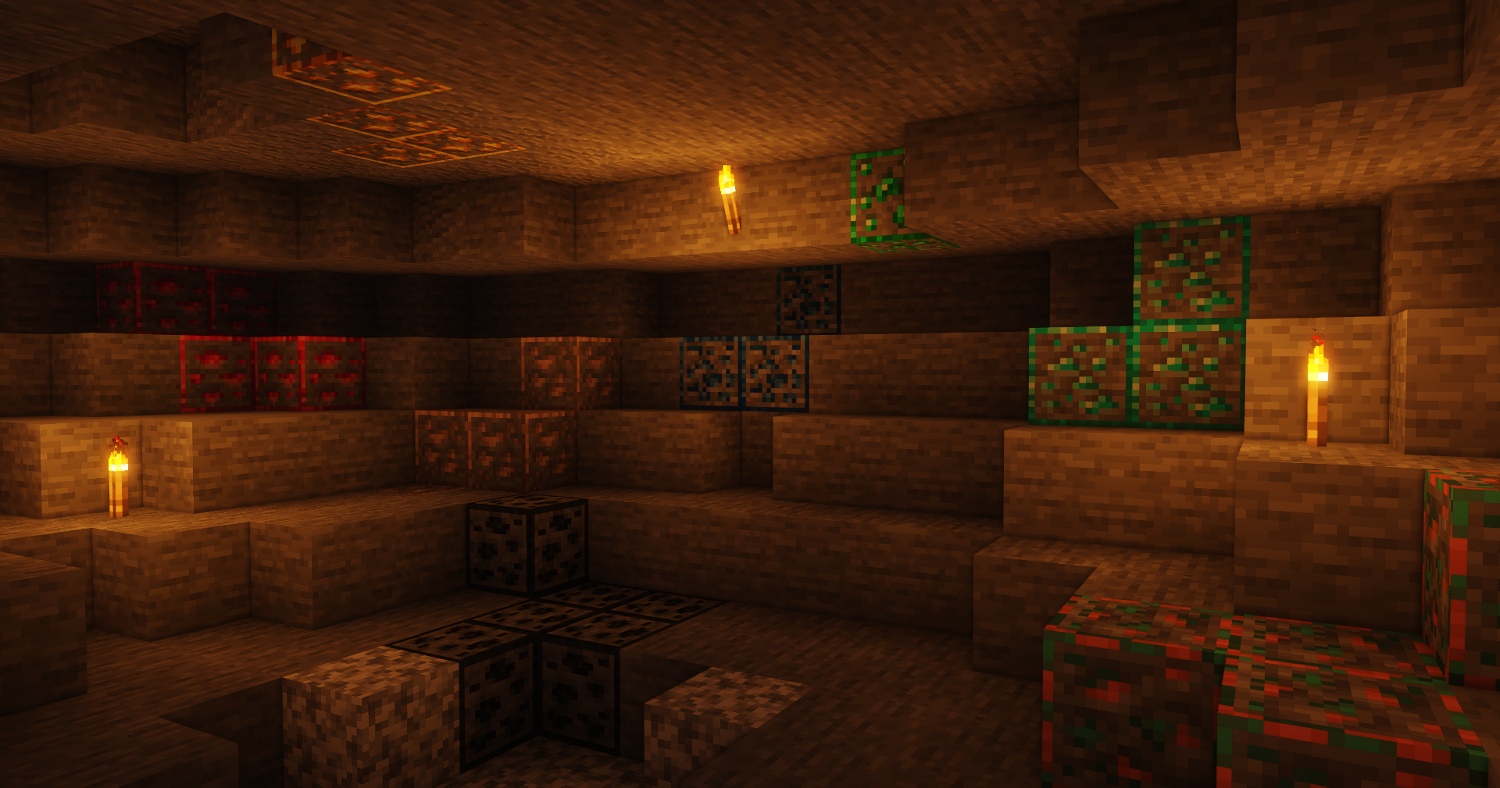
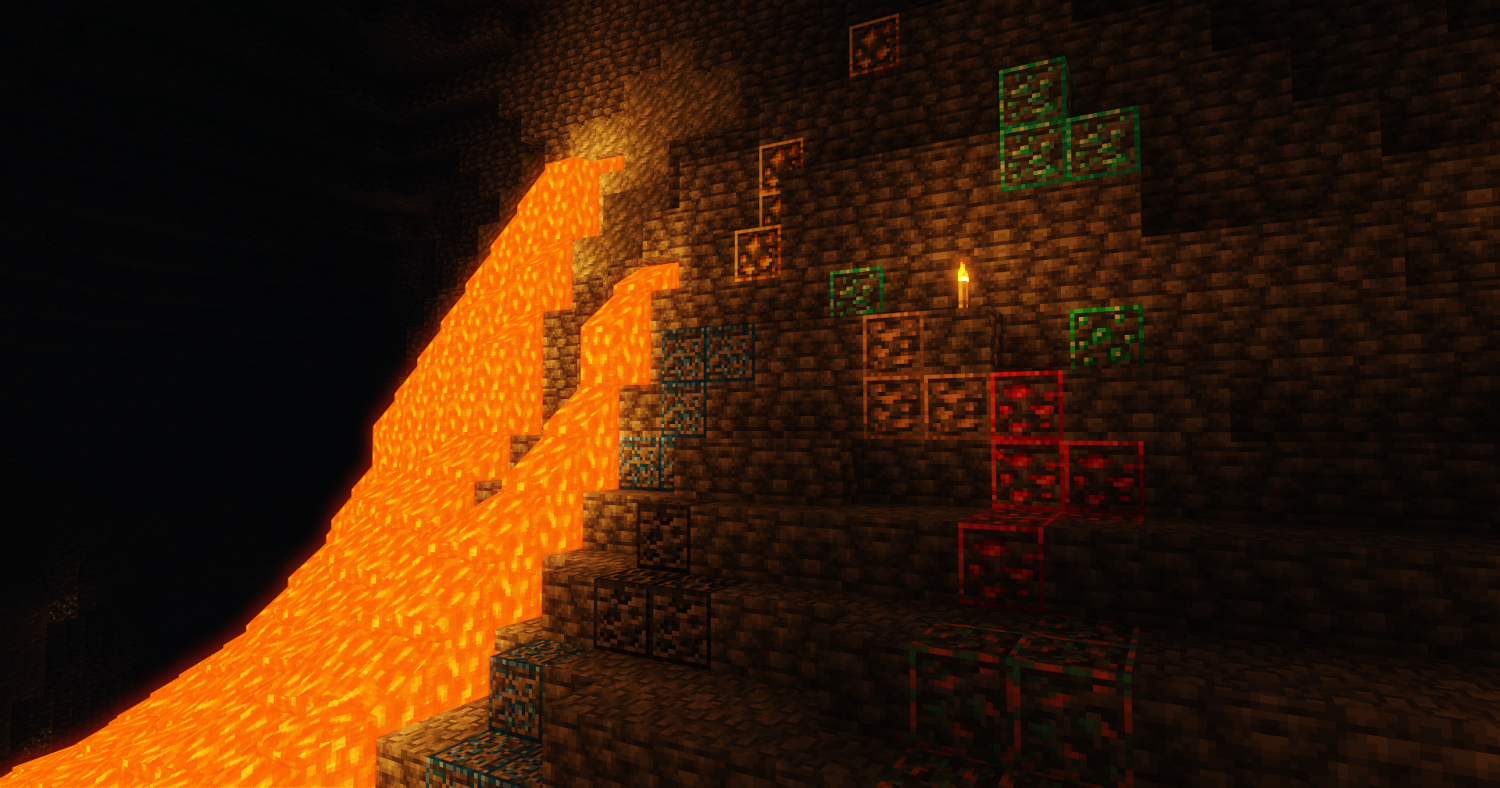
really simple pack that just adds outlines on the ores. ik its been done a billion times but i did it again lol
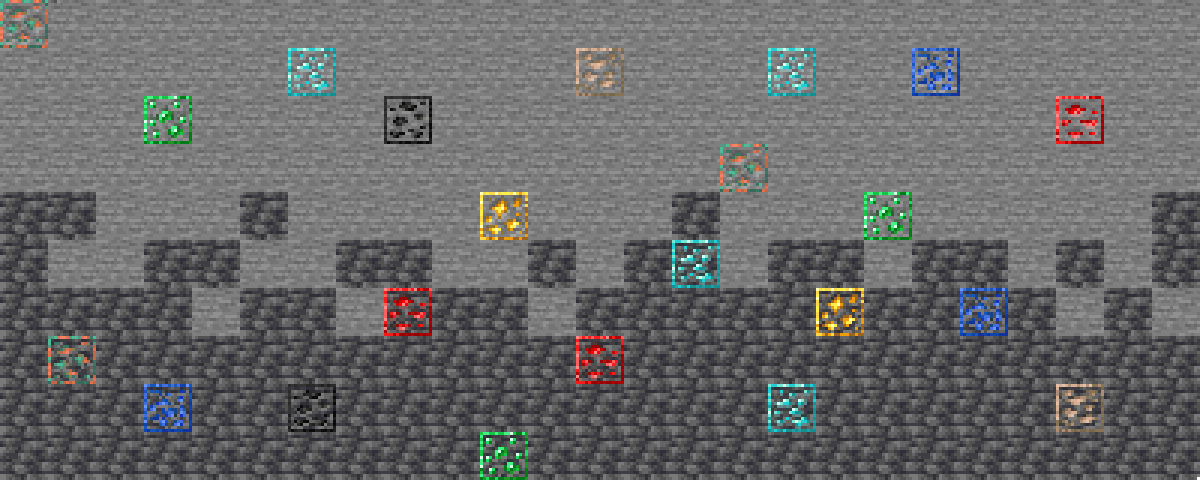
the ore is like compacted so it doesn’t touch the outlines to make it not blend together