Proxy Essentials
# Proxy Essentials Plugin
![Banner][banner]
[![Modrinth][badge-modrinth]][modrinth]
[![License][badge-license]][license]
[![Discord][badge-discord]][social-discord]
[![Follow @simplecloudapp][badge-x]][social-x]
[![Follow @simplecloudapp][badge-bluesky]][social-bluesky]
[![Follow @simplecloudapp][badge-youtube]][social-youtube]
[Report a Bug][issue-bug-report]
·
[Request a Feature][issue-feature-request]
🌟 Give us a star — your support means the world to us!
> All information about this project can be found in our detailed [documentation][docs-thisproject].
The Proxy Plugin enhances your server network with customizable MOTD (Server Info) and Tablist features, offering extensive customization options through simple configuration files. All settings are synchronized across all proxies.
## Features
– [x] **Mutliple MOTD Layouts**: Create multiple MOTD Layouts for different states!
– [x] **Custom Tablist**: Send your Players custom Tablist Header and Footer!
– [x] **Joinstates**: Create different joinstates so your players can only join with certain permissions (you can call it advanced maintenance feature)
## Contributing
Contributions to SimpleCloud are welcome and highly appreciated. However, before you jump right into it, we would like you to read our [Contribution Guide][docs-contribute].
## License
This repository is licensed under [Apache 2.0][license].
[banner]: https://raw.githubusercontent.com/simplecloudapp/branding/refs/heads/main/readme/banner/plugin/proxy-essentials.png
[issue-bug-report]: https://github.com/theSimpleCloud/proxy-essentials-plugin/issues/new?labels=bug&projects=template=01_BUG-REPORT.yml&title=%5BBUG%5D+%3Ctitle%3E
[issue-feature-request]: https://github.com/theSimpleCloud/proxy-essentials-plugin/discussions/new?category=ideas
[docs-thisproject]: https://docs.simplecloud.app/plugin/proxy-essentials
[docs-contribute]: https://docs.simplecloud.app/contribute
[modrinth]: https://modrinth.com/plugin/proxy-essentials-plugin
[maven-central]: https://central.sonatype.com/artifact/app.simplecloud.controller/controller-api
[dev]: https://repo.simplecloud.app/#/snapshots/app/simplecloud/controller/controller-api
[artifacts]: https://repo.simplecloud.app/#/snapshots/app/simplecloud/controller/controller-api
[dev-artifacts]: https://repo.simplecloud.app/#/snapshots/app/simplecloud/controller/controller-api
[badge-maven-central]: https://img.shields.io/maven-central/v/app.simplecloud.controller/controller-api?labelColor=18181b&style=flat-square&color=65a30d&label=Release
[badge-dev]: https://repo.simplecloud.app/api/badge/latest/snapshots/app/simplecloud/controller/controller-api?name=Dev&style=flat-square&color=0ea5e9
[license]: https://opensource.org/licenses/Apache-2.0
[snapshots]: https://repo.simplecloud.app/#/snapshots
[social-x]: https://x.com/simplecloudapp
[social-bluesky]: https://bsky.app/profile/simplecloud.app
[social-youtube]: https://www.youtube.com/@thesimplecloud9075
[social-discord]: https://discord.simplecloud.app
[badge-modrinth]: https://img.shields.io/badge/modrinth-18181b.svg?style=flat-square&logo=modrinth
[badge-license]: https://img.shields.io/badge/apache%202.0-blue.svg?style=flat-square&label=license&labelColor=18181b&style=flat-square&color=e11d48
[badge-discord]: https://img.shields.io/badge/Community_Discord-d95652.svg?style=flat-square&logo=discord&color=27272a
[badge-x]: https://img.shields.io/badge/[email protected]?style=flat-square&logo=x&color=27272a
[badge-bluesky]: https://img.shields.io/badge/[email protected]?style=flat-square&logo=bluesky&color=27272a
[badge-youtube]: https://img.shields.io/badge/youtube-d95652.svg?style=flat-square&logo=youtube&color=27272a
ProAntiTab
##### ****
One of the simplest plugin & command hider!
Decide what plugins and commands your players should see! ^^
**placeholderapi support – free – no dependencies required**
___________________________________
**
**********
# **A**BOUT
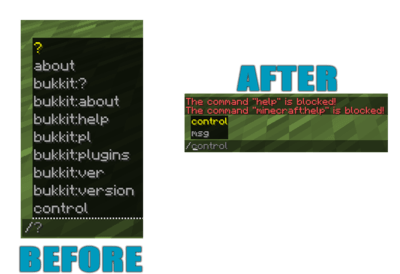
ProAntiTab is an advanced **plugin hider** with **many features** and a very simple to understand system. It prevents your server from **plugin spoofers** used by hack clients, manipulates the **tab-completion**, blocks unwanted **suggestions** and much more!
#####
#####
# **I**N ACTION
######
# **C**USTOM SERVER BRAND (F3)
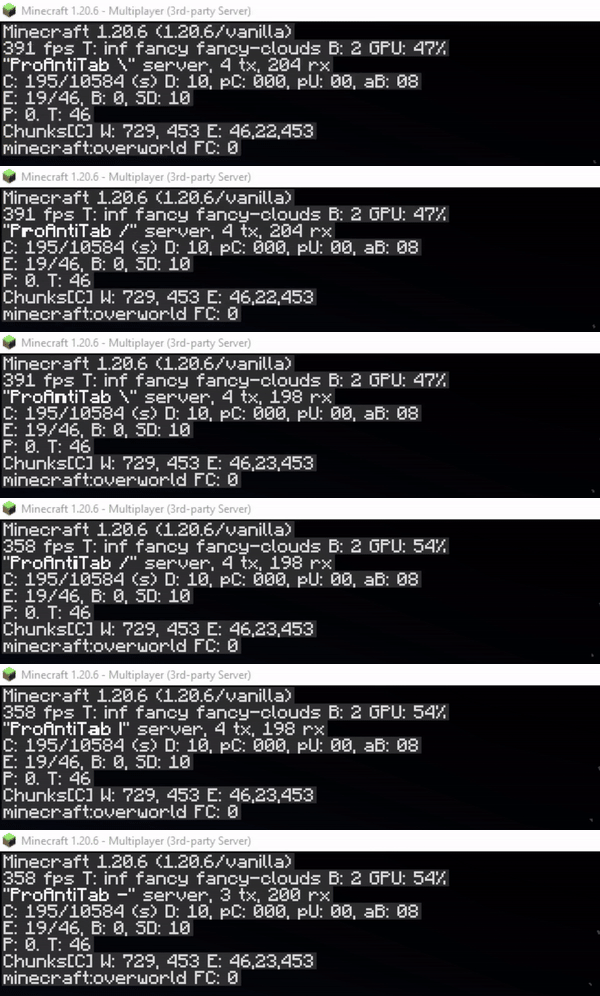
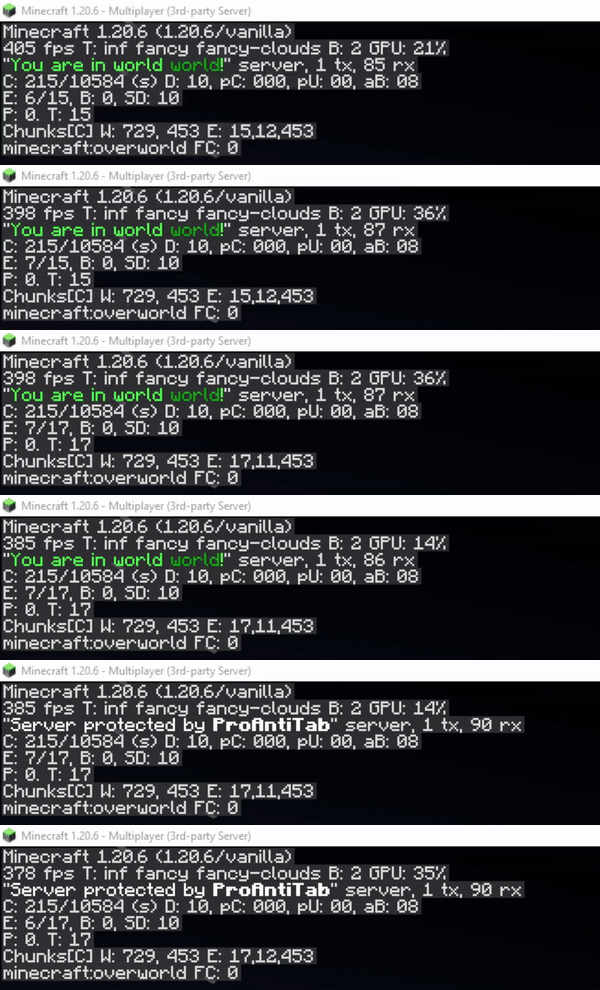
Create your own animated custom server brand on your Spigot, Bungeecord and Velocity server!
**
open config.yml section
“`yaml
# This feature allows you to customize your server-brand you see when you press F3.
# Normally there stands something like ‘Purpur’, or ‘Spigot’.
# With this feature you are able to change and even animate it! ^^
custom-server-brand:
enabled: false
# Determines the speed in that the animation goes
repeat-delay: 3
# This here is the list of the animation
# Possible placeholders:
# %player% – name of the player
# %displayname% – displayname of the player
# %world% – name of world where the player is
# and the other placeholders from PlaceholderAPI
brands:
– ‘&f&lP&froAntiTab |’
– ‘&fP&lr&foAntiTab /’
– ‘&fPr&lo&fAntiTab -‘
– ‘&fPro&lA&fntiTab |’
– ‘&fProA&ln&ftiTab ‘
– ‘&fProAn<&fiTab |’
– ‘&fProAnt&li&fTab /’
– ‘&fProAnti&lT&fab -‘
– ‘&fProAnti&lT&fab ‘
– ‘&fProAntiT&la&fb |’
– ‘&fProAntiTa&lb&f /’
– ‘&fProAntiTab -‘
– ‘&fProAntiTab ‘
“`
######
# **U**SE BLACKLIST AS WHITELIST
You have way too many commands to block? Don’t worry.
There’s a section in the config.yml located pretty much high that allows you to turn the blacklist into a whitelist instead. This will block every command on your server except for those that are listed.
section in config.yml
“`yaml
# This is a very necessary feature if you have way too many commands to block and instead decide
# to whitelist specific commands.
# Enabling this will disable ALL commands except for those that are in the (group-)list.
turn-blacklist-to-whitelist: false
“`
######
# **A**NTI PLUGIN SPOOFING
##### ProAntiTab is able to detect and block plugin spoofing attempts used by hack clients.
**
######
# **B**LOCK SUB ARGUMENTS
We all know the problem when players should be able to use some of the commands but should not see literally EVERY sub-argument in a command. Well, then just blend them out? ProAntiTab can do this for you and it’s very easy to setup as well! (See some examples below)

example
“`yaml
# Let’s say you just want to allow “/help Minecraft” only and not “/help apple”.
# It will also automatically allow everything after “/help Minecraft …”
– help Minecraft
# [CMD] = Allow the execution of the command
# [TAB] = Allow the tab-completion of the command
– “[CMD]cmi tpa” # Only executable. Not tab-completable
– tpa # Executable & Tab-Completable
# %hidden_online_players% = Online players (Removed from tab-completion)
# %online_players% = Online players
# %hidden_players% = Registered players (Removed from tab-completion)
# %players% = Registered players
# %numbers% = Numbers, such as 1000 or 1.000
# _- = Block everything after
– “tpa %online_players%”
– “sell %numbers%”
# Using the operator _- at the end cancels every argument afterwards and blocks it.
# This will allow the player to use “/help Minecraft” but not “/help Minecraft xyz”
– help Minecraft _-
“`
######
# **B**LOCK COLON COMMANDS
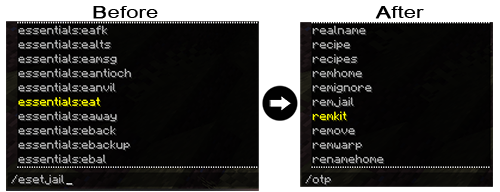
Blocking each and every colon command like essentials:spawn by hand is not an easy task. But with this simple feature, you can easily block all colon commands automatically! Only people with the proantitab.namespace permission can see and use these commands again.
open config.yml section
“`yaml
#>> HTP (Overwritten)
# Here you can disable all namespace commands.
# Namespace commands are commands like plugin:command (e.g: essentials:warp)
# You can bypass this restriction with the proantitab.namespace permission.
block-namespace-commands:
enabled: false
“`
######
# **C**USTOM PLUGINS LIST
Just blocking the /plugins command is pretty boring. This feature here allows you to make it more interesting by displaying for example fake plugins.

open config.yml section
“`yaml
#>> HTP (Overwritten)
# Here you can customize your own fake ‘/plugins’ command.
custom-plugins:
enabled: true
commands:
– pl
– plugins
– bukkit:pl
– bukkit:plugins
message:
– ‘&fPlugins (0):’
“`
######
# **C**USTOM VERSION COMMAND
Who wouldn’t like to pretend to own a custom server-jar? Have fun customizing your very own /version command to your personal liking.

open config.yml section
“`yaml
#>> HTP (Overwritten)
# Here you can customize your own fake ‘/version’ command.
custom-version:
enabled: true
commands:
– version
– ver
– icanhasbukkit
– bukkit:ver
– bukkit:version
message:
– ‘&fThis server is running CraftBukkit version git-NasaSpigot-294 (MC: X)’
“`
######
# **C**USTOM UNKNOWN COMMAND MESSAGE
The Bukkit/Spigot version of ProAntiTab gives your the possibility to create your own unknown-command message to align it with the blocked-command message for example.

open config.yml section
“`yaml
# Now there we come to the good stuff! ^^
# If ProAntiTab is loaded on a Spigot server, you will see this option right here.
# With that you can also customize your own “Unknown Command”-message.
custom-unknown-command:
enabled: true
message:
– ‘&cThis command does not exist!’
“`
######
# **C**USTOM PROTOCOL PING
Do you know the red text message at the players count when you ping a server with the wrong version? Exactly this holds the information of what kind of server your proxy server is running at. This feature hides the version of the proxy with a custom made one. It’s enabled by default but doesn’t show the text. The text can be seen when someone pings the server with the wrong version or uses a resolver. This picture shows you what someone with the wrong version would see, unless the “always-show” is enabled. If this option is enabled, this text will always appear.

open config.yml section
“`yaml
# Change the protocol for the version name when the server is being pinged
# (!) Warning: It’s required to use Paper or Purpur to use this feature!
# (!) Supported server versions: 1.12.2 – latest
custom-protocol-ping:
enabled: false
# Normally it would only display when someone pings the server with the wrong version.
# Enabling this will always display the protocol and replace it with the normal player count.
always-show: false
# This number here determines the outcome for the %online_extended% placeholder.
# It’s the current amount of players increased by this number.
# For example: 5/20 becomes 6/20
extend-online-count: 1
# true: Use new calculated online-count (%online_extended%) as max-players count.
# false: Use the default max-players count.
use-as-maxplayers: false
# Enabling this option hides the list of players on your server,
# when you hover over the player count.
hide-players: true
# The displayed protocol message
# Available placeholders:
# %online% – current online player count
# %online_extended% – manipulated online player count
# %max% – max player count
protocol: ‘&f&lProAntiTab &7(&a%online%&7/&c%max%&7)’
“`
######
# **C**USTOM RESPONSE ACTIONS
For some, it’s important to determine how the response message should be or what should happen. You can customize that factor to your personal liking and use different actions to have full control over your blocked commands.


Bukkit/Spigot examples
“`yaml
# ____ ___ __ _ ______ __
# / __ _________ / | ____ / /_(_)_ __/___ _/ /_
# / /_/ / ___/ __ / /| | / __ / __/ / / / / __ `/ __
# / ____/ / / /_/ / ___ |/ / / / /_/ / / / / /_/ / /_/ /
# /_/ /_/ ____/_/ |_/_/ /_/__/_/ /_/ __,_/_.___/
# custom-responses.yml
#
# Here you can configure a few of the blocked commands a bit further.
# But what exactly is this here? Every command that would normally respond with the typical “command is blocked” message, can be configured in here!
# And how does it work? It’s simple. You just provide the a trigger of the command that would be normally blocked.
# Commands that would normally work won’t send the messages you have set here.
# This way PAT can offer you full control over certain commands and their normal responses.
# What are these action section at each block?
# This is an additional feature to make your responses much more alive.
# Example actions that can be used are the following:
# Execute console command:
# Syntax: console::command
# Example: console::say %player% is an evil player
# Execute player command:
# Syntax: execute::command
# Example: execute::help
# Send actionbar:
# Syntax: actionbar::text
# Example: actionbar::&cThis is not cool %player%!
# Send title:
# Syntax: title::title::subtitle::5::20::5
# Example: title::&aTest title::&cHello %player%!
# Play sound:
# Syntax: sound::soundName::volume::pitch
# Example: sound::ENTITY_ENDER_DRAGON_GROWL::1.0::1.0
# Give potion effect:
# Syntax: effect::potionEffect::duration::amplifier
# Example: effect::BLINDNESS::45::1
# Here are a few examples:
# Example with kits.
# In here we only trigger the given message, if the player would type “/kit …”.
# If this command would work through sub-arguments, then the player would only able to execute the command with the
# listed sub-arguments assigned to it. Everything else will result with the set message in there.
# —
#example-with-kits:
# triggers:
# – “kit *”
# message:
# – “&cThis kit does not exist!”
# actions:
# – “actionbar::&cSorry %player%, but this kit does not exist!”
# Here another example with an auctionhouse plugin.
# In here we only trigger the given message, if the player would type “/ah plugin”.
# Normally it would print out the “command is blocked” message, because PAT would have blocked it in our case.
# Therefore, we can also assign a custom response message to it.
# —
#example-with-auctionhouse:
# triggers:
# – “ah plugin”
# message:
# – “&cThis sub-command does not exist. Please type: &e/ah help”
# actions:
# – “console::say That’s not nice %player%!”
# – “effect::BLINDNESS::45::1”
# – “sound::ENTITY_ENDER_DRAGON_GROWL::1.0::1.0”
# – “title::&cHey!::&cYou can’t do that %player%!::5::20::5”
# – “actionbar::&cNop, sorry %player%”
“`
Proxy examples
“`yaml
# ____ ___ __ _ ______ __
# / __ _________ / | ____ / /_(_)_ __/___ _/ /_
# / /_/ / ___/ __ / /| | / __ / __/ / / / / __ `/ __
# / ____/ / / /_/ / ___ |/ / / / /_/ / / / / /_/ / /_/ /
# /_/ /_/ ____/_/ |_/_/ /_/__/_/ /_/ __,_/_.___/
# custom-responses.yml
#
# Here you can configure a few of the blocked commands a bit further.
# But what exactly is this here? Every command that would normally respond with the typical “command is blocked” message, can be configured in here!
# And how does it work? It’s simple. You just provide the a trigger of the command that would be normally blocked.
# Commands that would normally work won’t send the messages you have set here.
# This way PAT can offer you full control over certain commands and their normal responses.
# What are these action section at each block?
# This is an additional feature to make your responses much more alive.
# Example actions that can be used are the following:
# Execute console command:
# Syntax: console::command
# Example: console::send %player% fallback
# Execute player command:
# Syntax: execute::command
# Example: execute::help
# Send actionbar:
# Syntax: actionbar::text
# Example: actionbar::&cThis is not cool %player%!
# Send title:
# Syntax: title::title::subtitle::5::20::5
# Example: title::&aTest title::&cHello %player%!
# Here are a few examples:
# Example with kits.
# In here we only trigger the given message, if the player would type “/kit …”.
# If this command would work through sub-arguments, then the player would only able to execute the command with the
# listed sub-arguments assigned to it. Everything else will result with the set message in there.
# —
#example-with-kits:
# triggers:
# – “kit *”
# message:
# – “&cThis kit does not exist!”
# actions:
# – “actionbar::&cSorry %player%, but this kit does not exist!”
# Here another example with an auctionhouse plugin.
# In here we only trigger the given message, if the player would type “/ah plugin”.
# Normally it would print out the “command is blocked” message, because PAT would have blocked it in our case.
# Therefore, we can also assign a custom response message to it.
# —
#example-with-auctionhouse:
# triggers:
# – “ah plugin”
# message:
# – “&cThis sub-command does not exist. Please type: &e/ah help”
# actions:
# – “console::say That’s not nice %player%!”
# – “title::Hey!::You can’t do that %player%!::30::3000::30”
# – “actionbar::Nop, sorry %player%”
“`
#####
# **N**EGATE COMMANDS
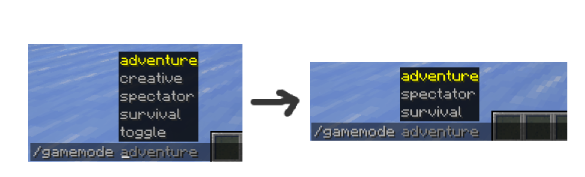
It’s not a must to write each and every possible sub-argument by hand. The same goes for commands in general.
You can negate them with the help of the negation operator (“!“).
**
example
“`yaml
# Allows /gamemode and all of its sub-arguments
# except “/gamemode creative”
– “gamemode”
– “!gamemode creative”
– ‘!gamemode toggle’
“`
“`yaml
# Allows all commands, except /anvil
– “*”
– “!anvil”
“`
#####
# **A**UTO-ADD ALL PLUGIN COMMANDS
Sometimes it’s so annoying to add all commands from a certain plugin by hand. That’s why ProAntiTab offers the possebility to simply add all commands from a certain plugin with a simple shortcut.
You can simply add “plugin=“ to add all commands from a plugin automatically.
**Only works for standalone Spigot (+Forks) servers**
example
“`yaml
# Allows all Essentials commands except /anvil.
# /gamemode is limited to only two sub-arguments
– “plugin=essentials”
– “!anvil”
– “gamemode creative”
– “gamemode survival”
“`
######
# **B**LOCK ON SPECIFIC SERVERS
If you use ProAntiTab on a network, you can pretty easily manage on what servers what commands should exist. Everything can be handled via the proxy and does not require additional maintenance on the backend servers.
For this, just follow the official [setup](https://github.com/RayzsYT/ProAntiTab/wiki/How-to-setup#proxy–spigot-eg-bungeecord–spigot) and [how-to](https://github.com/RayzsYT/ProAntiTab/wiki/How-to#introduction) guide, which can be both found on the [Github wiki](https://github.com/RayzsYT/ProAntiTab/wiki).
######
# **G**ROUP SYSYTEM
The PAT group system allows you to allow certain commands only for a certain group of people. PAT group commands are mainly for **whitelisting** commands, can merge with other groups, and so on.
They can also be used to blacklist commands by negating the commands inside there. But for this to work, the option `allow-group-overruling` inside the `config.yml` needs to be enabled.
How to use the PAT group system in general can be seen on the [Github wiki](https://github.com/RayzsYT/ProAntiTab/wiki/How-to#use-the-group-system).
######
# **P**LACEHOLDERAPI & PAPIPROXYBRIDGE SUPPORT
Customization and uniqueness is an important factor for many server owners. That’s why PAT offers you the possebility to edit and use many of its placeholders with the widely spreaded plugin [PlaceholderAPI](https://www.spigotmc.org/resources/6245/). Accessing those placeholders on the proxy isn’t a problem either. With the support of the addtional plugin [PAPIProxyBridge](https://www.spigotmc.org/resources/108415/), PAT’s placeholders are even accessable on your proxy server.
Available placeholders
“`yaml
# Some general Placeholders to work with:
# %pat_general_user% = Get the name of the user who receives this message.
# %pat_general_version_current% = Get current version name of PAT.
# %pat_general_version_newest% = Get newest version name of PAT.
# Placeholders of some of the messages in the config.yml:
# %pat_message_unknowncommand% = Get the “unknown command”-message from the config.yml of PAT. [cancel-blocked-command]
# %pat_message_blocked% = Get the “command blocked”-message from the config.yml of PAT. [custom-unknown-command]
# Placeholders to list all commands:
# %pat_list_size_commands% = Get the amount of all listed commands.
# %pat_list_commands% = Get all listed commands.
# %pat_list_sorted_commands% = Get all listed commands in alphabetic order. (A-Z)
# %pat_list_reversed_groups% = Get all listed commands in reversed alphabetic order. (Z-A)
# Placeholders to list all commands of a group: (replace ‘xxx’ with the group-name)
# %pat_list_size_commands_group_xxx% = Get the amount of all commands of a group.
# %pat_list_commands_group_xxx% = Get all commands of a group.
# %pat_list_sorted_commands_group_xxx% = Get all commands of a group in alphabetic order. (A-Z)
# %pat_list_reversed_commands_group_xxx% = Get all commands of a group in reversed alphabetic order. (Z-A)
# Placeholders to list all groups:
# %pat_list_size_groups% = Get the amount of all available groups.
# %pat_list_groups% = Get all groups.
# %pat_list_sorted_groups% = Get all groups in alphabetic order. (A-Z)
# %pat_list_reversed_groups% = Get all groups in reversed alphabetic order. (Z-A)
“`
###
# **M**INIMESSAGE SUPPORT
## 
##### You want to design your messages more unique? We got you covered! *(works on 1.17 server and above)*
*([Click here to see the documentation for the format](https://docs.advntr.dev/minimessage/format.html#)*)
Look at those few examples to see what kind of possibilities awaits you:
example 1
“`yaml
cancel-blocked-commands:
enabled: true
message: ‘&cThis command is &4&lBLOCKED&c!’
“`

example 2
“`yaml
cancel-blocked-commands:
enabled: true
message: ‘&cThis command is blocked! &7Click here to get a view of all available commands instead.’
“`

######
# **H**OW TO SETUP?
Despite of the fact that ProAntiTab is pretty easy to use, the setup is slidely different for each server engine.
It normally is already enough to simply load ProAntiTab on the certain server you wanna use it, but in order to use ProAntiTab with all its features, its recommended to follow the [official setup guide on the Github wiki](https://github.com/RayzsYT/ProAntiTab/wiki/How-to-setup).
**Please feel free to join the [Discord](https://www.rayzs.de/discord) server to request for help if the instruction is unclear or too complicated. ^^**
#
# **H**OW TO ALLOW COMMANDS?
[Please check out the wiki to get an idea on how PAT works and can be used.](https://github.com/RayzsYT/ProAntiTab/wiki/How-to)
If you want to bypass all blocked commands, simply give yourself the following permission: **proantitab.bypass**
Following permission is required to execute all listed commands within a certain group: **proantitab.group.**
######
# **C**OMMANDS & PERMISSIONS
All commands and their permissions are listed on the [documentation](https://www.spigotmc.org/resources/113172/field?field=documentation) page at the very buttom.
######
# **C**ONFIGURATION FILE
Bukkit/Spigot
[config.yml](https://github.com/RayzsYT/ProAntiTab/blob/v2.0.1/src/main/resources/files/bukkit-config.yml)
[storage.yml](https://github.com/RayzsYT/ProAntiTab/blob/v2.0.1/src/main/resources/files/bukkit-storage.yml)
Proxy (Bungeecord/Velocity)
[config.yml](https://github.com/RayzsYT/ProAntiTab/blob/v2.0.1/src/main/resources/files/proxy-config.yml)
[storage.yml](https://github.com/RayzsYT/ProAntiTab/blob/v2.0.1/src/main/resources/files/proxy-storage.yml)
######
## **bStats**
[](https://bstats.org/plugin/bukkit/proantitab%20-%20spigot/20089)
[](https://bstats.org/plugin/bungeecord/proantitab%20-%20bungeecord/20090)
[](https://bstats.org/plugin/velocity/proantitab%20-%20velocity/21638)
[](https://www.rayzs.de/discord)
PlayTimePulse
# ⏱️ PlayTimePulse
A lightweight, accurate Minecraft plugin that tracks player playtime, integrates seamlessly with PlaceholderAPI, and provides a built-in rewards system with a claimable GUI.
—
## 🌟 Main Features
– ⏳ **Real-time Playtime Tracking** – Accurately tracks how long each player has been on your server
– 🎁 **24+ Playtime Rewards** – Milestone-based rewards that players can claim as they play more
– 📖 **Pageable Rewards GUI** – Easy-to-navigate interface with multiple pages for all rewards
– 🧾 **Simple Commands** – Intuitive `/playtime` command for players and admin tools
– 🔌 **PlaceholderAPI Support** – Integrates with popular plugins through placeholders
– 🛡️ **AFK Protection** – Prevents players from cheating by being AFK
– 💾 **Efficient Data Storage** – Lightweight flat-file storage with automatic saving
– ⚡ **High Performance** – Optimized code that won’t slow down your server
– 🛡️ **Reward Error Handling** – Prevents reward spamming even when commands fail
– ⚙️ **Flexible Configuration** – Easily customize all rewards, GUI, and settings
## 📦 All Features
– ⏳ Real-time playtime tracking (saved + current session)
– 🧾 `/playtime` command:
– Shows formatted playtime in `Xd Yh Zm`
– Opens a GUI to claim playtime-based rewards
– 🎁 Reward System:
– Milestone-based claimable rewards (24 rewards included in current config, with more to be added over time)
– Supports commands (since most of the things are given by commands)
– Blocks duplicate claiming with tracked saves
– Player head support for GUI icons (e.g., custom heads, player skulls)
– Custom sound effects when claiming rewards
– Error handling for failed commands to prevent reward spamming
– 📖 Pageable Rewards GUI:
– Pagination support for large numbers of rewards
– Customizable slots per page
– Navigation buttons for moving between pages
– 🧭 Navigation System:
– Previous/Next page buttons
– Close button to exit the GUI
– Customizable navigation button materials and names
– Optional custom head textures for navigation buttons
– 🛡️ AFK Protection:
– Prevents AFK farming of playtime
– Configurable interaction threshold and time window
– Tracks meaningful player interactions to validate activity
– 🔌 Full PlaceholderAPI support
– 📊 bStats integration for anonymous usage statistics
– 📁 Flat-file storage with autosave
– ⚙️ Performance optimized and easy to configure
—
## 🔧 Commands
| Command | Description | Permission |
|————————————————|———————————————|—————-|
| `/playtime` | Shows playtime and rewards GUI | playtime.use |
| `/playtime add h [m]` | Add playtime to player | playtime.admin |
| `/playtime reset ` | Reset player’s playtime and claimed rewards | playtime.admin |
—
## 🧩 PlaceholderAPI Support
| Placeholder | Description |
|——————————–|———————————————————-|
| `%playtime_overall_formatted%` | Total time (saved + current), formatted like `2d 4h 30m` |
| `%playtime_formatted%` | Current session only, formatted |
| `%playtime_overall%` | Total time in seconds (saved + current) |
| `%playtime_saved%` | Saved playtime only (in seconds) |
| `%playtime_current%` | Current online session (in seconds) |
—
## 🧪 Future Plans
– 🎨 Gradient color support for formatted text
– 🌟 Particle effects for reward claiming
– 🐛 Debug mode for easier troubleshooting
– ➕ More features coming soon
—
## 📁 Configuration
– `config.yml`: Define playtime milestones, rewards (commands), requirements, rewards icon/lore, and sound effects.
– Each reward can have a custom sound when claimed using the `claimSound` parameter
– Choose from over 400 Minecraft sounds (e.g., `entity.player.levelup`, `block.note_block.pling`)
– All sounds play at standard volume (1.0) and pitch (1.0)
– Custom heads can be added using `headId` with Base64 texture values
– Specify which page a reward should appear on using the `page` parameter (starting from 0)
– Navigation buttons can use custom player heads with `headId` parameter
– GUI slots and slots per page are configurable
– AFK protection settings:
– `interaction-threshold`: Minimum number of interactions required in the time window
– `time-window-minutes`: Time window in minutes to check for interactions
—
## 📥 Installation
1. Download the latest release
2. Drop the `.jar` file into your `/plugins` folder
3. Restart the server
4. Configure `config.yml` to define rewards / requirements.
5. (Optional) Install [PlaceholderAPI](https://www.spigotmc.org/resources/placeholderapi.6245/) for placeholders
—
## ✅ Requirements
– Minecraft: `1.21 up to 1.21.8`
– Java: `21+`
– Server: Paper / Pufferfish / Purpur (others need testing)
– (Optional) PlaceholderAPI
—
## 📊 Statistics
PlayTimePulse collects anonymous usage statistics through bStats. This helps us understand how the plugin is used and guides future development.
You can view plugin statistics at [bStats](https://bstats.org/plugin/bukkit/PlayTimePulse/26638).
To opt out of statistics collection, set `enabled: false` in the `/plugins/bStats/config.yml` file.
—
## 💬 Support
– 📬 [Open an issue](https://github.com/Souldevhub/PlayTimePulse/issues)
– 💻 [Discord](https://discord.gg/6SCAZfENjw)