ulib
# uLib
 
ulib is a general purpose library.
Copyright (c) 2022 [fluse1367](https://gitlab.com/fluse1367)
See “Included Software” (at the bottom) for copyright and license notice of included software.
Please also refer to the [documentation](https://gitlab.com/fluse1367/ulib/-/blob/main/docs/Readme.md).
## Features
Brief overview of ulib’s features.
### Core
– Code Injection Framework
– Dynamic Library Injection
– Maven Resolver
– Reflection Utilities
– JsonRPC v2 API
– Yaml/Json API
– SQL API
– Misc
### Minecraft
– Mojang Launchermeta API
– Mojang/Bukkit Mappings API
– Proxy-Server Bridge
– User Cache
– Misc
### Spigot
– GUI/Inventory Menus API
– Custom Enchantments
– Item API
– Misc
## Things to Know
– The minecraft variants of library depend on recent spigot/bungeecord/velocity versions. That means it may not work as
expected or may not work at all on older server versions. You will not receive any support, when using another server
version than the one this library is built for.
If you want to use older server versions, consider a cross-version compatibility tool, like
[ViaBackwards](https://www.spigotmc.org/resources/viabackwards.27448),
[ViaRewind](https://www.spigotmc.org/resources/viarewind.52109) or
[ProtocolSupport](https://www.spigotmc.org/resources/protocolsupport.7201).
– Minimum Java version is 17.
– When launching uLib for the first time (or if the respective caching folder was removed), it will download a few of
dependencies/libraries.
## Disclaimer
Note the copyright and [license of this project](https://gitlab.com/fluse1367/ulib/-/blob/main/LICENSE). Use this library at your own risk! The contributors of this
project do not take any responsibility/liability in any way.
# Included Software
The following 3rd-party software is included within this project:
– NBTEditor
([click](https://github.com/BananaPuncher714/NBTEditor/blob/ff303d06e16eed119079bae92b8ef5700ec35d87/src/main/java/io/github/bananapuncher714/nbteditor/NBTEditor.java))
Copyright (c) 2018 [BananaPuncher714](https://github.com/BananaPuncher714), licensed under
the [MIT license](https://github.com/BananaPuncher714/NBTEditor/blob/ff303d06e16eed119079bae92b8ef5700ec35d87/LICENSE)
– Apache Commons Lang v3 (Copyright (c) 2022 [The Apache Software Foundation](https://www.apache.org/), licensed under
the [Apache License 2.0](https://github.com/apache/commons-lang/blob/9f1ac974e1b52c58b1950acdaaf3e0d5881409df/LICENSE.txt)):
– SystemUtils
Class ([click](https://github.com/apache/commons-lang/blob/9f1ac974e1b52c58b1950acdaaf3e0d5881409df/src/main/java/org/apache/commons/lang3/SystemUtils.java))
– JavaVersion
Class ([click](https://github.com/apache/commons-lang/blob/9f1ac974e1b52c58b1950acdaaf3e0d5881409df/src/main/java/org/apache/commons/lang3/JavaVersion.java))
—
TraceSMP
# Plugin
This is a recreation of minecrafts Trace SMP. There will be many updates on this minecraft plugin. There are powers, effects, and particles.
## Why Download this?
It can add fun gameplay to your server, whether its pvp based, or just chilling. My friends used this for a minigame thing so they could find each other once (1.1).
## Who originally made this?
Jitscraft made TraceSMP with the custom plugin, shut down a bit later.
## What are the effects/powers
### Red
Effect: Fire resistance
Power: Right Click to turn lava into obsidian in a 5 block radius.
### Blue
Effect: Water Breathing
Power: Make a player Drown for a minute.
### Yellow
Effect: Speed
Power:Strike lightning
### Green
Effect: Hero Of The Village
Power: Get resistance 2 for 30 seconds
### Black
Effect: Invisability
Power: Teleport
### White
Effect: Slow falling. Do /slowfalling to toggle it. (Plugin version 1.2.1 or higher)
Power: Shoot up into the sky with levatation, no fall damage
### Pink
Effect: Regeneration
Power: gain 5 extra hearts for 30 seconds.
### Orange (Version 1.4.0+)
Effect: Strength
Power: Lazar Beam
# Stones (Upgrade, Version 1.4.1+)
You get a stone when you kill a mob. You need a different stone for each power.
### Black
Spiders (0.5%)
### White
Skeletons (0.5%)
### Green
Zombies (0.5%)
### Red
Blazes (1%)
### Blue
Drowned (1%)
### Pink
Which (1%)
### Yellow
Piglin (1%)
### Orange
Gaurdians (2%)
# Power Swapper
### Look in gallery for recipe!
# Help
You can get help in the discord under trace-smp-talk
TheNewEconomy
**Note: This resource is no longer maintained/supported.**
# The New Economy
[](https://app.codacy.com/gh/TheNewEconomy/EconomyCore/dashboard?utm_source=gh&utm_medium=referral&utm_content=&utm_campaign=Badge_grade)
[](https://ci.codemc.io/job/creatorfromhell/job/TNE/)
[](https://github.com/TheNewEconomy/VaultUnlockedAPI)
The New Economy, TNE, is the ultimate economy plugin for your Minecraft server, no matter what platform you’re on. While
TNE is pushed as being “feature-packed,” but it’s not feature-packed in the normal sense of jamming a bunch of useless features
into the core plugin, but rather using modules.

The economy plugin for server owners that want more out of their economy.
# About TNE
TNE was originally created for hey0’s hMod long before Bukkit/Spigot/Paper was a thing. Since then, it has taken on many
forms and this is the future form of the plugin. This core is designed to be robust and carry TNE into the future with or
without Minecraft by not being platform-dependent.
# Requirements
TNE has some minimum requirements that should be followed.
– MySQL 8.0+ (if using MySQL for storage)
– MariaDB 10.7.0+
– Java 17+
# Switched?
– Converter Coming Soon! Take the poll: [here](https://strawpoll.com/4xw9gxag)
# Support
To get an actual response use a support method below, not the reviews.
– [Developer API Docs](https://github.com/TheNewEconomy/EconomyCore/wiki/API)
– [Discord](https://discord.gg/WNdwzpy)
– [Github](https://github.com/TheNewEconomy/EconomyCore/issues)
# Features
## Menu System
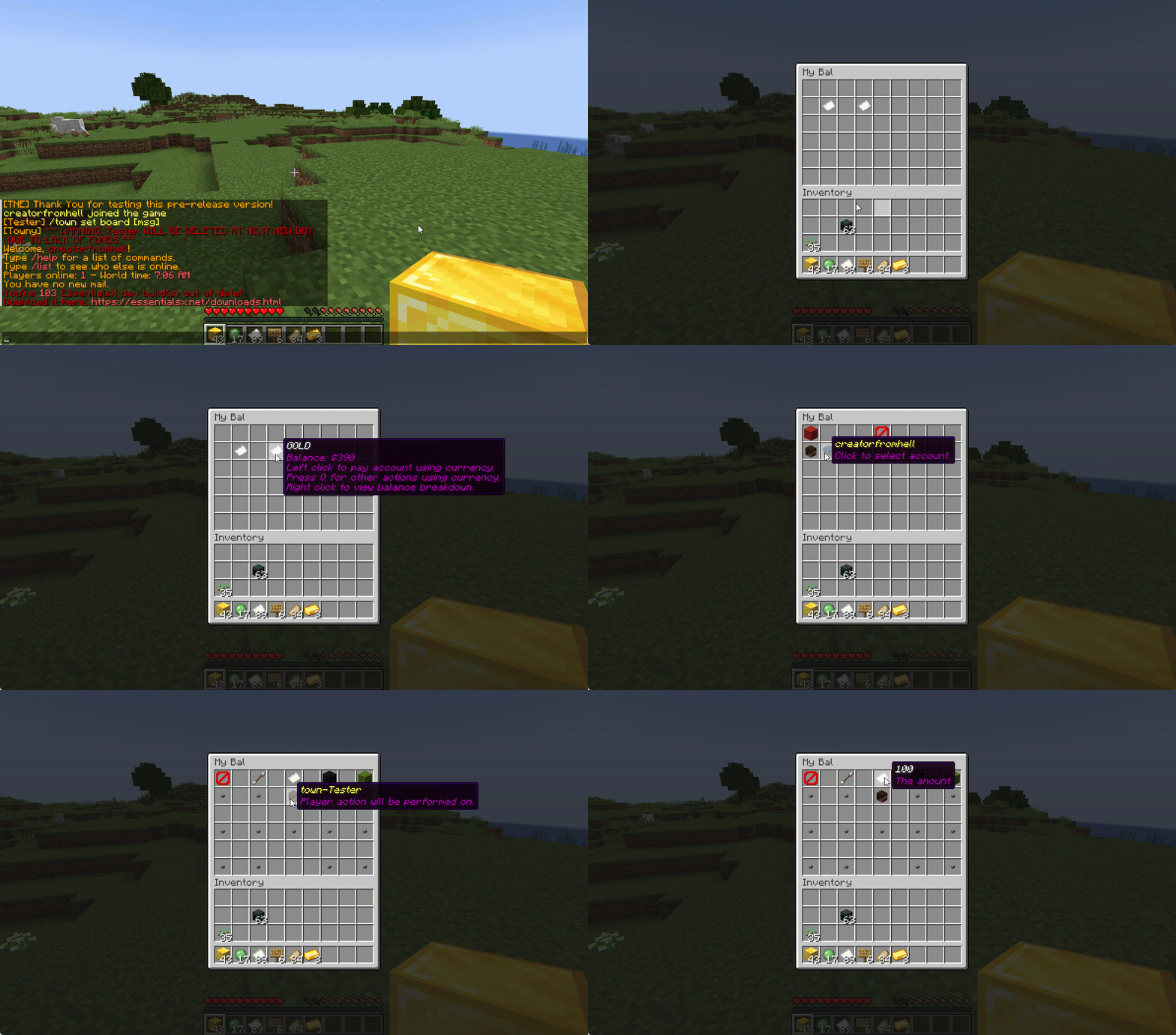
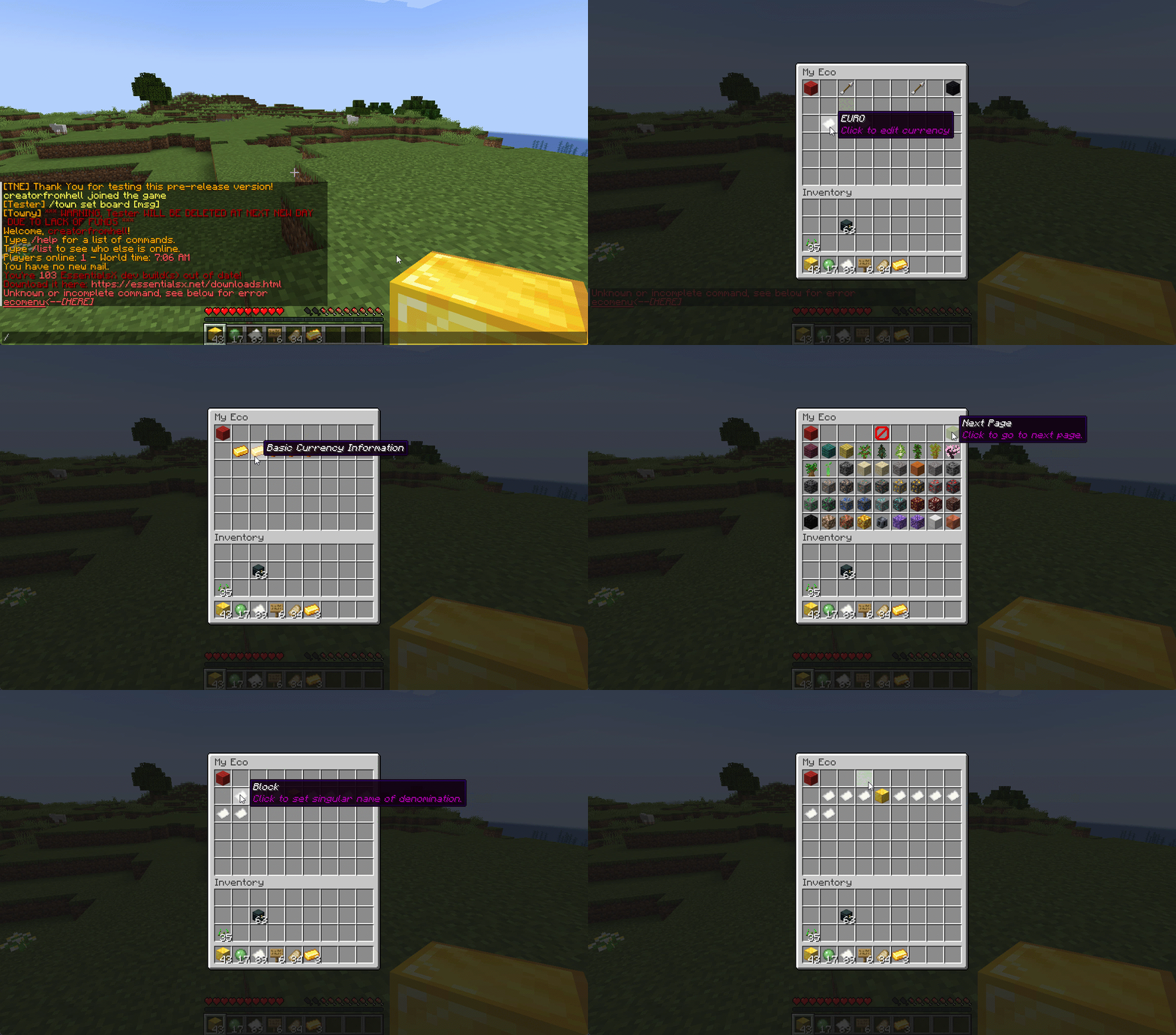
Want to use menus for currency creation and player actions? We got you!
### MyBal for Players
### MyEco for Admins
## Support your favorite plugins
We provide support for all your favorite plugins from Towny to Factions. Anything that supports Vault, supports TNE!
## Cross-Server
We support cross-server balance syncing through our velocity and bungee plugins, as well as Redis!
### Bungee
Download: [here](https://cdn.modrinth.com/data/bZ4eSWf0/versions/OTwQFFn1/TNE-BungeeCore-0.1.2.8-Release-1.jar)
### Velocity
Download: [here](https://cdn.modrinth.com/data/bZ4eSWf0/versions/prNGjbjv/TNE-VelocityCore-0.1.2.8-Release-1.jar)
## Updates
We continue to develop updates for TNE for free, and fix bugs as they’re reported.
## All the currencies – Unlimited
TNE Allows you to create unlimited currencies with ease through the currency creation GUI.
### Types
TNE Supports different types of currencies!
#### Virtual: Simple currency that exists in thin air
#### Item: Use minecraft items as currency.
– Shulker Box Support
– Bundle Support
### Fine Tune your Currency
Lots of per-currency configuration options.
– Create a custom balance format for each currency
– Set a starting amount for each currency
– Set custom conversion rates for each currency
– Create custom crafting recipes for item currencies
– Block Mob drops for each currency
– Set the max balance for each currency
– Set enderchest balance inclusion per currency
– Set item currencies to use MiniMessage inputs for display name and lores!
– Set custom note items for each currency, used to have a currency voucher for each currency.
– Allows for use of model data items as currency items
### Fine Tune Who Can Access What Currency
TNE allows you to fine tune who can run commands with each currency. You’re able to block players from using
/pay for certain currencies, and even checking their balance for others!
#### Mixed: This type uses both virtual and item balances, and allows players to switch their balance between items and virtual whenever!
#### Experience: Use experience as currency.
#### Experience-level: Use experience levels as currency.
## Money Notes
Convert your virtual currency into a physical money note using the /money note command.
## Multi-platform
Use Sponge? Sure. Paper? Why not? Both? Over Velocity? Definitely! Switch between, your TNE data works
for you no matter your platform. More platforms soon!
### Supported:
– Paper/Spigot/Purpur
– Sponge8
### Coming:
– Fabric
– Sponge7
## Discord Server
We have a discord server available to those users that have questions or need support!
## Configurability
TNE strives to allow you to configure things as much as possible. From the messages to starting money, to max holdings!
## MISC Features
– Adventure Chat support for translations to allow for awesome colorful messages!
– Support for Placeholders, include top 10
– Easy commands for easy administration
– Transaction Logging
– Easy-to-use menu system for currency creation and balance actions!
– Multiple data types
– SQL, YAML, and Maria DB
– Tab completion for commands!
– baltop command
## Open Source
Contribute on the [github](https://github.com/TheNewEconomy/EconomyCore)!
## Placeholders
| Name | Description |
|——————————————————-|—————————————————————-|
| tne_balance | Returns player’s balance. |
| tne_balance_formatted | Returns formatted player’s balance. |
| tne_world_worldname | returns player’s balance for specific world. |
| tne_world_worldname_formatted | returns the formatted player’s balance for specific world. |
| tne_currency_currencyname | returns player’s balance for specific currency. |
| tne_currency_currencyname_formatted | returns player’s balance for specific currency. |
| tne_wcur_worldname_currencyname | returns player’s balance for specific world and currency. |
| tne_wcur_worldname_currencyname_formatted | returns player’s balance for specific world and currency. |
| tne_toppos | returns player’s position on baltop |
| tne_toppos_world name or all | returns player’s balance for specific currency. |
| tne_toppos_world name or all_currency name or all | returns player’s balance for specific world and currency. |
| tne_toppos__position_ | returns the value for the position based on the value of Messages.Money.PlaceholderTopEntry in messages.yml |
## Permissions & Commands
## /tne
**About:** All commands that are designated as being for administrative purposes.
**Shortcuts:** /tne menu(/ecomenu), /tne(/ecomin, /ecoadmin, /ecomanage, /tneneweconomy)
**Base node:** tne.admin (default: ops)
**Wildcard node:** tne.admin.*
| Command | Permission | Description | Default |
|———————————–|——————-|———————————————————————————————————–|—————|
| tne backup | tne.admin.backup | Creates a backup of all server data. | ops |
| tne create [balance] | tne.admin.create | Creates a new economy account. Player ~ The account owner. Balance ~ The starting balance of the account. | ops |
| tne debug [level] | tne.admin.debug | Toggles console debug mode to the specified level. | ops |
| tne delete | tne.admin.delete | Deletes a player account. Player ~ The account owner. | ops |
| tne extract | tne.admin.extract | Extracts all player balances with their username attached for database related debugging. | ops |
| tne menu | tne.admin.menu | Opens up the tne economy admin menu | ops |
| tne purge | tne.admin.purge | Deletes all player accounts that have the default balance | ops |
| tne reload [configs] | tne.admin.reload | Used to reload configurations. | ops |
| tne reset | tne.admin.reset | Deletes all economy-related data from the database. | ops |
| tne restore | tne.admin.restore | Restores all balances that are located in extracted.yml after performing the extract command. | ops |
| tne save | tne.admin.save | Force saves all TNE data. | ops |
| tne status [status] | tne.admin.status | Displays, or sets, the current account status of an account. Player ~ The account owner. | ops |
| tne version | tne.admin.version | Displays the version of TNE currently running. | ops |
## /money
**About:** All commands that are used to interact with the server’s money system.
**Shortcuts:** /money balance(/bal, /balance), /money pay(/pay), /money top(/baltop), /money menu(/mybal)
**Base node:** tne.money (default: everyone)
**Wildcard node:** tne.money.*
| Command | Permission | Description | Default |
|————————————————————|———————–|—————————————————————————————-|—————|
| money balmenu | tne.money.mybal | Opens up the mybal menu. | everyone |
| money balance [world] [currency] | tne.money.balance | Displays your current holdings. | everyone |
| money convert [from currency] | tne.money.convert | Convert some of your holdings to another currency. | everyone |
| money deposit [currency] | tne.money.deposit | Deposits money from an item form into a virtual bank for mixed currencies. | everyone |
| money give [world] [currency] | tne.money.give | Adds money into your economy, and gives it to a player. | ops |
| money givenote [currency] | tne.money.givenote | Gives the specified player a currency note for the specified amount. | ops |
| money note [currency] | tne.money.note | Makes your virtual currency physical, for storage/trading purposes. | everyone |
| money other [world] [currency] | tne.money.other | Retrieves the balance of a player. | everyone |
| money pay [currency] | tne.money.pay | Use some of your holdings to pay another player. | everyone |
| money request [currency] | tne.money.request | Request money from a player. |
| money set [world] [currency] | tne.money.set | Set the holdings of a player. | ops |
| money setall [world] [currency] | tne.money.setall | Set the holdings of all players. | ops |
| money take [world] [currency] | tne.money.take | Removes money from your economy, specifically from a player’s balance. | ops |
| money top [page] | tne.money.top | A list of players with the highest balances. | ops |
| money top [page] [refresh(true/false)] | tne.money.top.refresh | This permission allows the user to include the refresh argument to refresh the baltop. | ops |
| money withdraw [currency] | tne.money.withdraw | Withdraws money from your virtual balance into its item form. | ops |
## /transaction
**About:** All commands that are used to interact with the transaction system.
**Shortcuts:** /trans
**Base node:** tne.transaction (default: everyone)
**Wildcard node:** tne.transaction.*
| Command | Permission | Description | Default |
|——————————————————————–|———————————————————|—————————————————————————————|—————|
| transaction away [page #] | tne.transaction.away | Displays transactions that you missed since the last time you were on. | everyone |
| transaction history [player:name] [page:#] [world:name/all] | tne.transaction.history / tne.transaction.history.other | See a detailed break down of your transaction history. Page ~ The page number you wish to view. World ~ The world name you wish to filter, or all for every world. Defaults to current world. | everyone |
| transaction info | tne.transaction.info | Displays information about a transaction. UUID ~ The id of the transaction. | everyone |
| transaction void | tne.transaction.void | Undoes a previously completed transaction. UUID ~ The id of the transaction. | ops |
TMOTD

# TMOTD
Simple optimized motd plugin
# Features
– MOTD
– Multiple motds
– Customizable change interval time
– Reload command
– MOTD set comand
# Commands
– /motd set (line 1) (line2)
– /motd reload
– /motd version
# Permissions
– tmotd.reload
– tmotd.set
– tmotd.version
# Dependencies
– None
TLobbyCommand
# TLobbyCommand
Simple hub & lobby command
# Features
– Hub & lobby command
– Multiple lobbys
# Commands
– /tlc version
# Permissions
– tlc.version
# Dependencies
– None
tiAuth
# tiAuth
Authorization plugin for BungeeCord
—
### Features:
– Dialog window support `(1.21.6+)`
– Interactive window with a password input field
– Premium mode
– Allows licensed players to skip password entry by activating local `online-mode true`
– Session support
– Allows players to skip password entry for a certain period after successful authentication
– Multiple database types support
– Supports `SQLite`, `H2`, `MySQL`, `PostgreSQL`
– Virtual server
– Virtual server for auth server powered by [NanoLimbo](https://github.com/1050TIt0p/NanoLimbo)
—
### Commands:
#### For players:
– `/register ` – Register an account
– `/login ` – Log in
– `/logout` – Destory session
– `/changepassword ` – Change password
– `/premium` – Enable premium mode
– `/unregister` – Delete account
#### For administrators:
– `/tiauth reload` – Reload config
– Permission: `tiauth.admin.commands.reload`
– `/tiauth unregister ` – Delete player account
– Permission: `tiauth.admin.commands.unregister`
– `/tiauth changepassword ` – Change player password
– Permission: `tiauth.admin.commands.changepassword`
– `/tiauth forcelogin ` – Force login player
– Permission: `tiauth.admin.commands.forcelogin`
– `/tiauth migrate[file] [user] [password] [host] [port] [name]` – Migrate database from other plugins/database type
– Permission: `tiauth.admin.commands.migrate`
—
### Migration
#### Supported Plugins
– **tiAuth** (for changing the database type)
– **MCAuth**
– **LimboAuth**
– **AuthMe**
#### Migration Commands
Below are the commands for the default database types used by these plugins.
If you are using a **file-based database** (SQLite or H2):
– Place the database file into the plugin folder.
– For **H2**, **do not include** the `.mv.db` extension in the filename.
– If there is no username or password, set both `user` and `password` to `empty`.
#### MCAuth SQLite
“`
/tiauth migrate mcauth sqlite auth.db
“`
#### LimboAuth H2
“`
/tiauth migrate limboauth h2 limboauth-v2 empty empty
“`
#### AuthMe SQLite
“`
/tiauth migrate authme sqlite authme.db
“`
#### Important — LimboAuth H2 Migration
Before migrating from **LimboAuth H2** (which uses H2 as its default database):
1. Open your `config.yml`.
2. Change the `version` value under `libraries.h-2` to **2.1.214**.
3. Delete the **tiAuth** database file (if you are using H2 — it’s the default).
4. Restart your server.
This is required because **LimboAuth** uses an **outdated version of H2** that is incompatible with the newer version used by **tiAuth** by default.
If you skip these steps, the plugin will throw an error during migration.
—
### Virtual server configuration
After setting `servers.use-virtual-server` to `true` and restarting the server,
you need to configure **NanoLimbo** — its configuration is located in:
“`
/plugins/tiAuth/limbo
“`
#### Configure `infoForwarding`
– Set `type` to **MODERN** if you are using **VELOCITY_MODERN**,
then specify your **key** under `secret`.
– If you are using **BungeeGuard**, set `type` to **BUNGEE_GUARD**,
then specify your **tokens** under `tokens`.
– **LEGACY** mode is **not recommended** as it is insecure.
#### Optional Settings
You may optionally:
– Change the **port**
– Disable **BossBar**, **Join Message**, etc.
After editing `/plugins/tiAuth/limbo/settings.yml`,
**restart your proxy** to apply the changes.
—
### Support
[Discord Server](https://discord.matvey.tatar/)
[Telegram](https://t.me/x1050ti_top)
TheAPI

## Our purpose
Are you tired of looking for different APIs on the internet to create in your projects? Neither do we! And this is why TheAPI is here.
We bring the most useful and most wanted features directly for developers. From custom configurations with comments feature to Object parsers to String and back. Also, TheAPI offers an extensive Sockets API that will make working with sockets a million times easier! And we have much more, check out the sample code in the Examples section.
## Looking for source-code?
Our project is located on github:
https://github.com/TheDevTec/TheAPI
# How to include the API with Maven:
“`
jitpack.io
https://jitpack.io
com.github.TheDevTec
TheAPI
13.8
provided
“`
# How to include the API with Gradle:
“`
repositories {
maven { url ‘https://jitpack.io’ }
}
dependencies {
compileOnly “com.github.TheDevTec:TheAPI:13.8”
}
“`
## Our community
Join our Discord community for help and advice!
https://discord.gg/APwYKQRxby
Teams API
**The universal bridge between team plugins and everything else.**
TeamsAPI is a passive, server-side bridge plugin for Paper, Spigot, Purpur, and Folia servers, inspired by Vault. It provides a single, stable interface for team operations, so any plugin that needs team data can work with any compatible team plugin, without either plugin knowing about the other.
Implemented in Factions fork: https://www.spigotmc.org/resources/pvpindex-factions.135055/
Suggest it as suggestion to teams plugins, they can send me a message so I can make a list.
## How it works
“`text
Your Plugin (consumer) -> TeamsAPI (bridge) -> Team Plugin (provider)
“`
– **Providers** — faction, clan, guild, or custom team plugins `implement TeamsService`
and register with TeamsAPI during `onEnable()`.
– **Consumers** — scoreboard plugins, chat formatters, quest plugins, or any plugin that
needs team data call `TeamsAPI.getService()` and use the returned interface.
– **Server owners** — install `TeamsAPI.jar` and one compatible team plugin. Done.
No two plugins need to know about each other. When the team plugin changes, every
consumer plugin keeps working without a recompile.
## Features
– **Provider-agnostic**: works with any team plugin that ships a `TeamsService` implementation.
– **Graceful fallback**: if no provider is present, `TeamsAPI.isAvailable()` returns `false`; consumers can disable their team features cleanly instead of crashing.
– **Read-only snapshots**: `Team` and `TeamMember` are immutable interfaces; providers own the backing data.
– **Role hierarchy**: built-in `OWNER > ADMIN > MEMBER` with `outranks()` and `canManage()` helpers.
– **Optional invite service**: providers can expose `TeamsInviteService` for invitation workflows.
– **Optional warp service**: providers can expose `TeamsWarpService` for named team warps.
– **Optional claim service**: providers can expose `TeamsClaimService` for chunk-claim management.
– **Optional power service**: providers can expose `TeamsPowerService` for player and team power values.
– **Cancellable events**: twelve Bukkit events that providers can fire so other plugins can react to or cancel team operations.
– **Lightweight**: a single shaded JAR with no runtime dependencies beyond the Bukkit API.
– **JitPack-ready**: depend on just the API module at compile time; no transitive dependencies leak into your plugin.
– **Velocity bridge** *(experimental)*: optional `teams-api-velocity` plugin for querying team data from the Velocity proxy. Supports multi-proxy networks via Redis.
– **BungeeCord bridge** *(experimental)*: optional `teams-api-bungeecord` plugin for querying team data from BungeeCord / Waterfall proxies. Supports multi-proxy networks via Redis.
## Requirements
| Requirement | Value |
|————-|——-|
| Server software | Paper / Spigot / Purpur / Folia 1.16+ |
| Java | 17+ (25 recommended) |
| Plugin dependencies | None |
## Installation (server owners)
1. Download `teams-api-plugin-VERSION.jar` from the **Files** tab of this listing or
from [GitHub Releases](https://github.com/ez-plugins/teams-api/releases).
2. Drop it into your server’s `plugins/` directory.
3. Install a compatible team plugin that provides a `TeamsService` implementation.
4. Restart the server.
TeamsAPI has no configuration files.
## For developers
Add the API artifact to your project via [JitPack](https://jitpack.io/#ez-plugins/teams-api):
### Maven
“`xml
jitpack.io
https://jitpack.io
com.github.ez-plugins
teams-api
1.4.0
provided
“`
### Gradle
“`groovy
repositories {
maven { url ‘https://jitpack.io’ }
}
dependencies {
compileOnly ‘com.github.ez-plugins:teams-api:1.4.0’
}
“`
### Consumer quick-start
Declare the dependency in `plugin.yml` (use `softdepend` if team support is optional):
“`yaml
depend:
– TeamsAPI
“`
Then use the API at runtime:
“`java
@Override
public void onEnable() {
if (!TeamsAPI.isAvailable()) {
getLogger().warning(“No team plugin found. Team features disabled.”);
return;
}
getLogger().info(“TeamsAPI found. Team features enabled.”);
}
// In a command or listener:
TeamsService teams = TeamsAPI.getService();
Optional team = teams.getPlayerTeam(player.getUniqueId());
team.ifPresent(t -> player.sendMessage(“Your team: ” + t.getDisplayName()));
“`
### Provider quick-start
Declare a soft-dependency in `plugin.yml`:
“`yaml
softdepend:
– TeamsAPI
“`
Register your implementation when the plugin loads:
“`java
@Override
public void onEnable() {
TeamsAPI.registerProvider(this, new MyTeamsService(this));
}
@Override
public void onDisable() {
TeamsAPI.unregisterProvider(teamsService);
}
“`
## API surface
### Team lifecycle & lookup
| Method | Returns | Description |
|——–|———|————-|
| `createTeam(name, ownerUUID)` | `Optional` | Creates a new team |
| `deleteTeam(teamId)` | `boolean` | Deletes a team by UUID |
| `getTeam(teamId)` | `Optional` | Looks up a team by UUID |
| `getTeamByName(name)` | `Optional` | Looks up a team by name |
| `getPlayerTeam(playerUUID)` | `Optional` | Returns the player’s current team |
| `getAllTeams()` | `Collection` | Returns every registered team |
| `getTeamCount()` | `int` | Total number of teams |
### Membership management
| Method | Returns | Description |
|——–|———|————-|
| `addMember(teamId, playerUUID, role)` | `boolean` | Adds a player with a given role |
| `removeMember(teamId, playerUUID)` | `boolean` | Removes a player from the team |
| `setMemberRole(teamId, playerUUID, role)` | `boolean` | Changes a member’s role |
| `getMemberRole(teamId, playerUUID)` | `Optional` | Returns the member’s current role |
### Invite service (optional)
Register alongside `TeamsService` if your plugin supports invitations:
“`java
TeamsAPI.registerInviteProvider(this, inviteService);
“`
| Method | Returns | Description |
|——–|———|————-|
| `invitePlayer(teamId, inviterUUID, inviteeUUID)` | `boolean` | Sends an invitation |
| `acceptInvite(teamId, playerUUID)` | `Optional` | Accepts the invitation and joins the team |
| `declineInvite(teamId, playerUUID)` | `boolean` | Declines an invitation |
Consumers check availability with `TeamsAPI.isInviteAvailable()` before calling `TeamsAPI.getInviteService()`.
### Warp service (optional)
Register alongside `TeamsService` if your plugin supports team warps:
“`java
TeamsAPI.registerWarpProvider(this, warpService);
“`
| Method | Returns | Description |
|——–|———|————-|
| `setWarp(teamId, name, location, creatorUUID)` | `boolean` | Creates or updates a named warp |
| `removeWarp(teamId, name)` | `boolean` | Deletes a warp by name |
| `getWarp(teamId, name)` | `Optional` | Looks up a warp by name |
| `getWarps(teamId)` | `Collection` | Returns all warps for a team |
Consumers check availability with `TeamsAPI.isWarpAvailable()` before calling `TeamsAPI.getWarpService()`.
### Claim service (optional)
Register alongside `TeamsService` if your plugin supports chunk claims:
“`java
TeamsAPI.registerClaimProvider(this, claimService);
“`
| Method | Returns | Description |
|——–|———|————-|
| `claimChunk(teamId, playerUUID, world, x, z)` | `boolean` | Claims a chunk for the team |
| `unclaimChunk(teamId, playerUUID, world, x, z)` | `boolean` | Removes the claim |
| `unclaimAll(teamId)` | `boolean` | Removes all claims for the team |
| `getClaimAt(world, x, z)` | `Optional` | Returns the claim at a chunk, if any |
| `getTeamClaims(teamId)` | `Collection` | All claims for the team |
| `getClaimCount(teamId)` | `int` | Number of claimed chunks |
| `isClaimed(world, x, z)` | `boolean` | Whether the chunk is claimed by anyone |
| `isClaimedBy(teamId, world, x, z)` | `boolean` | Whether the chunk is claimed by this team |
| `getTeamMaxClaims(teamId)` | `int` | Claim limit (-1 means unlimited) |
Consumers check availability with `TeamsAPI.isClaimAvailable()` before calling `TeamsAPI.getClaimService()`.
### Power service (optional)
Register alongside `TeamsService` if your plugin exposes power values:
“`java
TeamsAPI.registerPowerProvider(this, powerService);
“`
| Method | Returns | Description |
|——–|———|————-|
| `getPlayerPower(playerUUID)` | `double` | Current power of the player |
| `getPlayerMaxPower(playerUUID)` | `double` | Maximum power the player can hold |
| `setPlayerPower(playerUUID, power)` | `boolean` | Sets the player’s power |
| `getTeamPower(teamId)` | `double` | Combined power of all team members |
| `getTeamMaxPower(teamId)` | `double` | Maximum combined power the team can hold |
Consumers check availability with `TeamsAPI.isPowerAvailable()` before calling `TeamsAPI.getPowerService()`.
### Events
All events live in `com.skyblockexp.teamsapi.event`. Providers are encouraged but not required to fire them.
| Event | Cancellable | Fired when |
|——-|————-|————|
| `TeamCreateEvent` | Yes | Before a team is created |
| `TeamDeleteEvent` | Yes | Before a team is deleted |
| `TeamJoinEvent` | Yes | Before a player joins a team |
| `TeamLeaveEvent` | Yes | Before a player leaves a team |
| `TeamRoleChangeEvent` | Yes | Before a member’s role changes |
| `TeamInviteEvent` | Yes | Before an invitation is sent |
| `TeamInviteAcceptEvent` | No | After a player accepts an invitation |
| `TeamInviteDeclineEvent` | No | After a player declines an invitation |
| `TeamWarpSetEvent` | Yes | Before a warp is created or updated |
| `TeamWarpDeleteEvent` | Yes | Before a warp is deleted |
| `TeamClaimEvent` | Yes | Before a chunk is claimed |
| `TeamUnclaimEvent` | Yes | Before a chunk is unclaimed |
### Roles
| Role | Priority | Description |
|——|———-|————-|
| `OWNER` | 100 | Full control; cannot be removed by others |
| `ADMIN` | 50 | Can manage members with a lower priority |
| `MEMBER` | 10 | Regular team member |
## Links
– [GitHub](https://github.com/ez-plugins/teams-api) — source code & issue tracker
– [Developer Guide](https://ez-plugins.github.io/teams-api/developer-guide.html) — full integration walkthrough
– [API Reference](https://ez-plugins.github.io/teams-api/api.html) — complete method tables
– [JitPack](https://jitpack.io/#ez-plugins/teams-api) — Maven / Gradle dependency
—
*MIT License – free to use in any project, open- or closed-source.*
TaterLib
# TaterLib
[](https://github.com/p0t4t0sandwich/TaterLib/blob/main/LICENSE)
[](https://github.com/p0t4t0sandwich/TaterLib)
[](https://github.com/p0t4t0sandwich/TaterLib/issues)
[](https://discord.neuralnexus.dev)
[](https://wakatime.com/badge/user/fc67ce74-ca69-40a4-912f-61b26dbe3068/project/ba087a5d-fd50-4b54-9723-3effbfda7567)
A cross API code library that allows developers to write code that works across multiple modding platforms, and across a
wide range of Minecraft versions, all with one JAR file. If TaterLib runs on it, so can your plugin/mod.
Please note, some abstractions may not be fully implemented yet, and some may be missing.
If you’re looking for a specific abstraction/game event, please open an issue, and we’ll get to it as soon as possible,
or feel free to open a PR with an implementation.
[Contributions are always welcome!](https://github.com/p0t4t0sandwich/TaterLib/blob/main/.github/CONTRIBUTING.md)
Let’s cut to the chase, why should you use and/or contribute to TaterLib? Well, let’s say you have a mod/plugin that you
want to port to a different modding API. You could go through the laborious task of implementing all the events,
commands, etc. on each platform and create all your own cool fancy abstractions for each game object, or you could use
TaterLib and save yourself a lot of time. (which is why I started this project in the first place)
There’s two ways to use TaterLib, you can depend on the general API, then implement any missing features yourself on
each platform, or if something’s missing, you can start a PR with either a basic or full implementation, and we can
improve TaterLib and save you a lot of time in the future. (a bit of a win-win)
Link to our support: [Discord](https://discord.neuralnexus.dev)
## Download
[](https://github.com/p0t4t0sandwich/TaterLib/releases)
[](https://www.spigotmc.org/resources/taterlib.111852/)
[](https://hangar.papermc.io/p0t4t0sandwich/TaterLib)
[](https://www.curseforge.com/minecraft/bukkit-plugins/taterlib)
[](https://modrinth.com/mod/taterlib)
[](https://www.curseforge.com/minecraft/mc-mods/taterlib)
[](https://ore.spongepowered.org/p0t4t0sandwich/TaterLib)
[](https://builtbybit.com/resources/taterlib.40265/)
[](https://polymart.org/resource/taterlib.5552)
[](https://craftaro.com/marketplace/product/taterlib.2771)
[](https://maven.neuralnexus.dev/#/snapshots/dev/neuralnexus/taterlib-api)[](https://jenkins.neuralnexus.dev/job/TaterLibDev/)
[](https://maven.neuralnexus.dev/#/releases/dev/neuralnexus/taterlib-api)[](https://jenkins.neuralnexus.dev/job/TaterLib/)
### Adding to your project
“`gradle
repositories {
maven {
name = ‘NeuralNexus’
url = ‘https://maven.neuralnexus.dev/releases’
}
}
dependencies {
compileOnly(‘dev.neuralnexus:taterlib-api:‘)
}
“`
There’s also a snapshot repository available at `https://maven.neuralnexus.dev/repository/snapshots`
### Compatibility Cheatsheet
TaterLib supports: Bukkit, BungeeCord, Fabric, Forge, Sponge, and Velocity
General notes:
– No Fabric on 1.13
– No Fabric/Forge below 1.7.10
| Server type | Versions | Jar Name |
|————-|————-|———————————|
| 1.20.x | 1.20-1.20.4 | `TaterLib-1.20.x-.jar` |
| 1.19.4 | 1.19.4 | `TaterLib-1.19.4-.jar` |
| 1.19.2 | 1.19.2 | `TaterLib-1.19.2-.jar` |
| 1.19 | 1.19 | `TaterLib-1.19-.jar` |
| 1.18.2 | 1.18.2 | `TaterLib-1.18.2-.jar` |
| 1.18 | 1.18 | `TaterLib-1.18-.jar` |
| 1.17 | 1.17-1.17.1 | `TaterLib-1.17-.jar` |
| 1.16 | 1.16-1.16.5 | `TaterLib-1.16-.jar` |
| 1.15 | 1.15-1.15.2 | `TaterLib-1.15-.jar` |
| 1.14 | 1.14-1.14.3 | `TaterLib-1.14-.jar` |
| 1.13 | 1.13-1.13.2 | `TaterLib-1.13-.jar` |
| 1.12 | 1.12-1.12.2 | `TaterLib-1.12-.jar` |
| 1.11 | 1.11-1.11.2 | `TaterLib-1.11-.jar` |
| 1.10 | 1.10-1.10.2 | `TaterLib-1.10-.jar` |
| 1.9 | 1.9-1.9.4 | `TaterLib-1.9-.jar` |
| 1.8 | 1.8-1.8.8 | `TaterLib-1.8-.jar` |
| 1.7 | 1.7-1.7.10 | `TaterLib-1.7.10-.jar` |
| 1.6.4 | 1.6.4 | `TaterLib-1.6.4-.jar` |
| 1.2.5 | 1.2.5 | `TaterLib-1.2.5-.jar` |
| b1.7.3 | b1.7.3 | `TaterLib-b1.7.3-.jar` |
## Dependencies
– [Fabric API](https://modrinth.com/mod/fabric-api) – Required on Fabric
– [Legacy Fabric API](https://www.curseforge.com/minecraft/mc-mods/legacy-fabric-api) – Required on Fabric 1.12.2 and
below
### Optional Dependencies
– [LuckPerms](https://luckperms.net/) – For permissions/prefix/suffix support
## Commands and Permissions
| Command | Permission | Description |
|———————-|—————————–|————————–|
| `/taterlib version` | `taterlib.command.version` | Get the TaterLib version |
| `/taterlib reload` | `taterlib.command.reload` | Reload TaterLib config |
| `/taterlib dump` | `taterlib.command.dump` | Dump TaterLib info |
| `/taterlib fulldump` | `taterlib.command.fulldump` | Dump TaterLib info |
## Projects that use TaterLib
Feel free to open a PR to add your plugin/mod to this list!
– [BadSpawns](https://github.com/p0t4t0sandwich/BadSpawns)
– [BeeNameGenerator](https://github.com/p0t4t0sandwich/BeeNameGeneratorPlugin)
– [TaterComms](https://github.com/p0t4t0sandwich/TaterComms)
– [TaterUtils](https://github.com/p0t4t0sandwich/TaterUtils)
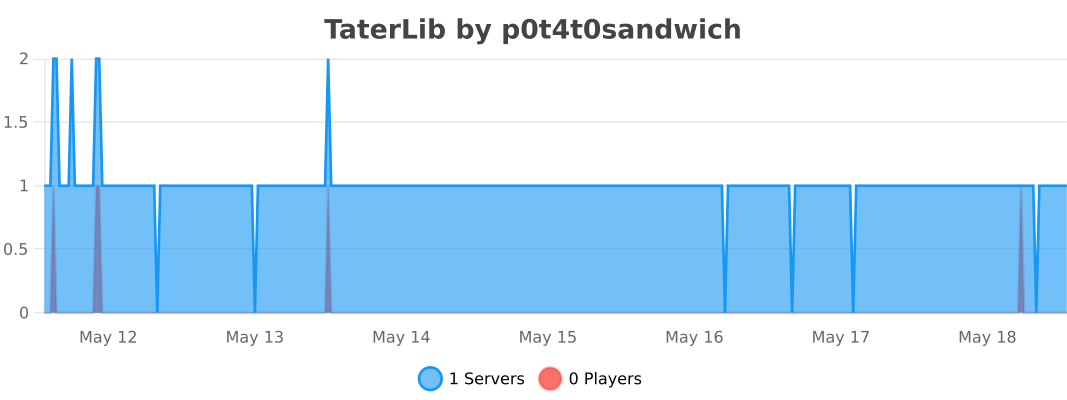
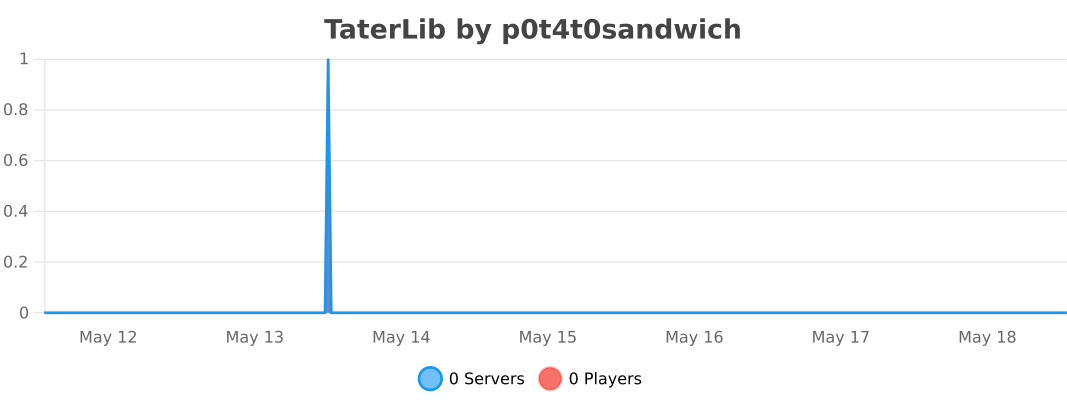
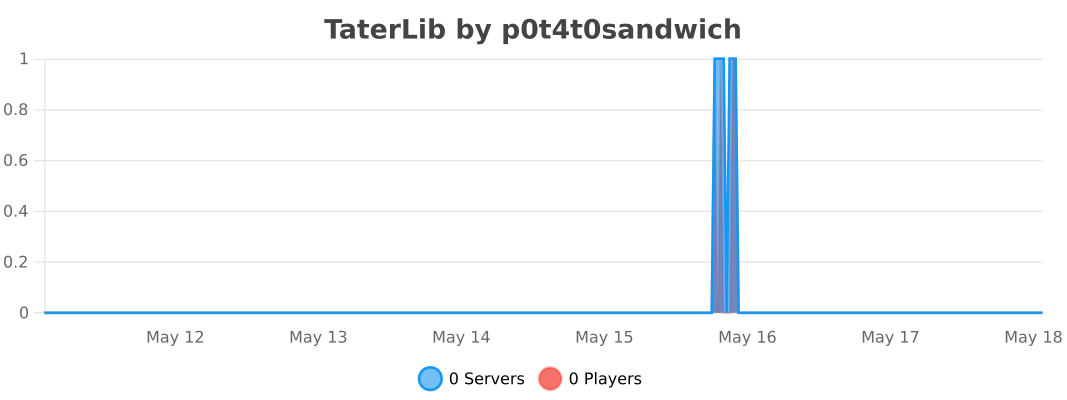
## Metrics
### Bukkit
### BungeeCord
### Sponge
### Velocity
TabWhitelist
# TabWhitelist! – Command Management
**TabWhitelist** is a powerful and lightweight Minecraft server plugin designed to give administrators total control over player command visibility and execution. It allows you to hide sensitive server information, block unwanted commands, and create custom rank-based access, ensuring a clean and secure experience for your community. By filtering the tab-completion list and overwriting default system messages, you can fully brand your server’s “Unknown Command” response and keep your plugin list private.
Don’t believe it? **TRY THE LATEST RELEASE NOW!**
**⚠️ NOTE:** Java 21 or higher is required!
“`
Now also on proxy! BungeeCord, Waterfall, Velocity.
Looking for a proxy version for Java 11? Find TabWhitelist 1.1-ForProxy (Java 11)
“`
### Features
– **Full Command Control** – Easily toggle between Whitelist and Blacklist modes to decide which commands are accessible.
– **Dynamic Tab-Blocking** – Automatically hides unauthorized commands from the TAB completion menu in real-time.
– **Rank-Based Groups** – Assign specific command sets to different player ranks using custom permissions like tabwhitelist.group.vip.
– **World-Specific Rules** – Define different allowed or blocked commands based on the world the player is currently in.
– **Multi-Sensory Feedback** – Engage players with custom sounds, titles, action bars, and particles whenever a command is blocked.
– **Subcommand & Namespace Protection** – Block specific phrases (e.g., /pl, /ver) and automatically handle hidden command aliases like /minecraft:cmd.
– **Command Cooldowns** – Prevent command spam by setting per-command timers that players must wait out.
– **Admin Notifications** – Alert staff members instantly with customizable messages when a player attempts to use a restricted command.
– **Instant Reload** – Use the /twreload command to update all configurations and TAB menus without needing to restart the server.
### Commands
– /twreload – Refreshes the configuration file and updates player TAB lists instantly.
### Permissions
– tabwhitelist.admin – Access to everything (bypasses all blocks and filters).
– tabwhitelist.reload – Allows use of the /twreload command.
– tabwhitelist.group. – Grants access to a specific command group defined in the config (e.g., tabwhitelist.group.vip).
– tabwhitelist.notify – Allows staff members to receive real-time alerts whenever a player attempts to use a blocked command.
– tabwhitelist.bypass.cooldown – Grants a player the ability to ignore the command cooldown timers set in the configuration.
### How to use
Click to expand
1. Place the .jar file in the server’s plugins folder.
2. Restart the server and check the console for: [TabWhitelist] v1.2 enabled!.
3. Open the plugins/TabWhitelist/config.yml file.
4. Set your unknown-command-message to match your server’s branding.
5. Add your basic player commands to the commands list.
6. (Optional) Create custom groups in the groups section for your Ranks (VIP, MVP, etc.).
7. Assign the corresponding permissions (e.g., tabwhitelist.group.vip) to your ranks using a permission plugin like LuckPerms.
8. Run /twreload to apply changes!
## Bug report and contact
“`
[email protected] – new mail
“`