EaglerMOTD
# EaglerMOTD
EaglerMOTD is a plugin that adds support for animated and/or randomized MOTDs to [EaglercraftXServer](https://modrinth.com/plugin/eaglercraftxserver).

This plugin is fully compatible with your config files from the previous two revisions of EaglerMOTD, with the exception of the `random` and `shuffle` options in messages.json. These were eliminated to allow the code to be better optimized, and because its already possible to randomize what MOTD the plugin displays through different means.
This plugin can be installed on any Spigot, BungeeCord, or Velocity server that runs EaglercraftXServer.
## Configuration
Please consult the README of the EaglerXBungee/EaglerXVelocity version of EaglerMOTD for more information on the config file format: [https://github.com/lax1dude/eaglercraft-motd-1.8/blob/main/README.md](https://github.com/lax1dude/eaglercraft-motd-1.8/blob/main/README.md)
Do not forget that `random` and `shuffle` are no longer supported.
EaglercraftXServer
# EaglercraftXServer
### An industrial-grade Eaglercraft server
Adds support for various browser ports of Minecraft Java Edition to your Spigot, BungeeCord, or Velocity server.
a.k.a. “EaglerXServer”
## Key Features
– **EaglercraftX 1.8, Eaglercraft 1.12.2, and Eaglercraft 1.5.2 clients are supported**
– **Install on Spigot, BungeeCord, or Velocity from only a single JAR file**
– **Access dozens of exclusive Eaglercraft features through a cross-platform API**
– **Install packet translator modules for legacy protocol versions (1.5, 1.6, beta, etc)**
– **Native RPC protocol to access the API of a BungeeCord/Velocity server from Spigot**
– **Synchronize multi-proxy setups seamlessly using EaglerXSupervisor**
## Installation
EaglerXServer works best when installed on a reverse proxy (BungeeCord, Velocity), you can also install the plugin on your Bukkit/Spigot/Paper server, but we do not currently maintain Bukkit plugin support for versions above 1.17.
To get started, place the EaglerXServer JAR in the “plugins” folder of your Spigot, BungeeCord, or Velocity server. In most cases you will also need to use ViaVersion, ViaBackwards, and ViaRewind to make your Spigot servers compatible with 1.8. If you would like to support 1.5, add the [EaglerXRewind](https://modrinth.com/plugin/eaglercraftxrewind) JAR to the “plugins” folder as well. Add [EaglerMOTD](https://modrinth.com/plugin/eaglermotd) for animated MOTDs and [EaglerWeb](https://modrinth.com/plugin/eaglerweb) if you want to host a website from your server.
To connect to your server, use the same IP address and port as you would on Java edition, EaglerXServer adds a translation layer that converts any Eaglercraft connections on your server to a regular Java edition connection.
Please keep in mind that on BungeeCord and Velocity you must edit the EaglercraftXServer listeners config file to change the `inject_address` to match the address of one of the listeners configured on the underlying BungeeCord/Velocity server. This is different from how EaglercraftXBungee and EaglercraftXVelocity worked, where you could put any address and allow the plugin to open the port, this change was made to allow EaglercraftXServer to be better compatible with other plugins like ViaVersion and ProtocolLib.
**Velocity Note:** You may have issues if you attempt to use EaglercraftXServer with other plugins that also register plugin message event handlers, because Velocity’s event bus will cause the plugin messages to be observed in an undefined order if an async handler is given higher priority than EaglercraftXServer.
**xCord Note:** You will probably have issues if you attempt to install EaglercraftXServer on xCord (premium fork of BungeeCord) depending what additional xCord configuration options you enable. If you have issues, reset the xCord configuration files to their defaults, EaglercraftXServer has been confirmed to work (or at least connects) on xCord if you use the default configuration files.
## Configuration
On BungeeCord and Velocity, EaglercraftXServer should generate detailed comments in the config files, describing each property in detail. However this does not work on most Spigot versions (like 1.12) due to the YAML parser/serializer bundled with it not supporting comments. Please see the [CONFIG.md](https://github.com/lax1dude/eaglerxserver/blob/main/CONFIG.md) file for documentation if your platform does not support comments.
Large server view distances are known to cause problems on the low bandwidth connections most people find themselves playing Eaglercraft on, consider reducing your server’s view distance if you experience intermittent “End of stream” errors.
## Plugin Development
The API is available through a “maven repository” at `https://repo.lax1dude.net/repository/releases/`
Please see the [GitHub](https://github.com/lax1dude/eaglerxserver/) for more information on the EaglercraftXServer API
EaglercraftXRewind
# EaglercraftXRewind
Addon for [EaglercraftXServer](https://modrinth.com/plugin/eaglercraftxserver) to add Eaglercraft 1.5.2 support on Spigot, BungeeCord, and Velocity.
This plugin is a compatibility layer that will translate the Eaglercraft 1.5 packets to an EaglercraftX 1.8 connection, allowing them to connect to a 1.8-compatible Eaglercraft server. This usually involves running ViaVersion, ViaBackwards, and ViaRewind on your server as well, to upgrade the 1.8 connection to whatever modern version of Spigot you’re running.
**Note:** If you would like to support versions of Eaglercraft 1.5 older than 22w34a (before singleplayer), add the `-Deaglerxrewind.oldChunkFormat=true` system property to your JVM arguments. This will perform worse for both clients and the server, but will be compatible with every version of 1.5 going back to 2020.
DynamicShop
**⚡ DynamicShop 2.0**
*A next-generation global shop with dynamic supply/demand pricing, web analytics, custom items, permissions shop & more.*
[](https://www.codefactor.io/repository/github/selfservice0/dynamicshop/overview/main)


—
**✨ What’s New in v2.5.0**

* **NEW:** (Soft Limit) Pricing Curve Madx Stock
* **NEW:** (Hard Limit) Storage Hard Limit
* **NEW:** In-Game Editor Integration
* **NEW:** Web Admin Integration Type “`/shopadmin webadmin“`
* **NEW:** Option to allow Shortage decay. (shortage is gained when an item sits at <=0 stock). Now sitting at positive stock can decay that shortage.
* **Improved:** More shopadmin gui options
* **Fixed:** Percent Increase not properly displaying in gui.
---
---
**✨ What's New in v2.0**
* **NEW:** Real-time Web Dashboard (built-in)
* **NEW:** Command Shops — sell commands as items!
* **NEW:** `messages.yml` — customize 100% of messages
* **NEW:** Requires ProtocolLib (better click detection)
* **NEW:** PlaceholderAPI support
* **NEW:** Supports ItemAdder, MMOItems, Oraxen, NBT items
* **Improved:** Faster search GUI
* **Improved:** Category UI
* **Improved:** Dynamic price scaling
* **Improved:** Logging & transaction safety
---
**🌐 Web Dashboard**
*Real-time analytics, transaction logs, top items, volume tracking, category stats.*


---
**🛒 Shop GUI**

---
**🚀 Features**
Expand Full Features
**🔁 Dynamic Pricing Engine**
* Prices rise when players buy
* Prices drop when players sell
* Shortage + surplus multipliers
* Time-based stabilization
* Fully configurable
**🌍 Global Stock Tracking**
* Tracks server-wide supply
* Supports negative stock (rare item surge pricing)
* Auto-saves
**🎨 Modern GUI**
* Category selector
* Clean sub-menus
* Buy / Sell / Shift-Bulk
* Realtime price display
**🔐 Permission Shop**
Add a permission as an item in the shop:
“`
/shopadmin add perm
“`
Displays using the item/block you hold.
**🧰 Server-Shop (Custom Items + Commands)**
Add ANY item or command:
“`
/shopadmin add server-shop 500 my_spawn command essentials:spawn {player}
“`
Supports:
* Commands
* Custom model data
* NBT items
* ItemAdder, Oraxen, MMOItems
* PlaceholderAPI placeholders
**💬 `messages.yml` — Full Customization**
* Translate everything
* Custom GUI titles
* Custom lore & lines
* Custom error messages
**📊 Web Stats Dashboard**
* Live transactions
* Category distribution
* Top players
* Top traded items
* JSON API
**⚙ Configuration**
* Extensive base price list
* Category auto-sorting
* Tax, multipliers, limits
* Disable any item
**⚡ Performance**
* Zero-lag architecture
* No heavy repeating tasks
* Async logging
—
**⌨ Commands & Permissions**
Commands
“`
/shop – Open shop
/shop – Open a category
/shop sell – Sells held item in PlayerShop for defined price
/shopsearch – Search items
/shopadmin – Opens admin GUI
/shopadmin add perm
/shopadmin add server-shop
/shopadmin add server-shop command
“`
Permissions
“`
shop.use – Open the shop, buy/sell (default true)
shop.admin – Full admin access
shop.playershop.sell – Ability to use PlayerShop
“`
—
**📦 Requirements**
* **ProtocolLib** – REQUIRED
* **Vault** – REQUIRED for economy
* **PlaceholderAPI** – OPTIONAL
—
**🔌 PlaceholderAPI Placeholders**
DynamicShop 2.1.0 includes full native support for PlaceholderAPI.
Placeholders auto-register.
PAPI
“`
==================== GLOBAL OVERVIEW ====================
%dynamicshop_total_transactions%
%dynamicshop_items_bought%
%dynamicshop_items_sold%
%dynamicshop_total_money_exchanged%
==================== RECENT & TOP ACTIVITY ====================
%dynamicshop_recent_transaction%
%dynamicshop_most_traded_item%
==================== PLAYER STATISTICS ====================
Format: %dynamicshop_player__%
Stats:
purchases | sales | money_spent | money_earned | net
Examples:
%dynamicshop_player_selfservice0_purchases%
%dynamicshop_player_selfservice0_sales%
%dynamicshop_player_selfservice0_money_spent%
%dynamicshop_player_selfservice0_money_earned%
%dynamicshop_player_selfservice0_net%
==================== ITEM STATISTICS ====================
Format: %dynamicshop_item__- %
Stats:
displayname
times_bought
times_sold
times_bought_quantity
times_sold_quantity
net_flow
Examples:
%dynamicshop_item_displayname_DIAMOND%
%dynamicshop_item_times_bought_DIAMOND%
%dynamicshop_item_times_sold_IRON_INGOT%
%dynamicshop_item_times_bought_quantity_OAK_LOG%
%dynamicshop_item_times_sold_quantity_DIRT%
%dynamicshop_item_net_flow_EMERALD%
==================== ITEM PRICING / STOCK ====================
%dynamicshop_price_- %
%dynamicshop_sellprice_- %
%dynamicshop_stock_- %
Examples:
%dynamicshop_price_DIAMOND%
%dynamicshop_sellprice_OAK_LOG%
%dynamicshop_stock_GOLD_INGOT%
“`
—
**📥 Installation**
1. Drop plugin into `/plugins`
2. Install **ProtocolLib** & **Vault**
3. Restart server
4. Configure `config.yml` & `messages.yml`
—
**⬇ Download**
**✔ Compatible with Spigot & Paper 1.20 – 1.21**
* **Discord:** [https://discord.gg/7fRV2uQFgn](https://discord.gg/7fRV2uQFgn)
* **GitHub:** [https://github.com/selfservice0/DynamicShop/releases](https://github.com/selfservice0/DynamicShop/releases)
* **Wiki** [https://github.com/selfservice0/DynamicShop/wiki](https://github.com/selfservice0/DynamicShop/wiki)
DynamicDNS

This plugin keeps your subserver always reachable, even if it’s hosted on a dynamic IP address. It’s perfect for setups where a server (like a Minecraft subserver) runs on a home computer or any machine without a static IP. You don’t have to manually update IPs anymore – it just works.
No need for external DNS tricks or restarts – the IP stays in sync automatically, in real-time.
## How it works?
The proxy server listens for incoming connections using a ServerSocket. When a new connection attempt is detected, the plugin checks if the subserver’s IP address has changed. If it has, the plugin updates the subserver’s address automatically before forwarding the connection. This way, the proxy always routes traffic to the correct, current IP of the subserver.
## How to install?
1. Upload the plugin to your Velocity/BungeeCord proxy server.
2. Start the proxy and adjust the configuration to fit your setup.
3. Copy the secret key from the token.txt file generated on the proxy server.
4. Upload the plugin to your subserver (e.g. a Spigot-based survival server).
5. In the subserver config, set the server ID that should have its IP updated.
6. Paste the secret key from the proxy into the Spigot plugin’s configuration.
DS-Ads

## Why Choose DS-Ads?
DS-Ads is not just another advertisement plugin but a complete advertising solution designed for modern Minecraft servers. It offers **zero memory leaks**, **lightning-fast performance**, and **incredible flexibility**. DS-Ads sets the **standard for server advertisements**.
—
## Core Features
### Advertisement Types
– **Broadcast Messages** — Server-wide announcements
– **Title & Subtitle** — Eye-catching screen displays
– **Boss Bar** — Persistent top-screen messages
– **Action Bar** — Quick status updates
### Advanced Formatting
– **HEX Color Support** — Full RGB color palette
– **MiniMessage Format** — Modern text styling
– **PlaceholderAPI** — Dynamic content injection
– **Centered Messages** — Professional alignment
– **Hover & Click Events** — Interactive elements
### Smart Configuration
– **Permission-Based** — Target specific player groups
– **Scheduled Delivery** — Timed advertisements
– **Per-World/Server Settings** — Different ads for different worlds
– **Sound Effects** — Audio notifications
– **YAML Configuration** — Easy to edit and manage
—
## Commands & Permissions
**Commands:**
“`
/ads reload ➜ Reload all configurations
/ads enable ➜ Enable the plugin globally
/ads disable ➜ Disable the plugin globally
/ads send ➜ Force send an ad to player(s)
“`
**Permissions:**
“`
ads.send ➜ Permission to send ads to players
ads.manage ➜ Permission to enable/disable plugin
ads.reload ➜ Permission to reload configuration
“`
—
## Requirements & Compatibility
### Dependencies
– **PlaceholderAPI** — Required for SpigotMC & Forks
### Supported Versions
– **Minecraft** — 1.18.2 – 26.1.2
– **Spigot, Paper, Purpur, Pufferfish** — Full support
– **Bungeecord, Waterfall & Velocity** — Proxy support
### Coming Soon
– **Achievement-style notifications**
– **In-game GUI configuration editor**
– **Custom command triggers**
– **ProxyPAPIBridge integration**
—
## Live Demonstration
—
## Partners Zone
—
© 2026 FruitForge Studios
Discord Statusbot
Features:
1. Bot status is synchronized with the server.
2. The bot shows how many players are online and what their names are in its status.

3. Configuration file for localization and other settings.
4. The bot can send DMs or send messages in server channels.

5. From version 20.0 you can make the bot send and update a fully configurable embed. (Spigot has [PlaceholderAPI](https://www.spigotmc.org/resources/placeholderapi.6245/) support)
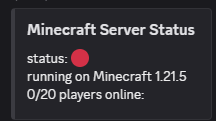
Note that some information and features may differ depending on the mod loader you use. I’m trying to get them all synced, but it’s still going to take some time.
————
For more detailed information and an installation guide, see [the wiki](https://github.com/mopsy14/Spigot-Statusbot/wiki/Getting-started).
Questions, feature requests or bugs? [Create an issue on Github](https://github.com/mopsy14/Minecraft-Discord-Statusbot/issues/new) or [join my Discord server](https://discord.gg/rcnQw5eCWJ)!
DisBot
# 🤖 **DisBot — Bot Plugin**
**DisBot** is a lightweight plugin that connects your Minecraft server with **Discord**, allowing administrators to interact with the server directly from Discord.
Designed to run on software like **BungeeCord**, **Velocity** and **Paper**.
## **Requirements**
– None!
## **Features**
– Custom commands via YAML files
– Easy configuration with `config.yml`
– Prefix commands (`db! `) and slash commands (`/`)
– Embed messages with custom color per command
– Ephemeral messages (slash commands only)
– Command cooldowns
– Command aliases
– Channel restrictions
– Reload without restart (`/disbot reload`)
– Support for BungeeCord, Velocity and Paper
– Lightweight and modular design
## **Custom Commands**
Administrators can create custom commands simply by adding `.yml` files inside:
“`
plugins/DisBot/commands
“`
This allows you to expand the bot’s functionality **without modifying the plugin code**.
## **Internal Commands**
“`
– disbot reload — Reload the plugin.
“`
## **Support**
Join our [Discord server](https://discord.gg/E2hAAa7F6q) for help and suggestions!
Custom F3 Brand
# Custom F3 Brand
### Edit your server name in debug screen!
#### It’s simple, it’s powerful, it’s fully customizable!
Set your custom message or animation in the debug screen (F3) of your server. You just need to edit the config of the plugin,
it’s easy and intuitive.
#### The plugin seems to work fine on Minecraft 1.21 (_Update Protocollib if you are using spigot_). Make sure to test the plugin in your environment before using it in production. If you fine any error let me know [here](https://mcni.it/dsdev).
## Features
– Spigot version
– PlaceholderAPI support
– Bungeecord version
– Velocity version
– Velocity version is in alpha stage, please report any issue you find.
## Requirements
– Minecraft 1.16+
– Java 17+.
– ProtocolLib is required for the Spigot version.
## Installation
Download the plugin from [here](https://modrinth.com/plugin/customf3brand) and put it in your plugins folder.
If you are installing this plugin in a Spigot server download also [ProtocolLib](https://www.spigotmc.org/resources/protocollib.1997/);
That’s it!
## Commands
– “`/f3r“` to reload the config (spigot)
– “`/bf3r“` to reload the config (bungeecord)
– “`/vf3r“` to reload the config (velocity)
## Permissions
– “`cf3.reload“` to reload the config
## Warnings
– Do not reload the plugin in a velocity server! If you want to reload the config use the command “`/vf3r“`.
– The configuration file is a JSON file with json5 extension. This is done to allow comments in the file but is parsed as a json.
When editing the file make sure to follow the json syntax.
## Known issues
– Some plugins and mods to communicate needs certain brand names and may not work properly with this plugin.
## Contributing
To contribute to this repository just fork this repository make your changes or add your code and make a pull request.
## License
CustomF3Brand is released under “The 3-Clause BSD License”. You can find a copy [here](https://github.com/MultiCoreNetwork/CustomF3Brand/blob/master/LICENSE)
CraftersStaff

# CraftersStaff – Advanced Staff & Moderation Suite for Spigot/Paper
CraftersStaff is an advanced, all‑in‑one administration and moderation plugin for **Spigot** and **Paper** servers. It centralizes day‑to‑day staff tasks (staff mode, vanish, freezing, notes, reports, inventory inspection, staff chat, GUI menus, etc.) into a single, cohesive system that is easy for server owners to configure and easy for staff members to learn and use.
The plugin is designed to be:
– **Intuitive** – Staff can start using it with minimal training thanks to clear commands and GUIs.
– **Powerful** – Covers the full moderation workflow: detecting issues, freezing players, collecting evidence, logging staff actions and coordinating decisions.
– **Flexible** – Highly configurable via YAML files and language files so every server can adapt texts, menus and flows to its own community.
– **Network‑ready** – Built with hybrid Spigot/Velocity support (for network setups) while still working perfectly on single Spigot/Paper servers.
> **Official documentation:** For full setup guides, screenshots, configuration reference and troubleshooting, visit **https://craftersdevelopment.pages.dev/**
—
# About the Developer
CraftersStaff is developed and maintained by **xUnknowns**, a developer focused on creating robust, production‑ready tools for Minecraft communities.
Key principles behind the project:
– **Stability first** – Features are implemented with careful attention to performance and error handling so the plugin can run on production servers without issues.
– **Clarity for staff** – Every command, GUI and message is written to be clear for staff members under pressure (e.g. during a cheat investigation or a griefing incident).
– **Respect for customization** – Server owners are encouraged to customize menus, texts and permissions. The plugin includes advanced config‑merge logic to add new options without overwriting existing customization.
– **Internationalization** – Out of the box, CraftersStaff ships with multiple languages (including English, Spanish, Portuguese, German, French, Russian, Dutch and Italian), and the system is designed to keep translations in sync.
—
# Key Features Overview
– **Staff Mode** – A dedicated mode for moderators with safe inventory saving, staff tools, flight and optional vanish.
– **Vanish System** – Fully hides staff from normal players, including the tab list, while still allowing them to moderate.
– **Freeze System & FreezerChat** – Freeze suspicious players, prevent movement/interaction and open a private “freeze chat” channel with them.
– **Notes System (Notes Manager)** – Add structured notes to players with statuses, requests for attention and auditing via GUI.
– **Reports Manager** – Let players submit reports and give staff a powerful GUI to review, filter and act on those reports.
– **Online Players Menu** – Visual overview of all online players with quick actions for moderation (inspect, freeze, teleport, etc.).
– **Staff List / Staff Online** – Quickly see which staff members are online and interact with them through a GUI.
– **GUIs Driven by YAML** – Menus such as Notes Manager, Online Players, Reports Manager and Staff Detail are defined by editable YAML files.
– **Staff Pass (Activity Logger)** – Log key staff actions (freeze, notes, vanish, etc.) and review them later via in‑game commands.
– **Extensive Permissions System** – Fine‑grained permissions for every feature, from basic staff toggles to advanced admin actions and note management.
—
# Commands Overview
Commands are defined dynamically via `commands.yml` and registered at runtime. By default, the plugin provides the following main commands:
– **`/staff`** (aliases: `/s`, `/mod`) – Toggle Staff Mode on/off.
– **`/freeze `** – Freeze or unfreeze a player.
– **`/vanish`** (alias: `/v`) – Toggle vanish (invisibility).
– **`/clearchat`** (aliases: `/clear`, `/cc`) – Clear the global chat.
– **`/inspect `** – Open the inspection panel for a player.
– **`/invsee `** – View a player’s inventory in real time.
– **`/note …`** – Manage player notes (list, add, remove, accept).
– **`/craftersstaff`** (alias: `/cs`) – Main management command (e.g. `/cs reload`).
– **`/report `** – Let normal players report others to staff.
– **`/staffchat`** (alias: `/sc`) – Toggle private staff chat.
– **`/freezerchat`** – Open or toggle the private chat with the frozen player.
> The actual command names and aliases can be changed in `plugins/CraftersStaff/commands.yml`. A server restart is required for command name changes to apply fully.
—
# Permissions Overview
– `craftersstaff.use` – Allows toggling Staff Mode.
– `craftersstaff.freeze` – Allows using `/freeze`.
– `craftersstaff.vanish` – Allows using `/vanish`.
– `craftersstaff.chat` – Allows using `/staffchat` and reading staff chat.
– `craftersstaff.list` – Allows viewing the staff list.
– `craftersstaff.players` – Allows viewing the full player list.
– `craftersstaff.help` – Allows viewing help.
– `craftersstaff.clearchat` – Allows clearing the global chat.
– `craftersstaff.invsee` – Allows opening inventories with `/invsee`.
– `craftersstaff.inspect` – Allows using `/inspect`.
– `craftersstaff.admin.actions` – Allows admin‑level actions in GUIs.
– `craftersstaff.note` – Base permission for note commands (includes `note.list`, `note.add`, `note.remove`).
– `craftersstaff.note.admin` – Allows removing any note regardless of creator.
– `craftersstaff.staffpass.log` – Allows viewing staff activity logs.
—
# Staff Mode and Vanish
## `/staff` – Entering and Leaving Staff Mode
**Permission:** `craftersstaff.use`
When a staff member runs `/staff`:
– **Current inventory is saved** – Stored and fully restored when exiting.
– **Staff tools are equipped** – Predefined set of staff items (inspection tools, teleport tools, etc.).
– **Optional flight and gamemode switches** – Staff may receive flight and creative mode depending on configuration.
– **Vanish integration** – Entering Staff Mode can also toggle vanish automatically.
– **State persistence** – Staff Mode and vanish state are remembered across reconnects.

Running `/staff` again exits Staff Mode: tools are removed, original inventory is restored and optional changes are reverted.
## `/vanish` – Invisible Moderation
**Permission:** `craftersstaff.vanish`
`/vanish` toggles the moderator’s visibility to normal players and removes them from the tab list. While vanished, staff can still move, teleport, inspect players and use all moderation tools.
—
# Freeze System and FreezerChat
## `/freeze ` – Locking a Player in Place
**Permission:** `craftersstaff.freeze`
When you freeze a player:
– The target cannot move, break blocks, place blocks, or interact with the world.
– Certain commands can be blocked or whitelisted while frozen.
– Alerts are sent to staff and/or Discord via webhooks.
## `/freezerchat` – Private Chat with the Frozen Player
During a freeze, `/freezerchat` opens a **private chat channel** between the staff member and the frozen player. Messages are only visible to staff and the frozen target — ideal for calm, organized investigations without confusing other players.
—
# Notes System – Player Notes and Collaboration

The **Notes System** allows staff to attach structured notes to players, track status, and collaborate over time.
– **Notes** – Text entries attached to a player (e.g. “Suspected x‑ray on 2026‑02‑20”).
– **Statuses** – States such as `PENDING` and `IN_PROGRESS`, so the team can see which notes need action.
– **Requests for attention** – Staff can request other team members to look into a note.
– **Admin overrides** – With the right permission, admins can remove any note.
**Permissions:** `craftersstaff.note` | `craftersstaff.note.list` | `craftersstaff.note.add` | `craftersstaff.note.admin`
—
# Reports Manager – Handling Player Reports

`/report ` lets players send structured reports to staff. Reports are stored and reviewed via the **Reports Manager GUI**:
– Staff can see a list of open reports.
– Each entry shows the reporting player, the reported player, and the reason.
– From the GUI, staff can teleport, inspect, freeze or otherwise act on the case.
—
# Online Players & Staff Menus


– **Online Players Menu** – Shows all connected players with quick actions (inspect, freeze, teleport, notes, etc.).
– **Staff Online Menu** – Shows currently connected staff members for real‑time coordination.
Both menus are fully customizable via YAML (`menus/player_list.yml`, `menus/staff_list.yml`).
—
# Staff Detail – Per‑Staff Overview

The **Staff Detail** GUI gives an overview of a single staff member: online status, role, and quick access to actions (teleport, open inventory, see recent actions). Layout is driven by `menus/staff_detail.yml`.
—
# Inspect – Deep Dive into a Player
**Permission:** `craftersstaff.inspect`
`/inspect ` opens a powerful **Inspection Panel** including:
– Basic player info (name, UUID, current world, ping, etc.).
– Direct access to Notes, Reports, Freeze, Teleport and more.
– Quick‑Action buttons configurable in `config.yml` using `%player%` placeholders.
—
# Inventory Inspection – `/invsee`
**Permission:** `craftersstaff.invsee`
`/invsee ` lets staff view (and optionally modify) a player’s inventory in real time — inspect suspicious items, illegal stacks, x‑ray loot and more.
—
# Chat Management
## `/staffchat` – Private Staff Channel
**Permission:** `craftersstaff.chat`
Toggle a private channel where only staff with the right permission can read messages — ideal for coordinating freezes, planning actions and internal discussion.
## `/clearchat` – Clean the Global Chat
**Permission:** `craftersstaff.clearchat`
Instantly clears the public chat for all players. Useful after spam attacks, advertising or heated arguments.
—
# Configuration, Languages and Menus
– **`config.yml`** – Staff Mode, vanish, database (SQLite/MySQL), TPS alerts, Discord webhooks, network flags, and more.
– **`lang/message_xx.yml`** – Localization for EN, ES, PT, DE, FR, RU, NL, IT and more. New keys are merged automatically without overwriting custom translations.
– **`menus/*.yml`** – Full control over GUI sizes, items, names, lores and click actions.
The plugin includes a **non‑destructive config merge** system: when the plugin updates, new options are appended to your existing files without replacing custom values.
—
# Getting Started – Quick Setup
1. **Drop the JAR** – Place it in your `plugins/` folder and restart the server.
2. **Configure the basics** – Set language, database, vanish behavior and Discord webhooks in `config.yml`.
3. **Assign permissions** – Use LuckPerms or any permissions plugin to grant staff their permissions.
4. **Customize menus (optional)** – Edit YAML files in `plugins/CraftersStaff/menus/` to match your server’s style.
5. **Train your staff** – Share the docs and let them practice in a test environment.
—
# Official Documentation & Support
> **Official Docs:** https://craftersdevelopment.pages.dev/
There you will find the full configuration reference, detailed feature pages, troubleshooting tips and changelogs.
If you appreciate the plugin, consider leaving a review or sharing feedback with **xUnknowns**. Enjoy moderating your server with **CraftersStaff**! 🎮
## License & Intellectual Property
© 2026 **Crafters Development**. All rights reserved.
Redistribution, copying, or modification of this software is prohibited without the express permission of Crafters Development. This code is intellectual property protected by **Chilean Intellectual Property Law 17.336**.
> [!IMPORTANT]
> **Redistribution Clarification:**
> The prohibition on redistribution applies strictly to hosting or uploading the software to **external download websites** or unauthorized third-party platforms.
>
> This restriction **DOES NOT** apply to sharing information, screenshots, or official links through:
> * **Messaging Apps:** Discord, WhatsApp, Telegram, etc.
> * **Social Media:** Twitter (X), Facebook, etc.
> * **Community Groups:** Private server chats or staff groups.





