A lightweight and highly customizable nickname plugin!
Supports 1.21.4-26.1.2
bStats:
What is Name Tag?
Name Tag is a nick plugin for Paper servers. It lets players fully disguise as another identity — changing their display name, skin, and optionally their UUID — with persistence across restarts, proxy network support, TAB integration, and automatic rewriting of death, advancement, and join messages.
Features
Feature
Description
Nick as Player
Fully disguise as another player’s name and skin with /nick <player> as <name>
Name-Only Nicking
Change just the display name with /nick <player> with_name <name>
Skin-Only Changes
Apply another player’s skin with /nick <player> with_skin <name>
Mineskin Support
Apply skins from Mineskin URLs or IDs with /nick <player> from_url <url>
Random Nicking
Generate a realistic random username via Lodestone’s cloud service, with legacy fallback
Persistent Storage
Local YAML, MongoDB, MySQL, or MariaDB — nicks survive restarts and re-apply on join
Proxy-Ready
Point all backends at a shared database and nick state follows players across BungeeCord, Velocity, or Waterfall
TAB Integration
Automatically updates the TAB plugin’s tab list when a nick is applied or reset
Message Rewriting
Death, advancement, join/quit messages, and commands all use the nicked name
UUID Spoofing
Optionally spoof the player’s UUID to match the nicked identity (experimental)
Working on a Scripted SMP? Do you want to nick new players with a random username?
You should try out Auto Nickname!
Name Tag includes an extensive API that allows developers to integrate Name Tag’s systems directly into their plugins.
Read our Documentation for usage details and examples.
Most of Lodestone’s plugins—including Name Tag—are completely free to use!
Please consider supporting development through Ko-fi or Paypal. It directly helps fund future projects.
A plugin for blocking nicknames and adding additional checks for privileged accounts.
– Supports Paper and BungeeCord
– Convenient declarative configuration
– Checks by IP, subnet, or virtual host
– Nickname blocking by exact match or regex pattern
– Reload with a single command: `/nameguard reload`
## Whitelist
All access rules are described declaratively in the `access-groups.yml` file.
“`yaml
# Group name. Can be anything and will be shown in logs if logging is enabled
group:
# If disabled, the group will be ignored
enabled: false
# Enable logging for failed join attempts
log-to-console: true
match:
# If enabled, any player will be checked against this group
everything: false
# If the nickname is in this list, the player will be checked against this group
nicknames:
– owner
– helper
# If the nickname matches at least one regex pattern from the list,
# the player will be checked against this group
patterns:
– “b[a4]d_?w[o0]rd”
“`
If a player is checked by a group and does not pass any access rule,
the join attempt is denied with the `kick-message`, and a corresponding
message is logged to the console if `log-to-console` is enabled.
If a player is checked by a group and passes at least one access rule,
the player is allowed to join, and all further checks are skipped.
The order in which groups are checked is determined by their order in the file.
MythicSkywars
# MythicSkyWars
A modern, high-performance SkyWars plugin built for Spigot and Paper servers, supporting Minecraft versions from 1.8 up to 26.1.2.
This project started as a hard fork of MythicSkywars but has evolved into a fully independent and heavily extended solution focused on performance, scalability, and modern features.
—
## ✨ Overview
MythicSkyWars is designed for both standalone servers and large proxy networks. It focuses on:
– Low resource usage
– Fast setup
– High configurability
– Seamless player experience
—
## 🚀 Core Features
– Multi-arena support with solo and team modes
– Full proxy compatibility (BungeeCord and Velocity)
– Advanced cage system with customizable spawn cages (including schematic cages via WorldEdit)
– Configurable chest loot system (basic, normal, overpowered + center variants)
– Voting system (time, weather, chest type, modifiers, health)
– Spectator mode with full controls
– Scoreboards with PlaceholderAPI support (5 different states)
– Kit system with in-game creation and voting
– Game events (EnderDragon, Wither, MobSpawn, CrateDrop, ChestRefill, DeathMatch, ArrowRain, AnvilRain, ShrinkingBorder, and more)
– Party system
– MySQL support
– Holographic leaderboards (DecentHolograms)
– Particle effects, projectile trails, taunts, kill/win sounds, glass colors
– Player statistics (wins, kills, losses, deaths, games played, XP, level, K/D, W/L)
– 100% configurable messages
—
## 🔥 MythicSkyWars Enhancements
### Gameplay & Systems
– **Rejoin System** — reconnect to active matches after disconnect (`/rejoin`)
– **Lucky Block Integration** — optional Lucky Block mode with NTD-LuckyBlock, custom drops, hand items, and dedicated menus
– **Prestige System** — multiple prestige tiers with requirements (level, kills, permissions), custom prefixes, and database tracking
– **Level & XP System** — full progression with configurable XP rewards per action, progress bars, level-up reward commands
– **Soul Well** — Hypixel-style soul well with animated spinning, rarity tiers (legendary/rare/common), soul currency
– **Team Balancing** — automatic distribution of unselected players across teams
– **Summoned Mob System** — mobs spawned via spawn eggs are friendly to the owner and their team, auto-target enemies
– **Water Portal Joining** — configurable water portal regions in lobby that auto-join players to games
– **Default Kit Files** — bundled starter kit configurations
– **Easy Arena Setup** — streamlined arena creation workflow
### Visual & UX Improvements
– **Chest Refill Visuals** — visual indicators with timers for chest refills
– **Lobby Enhancements** — hide join/quit/death messages, water portal system
– **Glass Color Options** — legacy-compatible cosmetics
– **Cosmetics Reorganization** — clean directory structure
### Backend & Developer Features
– **Config Auto-Merge** — safely syncs bundled config updates without overwriting existing values
– **MongoDB Migration** — import full player data from UltraSkyWars (kills, wins, XP, souls, levels, cosmetics, prestige)
– **Developer API Events** — SkyWarsDeathEvent, SkyWarsJoinEvent, SkyWarsKillEvent, SkyWarsLeaveEvent, SkyWarsWinEvent, SkyWarsMatchStateChangeEvent, SkyWarsVoteEvent, SkyWarsSelectKitEvent, SkyWarsSelectTeamEvent, SkyWarsReloadEvent, SkyWarsReloadPreLoadEvent, SkywarsGameEventTriggerEvent, SkywarsGameEventAnnounceEvent
### New Commands
| Command | Permission | Description |
|———|———–|————-|
| `/sw prestige` | `sw.prestige` | Open prestige selection menu |
| `/rejoin` | `sw.rejoin` | Rejoin previous match if still available |
| `/leave` | `sw.leave` | Leave current match (standalone) |
| `/sw soulwell` | `sw.admin` | Configure soul well location |
| `/sw migrateusw` | `sw.migrateusw` | Import stats from UltraSkyWars MongoDB |
### New Permissions
| Permission | Description |
|———–|————-|
| `sw.rejoin` | Use /rejoin command |
| `sw.leave` | Use /leave command |
| `sw.prestige` | Use prestige menu |
| `sw.soulwell` | Use Soul Well from options menu |
| `sw.migrateusw` | Run UltraSkyWars migration |
### New Placeholders (PlaceholderAPI)
| Placeholder | Description |
|————-|————-|
| `%swr_souls%` | Total souls |
| `%swr_soulwell_usages%` | Soul well spins |
| `%swr_soulwell_legendaries%` | Legendary drops received |
| `%swr_soulwell_rares%` | Rare drops received |
| `%swr_soulwell_souls_gathered%` | Souls collected from gameplay |
| `%swr_soulwell_souls_purchased%` | Souls bought with currency |
| `%swr_prestige_prefix%` | Prestige tier prefix |
| `%swr_prestige_id%` | Current prestige ID |
| `%swr_level_display_prefix%` | Combined level + prestige display |
| `%swr_players_playing_solo%` | Solo players currently in-game |
| `%swr_players_playing_team%` | Team players currently in-game |
| `%swr_players_waiting_solo%` | Solo players waiting |
| `%swr_players_waiting_team%` | Team players waiting |
### New Config Files
– **`levels.yml`** — XP rewards, level definitions, progress bar settings, prestige tiers, level-up rewards
– **`luckyblocks.yml`** — Lucky Block mode settings, custom drops, hand items, chest loot integration
1. Build or download the plugin jar
2. Place the jar into your `plugins` folder
3. Start the server to generate configs
4. Set lobby spawn with `/sw setspawn`
5. Create arenas and configure settings
6. Restart and enjoy
### Player Commands (`/sw …`)
| Command | Description |
|———|————-|
| `/sw join` | Join a SkyWars match |
| `/sw joinmenu [solo|team]` | Open the join menu |
| `/sw quit` | Quit from the current game |
| `/sw lobby` | Return to lobby |
| `/sw spectate [player/map]` | Spectate a game |
| `/sw stats [player]` | View player stats |
| `/sw top [stat]` | Display leaderboard |
| `/sw options` | Open options menu |
| `/sw prestige` | Open prestige selection menu |
| `/sw winsound` | Open win sound menu |
| `/sw killsound` | Open kill sound menu |
| `/sw glass` | Open glass color menu |
| `/sw taunt` | Open taunt menu |
| `/sw particle` | Open particle effect menu |
| `/sw projectile` | Open projectile effect menu |
| `/sw bypasslobbyslots` | Bypass lobby slot limits |
### Admin Commands (`/sw …`)
| Command | Description |
|———|————-|
| `/sw setspawn` | Set the lobby spawn |
| `/sw reload` | Reload SkyWars |
| `/sw start` | Force start a match |
| `/sw stat [player] [stat] [method] [amount]` | Modify player stats |
| `/sw clearstats [player]` | Clear a player’s stats |
| `/sw chestadd [type] [method] [%]` | Add items to chest loot |
| `/sw chestedit` | Edit chest loot in-game |
| `/sw updatetop` | Force update leaderboards |
| `/sw hologram [stat] [format]` | Add a hologram leaderboard |
| `/sw holoremove` | Remove closest hologram |
| `/sw soulwell` | Configure soul well location |
| `/sw lobbywaterportal` | Configure lobby water portals |
| `/sw migrateusw` | Import stats from UltraSkyWars MongoDB |
| `/sw send` | Send a player to a game |
| `/sw select` | Select an arena |
### Map Commands (`/swmap …`)
| Command | Description |
|———|————-|
| `/swmap create [name]` | Create a new map |
| `/swmap edit [name]` | Open map for editing |
| `/swmap save [name]` | Save an open map |
| `/swmap register [name]` | Register map for play |
| `/swmap unregister [name]` | Remove map from play |
| `/swmap delete [name]` | Delete a map |
| `/swmap list` | List available maps |
| `/swmap arenas` | Open Arena GUI |
| `/swmap spawn [type] [team]` | Add spawn (player/spec/deathmatch/look) |
| `/swmap chesttype [name]` | Toggle chest type (normal/center) |
| `/swmap checkchest` | Verify chest placements |
| `/swmap minimum [name] [num]` | Set minimum players |
| `/swmap name [name] [display]` | Set display name |
| `/swmap creator [name] [creator]` | Set creator name |
| `/swmap teamsize [name] [size]` | Set team size |
| `/swmap refresh [name]` | Reload map data file |
| `/swmap legacyload [name]` | Import legacy beacon-based map |
| `/swmap leave` | Leave map editor |
| `/swmap debug` | Debug map info |
### Kit Commands (`/swkit …`)
| Command | Description |
|———|————-|
| `/swkit create [name]` | Create kit from inventory |
| `/swkit update [name]` | Update kit with current inventory |
| `/swkit enable [name]` | Toggle kit enabled/disabled |
| `/swkit icon [name]` | Set kit icon to held item |
| `/swkit lockicon [name]` | Set locked icon to held item |
| `/swkit name [name] [display]` | Set display name |
| `/swkit lore [name] [line] [text]` | Set lore line (1-16 or “locked”) |
| `/swkit position [name] [pos]` | Set menu position (0-44) |
| `/swkit perm [name]` | Toggle permission requirement |
| `/swkit list` | List all kits |
| `/swkit load [name]` | Preview kit in inventory |
### Party Commands (`/swparty …`)
| Command | Description |
|———|————-|
| `/swparty create [name]` | Create a party |
| `/swparty invite [player]` | Invite a player |
| `/swparty accept` | Accept invite |
| `/swparty decline` | Decline invite |
| `/swparty leave` | Leave party |
| `/swparty disband` | Disband party |
| `/swparty info` | View party info |
| `/swparty name [name]` | Change party name |
—
## 🔑 Permissions
### Group Permissions
| Permission | Description |
|———–|————-|
| `sw.*` | All SkyWars permissions |
| `sw.admin` | All admin commands |
| `sw.maps` | All map commands |
| `sw.kits` | All kit commands |
| `sw.parties` | All party commands |
| `sw.player` | All player commands |
### Player Permissions
| Permission | Description |
|———–|————-|
| `sw.join` | Join games |
| `sw.joinmenu` | Use join menu |
| `sw.quit` | Quit games |
| `sw.leave` | Use /leave command |
| `sw.rejoin` | Use /rejoin command |
| `sw.spectate` | Spectate games |
| `sw.stats` | View stats |
| `sw.top` | View leaderboard |
| `sw.prestige` | Use prestige menu |
| `sw.soulwell` | Use Soul Well |
| `sw.soulwell.xezbethluck` | Soul well luck bonus |
| `sw.votemenu` | Open vote menu |
| `sw.chestvote` | Vote on chest type |
| `sw.healthvote` | Vote on health |
| `sw.timevote` | Vote on time |
| `sw.weathervote` | Vote on weather |
| `sw.modifiervote` | Vote on modifier |
| `sw.winsound` | Win sound menu |
| `sw.killsound` | Kill sound menu |
| `sw.glass` | Glass color menu |
| `sw.taunt` | Taunt menu |
| `sw.projectile` | Projectile effect menu |
| `sw.particle` | Particle effect menu |
| `sw.colorchat` | Use color codes in chat |
| `sw.signs` | Break/place SkyWars signs |
| `sw.vip1` – `sw.vip5` | VIP multiplier tiers |
| `sw.kit.[filename]` | Unlock specific kits |
| `sw.pareffect.[name]` | Unlock particle effects |
| `sw.proeffect.[name]` | Unlock projectile effects |
| `sw.glasscolor.[name]` | Unlock glass colors |
| `sw.killsound.[name]` | Unlock kill sounds |
| `sw.winsound.[name]` | Unlock win sounds |
| `sw.taunt.[name]` | Unlock taunts |
### Admin Permissions
| Permission | Description |
|———–|————-|
| `sw.setspawn` | Set lobby spawn |
| `sw.reload` | Reload plugin |
| `sw.start` | Force start match |
| `sw.stat` | Modify player stats |
| `sw.clearstats` | Clear player stats |
| `sw.chestadd` | Add chest loot |
| `sw.chesttype` | Change chest type |
| `sw.updatetop` | Update leaderboards |
| `sw.migrateusw` | Run UltraSkyWars migration |
| `sw.send` | Send player to game |
| `sw.select` | Select arena |
| `sw.allowcommands` | Use commands while in-game |
| `sw.admin.joinBypass` | Bypass full game restrictions |
| `sw.alterlobby` | Modify lobby |
| `sw.opteleport` | OP teleport |
| `sw.partychatspy` | Spy on party chat |
This project originates from MythicSkywars. All original code remains under its respective license. New modifications and additions are maintained independently by the Mythical team.
MapModCompanion
# Companion for map mods
**With this plugin your minimap will never be confused which world you’re in. [A more in-depth explanation can be found in the wiki](https://github.com/turikhay/MapModCompanion/wiki/How-it-works).**
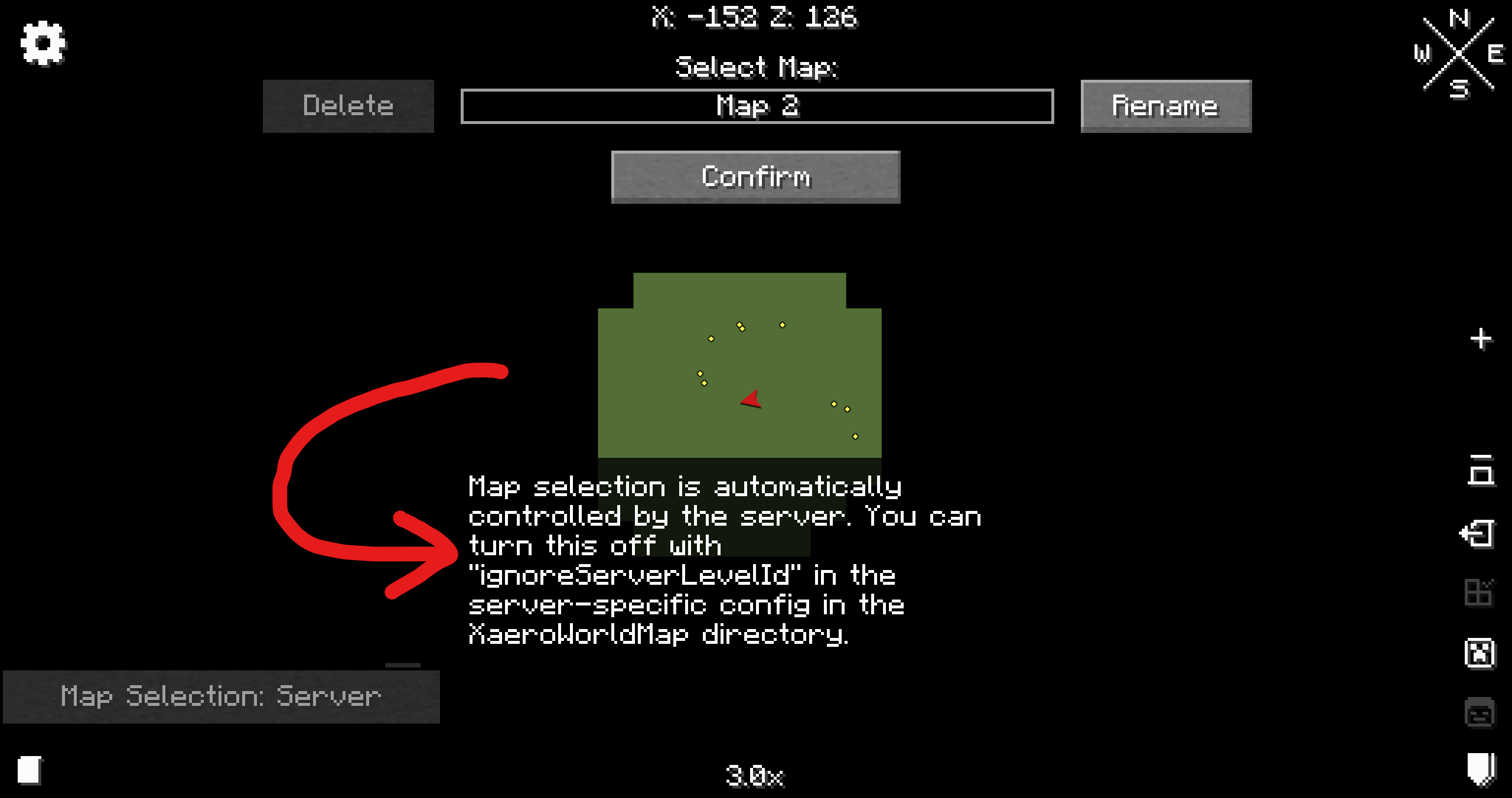
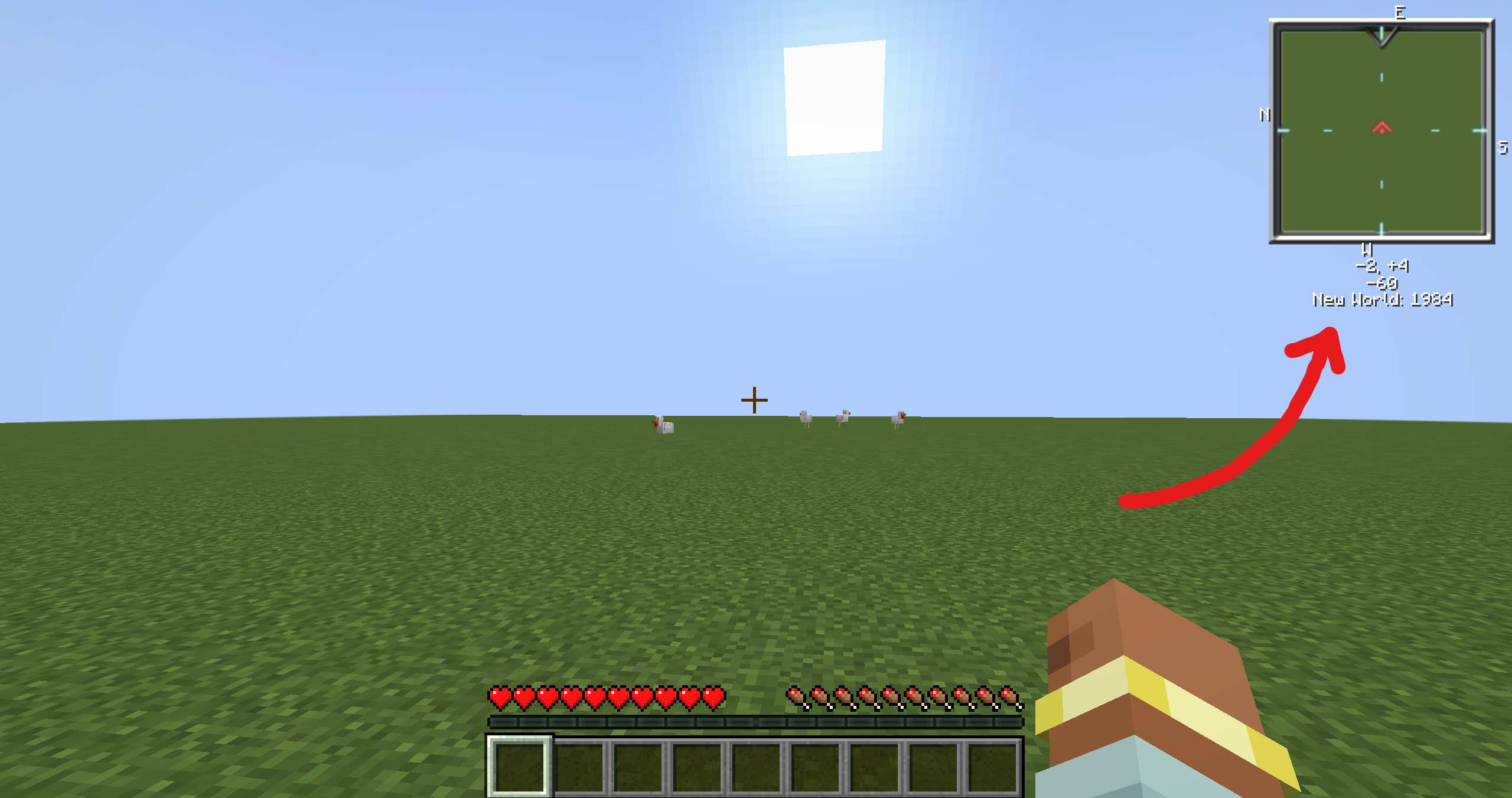
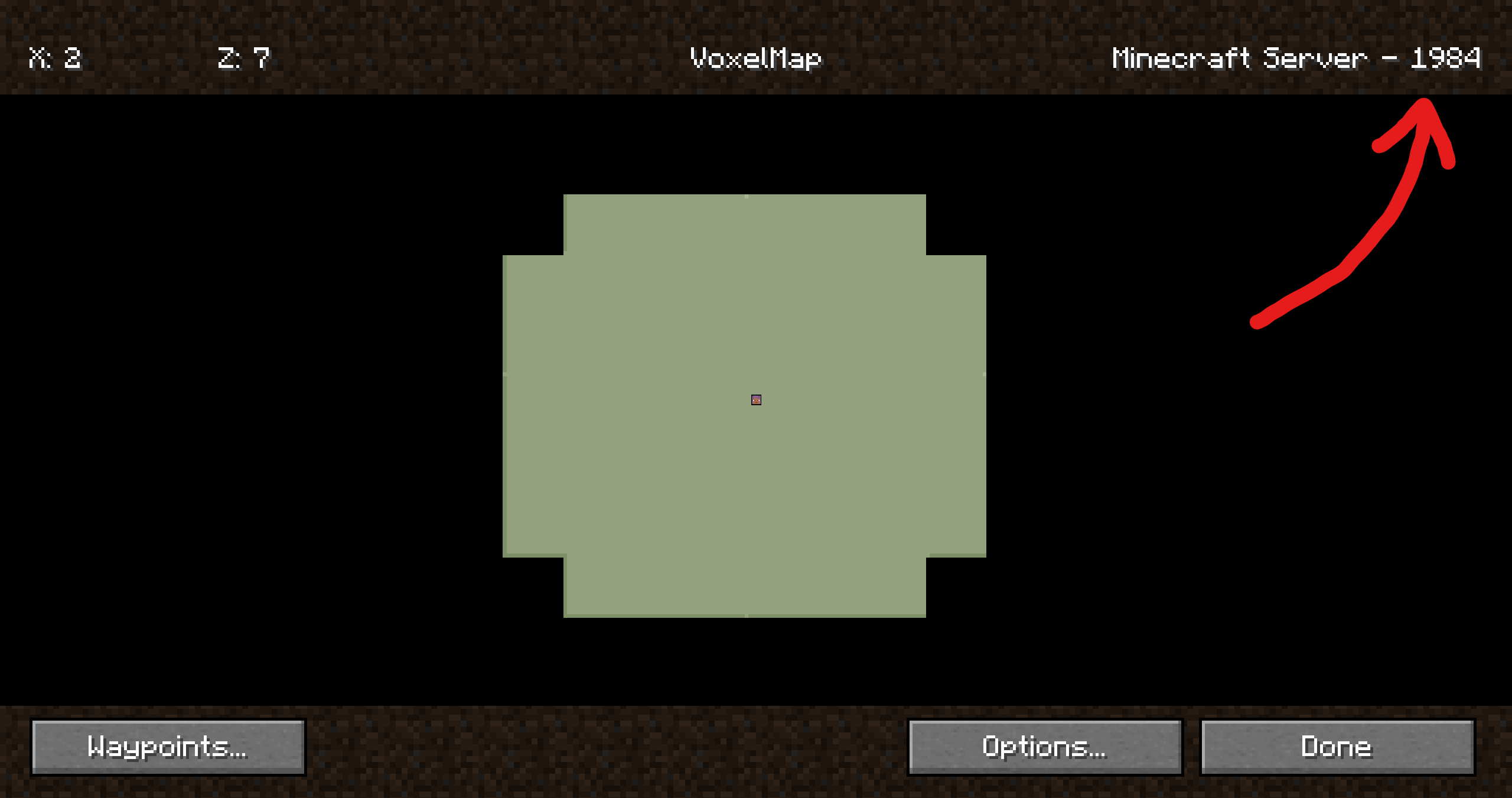
How it should look like
| Mod | Screenshot |
| —-|————|
| Xaero’s World Map | |
| VoxelMap | |
| Xaero’s Minimap | See Xaero’s WorldMap |
| JourneyMap | It just works 😄 |
Companion plugin for
[Xaero’s Minimap]
(and their [World Map][Xaero’s World Map]),
[JourneyMap] and
VoxelMap (both [old][VoxelMap (old)] and [updated][VoxelMap-Updated]).
Provides a way for these mods to identify worlds on BungeeCord/Velocity servers.
It’s recommended to install this plugin on a fresh server, otherwise **existing map data**
(waypoints, map cache, etc.) **may no longer be visible to some players**. Fortunately,
[there are ways to restore it](https://github.com/turikhay/MapModCompanion/wiki/Restore-map-data).
It’s worth mentioning that the plugin doesn’t affect in-game progress.
This plugin was inspired by @kosma’s [worldnamepacket],
which supported Velocity, Fabric and Spigot at the time of writing.
If you have any questions, please [join my Discord][Discord].
[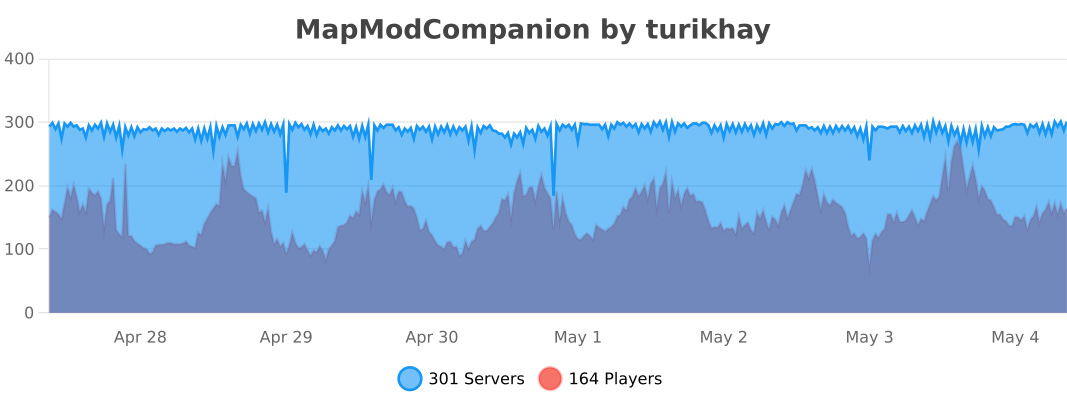](https://bstats.org/plugin/bukkit/MapModCompanion/16539 “MapModCompanion on bStats”)
[Folia](https://papermc.io/software/folia) is supported, but isn’t tested thoroughly. Please report if the support is broken.
## Installation
ℹ️ Plugin must be installed on every downstream (backend) server in your network. Simply installing it on the proxy side (BungeeCord/Velocity) isn’t enough. To ensure compatibility, you need to install the plugin on both the proxy server (BungeeCord/Velocity) and each of the backend servers (Spigot/Paper).
1. Download the latest release
2. Put each file into the corresponding plugins folder
3. That’s it. No configuration is required. You can restart your servers now.
## Configuration
The configuration file is stored at `plugins/MapModCompanion/config.yml` for both Spigot and BungeeCord.
Velocity uses `plugins/mapmodcompanion/config.toml`.
The configuration file reloads automatically if it’s modified.
# modl – support & moderation reimagined
Streamline administrative duties with AI, dynamic punishments, and a slick web-interface.
### Description
modl is a modern solution to completely streamline moderation and support for your Minecraft server. The system is fully customizable, free to use, and open-sourced under the AGPL-3.0 license. Stay in control of your server from anywhere with our web-interface at https://modl.gg. Use AI to automatically handle chat reports. Simplify punishments through dynamic punishment types powered by points and severities.
**Free forever** and completely branded for your server – your players and staff will not see any modl.gg branding (assuming you enable custom domain).
modl can run natively on **Spigot, PaperSpigot, Folia, BungeeCord, and Velocity**, without feature degradation on any platform.
## Features
#### 3rd Iteration Punishment System
Designed to fairly and consistently sanction players whilst maintaining moderator discretion.
– Fully customizable **point system** to designate low, medium, and habitual designations for both Gameplay and Social offenses
– Fully customizable punishment durations for each **severity** (lenient, normal, severe) and each **offender status** (low, medium, habitual)
– Issue punishments for bad usernames and skins that **automatically pardon** when a player changes his/her skin/username.
– Ability to make a ban “stat-wiping” that issues a command on the server upon _expiration_ to reset stats (not executed when pardoned or cancelled)
– Full modification system for **changing durations** and **pardoning** (remove points)
– Full evidence system for **uploading files** and linking to other sites (YouTube, Imgur, etc)
– 8-char alphanumeric ID system for streamlined appeal system, staff see all punishment details and can pardon/change duration without leaving the page. **Customize** the appeal page for each different punishment type
– Bans on offline players wait until a successful login to start the expiration countdown.
– Stack multiple bans/mute that execute **consecutively** (one after the other becomes inactive) – start time is when the player attempts to login unimpeded by other bans/mutes.
– Traditional, manual punishments also exist (ban, tempban, mute, tempmute, kick, blacklist)
– Import all bans, mutes, and player data (IPs) from **LiteBans** seamlessly
#### Full Player Profiles and Smart Alt-account Linking
– See player info (playtime, session details, country), notes, history, alts, reports in sleek in-game and web UIs (windows for many open players on web).
– **Link accounts** that have the same non-proxy IP logins OR have the shared proxy logins within 2 hours of each other. This system tracks logins even if denied by a banned screen, allowing you to link accounts whenever a **bad actor** screws up and attempts to login on a banned account (to check) before logging into their ban evading account.
– Handle each linked ban **independently**- was there a mistake? Public internet or sibling? Easily handle the linked ban on a specific account without changing the initial ban.
– Linked bans expire when the original ban expire automatically.
– Automatically **snapshot** full context chat-logs when someone is chat-reported.
– Allow players to **upload files** or link external evidence to all reports.
– Issue punishments from reports without leaving the ticket page.
– Link tickets to punishments that will auto-close the ticket and send a response letting the reporter know the offender was punished. Also can be used as evidence when hooked up to [modl-anticheat-bridge](https://github.com/modl-gg/minecraft-anticheat-bridge/releases) (Anti-cheat automatically creates reports based on flags)
– You can sort online players by number of reports to identify potential rule breakers across your network.
– Audit and **rollback** any staff punishment actions.
– See statistics on average ticket response times and **staff activity** (ticket responses, punishments issued, etc)
– See **trends** for different types of punishments and ticket data.
– Manage all files uploaded (evidence, ticket attachments): easily view, search, filter, delete, and download all files.
– To not pester players and use excessive tokens, AI chat moderation **only scans messages that are chat-reported**. This is the most effective way of moderating chat as current systems that analyse all messages issuing auto-mutes are incredibly annoying for players and expensive.
– Constantly evolving system prompts to improve **accuracy** of AI auto-mod, is context-aware of Minecraft (e.g: “i’m going to kill you with a fireball” is a game term, not an IRL death threat).
– Configure AI to look for specific things and execute punishments **automatically** or make suggestions for staff approval.
#### Support One-Stop-Shop: Use **your own domain** (recommended: support.yourserver.com)
– **Fully customizable** knowledgebase homepage with logo, external link, and sections
– Searchable markdown article support, write **your** rules, guidelines, and support articles with ease.
– Create fully **custom forms** for bug reports, support tickets, and staff applications: reveal hidden sections based on answer to multiple-choice questions.
– Customizable **quick-response buttons** to significantly streamline efficiency and keep responses consistent.
– Send in-game and email **notifications** for when staff respond to a player’s ticket.
– We use browser cookies to verify that responses in tickets are the same as the initial responder.
– Staff members are automatically **subscribed** to tickets they respond in and can easily track updates to those tickets in their home feed.
– Invite your staff team and fully customize their **roles** and permissions (permission nodes for each punishment type)
– Set each staff member’s Minecraft account so that permissions and punishments are **synced** between panel and in-game.
– Make modl yours: upload a custom logo, favicon, homepage image, and set your custom domain.
– Everything is fully **customizable**, from Minecraft plugin locale to ticket forms and punishment types.
### Requirements
1. Java 8+
2. Working internet connection
3. Any version Spigot, PaperSpigot, Folia, BungeeCord, or Velocity
### Installation
1. Register your server at https://modl.gg
2. Go to your panel’s settings and find your API key under “Server & Billing” **>** “Server Config”.
3. Drop **modl-(version).jar** into your /plugins directory (Install on all Spigot servers and your proxy if you run a network. Run Spigot modl instances in bridge mode if so.)
4. Restart your server and wait for **/plugins/modl/config.yml** to generate, once it does input your API key and panel URL then restart
5. Done!
**Showcase & Installation Video (outdated – view docs installation guide):**
**For support, please join our [discord server](https://modl.gg/discord) or open an [issue on GitHub](https://github.com/modl-gg/issue-tracker/issues). If you encounter any issues or bugs, please report them :)**
MiraiMC
MiraiMC
[](https://github.com/DreamVoid/MiraiMC/releases/latest)
[](https://www.codefactor.io/repository/github/dreamvoid/miraimc)
[](https://github.com/DreamVoid/MiraiMC/actions/workflows/maven.yml?query=is%3Asuccess)

—
MiraiMC is a [mirai](https://github.com/mamoe/mirai) bot for Minecraft servers
> Mirai is a high-performance multi-platform library, as well as a framework, providing protocol support for Tencent QQ.
> Mirai is designed to handle all sorts of messaging works that can be automatically done by bots in a perfect way.
> Tencent QQ: A modern messaging software used by all Chinese netizens.
## Features
* Support Bukkit/Sponge servers.
* Support BungeeCord/Velocity proxies.
* Optimized for GUI-less OS such as Linux
* Dynamically load dependent libraries to minimize file size.
## Getting Started (Server)
1. Download MiraiMC from “Featured versions” part. Then install it like installing other plugins.
2. Configure any plugins’ that depend on MiraiMC (if any) and login to your bot account
A more detailed tutorial can be found here: https://docs.miraimc.dreamvoid.me/
## Getting Started (Plugin Developer)
* It is simple to develop a new MiriMC-based plugin by using template:
– [Maven](https://github.com/MiraiMC/MiraiMC-Template)
– [Gradle KotlinDSL](https://github.com/MiraiMC/MiraiMC-Template-Gradle-KotlinDSL)
* MiraiMC javadoc here: https://jd.miraimc.dreamvoid.me
* Detailed development tutorial here: https://docs.miraimc.dreamvoid.me/
## Commands and permissions
### Commands
| Command | Description | Permissions |
| —- | — | —- |
| /mirai | MiraiMC Robot Command | miraimc.command.mirai |
| /mirai login [protocol] | Log in to a robot (you can execute this command multiple times to log in to multiple robots) | miraimc.command.mirai.login |
| /mirai logout | Log out and close a bot | miraimc.command.mirai.logout |
| /mirai list | List currently online bots | miraimc.command.mirai.list |
| /mirai sendfriendmessage | Send a message to a specified friend | miraimc.command.mirai.sendfriendmessage |
| /mirai sendfriendnudge | Send a stamp to a specified friend | miraimc.command.mirai.sendfriendnudge |
| /mirai sendgroupmessage | Send a message to the specified group | miraimc.command.mirai.sendgroupmessage |
| /mirai checkonline | Check if the specified robot is online | miraimc.command.mirai.checkonline |
| /mirai autologin add [protocol] | Add an autologin robot account | miraimc.command.mirai.autologin |
| /mirai autologin remove | Remove an autologin bot account | miraimc.command.mirai.autologin |
| /mirai autologin list | View autologin robot account list | miraimc.command.mirai.autologin |
| /miraimc | MiraiMC Plugin Command | miraimc.command.miraimc |
| /miraimc bind add | Add binding for player and QQ number | miraimc.command.miraimc.bind |
| /miraimc bind getplayer | Get the QQ number bound to the specified player name | miraimc.command.miraimc.bind |
| /miraimc bind getqq | Get the player name bound to the specified QQ number | miraimc.command.miraimc.bind |
| /miraimc bind removeplayer | Removes a player’s bind | miraimc.command.miraimc.bind |
| /miraimc bind removeqq | Delete the binding of a QQ number | miraimc.command.miraimc.bind |
| /miraimc reload | Reload configuration file | miraimc.command.miraimc.reload |
### Permissions
| Permission Node | Description | Default |
| ——- | —- | —- |
| miraimc.command.mirai | Allow use of `/mirai` | OP |
| miraimc.command.mirai.* | Allow all subcommands of `/mirai` | OP |
| miraimc.command.mirai.login | Allow `/mirai login` | OP |
| miraimc.command.mirai.logout | Allow `/mirai logout` | OP |
| miraimc.command.mirai.list | Allow `/mirai list` | OP |
| miraimc.command.mirai.sendfriendmessage | Allow `/mirai sendfriendmessage` | OP |
| miraimc.command.mirai.sendfriendnudge | Allow `/mirai sendfriendnudge` | OP |
| miraimc.command.mirai.sendgroupmessage | Allow `/mirai sendgroupmessage` | OP |
| miraimc.command.mirai.checkonline | Allow `/mirai checkonline` | OP |
| miraimc.command.mirai.autologin | Allow `/mirai autologin` | OP |
| miraimc.command.miraimc | Allow use of `/miraimc` | OP |
| miraimc.command.miraimc.* | Allow all subcommands of `/miraimc` | OP |
| miraimc.command.miraimc.bind | Allow `/miraimc bind` and subcommands | OP |
| miraimc.command.miraimc.reload | Allow `/miraimc reload` | OP |
## LICENSE
[GNU Affero General Public License v3.0](https://github.com/DreamVoid/MiraiMC/blob/main/LICENSE)
## Acknowledgments
Thanks to the following people/teams/projects for their contributions to MiraiMC!
* [mamoe/mirai](https://github.com/mamoe/mirai): Powerful QQ robot support library, the core and foundation of MiraiMC.
* [lucko/helper](https://github.com/lucko/helper): Provide MiraiMC with a solution to dynamically load the mirai core.
* [brettwooldridge/HikariCP](https://github.com/brettwooldridge/HikariCP): An efficient SQL connection pool, providing database connection solutions for MiraiMC.
* [LT_Name](https://github.com/lt-name): Optimized a lot of Nukkit code for MiraiMC, also provided a lot of help for MiraiMC.
* You.
[DreamVoid](https://github.com/DreamVoid) and [MiraiMC](https://github.com/MiraiMC), made with ❤.
This file is a translated version of the [original file](https://github.com/DreamVoid/MiraiMC/blob/main/README.md), and some semantics may differ from the original file.
MiniMOTD

### MiniMOTD is a basic server list MOTD plugin/mod for Minecraft servers and proxies
– MiniMOTD supports RGB colors and gradients through [MiniMessage](https://github.com/KyoriPowered/adventure-text-minimessage), which is also where MiniMOTD gets it’s name.
– For more detailed info on formatting text, refer to the [MiniMessage docs](https://docs.adventure.kyori.net/minimessage.html).
– RGB colors are automatically downsampled for outdated clients.
– Requires [Fabric API](https://modrinth.com/mod/fabric-api)
#### Downloads
Downloads can be obtained from [GitHub releases](https://github.com/jpenilla/MiniMOTD/releases). There is a separate jar for each platform, as well as a universal jar for all platforms. Paper and Spigot share the same jar, as do Waterfall and Bungeecord.
#### Configuration
See the [wiki](https://github.com/jpenilla/MiniMOTD/wiki) for configuration details
Minecraft Server Management Protocol Legacy Support
# Minecraft Server Management Protocol Legacy Support
Adds a Minecraft Server Management Protocol endpoint to server software that does not provide Mojang’s native implementation.
The Minecraft Server Management Protocol is the newer management API for Minecraft servers. It exposes server information and management actions through JSON-RPC over WebSocket, instead of relying on older mechanisms such as server-list ping or RCON. This plugin brings that protocol shape to older server versions and proxy environments so external tools can speak one management protocol across mixed infrastructure.
## What it provides
– A WebSocket endpoint for Minecraft Server Management Protocol clients.
– JSON-RPC request and response handling compatible with the protocol model documented on the Minecraft Wiki.
– Discovery through `rpc.discover`, so clients can inspect which methods are available.
– Server/proxy status support, including online player list and version information.
– Management operations for Bukkit-based servers, including players, allowlist, bans, operators, selected server settings, gamerules, save, stop, and system messages.
– Proxy management operations for Velocity and BungeeCord, including players, kick, status, stop, and system messages.
– Authentication by shared secret, with browser-origin checks for WebSocket subprotocol authentication.
– Optional TLS using a PKCS12 keystore.
| Platform | Status |
| — | — |
| Spigot / Paper | Main supported runtime. Built against the Spigot 1.8.8 API for legacy compatibility. |
| Velocity | Proxy runtime support for discovery, players, kick, proxy status, proxy stop, system messages, and proxy/player notifications. |
| BungeeCord | Proxy runtime support for discovery, players, kick, proxy status, proxy stop, system messages, and proxy/player notifications. |
For legacy SpaceChunks usage, install the Spigot/Paper build on the backend server when you need live server status and online player counts from old Minecraft versions.
## Supported Methods
| Method group | Spigot / Paper | Velocity | BungeeCord |
| — | — | — | — |
| `rpc.discover` | yes | yes | yes |
| `minecraft:players` | yes | yes | yes |
| `minecraft:players/kick` | yes | yes | yes |
| `minecraft:server/status` | yes | yes, proxy status | yes, proxy status |
| `minecraft:server/stop` | yes | yes, stops proxy | yes, stops proxy |
| `minecraft:server/system_message` | yes | yes, proxy players | yes, proxy players |
| `minecraft:server/save` | yes | no | no |
| `minecraft:allowlist/*` | yes | no | no |
| `minecraft:bans/*` | yes | no | no |
| `minecraft:ip_bans/*` | yes | no | no |
| `minecraft:operators/*` | yes | no | no |
| `minecraft:serversettings/*` | partial | no | no |
| `minecraft:gamerules/*` | yes | no | no |
Spigot/Paper server settings are limited to APIs available through the Spigot 1.8.8 API. Implemented settings are `autosave`, `difficulty`, `use_allowlist`, `player_idle_timeout`, `allow_flight` read-only, `motd` read-only, `spawn_protection_radius`, `game_mode`, and `view_distance` read-only.
## Supported Notifications
| Notification group | Spigot / Paper | Velocity | BungeeCord |
| — | — | — | — |
| `minecraft:notification/server/started` | yes | yes | yes |
| `minecraft:notification/server/stopping` | yes | yes | yes |
| `minecraft:notification/server/status` | yes | yes | yes |
| `minecraft:notification/server/activity` | yes | yes | yes |
| `minecraft:notification/players/joined` | yes | yes | yes |
| `minecraft:notification/players/left` | yes | yes | yes |
| `minecraft:notification/server/saving` | yes | no | no |
| `minecraft:notification/server/saved` | yes | no | no |
| `minecraft:notification/allowlist/*` | management API changes only | no | no |
| `minecraft:notification/bans/*` | management API changes only | no | no |
| `minecraft:notification/ip_bans/*` | management API changes only | no | no |
| `minecraft:notification/operators/*` | management API changes only | no | no |
| `minecraft:notification/gamerules/*` | management API changes only | no | no |
## Configuration
The service is disabled by default. Enable it only after setting a secret and deciding where it should listen.
Velocity and BungeeCord create `management-server.properties` in the plugin data folder with the same setting names.
### Settings
– `management-server-enabled`: Starts or disables the management endpoint.
– `management-server-host`: Interface to bind. Use `localhost` when only local tooling or a reverse proxy should connect.
– `management-server-port`: Port for the WebSocket server. Use a fixed port for production.
– `management-server-secret`: Required shared secret. It must be exactly 40 alphanumeric characters.
– `management-server-allowed-origins`: Comma-separated list of allowed browser origins when authenticating through `Sec-WebSocket-Protocol`.
– `management-server-tls-enabled`: Enables `wss://`. Requires a valid keystore.
– `management-server-tls-keystore`: Path to a PKCS12 keystore.
– `management-server-tls-keystore-password`: Keystore password. It can also be supplied through `MINECRAFT_MANAGEMENT_TLS_KEYSTORE_PASSWORD` or the JVM property `management.tls.keystore.password`.
## License
Licensed under the Apache License, Version 2.0. See [LICENSE](LICENSE).
MineCord Link
# MineCord Link
MineCord Link is a Minecraft plugin that links your Minecraft server to Discord, enabling seamless communication between the two platforms.
## Features
– Connect your Minecraft server chat with a Discord channel
– Send Minecraft server events to Discord:
– Player join/leave notifications
– Player death messages
– Player advancement achievements
– Execute Minecraft commands from Discord
– Share player coordinates between Minecraft and Discord
– Automatic plugin updates
– Cross-chat toggle to enable/disable chat synchronization
– Display online players list in Discord
– Server start/stop notifications in Discord
– Customizable bot activity status
– Link Minecraft and Discord accounts
## Commands
### Minecraft Commands
– `/mcl reload` – Reloads the plugin configuration (requires `minecordlink.reload` permission)
– `/mclcoords [location name]` – Share your current coordinates in the game and Discord
– `/mcllinkdiscord [code]` – Generate or enter a code to link your Minecraft account to Discord
– `/mcltogglelistener ` – Toggle individual listeners on or off (requires `minecordlink.togglelistener` permission)
### Discord Commands
– `/ping` – Responds with “Pong!” to check if the bot is active
– `/admin ` – Executes a Minecraft server command (only for authorized users)
– `/setup` – Sets up the bot for the current server and channel (requires Discord Administrator permission)
– `/players` – Displays a list of online players
– `/crosschat` – Toggles the crosschat feature on or off (only for authorized users)
– `/linkminecraft [code]` – Link your Discord account to your Minecraft account or generate a link code
MineAds Monitor
# MineAds Monitor Plugin
We at MineAds provide this plugin to help Minecraft server owners integrate their servers with our analytics platform. It automatically tracks server activity like player joins, leaves, chat, and commands, then sends this data to us for analysis.
## What We Use It For
As a server analytics platform, we collect data from servers that sign up their networks with us. We use this information to provide detailed analytics to server owners, helping them understand player behavior, optimize their servers, and improve their community’s experience. This data also helps us enhance our platform’s insights.
## Setup Instructions
1. Download the plugin JAR file that matches your server type (Bukkit/Spigot/Paper, BungeeCord, or Velocity).
2. Place the JAR in your server’s plugins folder.
3. Restart your server to generate the config file.
4. Open the `config.yml` file in your plugins/MineAdsMonitor folder.
5. Add your unique plugin key from the MineAds dashboard (it starts with “pluginkey_”).
6. Set a server ID like “survival-main” to identify this server.
7. Save the file and restart the server again.
## Configuration Options
The plugin uses a simple YAML format for its settings. Here’s what each option does:
– **pluginKey**: Your special key from MineAds that links your server to their system. You get this from their website.
– **serverId**: A name for your server, like “creative-hub” or “pvp-arena”, using only letters, numbers, and dashes.
– **enabledEvents**: Choose which types of player activities to track. By default, it tracks everything: purchases, chat, commands, joins, and leaves.
– **disableChatContent**: Turn this on if you don’t want the actual words players type in chat to be sent (only that they chatted).
– **defaultMaxCommandArgs**: How many parts of a command to record. For example, “/warp home” would save 1 part (just “warp”) by default.
– **commandArgLimits**: Set different limits for specific commands, like allowing more details for “/warp” commands.
– **debug**: Turn this on to see extra messages in the server console for troubleshooting.
## Commands
The plugin includes commands for server admins (you need the “mineadsmonitor.admin” permission):
– **/mineadsmonitor help**: Shows all available commands.
– **/mineadsmonitor version**: Tells you what version of the plugin you’re running.
– **/mineadsmonitor reload**: Reloads the config file without restarting the server.
– **/mineadsmonitor initial/expiry/renewal/chargeback/refund** [details]: Manually record purchase-related events (like when someone buys or loses a rank).
## Performance and Lag Prevention
To keep your server running smoothly, the plugin is designed to be very lightweight:
– It collects data in the background without slowing down gameplay.
– Instead of sending data immediately, it groups events together and sends them in batches every 10 seconds.
– All network requests happen on separate threads, so they never interrupt your server’s main operations.
– Data is compressed before sending to use less bandwidth.
– If there are connection problems, it automatically retries with smart delays to avoid overwhelming your server.













 |
|
 |
|