VersionTinmoli
# VersionTinmoli
> **Version**: 1.0.2
> **Supported Platforms**: Velocity 3.0+ | BungeeCord 1.16+ | Bukkit/Spigot/Paper 1.20.1+
A lightweight Minecraft proxy/server plugin for customizing the version name displayed in the server list, with rich color and formatting support.
[中文文档](README_CN.md) | [English Documentation](README.md)
—
## Table of Contents
– [Features](#features)
– [Supported Platforms](#supported-platforms)
– [Quick Start](#quick-start)
– [Color Support](#color-support)
– [Commands](#commands)
– [Configuration](#configuration)
– [FAQ](#faq)
– [Changelog](#changelog)
—
## Features
– **Colored Version Names** – Velocity supports MiniMessage format (RGB, gradients, rainbow), BungeeCord/Bukkit support legacy color codes
– **Rich Formatting** – Bold, italic, underline, strikethrough support
– **Hot Reload** – Reload configuration with `/vt reload` command
– **Dynamic Modification** – Instantly modify version name with `/vt md ` command
– **Simple Configuration** – YAML configuration file
– **Lightweight** – No performance impact
– **Auto Fallback** – Compatible with older client versions
– **Multi-language** – Supports English and Chinese
—
## Supported Platforms
| Platform | Version | Java Version | Status |
|———-|———|————–|——–|
| Velocity | 3.0+ | Java 21+ | Fully Supported |
| BungeeCord | 1.16+ | Java 17+ | Fully Supported |
| Bukkit/Spigot | 1.20.1-1.21.11 | Java 17+ | Requires newer version |
| Paper | 1.20.1-1.21.11 | Java 17+ | Fully Supported |
—
## Quick Start
### Installation
1. Download the JAR file for your platform from [Releases](https://github.com/Tinmoli/VersionTinmoli/releases)
2. Place the JAR file in your server’s `plugins/` directory
3. Restart the server
4. Edit the configuration file (auto-generated)
5. Use `/vt reload` to reload the configuration
### Configuration File Location
– **Velocity**: `plugins/versiontinmoli/config.yml`
– **BungeeCord**: `plugins/VersionTinmoli/config.yml`
– **Bukkit**: `plugins/VersionTinmoli/config.yml`
—
## Color Support
### Velocity – MiniMessage Format
“`yaml
# Named colors
version_name: “Velocity 1.8-1.21”
# RGB colors (1.16+)
version_name: “<#FF5555>Red <#55FF55>Green”
# Gradient effects
version_name: “Rainbow Server”
# Rainbow effects
version_name: “Rainbow Server”
# Style combinations
version_name: “VIP | Online”
“`
**Available Colors**: ``, ``, ``, ``, ``, ``, ``, ``, ``, ``, ``
**Available Styles**: ``, ``, ``, ``
—
### BungeeCord/Bukkit – Legacy Color Codes
“`yaml
# Basic colors
version_name: “&6BungeeCord &71.8-1.21”
# With formatting
version_name: “&l&6VIP Server&r &7| &a1.8-1.21”
# Multi-color combinations
version_name: “&cRed &6Gold &eYellow &aGreen”
“`
**Color Codes**: `&0`-`&9`, `&a`-`&f` (black, dark blue, dark green, dark aqua, dark red, purple, gold, gray, dark gray, blue, green, aqua, red, pink, yellow, white)
**Format Codes**: `&l` (bold), `&m` (strikethrough), `&n` (underline), `&o` (italic), `&r` (reset)
—
### Client Compatibility
| Client Version | Supported Colors |
|—————-|——————|
| 1.16+ | Full RGB colors |
| 1.7-1.15 | 16 named colors |
| < 1.7 | Basic colors |
---
## Commands
| Command | Permission | Description |
|---------|------------|-------------|
| `/vt` | `versiontinmoli.admin` | Show plugin information |
| `/vt reload` | `versiontinmoli.admin` | Reload configuration file |
| `/vt md ` | `versiontinmoli.admin` | Modify version name |
**Permission Notes**: Velocity/BungeeCord require `versiontinmoli.admin` permission, Bukkit defaults to OP
—
## Configuration
### Basic Configuration
“`yaml
# VersionTinmoli Configuration File
# Customize the version name displayed in the server list
# Language setting (en_US or zh_CN)
language: “en_US”
# Version name configuration
version_name: “Velocity 1.8.x-1.21.11”
“`
### Language Settings
The plugin supports multiple languages. You can set the language in the configuration file:
– `en_US` – English
– `zh_CN` – Simplified Chinese
After modifying the `language` field, use `/vt reload` to reload the configuration and switch languages. All command messages and prompts will be displayed in the corresponding language.
### Language File Customization
Language files are automatically copied to the external directory on first run:
– **Velocity**: `plugins/versiontinmoli/lang/`
– **BungeeCord**: `plugins/VersionTinmoli/lang/`
– **Bukkit**: `plugins/VersionTinmoli/lang/`
You can edit these files to customize messages. The plugin will load from the external directory first, then fall back to the built-in files.
### Configuration Examples
**Regular Server**
“`yaml
# Velocity
version_name: “Minecraft 1.8-1.21”
# BungeeCord/Bukkit
version_name: “&6Minecraft &71.8-1.21”
“`
**VIP Server**
“`yaml
# Velocity
version_name: “VIP Server”
# BungeeCord/Bukkit
version_name: “&l&6VIP Server”
“`
**Minigames Server**
“`yaml
# Velocity
version_name: “MiniGames | Online”
# BungeeCord/Bukkit
version_name: “&cM&6i&en&ai&9G&ba&dm&5e&cs &f| &aOnline”
“`
**PVP Server**
“`yaml
# Velocity
version_name: “PVP | Fighting”
# BungeeCord/Bukkit
version_name: “&l&cPVP &r&7| &eFighting”
“`
—
## FAQ
### Migrating from TOML to YAML
If you’re upgrading from an older version (before v1.0.2), you need to migrate your configuration from TOML format to YAML format.
**Automatic Migration (Recommended):**
1. Backup your `config.toml` file
2. Delete the `config.toml` file
3. Restart the server or run `/vt reload`
4. The plugin will automatically create a new `config.yml` file
5. Edit `config.yml` and set your custom version name
**Manual Migration:**
TOML format (old):
“`toml
version_name = “My Server 1.20”
“`
YAML format (new):
“`yaml
version_name: “My Server 1.20”
“`
Main difference: Use colon `:` instead of equals sign `=`
### Configuration Not Working
1. Ensure the configuration file is in the correct location
2. Check YAML syntax is correct
3. Use `/vt reload` to reload configuration
4. If still not working, restart the server
### Colors Not Displaying or Showing as Text
**Problem**: RGB color codes display as text like `Red Green`
**Cause**: Using incorrect closing tags ``
**Solution**:
“`yaml
# Wrong
version_name: “<#FF5555>Red <#55FF55>Green”
# Correct
version_name: “<#FF5555>Red <#55FF55>Green”
version_name: “Red Green”
“`
**Other Color Issues**:
1. **Velocity**: Use MiniMessage format `text`
2. **BungeeCord/Bukkit**: Use `&` or `§` color codes
3. RGB colors require Minecraft 1.16+ client
4. Check server logs for errors
### Platform-Specific Requirements
1. **Velocity**: Requires Velocity 3.0+ and Java 21+
2. **BungeeCord**: Requires BungeeCord 1.16+ and Java 17+
3. **Bukkit**: Requires Minecraft 1.20.1+ and Java 17+
—
## License
This project is licensed under the MIT License.
## Support
For issues or suggestions, please submit them on [GitHub Issues](https://github.com/Tinmoli/VersionTinmoli/issues).
—
**Documentation Version**: 1.0.2
**Maintainer**: Tinmoli
Version Blocker
**Version Blocker – Keep Your Server Safe from Wrong Game Versions**
**Description:**
– Version Blocker is a Velocity proxy plugin that ensures only players with the allowed Minecraft version can connect to your servers. It checks each player’s game version and:
–
– Blocks unsupported versions from accessing your Paper servers.
–
– Displays a custom message when a player’s version is incorrect.
–
– Ensures a smooth experience by preventing incompatible clients from joining.
**Key Features:**
– Enforce a single allowed game version.
– Customizable rejection message.
– Simple configuration and setup.
List of MC protocol : https://minecraft.wiki/w/Minecraft_Wiki:Projects/wiki.vg_merge/Protocol_History
_**This is a very lightweight and simplistic plugin. No support or feature requests are available.**_
Version Separator
# Version separator
A Velocity plugin that separates players to different servers based on game version when connecting to the server.
## Configuration
The plugin uses TOML as the language of config file.
The key should be the protocol version, and the value should be the name of a registered server in `velocity.toml`.
### Example
“`toml
[servers]
763 = “modded”
767 = “latest-surv”
“`
This connects newly-joined player to `modded` server if using 1.20 or 1.21,
and connects to `latest-surv` server if using 1.21 or 1.21.1.
VerifyMC-Proxy
VerifyMC-Proxy is a companion plugin for VerifyMC that runs on your BungeeCord/Waterfall or Velocity proxy server. It intercepts player logins and verifies whitelist status via the VerifyMC backend API before allowing players to connect to your backend servers.
Features:
– Support for both BungeeCord/Waterfall and Velocity
– Real-time whitelist verification via HTTP API
– Customizable kick messages
– Multi-language support (English/Chinese)
– Auto-update configuration from remote
velostat
This plugin provides a lightweight HTTP API that exports the real-time status of all Velocity backend servers in JSON format.
Exported fields are fully configurable via `plugins/velostat/config.yml`, allowing safe public exposure.
The game version is for all versions supported by Velocity 3.4.0-SNAPSHOT as it is added to the proxy server only. The game version must be specified and is specified, but see the [Server compatibility](https://docs.papermc.io/velocity/server-compatibility/) for details.
– – –
# Installation
1. Download the latest release of the plugin
2. Put `velostat-x.x.jar` in /plugins directory of velocity
This completes the process!
– – –
# Config reference
| Setting name | Description | Default |
|:—————————|:———————————————————————————–|:——–|
| `api.port` | The port number for the internal HTTP server to listen on. | `8080` |
| `ping.interval_seconds` | The interval (in seconds) at which the plugin pings sub-servers to collect status. | `10` |
| `export.server.name` | Whether to include the server name (defined in Velocity) in the JSON output. | `true` |
| `export.server.address` | Whether to include the server address in the JSON output. | `true` |
| `export.server.status` | Whether to include the online/offline status in the JSON output. | `true` |
| `export.server.motd` | Whether to include the server’s MOTD (Message of the Day) in the JSON output. | `true` |
| `export.server.players` | Whether to include player counts (online/max) in the JSON output. | `true` |
| `export.server.version` | Whether to include the game version name and protocol version in the JSON output. | `true` |
| `export.server.updated_at` | Whether to include the last update timestamp in the JSON output. | `true` |
– – –
# Example Json output
Accessing `http://:/status` will return data with a `Content-Type: application/json`.
### FULL data
“`json
{
“lobby”: {
“name”: “lobby”,
“address”: “127.0.0.1:25565”,
“online”: true,
“motd”: “Welcome to the Lobby!”,
“players”: {
“online”: 12,
“max”: 100
},
“version”: {
“name”: “Paper 1.21.1”,
“protocol”: 767
},
“updated_at”: 1704681000000
},
“survival”: {
“name”: “survival”,
“address”: “127.0.0.1:25566”,
“online”: false,
“motd”: null,
“players”: {
“online”: 0,
“max”: 0
},
“version”: null,
“updated_at”: 1704681000000
}
}
“`
### Configured data
“`json
{
“lobby”: {
“name”: “lobby”,
“online”: true,
“motd”: “Welcome to the Lobby!”,
“players”: {
“online”: 12,
“max”: 100
},
“updated_at”: 1704681000000
},
“survival”: {
“name”: “survival”,
“online”: false,
“motd”: null,
“players”: {
“online”: 0,
“max”: 0
},
“updated_at”: 1704681000000
}
}
“`
## Field Description
### Root Object
| Field | Type | Description |
|———–|———|——————————————–|
| `servers` | `array` | List of servers defined in `velocity.toml` |
—
### Server Object
| Field | Type | Description |
|:————:|:———:|:——————————————————————|
| `name` | `string` | Server name defined in `[servers]` section of `velocity.toml` |
| `address` | `string` | Server address (`host:port`) |
| `online` | `boolean` | Whether the server responded to a ping |
| `motd` | `string` | Server MOTD (may contain legacy color codes) |
| `players` | `object` | Player information (only present if enabled and server is online) |
| `version` | `object` | Minecraft version information |
| `updated_at` | `number` | Last update timestamp(UNIX time) |
—
### Players Object
| Field | Type | Description |
|:——–:|:——–:|———————————-|
| `online` | `number` | Current number of online players |
| `max` | `number` | Maximum player capacity |
—
### Version Object
| Field | Type | Description |
|:———-:|:——–:|————————————-|
| `name` | `string` | Version name reported by the server |
| `protocol` | `number` | Minecraft protocol version |
—
## Notes
* Fields may be **omitted** depending on `config.yml` settings.
* If a server is offline, only `name`, `address`, and `online` are guaranteed.
* This API is intended for **internal dashboards, status pages, or monitoring tools**.
# Issue and question
If the plugin does not work properly, try deleting `config.yml`.
Problems and questions feature request [here]([https://github.com/stellarcielo/velostat/issues).
VeloFallback
VeloFallback is a Velocity plugin for auth-lobby setups. It forces first-time joins to an initial server (e.g. fakehub for AuthMe), but when players are kicked/disconnected from gameplay servers (survival, etc.) it redirects them to a configurable fallback lobby (hub) instead of sending them back to the auth server. Includes auto-generated config, fallback try list, and /velofallback reload.
Velodicord
[](https://modrinth.com/plugin/velodicord)
[](https://discord.gg/352Cdy8MjV)
[](https://lit.link/nekozuki0509)
[](https://github.com/Nekozuki0509/Fabdicord)
[](https://github.com/Nekozuki0509/V4S4J)
# Velodicord
## [JAPANESE/日本語](https://github.com/Nekozuki2009/Velodicord?tab=readme-ov-file#velodicord)
## Description
This is a plugin for velocity, which allows you to share chat between discord and minecraft, Japanese language version of it, start/stop velocity server notification, player move in/out/server move notification, player death notification, player progress achievement notification, player command execution notification, server move by /server name, current coordinates notification to discord by /pos, current player notification by /player (can also be done from discord). player’s progress, player’s command execution, server move by /server name, /pos notification to discord of current coordinates, /player notification of current players (from discord as well), etc.
> **Notification of player death, player progress, player command execution, /pos notification to discord of current coordinates, and [Fabdicord](https://modrinth.com/project/fabdicord) is also needed on the fabric server side**
## TODO
1. Create a discord bot
– Required permissions
– Bot
– Privileged Gateway Intents
– PRESENCE INTENT
– SERVER MEMBERS INTENT
– MESSAGE CONTENT INTENT
– OAuth2
– OAuth2 URL Generator
– SCOPES
– applications.commands
– bot
– BOT PERMISSIONS
– Administer
1. Put this plugin in the plugins folder of velocity server and restart
1. Edit plugins/Velodicord/config.json
1. let’s enjoy!
## config file
“`
{
“_bcomment_” : “discordbotのtoken”,
“BotToken” : “aaaaaa”,
“_mcomment_” : “discordのメインチャンネルID”,
“MainChannelID” : “000000”,
“_pmcomment_” : “discordのプラグインメッセージチャンネルID”,
“PMChannelID” : “000000”,
“_lcomment_” : “マイクラサーバーのログ**フォーラム**チャンネルID(オプション)”,
“LogChannelID” : “000000”,
“_ncomment_” : “discordの入退出などの通知チャンネルID(オプション)”,
“NoticeChannelID” : “000000”,
“_pocomment_” : “discordのPOSチャンネルID(オプション)”,
“PosChannelID” : “000000”,
“_cccomment_” : “discordのコマンドチャンネルID(オプション)”,
“CommandChannelID” : “000000”,
“_vcomment_” : “VOICEVOXのタイプ CPU : 1 DirectML : 2 CUDA : 3”,
“VOICEVOX-type” : “1”,
“_dcomment_” : “デフォルトの読み上げの声のID”,
“DefaultSpeakerID” : “3”,
“_crcomment_” : “管理者コマンドを実行できるロールID”,
“CommandRoleID” : “aaaaaa”
}
“`
[](https://ko-fi.com/U7U213BUNP)
VelocityWhitelist
# VelocityWhitelist
*A Velocity proxy whitelist management plugin.*
> **If you have any ideas for improving the plugin, please open a new issue with the IDEA label on github.**
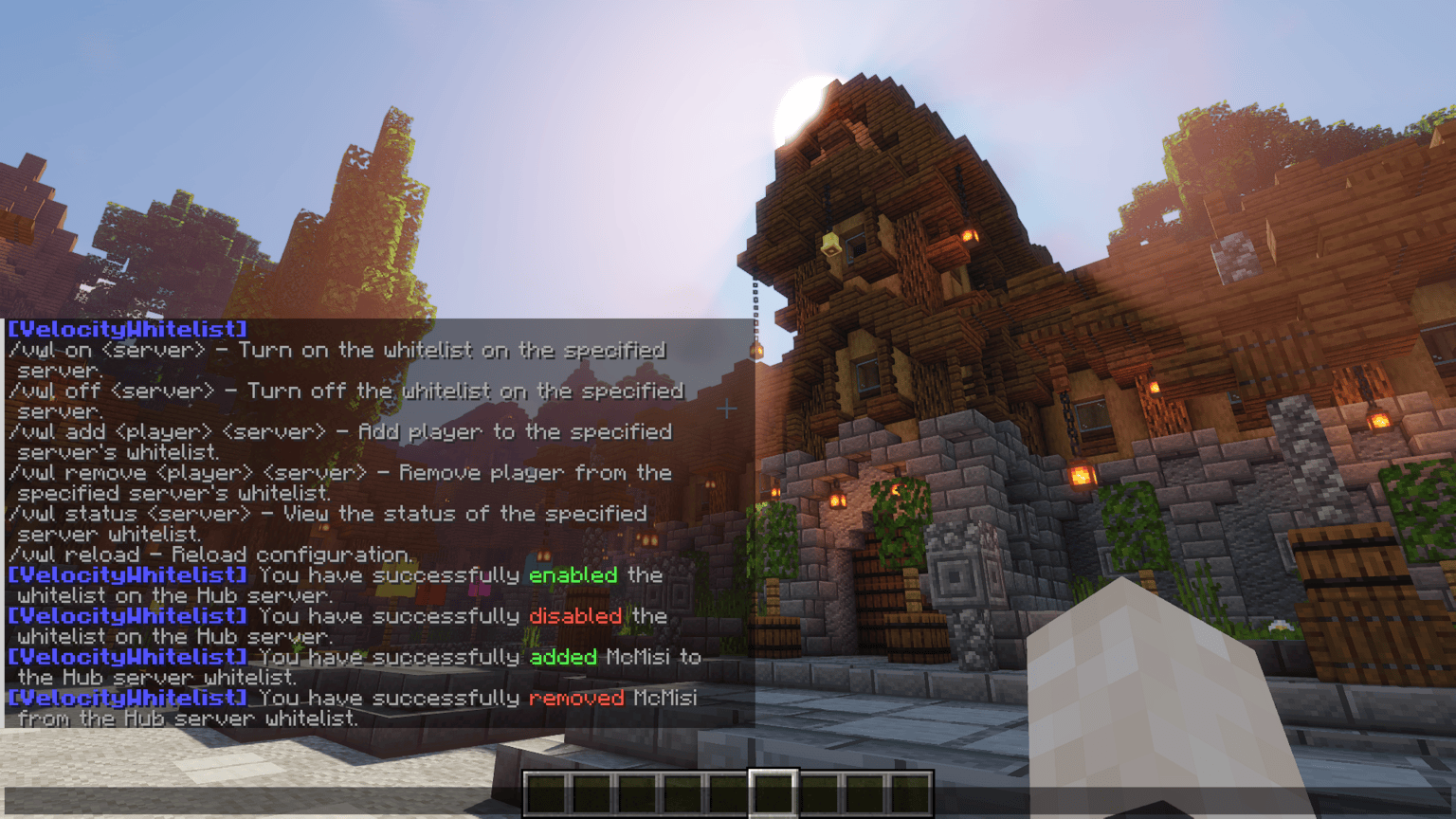
## Commands
| Command | Description |
|——————————-|——————————————————|
| /vwl on | Turn on the whitelist on the specified server. |
| /vwl off | Turn off the whitelist on the specified server. |
| /vwl add | Add player to the specified server’s whitelist. |
| /vwl remove | Remove player from the specified server’s whitelist. |
| /vwl status | View the status of the specified server whitelist. |
| /vwl reload | Reload configuration. |
## Permissions
| Permission | Description |
|————————————|—————————————————————————————————|
| `velocitywhitelist` | Grants access to view the plugin’s help and basic commands. |
| `velocitywhitelist.on.` | Allows enabling the whitelist on a specific server (replace `` with the server name). |
| `velocitywhitelist.on.*` | Grants global permission to enable the whitelist on any server. |
| `velocitywhitelist.off.` | Allows disabling the whitelist on a specific server (replace `` with the server name). |
| `velocitywhitelist.off.*` | Grants global permission to disable the whitelist on any server. |
| `velocitywhitelist.add.` | Allows adding a player to the whitelist on a specific server (replace `` with the server name). |
| `velocitywhitelist.add.*` | Grants global permission to add players to the whitelist on any server. |
| `velocitywhitelist.remove.`| Allows removing a player from the whitelist on a specific server (replace `` with the server name).|
| `velocitywhitelist.remove.*` | Grants global permission to remove players from the whitelist on any server. |
| `velocitywhitelist.status.`| Allows viewing the whitelist status on a specific server (replace `` with the server name). |
| `velocitywhitelist.status.*` | Grants global permission to view the whitelist status on any server. |
| `velocitywhitelist.reload` | Allows reloading the plugin configuration. |
| `velocitywhitelist.bypass` | Allows the player to bypass whitelist restrictions, regardless of server-specific settings. |
## ☕ Support
[](https://www.buymeacoffee.com/gmisi)
VelocityWelcomeX
**VelocityWelcome
Overview**
VelocityWelcome is a comprehensive Minecraft server welcome system that works across both Velocity proxy and Bukkit/Spigot servers. It provides customizable, colorful welcome messages while eliminating the default vanilla join and quit messages for a cleaner, more professional server experience.
**Features**
Custom Welcome Messages: Display personalized, randomized welcome messages when players join your network
Player Join Counter: Show players their unique join number (e.g., “#42”) to create a sense of community and history
No Vanilla Messages: Automatically suppresses the default Minecraft join/quit messages
Network-Wide Support: Works seamlessly between Velocity proxy and all connected Bukkit/Spigot servers
Fully Customizable: Change colors, message formats, and welcome text through a simple configuration
Persistent Player Data: Maintains player join rankings across server restarts
**Why Choose VelocityWelcome?**
Clean Server Experience
VelocityWelcome completely eliminates the standard Minecraft join and quit notifications that can clutter your chat, especially on busy servers. Only your custom welcome messages will be displayed, giving your server a professional and polished feel.
Enhanced First Impressions
First impressions matter. When new players join your server, they’ll be greeted with a colorful, personalized welcome message that stands out from the standard Minecraft experience. This small touch can significantly improve how players perceive your server’s quality.
Community Building
The unique join counter feature shows players their position in your server’s history (e.g., “Welcome PlayerName! (#137)”). This creates a sense of belonging and community, making players feel like they’re part of something established and significant.
Network Efficiency
VelocityWelcome is designed specifically for proxy-based server networks. It efficiently communicates between your Velocity proxy and backend servers to ensure consistent behavior and prevent duplicate welcome messages when players move between servers in your network.
Technical Excellence
VelocityWelcome is built with performance in mind:
Lightweight with minimal resource usage
Uses efficient plugin messaging channels
Thread-safe concurrent collections for player tracking
Early-priority event handling to prevent conflicts with other plugins
**Setup and Installation**
**Prerequisites**
Velocity proxy server (latest version recommended)
Bukkit/Spigot/Paper servers (latest version recommended)
Installation Steps
**Download the Plugin Files**
VelocityWelcome.jar (for Velocity proxy)
VelocityWelcomeBukkit.jar (for each Bukkit/Spigot server)
Both from here.
**Install on Velocity**
Place VelocityWelcome.jar in your Velocity plugins folder
Restart your proxy server
A default configuration will be generated
**Install on Backend Servers**
Place VelocityWelcomeBukkit.jar in the plugins folder of each backend server
Restart each server
No additional configuration needed on backend servers
**
Configuration (Optional)**
Edit the config.json file in the VelocityWelcome folder
Customize welcome messages, colors, and other options
Save changes and use /velocity reload to apply
Configuration
The plugin creates a simple JSON configuration file with the following options:
VelocityWebPanel
# VelocityWebPanel
Requires LuckPerms
A distributed Minecraft network web panel for **Velocity + Paper** environments.
`VelocityWebPanel` runs a central panel on your Velocity proxy and connects Paper servers as backend agents, giving you one place to monitor and manage your network.

## What It Does
– Hosts a browser-based admin panel from the Velocity side
– Connects multiple Paper servers through a backend WebSocket channel
– Streams server stats, players, plugins, and console output in near real time
– Lets authorized users run commands on individual backend servers
– Includes account-based login with BCrypt-hashed passwords

## Architecture
### 1) Velocity Side (Central Hub)
– Serves the web UI over HTTP (`web-port`, default `8080`)
– Exposes API endpoints for auth, polling, and actions
– Runs internal backend WebSocket server (`ws-port`, default `8100`)
– Maintains connected server sessions and broadcasts updates to browsers
– Includes a built-in `Velocity` node in the dashboard via `VelocityProxyBridge`
### 2) Paper Side (Agent on Each Server)
– Connects to Velocity using shared secret handshake
– Sends periodic stats (TPS, memory, CPU, uptime, players)
– Streams console lines and command outputs
– Sends plugin list and player list updates
## Web Panel Features
– **Dashboard**: all connected servers with online status and quick metrics
– **Console**: live output + remote command execution
– **Players**: per-server player list view
– **Stats**: server performance cards + historical player samples
– **Plugins**: installed plugin list per backend
– **Network Info**: aggregated table across all servers
– **Users**: list/remove panel users from the UI


## Authentication & Access
– Players register or update panel password using:
– `/vwpanel `
– Passwords are stored as BCrypt hashes in `users.dat`
– Required LuckPerms integration validates `velocitywebpanel.use` permission
– Backend agent connections are protected by a shared `secret` value

## Configuration (from `config.yml`)
– `panel-name`: panel branding/title
– `web-port`: panel HTTP port
– `ws-port`: backend agent WebSocket port
– `secret`: shared backend handshake secret
– `velocity-host`: proxy host used by Paper agents
– `server-name`: backend display name
– `server-type`: backend type label
– `update-interval`: stats push interval (seconds)
– `console-buffer-size`: retained console lines on agent side
## Typical Use Case
Ideal for network operators who want lightweight centralized visibility and control across multiple Paper servers behind Velocity, without requiring a heavy external dashboard stack.