vSLS
# vSLS
**vSLS** is a Velocity plugin that integrates your network with the **[SLS (Server Launch System)](https://docs.protoxon.com/)**.
It allows you to dynamically create and manage server instances directly in game using simple commands. vSLS automatically registers new servers with your Velocity proxy, routes players, and provides a lightweight matchmaking and queue system. Server instances are created and scaled based on demand, ensuring efficient resource usage and fast response times.
For installation and configuration instructions visit: [vSLS Docs](https://protoxon.github.io/sls-docs/guide/vsls/)
Discord: [](https://discord.com/invite/BrH8GtyGSh)
[](https://github.com/jessefaler/SLS)
—
## Requirements
* A properly configured SLS environment
* Velocity proxy
## Demo
A live demo **Minecraft** network is available if you want to try vSLS in action.
* **Server address:** `demo.protoxon.com`
This demo showcases how servers can be dynamically created and managed for minigames.
## About SLS
SLS is an open-source system for automating the deployment and scaling of containerized game servers. It is designed for networks that require fast, consistent, and reproducible server instances.
For full documentation and setup instructions, visit: [SLS Docs](https://docs.protoxon.com/)
VServerInfo
# VServerInfo [](https://github.com/4drian3d/VServerInfo/actions/workflows/maven.yml) [](https://discord.gg/5NMMzK5mAn)
Get the information of each server in your Velocity network
[](https://www.bisecthosting.com/4drian3d?r=ModVServerInfo)
## Requirements
– Velocity 3.3.0
– Java 17+
## Commands
#### Permission `vserverinfo.command`
### /vserverinfo
This command will give you information about all the servers you have in your Velocity network.
### /vserverinfo
Get the information about a single server
## How does this plugin differ from the Velocity(/glist) integrated command?
This plugin allows you to check the online/offline status of each of your servers, as well as to obtain additional information such as their MOTD and allows a complete customization of the plugin formats.
All messages are fully customizable from the configuration (config.conf)

## Tutorial
**Spanish**
VRealmsConnector
# VRealms Connector
This is a simple server connector I made for Velocity, because I couldn’t find one that suited my needs. Currently, you can only register and unregister Servers through a Command, later it’s also planned to do so through a Rest API.
For now, this is how to use the Commands:
– `/addserver
[port]`
– `/removeserver `
The port uses 25565 by default
## THIS PROJECTS SOURCE CODE WILL NOT BE MADE PUBLIC (FOR NOW)
If you need the Source, decompile it, or just make it yourself
VPlayerLimit
# VPlayerLimit
[](https://discord.gg/5NMMzK5mAn)
Limit how many players can join your server.
This is not a plugin to set the maximum number of players in motd, it simply limits the number of connected players.
[](https://www.bisecthosting.com/4drian3d)
## Installation
– Download VPlayerLimit from Modrinth
– Drag and drop on your plugins folder
– Start the server
– Configure the player limit and the expulsion message
VPingHost
# VPingHost
[](https://discord.gg/5NMMzK5mAn)
[](https://t.me/Adrian3dUpdates)
[](https://t.me/Adrian3dSupport)
A simple Velocity plugin that allows you to get information about other servers instantly.
This plugin was born as a test from this [Velocity pull request](https://github.com/PaperMC/Velocity/pull/1180),
but I thought to make it a public test plugin to check the proxy server or backend servers connectivity or MOTD response.
[](https://www.bisecthosting.com/4drian3d)
## Installation
– Download VPingHost from Modrinth
– Drag and drop on your plugins folder
– Start the server
## Features
– Send a ping to any Minecraft server and get its corresponding motd
– Specifies the version to ping with
– Specifies the version with which to ping the server
## Command
`/pinghost [host] (protocol version)`
Permission: `pinghost.command`
Example: `/pinghost my.server.net 765`
If you need to specify a specific port, you can add it with the syntax `host:port`.
### Differences between this plugin and VServerInfo
VServerInfo allows you to display information about your servers that you have in your own network.
VPingHost allows you to display information about the motd of any available server.
VPacketLogger
# VPacketLogger
[](https://github.com/4drian3d/VPacketLogger/actions)

[](https://discord.gg/5NMMzK5mAn)


Simple Velocity plugin to log Packet executions
[](https://www.bisecthosting.com/4drian3d?r=ModVPacketLogger)
## Installation
– Install [VPacketEvents](https://modrinth.com/plugin/vpacketevents)
– Download VPacketLogger from [Modrinth](https://modrinth.com/plugin/vpacketlogger)
– Drag and drop on your plugins folder
– Start the server
## How it works
VPacketLogger simply logs every packet sent or received between the proxy and the player.
It can only intercept packets that are handled by Velocity, whether they are native or logged by other plugins.
In the configuration you can set which placeholders to use, MiniMessage format is supported.
VPacketEvents
# VPacketEvents
[](https://discord.gg/5NMMzK5mAn)


Manage and register packets through Velocity’s native events
[](https://www.bisecthosting.com/4drian3d?r=ModVPacketEvents)
“`java
class PacketListener {
@Subscribe
public void onPacketReceive(PacketReceiveEvent event) {
final MinecraftPacket packet = event.getPacket();
if (packet instanceof KeyedPlayerCommand commandPacket) {
event.setResult(GenericResult.denied());
}
}
@Subscribe
public void onPacketSend(PacketSendEvent event) {
// some stuff
}
public void registerPacket() {
// UpdateTeamsPacket registration
PacketRegistration.of(UpdateTeamsPacket.class)
.direction(Direction.CLIENTBOUND)
.packetSupplier(UpdateTeamsPacket::new)
.stateRegistry(StateRegistry.PLAY)
.mapping(0x47, MINECRAFT_1_13, false)
.mapping(0x4B, MINECRAFT_1_14, false)
.mapping(0x4C, MINECRAFT_1_15, false)
.mapping(0x55, MINECRAFT_1_17, false)
.mapping(0x58, MINECRAFT_1_19_1, false)
.mapping(0x56, MINECRAFT_1_19_3, false)
.mapping(0x5A, MINECRAFT_1_19_4, false)
.register();
}
}
“`
## Installation
– Download VPacketEvents from Modrinth
– Drag and drop on your plugins folder
– Start the server
## Dev Setup
### Gradle
“`kotlin
repositories {
mavenCentral()
}
dependencies {
compileOnly(“io.github.4drian3d:vpacketevents-api:1.1.0”)
}
“`
## Javadocs
https://javadoc.io/doc/io.github.4drian3d/vpacketevents-api
VoxaAegis
# VoxaAegis
VoxaAegis is a layered anti-bot protection system for Minecraft server networks.
It is built to reduce the impact of join floods, coordinated bot waves, repeated retry swarms, suspicious registration behavior, and abnormal post-join bot sessions through explainable server-side mitigation.
VoxaAegis does not try to be a DDoS firewall. It is a plugin-layer defense system for Minecraft traffic that helps operators detect, slow down, isolate, challenge, and block bot-like clients before they can damage the player experience.
## What It Does
VoxaAegis combines multiple protection layers instead of relying on one simple rate limit.
Main features:
– Join flood and burst-rate limiting
– Coordinated username, timing, IP, and subnet wave detection
– Risk scoring for suspicious usernames, fresh addresses, retry swarms, churn, and offender memory
– Quarantine flow for suspicious joins
– Fake entry gate / screening room for players under review
– Adaptive anti-bot challenges
– HumanityGate post-join verification
– Post-join liveness checks for physics-void and look-only sessions
– Client brand, locale, ping, movement, and interaction signal checks
– Repeated `/register` secret wave detection without storing plaintext passwords
– Persistent cooldown ledger for restart-safe mitigation memory
– Runtime bypass and temporary trust controls
– Operator-facing status, stats, diagnostics, event journal, and support dumps
## Commands
– `/voxaaegis help` — show command list
– `/voxaaegis status` — live protection overview
– `/voxaaegis stats` — mitigation and screening statistics
– `/voxaaegis profile` — current attack profile
– `/voxaaegis attacklog [limit]` — recent attack summaries
– `/voxaaegis events [limit]` — recent event journal
– `/voxaaegis dump` — write a support dump
– `/voxaaegis inspect ` — inspect a live player
– `/voxaaegis analyze [ip]` — preview join scoring
– `/voxaaegis doctor` — topology and runtime checks
– `/voxaaegis cache status` — cache and housekeeping state
– `/voxaaegis cache purge` — force cleanup
– `/voxaaegis release ` — release a quarantined player
– `/voxaaegis bypass add ` — add a runtime username bypass
– `/voxaaegis bypass add-ip ` — add a runtime IP bypass
– `/voxaaegis bypass remove ` — remove a runtime username bypass
– `/voxaaegis bypass remove-ip ` — remove a runtime IP bypass
– `/voxaaegis bypass list` — list runtime username bypasses
– `/voxaaegis bypass list-ip` — list runtime IP bypasses
– `/voxaaegis trust add ` — temporarily trust an address
– `/voxaaegis trust remove ` — remove temporary trust
– `/voxaaegis trust list` — list trusted addresses
– `/voxaaegis reload` — soft reload
– `/voxaaegis hard-reload` — full runtime rebuild reload
## Why Use It
VoxaAegis is designed for server owners who want practical anti-bot protection without losing visibility.
The plugin focuses on:
– layered mitigation instead of one brittle hard block
– readable operator diagnostics
– clear attack summaries
– configurable quarantine and challenge behavior
– safer handling of suspicious players before they reach the real server
– compatibility with authentication plugins through allowed auth commands
– actionable status output for tuning during attacks
## Supported Platforms
Primary backend line:
– Paper
– Purpur
– Pufferfish
– Spigot best-effort
Proxy / network line:
– Velocity
– BungeeCord / Waterfall
Secondary / experimental lines:
– Folia
– Sponge
– Legacy Spigot / Paper 1.16.5 – 1.19.4 through the separate legacy jar
## Version Support
Modern backend and proxy line:
– Minecraft `1.20 – 1.21.11`
Legacy backend line:
– Minecraft `1.16.5 – 1.19.4`
– Requires Java 17
– Uses the separate `voxa-aegis-legacy-0.3.jar`
## Important Notes
– Current release line: **0.3**
– Main recommended runtime: **Paper / Purpur / Pufferfish**
– Sponge is a narrow experimental line and should not be treated as equal to the Paper-family runtime.
– BungeeCord / Waterfall support exists, but Velocity is the preferred proxy platform.
– VoxaAegis is not a replacement for real network-layer DDoS protection.
– For very large attacks, use proper hosting protection and a proxy-first architecture.
Version Numbering Converter
# VNC (Version Numbering Converter)
Version Numbering Converter (VNC) is a Java library for working with Minecraft versions across both numbering families:
– Classic Java-style versions such as `1.20.6` and `1.21.11`
– Year-based drop versions such as `24.1`, `25.4`, and `26.1.1`
It covers two use cases:
– Pure version modeling and conversion through `MinecraftVersion`, `VersionScheme`, and `MappingTable`
– Bukkit/Paper runtime detection through `VNC`, including server constants, player version resolution, protocol lookup, and version comparisons
## Highlights
– Exact historic mappings from `1.0.0` through `1.21.11`
– Drop support for current lines such as `25.4`, `26.1`, and `26.1.1`
– Protocol lookup for exact releases and published snapshots
– A runtime bridge for Bukkit/Paper with legacy-compatible constants like `SERVER_VERSION`
– String-based comparisons that correctly handle patch-sensitive boundaries like `1.20.5`
## Core API
### 1. Parse and inspect versions
“`java
MinecraftVersion classic = MinecraftVersion.parse(“1.21.11”);
MinecraftVersion drop = MinecraftVersion.parse(“26.1”);
classic.isClassic(); // true
classic.getVersion(); // “1.21.11”
classic.getProtocol(); // 774
classic.supportsHex(); // true
drop.isClassic(); // false
drop.getVersion(); // “26.1”
drop.getProtocol(); // 775
“`
### 2. Convert between numbering schemes
“`java
String dropName = VersionScheme.MOJANG.toDrop(“1.20.3”); // “23.2”
String classicName = VersionScheme.MOJANG.toClassic(“25.2.2”); // “1.21.8”
String customClassic = VersionScheme.CROA_CUSTOM.toClassic(“25.4”); // “1.22”
String customDrop = VersionScheme.CROA_CUSTOM.toDrop(“1.22.1”); // “25.4.1”
“`
### 3. Create your own mapping scheme
“`java
MappingTable table = new MappingTable()
.registerLine(30, 1, “1.50”, “1.50.1”)
.registerMapping(“1.51”, “30.2”);
VersionScheme scheme = VersionScheme.mapped(table);
scheme.toDrop(“1.50.1”); // “30.1.1”
scheme.toClassic(“30.2”); // “1.51”
“`
### 4. Resolve protocols
“`java
Integer protocol = MinecraftVersion.protocolForIdentifier(“1.20.6”); // 766
Integer snapshot = MinecraftVersion.protocolForIdentifier(“26.2-snapshot-3”);
MinecraftVersion newest = MinecraftVersion.fromProtocol(754); // 1.16.5
List all = MinecraftVersion.versionsForProtocol(767); // 1.21, 1.21.1
“`
## Bukkit / Paper runtime API
`VNC` exposes a runtime snapshot of the current server:
“`java
MinecraftVersion server = VNC.SERVER_MINECRAFT_VERSION;
String classic = VNC.SERVER_CLASSIC_VERSION;
String drop = VNC.SERVER_DROP_VERSION;
int protocol = VNC.SERVER_PROTOCOL;
double legacy = VNC.SERVER_VERSION;
boolean modernRegistry = VNC.isAtLeast(“1.20.5”);
boolean legacyCommands = VNC.isBefore(“1.13”);
boolean inRange = VNC.isBetween(“1.19”, “1.21.11”);
“`
Player version resolution uses ViaVersion when present and falls back to the server version otherwise:
“`java
MinecraftVersion playerVersion = VNC.player(player);
if (playerVersion.supportsHex()) {
// Safe to send RGB formatting to this player
}
“`
## Why use the string helpers?
`SERVER_VERSION` is still available for compatibility with older plugins, but patch-sensitive checks should prefer:
“`java
VNC.isAtLeast(“1.20.5”);
VNC.isBefore(“1.21.9”);
VNC.compare(VNC.SERVER_MINECRAFT_VERSION, “26.1”);
“`
That avoids the common limitations of comparing versions only as `double`.
## Requirements
– Java 8+
– For the Bukkit runtime helpers: a Bukkit/Paper-compatible runtime on the classpath
– Optional: ViaVersion, if you want `VNC.player(…)` to resolve the effective client version instead of the server version
vMessage
# vMessage
    
> 🆕 Hey, I’m SzymON/OFF! If you found **vMessage** useful please don’t hesitate to also try [vHubs](https://modrinth.com/plugin/vhubs)! It allows you to create multiple hub servers accesible with player commands (e.g. `/hub`, `/lobby`, `/survival`).
**vMessage** is the best Velocity plugin for synchronizing chat and player events across your entire proxy network! It is designed for server administrators who want seamless, reliable, and configurable message syncing without unnecessary complexity.
## Features
– **Global Chat Sync:** Instantly syncs chat messages across all servers connected to your Velocity proxy.
– **Join/Leave/Change-Server Broadcasts:** Notifies all players network-wide when someone joins, leaves, or switches servers.
– **Silent Permissions:** Players with a special silent permission can prevent their join, leave, and server change messages from being announced.
– **Powerful Configuration:** Comes with a robust, easy-to-use config file so you can tailor the plugin to your network’s needs.
– **Lightweight & Fast:** No unnecessary features or bloat—just efficient, reliable message syncing.
## Installing
1. Place `vMessage.jar` into your Velocity `plugins` folder.
2. Install the appropriate versions of [SignedVelocity](https://modrinth.com/plugin/signedvelocity) on your proxy AND backends.
3. Start or restart your Velocity proxy.
4. Edit the generated configuration file (`plugins/vMessage/config.yml`) to suit your preferences.
Once installed and configured, vMessage will automatically:
– Sync chat messages across all servers
– Broadcast join, leave, and server switch events to all players (unless the player has the silent permission)
No commands or permissions are required for basic functionality.
## Updating
To update vMessage, replace the existing `vMessage.jar` in your `plugins` folder with the latest version and restart your Velocity proxy.
If new configuration options are introduced, your config.yml will be migrated automatically.
## Commands
vMessage provides several administrative commands for advanced usage and configuration:
– `/vmessage say `
Sends a message as the specified player across the network.
**Permission:** `vmessage.command.say`
– `/vmessage fake [player] [old-server]`
Sends a fake join, leave, or server change message as if the specified player performed that action.
**Permission:** `vmessage.command.fake`, `vmessage.command.fake.join`, `[…].leave`, `[…].change`
– `/vmessage reload`
Reloads the plugin configuration without restarting the proxy.
**Permission:** `vmessage.command.reload`
– `/vmessage help`
Displays the help message with available commands.
**Permission:** `vmessage.command.help`
– `/broadcast `
Broadcasts a custom message on the network.
**Permission:** `vmessage.command.broadcast`
**Aliases:** `/bc`, `/bcast`, `/shout`
– `/message `
Sends a private message to a specific player across the network.
**Permission:** `vmessage.command.message`
**Aliases:** `/msg`, `/tell`, `/whisper`, `/w`
– `/reply `
Replies to the last player who sent you a private message.
**Permission:** `vmessage.command.reply`
**Aliases:** `/r`
You can also use `/vmsg` or `/vm` as an alias for `/vmessage` for convenience.
Make sure to assign the appropriate permissions to your staff or admin roles in your Velocity configuration.
For `/broadcast`, `/message`, and `/reply`, you can set `allow-by-default` to `true` in the config file to let all players use these commands without needing explicit permissions.
## Configuration
vMessage provides a powerful and easy-to-use configuration file. You can customize message formats, toggle features, and more. Look at the wiki for detailed configuration options: [vMessage Wiki](https://github.com/szymon-off/vMessage/wiki/Configuration-(config.yml))
## Why vMessage?
– **Purpose-built for Velocity:** Designed specifically for Velocity, making it the most reliable and feature-rich solution for network-wide messaging.
– **Simple Setup:** Drop it in, configure, and go. No complicated dependencies or setup steps.
– **Actively Maintained:** Built with modern best practices and open to community feedback.
## Contributing
Contributions are welcome! Please open issues or submit pull requests for improvements or bug fixes.
## Building from Source
If you want to build vMessage yourself:
– Prerequisites: Java 17 or higher
– Clone the repository and build:
“`bash
git clone https://github.com/szymon-off/vMessage.git
cd vMessage
./gradlew build
“`
– The built jar file will be in the `build/libs/vMessage-0.0.0-UNKNOWN.jar`.
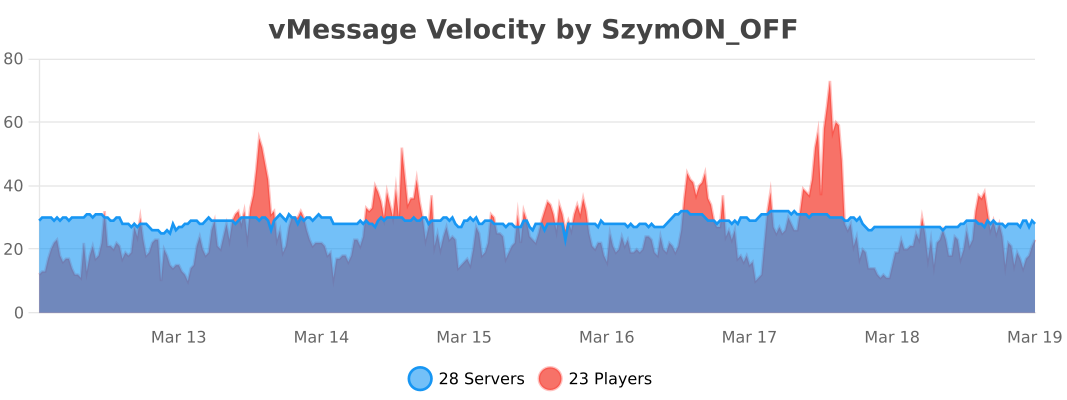
## Usage Statistics
## License
– Versions **≤ 1.6.1** are licensed under the **MIT License**.
– Versions **≥ 1.7.0** are licensed under the **GNU General Public License v3.0** (GPL-3.0).
You can find the full text of each license in the corresponding release archive, or in the repository under the `LICENSE` file for that version.