Simple Reconnect
A plugin for Velocity that reconnects players to the last server they were playing on
## Features
– **Automatic reconnection to the last server on player login**
– Configurable messages for reconnect success and server unavailable
– Multiple storage backends: YAML, SQLite, MySQL, MariaDB, PostgreSQL, LuckPerms
– Optional per-server permission (velocity.reconnect.)
– Server blacklist to prevent reconnection to specific servers
– Optional LiteBans integration to prevent reconnecting banned players
– Optional fallback prevention (block redirect to fallback server when kicked)
– _reload_ command to reload configuration without restarting the proxy
## Commands
– **/vreconnect reload** Reloads the plugin configuration
## Permissions
– **reload:** requires permission velocity.reconnect.reload (default: op)
## Configuration
“`
# For debugging purposes, recommended to disable
debug: false
# Should we check for the latest version?
checkUpdates: true
# Send players a message when they are reconnected
messageOnReconnect: true
reconnectMessage:
– “You were reconnected to %server%.”
# Send a message when their previous server isn’t available
notAvailable: true
notAvailableMessage:
– “Unable to reconnect you to your last server.”
# Require velocity.reconnect. permission per server
perServerPermission: false
# Servers that players cannot reconnect to
blacklist: []
# Prevent connection to fallback servers when kicked
preventFallback: false
preventFallbackMessage: []
# LiteBans hook – prevents banned players from reconnecting to banned servers
liteBansHook: false
storage:
method: “yaml”
data:
address: “localhost:3306”
database: “reconnect.db”
username: “root”
password: “1234”
“`
– **debug:** Enable debug logging
– **checkUpdates:** Check for new versions on startup; admins with velocity.reconnect.admin get update notifications
– **messageOnReconnect / reconnectMessage:** Message shown when player is reconnected. Placeholders: %server%, %player%
– **notAvailable / notAvailableMessage:** Message when the last server is offline or unreachable
– **perServerPermission:** If true, player needs velocity.reconnect. to reconnect to each server
– **blacklist:** List of server names where reconnection is never allowed
– **preventFallback / preventFallbackMessage:** When kicked, prevent redirect to fallback server (if not on blacklist)
– **liteBansHook:** Integrate with LiteBans to block reconnection to servers where the player is banned
– **storage.method:** Storage backend. Options: yaml, sqlite, mysql, mariadb, postgresql, luckperms
– **storage.data:** Connection settings for database backends. For SQLite/YAML, database is the file path
## Storage
In the **config.yml**, there are different storage options. If you don’t need your own plugins to interact with this one, we recommend you keep the **method** set as the default option **(yaml)**
“`
storage:
method: “yaml”
# The below is only needed if you are using MySQL
data:
address: localhost
database: reconnect
username: root
password: ”
“`
To change the method, alter the **method** key. Current options are:
– **yaml:** Local .yml file
– **sqlite:** Local SQL database
– **mysql:** Local or remote SQL database
The **data** section is for if you are using the **mysql** option for **method**
– **address:** The address of the SQL database
– **database:** The name of the database
– **username:** Username for the SQL database
– **password:** Password for the SQL database
###Requirements
– Java 21 (LTS)
– Velocity Proxy on the latest supported version
### Internal behaviour
– When using a forced host, the plugin does not override the initial server choice
– Storage location for YAML: **plugins/reconnect/data.yml**
– For LuckPerms storage, the last server is stored as user metadata
Simple Maintenance Plugin
# Simple Maintenance Plugin
A simple solution to manage maintenance mode for your velocity server.
### Source Code
github.com/FlauschigesAlex
### Supported platforms and versions
– Velocity Versions: 3.4.0 – 3.5.0
Although simple-maintenance-plugin may work on other platforms or versions, I do not guarantee for their stability or functionality.
### Commands
– `/maintenance` – Lists all servers in maintenance mode.
– `/maintenance (status)` – Displays the server’s maintenance mode status.
– `/maintenance status ` – Toggles the server’s maintenance mode.
– `/maintenance message ` – Sets the server’s maintenance message.
– `/maintenance message clear` – Resets the server’s maintenance message.
– `/maintenance duration indefinite` – Sets the server’s maintenance duration to indefinite.
– `/maintenance duration ` – Sets the server’s maintenance duration.
– `/maintenance enforce` – Enforces the server’s maintenance mode.
### Permissions
`smp.command`: Allows the user to use the `/maintenance` command.
`smp.bypass`: Allows the user to bypass maintenance mode.
Simple Lobby Proxy
**It’s Finally here!**
**An easy to use VELOCITY Plugin to easier setup _/lobby_ Commands!**
**On every Backend Server is the _/lobby_ Command Available!**
🛠️**Install:**
– **Only install it on your Proxy Server _NOT_ the Backend Servers!**
– **1.16.x – 1.21.x for Velocity and BungeeCord!**
SignedVelocity
# SignedVelocity




Allows you to cancel or modify messages or commands from Velocity without synchronization problems

## Requirements
– Java 21+
– Velocity 3.4.0+
#### **Backend:**
– Paper 1.20+
– Sponge 10/12+
– Minestom
– Fabric 1.21+
## Features
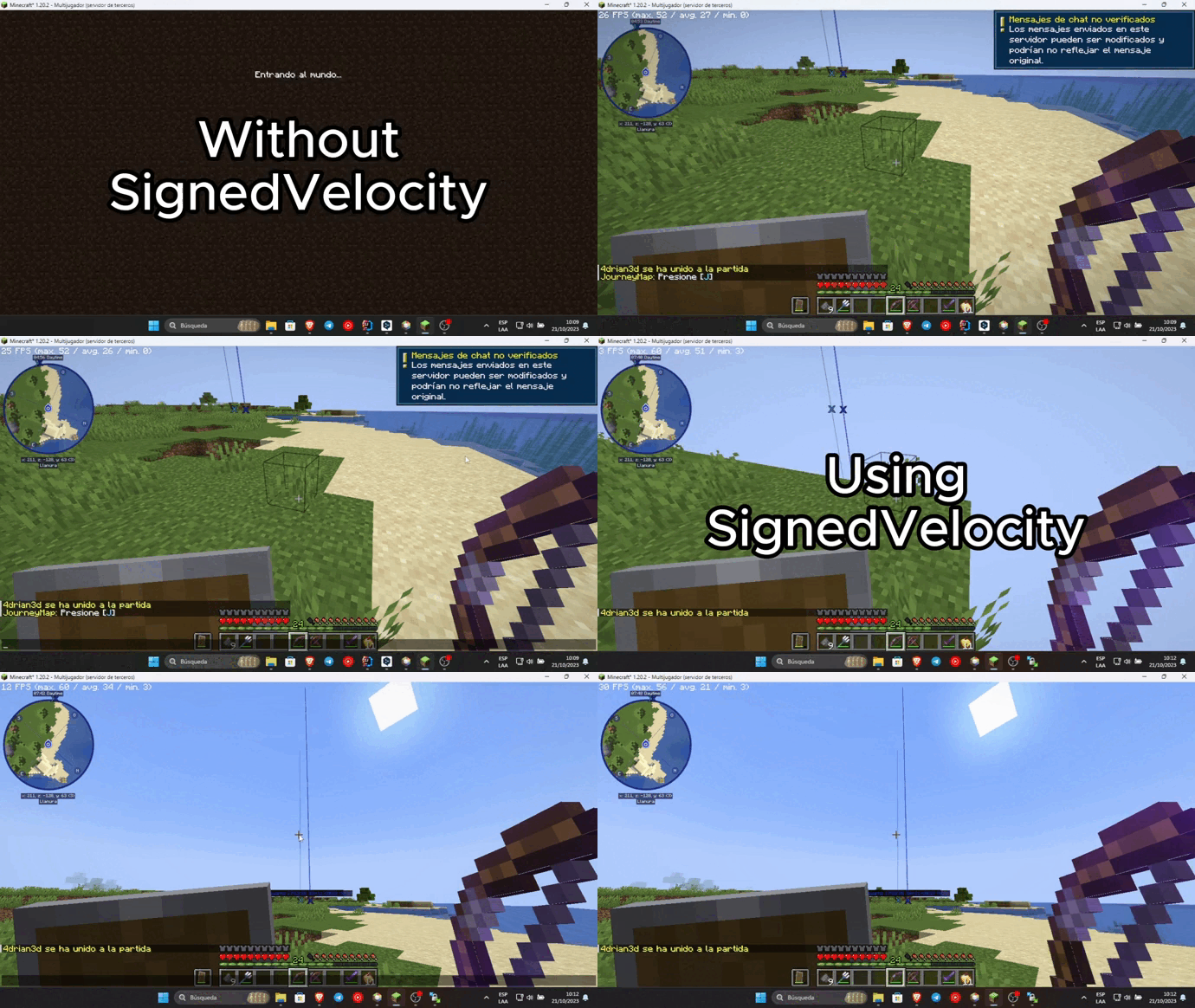
– Transmit the modification and cancellation status of Velocity messages and commands to your backend server using plugin messages. This avoids chat chain synchronization problems and avoids Velocity’s security check by correctly synchronizing messages.
– Chat reporting support using Velocity (can be disabled using external plugins like FreedomChat, **not recommended**)
– Ability to remove the unsecured chat warning when logging into each server. Requires VPacketEvents or PacketEvents
> SignedVelocity-Proxy versions prior to 1.3.0 contain an exploit that can be used
> to replace the input of any player, and can give administrator permissions to malicious agents,
> it is recommended to upgrade to the latest version.
> SignedVelocity backend versions are not affected
## Installation
In order for SignedVelocity to work, you must install it on both Velocity and all your servers
### Velocity
– Download SignedVelocity-Proxy
– Drag and drop on your Velocity plugins folder
– Start your proxy
### Paper
– Download SignedVelocity-Paper
– Drag and drop on your Paper plugins folder
– Start your server
### Sponge
– Download the version of SignedVelocity-Sponge that is compatible with your server.
SignedVelocity-Sponge-8 supports API 8.1 and 9, SignedVelocity-Sponge-10 supports API 10 and 11
– Drag and drop on your Sponge plugins folder
– Start your server
### Fabric
– Download the version of SignedVelocity Fabric that corresponds to your server version
– Drag and drop on your Fabric mods folder
– Start your server
### Minestom
In the case of Minestom, SignedVelocity from version 1.3.0 onwards is used in the form of a library
so that it can be included in your own implementation.
#### Maven Repository
##### Gradle
“`kotlin
repositories {
mavenCentral()
}
dependencies {
implementation(“io.github.4drian3d:signedvelocity-minestom:1.4.0”)
}
“`
#### Example
“`java
import io.github._4drian3d.signedvelocity.minestom.SignedVelocity;
// then…
SignedVelocity.initialize();
“`
For older versions of Minestom, you can use SignedVelocity-Minestom 1.2.4 which comes as an extension
### Installation Videos
### Spanish by 4drian3d
## Metrics

Sigil
# Sigil
Sigil is a telemetry plugin for Velocity proxy servers that tracks player activity and exposes metrics in Prometheus format. It provides real-time insights into your Minecraft network’s performance and player demographics.
## Features
– Real-time player tracking and metrics
– Geographic location tracking using GeoLite2 database
– Backend server status monitoring
– Prometheus-compatible metrics endpoint
– Session duration tracking
– Player count by region and backend server
## Metrics Available
– Active player sessions
– Player distribution by region
– Player distribution by backend server
– Session duration histograms
– Backend server status
## Installation
1. Download the latest release
2. Place the JAR file in your Velocity server’s `plugins` directory
3. Restart your Velocity server
## Metrics Access
Metrics are exposed in Prometheus format at:
“`
http://localhost:9091/metrics
“`
## License
This project is licensed under the MIT License.
### Third-party Licenses
GeoLite2 database is distributed under the Creative Commons Attribution-ShareAlike 4.0 International License.
ShortCMD
### Look before you put it on the server
# ShortCmd – Plugin for executing commands from URLs | Плагин для выполнения команд из URL
## English
### Description
ShortCmd is a Minecraft server plugin that allows executing commands from external sources (like Pastebin) or saving them for later use. The plugin provides a convenient interface for managing and executing commands.
### Key Features
– **Execute commands from URLs/Pastebin**
– **Save commands and links for reuse**
– **Manage saved commands (run/delete)**
– **Flexible security settings**
– **Multi-language support (English/Russian)**
– **Different execution modes (as console or player)**
### Installation
1. Download the plugin file (ShortCmd.jar)
2. Place it in your server’s `plugins` folder
3. Restart the server
### Commands
Main command: `/shortcmd` or `/scmd` (alias)
Available subcommands:
| Command | Description | Permission |
|—————|———————————————–|———————|
| help | Show help menu | shortcmd.help |
| run | Execute commands from URL/Pastebin | shortcmd.run |
| save | Save command link | shortcmd.save |
| savecmd [name] | Download and save commands from URL | shortcmd.savecmd |
| storage | Manage saved commands | shortcmd.storage |
| lang | Change language | shortcmd.lang |
| mode | Change execution mode | shortcmd.mode |
| reload | Reload configuration | shortcmd.reload |
### Permissions
All permissions default to server operators (`default: op`):
– `shortcmd.help` – access to help
– `shortcmd.run` – execute commands from URLs
– `shortcmd.save` – save links
– `shortcmd.savecmd` – save commands
– `shortcmd.storage` – manage storage
– `shortcmd.lang` – change language
– `shortcmd.mode` – change execution mode
– `shortcmd.reload` – reload configuration
– `shortcmd.*` – all plugin permissions
### Configuration
Main settings in `config.yml`:
“`yaml
# Blocked commands
blocked-commands:
– op
– stop
– reload
– plugman
language: en # en/ru
# Timeouts in milliseconds
timeouts:
connect: 10000 # Connection timeout
read: 10000 # Read timeout
internet-check: 3000 # Internet check
command-delay: 100 # Delay between commands
“`
—
## Русская
### Описание
ShortCmd – это плагин для Minecraft серверов, который позволяет выполнять команды из внешних источников (например, Pastebin) или сохранять их для последующего использования. Плагин предоставляет удобный интерфейс для управления командами и их выполнения.
### Основные возможности
– **Выполнение команд из URL/Pastebin**
– **Сохранение команд и ссылок для повторного использования**
– **Управление сохранёнными командами (запуск/удаление)**
– **Гибкие настройки безопасности**
– **Поддержка двух языков (русский/английский)**
– **Различные режимы выполнения команд (от имени консоли или игрока)**
### Установка
1. Скачайте файл плагина (ShortCmd.jar)
2. Поместите его в папку `plugins` вашего сервера
3. Перезапустите сервер
### Команды
Основная команда: `/shortcmd` или `/scmd` (алиас)
Доступные подкоманды:
| Команда | Описание | Разрешение |
|—————|———————————————–|———————|
| help | Показать справку | shortcmd.help |
| run | Выполнить команды из URL/Pastebin | shortcmd.run |
| save | Сохранить ссылку на команды | shortcmd.save |
| savecmd [name] | Скачать и сохранить команды из URL | shortcmd.savecmd |
| storage | Управление сохранёнными командами | shortcmd.storage |
| lang | Изменить язык | shortcmd.lang |
| mode | Изменить режим выполнения команд | shortcmd.mode |
| reload | Перезагрузить конфигурацию | shortcmd.reload |
### Разрешения
Все разрешения по умолчанию выдаются операторам сервера (`default: op`):
– `shortcmd.help` – доступ к справке
– `shortcmd.run` – выполнение команд из URL
– `shortcmd.save` – сохранение ссылок
– `shortcmd.savecmd` – сохранение команд
– `shortcmd.storage` – управление хранилищем
– `shortcmd.lang` – изменение языка
– `shortcmd.mode` – изменение режима выполнения
– `shortcmd.reload` – перезагрузка конфигурации
– `shortcmd.*` – все разрешения плагина
### Конфигурация
Основные настройки в `config.yml`:
“`yaml
# Заблокированные команды
blocked-commands:
– op
– stop
– reload
– plugman
language: ru # ru/en
# Таймауты в миллисекундах
timeouts:
connect: 10000 # Таймаут подключения
read: 10000 # Таймаут чтения
internet-check: 3000 # Проверка интернета
command-delay: 100 # Задержка между командами
“`
### Лицензия
Плагин распространяется под лицензией MIT. Подробнее см. в файле LICENSE.
Shimatsu ProxyFallback
# Shimatsu ProxyFallback
Shimatsu ProxyFallback is a lightweight and efficient solution for Velocity proxies, designed to keep your community connected even when backend servers fail.
## 💡 The Story Behind the Plugin
This plugin was originally developed exclusively for my own server, Shimatsu Network. I spent a lot of time looking for a simple and reliable fallback plugin that met our specific needs, but I couldn’t find anything that fit. I decided to write my own solution and share it with the public to help other server owners who are looking for a “plug and play” fallback system.
## ⚡ Key Features
### Automatic Fallback:
Seamlessly moves players to the lobby (or any designated server) if their current server crashes or shuts down.
### Simple Exclusion System:
Uses a basic string-check to identify disconnect reasons that should not trigger a fallback (e.g., stopping the proxy from sending banned players back to the lobby).
### Custom Server Commands:
Create your own shortcut commands (like /vanilla or /lobby) with custom permissions directly in the configuration.
### Multi-language Support:
Pre-configured for English and Czech, utilizing MiniMessage (Adventure) for modern, easy-to-style formatting.
### Selective Fallback:
Choose whether to enable fallback for all servers on your proxy or only a specific list.
##
## ⚠️ Important Information
**!IMPORTANT** Simple Exclusion System: The excluded-reasons feature is a simple string-based filter. It scans the disconnect message for specific keywords (e.g., “banned”). This is intended as a basic bridge. For proper network security, it is highly recommended to use a dedicated punishment plugin (such as LibertyBans or AdvancedBans) that handles bans and kicks across the entire network.
**!NOTE** Compatibility: This plugin was specifically developed and tested on Velocity 1.21.11. While it is expected to function correctly on Velocity 1.21.1 and newer, please test it thoroughly in your specific environment before full deployment.
## ⚙️ Configuration
The plugin is designed to be highly flexible. You can modify the fallback logic, all player-facing messages, and custom commands in the config.yml.
##
## 🛠️ Commands & Permissions
**Custom Commands:**
As defined by you in the config (Default: /lobby, /vanilla).
**Permissions:**
Custom permissions can be assigned to each command
(e.g., proxyfallback.command.lobby).
Shiftly
**Shiftly** is a lightweight and high-performance proxy plugin designed for server networks running on **Velocity**. It allows administrators to smoothly move players between servers using the /move command with advanced tab completion and flexible message broadcasting.
The plugin is optimized for minimal resource usage while maintaining fast execution paths, making it suitable for large-scale networks.
– Smart tab completion
– MiniMessage formatting support
– Configurable message system
– Broadcast scope options (GLOBAL, TARGET_ONLY, TARGET_AND_ADMINS)
– Lightweight architecture for high-performance proxies
– Permission-based administration control
– LuckPerms compatibility support
# Performance
**Shiftly** is built with efficiency in mind, ensuring minimal impact on proxy tick performance while handling player transfers reliably.
## Configuration
All messages and settings can be customized inside the configuration files, allowing full control over plugin behavior.
### Commands
“`
/move
/move @a
/move -group
“`
Shardplex MOTD
# Overview
Velocity plugin for easily modifying the MOTD with unquain look for players in server list.

# Features
– Beautiful **HEX code** gradients, and **lagacy** colors.
– All Minecraft text formating support.
– Build-in placeholders **%players%** & **%maxplayers%**.
– Unusual text on the right in server list.
– Randomly text pull on every server refresh.
– Maintance mode with alternative ico.
– Fake online players.
– Changing any text in the serverlist.
## Commands:
– /motd reload – Hot-reload the MOTD at any time to apply changes.
– /motd maintenance – Enable “Maintenance” mode for the server.
– /motd maxplayers – Change the maximum amount of players for the server.
– /motd fakeplayers – Change the amount of “fake players” shown on the server list.
## Config & Showcase:
Default config
“`
# Plugin by Shardclay for Shardplex with Gemini and Love
#
# Formatting:
# Colors: Text
# Gradients: <#RRGGBB>Text<#BBGGRR>
# Styles: Text, , , ,
#—————————————————————————————–
prefix: ‘[ShardplexMOTD] ‘
#—————————————————————————————–
maxplayer: 20
fakeplayer: false
maintenance: false
#—————————————————————————————–
favicon:
normal: server-icon.png
maintenance: maintenance-icon.png
#—————————————————————————————–
motd:
normal:
top:
– ‘Welcome to my Server’
– ‘Hello and welcome!’
– ‘Enjoy your stay on the server!’
bottom:
– ‘Have fun playing!’
– ‘Good luck!’
– ‘We hope you enjoy the experience!’
maintenance:
top: ‘Welcome to my Server’
bottom: ‘We are currently performing maintenance’
#—————————————————————————————–
# Formatting:
# Colors: all lagacy only (&c)
# Styles: all lagacy only (&l)
versionname:
left:
– ‘A nice left text’
– ‘Version 1.0’
– ‘Minecraft 1.20’
right:
normal: ‘%players% / %maxplayers%’
maintenance: ‘Maintenance’
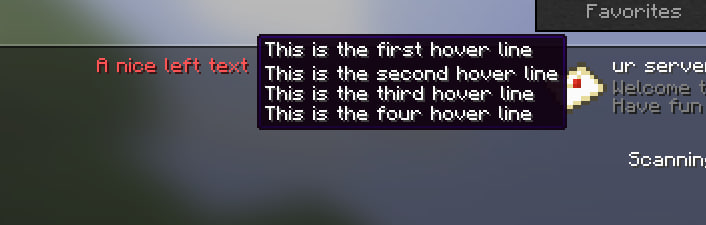
hover:
– ‘This is the first hover line’
– ‘This is the second hover line’
– ‘This is the third hover line’
– ‘This is the four hover line’
#—————————————————————————————–
messages:
maintenance:
kick:
– ‘%prefix%’
– ”
– ‘The server is currently under maintenance.’
– ‘Please try again later.’
fullserver:
– ‘%prefix%’
– ”
– ‘The server is currently full.’
– ‘Please try again later.’
“`
Showcase

SessionSkip
Simple velocity proxy plugin, that allows keeping server in a mixed online mode. By default, all players are authenticated, but for players that don’t own the game, they can be whitelisted by IP and will bypass Mojang authentication servers.
Notes:
Giving offline players OP or other permissions is insecure. Be careful when setting up permissions for offline users. If you must give them permissions, look into other plugins that might have better solutions (another form of auth besides IP).
Unauthenticated players will use offline UUIDs. Inventories and most other data are not shared between offline and online UUIDs, so try not to mix and match them. The plugin won’t allow players in the exempt list to authenticate with Mojang – if they don’t match the IP list it will explicitly reject them instead of attempting to authenticate them.
Usage:
– /exempt add <player> <cidr>
– Exempts a player
– /exempt remove <player> <cidr>
– Removes an existing exemption
– /exempt removeall <player>
– Removes all exemptions on a player. You’ll also need to migrate their inventory from an offline UUID to an online UUID.
– /exempt list <player>
– List all exemptions on a player
– /exempt listplayers
– List all players that have exemptions
– /exempt reload
– Reload config from disk
/exempt command requires the “command.exempt” permission on the velocity proxy.