Socialismus


[](https://modrinth.com/plugin/socialismus-chirper)
[](https://modrinth.com/plugin/socialismus-channelizer)

[](https://discord.arcadeya.com)
Accessibility
SOCIALISMUS: MODULARITY WAVE
### Supported Platforms
`SPIGOTMC` | `FOLIA` | `VELOCITY` | `PAPERPMC`
### Supported Versions
`1.16.x` and `newer`
A customizable, truly modular and modern plugin for your Minecraft server
that aims to improve communication between and with players.
—
## Dependencies & Information
**General**
You can use either Velocity or any Spigot fork. Just select the correct JAR file and place it in the `plugins` folder.
**Java**
We recommend using Java 17 for older versions (e.g., `1.16`) and Java 21 and higher for newer versions.
**Integrations**
Our plugin and modules integrate with various other plugins. By default, we recommend using PlaceholderAPI for additional placeholders, though you can find others on our module pages.
**Good to know**
This plugin will *not* be ported to lower versions. If you want to use it, update your server; otherwise, find an alternative.
—
## Infinite Chats
Define unlimited chat channels in your preferred config format, hot-reloadable without code changes.
– **Flexible Triggers**: optional prefixes (`!`, `#`) or auto-trigger `GLOBAL` or `LOCAL` with configurable radius
– **Powerful Requirements**: group multiple rules (perms, worlds, etc.) and apply a variety of operators per group for fine-grained access control
– **Dynamic Formats**: create multiple message templates per channel, tie each to a requirement group, and the plugin auto-selects the format whose requirements are met
– **Built-In Fallback**: catch-all channel for any message that doesn’t match other chats
## Synchronization
Effortlessly keep your network in sync—across `servers` or through `proxies`.
– **Cross-Server Chat**: broadcast live messages in real time across all servers or through proxies
– **Shared History & Cleanup**: forward every message network-wide, then issue a synchronized `clear` command to instantly wipe chat histories on every server
– **Unified Command Suggestions**: propagate player tab-completion and command hints network-wide
Requires the Sync Module, configured separately (e.g., Redis credentials) in its own config file.
—
## Customization
Tailor every feature via your **preferred config format** (YAML, JSON, TOML, etc.)—zero hardcoded strings, fully hot-reloadable.
– **Commands**: enable/disable commands; set aliases; assign permissions; customize descriptions, usage templates & cooldowns
– **Messages**: define every prompt, notification & error in config—control text, placeholders, colors & layout without touching code
– **Global Settings**: configure core behavior entirely in config (Logging, Serializer, Sync, Updater, Listeners)
– **Hot-Reload**: apply changes `instantly` with a dedicated command
—
## Modularization
Add only the features you need via a **plug-and-play** module system.
– **On-Demand Features**: only installed modules are loaded—no extra code or unused functionality
– **Auto-Generated Config**: each module creates its own config folder on first load
– **Decoupled Development**: modules rely solely on the core—no inter-module dependencies required
– **Independent Updates**: update, add or remove modules without touching the core plugin
—
## Modules
[**Chirper – Free**: The loudmouth of the server! Make sure your announcements are heard by all. Ideal for rallying the troops or just making sure everyone knows it’s pizza night.](https://modrinth.com/plugin/socialismus-chirper)
[**SocialismusChannelizer – Free**: The resource provider! Enables synchronization feature for other modules using BungeeCord channels.](https://modrinth.com/plugin/socialismus-channelizer)
—
[Click on this block to join our Discord server and get real-time support from our team and community!](https://discord.arcadeya.com/)
—
SocialFire
# SocialFire
The most feature-complete social announcements plugin for Velocity.
## What’s this plugin?
Allows network admins to seamlessly fill the gap between automatic social announcements and social commands like /discord and /store
# Features
Single config for both announcements and commands
Example:
“`yml
announcements:
store: # the name of the command
link: https://store.xyz.abc # Chat clickable link
interval: 180 # delay for announcements in seconds
sound: “ENTITY_PLAYER_LEVELUP”
message: |- # message for chat
&f
&e🛒 Server Store
&fPurchase &eranks, coins, keys &fand much
&fmore at our &estore & support &fthe server!
&e➟ &nstore.xyz.abc
&f
“action-bar”: “§e🛒 &lSTORE §7| §fhttps://store.xyz.abc” # action bar
discord: # same as before
link: https://discord.gg/
interval: 140 # in seconds
sound: “ENTITY_PLAYER_LEVELUP”
message: |-
&f
&9✉ Server Discord
&fStay up to date with all &9announcements,
&9gveaways, events &fand much more!
&9➟ &ndiscord.gg/
&f
“action-bar”: “§9✉ &lDISCORD §7| §fhttps://discord.gg/”
# You can add as many of these commands as you want
“`
# Usage/Compatibility/Installation
To install this plugin, just download the .jar file and put it in your plugins folder of your velocity and reboot your velocity proxy and to support sounds, put it in paper as well.
Currently the plugin only supports velocity and is tested on version 3.4-build-459+ but looking forward we are going to add support for bungee.
SMLib

This library is required for the functions of StreamingModule and must always be installed in the latest version if StreamingModule is used.
See StreamingModule:
[StreamingModule – Twitch Integration Plugin](https://modrinth.com/plugin/streamingmodule)
# Features of StreamingModule
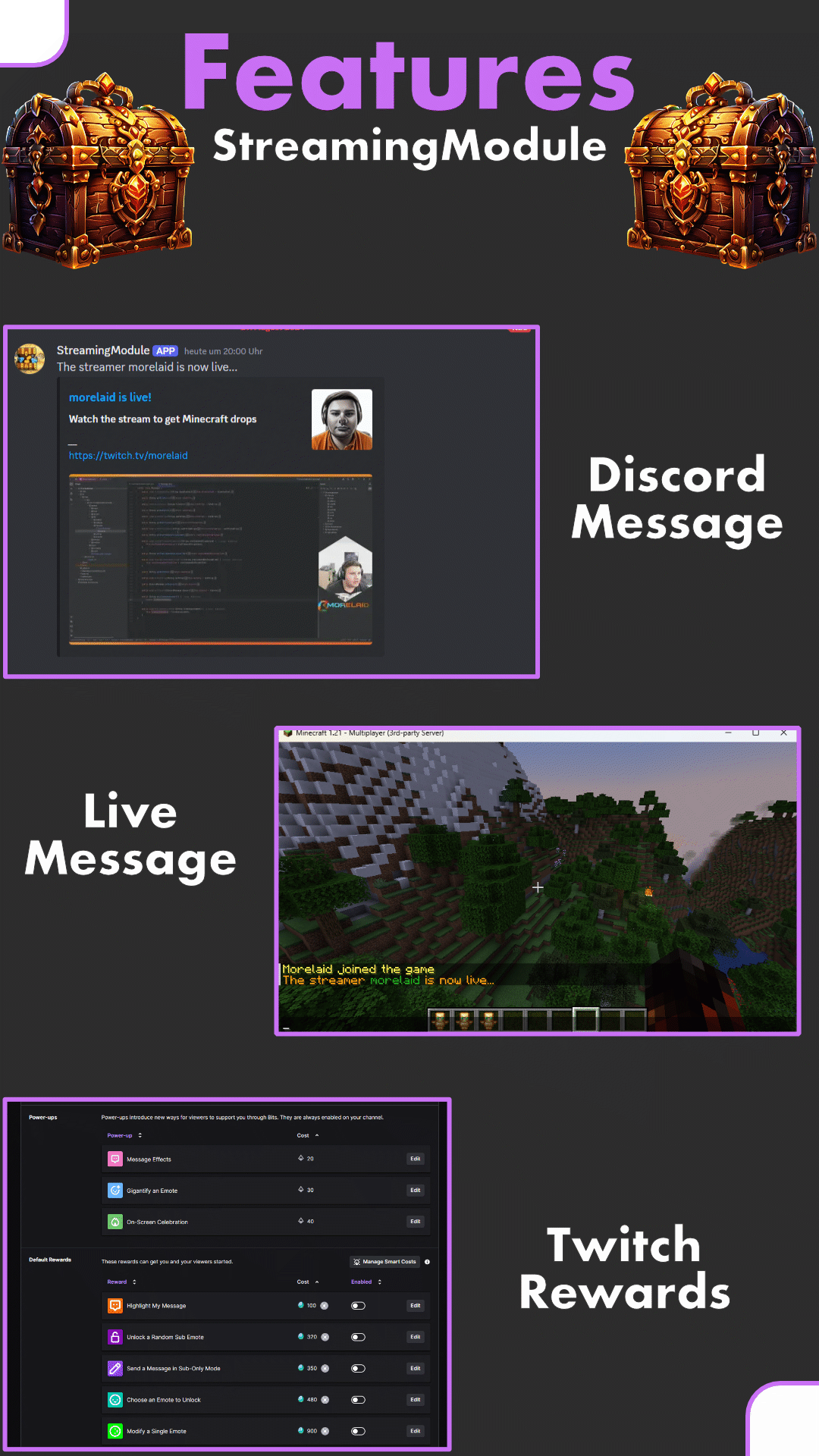
StreamingModule (formerly known as “StreamingDrops”) is a Twitch integration for Minecraft with many different functions. Among other things, Twitch viewers can get Minecraft drops (similar to the Twitch (Gaming) Drops).
In addition, streamers can be displayed as live on the server, the streamer can see his Twitch chat directly in Minecraft or chat commands in the Twitch chat with content from Minecraft are possible. The integration of Twitch Rewards (Channel Points) is also possible for positive or negative actions
# Features
– Setup everything as twitch drop (items, money, crates, ranks & more)
– Add multiple streamers possible
– No streamkeys or oAuth-Keys necessery
– Change the drop chance
– Automated broadcast message and discord announcement, when a streamer goes live
– Livetag for streamers via PlaceholderAPI
– Offline drop support
# Requirements
– SMLib
– Java 11+
– HTTPS Port open
– “StreamingModule” (the Twitch bot) must be a moderator of your twitch channel
On some servers outgoing messages / requests are blocked. This is expressed by an error message with the command “/online”, with an HTTP(S) error code. Please check at this point whether the ports have been released accordingly.
# Installation / Setup
Here is a short step by step list: [Setup (wiki)](https://github.com/morelaid/StreamModule/wiki/Setup#installation)
### Known Incompatible Plugins
– Matrix Anti-Cheat
# Support / Bugs / Suggestion
Discord: [https://discord.gg/5zuC36R](https://discord.gg/5zuC36R)
For requests, comments or emerging errors, I am happy to help. In order to be able to help quickly, I would be pleased if the following information is already filled in during the inquiry:
– Execute „/sm report“
– Join the discord server and give a short description of your problem
Requests can be made in **German** or **English**.
SmartRouter
# SmartRouter
SmartRouter is a Velocity plugin that smartly routes players based on their last connected server. It is designed for networks with multiple sub-servers like `hub`, `spawn`, and `smp`.
## ✨ Features
– Redirect players trying to connect to a fallback server (e.g., `spawn`) to their **previous server**.
– Track players’ last connected server and remember it across reconnects.
– Fully configurable with `config.yml`.
– Requires **LuckPerms** to store and retrieve player metadata.
—
## 📦 Requirements
– **Velocity** Proxy
– **LuckPerms** (must be installed and active on the proxy)
If LuckPerms is not found, the plugin will automatically disable itself.
—
## ⚙️ Configuration
The configuration file is created at `plugins/smartrouter/config.yml`.
“`yaml
file-version: 1
intercept-servers:
– spawn
remember-servers:
– spawn
– smp
“`
### `intercept-servers`
A list of server names to intercept when a player connects.
If a player attempts to join any of these servers, SmartRouter checks their last known server and redirects them if needed.
**Example:**
If a player tries to join `spawn`, but their last known server was `smp`, they’ll be redirected back to `smp` instead of joining `spawn`.
—
### `remember-servers`
A list of server names to remember as a player’s last server.
When a player joins any of these servers, SmartRouter saves the server name to metadata (via LuckPerms).
**Tip:**
Add any servers here that players might return to after a reconnect.
—
### 💡 Example Use Case
Let’s say your network has:
– A hub server players always connect to first.
– A spawn area where players are teleported initially.
– An SMP world players explore and return to.
With SmartRouter, players are routed to spawn the first time. If they log out in `smp`, the next time they connect, SmartRouter will skip spawn and send them back to `smp`.
SmartRejoin
# SmartRejoin for Velocity


**SmartRejoin** is a modern alternative to older reconnect plugins, built with a highly customizable rule-based engine.
—
## Features
– 🧠 Automatically sends players back to the server they disconnected from.
– ⚙️ Define custom rules based on a player’s last server. For example, send players from a `bedwars_` game to the most populated `bedwars_lobby`.
– ⚖️ Distributes players across lobbies by connecting them to the server with the **most** or **least** players, or to a **random** one.
– 🛡️ Configure a safe fallback server (or a pool of servers) for new players or when a target server is offline.
– ⚡ Reload the configuration on-the-fly with a simple command.
—
## Installation
1. Download the plugin
2. Place the plugin into your Velocity proxy’s `/plugins` directory.
3. Restart your Velocity proxy. A `config.yml` file will be generated in `/plugins/SmartRejoin/`.
—
## Commands & Permissions
| Command | Alias | Permission | Description |
| :— | :— | :— | :— |
| `/smartrejoinreload` | `/srr` | `smartrejoin.command.reload` | Reloads the `config.yml` file. |
—
## Configuration (`config.yml`)
The configuration is split into three main parts: **Fallback**, **Default Rule**, and **Custom Rules**.
### Quick Start
For the simplest setup, just install the plugin. By default (`rule: SAME`), it will automatically reconnect players to the server they left. New players will be handled by your `velocity.toml` configuration. To use the plugin’s fallback for new players, set `fallback.enabled: true`.
### Example Use Cases
– **BedWars Lobby**: If a player leaves `bedwars_12`, send them to the `bedwars_lobby` with the most players.
– **Persistent Survival**: If a player leaves `survival`, always send them back to `survival`.
– **Random Lobby**: If a player was in any `lobby_` server, send them to another random `lobby_` server.
– **AFK Escape**: If a player was in an `afk` server, send them to the `lobby` with the fewest players.
### Full Configuration Example (different from default one!)
“`yml
# ————————————————— #
# SmartRejoin Configuration #
# ————————————————— #
# — General Settings —
settings:
# If true, the plugin will print informational messages to the console.
# Critical errors are always logged.
logging_enabled: true
# — Fallback Configuration —
# Used for new players or when a target server from a rule is offline.
fallback:
# If ‘enabled’, this plugin’s fallback logic will be used.
enabled: true
# ‘RANDOM’: Connects to a random server whose name CONTAINS the ‘name’ value.
# ‘SERVER’: Connects to a specific server with an exact ‘name’.
type: RANDOM
name: “lobby”
# — Default Rule —
# Applied if a player’s last server doesn’t match any custom rules below.
default:
# ‘SAME’: Connects to the exact same server. (Most common)
# ‘FALLBACK’: Immediately uses the fallback rule.
# ‘SMART’: Finds a related lobby. See comments below for details.
rule: SAME
# Arguments for the ‘SMART’ rule.
# Example: [‘MOST’, ‘%last_seen%_lobby’]
arguments: []
# — Custom Rules —
# Define specific redirection rules here. They are checked in order.
rules:
stay_on_survival:
last_seen:
# Condition: Player’s last server name must be an exact match.
type: EQUALS
name: “survival”
where_to_join:
# Action: Connect to a server with this exact name.
type: EQUALS
name: “survival”
bedwars_lobby_fallback:
last_seen:
# Condition: Player’s last server name must contain “bedwars”.
type: CONTAINS
name: “bedwars”
where_to_join:
# Action: Find all online servers containing “bedwars_lobby” and
# connect to the one with the MOST players.
type: MOST
name: “bedwars_lobby”
Server Launch System
# 
**SLS** is a powerful plugin designed to dynamically start and manage servers, facilitate cross-server communication, and maintain a server registry.
## Features
– **Dynamic Server Management:** Automatically start and stop servers as needed.
– **Cross-Server Communication:** Seamlessly manage communication between multiple servers.
– **Server Registry Management:** Keep track of active and available servers.
## Installation
1. **Download the Latest Jar:**
– Obtain the latest version of the SLS plugin [here](https://github.com/protoxon/SLS/releases).
2. **Move Jar to Plugins Folder:**
– Move the downloaded jar file to the `plugins` folder of your proxy server.
3. **Start the Server:**
– Launch your proxy server to generate the configuration files.
4. **Modify the Configurations:**
– Adjust the configuration settings as needed to suit your server setup. The configuration files can be found in the `plugins/sls` directory.
## Permissions
– **Administrator Commands:**
– Permission: `sls.command.admin`
– Required for executing administrative commands on the proxy server.
SlashServerCmdBlock
Adding this plugin to the Velocity server enables users to use commands such as /s1.
However, only users can use these commands; an additional add-on is required to enable command blocks.
We plan to create mods/plugins compatible with various versions going forward.
このプラグインをvelocityサーバーに追加することによって、/s1などのvelocityコマンドが追加されます。
しかし、velocityプラグインのみだとバックエンドサーバー(s1、c1)でコマンドブロックを用いた/s1コマンドなどが使用できません。これを解決するためのアドオンがあるため、それをバックエンドサーバーへ導入することで機能するようになります。
今後様々なバージョンに対応していくつもりです。
SlashServer
# SlashServer
A stupid simple pluign to let your players connect to servers by doing /
Features:
* I don’t know… You can /creative if you have a creative server.
Commands:
* / – Send a player to a server
SkyeNetwork Velocity
# SkyeNetV – SkyeNet Velocity Plugin
A comprehensive Velocity plugin for the SkyeNet Minecraft server network, providing server management utilities and rules system.
## Version 2.1
### New Features
– **Server Rules System**: Complete rules management with JSON-based configuration
– **MiniMessage Support**: Rich text formatting with gradients and colors
– **Admin Commands**: Full CRUD operations for rule management
– **Flexible Configuration**: JSON-based rules storage with customizable headers and footers
## Installation
1. Download the latest `SkyeNetV-x.y.z.jar` from releases
2. Place the JAR file in your Velocity `plugins/` directory
3. Restart your Velocity proxy server
4. The plugin will create necessary configuration files in `plugins/skyenetv/`
## Features
### 🛡️ Server Rules System
– **Dynamic Rule Management**: Add, edit, and remove rules on-the-fly
– **Rich Text Formatting**: Full MiniMessage support for colorful text
– **Permission-Based Access**: Admin-only commands with role-based security
– **JSON Configuration**: Easy-to-edit rules storage
– **Customizable Headers/Footers**: Personalize your rules display
### 🎨 MiniMessage Formatting
The plugin supports the full MiniMessage specification for rich text formatting:
– **Colors**: ``, ``, ``, etc.
– **Gradients**: `Amazing Text`
– **Decorations**: ``, ``, ``
– **Combined Effects**: `Important Rule`
## Commands
### `/rules` – Server Rules Management
#### Public Commands
– **`/rules`** – Display all server rules to the player
#### Admin Commands (Requires `skyenetv.rules.admin` permission)
– **`/rules add “
” “<description>“`** – Add a new rule<br />
– Example: `/rules add “No Griefing” “Destroying other players’ builds is prohibited”`</p>
<p>– **`/rules remove <id>`** – Remove a rule by its ID number<br />
– Example: `/rules remove 3`</p>
<p>– **`/rules edit <id> “<title>” “<description>“`** – Edit an existing rule<br />
– Example: `/rules edit 1 “No Hacking” “Using unauthorized modifications is strictly forbidden”`</p>
<p>– **`/rules header <text>`** – Set the header text displayed above rules<br />
– Example: `/rules header “<gradient:gold:yellow>SkyeNet Server Rules</gradient>“`</p>
<p>– **`/rules footer <text>`** – Set the footer text displayed below rules<br />
– Example: `/rules footer “<gray>Thank you for following our rules!</gray>“`</p>
<p>– **`/rules reload`** – Reload rules from the configuration file</p>
<p>## Permissions</p>
<p>| Permission | Description | Default |<br />
|————|————-|———|<br />
| `skyenetv.rules.admin` | Access to all rule management commands | OP only |</p>
<p>## Configuration</p>
<p>### Rules Configuration (`plugins/skyenetv/rules.json`)</p>
<p>The rules are stored in JSON format with the following structure:</p>
<p>“`json<br />
{<br />
“header”: “<gradient:gold:yellow>SkyeNet Server Rules</gradient>“,<br />
“footer”: “<gray>Thank you for following our rules!</gray>“,<br />
“rules”: [<br />
{<br />
“id”: 1,<br />
“title”: “<red>No Hacking”,<br />
“description”: “Using unauthorized modifications or exploits is strictly prohibited.”<br />
},<br />
{<br />
“id”: 2,<br />
“title”: “<yellow>Be Respectful”,<br />
“description”: “Treat all players with respect. No harassment, bullying, or discrimination.”<br />
}<br />
]<br />
}<br />
“`</p>
<p>### Default Rules</p>
<p>The plugin comes with example rules that demonstrate MiniMessage formatting:<br />
1. **No Hacking** – Prohibition of unauthorized modifications<br />
2. **Be Respectful** – Guidelines for player interaction<br />
3. **No Griefing** – Protection of player builds<br />
4. **Follow Chat Rules** – Communication guidelines<br />
5. **No Advertising** – Server promotion restrictions</p>
<p>## MiniMessage Examples</p>
<p>Here are some formatting examples you can use in your rules:</p>
<p>### Basic Colors<br />
“`<br />
<red>Red text</red><br />
<blue>Blue text</blue><br />
<green>Green text</green><br />
<yellow>Yellow text</yellow><br />
<gray>Gray text</gray><br />
“`</p>
<p>### Gradients<br />
“`<br />
<gradient:red:blue>Gradient from red to blue</gradient><br />
<gradient:gold:yellow>Golden gradient</gradient><br />
<gradient:#ff0000:#00ff00>RGB gradient</gradient><br />
“`</p>
<p>### Text Decorations<br />
“`<br />
<bold>Bold text</bold><br />
<italic>Italic text</italic><br />
<underlined>Underlined text</underlined><br />
<strikethrough>Strikethrough text</strikethrough><br />
“`</p>
<p>### Combined Effects<br />
“`<br />
<red><bold>Important Warning!</bold></red><br />
<gradient:gold:yellow><italic>Special Announcement</italic></gradient><br />
“`</p>
<p>## Development</p>
<p>### Building from Source</p>
<p>1. Clone the repository<br />
2. Ensure you have Java 17+ and Maven installed<br />
3. Run `mvn clean package`<br />
4. The compiled JAR will be in the `target/` directory</p>
<p>### Project Structure<br />
“`<br />
src/main/java/me/pilkeysek/skyenetv/<br />
├── SkyeNetV.java # Main plugin class<br />
├── commands/<br />
│ └── RulesCommand.java # Rules command handler<br />
└── config/<br />
└── RulesConfig.java # Rules configuration manager<br />
“`</p>
<p>## Support</p>
<p>– **GitHub Issues**: Report bugs and request features<br />
– **Discord**: Join our community server<br />
– **Website**: [https://skyemc.net](https://skyemc.net)</p>
<p>## License</p>
<p>This project is licensed under the MIT License.</p>
<p>## Authors</p>
<p>– **NobleSkye** – Project Lead<br />
– **PilkeySEK** – Core Developer<br />
– **SkyeNetwork Team** – Contributors</p>
<p>—</p>
<p>*SkyeNetV v2.1 – Enhancing your Velocity server experience*</p>
</article>
<article>
<h1>SkinsRestorer</h1>
<p># <center>SkinsRestorer</p>
<p>### <center>[](https://skinsrestorer.net/docs) [](https://skinsrestorer.net/discord) [](https://translate.skinsrestorer.net/)</p>
<p>## What is SkinsRestorer?<br />
SkinsRestorer is a plugin that restores skins for offline mode servers & networks that gives the players ability to change their skins by typing a single command.</p>
<p>## Where can I use SkinsRestorer?</p>
<p>   </p>
<p>  </p>
<p>## How can I install SkinsRestorer?</p>
<p>*It’s easy to install SkinsRestorer!*</p>
<p>All the steps are detailed in [our installation guide](https://skinsrestorer.net/docs/installation).</p>
<p>## What are the Commands and Permissions?</p>
<p>Read the [official documentation](https://skinsrestorer.net/docs/configuration/commands-permissions) for a list of commands and permissions.</p>
<p>## What if I need support?<br />
If you need any support you can **[join our Discord server](https://skinsrestorer.net/discord),**<br />
so we can help you out 🙂</p>
<p>[](https://skinsrestorer.net/discord)</p>
<p>## Meet the Team:<br />
* [xknat](https://github.com/xknat) – Developer<br />
* [Pistonmaster](https://github.com/AlexProgrammerDE) – Developer<br />
* [SloPlays](https://github.com/aljaxus) – Website & backend<br />
* mono21400 – support</p>
<details>
<summary>Retired Staff</summary>
<p>* [Logics](https://github.com/Logics4) – Maintainer<br />
* Angel_0 – support<br />
* [riflowth](https://github.com/riflowth) – Skinsystem intergration dev<br />
* [fezerngodo](https://github.com/fezerngodo) – Skinsystem intergration dev<br />
* [McLive](https://github.com/McLive) – Retired dev<br />
* [Th3Tr0LLeR](https://github.com/Th3Tr0LLeR) – Retired Founder<br />
* Blackfire62 – Retired dev<br />
* [DoNotSpamPls](https://github.com/DoNotSpamPls) – Retired dev<br />
* HyperGaming18 – Retired support</p>
</details>
<p>## Stats</p>
<p>### Bukkit</p>
<p>[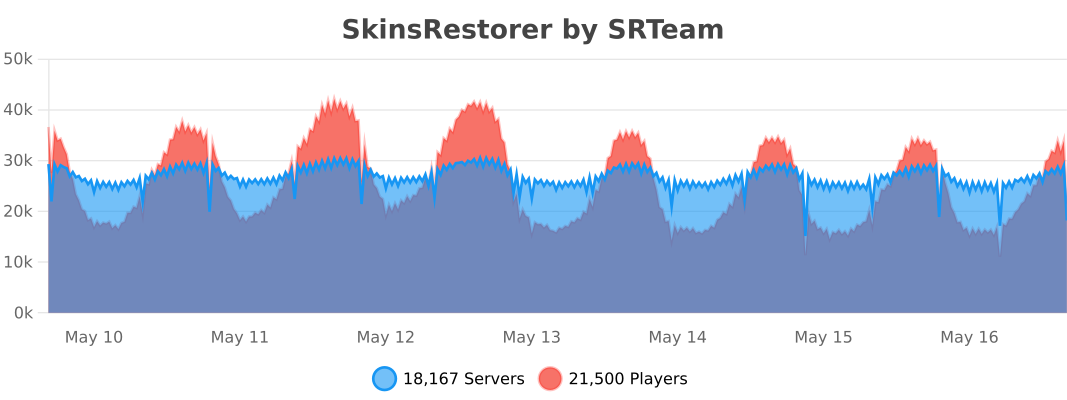](http://bstats.org/plugin/bukkit/skinsrestorer)</p>
<p>### BungeeCord</p>
<p>[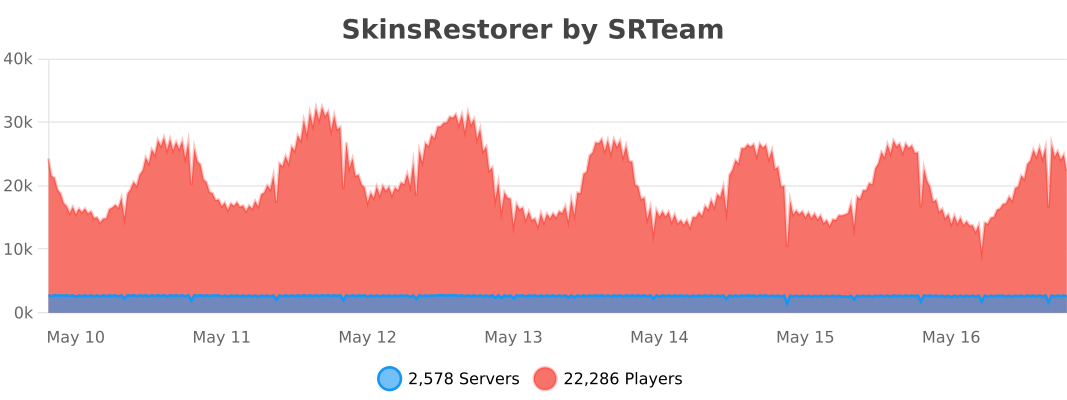](http://bstats.org/plugin/bungeecord/skinsrestorer)</p>
<p>### Velocity</p>
<p>[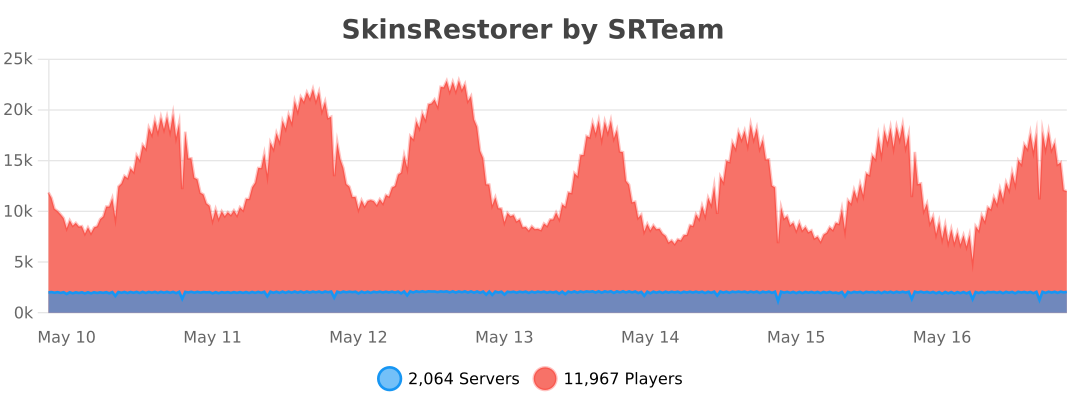](https://bstats.org/plugin/velocity/skinsrestorer) </p>
<p>## Want to support us and the plugin?</p>
<p>We have spent much of our time working on SkinsRestorer, we made it free, so that any server could enjoy it.<br />
Please consider [donating to us](https://skinsrestorer.net/donate) if you would like to thank us. This allows us to continue working on this project.</p>
<p>[](https://ko-fi.com/skinsrestorer) [](https://skinsrestorer.net/donate)</p>
<p>—</p>
<p><img decoding="async" align="right" src="https://enderdash.com/logo.png" height="150" width="150"></p>
<p>### ✨ Are you looking for an advanced administration panel for your server?</p>
<p>EnderDash allows you to manage your existing Minecraft servers using an advanced dashboard by installing a single plugin, batteries included. Run commands (with tab completion), read logs, manage files, invite your whole team, manage players, Ocelot (AI Assistant), works with your existing Infrastructure/Panels and much more.</p>
<p>Check it out: [https://enderdash.com](https://enderdash.com/?utm_source=modrinth&utm_medium=description&utm_campaign=skinsrestorer)</p>
<p>—</p>
<p>end, no seriously just give us a star already ^w^.</p>
</article>
</main>
<script type="speculationrules">
{"prefetch":[{"source":"document","where":{"and":[{"href_matches":"/*"},{"not":{"href_matches":["/wp-*.php","/wp-admin/*","/wp-content/uploads/*","/wp-content/*","/wp-content/plugins/*","/wp-content/themes/minecraft/*","/*\\?(.+)"]}},{"not":{"selector_matches":"a[rel~=\"nofollow\"]"}},{"not":{"selector_matches":".no-prefetch, .no-prefetch a"}}]},"eagerness":"conservative"}]}
</script>
<div class="gtranslate_wrapper" id="gt-wrapper-23509202"></div><script id="gt_widget_script_23509202-js-before">
window.gtranslateSettings = /* document.write */ window.gtranslateSettings || {};window.gtranslateSettings['23509202'] = {"default_language":"en","languages":["ar","az","bn","bg","hr","cs","da","nl","en","fi","fr","de","el","hu","id","it","ja","kk","ko","fa","pl","pt","ro","ru","sl","es","sv","th","uk","uz","vi"],"url_structure":"sub_directory","flag_style":"2d","wrapper_selector":"#gt-wrapper-23509202","alt_flags":[],"custom_domains":{"ru":"minecraft.vpesports.games"},"float_switcher_open_direction":"top","switcher_horizontal_position":"left","switcher_vertical_position":"bottom","flags_location":"\/wp-content\/plugins\/gtranslate\/flags\/"};
//# sourceURL=gt_widget_script_23509202-js-before
</script><script src="https://minecraft.vpesports.com/wp-content/plugins/gtranslate/js/float.js?ver=3.1.1" data-no-optimize="1" data-no-minify="1" data-gt-orig-url="/loader/velocity/page/18/" data-gt-orig-domain="minecraft.vpesports.com" data-gt-widget-id="23509202" defer></script><script id="wp-emoji-settings" type="application/json">
{"baseUrl":"https://s.w.org/images/core/emoji/17.0.2/72x72/","ext":".png","svgUrl":"https://s.w.org/images/core/emoji/17.0.2/svg/","svgExt":".svg","source":{"concatemoji":"https://minecraft.vpesports.com/wp-includes/js/wp-emoji-release.min.js?ver=7.0"}}
</script>
<script type="module">
/*! This file is auto-generated */
const a=JSON.parse(document.getElementById("wp-emoji-settings").textContent),o=(window._wpemojiSettings=a,"wpEmojiSettingsSupports"),s=["flag","emoji"];function i(e){try{var t={supportTests:e,timestamp:(new Date).valueOf()};sessionStorage.setItem(o,JSON.stringify(t))}catch(e){}}function c(e,t,n){e.clearRect(0,0,e.canvas.width,e.canvas.height),e.fillText(t,0,0);t=new Uint32Array(e.getImageData(0,0,e.canvas.width,e.canvas.height).data);e.clearRect(0,0,e.canvas.width,e.canvas.height),e.fillText(n,0,0);const a=new Uint32Array(e.getImageData(0,0,e.canvas.width,e.canvas.height).data);return t.every((e,t)=>e===a[t])}function p(e,t){e.clearRect(0,0,e.canvas.width,e.canvas.height),e.fillText(t,0,0);var n=e.getImageData(16,16,1,1);for(let e=0;e<n.data.length;e++)if(0!==n.data[e])return!1;return!0}function u(e,t,n,a){switch(t){case"flag":return n(e,"\ud83c\udff3\ufe0f\u200d\u26a7\ufe0f","\ud83c\udff3\ufe0f\u200b\u26a7\ufe0f")?!1:!n(e,"\ud83c\udde8\ud83c\uddf6","\ud83c\udde8\u200b\ud83c\uddf6")&&!n(e,"\ud83c\udff4\udb40\udc67\udb40\udc62\udb40\udc65\udb40\udc6e\udb40\udc67\udb40\udc7f","\ud83c\udff4\u200b\udb40\udc67\u200b\udb40\udc62\u200b\udb40\udc65\u200b\udb40\udc6e\u200b\udb40\udc67\u200b\udb40\udc7f");case"emoji":return!a(e,"\ud83e\u1fac8")}return!1}function f(e,t,n,a){let r;const o=(r="undefined"!=typeof WorkerGlobalScope&&self instanceof WorkerGlobalScope?new OffscreenCanvas(300,150):document.createElement("canvas")).getContext("2d",{willReadFrequently:!0}),s=(o.textBaseline="top",o.font="600 32px Arial",{});return e.forEach(e=>{s[e]=t(o,e,n,a)}),s}function r(e){var t=document.createElement("script");t.src=e,t.defer=!0,document.head.appendChild(t)}a.supports={everything:!0,everythingExceptFlag:!0},new Promise(t=>{let n=function(){try{var e=JSON.parse(sessionStorage.getItem(o));if("object"==typeof e&&"number"==typeof e.timestamp&&(new Date).valueOf()<e.timestamp+604800&&"object"==typeof e.supportTests)return e.supportTests}catch(e){}return null}();if(!n){if("undefined"!=typeof Worker&&"undefined"!=typeof OffscreenCanvas&&"undefined"!=typeof URL&&URL.createObjectURL&&"undefined"!=typeof Blob)try{var e="postMessage("+f.toString()+"("+[JSON.stringify(s),u.toString(),c.toString(),p.toString()].join(",")+"));",a=new Blob([e],{type:"text/javascript"});const r=new Worker(URL.createObjectURL(a),{name:"wpTestEmojiSupports"});return void(r.onmessage=e=>{i(n=e.data),r.terminate(),t(n)})}catch(e){}i(n=f(s,u,c,p))}t(n)}).then(e=>{for(const n in e)a.supports[n]=e[n],a.supports.everything=a.supports.everything&&a.supports[n],"flag"!==n&&(a.supports.everythingExceptFlag=a.supports.everythingExceptFlag&&a.supports[n]);var t;a.supports.everythingExceptFlag=a.supports.everythingExceptFlag&&!a.supports.flag,a.supports.everything||((t=a.source||{}).concatemoji?r(t.concatemoji):t.wpemoji&&t.twemoji&&(r(t.twemoji),r(t.wpemoji)))});
//# sourceURL=https://minecraft.vpesports.com/wp-includes/js/wp-emoji-loader.min.js
</script>
</body>
</html>