StaffChatVelocity
StaffChatVelocity is a simple Velocity Minecraft Plugin that allows you to write with other Staffmembers easily. This is my first project and I hope you like it ❤️
# Why sould I use this plugin?
Because it’s made with Heart ❤️ by me. I’m using this Plugin on my own Minecraft Server, which means that it will get Updates frequently. I would be really happy if you give it a try.
# How does it work?
## Features
– Customisable Staffchat with Discord Integration
## Commands
– “`/staffchat “` sends a message to the staffchat. Alias: /sc
– “`/staffchatplugin reload (all|config|discord)“` reloads the plugin. This may take a while, because the Discord-Bot also reloads. Alias: /scpl
## Permissions
– staffchat.use Use the staffchat
– staffchat.see See the staffchat
– staffchat.manage Execute “`/staffchatplugin“`
– staffchat.manage.reload Reload the plugin
## Files
plugins/staffchatvelocity/config.yml
NookureStaff
# Introducing NookureStaff OSS
> This is the free version of the plugin available to the public. It currently includes all the features of the formerly premium version. However, please note that personalized support through Discord tickets will only be available to buyers of NookureStaff. The free version might have limitations in the future and could require an additional payment for certain features. The plugin’s source code will remain published under the AGPLv3 license.
NookureStaff is the most advanced staff utilities plugin for Minecraft servers. Its comprehensive features, extensive customization options, and remarkable flexibility make it suitable for any type of Minecraft server, whether a small standalone server or a massive multi-proxy network.
## Main features of the plugin
Our plugin has an extensive list of features that can be chosen to be toggled on or off by the end user, but we always make every aspect configurable.
## Player Actions
You can do shift + click on a player and you will have a full GUI with a lot of actions for the current player, you can add whatever you want to this inventory!, the only limit is your imagination! You can also open this inventory by performing the following command: /player-list

## Staff Mode
This mode restricts staff members from impacting the server state unless they have special permissions, while still granting them access to valuable moderation tools.

## User Notes
This module allows adding notes to users on the Minecraft server. These notes can be displayed when the user logs in. Additionally, admins can set notes to be visible only to other admins, allowing them to leave notes for other staff members as well.

## Vanish
The vanish state can be activated by staff members using a command or while in Staff Mode, rendering them invisible to regular players. This feature enables staff to spectate players discreetly, monitor for hacks, and ensure compliance with server rules.
## Freeze
This tool enables staff members to freeze players and display a message in the chat. It can be particularly useful when staff need to conduct a screenshare on a user to verify if they are cheating.

## **Staff Chat**
The Staff Chat feature provides a private communication channel for online staff members within the Minecraft server, allowing them to interact with each other discreetly without using the public chat.
## Multi Server
This plugin is not only capable of running on an independent Minecraft server but is also compatible with Proxy synchronization. This compatibility enables simultaneous usage across multiple servers, facilitating communication of certain plugin features between the backend servers.
## Multi Proxy
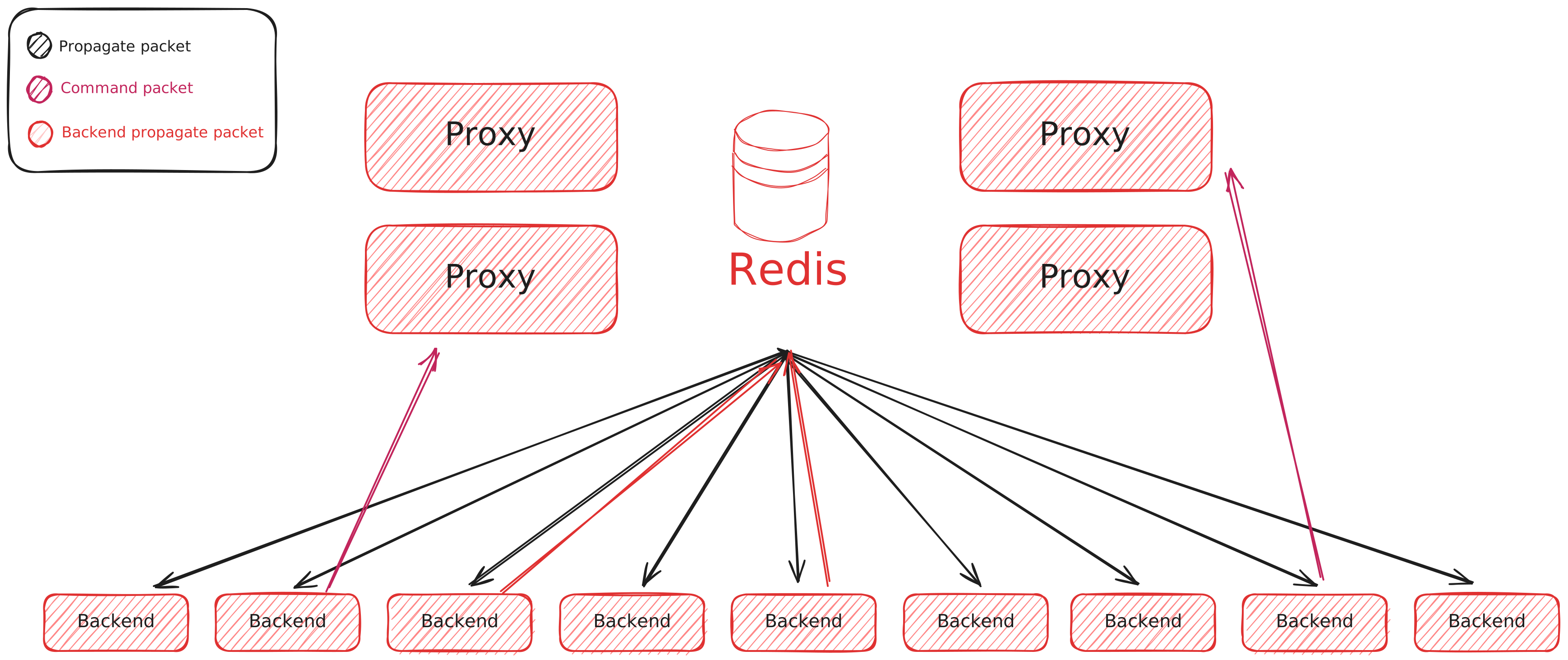
Nookure Staff is compatible with Proxy synchronization for multi-server use and seamlessly operates on multiple proxies with Redis integration. This allows efficient communication and synchronization of plugin functions across different proxy servers, enhancing scalability and performance in complex server setups.
## Customization
Nookure Staff offers extensively customizable configuration files that allow for precise adjustments to every aspect of the plugin. Messages, items, and commands can be effortlessly modified within seconds. Additionally, the plugin boasts a variety of features that can be selectively enabled or disabled to tailor the user experience and ensure optimal server performance.
## Multi-server and proxy sync
This plugin can work on multiple servers or proxies connecting each instance to a MySQL database. If you want, you can also setup Redis, following the steps in our [official documentation](‘https://docs.nookure.com/nkstaff/messenger.html’).
## Usage Stats
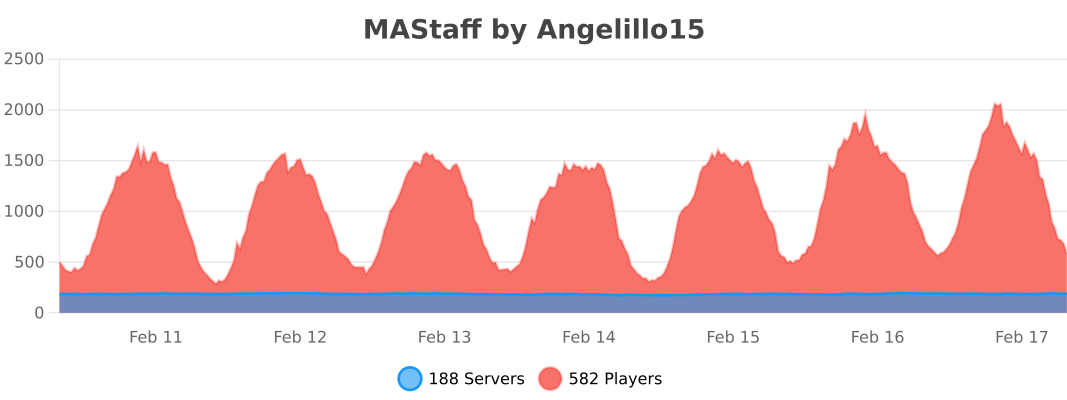
The plugin name in bstats appear as MAStaff (the old plugin name)
## Frequently Asked Questions
**Q**: Do I need to have more than one server to use this plugin?
**A:** No, this plugin can run on standalone servers or multiple servers at once, depending on your needs.
**Q:** Do I need a license to use this plugin?
**A:** No. You only have to download the plugin from the website and drag it to your plugins folder on your server.
**Q:** Does this plugin support proxies?
**A:** Yes, the plugin only supports Velocity, the plugin is only required to execute commands on the proxy and the pm messenger, the rest of the features are executed on the backend server.
**Q:** How can I set up the plugin on my server?
**A:** You can check our [documentation](‘https://docs.nookure.com/nkstaff/messenger.html’) to learn how the plugin works and configure each aspect. If you find any difficulties during the process, you can join [our Discord server](‘https://discord.nookure.com’) and open a ticket, where we will help you fix your issue.
**Q:** I can’t find a feature that I would like. How can I suggest that to be implemented?
**A:** You can join [our Discord server](‘https://discord.nookure.com’) and open a ticket explaining in detail what would you like to be implemented in next updates. We are always listening for feedback and trying to make NookureStaff better!
SQLib
[](https://GitHub.com/Naereen/StrapDown.js/graphs/commit-activity)
[](http://makeapullrequest.com)
[](https://ko-fi.com/G2G4DZF4D)

# SQLib
SQLib is the easiest way to store data for all your minecraft needs! A simple sql wrapper made with a focus on minecraft use cases.
# Important Note:
This library is not a full-fledged sql wrapper, and does not provide full access to many sql features.
The main focus of this library is to provide an easy and simple way to store data in your mods.
If you are looking for a more advanced database I recommend taking a look at something like [Nitrite](https://github.com/nitrite/nitrite-java).
# Config
The mod generates a config on first time start that allows you to configure the database used by all mods relying on sqlib.
The default database is a sqlite database running in the sqlib directory.
# Datatypes
The datatypes can be accessed via `JavaTpes`, `MinecraftTypes` or the `AdventureTypes` classes. I tend to add support for new types as I run into them in my projects. If you would like one added, pleade make an issue!
| Standard | Minecraft | Adventure |
|———-|————-|———–|
| Byte | Vec3i | Key |
| Byte[] | BlockPos | Component |
| Bool | ChunkPos | |
| Short | Text | |
| Int | Identifier | |
| Float | Sound | |
| Double | Json | |
| Long | NbtElement | |
| String | | |
| Char | | |
| Date | | |
| Color | | |
| UUID | | |
| URI | | |
| URL | | |
You can also add your own custom types as seen here:
# Setup
In your build.gradle include:
“` gradle
repositories {
maven { url “https://api.modrinth.com/maven” }
}
dependencies {
modImplementation(“maven.modrinth:sqlib:3.2.2”)
}
“`
# Developer Usage
This example uses the built-in database managed by sqlib. for 99% of mods, using the built-in database is good, however
further down are examples for custom database management.
“`java
// Do not call SQLib.getDatabase() in a early mod initializer. Doing so will likely crash your mod.
// Calling in or after the regular mod initializer is ok.
Database db = SQLib.getDatabase();
DataStore store = db.dataStore(“myModId”, “userdata”);
DataContainer playerData = store.createDataContainer();
playerData.put(JavaTypes.STRING, “username”, “CoolGuy123”);
playerData.put(MinecraftTypes.BLOCKPOS, “home”, new BlockPos(304, 62, 37));
playerData.put(MinecraftTypes.NBT, “nbt”, new NbtCompound());
System.out.println(playerdata.get(JavaTypes.STRING, “username”));
System.out.println(playerdata.get(MinecraftTypes.BLOCKPOS, “home”));
System.out.println(playerdata.get(MinecraftTypes.NBT, “nbt”));
“`
# Custom Database Management
“`java
Postgres db = new Postgres(“name”, “192.168.1.69”, “3306”, “cooluser”, “radman”);
// OR
MySQL db = new MySQL(“name”, “192.168.1.69”, “3306”, “cooluser”, “radman”);
// OR
SQLite db = new SQLite(“name”, “some/dir”);
“`
# Transaction Support
This approach will bach sql commands into one command for faster read/writes of large amounts of data.
“`java
DataStore store = db.dataStore(“modId”, “userdata”);
DataContainer playerData = table.createDataContainer();
playerData.transaction().put(“username”, “CoolGuy123”).put(“home”, new BlockPos(304, 62, 37).commit();
“`
# Custom Types
You can add a custom type by following the implentations in `JavaTypes`, `MinecraftTypes` and `AdventureTypes`. Then you can use it like any other native SQLib type.
“`java
// The SQLPrimitive is the base type to serialize to, and the two function lambdas are to serialize and deserialize from it
public static final SQLibType JSON = new SQLibType<>(SQLPrimitive.STRING, JsonElement::toString, JsonParser::parseString);
// You can also extend a type like this:
public static final SQLibType IDENTIFIER = new SQLibType<>(SQLPrimitive.STRING, Identifier::toString, Identifier::tryParse);
public static final SQLibType SOUND = new SQLibType<>(IDENTIFIER, SoundEvent::getId, SoundEvent::of);
“`
SpongeForBukkit
Sponge For Bukkit is a plugin that allows you to run Sponge-style plugins alongside Bukkit/Paper plugins on your Minecraft server.
### Features:
– Load Sponge plugins directly from /plugins/SpongeForBukkit/sponge-plugins/
– Bukkit and Paper plugins placed in the same folder are also supported
– Configurable plugin prefix for all messages
– /sbreload command to reload configuration
– /spongeplugins (/sp) command with pagination to list all loaded plugins
– Sponge plugin configs can remain in their own folders or follow Bukkit standard
### Requirements:
– Minecraft 1.21+ (Bukkit or Paper)
– Java 21
### Installation:
1. Place the Sponge For Bukkit plugin jar into your `/plugins/` folder
2. Create a `sponge-plugins` folder inside `/plugins/SpongeForBukkit/`
3. Drop your Sponge or Bukkit plugins into the `sponge-plugins` folder
4. Start or reload your server
### Note:
You do NOT have to create the sponge-plugins folder, as it is only optional.
SpicyAzisaBan
# 🚫SpicyAzisaBan
[](https://repo.azisaba.net/#browse/browse:maven-public:net%2Fazisaba%2Fspicyazisaban%2Fcommon)
## 📖Description
SpicyAzisaBan is an all-in-one punishment system for Velocity. (Heavily inspired by AdvancedBan)
It supports various types of punishments, following are the types of punishments supported by SpicyAzisaBan:
– Ban
– Temp ban
– IP ban
– Temp IP ban
– Mute
– Temp mute
– IP mute
– Temp IP mute
– Warning
– Caution
– Kick
– Note
SpicyAzisaBan also supports multiple servers (such as multiple instances of Velocity), so you can use it in a network environment.
## ✨Features
– Ban, Mute, Warn, Caution, Kick, Note players
– Discord webhook support
– Support multiple instances of Velocity
– Pre-defined reasons for each server/type of punishment
– Customizable messages
– Ban all alt accounts at once
– Lockdown mode (prevent new players from joining the server)
– Punishment automation via external API (see below for more information)
## ❗️Requirements
– Java 17 or later
– Internet connection (for fetching dependencies)
– MySQL or MySQL-compatible (e.g. MariaDB) database
– We recommend using supported versions of MariaDB
## 💻Installation
1. Download the plugin from [Modrinth](https://modrinth.com/plugin/spicyazisaban/versions) and place it in your server’s `plugins` folder.
2. Start the server once to generate the configuration file. (Or you can just create the file manually)
3. Configure the plugin in `plugins/SpicyAzisaBan/config.yml`.
4. Restart the server.
5. Do `/sab info` to see if the plugin is working correctly.
## 📝Configuration
“`yml
# SpicyAzisaBan config
#
# Important: If you are running from CLI, you only need to configure database settings, and you can just ignore
# anything else.
# Command prefix
# ———-
# You will be able to run command with: /${prefix}command
# So if you set this to “/”, you can run command with //command
prefix: “”
# Database settings
# ———-
# MySQL or MySQL-compatible (e.g. MariaDB) database is required to run SpicyAzisaBan.
database:
host: localhost
name: spicyazisaban
user: spicyazisaban
password: p@55w0rd
verifyServerCertificate: false
useSSL: true
# If true, the plugin will prevent players from joining the server if database is inaccessible.
failsafe: true
warning:
# Don’t set to 1s, it’s too terrible because we fetch the punishments from database every time we check for warnings
sendTitleEvery: 10s
titleStayTime: 5s
# These settings below are reloadable by doing /sab reload
serverNames:
# “server” (key) must not contain UPPERCASE character.
server: FriendlyServerName
defaultReasons:
# valid types: ban, temp_ban, ip_ban, temp_ip_ban, mute, temp_mute, ip_mute, temp_ip_mute, warning, caution, kick, note
# invalid types are ignored
ban:
# : reasons list
global:
– “ban reason (global) 1”
– “ban reason (global) 2”
lobby:
– “ban reason (lobby) 1”
– “ban reason (lobby) 2”
# a player wouldn’t be able to bypass with eg /minecraft:tell
blockedCommandsWhenMuted:
# server: Array
# “global” would affect all servers
global:
– tell
– r
– me
life:
– rpc
– me
banOnWarning:
# if warning count hits 3, 4, 5…, the player would be banned with specified reason
# this feature will be disabled if you set this value to <= 0
threshold: 3
time: "1mo"
# Available variables: %PREFIX%, %COUNT& (current warnings count), %TIME% (above), %ORIGINAL_REASON% (reason used for /warn)
reason: "You've got %COUNT% warnings and you've been banned for %TIME%. (Original reason: %ORIGINAL_REASON%)"
customBannedMessage:
# usually configured via messages.yml, but you can set the message per server here
# key = server
# value = message
rpg:
- "&cA player has been deleted from the server."
# Discord webhook URLs
# If you don't need this feature, simply uncomment the line below.
#webhookURLs: { __fallback__: {} }
# and comment out the lines below.
webhookURLs:
__fallback__:
default: "https://discord.com/api/webhooks/123456/secret"
server1:
default: "https://discord.com/api/webhooks/123456/secret"
global:
default: "https://discord.com/api/webhooks/123456/secret"
ban: "https://discord.com/api/webhooks/789012/secret"
```
## Non-exhaustive list of permissions
We recommend using [LuckPerms](https://luckperms.net) for permission management.
- `sab.command.spicyazisaban`
- `sab.command.spicyazisaban.creategroup`
- `sab.command.spicyazisaban.deletegroup`
- `sab.command.spicyazisaban.group`
- `sab.command.spicyazisaban.info`
- `sab.command.spicyazisaban.debug`
- `sab.command.spicyazisaban.reload`
- `sab.command.spicyazisaban.deletepunishmenthistory`
- `sab.command.spicyazisaban.deletepunishment`
- `sab.command.spicyazisaban.link`
- `sab.command.spicyazisaban.unlink`
- `sab.check`
- `sab.history`
- `sab.seen`
- `sab.banlist`
- `sab.proofs`
- `sab.delproof`
- `sab.addproof`
- `sab.changereason`
- `sab.unban`
- `sab.unmute`
- `sab.unpunish`
- `sab.punish.global`
- `sab.punish.group.`
– `sab.punish.server.`
– `sab.ban.perm`
– `sab.ban.temp`
– `sab.ipban.perm`
– `sab.ipban.temp`
– `sab.mute.perm`
– `sab.mute.temp`
– `sab.ipmute.perm`
– `sab.ipmute.temp`
– `sab.warning`
– `sab.caution`
– `sab.kick`
– `sab.note`
– `sab.notify.ban`
– `sab.notify.tempban`
– `sab.notify.ipban`
– `sab.notify.tempipban`
– `sab.notify.mute`
– `sab.notify.tempmute`
– `sab.notify.ipmute`
– `sab.notify.tempipmute`
– `sab.notify.warn`
– `sab.notify.caution`
– `sab.notify.kick`
– `sab.notify.note`
– `sab.exempt.mute`
– `sab.exempt.temp_mute`
– `sab.exempt.ip_mute`
– `sab.exempt.temp_ip_mute`
## 🔧Developer API
Unfortunately, SpicyAzisaBan itself does not provide helpful APIs for developers to use. (There are a lot of internal APIs that are not intended to be used by other plugins.)
If you do rely on internal API, you should be aware that it may change without notice.
If you need to automate the punishment system (but not unpunish) from backend Spigot/Paper server, you can use the API provided by [AziPluginMessaging](https://github.com/AzisabaNetwork/AziPluginMessaging).
This is one of our internal plugins, but we provide the API for developers who want to use it.
You need to install the plugin on both the backend (Spigot/Paper) server and the proxy (Velocity) server.
You can see the example of using the API in [PunishCommand.java](https://github.com/AzisabaNetwork/AziPluginMessaging/blob/main/spigot/src/main/java/net/azisaba/azipluginmessaging/spigot/commands/PunishCommand.java).
## 🛟Support
Support is provided via our [Discord server](https://azisaba.dev).
## 📜License
This project is licensed under the GNU General Public License v3.0.
Sour Whitelist
# Sour Whitelist
A trivial Proxy-wide whitelist system.
– One permission (`sour.whitelist_command`)
– Records player last access time and IP addresses
– All functionality from one command `/sourwhitelist`
– Super simple settings file
SoulFireBypass
# SoulFireBypass
Allow SoulFire to bypass online mode auth on your server.
After installing this plugin on your Velocity/BungeeCord proxy, you can edit the `config.yml` file to configure a secret token you can provide the [SoulFire](https://soulfiremc.com) Forwarding Bypass plugin to allow offline-mode bots to join your online-mode server.
This allows you to test your servers using SoulFire with bots without having to disable online-mode on your server.
—

### ✨ Are you looking for an advanced administration panel for your server?
EnderDash allows you to manage your existing Minecraft servers using an advanced dashboard by installing a single plugin, batteries included. Run commands (with tab completion), read logs, manage files, invite your whole team, manage players, Ocelot (AI Assistant), works with your existing Infrastructure/Panels and much more.
Check it out: [https://enderdash.com](https://enderdash.com/?utm_source=modrinth&utm_medium=description&utm_campaign=soulfirebypass)
—
Sonar

## Sonar
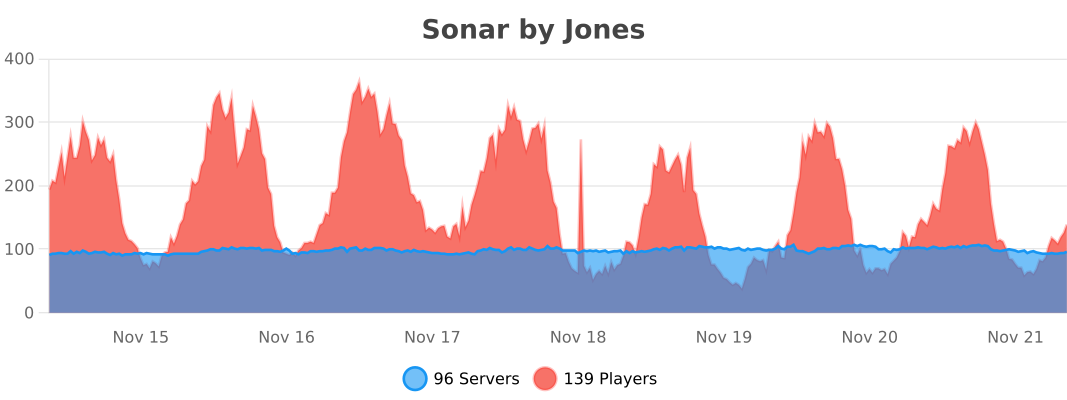
Sonar is a lightweight and easy-to-use anti-bot plugin for your Minecraft server. Sonar provides a multi-layered defense against bots, keeping your server safe from common and even sophisticated bot attacks without hindering the experience for real players.
> ### Notice about Sonar 3.0
>
> If you want more robust protection, better performance, and awesome new features, check out Sonar 3.0 at https://sonar.top/!
> You can read more about what sets Sonar 3.0 apart from Sonar 2.0 [here]().
## Design and Goal
* Effective, lightweight, and easy-to-use
* No unnecessary features and clean code
* Protection against all kinds of bot attacks
* No player should be annoyed by any sort of [CAPTCHA](https://en.wikipedia.org/wiki/CAPTCHA)
* No sort of checking for VPNs or proxies
* Multi-platform support (See [supported versions](https://docs.jonesdev.xyz/sonar/supported-versions))
## Checks
Sonar analyzes a player’s behavior before joining the actual server, therefore stopping malicious traffic from ever reaching the backend. It is supposed to be an instant, powerful, and simple method of verification that should prevent all typical and advanced types of bots.
1. Sonar sends the player to a lightweight fake server when they connect for the first time.
2. Sonar verifies that players obey the laws of Minecraft’s physics, including gravity and proper block collision.
3. Sonar verifies that players send legitimate packets when interacting with vehicles (e.g. boats).
4. Sonar makes sure that players send legitimate packets according to the [vanilla Minecraft protocol]().
Sonar also protects against spambot attacks since it queues the incoming connections, therefore making it technically impossible to have a ton of bots join the server at the same time.
### False positives
Sonar is unlikely to ever falsely prevent a player from joining the server since Minecraft uses the TCP protocol, which means that packets are always sent in the correct order. Therefore, lag or ping should not affect the bot check.
## Previews and tutorials
Hindi
Spanish
Russian
Short Previews
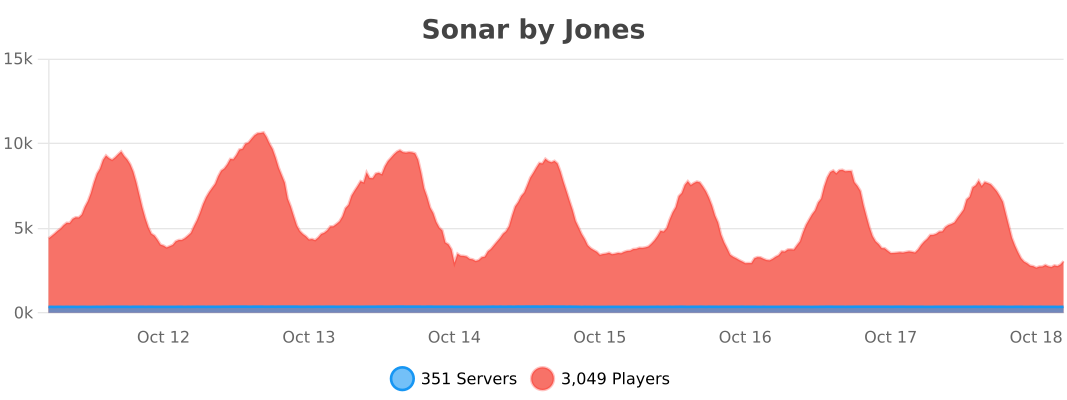
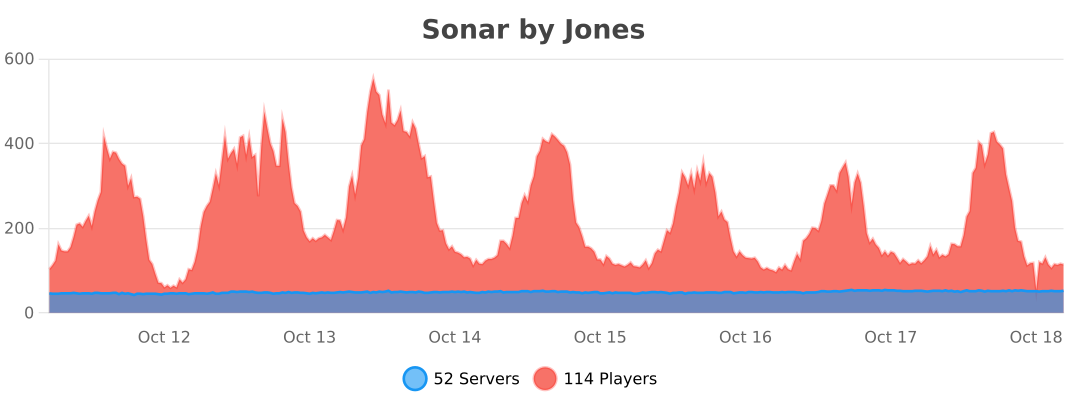
## bStats
Velocity
BungeeCord
Bukkit
SomeNotify
# SomeNotify
`SomeNotify` is a Velocity plugin for sending one message to all players connected through the proxy.
## Features
– Command `/notify `
– Command `/notify reload` to reload `config.yml`
– Broadcast to all online players on all backend servers
– Configurable message format with MiniMessage
– Configurable sender display mode: `player`, `custom`, `console`
– Built-in language support: `ru`, `en`
## Installation
1. Download the jar.
2. Put `SomeNotify-1.0.0.jar` into your Velocity `plugins` folder.
3. Start Velocity once to generate config.
4. Edit `plugins/SomeNotify/config.yml`.
5. Restart Velocity.
## Permission
– `somenotify.notify` allows using `/notify`.
– `somenotify.reload` allows using `/notify reload`.
## Config (`config.yml`)
“`yml
language: “ru”
permission: “somenotify.notify”
reload-permission: “somenotify.reload”
message-format: |
[Notify]
{sender}:
{message}
sender-mode: “player”
custom-sender-name: “Administration”
console-name: “Console”
messages:
ru:
usage: “Use /notify or /notify reload”
no-permission: “No permission.”
empty-message: “Message cannot be empty.”
sent: “Message sent ({online} players).”
reload-success: “Config reloaded successfully.”
reload-failed: “Config reload failed. Check console.”
en:
usage: “Usage: /notify or /notify reload”
no-permission: “You do not have permission to use this command.”
empty-message: “Message cannot be empty.”
sent: “Message sent ({online} players).”
reload-success: “Config reloaded successfully.”
reload-failed: “Config reload failed. Check console.”
“`
You can replace texts in `messages.ru` with any Russian strings you want.
## Placeholders
– `{sender}` resolved sender name based on `sender-mode`
– `{message}` message from command arguments
– `{online}` number of players who received the message
## Notes
– `message-format` supports MiniMessage tags.
– `language` accepts `ru` or `en`. Any other value falls back to `ru`.
Socialismus: Chirper


[](https://discord.arcadeya.com)
Accessibility
SOCIALISMUS CHIRPER: MODULARITY WAVE
### Supported Platforms
`SPIGOTMC` | `FOLIA` | `VELOCITY` | `PAPERPMC`
### Supported Versions
`1.16.x` and `newer`
A configurable announcer for servers and proxies that sends periodic messages. Define announcements in your config—specifying timing, targets, prefixes and templates—and trigger on demand, all governed by permissions and cooldowns.
—
## Dependencies & Information
**General**
You can use this module with Socialismus, which runs on Velocity or a Spigot fork.
**Integrations**
Chirper has no additional integrations. You can only use the default integrations from Socialismus.
**Socialismus required**
This is not a standalone plugin, but rather a module that extends the functionality of the Socialismus plugin. For this reason, you cannot start it in the normal way.
—
## Announcer
Enable unlimited announcers with flexible message lists, sequencing options and scheduling controls.
– **Multiple Instances**: spin up any number of announcers, each with its own list of announcements.
– **Configurable Sequences**: choose ascending or descending order, randomize per cycle, or group announcements into sub-sequences.
– **Conditional Requirements**: enforce a minimum player count before announcing.
– **Timing Controls**: specify an initial delay and interval between posts for each announcer.
—
## Announcement
Handle announcements across various media types, each fully customizable in terms of content, timing, and activation rules.
– **Multiple Channels**: combine MESSAGE, SOUND, TITLE, BOSSBAR, and ACTIONBAR in any one announcement.
– **Scheduling & Activation Controls**: apply delays, repeating behavior, and enable/disable flags at the announcement level.
—
[Click on this block to join our Discord server and get real-time support from our team and community!](https://discord.arcadeya.com/)
—