Chunky
Chunky
Pre-generates chunks, quickly, efficiently, and safely
Features
– Start one or several chunk generation tasks at the same time (if you want to leverage your CPU more)
– Pause chunk generation tasks, saving them for later
– Shows detailed information such as chunks processed, percent to completion, ETA, chunk processing rate, etc
– Custom world [shapes](https://github.com/pop4959/Chunky/wiki/Shapes), and optional world border support with [ChunkyBorder](https://modrinth.com/plugin/chunkyborder) installed
Permissions
In order to use chunky you will need to either:
– Be an operator on a dedicated server. To become an operator, someone with access to the server must run the command *op * from the server console.
– Be in a singleplayer world. In older versions of chunky you may also need to enable cheats for the world. This can be done during world creation, or by using the “Open to LAN” button.
Commands
Task Management
**chunky start** *Starts a new chunk generation task from the current selection*
**chunky pause** *Pauses the current chunk generation tasks, and saves progress*
**chunky continue** *Continues running current or saved chunk generation tasks*
**chunky cancel** *Stops the current chunk generation tasks, and cancels progress*
Selection
**chunky world [world]** *Sets the currently selected world*
**chunky shape ** *Set the [shape](https://github.com/pop4959/Chunky/wiki/Shapes) to generate*
**chunky center [ ]** *Sets the current center block location*
**chunky radius ** *Sets the current radius*
**chunky worldborder** *Set the center and radius to match the world border in the selected world*
**chunky spawn** *Set the center to the spawn point*
**chunky corners ** *Set the selection by corner coordinates*
**chunky pattern ** *Set the preferred generation [pattern](https://github.com/pop4959/Chunky/wiki/Patterns)*
**chunky selection** *Display the current selection*
Miscellaneous
**chunky silent** *Toggle displaying update messages*
**chunky quiet ** *Set the quiet interval in seconds for update messages*
**chunky progress** *Display pre-generation progress in-game for all tasks*
**chunky reload** *Reloads the configuration*
**chunky trim** *Delete chunks outside selection*
Examples
**Generate chunks in a square centered at 0,0 in the overworld with a 1000 block radius**
“`
chunky radius 1000
chunky start
“`
**Generate chunks in a circle centered at spawn in the nether with a 1000 block radius**
“`
chunky world the_nether
chunky shape circle
chunky spawn
chunky radius 1000
chunky start
“`
**Generate chunks inside a world border centered at 0,0 with a 10000 block radius**
“`
worldborder center 0 0
worldborder set 20000
chunky worldborder
chunky start
“`
Links
[**Wiki**](https://github.com/pop4959/Chunky/wiki) Find up-to-date information about plugin features
[**Discord**](https://discord.gg/ZwVJukcNQG) Visit the #chunky channel and ask questions
[**Crowdin**](https://crowdin.com/project/chunky) Help translate the plugin into several languages
[**Donate**](https://www.paypal.me/pop4959) Support the project if you’ve found it useful
[**bStats**](https://bstats.org/plugin/bukkit/Chunky/8211) Check out some cool stats for the plugin
[**CodeMC**](https://ci.codemc.io/view/Author/job/pop4959/job/Chunky/) Download the latest builds from this mirror
[**ChunkyBorder**](https://modrinth.com/plugin/chunkyborder) Custom world border addon
Screenshots
Example pre-generated square world with radius 2000

Generating 3 worlds simultaneously using a Ryzen 3700X processor + 16GB RAM

Partner
Chunky is partnered with Bloom Host who provide excellent high performance server hosting options. Click the banner below and use code **CHUNKY** for 25% off your server!
[](https://billing.bloom.host/aff.php?aff=24)
ChatPlugin


ChatPlugin is a highly customizable and modular plugin that lets you personalize not only the chat, but many other aspects of your server as well. It also offers several Staff modules to make server administration easier.
You can click on the highlighted links to learn more about each feature. For additional details, please visit [the website](https://remigio07.me/chatplugin).

⚡Versatile, powerful
all-in-one solution
Chat, GUIs, join-quit modules,
server customization and more.
|

ℹ️ Extensive wiki and comprehensive support
Detailed guides available; fast,
friendly support via Discord.
|

⚖️ Lightweight and modular design
Turn off what you do not need:
ChatPlugin is fully modular.
|

⚙️ Vast but concise developer API
Easily integrate with the robust
and 100% documented API.
|

**Premium version**
The premium version is also _proxy-compatible_ and includes the plugin’s most advanced features. _Non-exclusive_ list:
| Module |
Features |
Description |
In-game footage |
| Scoreboards |
- flickerless, asynchronous
- custom red numbers (1.20.3+)
- only-zeros mode (all versions)
- event-triggered scoreboards
/scoreboard to toggle
|
Displays useful, animated and fully customizable information in the player’s sidebar with unlimited scoreboards. |
 |
| Hover info |
|
Shows interactive information when players hover over chat messages and executes actions if they click them. |
 |
| Bossbars |
|
Displays ads or useful and easily readable information using unlimited, fully customizable bossbars. |
 |
| Chat log |
- filter by sender, text or date
- option to show only private or blocked messages
/chatlog to check
|
Logs public and private messages to the storage, enabling Staff members to search them using filtering queries. |
 |
| Punishments (beta) |
|
Bans, banwaves, warnings, kicks, mutes and soon™ a web interface. |
 |
| Account check |
|
Check if a player owns multiple accounts using several techniques, including IP lookups, to get a reliable result. |
 |
| Anticheat integrations |
- 2 additional GUIs:
- Violations GUI
- Player violations GUI
- supported anticheats:
|
Real-time alerts and info about player violations, seamlessly integrated with the anticheat installed. |
 |
| Discord integration |
|
Check the server’s status and punishments, perform IP lookups and receive notifications on Discord. |
 |
| Telegram integration |
|
Check the server’s status and punishments, perform IP lookups and receive notifications on Telegram. |
 |
| MoTDs |
|
Custom MoTDs with placeholder support translated using the player’s language. |
 |
**Free version**
Most features are included with the free version. _Non-exclusive_ list:
| Module |
Features |
Description |
In-game footage |
| Chat |
|
All-in-one chat system with channels, advanced antispam protection, player @mentions, private messaging and :instant_emojis:. |


|
| GUIs |
- 6 built-in GUIs (12 on the premium version):
- Main GUI
- Player info GUI
- Preferences GUI
- Languages GUI
- Chat color GUI
- Emojis’ tone GUI
- deeply customizable
- animated (auto-refresh)
|
Quickly customize preferences, monitor real-time stats and access key information at a glance. |
 |
| Join-quit |
|
Fully customizable rank-based join/quit messages and titles, plus alerts for outdated clients. |
 |
| Server customization |
|
Enhance your server’s visuals with custom tablists, actionbars, F3 server branding and clickable advertisements. |


|
| IP lookup |
|
Geolocate players’ IPv4 addresses with precision. |
 |
| Staff chat |
- quick communication among Staff members
- cross-server on the premium version
|
Simple Staff-only chat which includes the console. |
 |
| Performance metrics |
/ping to check a player’s ping/tps to check the server’s ticks per second/mspt to check the server’s milliseconds per tick
|
Analyze latencies, tick rates and responsiveness using colors to represent performance levels. |


|

ChatPlugin offers integrations with the following plugins:
– **CombatLogX**: prevents vanished players from hitting others
– **DiscordSRV**: blocks messages when a player cannot use the chat
– **EssentialsX**: adds the `{balance}` placeholder, even without a placeholder plugin
– **Floodgate**: detects Bedrock players to adapt certain features
– **GadgetsMenu**: removes cosmetics when a player enables vanish
– **Geyser**: detects Bedrock players to adapt certain features
– **LuckPerms**: checks permissions even when players are offline
– **MVdWPlaceholderAPI**: enables other plugins’ placeholders and offers 100+ custom placeholders
– **PlaceholderAPI**: enables other plugins’ placeholders and offers 100+ custom placeholders
– **PlayerParticles**: removes particles when a player enables vanish
– **ProtocolSupport**: detects players’ versions to send certain version-based messages
– **UltraCosmetics**: removes cosmetics when a player enables vanish
– **Vault**: adds the `{balance}` placeholder, even without a placeholder plugin
– **ViaVersion**: detects players’ versions to send certain version-based messages
Additionally, the premium version integrates with the following plugins:
– **Matrix**: provides the Violations and the Player violations GUI
– **Negativity**: provides the Violations and the Player violations GUI
– **Vulcan**: provides the Violations and the Player violations GUI
– **WorldGuard**: adds the `region-enter` and the `region-leave` event-triggered scoreboards
BuildMode
# BuildMode
Secure your world by allowing only players who have permission for the /build command to build. This is useful for networks that want to secure their lobby. The function is very simple, you can only build if you run /build and that only works with the permission build.use .
## Command & Permissions
Command: **/build** Permission: **build.use** Description: **Toggle buildmode**
Command: **/build reload** Permission: **build.reload** Description: **Reloads plugin**
## ToDo:
– Added the option to select which worlds the system should be active in.
– Adding the option to block interactions as well.
– Add /build to toggle for others.
– Add the option to select a radius of the spawnpoint to protect.
– Add an option to toggle anti pvp.
Please let me know if you have any other ideas.
BlueMap
[](https://bluemap.bluecolored.de/)
create **3D**-maps of your Minecraft worlds and display them in your browser
**>> [DEMO MAP](https://bluecolored.de/bluemap) <<**
[](https://github.com/orgs/BlueMap-Minecraft/projects/2)
[](https://github.com/BlueMap-Minecraft/BlueMap/releases)
[](https://github.com/BlueMap-Minecraft/BlueMap/releases/latest)
[](https://discord.gg/zmkyJa3)
## What is BlueMap
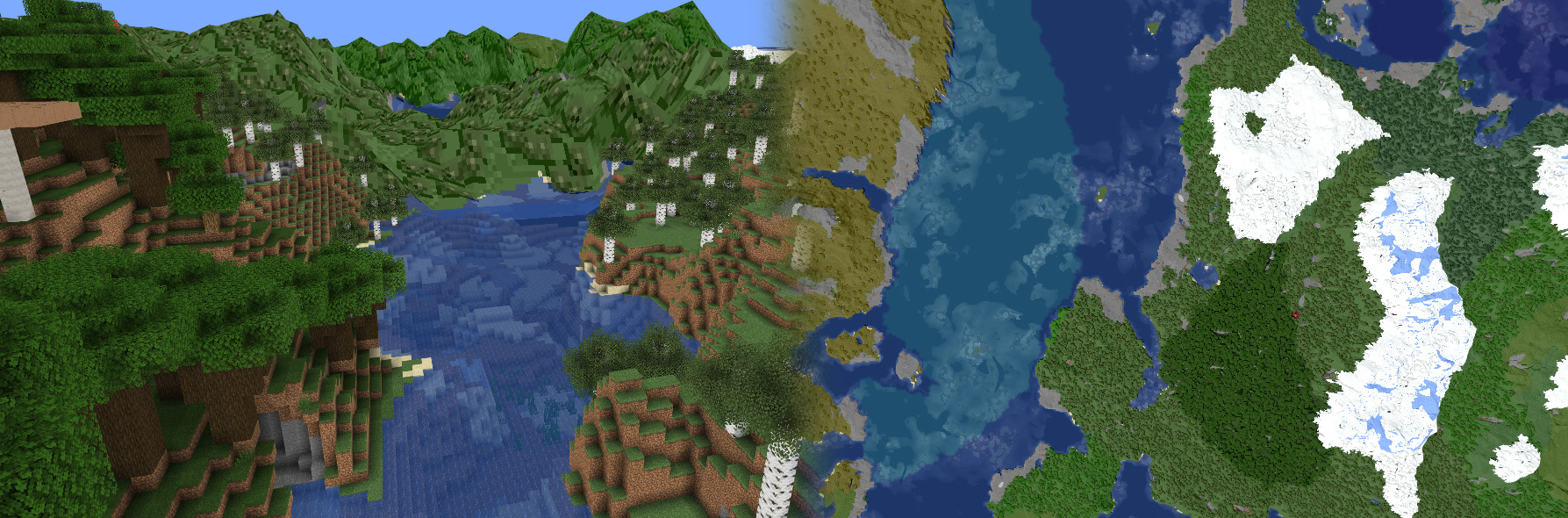
BlueMap is a program that reads your Minecraft world files and generates not only a map, but also 3D-models of the whole surface.
With the web-app you then can look at those in your browser and basically view the world as if you were ingame!
Or just look at it from far away to get an overview.
[](https://bluecolored.de/bluemap)
BlueMap comes as a Spigot/Paper or Sponge Plugin, as a Fabric or Forge-Mod and you can also use BlueMap without any Server
from the Command-Line as a standalone tool.
If installed as a Plugin/Mod, BlueMap **renders asynchronously** to your MinecraftServer-Thread.
This means at no time will it block your server-thread directly.
So as long as your CPU is not fully utilized, your server should not be slowed down while BlueMap is rendering.
## Using BlueMap
You can download BlueMap from [here](https://github.com/BlueMap-Minecraft/BlueMap/releases).
Read the [installation instructions](https://bluemap.bluecolored.de/wiki/getting-started/Installation.html) to get started!
And [here](https://bluemap.bluecolored.de/3rdPartySupport.html) is a list of addons and tools that work with bluemap.
Here you can see how many servers are using BlueMap:
[](https://metrics.bluecolored.de/)
If you need help with the setup, feel free to join the [Discord-server](https://discord.gg/zmkyJa3), we’ll be happy to help you there!
### Metrics and Webserver
**BlueMap uses [bStats](https://bstats.org/) and an own metrics-system and is hosting a web-server!**
Metrics are really useful to keep track of how the plugin is used and helps me stay motivated! Please turn them on 🙂
**bStats:** All data collected by bStats can be viewed here: https://bstats.org/plugin/bukkit/BlueMap/5912.
**own metrics:** Additionally to bStats, BlueMap is sending a super small report, containing only the implementation-name and the version of the BlueMap-plugin to my server. I do this, because there are some other implementations for BlueMap (Fabric, Forge, CLI) that are not supported by bStats. Here is an example report:
“`json
{
“implementation”: “sponge”,
“version”: “0.0.0”
}
“`
All metrics can be disabled in the plugins config.
**web-server:** The web-server is a core-functionality of this plugin. So it is enabled by default but can be disabled in the plugin-config. By default the web-server is bound to all network-interfaces (‘0.0.0.0’) on port `8100` and is hosting the content of the `./bluemap/web/`-folder.
### Todo / planned features
[Here is a todo-list](https://github.com/orgs/BlueMap-Minecraft/projects/2) ordered by what i right now think is the priority, but might always change or be reordered at my discretion. *(I develop BlueMap in my free-time, so nothing here is a promise and there are no ETA’s)*
### Issues / Suggestions
You found a bug, have another issue or a suggestion?
You are very welcome to to join the [Discord-server](https://discord.gg/zmkyJa3) and the [reddit](https://www.reddit.com/r/BlueMap) and share your thoughts!
BetterLinks
# BetterLinks
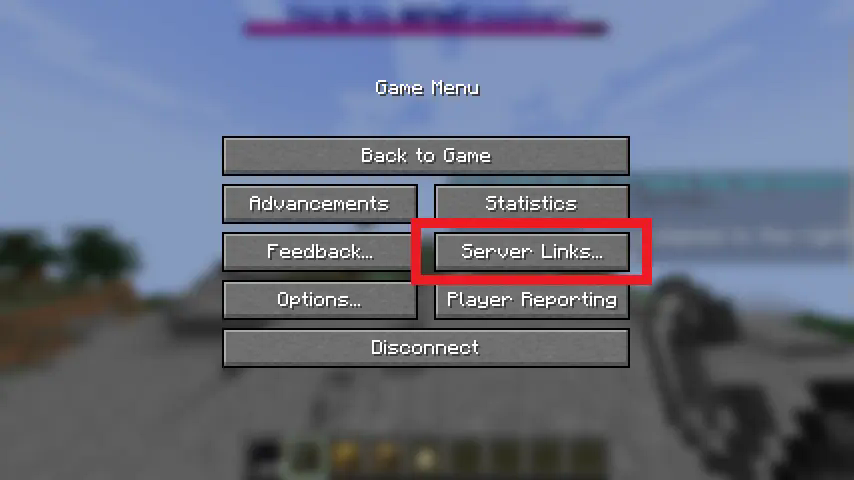
BetterLinks adds support for the new server links feature in 1.21+. This adds a new button to the game menu, which when
pressed will bring you to a new menu with buttons showing customizable text heading to customizable URLs.
This project and its collaborators use the following regularly and are thankful for their maintenance:
– [PacketEvents](https://github.com/retrooper/packetevents)
– [sharkbyte-configuration](https://github.com/amnoah/sharkbyte-configuration)
## Photos

## Requirements
This plugin only supports 1.21+ on platforms with an existing BetterLinks implementation. This includes Spigot,
Paper (and its forks), Folia, Sponge, and (soon) Fabric.
## Quick Feature Breakdown
– Platform independent design.
– Fully packet-based.
– Color code support.
– Weight-based, allowing for sorting.
For individual platform features, please check each module.
# Documentation
Please check the [BetterLinks wiki](https://github.com/amnoah/BetterLinks/wiki).
Necessary documentation will either be included in the config file or in the wiki.
# Support
For general support, please join my [Discord server](https://discord.gg/ey9uTg3hcy).
For issues with the project, please open an issue in the issues tab.
BetterAnticheat
# BetterAnticheat
**BEFORE INSTALLING, PLEASE READ:**
At this point, BetterAnticheat is in an early developmental state. It is not confirmed to be stable and should be used
with caution.
BetterAnticheat is an auxiliary anticheat. BetterAnticheat does not aim to and will not catch cheats like flight, speed,
reach, etc. BetterAnticheat exists to catch more niche cheats that many anticheats do not catch on their own, meaning it
should be run alongside another anticheat.
It is also designed to be lightweight, platform-independent, compatible with other anticheat systems, and most checks
are designed with a 0-buffer system – meaning if a check flags it means that a player is 100% cheating. Here is how
BetterAnticheat accomplishes this:
– Lag compensation. BA knows how the client perceives the world at any given time and can account for it.
– Cookies. BA uses the cookie packet for compensation as to not interfere with Ping/Pong usage.
– Runtime command registration. BA commands can have their paths altered live and can be enabled/disabled.
– Industry-grade design. BA is designed by anticheat developers with significant experience and history.
– Machine learning. BA uses machine learning to establish a trust level for users in combat.
### This project and its collaborators use the following regularly and are thankful for their maintenance:
– [PacketEvents](https://github.com/retrooper/packetevents)
– [sharkbyte-configuration](https://github.com/amnoah/sharkbyte-configuration)
A public test server exists at `192.18.159.249` for clients 1.21.4 and above, but it is not always online due to being
used for development too.
NOTE: Please stop claiming this is a local ip address! It is not. You are thinking of IPs in the `192.168.0.0` –
`192.168.255.255` range.
## Requirements
This plugin is designed for 1.21.4+ on Spigot, Paper/Folia, Sponge, and Velocity.
It requires [PacketEvents](https://github.com/retrooper/packetevents)
On the Spigot and Paper/Folia platforms, it supports [BetterReload](https://modrinth.com/plugin/betterreload). This is an optional dependency.
## Checks
BetterAnticheat has the following checks in the following categories:
### Chat
These checks look for issues with chatting. These may catch macros and chat automation tools.
– HiddenChat | Sending chat messages with the chat box hidden (often macros).
– ImpossibleCompletion | Tab completing invalid messages.
– ImpossibleMessage | Sending empty or invalidly formatted messages.
### Combat
These checks look for issues with combat. These may catch a variety of combat cheats.
– ActionInteractOrder | Sending an EntityAction packet prior to an InteractEntity in a tick.
– DualClick | Sending simultaneous left and right clicks.
– InvalidInteractionPosition | Invalid client-calculated hitbox interactions.
– InvalidReleaseValues | Releasing a used item with values filled out.
– InvalidUseActions | Attacking or placing while using an item.
– MultipleAction | Changing sneak or sprint status multiple times in a tick.
– MultipleHit | Hitting multiple entities in a tick.
– NoSwingCombat | Attacking an entity without sending an arm swing packet.
– SelfHit | Attacking yourself.
– SlotInteractOrder | Sending a SlotChange prior to InteractEntity packet in a tick.
### Dig
These checks look for issues with digging. These may catch nuker, fast break, and other cheats.
– DigBlockFacePosition | Digging block faces which cannot be seen.
– DigOrder | Sending wrongful dig stages.
– MultiBreak | Digging multiple blocks at once.
– RepeatedDig | Sending multiple dig packets within a tick.
### Flying
These checks look for issues with flying packets. These may catch position/rotation alterations and related cheats.
– ArtificialFlying | Faking flying packets.
– ArtificialPosition | Sending impossibly small position changes.
– FlyingSequence | Not sending flying packets within 20 ticks.
– ImpossiblePosition | Sending position values that are impossible.
– ImpossibleRotation | Sending rotation values that are impossible.
– RepeatedRotation | Sending repeated rotation values.
– RepeatedSteer | Sending steer packets with no corresponding rotation change.
### Heuristic
These checks use statistics and observed behavior to identify cheats. Unlike other checks, these are not built on
defined behavior and theoretically could be false flagged by perfect player behavior. As such, I’d recommend that these
should be used as an indicator to watch players and, at most, kick them rather than issuing more permanent punishments.
– CombatAcceleration | Constant acceleration during combat.
### Misc
These checks are a variety that don’t fit into other categories.
– ImpossibleHorseJump | Sending mathematically wrong horse jumps.
– ImpossibleSlot | Accessing slots which are not real.
– LargeName | Renaming an item an excessively long name.
– MultipleSlot | Changing slots multiple times in a tick.
– SmallRender | Having a render distance less than 2.
### Packet
These checks look for general packet issues. These may catch packet order alterations.
– Balance | Checks for accelerated game speeds (WIP).
– Post | Sending packets in the wrong order.
### Place
These checks look for issues with block placement. These may catch scaffold, fast place, ghost hand, and other cheats.
– CursorPosition | Invalid client-calculated block raycasts.
– PlaceBlockFacePosition | Placing on block faces which cannot be seen.
# Documentation
For the documentation home, please visit [here](https://github.com/amnoah/BetterAnticheat/wiki/).
For information on how to hide BetterAnticheat, please visit [here](https://github.com/amnoah/BetterAnticheat/wiki/Hiding-BetterAnticheat).
For information on how to use BetterAnticheat, please visit [here](https://github.com/amnoah/BetterAnticheat/wiki/Using-BetterAnticheat).
# Support
For general support, please join my [Discord server](https://discord.gg/ey9uTg3hcy).
For issues with the project, please open an issue in the issues tab.
Better Performance Plugin
Use the Plugin to pregenerate minecraft chunks to improve the performance of the server while exploring and playing.
Command:
/pgc [radius]
Example:
/pgc 35
Note:
It is better if you start slowly increasing the amount of chunks you pregenerate for example instead of jumping to pregenning 50 go from 35 to 37 to 39 and so on to avoid crashing the server.
Better Mending
# 🔧 Better Mending for Spigot !
✨ **A faithful port of the original mod:**
👉 [Better Than Mending (by legobmw99)](https://modrinth.com/mod/better-than-mending)
🌐 **Now available on Spigot:**
➡️ [**Download here!**](https://www.spigotmc.org/resources/better-mending.112248/)
💻 **Want dev builds?**
🚀 [Check GitHub releases!](https://github.com/Paulem79/BetterMending/releases/latest)
—
## ✅ What does it do?
This plugin adds **one powerful feature**:
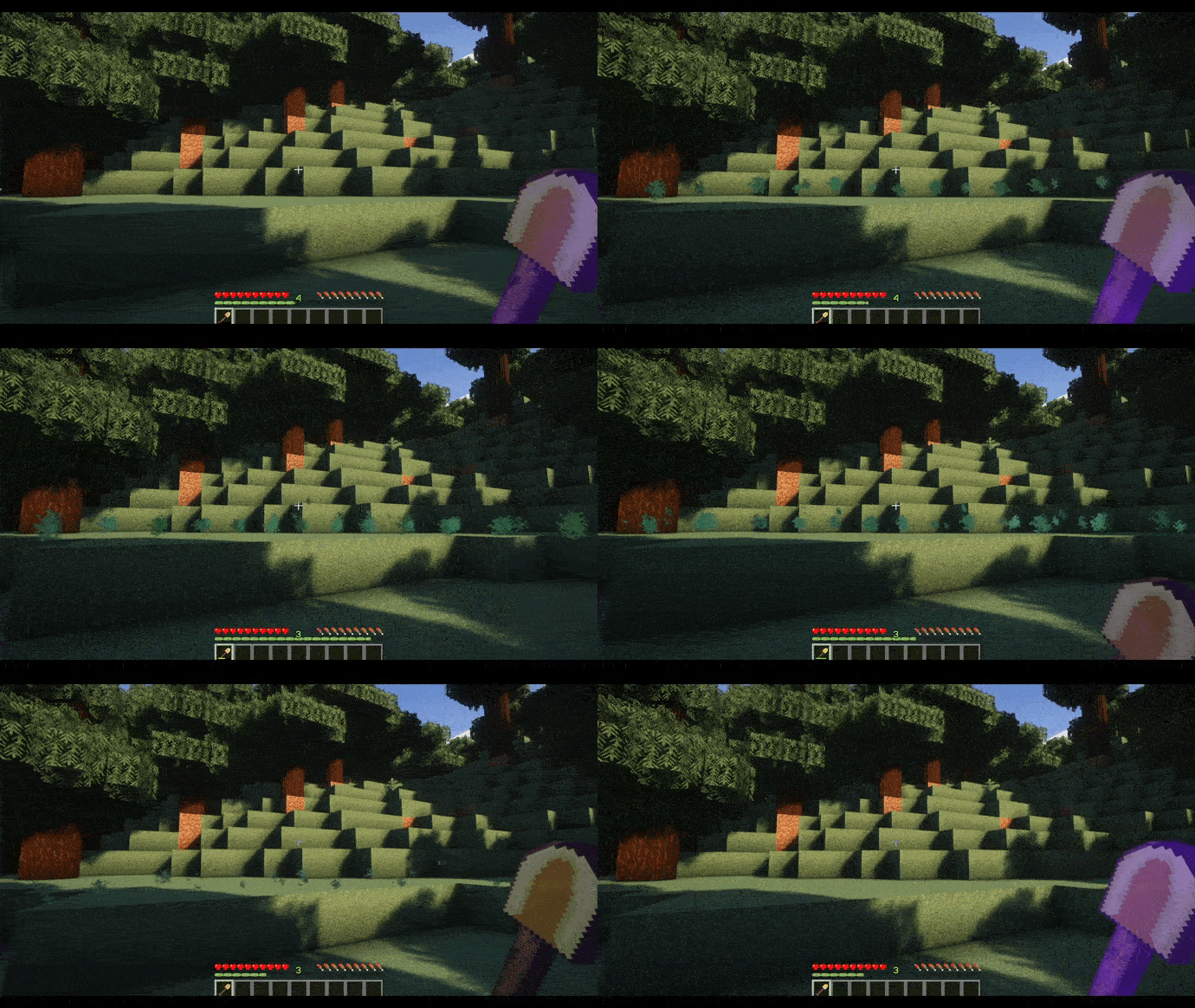
➡️ **Sneak + Right-Click** a Mending item to repair it using **your stored XP** 💎
🔧 Features included:
* ⚙️ Fully customizable **config file**
* 🔑 Built-in **permissions support**
* ✨ Visual **effects when repairing**
—
## 🛡️ Permissions
“`yaml
btm.use # Allows the mending ability
btm.commands.btm # Controls the /btm command (enable/disable skill)
btm.commands.reload # Controls /btm reload
“`
—
## 🎥 See it in action!
—
⚡ **This plugin uses the exact system from the original mod – simple, efficient, and powerful!**
Better Keep Inventory
# Better Keep Inventory
[](https://discord.imjustdoom.com)
[](https://x.com/ImJustDoom)
[](https://ko-fi.com/justdoom) [](https://github.com/JustDoom/BetterKeepInventory)
Better Keep Inventory is a plugin that builds more functionality on top of the “Keep Inventory” gamerule idea.
The gamerule is very limited with the only configuration available is enabling/disabling it and having it work in specific worlds.
This plugin can handle those scenarios for you and more! Per world configuration and keeping your inventory in specific scenarios such as natural deaths, mob deaths or player deaths.
Whether your items are kept or dropped for whatever reason is up to you!
## Features
– Per world configuration
– Permissions
– Reloadable config without restarting the server
– Keep/Drop on PVP, Natural or Mob caused death!
– Paper and Sponge support
### Planned
– Configurable message on keep inventory
– Drop/keep only certain items
– Limited keep inventory uses per specified time/lifetime
## Usage
Just install the plugin to your plugins folder for your platform (Paper or Sponge)
A player death is classified as a player other than yourself causing your death, whether it be from a sword, arrow, or hitting off a cliff.
As long as Minecraft classifies it as being killed by another player it is labelled a player death in the plugin.
A natural death is when you die from starvation, fall damage, drowning, or from the void. It should cover death from the `/kill` command too.
A mob death is when you are killed by a hostile mob, creeper, skeleton, spider etc.
### Commands
There is one command `/betterkeepinventory reload` which reloads the config file and applies the changes made.
It requires the permission `betterkeepinventory.commands`. You can also run `/bki reload` for short.
### Permissions
By default, every player will have the keep inventory functionality enabled.
To only give it to specific people you can set the option `require-permission` to true and give only the players you want to have the keep inventory ability the permission `betterkeepinventory.keep`.
To do that you will need a permission plugin like [LuckPerms](https://luckperms.net/).
### Configuration
The Paper plugin uses a `.yml` file for configuration and the Sponge plugin uses a `.json` file.
For world specific settings the Sponge config needs the full world name such as `minecraft:overworld`.
Default world names are also different between Paper and Sponge
“`yml
# NOTE: DO NOT HAVE THE KEEP INVENTORY GAMERULE ENABLED WITH THIS PLUGIN
# Global default settings that affect all worlds. Set all of them to false for vanilla functionality (No keep inventory)
# “keep” refers to what should be kept when the player dies which is not configurable
# Should the permission “betterkeepinventory.keep” be required for a player to “keep” on death
# If false everyone will “keep”
require-permission: false
# Should the player “keep” when killed by another player
keep-on-player-death: false
# Should the player “keep” on a natural death. Fall damage, starving, drowning etc
keep-on-natural-death: true
# Should the player “keep” when killed by a mob
keep-on-mob-death: true
# Should the player “keep” if they commited suicide. With arrows, end crystal etc
keep-on-suicide: false
# “keep” settings
# When the player dies should their inventory be kept
keep-inventory-items-on-death: true
# When the player dies should their EXP level be kept.
# The higher level you are the more EXP needed to level up so dying with 10 levels and 50% keep EXP will not respawn the player with 5 levels
# The value can also be a number from 0 to 1, with 1 meaning that all EXP is kept and 0 is none
# 0.5 – Keeps only half the EXP
keep-exp-on-death: 1.0
# World specific settings. These will override the above global settings for the specified world
worlds:
# The name of the world
world:
# Should these settings override the global ones. Set to false to disable the override
enabled: false
require-permission: false
keep-on-killed-by-player: false
keep-on-natural-death: true
keep-on-mob-death: true
keep-inventory-items-on-death: true
keep-exp-on-death: 0.5
world_nether:
enabled: false
require-permission: true
keep-on-killed-by-player: false
keep-inventory-items-on-death: true
keep-exp-on-death: 1.0
# The “keep-on-natural-death” and “keep-on-mob-death” options have been left out. These two will default to the global
# defaults set at the top of the file while the other settings that are specified will have whatever option is set
# above inside the world section
“`
Example for only keeping your inventory in the nether no matter what
“`yml
require-permission: false
keep-on-player-death: false
keep-on-natural-death: false
keep-on-mob-death: false
keep-on-suicide: false
keep-inventory-items-on-death: true
keep-exp-on-death: 1.0
worlds:
world_nether:
enabled: true
require-permission: false
keep-on-killed-by-player: true
keep-on-natural-death: true
keep-on-mob-death: true
keep-on-suicide: false
keep-inventory-items-on-death: true
keep-exp-on-death: 1.0
“`
## Support
Support can be provided on my [discord server](https://discord.gg/ydGK5jYV6t) or you can report any bugs on the GitHub repository [here](https://github.com/JustDoom/BetterKeepInventory/issues)
## If you need a new server check out our partner [lagless.gg](https://lagless.gg/aff/dinonuggies)
[](https://lagless.gg/aff/dinonuggies)
Use code **Dinonuggies** for 20% off!
BeeNameGenerator
# BeeNameGenerator
[](https://img.shields.io/github/downloads/p0t4t0sandwich/BeeNameGeneratorPlugin/LICENSE)
[](https://github.com/p0t4t0sandwich/BeeNameGeneratorPlugin)
[](https://github.com/p0t4t0sandwich/BeeNameGeneratorPlugin/issues)
[](https://discord.neuralnexus.dev)
[](https://wakatime.com/badge/user/fc67ce74-ca69-40a4-912f-61b26dbe3068/project/0f240003-7202-4e04-810e-e83bb007db81)
A Minecraft plugin that implements the [bee-name-generator](https://github.com/p0t4t0sandwich/bee-name-generator) API to generate bee names automagically
Link to our support: [Discord](https://discord.neuralnexus.dev)
## Download
[](https://github.com/p0t4t0sandwich/BeeNameGeneratorPlugin/releases)
[](https://maven.neuralnexus.dev/#/releases/dev/neuralnexus/BeeNameGenerator)
[](https://maven.neuralnexus.dev/#/snapshots/dev/neuralnexus/BeeNameGenerator)
[](https://www.spigotmc.org/resources/beenamegenerator.112100/)
[](https://hangar.papermc.io/p0t4t0sandwich/BeeNameGenerator)
[](https://modrinth.com/mod/beenamegenerator)
[](https://www.curseforge.com/minecraft/mc-mods/beenamegenerator)
[](https://ore.spongepowered.org/p0t4t0sandwich/BeeNameGenerator)
### Compatibility Cheatsheet
BeeNameGenerator supports: Bukkit, Fabric, Forge, and Sponge (8-11 works with the same jar)
| Server type | Versions | Jar Name |
|———————|————-|—————————————|
| All 1.20 (Sponge11) | 1.20-1.20.2 | `BeeNameGenerator-1.20-.jar` |
| All 1.19 (Sponge10) | 1.19-1.19.4 | `BeeNameGenerator-1.19-.jar` |
| All 1.18 (Sponge9) | 1.18-1.18.2 | `BeeNameGenerator-1.18-.jar` |
| All 1.17 (Sponge9) | 1.17-1.17.1 | `BeeNameGenerator-1.17-.jar` |
| All 1.16 (Sponge8) | 1.16-1.16.5 | `BeeNameGenerator-1.16-.jar` |
| All 1.15 (Sponge8) | 1.15-1.15.2 | `BeeNameGenerator-1.15-.jar` |
## Dependencies
– [TaterLib](https://github.com/p0t4t0sandwich/TaterLib) – Required on all platforms
– [FabricAPI](https://modrinth.com/mod/fabric-api) – Required on Fabric
### Optional Dependencies
– [LuckPerms](https://luckperms.net/) – For permissions/prefix/suffix support
## Usage
– Commands either require a permissions manager or OP level 4 in order to use them.
– You can set the “payment” item in the config, which is the item that is consumed when using the `/bng name auto` command (defaults to a name tag).
– The naming radius can be set in the config, which is the radius around the player that the plugin will look for bees to name (defaults to 10 blocks).
– Some commands require an authenticated API key to use them, which is set in the config (you’d need to host your own [API endpoint](https://github.com/p0t4t0sandwich/bee-name-generator)).
## Commands and Permissions
| Command | Permission | Description |
|——————————————|———————————–|———————————————————–|
| `/bng help` | `taterlib.command.help` | Show help for commands |
| `/bng reload` | `taterlib.command.reload` | Reload the plugin |
| `/bng name ` | `taterlib.command.name` | Name a bee or get a named name tag |
| `/bng name auto` | `taterlib.command.name.auto` | Automatically name a nearby bee |
| `/bng name tag` | `taterlib.command.name.tag` | Get a name tag with a random bee name |
| `/bng get` | `taterlib.command.get` | Gets a random bee name |
| `/bng add` | `taterlib.command.add` | Adds a bee name to the database (Authenticated API Route) |
| `/bng suggest ` | `taterlib.command.suggest` | Suggest a name to the database |
| `/bng suggest ` | `taterlib.command.suggest` | Suggest a name to the database |
| `/bng suggest list` | `taterlib.command.suggest.list` | List all pending suggestions |
| `/bng suggest accept ` | `taterlib.command.suggest.accept` | Accept a pending suggestion (Authenticated API Route) |
| `/bng suggest reject ` | `taterlib.command.suggest.reject` | Reject a pending suggestion (Authenticated API Route) |
## Config
`/BeeNameGenerator/beenamegenerator.config.yml`
“`yaml
—
version: 1
api:
# URL for the Bee Name Generator API
base_url: “https://api.sperrer.ca/api/v1/bee-name-generator”
# Auth Token for the Bee Name Generator API
auth_token: “YOUR_AUTH_TOKEN”
naming:
radius: 10
payment_item: “minecraft:name_tag”
“`
## [Release Notes](https://github.com/p0t4t0sandwich/BeeNameGeneratorPlugin#release-notes)