PistonMOTD
#
PistonMOTD
###
[](https://discord.gg/8Qk2mtUDFf) [](https://ko-fi.com/alexprogrammerde)
###

## Features
* Customize playercounter tooltip
* Customize online player and max player counter
* Random MOTD
* Custom client out of date message. You can force that to always happen too.
* Random favicon
* Placeholders (extendable via api)
* Hide your playercount
* Very easy to understand config
* Modular (You can enable/disable every feature)
* TPS placeholder
* RGB support
* Luckperms prefix support
Compatible with external MOTD plugins. (Can’t promise it will work with every MOTD plugin.)
—

### ✨ Are you looking for an advanced administration panel for your server?
EnderDash allows you to manage your existing Minecraft servers using an advanced dashboard by installing a single plugin, batteries included. Run commands (with tab completion), read logs, manage files, invite your whole team, manage players, Ocelot (AI Assistant), works with your existing Infrastructure/Panels and much more.
Check it out: [https://enderdash.com](https://enderdash.com/?utm_source=modrinth&utm_medium=description&utm_campaign=pistonmotd)
—
## API
It **IS** possible to create and execute your own parsers with an external plugin. To register you need a class implementing the [PlaceholderParser](https://github.com/AlexProgrammerDE/PistonMOTD/blob/master/pistonmotd-api/src/main/java/net/pistonmaster/pistonmotd/api/PlaceholderParser.java) and to register it at the [PlaceholderUtil](https://github.com/AlexProgrammerDE/PistonMOTD/blob/master/pistonmotd-api/src/main/java/net/pistonmaster/pistonmotd/api/PlaceholderUtil.java) with [#registerParser(PlaceholderParser parser)](https://github.com/AlexProgrammerDE/PistonMOTD/blob/943959fafb27e68ebfa75462b35bf34bc6923e2b/pistonmotd-api/src/main/java/net/pistonmaster/pistonmotd/api/PlaceholderUtil.java#L40).
Here is an example of that:
[ServerPlaceholder](https://github.com/AlexProgrammerDE/PistonMOTD/blob/master/pistonmotd-bungee/src/main/java/net/pistonmaster/pistonmotd/bungee/ServerPlaceholder.java)
[Registering](https://github.com/AlexProgrammerDE/PistonMOTD/blob/943959fafb27e68ebfa75462b35bf34bc6923e2b/pistonmotd-bungee/src/main/java/net/pistonmaster/pistonmotd/bungee/PistonMOTDBungee.java#L58)
And this stuff might get handy:
[Javadoc](https://www.pistonmaster.net/PistonMOTD/apidocs/index.html)
## Stats
[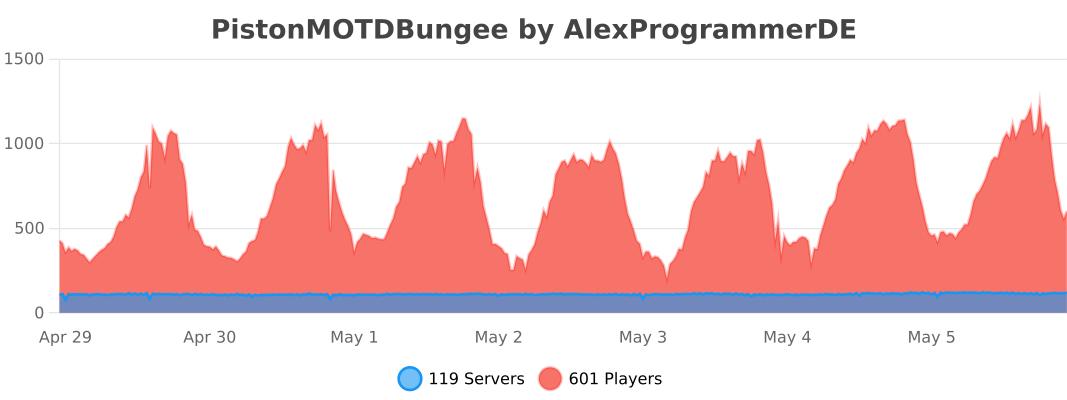](https://bstats.org/plugin/bungeecord/PistonMOTDBungee/8968)
[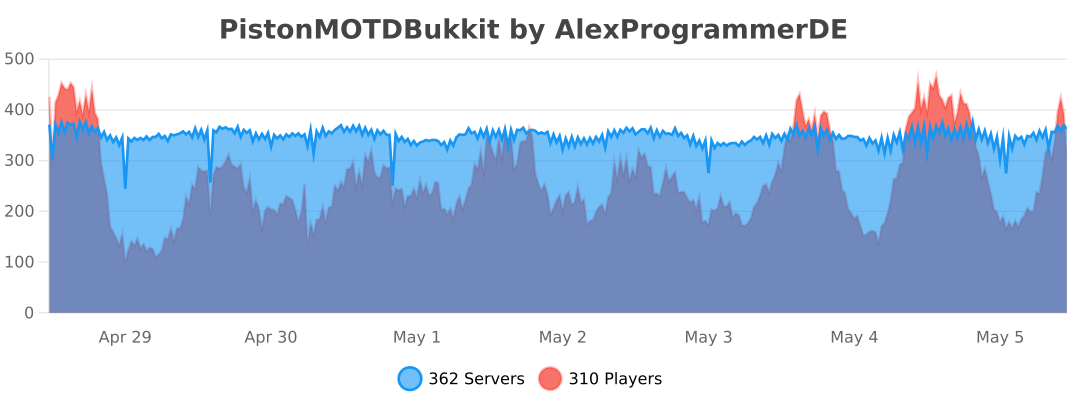](https://bstats.org/plugin/bukkit/PistonMOTDBukkit/9100)
[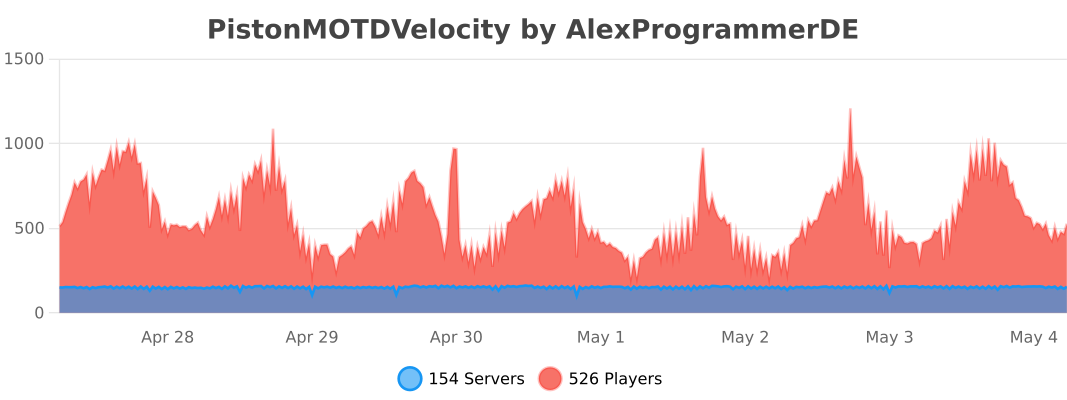](https://bstats.org/plugin/velocity/PistonMOTDVelocity/14316)
## Discord
[](https://discord.gg/8Qk2mtUDFf)
Have fun! 😉
PacketEvents
Resources
– [Read documentation](https://packetevents.gitbook.io/)
– [Getting Started](https://packetevents.gitbook.io/docs/getting-started)
– [JavaDocs](https://packetevents.github.io)
– [Releases](https://github.com/retrooper/packetevents/releases/)
– [GitHub](https://github.com/retrooper/packetevents/releases/)
– [Modrinth](https://modrinth.com/plugin/packetevents)
– [SpigotMC](https://www.spigotmc.org/resources/packetevents-api.80279/)
– [Development Builds](https://ci.codemc.io/job/retrooper/job/packetevents)
– [Statistics](https://bstats.org/plugin/bukkit/packetevents/11327)
Sponsors
Thanks to the following sponsors for supporting this project:


Credits
Here are some projects that we are heavily inspired by, thus we have integrated
small portions of their code into our work.
[Protocol Documentation for the Minecraft Java Edition](https://wiki.vg/Protocol)
[ViaVersion](https://github.com/ViaVersion/ViaVersion)
[ProtocolSupport](https://github.com/ProtocolSupport/ProtocolSupport)
[adventure](https://github.com/KyoriPowered/adventure)
[MCProtocolLib](https://github.com/GeyserMC/MCProtocolLib/)
### Statistics
[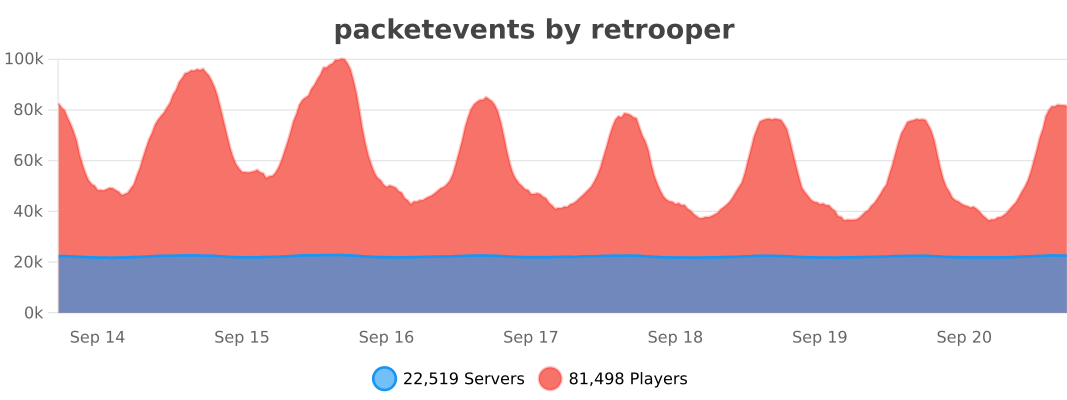](https://bstats.org/plugin/bukkit/packetevents/11327)
NuLLAbyss / NuLLOtchłań

# 🕳️ NuLLAbyss – Server Loot System for Hardcore Servers
**NuLLAbyss** is a utility plugin that creates a server-wide loot system. When players die or drop items, those items get collected into **The Void**, a shared inventory that opens periodically for everyone to loot.
Perfect for **hardcore, survival, and SMP servers** where fallen players’ gear becomes fair game for the survivors.
—
## 🛠️ Key Features
### Core System
– **Automatic Item Collection** — Ground items collected into The Void when it opens
– **Scheduled Openings** — Opens at configurable intervals, stays open for set duration
– **Configurable Reminders** — Warn players before opening (e.g., 15, 10, 5, 1 min)
– **Despawn Protection** — Save items right before they would disappear
– **Pagination Support** — Unlimited items with multiple pages and navigation
### World Control
– **Per-World Settings** — Each world can have individual settings:
– `allow-command` — Can players use /abyss in this world?
– `collect-items` — Should items be saved to The Void?
– `clear-items` — Should items be cleared from ground?
– **Whitelist/Blacklist Mode** — Control default behavior for unlisted worlds
### Item Clear Module
– **Active Item Clearing** — Remove ground items in specific worlds
– **Two Modes:**
– `interval: 60` — Clear items every 60 seconds
– `interval: 0` — Clear items only when The Void opens
– **Warning System** — Broadcasts before clearing (configurable times)
– **Player Notifications** — Warn on world enter and item drop
### Exclude Items
– **Material Exclusions** — Specify items that should never be collected
– **Name Exclusions** — Exclude items by custom display name
– **Separate Config** — Easy to manage `exclude_items.yml`
### Smart Scheduling
– **Minimum Players** — Pause when server is empty (configurable threshold)
– **Cycle Completion** — If players leave mid-cycle, it completes before pausing
– **Auto-Resume** — Starts new cycle when enough players join
### Customization
– **Custom Commands** — Define main command and aliases (`/abyss`, `/trash`, `/void`, etc.)
– **Multilingual** — English and Polish included
– **HEX Color Support** — Use `&#RRGGBB` in all messages
– **Live Reload** — Apply changes without restart
—
## 🧠 How It Works
1. Items dropped on the ground wait to be collected
2. Reminders notify players that The Void is about to open
3. When it opens — all ground items are swept into a shared GUI
4. Players rush to `/abyss` and grab what they can
5. After the timer ends, The Void closes
—
## 📋 Commands
| Command | Permission | Description |
|———|————|————-|
| `/abyss` | abyss.use | Open The Void GUI |
| `/abyss reload` | abyss.reload | Reload configuration |
| `/abyss open` | abyss.admin | Force open The Void |
| `/abyss close` | abyss.admin | Force close The Void |
| `/abyss status` | abyss.admin | View current status |
Command name and aliases are configurable in `config.yml`
—
## 🔐 Permissions
| Permission | Default | Description |
|————|———|————-|
| `abyss.use` | true | Access to /abyss command |
| `abyss.reload` | op | Reload configuration |
| `abyss.admin` | op | Admin commands (open, close, status) |
—
## ⚙️ Configuration
**config.yml** — Main configuration
“`yaml
minPlayers: 1 # 0 = always run, 1+ = wait for players
openDuration: 1800 # Time between openings (seconds)
openTime: 45 # How long it stays open
worlds:
mode: “blacklist”
list:
world_nether:
allow-command: false
collect-items: false
clear-items: true
itemClear:
interval: 0 # 0 = clear on open, 60 = every 60s
warningEnabled: true
warningTimes: [30, 10, 5]
pagination:
enabled: false
itemsPerPage: 51
limit: “off”
“`
**exclude_items.yml** — Protected items
“`yaml
excludedItems:
– BEDROCK
– COMMAND_BLOCK
excludedNames:
– “&cAdmin Sword”
“`
—
## 💬 Support
Need help? Have suggestions?
**[Join our Discord](https://discord.gg/fQXwuj4BMV)**
—
Crafted by **NullaretH** 💀
*Where the fallen lose, the bold survive.*
Hbm’s Nuclear Tech – Extended Edition





This mod is most up to date 1.12.2 NTM version.
It is based on the awesome work of Drillgon and HBM. This mod brings the 1.12.2 version of hbm a lot closer to the features of the 1.7.10 version. It is about nuclear reactors, rockets, nukes, weapons and bunkers.
Due to the amount and complexity of the recipes of this mod JEI is strongly recommended.


This mod is, as the name implies, all about technology, atomic science and nuclear weapons. It features an expansive tech tree of various processing and utility machines, craftable bombs and missiles, guns, and abandoned structures to explore. No longer are nukes just green TNT blocks – you will have to synthesize new types of explosives and enrich uranium before you can send nuclear missiles towards your pals.
- Nukes
- Missiles
- Weapons
- Huge Machines
- Radiation and other Hazards

Pictures tell more that a thousand words.
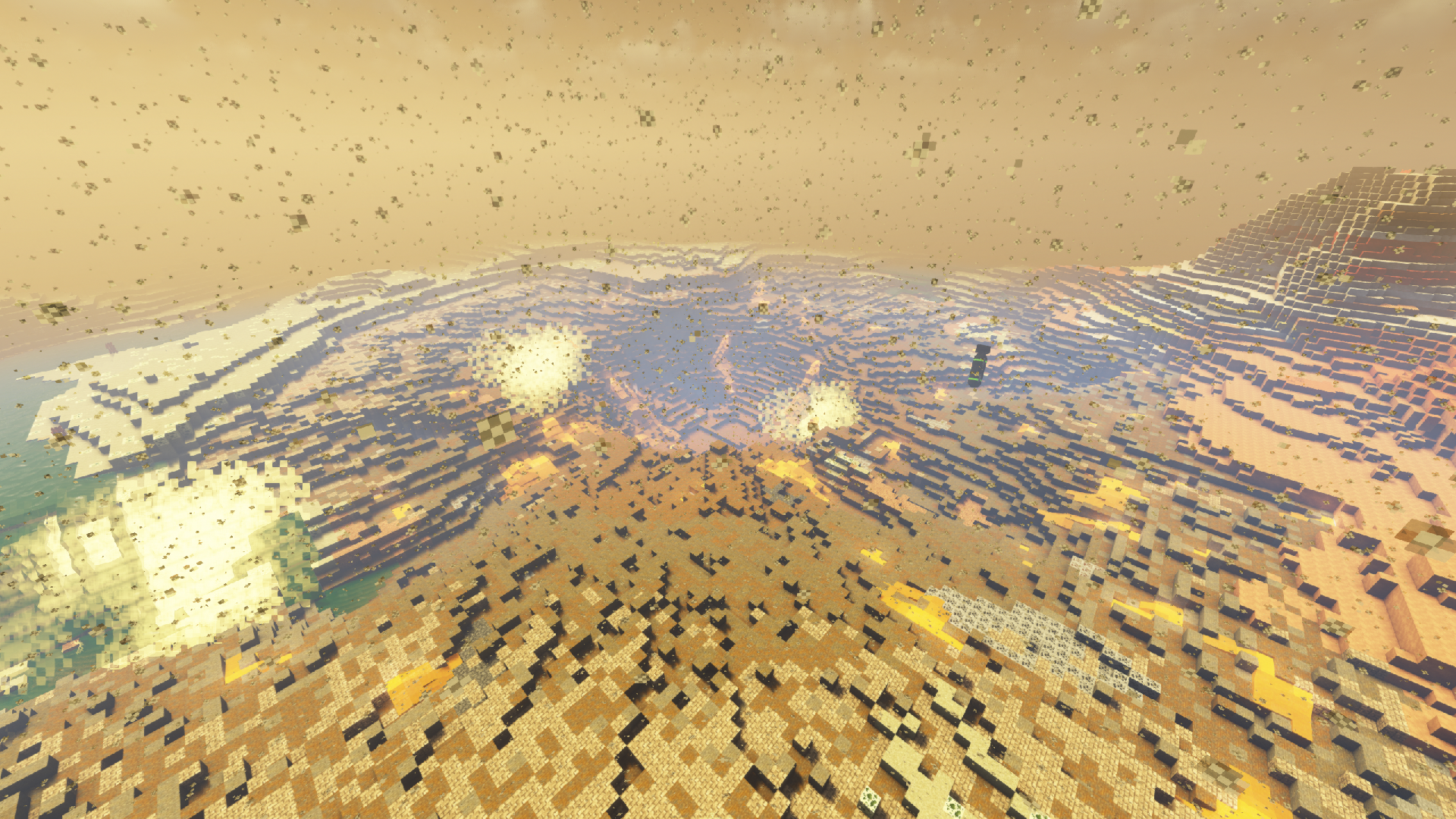
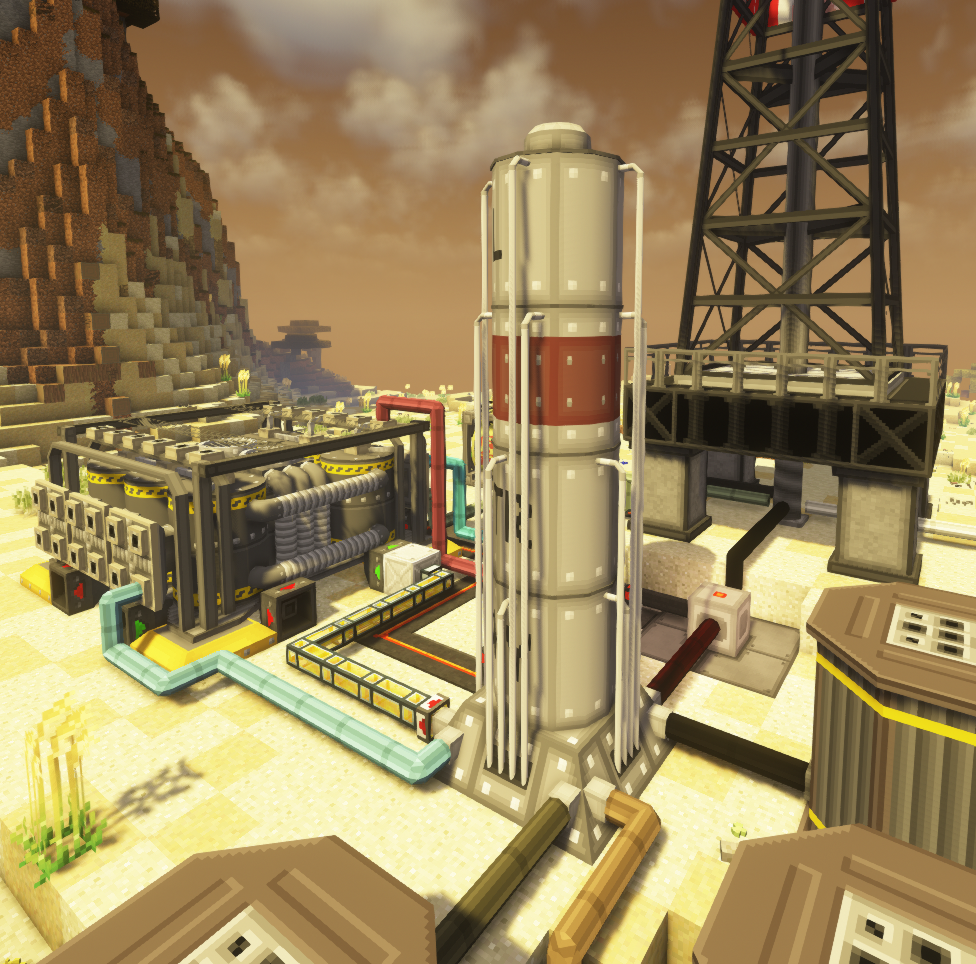
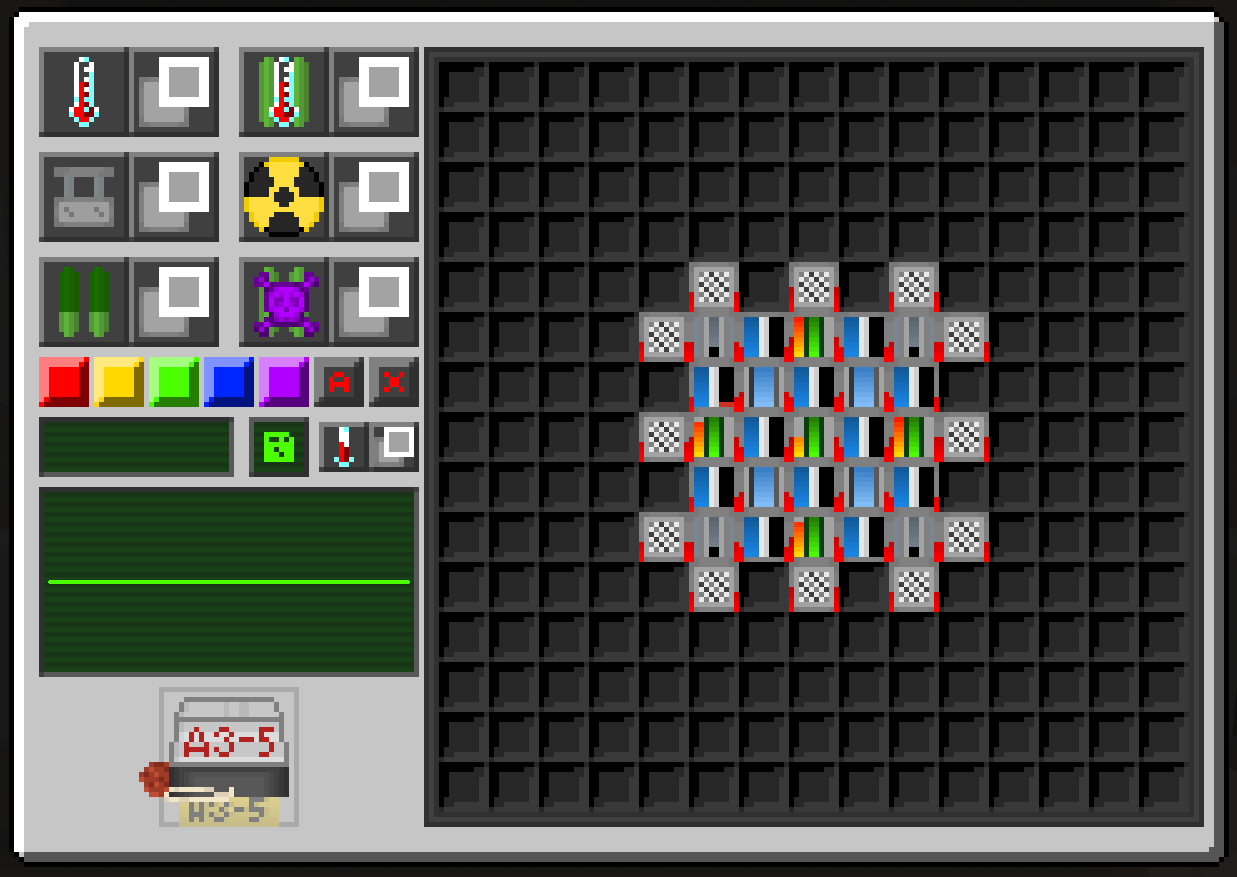


This mod does not have any special dependencies, so the installation procedure is the usual:
- Download the .jar file
- Install Forge modloader on your 1.12.2 Minecraft profile
- Launch the game once (or manually create the mods folder)
- Navigate to .minecraft and drop the jar file into the mods folder

Q: Is this the official 1.12.2 hbm version?
A: No because there is no one “official” 1.12.2 ntm version. Every person that makes a release for 1.12.2 creates their own edition.
Q: Why did you start modding the 1.12.2 ntm version?
A: I started modding after i noticed that the 1.7.10 had all the cool features like the RBMK Crane, FEL, Lead-209, etc and the 1.12.2 was not getting any more updates. So i decided to update it myself.
Q: What shader are you using? It looks awesome!
A: The shader i use is the Complementary Shader but with a custom config for sky and water colors.
Q: Will you add <insert suggestion>?
A: If i like the thing that is beeing suggested i might add it but i generally do not do requests.
Q: What are the differences between this mod and NTM Reloaded?
A: Oh boy – they are worlds apart. Extended edition has most bugs fixed and has the 1.7.10 oil stuff. The List of most differences is below.
Some of the new Textures:
- Emissive textures with optifine
- Pumpjack
- FEL
- Radiation Generator
- Vault Door
- All Missiles
- All Nukes
- Solinium Bomb
- Concrete
- Taint
- Every Gui
- Most Items and Blocks
New Mechanics:
- Nuke, Balefire and Fallout Chunkloading
- The big doors are now radiation proof and they open via redstone
- Very fast nuke and fallout
- Dropped radioactive powders contaminate the environment
- Fallout Rain can now be avoided by containing the nuclear explosion from the environment
- Dedicated Itemslots for Assembler and Chemplant so they do not overfill
- Manual Designator coordinates can now be typed in directly
- Silo Hatch has the correct sound
- Radar has the modes from 1.7.10 and in smart mode only detects rockets if they are descending and approaching
- Tsar can now be modular filled and can reach four different explosion ranges
- Irradiation channel recipes require different amounts of flux
- N2 mine is now modular so if you only fill it half way the explosion is half the size
- RTGs now have an actual halflife and power relation
- Battery I/O will be shown like in the 1.7.10
- Nukes evaporate all water in range and if they are in a wet biome the crater will get flooded
- Missile contrails last 4x longer
- Geiger counter also shows actual recieved dosis
New Blocks:
- Ducrete with all variants
- RBMK Deco blocks with all variants
- Stairs for most materials
- Slabs for most materials
- Waste Tall Grass
- Waste Dirt
- Colored concrete
New Items:
- All new radioactive ingots, nuggets, powders from Lead-209, Strontium-90, Cobalt-60, Iodine-135
- Dosimeter
- Digamma Diagnostic
- Lung Diagnostic
- Neoveline
- Size 15 Thermo Warhead
- Size 15 Volcano Warhead
- More cladding variants
- Tier III Bathwater
- RTGs
- RBMK Unobtainium Rod
- RBMK Zirconium Fast Breeder Rods
New Machines:
- FEL
- Radiation Sensor
- Digamma Decontaminator
- RTG Boiler
- RBMK Storage
- Fracking Tower
- Catalytic Cracking Tower
Fixes:
- Fixed Chemplant and Assembler duping bug
- Fixed Power Detector flickering
- Fixed missing names in english translation
- Fixed Small and Large Reactor balance
- Fixed missing Lava damage
- Fixed nuke animation restarting after reloading the chunk
- Fixed missing recipes

NoDim
# NoDim
A cross-platform, cross-version dimension-disabling mod
# About
This mod provides gamerules to disable Minecraft’s portals: Nether Portal, End Portal, and Gateway Portal.
This will not remove the dimension, but rather disable the teleportation via portals.
# Usage
The mod includes the following gamerules to disable access to certain dimensions:
– `/gamerule disableEnd `: Disables the End Portal
– `/gamerule disableNether `: Disables the Nether Portal
– `/gamerule disableGateway `: Disables the End Gateway Portals
**Note:** In 1.21.11 and later, the gamerule names have slight changed. The capital letters have been replaced with a “_” and the lowercase letter. Ex: `/gamerule disable_end `
# Supported Platforms (As of v1.1.0)
– Fabric/Quilt (1.14.3 – 1.21.8)
– Forge (1.14.3 – 1.21.8)
– NeoForge (1.14.3 – 1.21.8)
– PaperMC/Spigot/Folia (1.14.3 – 1.21.8)
– Sponge (1.14.3 – 1.21.8)
# Installation
## Fabric, Quilt, Forge, NeoForge
Simply put the mod in the mods folder
## Sponge
Simply put the plugin in the plugins folder
## Spigot/PaperMC
1. Install the [Ignite](https://github.com/vectrix-space/ignite) Mixin loader
2. Run the ignite jar alongside the paper/spigot jar
3. Put the mod in the mods folder and restart
## Folia
1. Install the [Ignite](https://github.com/vectrix-space/ignite) Mixin loader
2. Rename the Folia jar to “paper.jar”. Alternatively, you can launch the game with the following JVM args: `-Dignite.locator=paper -Dignite.jar=./folia.jar`
3. Run the ignite jar alongside the folia jar
4. Put the mod in the mods folder and restart
MiraiMC
MiraiMC
[](https://github.com/DreamVoid/MiraiMC/releases/latest)
[](https://www.codefactor.io/repository/github/dreamvoid/miraimc)
[](https://github.com/DreamVoid/MiraiMC/actions/workflows/maven.yml?query=is%3Asuccess)

—
MiraiMC is a [mirai](https://github.com/mamoe/mirai) bot for Minecraft servers
> Mirai is a high-performance multi-platform library, as well as a framework, providing protocol support for Tencent QQ.
> Mirai is designed to handle all sorts of messaging works that can be automatically done by bots in a perfect way.
> Tencent QQ: A modern messaging software used by all Chinese netizens.
## Features
* Support Bukkit/Sponge servers.
* Support BungeeCord/Velocity proxies.
* Optimized for GUI-less OS such as Linux
* Dynamically load dependent libraries to minimize file size.
## Getting Started (Server)
1. Download MiraiMC from “Featured versions” part. Then install it like installing other plugins.
2. Configure any plugins’ that depend on MiraiMC (if any) and login to your bot account
A more detailed tutorial can be found here: https://docs.miraimc.dreamvoid.me/
## Getting Started (Plugin Developer)
* It is simple to develop a new MiriMC-based plugin by using template:
– [Maven](https://github.com/MiraiMC/MiraiMC-Template)
– [Gradle KotlinDSL](https://github.com/MiraiMC/MiraiMC-Template-Gradle-KotlinDSL)
* MiraiMC javadoc here: https://jd.miraimc.dreamvoid.me
* Detailed development tutorial here: https://docs.miraimc.dreamvoid.me/
### Dependency
#### Maven
“`
io.github.dreamvoid
MiraiMC-Integration
1.9
provided
“`
#### Gradle
“`
implementation ‘io.github.dreamvoid:MiraiMC-Integration:1.9’
“`
## Commands and permissions
### Commands
| Command | Description | Permissions |
| —- | — | —- |
| /mirai | MiraiMC Robot Command | miraimc.command.mirai |
| /mirai login [protocol] | Log in to a robot (you can execute this command multiple times to log in to multiple robots) | miraimc.command.mirai.login |
| /mirai logout | Log out and close a bot | miraimc.command.mirai.logout |
| /mirai list | List currently online bots | miraimc.command.mirai.list |
| /mirai sendfriendmessage | Send a message to a specified friend | miraimc.command.mirai.sendfriendmessage |
| /mirai sendfriendnudge | Send a stamp to a specified friend | miraimc.command.mirai.sendfriendnudge |
| /mirai sendgroupmessage | Send a message to the specified group | miraimc.command.mirai.sendgroupmessage |
| /mirai checkonline | Check if the specified robot is online | miraimc.command.mirai.checkonline |
| /mirai autologin add [protocol] | Add an autologin robot account | miraimc.command.mirai.autologin |
| /mirai autologin remove | Remove an autologin bot account | miraimc.command.mirai.autologin |
| /mirai autologin list | View autologin robot account list | miraimc.command.mirai.autologin |
| /miraimc | MiraiMC Plugin Command | miraimc.command.miraimc |
| /miraimc bind add | Add binding for player and QQ number | miraimc.command.miraimc.bind |
| /miraimc bind getplayer | Get the QQ number bound to the specified player name | miraimc.command.miraimc.bind |
| /miraimc bind getqq | Get the player name bound to the specified QQ number | miraimc.command.miraimc.bind |
| /miraimc bind removeplayer | Removes a player’s bind | miraimc.command.miraimc.bind |
| /miraimc bind removeqq | Delete the binding of a QQ number | miraimc.command.miraimc.bind |
| /miraimc reload | Reload configuration file | miraimc.command.miraimc.reload |
### Permissions
| Permission Node | Description | Default |
| ——- | —- | —- |
| miraimc.command.mirai | Allow use of `/mirai` | OP |
| miraimc.command.mirai.* | Allow all subcommands of `/mirai` | OP |
| miraimc.command.mirai.login | Allow `/mirai login` | OP |
| miraimc.command.mirai.logout | Allow `/mirai logout` | OP |
| miraimc.command.mirai.list | Allow `/mirai list` | OP |
| miraimc.command.mirai.sendfriendmessage | Allow `/mirai sendfriendmessage` | OP |
| miraimc.command.mirai.sendfriendnudge | Allow `/mirai sendfriendnudge` | OP |
| miraimc.command.mirai.sendgroupmessage | Allow `/mirai sendgroupmessage` | OP |
| miraimc.command.mirai.checkonline | Allow `/mirai checkonline` | OP |
| miraimc.command.mirai.autologin | Allow `/mirai autologin` | OP |
| miraimc.command.miraimc | Allow use of `/miraimc` | OP |
| miraimc.command.miraimc.* | Allow all subcommands of `/miraimc` | OP |
| miraimc.command.miraimc.bind | Allow `/miraimc bind` and subcommands | OP |
| miraimc.command.miraimc.reload | Allow `/miraimc reload` | OP |
## LICENSE
[GNU Affero General Public License v3.0](https://github.com/DreamVoid/MiraiMC/blob/main/LICENSE)
## Acknowledgments
Thanks to the following people/teams/projects for their contributions to MiraiMC!
* [mamoe/mirai](https://github.com/mamoe/mirai): Powerful QQ robot support library, the core and foundation of MiraiMC.
* [lucko/helper](https://github.com/lucko/helper): Provide MiraiMC with a solution to dynamically load the mirai core.
* [brettwooldridge/HikariCP](https://github.com/brettwooldridge/HikariCP): An efficient SQL connection pool, providing database connection solutions for MiraiMC.
* [LT_Name](https://github.com/lt-name): Optimized a lot of Nukkit code for MiraiMC, also provided a lot of help for MiraiMC.
* You.
[DreamVoid](https://github.com/DreamVoid) and [MiraiMC](https://github.com/MiraiMC), made with ❤.
This file is a translated version of the [original file](https://github.com/DreamVoid/MiraiMC/blob/main/README.md), and some semantics may differ from the original file.
MiniMOTD

### MiniMOTD is a basic server list MOTD plugin/mod for Minecraft servers and proxies
– MiniMOTD supports RGB colors and gradients through [MiniMessage](https://github.com/KyoriPowered/adventure-text-minimessage), which is also where MiniMOTD gets it’s name.
– For more detailed info on formatting text, refer to the [MiniMessage docs](https://docs.adventure.kyori.net/minimessage.html).
– RGB colors are automatically downsampled for outdated clients.
– Requires [Fabric API](https://modrinth.com/mod/fabric-api)
#### Downloads
Downloads can be obtained from [GitHub releases](https://github.com/jpenilla/MiniMOTD/releases). There is a separate jar for each platform, as well as a universal jar for all platforms. Paper and Spigot share the same jar, as do Waterfall and Bungeecord.
#### Configuration
See the [wiki](https://github.com/jpenilla/MiniMOTD/wiki) for configuration details
#### Screenshots

Minimap Control
# Minimap Control
This plugin allows players to control how minimaps mods work per world on Spigot or Sponge based servers.
## Current Support:
– Journeymap
– XaerosMinimap
– VoxelMap-Updated
Journeymap config options are configurable either in game with journeymap, or via the config file
Xaero’s minimap is only configurable via the config file.
#### JM Note: Some worlds might not appear in journeymap’s in game config editor. This is a journeymap limit. Per-world configs are applied regardless.
#### Xaeros Note: Players connecting with version Xaero’s Minimap version 23.7.0 or below will be kicked from the server. These versions did not respect the config packet. PRs to change this behavior are welcome.
## Config Options
Global Config Options
“`yaml
global-journeymap-config:
journeymap-enabled: ‘true’
use-world-id: ‘true’
view-only-server-properties: ‘true’
allow-multiplayer-settings: ALL
world-player-radar: NONE
world-player-radar-update-time: ‘5’
see-underground-players: NONE
hide-ops: ‘false’
hide-spectators: ‘true’
allow-death-points: ‘false’
show-in-game-beacons: ‘true’
allow-waypoints: ‘true’
teleport-enabled: ‘true’
render-range: ‘0’
surface-mapping: ALL
topo-mapping: NONE
biome-mapping: NONE
cave-mapping: NONE
radar-enabled: NONE
player-radar-enabled: ‘false’
villager-radar-enabled: ‘false’
animal-radar-enabled: ‘false’
mob-radar-enabled: ‘false’
config-version: 5.9.15
global-xaeros-config:
cave-mode: true
nether-cave-mode: true
radar: false
global-voxel-config:
radar-allowed: true
radar-mobs-allowed: true
radar-players-allowed: true
caves-allowed: true
teleport-command: ‘tp %p %x %y %z’
worlds:
minecraft:overworld:
…
“`
Per world config
“`yaml
worlds:
minecraft:overworld:
journeymap-config:
enabled: ‘false’
teleport-enabled: ‘false’
render-range: ‘0’
surface-mapping: ALL
topo-mapping: ALL
biome-mapping: ALL
cave-mapping: ALL
radar-enabled: ALL
player-radar-enabled: ‘true’
villager-radar-enabled: ‘true’
animal-radar-enabled: ‘true’
mob-radar-enabled: ‘true’
config-version: 5.9.15
xaeros-config:
enabled: false
cave-mode: true
nether-cave-mode: true
radar: true
voxel-config:
enabled: false
radar-allowed: true
radar-mobs-allowed: true
radar-players-allowed: true
caves-allowed: true
teleport-command: ‘tp %p %x %y %z’
world-id: b50f7c55-0ad5-4734-ae16-50bf3f02c7d9
“`
MCKotlin
# MCKotlin
[](https://github.com/MCKotlin/MCKotlin/actions)
[](https://modrinth.com/plugin/mckotlin)
[](https://discord.gg/5NMMzK5mAn)
[](https://modrinth.com/plugin/mckotlin)
[](https://github.com/4drian3d/MCKotlin/releases)
Get the ability to run and develop Kotlin plugins on your Minecraft server or proxy.
This plugin includes the necessary Kotlin libraries to the server to avoid including them independently in several plugins at the same time
[](https://www.bisecthosting.com/4drian3d?r=ModMCKotlin)
## Requirements
– Java 8+
## Compatibility
– Velocity 3+
– Sponge 8
– CraftBukkit/Spigot/Paper/forks 1.8+
– BungeeCord/Waterfall
## How to use
### Server Admin
Simply install the latest version of the plugin on your server or proxy
### Developers
Add MCKotlin as a dependency
#### Spigot
**plugin.yml**
“`yaml
depend: MCKotlin-Paper
“`
#### Paper 1.19.4+
**paper-plugin.yml**
“`yaml
dependencies:
server:
MCKotlin-Paper:
required: true
“`
#### Velocity
“`java
@Plugin(
id = “myplugin”,
dependencies = {
@Dependency(id = “mckotlin-velocity”)
}
)
public class VelocityPlugin {}
“`
## Libraries included
– Kotlin StdLib 1.9.20
– Kotlin Reflect 1.9.20
– KotlinX Coroutines
### How does this plugin differ from other plugins such as [Kotlin](https://modrinth.com/plugin/kotlin)?
Unfortunately there are no plugins available that provide the necessary libraries to make kotlin plugins for environments like Velocity or Bungeecord. That was my motivation to develop this plugin that includes Kotlin-stlib 1.9.0 (created by Jetbrains, Apache 2 license)
Maintenance Pro
### **About Maintenance Premium**
**Maintenance Premium** is a highly customizable maintenance mode plugin designed for network administrators who need total control over their server downtime.
> [!IMPORTANT]
> > **Fork Notice**: This is a maintained fork of the original Maintenance plugin. As the original owner is no longer active on Modrinth, we have taken over development to ensure compatibility with modern Minecraft versions and to add highly requested features.
—
### **New in this Version: Redis Support**
In addition to the standard MySQL support, this fork introduces **Native Redis Support**. You can now link multiple proxy instances (Velocity/Bungee) through a Redis connection, ensuring that maintenance status and whitelists are synchronized instantly across your entire network without the delay of traditional database polling.
—
### **Features**
* **Custom MOTD & Icons**: Set a specific MOTD and server icon that only appears during maintenance.
* * **MiniMessage Support**: Full support for modern [Adventure MiniMessage](https://docs.adventure.kyori.net/minimessage/format) formatting (RGB, Gradients, etc.).
* * **Advanced Timers**: Start/End timers and Scheduled maintenance window.
* * **Whitelisting**: Allow staff or developers to bypass maintenance.
* * **Join Notifications**: Get alerted when players are blocked.
* * **Proxy-Specific Features**: Per-server maintenance, Waiting/Fallback lobbies, and Redis Sync.
—
### **Configuration & Requirements**
* **Paper Users**: ProtocolLib is **required** for custom icons and playercount messages.
* * **MiniMessage**: Use the [Adventure Web UI](https://webui.adventure.kyori.net/) to preview your designs.
*