The New Economy (Fork)
## ⚠️ Fork Notice – Community Continuation
This repository is **not the official The New Economy (TNE) project**.
The original TNE project was officially **retired on January 1st, 2026**.
This repository is a **community-maintained fork** created to continue development, maintenance, and support for TNE moving forward.
Our goal with this fork is to **take over active support**, accept fixes and improvements, and ensure long-term usability of TNE for existing and future servers.
All original licensing (AGPLv3) and attributions are preserved.
👉 **Join our [Discord](https://discord.gg/cNEDdfaCpa) for this fork’s support.**
—
# The New Economy – Continued Support
The New Economy (TNE) is the ultimate economy plugin for your Minecraft server, no matter what platform you’re on. While TNE is “feature-packed,” it’s not feature-packed in the normal sense of jamming a bunch of useless features into the core plugin. Instead, it uses modules.
[](https://raw.githubusercontent.com/TheNewEconomy/EconomyCore/main/logo.png)
*The economy plugin for server owners that want more out of their economy.*
—
## About TNE
TNE was originally created for hey0’s hMod long before Bukkit/Spigot/Paper existed. Since then, it has taken on many forms, and this is the future form of the plugin. This core is designed to be robust and carry TNE into the future with or without Minecraft by not being platform-dependent.
—
## Requirements
TNE has some minimum requirements that should be followed:
– MySQL 8.0+ (if using MySQL for storage)
– MariaDB 10.7.0+
– Java 17+
—
## Support
To get an actual response, use one of the support methods below — not the reviews.
– [Developer API Docs](https://github.com/TheNewEconomy/EconomyCore/wiki/API)
– [Wiki](https://tne.gitbook.io/tne-docs)
– [Discord](https://discord.gg/cNEDdfaCpa)
– [GitHub Issues](https://github.com/BitworksMC/EconomyCore/issues)
—
# Features
## Menu System
Want to use menus for currency creation and player actions? We got you!
## MyBal for Players
[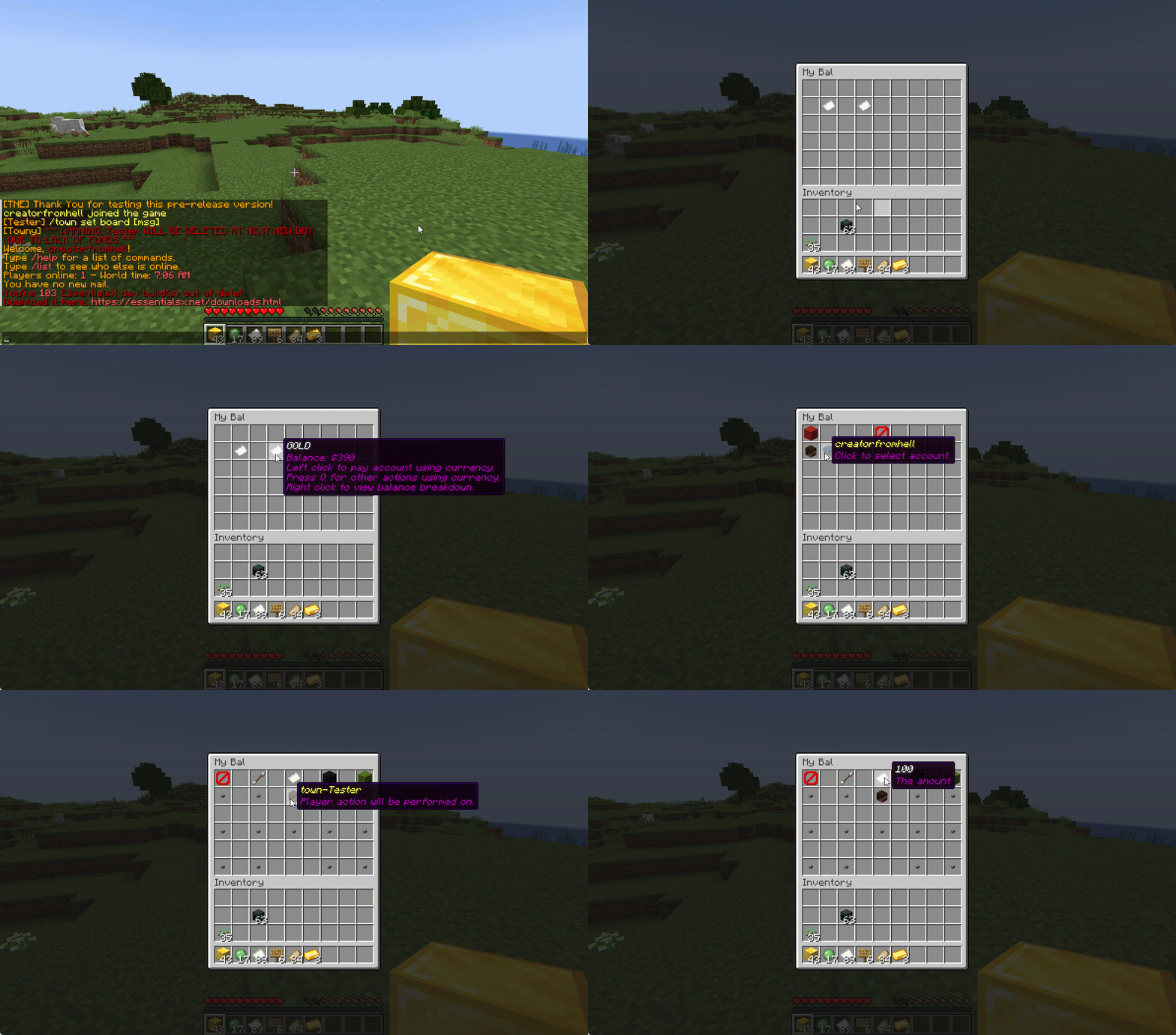](https://raw.githubusercontent.com/TheNewEconomy/EconomyCore/main/mybal.gif)
## MyEco for Admins
[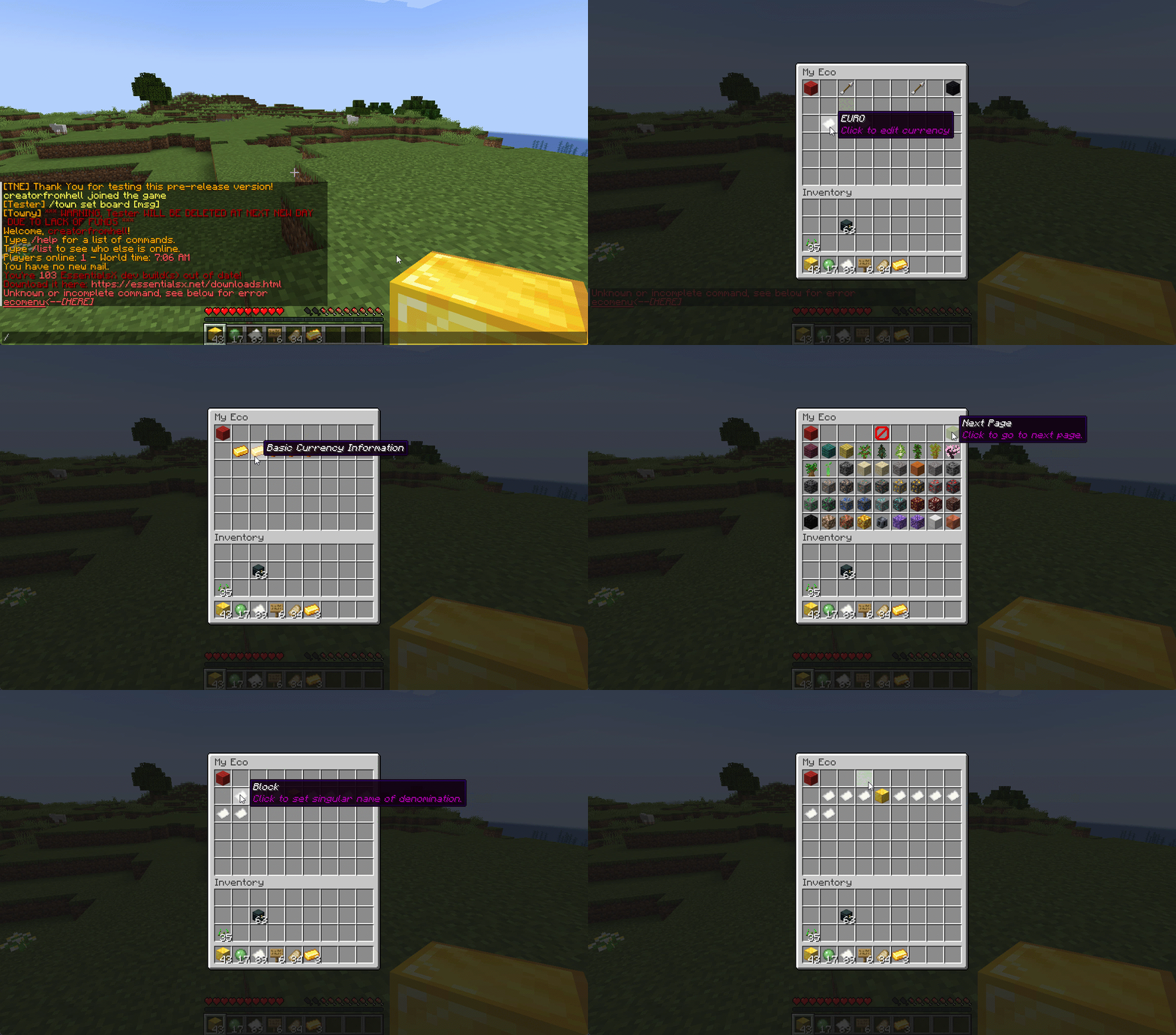](https://raw.githubusercontent.com/TheNewEconomy/EconomyCore/main/myeco.gif)
—
## Support Your Favorite Plugins
We provide support for all your favorite plugins from Towny to Factions. Anything that supports Vault supports TNE!
—
## Updates
We continue to develop updates for TNE for free and fix bugs as they’re reported.
—
## All the Currencies – Unlimited
TNE allows you to create unlimited currencies with ease through the currency creation GUI.
—
## Currency Types
TNE supports different types of currencies:
– **Virtual** — Simple currency that exists in thin air
– **Item** — Use Minecraft items as currency
– Shulker Box Support
– Bundle Support
– **Mixed** — Uses both virtual and item balances, allowing players to switch between them
– **Experience** — Use experience as currency
– **Experience-Level** — Use experience levels as currency
### Money Notes
Convert your virtual currency into a physical money note using the `/money note` command.
—
## Fine Tune Your Currency
Lots of per-currency configuration options:
– Create a custom balance format for each currency
– Set a starting amount for each currency
– Set custom conversion rates for each currency
– Create custom crafting recipes for item currencies
– Block mob drops for each currency
– Set the max balance for each currency
– Set enderchest balance inclusion per currency
– Use MiniMessage inputs for item display names and lores
– Create custom note items (currency vouchers)
– Use model data items as currency
—
## Fine Tune Who Can Access What Currency
TNE allows you to fine tune who can run commands with each currency. You can block players from using `/pay` for certain currencies and even restrict balance checks.
—
## Multi-Platform
Use Sponge? Sure.
Paper? Why not?
Both? Over Velocity? Definitely!
Switch platforms — your TNE data works for you no matter where you run it.
### Supported:
– Paper / Spigot / Purpur
– Sponge 8
### Coming:
– Fabric
– Sponge 7
—
## Discord Server
[We have a Discord server available for users who have questions or need support!](https://discord.gg/cNEDdfaCpa)
—
## Configurability
TNE strives to allow you to configure as much as possible — from messages to starting money to max holdings.
—
## Misc Features
– Adventure Chat support for colorful translations
– Placeholder support (including top 10)
– Easy administration commands
– Transaction logging
– Easy-to-use menu system
– Multiple data types:
– SQL
– YAML
– MariaDB
– Tab completion for commands
– `baltop` command
—
## Open Source
Contribute on GitHub:
https://github.com/BitworksMC/EconomyCore


TeaWaystones
# TeaWaystones
### ⚠ The latest versions won’t work on Spigot and CraftBukkit servers. Please use Paper.
TeaWaystones is my attempt at recreating the [Waystones mod](https://modrinth.com/mod/waystones) as a spigot/paper plugin. It allows you to craft waystones players can teleport to once they visited them.
You can find the builds to download [here](https://releases.tardis.systems/TeaWaystones). Just drop it into your plugins folder and you should be ready to go.
The plugin is compiled for and tested with Paper 1.21.5.
## Usage
You can craft Waystones with the following crafting recipe:

To rename a Waystone, you need to be standing directly next to one and then use the command `/tw setname `. The name may not contain spaces.
## Commands
|command|permission|description|
|-|-|-|
|`/tw setname `||sets the name of the waystone you are looking at.|
|`/tw seticon`||sets the icon of the waystone you are looking at to the item you have in your main hand.|
|`/tw list`|`waystones.command.list`|List all waystones with their location and the uuids of the players who visited the waystone.|
|`/tw setpublic `|`waystones.command.setpublic`|Changes if the waystone you are looking at can be teleported to without having visited it.|
|`/tw getitem`|`waystones.command.getitem`|Admin command that gives you a waystone.|
|`/tw openui [page]`|`waystones.command.openui`|Opens the waystone menu as if you interacted with a waystone.|
||`waystones.menu.seeWaystoneIds`|Players with this permission will see the IDs of waystones in the menu.|
## Config
“`yaml
version: 1 # do not manually change this
playersCanBreakWaystones: true
allPlayersSeeAllWaystones: false
sortWaystonesBy: NAME
recipeShape:
– “OEO”
– “EBE”
– “OCO”
recipeMaterials:
O: OBSIDIAN
E: ENDER_EYE
B: LIGHT_BLUE_CANDLE
C: COMPASS
# The following options might break things. Only change this if you know what you are doing:
waystoneMaterial: BEACON
“`
TaterLib
# TaterLib
[](https://github.com/p0t4t0sandwich/TaterLib/blob/main/LICENSE)
[](https://github.com/p0t4t0sandwich/TaterLib)
[](https://github.com/p0t4t0sandwich/TaterLib/issues)
[](https://discord.neuralnexus.dev)
[](https://wakatime.com/badge/user/fc67ce74-ca69-40a4-912f-61b26dbe3068/project/ba087a5d-fd50-4b54-9723-3effbfda7567)
A cross API code library that allows developers to write code that works across multiple modding platforms, and across a
wide range of Minecraft versions, all with one JAR file. If TaterLib runs on it, so can your plugin/mod.
Please note, some abstractions may not be fully implemented yet, and some may be missing.
If you’re looking for a specific abstraction/game event, please open an issue, and we’ll get to it as soon as possible,
or feel free to open a PR with an implementation.
[Contributions are always welcome!](https://github.com/p0t4t0sandwich/TaterLib/blob/main/.github/CONTRIBUTING.md)
Let’s cut to the chase, why should you use and/or contribute to TaterLib? Well, let’s say you have a mod/plugin that you
want to port to a different modding API. You could go through the laborious task of implementing all the events,
commands, etc. on each platform and create all your own cool fancy abstractions for each game object, or you could use
TaterLib and save yourself a lot of time. (which is why I started this project in the first place)
There’s two ways to use TaterLib, you can depend on the general API, then implement any missing features yourself on
each platform, or if something’s missing, you can start a PR with either a basic or full implementation, and we can
improve TaterLib and save you a lot of time in the future. (a bit of a win-win)
Link to our support: [Discord](https://discord.neuralnexus.dev)
## Download
[](https://github.com/p0t4t0sandwich/TaterLib/releases)
[](https://www.spigotmc.org/resources/taterlib.111852/)
[](https://hangar.papermc.io/p0t4t0sandwich/TaterLib)
[](https://www.curseforge.com/minecraft/bukkit-plugins/taterlib)
[](https://modrinth.com/mod/taterlib)
[](https://www.curseforge.com/minecraft/mc-mods/taterlib)
[](https://ore.spongepowered.org/p0t4t0sandwich/TaterLib)
[](https://builtbybit.com/resources/taterlib.40265/)
[](https://polymart.org/resource/taterlib.5552)
[](https://craftaro.com/marketplace/product/taterlib.2771)
[](https://maven.neuralnexus.dev/#/snapshots/dev/neuralnexus/taterlib-api)[](https://jenkins.neuralnexus.dev/job/TaterLibDev/)
[](https://maven.neuralnexus.dev/#/releases/dev/neuralnexus/taterlib-api)[](https://jenkins.neuralnexus.dev/job/TaterLib/)
### Adding to your project
“`gradle
repositories {
maven {
name = ‘NeuralNexus’
url = ‘https://maven.neuralnexus.dev/releases’
}
}
dependencies {
compileOnly(‘dev.neuralnexus:taterlib-api:‘)
}
“`
There’s also a snapshot repository available at `https://maven.neuralnexus.dev/repository/snapshots`
### Compatibility Cheatsheet
TaterLib supports: Bukkit, BungeeCord, Fabric, Forge, Sponge, and Velocity
General notes:
– No Fabric on 1.13
– No Fabric/Forge below 1.7.10
| Server type | Versions | Jar Name |
|————-|————-|———————————|
| 1.20.x | 1.20-1.20.4 | `TaterLib-1.20.x-.jar` |
| 1.19.4 | 1.19.4 | `TaterLib-1.19.4-.jar` |
| 1.19.2 | 1.19.2 | `TaterLib-1.19.2-.jar` |
| 1.19 | 1.19 | `TaterLib-1.19-.jar` |
| 1.18.2 | 1.18.2 | `TaterLib-1.18.2-.jar` |
| 1.18 | 1.18 | `TaterLib-1.18-.jar` |
| 1.17 | 1.17-1.17.1 | `TaterLib-1.17-.jar` |
| 1.16 | 1.16-1.16.5 | `TaterLib-1.16-.jar` |
| 1.15 | 1.15-1.15.2 | `TaterLib-1.15-.jar` |
| 1.14 | 1.14-1.14.3 | `TaterLib-1.14-.jar` |
| 1.13 | 1.13-1.13.2 | `TaterLib-1.13-.jar` |
| 1.12 | 1.12-1.12.2 | `TaterLib-1.12-.jar` |
| 1.11 | 1.11-1.11.2 | `TaterLib-1.11-.jar` |
| 1.10 | 1.10-1.10.2 | `TaterLib-1.10-.jar` |
| 1.9 | 1.9-1.9.4 | `TaterLib-1.9-.jar` |
| 1.8 | 1.8-1.8.8 | `TaterLib-1.8-.jar` |
| 1.7 | 1.7-1.7.10 | `TaterLib-1.7.10-.jar` |
| 1.6.4 | 1.6.4 | `TaterLib-1.6.4-.jar` |
| 1.2.5 | 1.2.5 | `TaterLib-1.2.5-.jar` |
| b1.7.3 | b1.7.3 | `TaterLib-b1.7.3-.jar` |
## Dependencies
– [Fabric API](https://modrinth.com/mod/fabric-api) – Required on Fabric
– [Legacy Fabric API](https://www.curseforge.com/minecraft/mc-mods/legacy-fabric-api) – Required on Fabric 1.12.2 and
below
### Optional Dependencies
– [LuckPerms](https://luckperms.net/) – For permissions/prefix/suffix support
## Commands and Permissions
| Command | Permission | Description |
|———————-|—————————–|————————–|
| `/taterlib version` | `taterlib.command.version` | Get the TaterLib version |
| `/taterlib reload` | `taterlib.command.reload` | Reload TaterLib config |
| `/taterlib dump` | `taterlib.command.dump` | Dump TaterLib info |
| `/taterlib fulldump` | `taterlib.command.fulldump` | Dump TaterLib info |
## Projects that use TaterLib
Feel free to open a PR to add your plugin/mod to this list!
– [BadSpawns](https://github.com/p0t4t0sandwich/BadSpawns)
– [BeeNameGenerator](https://github.com/p0t4t0sandwich/BeeNameGeneratorPlugin)
– [TaterComms](https://github.com/p0t4t0sandwich/TaterComms)
– [TaterUtils](https://github.com/p0t4t0sandwich/TaterUtils)
## Metrics
### Bukkit
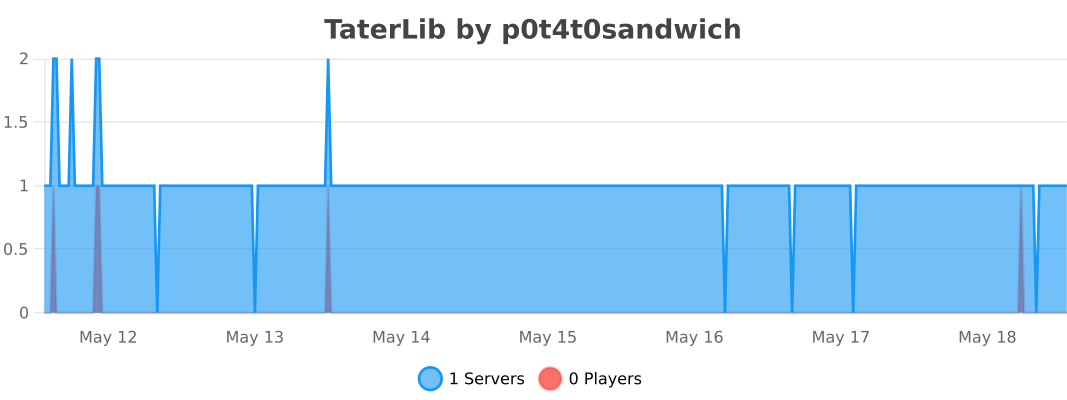
### BungeeCord
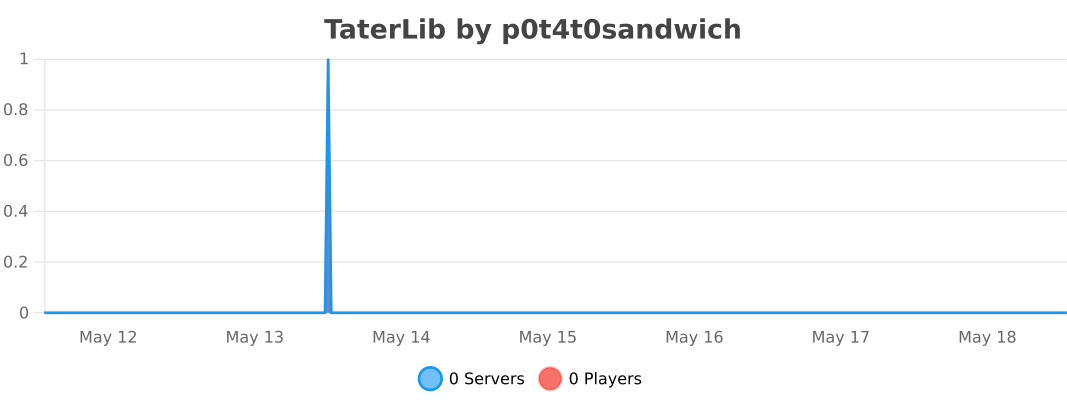
### Sponge
### Velocity
TagItem
– en
TagItem – a plugin that will add your nickname to the item with the help of the archer’s table so that in case of theft of the item you can prove that it is yours. The plugin was created to sign your nicknames in the lore of your item, so that if a player takes the item and does not want to give it to you, you can prove at any time that this is your item, this signature cannot be replaced or removed from the item, it will always be on it!
– ru
TagItem – плагин который с помощи стола лучника добавит на предмет ваш ник чтобы в случае кражи вещи вы могли доказать что она ваша. Плагин создан для подписи вашим ников в лоре вашего предмета, чтобы если игрок отобрал вещь и не хочет отдавать вам вы в любой момент можете доказать что это ваш предмет, эту подпись нельзя заменить или снять с предмета, она будет на нем всегда!
TabTPS
# TabTPS 
Minecraft server mod/plugin to show TPS, MSPT, and other information in the tab menu, boss bar, and action bar.
Current supported platforms:
– [Paper](https://papermc.io)
– [Sponge](https://spongepowered.org) 8+
– Fabric (requires [Fabric API](https://modrinth.com/mod/fabric-api))
– NeoForge
## Features
### Live information displays
– Configure what information will be shown using display configs (`/plugins/TabTPS/display-configs/`)
– Each display config has a permission associated, and players with that permission will use that display config.
– The default display config uses the permission `tabtps.defaultdisplay`, and allows for using all three display types.
– Only one display config can be assigned to each player, even if they have permission for multiple. Set priorities for different display configs in the main config (`plugins/TabTPS/main.conf`)
– Configure colors for displays using theme configs (`/plugins/TabTPS/themes/`)
#### Tab menu
* Command: “/tabtps toggle tab“
* 
#### Action bar
* Command: “/tabtps toggle actionbar“
* 
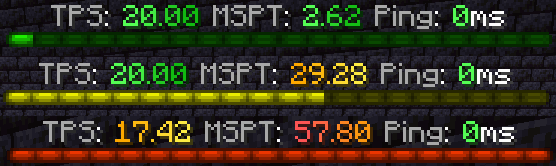
#### Boss bar
* Command: “/tabtps toggle bossbar“
* 
### Commands
#### Improved TPS command
* Command: “/tickinfo“ or “/mspt“
* Permission required: “tabtps.tps“
* 
#### Memory command
* Command: “/memory“, `/mem`, or “/ram“
* View information about the current memory pools of the server jvm.
* Note: the output and usefulness of this command varies depending on the type of garbage collection used, garbage collection settings, and many other factors.
* Permission required: “tabtps.tps“
* 
#### Ping command
* Commands: “/ping“, `/ping [username]`, or “/pingall“
* View the ping of yourself, or another user. “/pingall“ will show a summary of all connected player’s pings.
* Permissions: “tabtps.ping“ to view your own ping, “tabtps.ping.others“ to view other users ping and the ping summary.
* 
* 
#### Reload command
* Command: “/tabtps reload“
* Permission required: “tabtps.reload“
TAB

TAB is an all-in-one plugin for displaying information in various places, which aims to outperform all similar plugins in terms of features, compatibility and performance.
The compact configuration allows you to get the plugin to work the way you want regardless of how simple or complex you want it to be or how experienced you are.
The default configuration already contains useful values and examples to give you a better understanding and get you started quickly with instant results.
The extensive [wiki](https://github.com/NEZNAMY/TAB/wiki) answers any of your questions.


[](https://github.com/NEZNAMY/TAB)
[](https://github.com/NEZNAMY/TAB/issues)
[](https://github.com/NEZNAMY/TAB/wiki)
# Discord?
Official support by me is no longer provided to free users due to limited time and extreme inefficiency (see [provided services]([https://github.com/NEZNAMY/TAB?tab=readme-ov-file#provided-services](https://github.com/NEZNAMY/TAB?tab=readme-ov-file#provided-services)) for more info).
However, you can join this [fresh new community discord]([https://discord.gg/YPqXt63YQj](https://discord.gg/YPqXt63YQj)) made by a nice person who promises to help everyone with all plugins, including TAB.
Before you consider requiring assistance, check out the [wiki](https://github.com/NEZNAMY/TAB/wiki) first. It will answer any questions you may have and is also constantly getting improved.


Switchboard
# TaterComms
[](https://img.shields.io/github/downloads/p0t4t0sandwich/TaterComms/LICENSE)
[](https://github.com/p0t4t0sandwich/TaterComms)
[](https://github.com/p0t4t0sandwich/TaterComms/issues)
[](https://discord.neuralnexus.dev)
[](https://wakatime.com/badge/user/fc67ce74-ca69-40a4-912f-61b26dbe3068/project/c722f2dd-f37e-4e20-9b32-e00d4d8ec34b)
A simple, cross API plugin that bridges communication between servers, using built-in Proxy methods, Discord channels and TCP sockets.
Link to our support: [Discord](https://discord.neuralnexus.dev)
## Download
[](https://github.com/p0t4t0sandwich/TaterComms/releases)
[](https://maven.neuralnexus.dev/#/releases/dev/neuralnexus/TaterComms)
[](https://maven.neuralnexus.dev/#/snapshots/dev/neuralnexus/TaterComms)
[](https://www.spigotmc.org/resources/tatercomms.110592/)
[](https://hangar.papermc.io/p0t4t0sandwich/TaterComms)
[](https://modrinth.com/mod/tatercomms)
[](https://www.curseforge.com/minecraft/mc-mods/tatercomms)
[](https://ore.spongepowered.org/p0t4t0sandwich/TaterComms)
## Usage
– [Configuration guide wiki entry](https://github.com/p0t4t0sandwich/TaterComms/wiki/Configuration-Guide)
– [Create and add a Discord bot to your server](https://discordpy.readthedocs.io/en/stable/discord.html)
– The bot will need permissions to read and send messages with whatever permission scopes you set up, and in the channels you want to use
## Known Issues
– Under certain circumstances with a proxy, prefix/suffix information is not read correctly, still narrowing down the cause
– Global chat still needs some tweaking and a proper, per-user toggle
– Sponge death messages are a tad off with how the component serializes (eg: `playerName Skeleton was shot by` instead of `playerName was shot by Skeleton`)
– Still need to tweak the pass-through system and get that working properly
– Some implementations fire the shutdown event after the plugin unloads, so the shutdown message doesn’t get sent
– Bukkit 1.6.4 doesn’t have an advancement event
– Bukkit b1.7.3 doesn’t support the following
– proper death/advancement events
– plugin messaging
## Dependencies
– [TaterLib](https://github.com/p0t4t0sandwich/TaterLib) – Required on all platforms
– [FabricAPI](https://modrinth.com/mod/fabric-api) – Required on Fabric
### Optional Dependencies
– [LuckPerms](https://luckperms.net/) – For permissions/prefix/suffix support
## Compatibility Cheatsheet
TaterComms supports: Bukkit, Bungee, Fabric, Forge, Sponge, and Velocity
| Server type | Versions | Jar Name |
|———————|————-|———————————|
| All 1.20 (Sponge11) | 1.20-1.20.2 | `TaterComms-1.20-.jar` |
| All 1.19 (Sponge10) | 1.19-1.19.4 | `TaterComms-1.19-.jar` |
| All 1.18 (Sponge9) | 1.18-1.18.2 | `TaterComms-1.18-.jar` |
| All 1.17 (Sponge9) | 1.17-1.17.1 | `TaterComms-1.17-.jar` |
| All 1.16 (Sponge8) | 1.16-1.16.5 | `TaterComms-1.16-.jar` |
| All 1.15 (Sponge8) | 1.15-1.15.2 | `TaterComms-1.15-.jar` |
| All 1.14 | 1.14-1.14.3 | `TaterComms-1.14-.jar` |
## Commands and Permissions
| Command | Permission | Description |
|———————-|——————————|—————————–|
| `/tatercomms reload` | `tatercomms.admin.reload` | Reload the plugin |
| `/discord` | `tatercomms.command.discord` | Get the Discord invite link |
## [Release Notes](https://github.com/p0t4t0sandwich/TaterComms#release-notes)
SternalBoard
INFORMATION:
∗────────────────────∗
Bedrock support, Supporting all version incluiding 1.7x Tab system with animations PlaceholderAPI system support! Animated Scoreboard without delay! Per world Scoreboard Per region WorldGuard scoreboard Permission Scoreboard MiniMessage formating support Once Time Dependency downloader Blacklist/Whitelist Tab completer for Paper, legacy Paper and Spigot Hexadecimal colours suppor Advanced API Easy configuration.
Commands & Permissions /sternalboard- Displays the plugin information. Permission: None /sternalboard reload – Reloads the plugin configs!. Permission: sternalboard.reload /sternalboard toggle- Toggles the scoreboard Permission: sternalboard.toggle
INSTALLATION Download the plugin, drop it on your plugins folder and modify values! The software supports PlaceHolderAPI Click this link and download PlaceHolderApi You can check our WIKI
FEATURES High-performance multi version support Unlimited Animations No duplicated teams Free open source proyect Drop and plug plugin, easier config system for newer people
∗────────────────────∗
squaremap
# squaremap
## What is squaremap
squaremap is a minimalistic and lightweight live world map viewer for Minecraft servers.
squaremap hooks into your Minecraft server as a plugin or mod on a [supported platform](#supported-platforms), then generates and manages a live map of your server, viewable in any web browser.
## Features
* Ultra fast render times. Get your map rendered today, not next week.
* Simple vanilla-like top down 2D view, designed for navigation.
* Player markers showing yaw rotation, health, and armor.
* Easy to [setup](https://github.com/jpenilla/squaremap/wiki/Installation) and [configure](https://github.com/jpenilla/squaremap/wiki/Default-config.yml).
* Up to date Leaflet front-end.
* [Addons and integrations](https://github.com/jpenilla/squaremap/wiki/Addons) for many popular plugins.
## Supported platforms
– [Paper](https://papermc.io/)
– [Sponge](https://www.spongepowered.org/)
– [Fabric](https://fabricmc.net/) (requires [Fabric API](https://www.curseforge.com/minecraft/mc-mods/fabric-api))
– [NeoForge](https://neoforged.net/)
## Downloads
Downloads can be obtained here on Modrinth, or from [GitHub releases](https://github.com/jpenilla/squaremap/releases) for all supported platforms.
Development builds
> Development builds are available at https://jenkins.jpenilla.xyz/job/squaremap/
## Demo
Official squaremap demo: https://squaremap-demo.jpenilla.xyz/
## License
This project is licensed under the [MIT license](https://github.com/jpenilla/squaremap/blob/master/LICENSE)
Leaflet (the web ui frontend) is licensed under [2-clause BSD License](https://github.com/Leaflet/Leaflet/blob/master/LICENSE)
## API
squaremap provides simple APIs to draw markers, shapes, icons, and etc. on rendered maps. Javadocs are hosted on the maven repository alongside the binaries, and should be automatically downloaded by your IDE. See the [README](https://github.com/jpenilla/squaremap/blob/master/README.md) and [Wiki](https://github.com/jpenilla/squaremap/wiki) for more details about the API.
SocialCommands
**_# ✅ العربية_**
هذا البلُوغِن يوفّر مجموعة أوامر مفيدة لسيرفر ماينكرافت، منها:
– **/test**: لاختبار الإضافة.
– **/discord** و **/youtube**: لمشاركة روابط السيرفر.
– **/kickchanel**: لإرسال قناة الكيك (Kick Channel) للاعبين أو المسؤولين عند استخدامه.
كما يحتوي على نظام ترحيب يظهر رسائل مخصّصة عند دخول وخروج اللاعبين.
**طريقة تغيير روابط Discord و YouTube:**
1. بعد تشغيل البلُوغِن لأول مرة، سيتم إنشاء ملف **config.yml** داخل مجلد الإضافة.
2. افتح الملف وعدّل روابط **discord** و **youtube** بروابطك الخاصة.
3. احفظ الملف وأعد تشغيل السيرفر أو استخدم الأمر **/reload**.
سيتم عرض الروابط الجديدة عند تنفيذ الأوامر.
—
**_# ✅ English_**
This plugin adds several useful commands to your Minecraft server, including:
– **/test**: to check the plugin functionality.
– **/discord** and **/youtube**: to share server links.
– **/kickchanel**: sends the kick channel information to players or staff when used.
It also includes a welcome system that displays custom join and quit messages.
**How to change the Discord & YouTube links:**
1. When you launch the plugin for the first time, a **config.yml** file will be created in the plugin folder.
2. Open the file and replace the default **discord** and **youtube** URLs with your own.
3. Save the file and restart the server or use **/reload**.
The new links will appear when the commands are executed.
—
**_# ✅ Français_**
Ce plugin ajoute plusieurs commandes utiles à votre serveur Minecraft, notamment :
– **/test** : pour tester le plugin.
– **/discord** et **/youtube** : pour partager les liens du serveur.
– **/kickchanel** : envoie le lien ou la chaîne dédiée au kick lorsqu’il est utilisé.
Un système de bienvenue est également intégré pour afficher des messages personnalisés à l’arrivée et au départ des joueurs.
**Comment modifier les liens Discord et YouTube :**
1. Lors du premier lancement du plugin, un fichier **config.yml** sera créé dans le dossier du plugin.
2. Ouvrez le fichier et remplacez les URLs par défaut de **discord** et **youtube** par les vôtres.
3. Enregistrez le fichier et redémarrez le serveur ou utilisez **/reload**.
Les nouveaux liens seront affichés lors de l’exécution des commandes.