Yeth’s TPA
**Yeth’s TPA is a Teletransportation Accept mod for Minecraft designed to be compatible, stable, and sufficient.**
## Commands
– **/tpa ** Sends a TPA request to a user
– **/tpa accept ** Accepts a TPA request from a user
– **/tpa here** Sends a TPA Here request to a user
– **/tpa cancel** Cancels an outgoing TPA request
– **/tpa ignore ** Ignores a player from making TPA requests
– **/tpa help** Sends a list of all commands
– **/tpa disable** Disables TPA requests from being sent to you
– **/tpa enable** Enables TPA requests to be sent to you
– **/tpa setting ** Configures settings in TPA
## Features
– Automatic expiry of TPA requests
– TP delay w/ countdown
– Multiple request handling
– Permissions for server owners
– Anti-TPA-traps
## Support
Yeth’s TPA supports the following mod loaders:
– Fabric
– Neoforge
– Forge
– Quilt
– Legacy Fabric
– Babric
– Ornithe
– BTA
– LiteLoader
For Minecraft versions 1.7.2 – 26.1.2
Yadokari Hooks

Yadokari Hooks is a Sponge plugin that allows you to send Minecraft in-game events as webhooks to a specified URL.
## Use for Discord
1. **Obtain a Discord Webhook URL:**
– In your Discord server, go to the channel settings.
– Navigate to **Integrations** > **Webhooks** and create a new webhook.
– Copy the webhook URL.
2. **Configure yadokari-hooks:**
– Open your configuration file (e.g., `config.conf`).
– Add or update a webhook entry with the copied URL and set the format to `discord`.
“`hocon
hooks = [
{
url = “YOUR_DISCORD_WEBHOOK_URL”
format = “discord”
}
]
“`
XD’s Library
### XD’s Library
#### XDPXI’s library for numerous tasks.
—
### Features
> Please view the [Documentation](https://xdlib.xdpxi.dev/) for the correct features for your version
—
### Building from Source
#### To build the mod from source follow the steps below:
– Clone the [Git repository](https://github.com/XDPXI/XDLib)
– Run `gradlew build` or `build.ps1` in your terminal in the cloned repository
#### The compiled mod will be in `build/libs`
Version Numbering Converter
# VNC (Version Numbering Converter)
Version Numbering Converter (VNC) is a Java library for working with Minecraft versions across both numbering families:
– Classic Java-style versions such as `1.20.6` and `1.21.11`
– Year-based drop versions such as `24.1`, `25.4`, and `26.1.1`
It covers two use cases:
– Pure version modeling and conversion through `MinecraftVersion`, `VersionScheme`, and `MappingTable`
– Bukkit/Paper runtime detection through `VNC`, including server constants, player version resolution, protocol lookup, and version comparisons
## Highlights
– Exact historic mappings from `1.0.0` through `1.21.11`
– Drop support for current lines such as `25.4`, `26.1`, and `26.1.1`
– Protocol lookup for exact releases and published snapshots
– A runtime bridge for Bukkit/Paper with legacy-compatible constants like `SERVER_VERSION`
– String-based comparisons that correctly handle patch-sensitive boundaries like `1.20.5`
## Core API
### 1. Parse and inspect versions
“`java
MinecraftVersion classic = MinecraftVersion.parse(“1.21.11”);
MinecraftVersion drop = MinecraftVersion.parse(“26.1”);
classic.isClassic(); // true
classic.getVersion(); // “1.21.11”
classic.getProtocol(); // 774
classic.supportsHex(); // true
drop.isClassic(); // false
drop.getVersion(); // “26.1”
drop.getProtocol(); // 775
“`
### 2. Convert between numbering schemes
“`java
String dropName = VersionScheme.MOJANG.toDrop(“1.20.3”); // “23.2”
String classicName = VersionScheme.MOJANG.toClassic(“25.2.2”); // “1.21.8”
String customClassic = VersionScheme.CROA_CUSTOM.toClassic(“25.4”); // “1.22”
String customDrop = VersionScheme.CROA_CUSTOM.toDrop(“1.22.1”); // “25.4.1”
“`
### 3. Create your own mapping scheme
“`java
MappingTable table = new MappingTable()
.registerLine(30, 1, “1.50”, “1.50.1”)
.registerMapping(“1.51”, “30.2”);
VersionScheme scheme = VersionScheme.mapped(table);
scheme.toDrop(“1.50.1”); // “30.1.1”
scheme.toClassic(“30.2”); // “1.51”
“`
### 4. Resolve protocols
“`java
Integer protocol = MinecraftVersion.protocolForIdentifier(“1.20.6”); // 766
Integer snapshot = MinecraftVersion.protocolForIdentifier(“26.2-snapshot-3”);
MinecraftVersion newest = MinecraftVersion.fromProtocol(754); // 1.16.5
List all = MinecraftVersion.versionsForProtocol(767); // 1.21, 1.21.1
“`
## Bukkit / Paper runtime API
`VNC` exposes a runtime snapshot of the current server:
“`java
MinecraftVersion server = VNC.SERVER_MINECRAFT_VERSION;
String classic = VNC.SERVER_CLASSIC_VERSION;
String drop = VNC.SERVER_DROP_VERSION;
int protocol = VNC.SERVER_PROTOCOL;
double legacy = VNC.SERVER_VERSION;
boolean modernRegistry = VNC.isAtLeast(“1.20.5”);
boolean legacyCommands = VNC.isBefore(“1.13”);
boolean inRange = VNC.isBetween(“1.19”, “1.21.11”);
“`
Player version resolution uses ViaVersion when present and falls back to the server version otherwise:
“`java
MinecraftVersion playerVersion = VNC.player(player);
if (playerVersion.supportsHex()) {
// Safe to send RGB formatting to this player
}
“`
## Why use the string helpers?
`SERVER_VERSION` is still available for compatibility with older plugins, but patch-sensitive checks should prefer:
“`java
VNC.isAtLeast(“1.20.5”);
VNC.isBefore(“1.21.9”);
VNC.compare(VNC.SERVER_MINECRAFT_VERSION, “26.1”);
“`
That avoids the common limitations of comparing versions only as `double`.
## Requirements
– Java 8+
– For the Bukkit runtime helpers: a Bukkit/Paper-compatible runtime on the classpath
– Optional: ViaVersion, if you want `VNC.player(…)` to resolve the effective client version instead of the server version
V-ItemSign




# VItemSign Configuration
Vitemsign is a signing system for items, allowing you to sign and protect them.
# Preview
### Commands

## Configuration Overview
### **Custom Messages**
Customize messages for server startup, player join/quit, and Discord chat using the MiniMessage format.
We currently support: `de` and `en`
### **Commands**
`/itemsign ` – Signs the item with the specified text
`/itemsign lock` – Locks the signed item so that it cannot be changed.
`/itemsign unlock` – Unlocks the signed item so that it can be changed again.
`/itemsign delete` – Removes the sign from the item.
### 4. **Permissions**
`vitemsign.use` | Fully configurable in the Config.yml.
– Permission to use the `/itemsign` Command.
—
## Setup Instructions
1. Download and install the plugin on your Minecraft server.
2. Configure the `config.yml` file with your preferred settings:
– Set the database type and connection details.
– Define custom messages using MiniMessage.
3. Restart the server to apply the changes.
—
## Example config
“`yaml
language: en
# These items should remain in the list to avoid duplication bugs
BlockedItems:
– “SHULKER_BOX”
– “WHITE_SHULKER_BOX”
– “GRAY_SHULKER_BOX”
– “BLACK_SHULKER_BOX”
– “BROWN_SHULKER_BOX”
– “RED_SHULKER_BOX”
– “ORANGE_SHULKER_BOX”
– “YELLOW_SHULKER_BOX”
– “LIME_SHULKER_BOX”
– “GREEN_SHULKER_BOX”
– “CYAN_SHULKER_BOX”
– “LIGHT_BLUE_SHULKER_BOX”
– “BLUE_SHULKER_BOX”
– “PURPLE_SHULKER_BOX”
– “MAGENTA_SHULKER_BOX”
– “PINK_SHULKER_BOX”
– “CHEST”
– “TRAPPED_CHEST”
– “HOPPER”
– “ENDER_CHEST”
– “BARREL”
– “FURNANCE”
“`
—
## Example Message Configuration
“`yaml
# General Messages
prefix: “[VItemSign] ”
date_format: “MM/dd/yyyy – hh:mm a”
user_not_found: “That user does not exist.”
no_permission: “You don’t have permission to do that.”
cannot_sign_blocked_item: “You are not allowed to sign that!”
cannot_lock_blocked_item: “You are not allowed to lock this item!”
item_not_signed: “This item is not signed yet!”
not_your_item: “You are not the owner of that item!”
item_sign_deleted_successfully: “The sign has been deleted succesfully !”
item_already_locked: “This item has already been locked!”
item_locked_successfully: “This item has succesfully been locked!”
item_not_locked: “This item is not locked!”
item_unlocked_successfully: “This item has succesfully been unlocked!”
item_already_signed: “This item has already been signed!”
item_signed_successfully: “This item has succesfully been signed.”
item_in_hand_is_air: “You have to hold the item in you main hand!”
item_sign_broken_successfully: “You have broken a signed item block!”
lore_prefix_separator: ” | ”
signed_lore: “» Signed by am ”
Command:
Name: “itemsign”
Permission: “vitemsign.use”
Arguments:
Delete: “delete”
Lock: “lock”
Unlock: “unlock”
Usage:
– “VItemSign Help:”
– “/itemsign <Text> – Signs an Item.”
– “/itemsign delete – Delete the item sign.”
– “/itemsign lock – The sign will get locked.”
– “/itemsign unlock – The sign will get unlocked.”
“`
—
## Example Database Configuration
“`yaml
type: Sqlite # Avaiable types: mongo, mysql, sqlite
# MONGO
Mongo:
connection-string: “mongodb://:@:/”
database: “db”
# SQL
SQL:
connection-string: “jdbc:sqlite:plugins/VItemSign/database.db”
username: “username” # Not required for sqlite
password: “password” # Not required for sqlite
“`
—
—
## Soft Requirements
* WorldGuard
—
## Notes
– The MiniMessage format is highly flexible for styling and formatting messages. Refer to the [MiniMessage documentation](https://docs.advntr.dev/minimessage/format.html) for more details.
– SQLite is the simplest database option as it doesn’t require additional setup.

ViaSponge
# ViaSponge
See https://github.com/ViaVersion/ViaVersion for the main project.
## Required setup
**You need to follow these steps to run ViaSponge**
– Download the latest jar from https://modrinth.com/project/viasponge and put it into your Sponge mods folder
folder
– Download ViaVersion from https://viaversion.com/ (and other addons if needed) and **put them into
the mods folder as well**
Requires Java 17
ViaRewind
# ViaRewind
**ViaVersion addon to allow 1.8.x and 1.7.x clients on newer server versions.**
Runs on 1.9-latest servers or 1.8 clients and lower.
**You can override the included version in [ViaFabric](https://modrinth.com/mod/viafabric) or [ViaProxy](https://github.com/ViaVersion/ViaProxy):**
– in **ViaFabric**, put ViaRewind into the `mods` folder
– in **ViaProxy**, put ViaRewind into the `jars` folder
Requires Java 17. See [here](https://docs.papermc.io/misc/java-install) how to update your installed Java version. As a last resort, you can download Java 8 downgraded builds from [our ci](https://ci.viaversion.com/view/ViaRewind/job/ViaRewind-Java8/).
**Requires [ViaVersion](https://hangar.papermc.io/ViaVersion/ViaVersion) and [ViaBackwards](https://hangar.papermc.io/ViaVersion/ViaBackwards) to be installed..**
Releases/Dev Builds
–
You can find releases in the following places:
– **Hangar (for our plugins)**: https://hangar.papermc.io/ViaVersion/ViaRewind
– **Modrinth (for our mods)**: https://modrinth.com/mod/viarewind
– **GitHub**: https://github.com/ViaVersion/ViaRewind/releases
Dev builds for **all** of our projects are on our Jenkins server:
– **Jenkins**: https://ci.viaversion.com/view/ViaRewind/
Other Links
–
**Maven:** https://repo.viaversion.com/
**Issue tracker:** https://github.com/ViaVersion/ViaRewind/issues
**List of contributors:** https://github.com/ViaVersion/ViaRewind/graphs/contributors
Ultimate Message
– Ru
Этот плагин поможет вам кастомизировать объявление о заходе на сервер, а так же добавит локальный и глобальный чат на ваш сервер
Коротко но понятно 🙂
– En
This plugin will help you customize your server login announcement and add local and global chat to your server
Short but clear 🙂
Total Economy
# Total Economy
Total Economy is a plugin that aims to provide a full-fledged economy for your server. Each feature can be enabled/disabled and configured to your liking. With Vault support, Total Economy can be used alongside other plugins that depend on an economy.
## Features
– Vault support to allow easy integration with multiple plugins
– Easily pay other players
– Ability to enable/disable individual features
– Jobs and the ability to create your own jobs
– Shops (future version)
– Achievements (future version)
– Web UI for easy management (future version)
## Discussion
If you have any feature ideas or questions, please head over to the [Discussion](https://github.com/ericgrandt/TotalEconomy/discussions) page on GitHub as we’d love to hear them.
If you encounter any issues while using Total Economy, please feel free to create an [Issue](https://github.com/ericgrandt/TotalEconomy/issues) on GitHub and we’ll take a look.
TheNewEconomy
**Note: This resource is no longer maintained/supported.**
# The New Economy
[](https://app.codacy.com/gh/TheNewEconomy/EconomyCore/dashboard?utm_source=gh&utm_medium=referral&utm_content=&utm_campaign=Badge_grade)
[](https://ci.codemc.io/job/creatorfromhell/job/TNE/)
[](https://github.com/TheNewEconomy/VaultUnlockedAPI)
The New Economy, TNE, is the ultimate economy plugin for your Minecraft server, no matter what platform you’re on. While
TNE is pushed as being “feature-packed,” but it’s not feature-packed in the normal sense of jamming a bunch of useless features
into the core plugin, but rather using modules.

The economy plugin for server owners that want more out of their economy.
# About TNE
TNE was originally created for hey0’s hMod long before Bukkit/Spigot/Paper was a thing. Since then, it has taken on many
forms and this is the future form of the plugin. This core is designed to be robust and carry TNE into the future with or
without Minecraft by not being platform-dependent.
# Requirements
TNE has some minimum requirements that should be followed.
– MySQL 8.0+ (if using MySQL for storage)
– MariaDB 10.7.0+
– Java 17+
# Switched?
– Converter Coming Soon! Take the poll: [here](https://strawpoll.com/4xw9gxag)
# Support
To get an actual response use a support method below, not the reviews.
– [Developer API Docs](https://github.com/TheNewEconomy/EconomyCore/wiki/API)
– [Discord](https://discord.gg/WNdwzpy)
– [Github](https://github.com/TheNewEconomy/EconomyCore/issues)
# Features
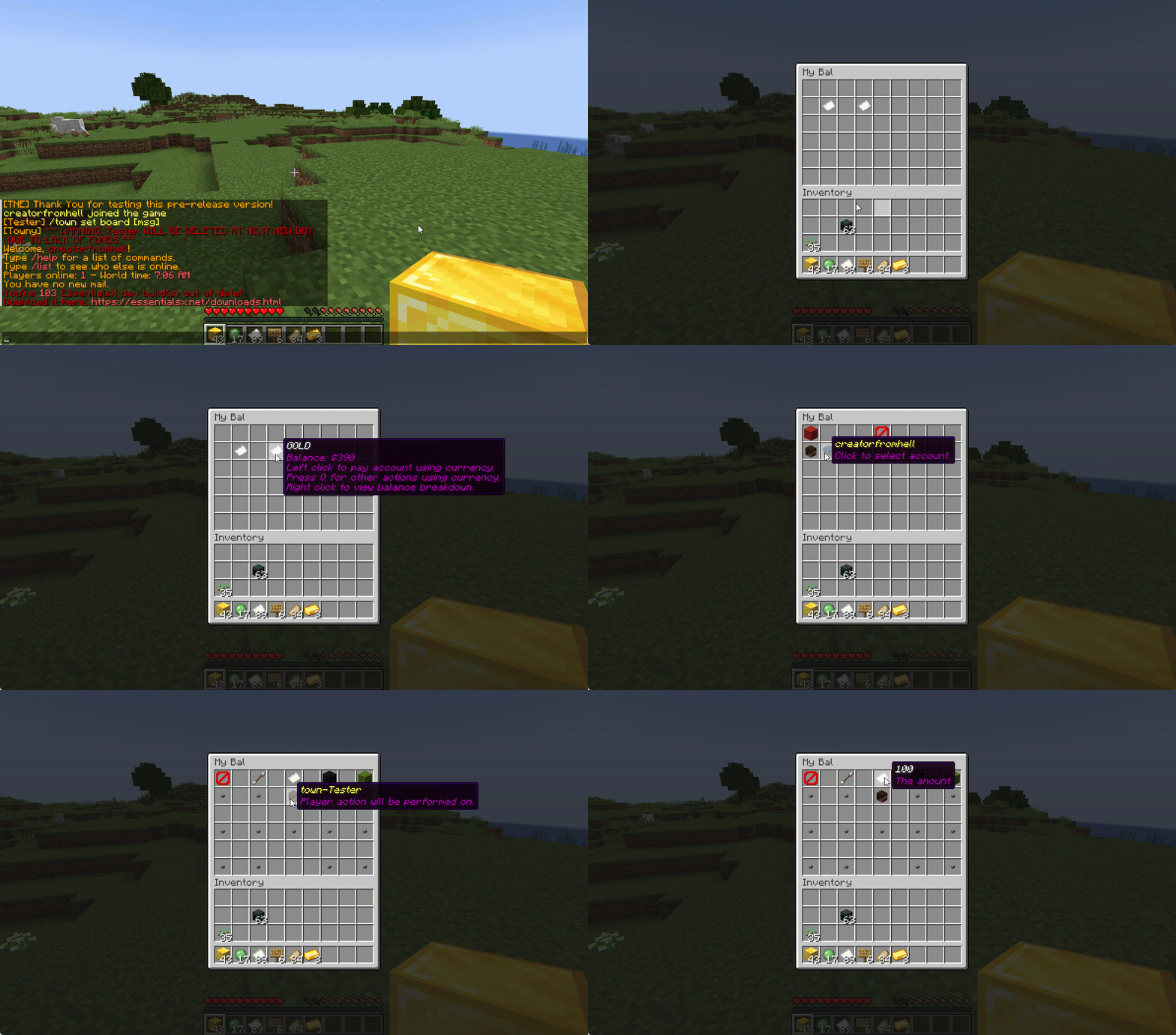
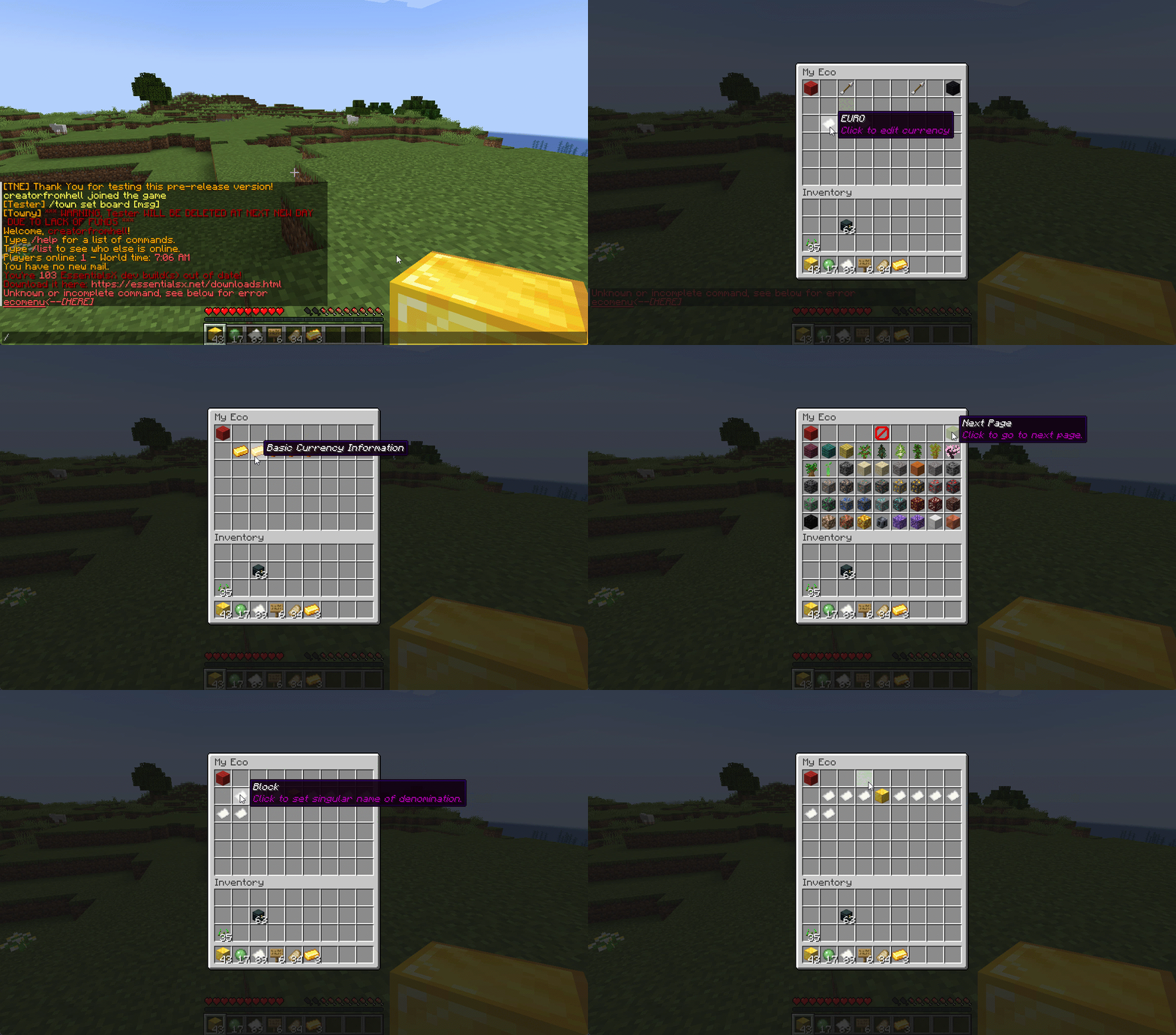
## Menu System
Want to use menus for currency creation and player actions? We got you!
### MyBal for Players
### MyEco for Admins
## Support your favorite plugins
We provide support for all your favorite plugins from Towny to Factions. Anything that supports Vault, supports TNE!
## Cross-Server
We support cross-server balance syncing through our velocity and bungee plugins, as well as Redis!
### Bungee
Download: [here](https://cdn.modrinth.com/data/bZ4eSWf0/versions/OTwQFFn1/TNE-BungeeCore-0.1.2.8-Release-1.jar)
### Velocity
Download: [here](https://cdn.modrinth.com/data/bZ4eSWf0/versions/prNGjbjv/TNE-VelocityCore-0.1.2.8-Release-1.jar)
## Updates
We continue to develop updates for TNE for free, and fix bugs as they’re reported.
## All the currencies – Unlimited
TNE Allows you to create unlimited currencies with ease through the currency creation GUI.
### Types
TNE Supports different types of currencies!
#### Virtual: Simple currency that exists in thin air
#### Item: Use minecraft items as currency.
– Shulker Box Support
– Bundle Support
### Fine Tune your Currency
Lots of per-currency configuration options.
– Create a custom balance format for each currency
– Set a starting amount for each currency
– Set custom conversion rates for each currency
– Create custom crafting recipes for item currencies
– Block Mob drops for each currency
– Set the max balance for each currency
– Set enderchest balance inclusion per currency
– Set item currencies to use MiniMessage inputs for display name and lores!
– Set custom note items for each currency, used to have a currency voucher for each currency.
– Allows for use of model data items as currency items
### Fine Tune Who Can Access What Currency
TNE allows you to fine tune who can run commands with each currency. You’re able to block players from using
/pay for certain currencies, and even checking their balance for others!
#### Mixed: This type uses both virtual and item balances, and allows players to switch their balance between items and virtual whenever!
#### Experience: Use experience as currency.
#### Experience-level: Use experience levels as currency.
## Money Notes
Convert your virtual currency into a physical money note using the /money note command.
## Multi-platform
Use Sponge? Sure. Paper? Why not? Both? Over Velocity? Definitely! Switch between, your TNE data works
for you no matter your platform. More platforms soon!
### Supported:
– Paper/Spigot/Purpur
– Sponge8
### Coming:
– Fabric
– Sponge7
## Discord Server
We have a discord server available to those users that have questions or need support!
## Configurability
TNE strives to allow you to configure things as much as possible. From the messages to starting money, to max holdings!
## MISC Features
– Adventure Chat support for translations to allow for awesome colorful messages!
– Support for Placeholders, include top 10
– Easy commands for easy administration
– Transaction Logging
– Easy-to-use menu system for currency creation and balance actions!
– Multiple data types
– SQL, YAML, and Maria DB
– Tab completion for commands!
– baltop command
## Open Source
Contribute on the [github](https://github.com/TheNewEconomy/EconomyCore)!
## Placeholders
| Name | Description |
|——————————————————-|—————————————————————-|
| tne_balance | Returns player’s balance. |
| tne_balance_formatted | Returns formatted player’s balance. |
| tne_world_worldname | returns player’s balance for specific world. |
| tne_world_worldname_formatted | returns the formatted player’s balance for specific world. |
| tne_currency_currencyname | returns player’s balance for specific currency. |
| tne_currency_currencyname_formatted | returns player’s balance for specific currency. |
| tne_wcur_worldname_currencyname | returns player’s balance for specific world and currency. |
| tne_wcur_worldname_currencyname_formatted | returns player’s balance for specific world and currency. |
| tne_toppos | returns player’s position on baltop |
| tne_toppos_world name or all | returns player’s balance for specific currency. |
| tne_toppos_world name or all_currency name or all | returns player’s balance for specific world and currency. |
| tne_toppos__position_ | returns the value for the position based on the value of Messages.Money.PlaceholderTopEntry in messages.yml |
## Permissions & Commands
## /tne
**About:** All commands that are designated as being for administrative purposes.
**Shortcuts:** /tne menu(/ecomenu), /tne(/ecomin, /ecoadmin, /ecomanage, /tneneweconomy)
**Base node:** tne.admin (default: ops)
**Wildcard node:** tne.admin.*
| Command | Permission | Description | Default |
|———————————–|——————-|———————————————————————————————————–|—————|
| tne backup | tne.admin.backup | Creates a backup of all server data. | ops |
| tne create [balance] | tne.admin.create | Creates a new economy account. Player ~ The account owner. Balance ~ The starting balance of the account. | ops |
| tne debug [level] | tne.admin.debug | Toggles console debug mode to the specified level. | ops |
| tne delete | tne.admin.delete | Deletes a player account. Player ~ The account owner. | ops |
| tne extract | tne.admin.extract | Extracts all player balances with their username attached for database related debugging. | ops |
| tne menu | tne.admin.menu | Opens up the tne economy admin menu | ops |
| tne purge | tne.admin.purge | Deletes all player accounts that have the default balance | ops |
| tne reload [configs] | tne.admin.reload | Used to reload configurations. | ops |
| tne reset | tne.admin.reset | Deletes all economy-related data from the database. | ops |
| tne restore | tne.admin.restore | Restores all balances that are located in extracted.yml after performing the extract command. | ops |
| tne save | tne.admin.save | Force saves all TNE data. | ops |
| tne status [status] | tne.admin.status | Displays, or sets, the current account status of an account. Player ~ The account owner. | ops |
| tne version | tne.admin.version | Displays the version of TNE currently running. | ops |
## /money
**About:** All commands that are used to interact with the server’s money system.
**Shortcuts:** /money balance(/bal, /balance), /money pay(/pay), /money top(/baltop), /money menu(/mybal)
**Base node:** tne.money (default: everyone)
**Wildcard node:** tne.money.*
| Command | Permission | Description | Default |
|————————————————————|———————–|—————————————————————————————-|—————|
| money balmenu | tne.money.mybal | Opens up the mybal menu. | everyone |
| money balance [world] [currency] | tne.money.balance | Displays your current holdings. | everyone |
| money convert [from currency] | tne.money.convert | Convert some of your holdings to another currency. | everyone |
| money deposit [currency] | tne.money.deposit | Deposits money from an item form into a virtual bank for mixed currencies. | everyone |
| money give [world] [currency] | tne.money.give | Adds money into your economy, and gives it to a player. | ops |
| money givenote [currency] | tne.money.givenote | Gives the specified player a currency note for the specified amount. | ops |
| money note [currency] | tne.money.note | Makes your virtual currency physical, for storage/trading purposes. | everyone |
| money other [world] [currency] | tne.money.other | Retrieves the balance of a player. | everyone |
| money pay [currency] | tne.money.pay | Use some of your holdings to pay another player. | everyone |
| money request [currency] | tne.money.request | Request money from a player. |
| money set [world] [currency] | tne.money.set | Set the holdings of a player. | ops |
| money setall [world] [currency] | tne.money.setall | Set the holdings of all players. | ops |
| money take [world] [currency] | tne.money.take | Removes money from your economy, specifically from a player’s balance. | ops |
| money top [page] | tne.money.top | A list of players with the highest balances. | ops |
| money top [page] [refresh(true/false)] | tne.money.top.refresh | This permission allows the user to include the refresh argument to refresh the baltop. | ops |
| money withdraw [currency] | tne.money.withdraw | Withdraws money from your virtual balance into its item form. | ops |
## /transaction
**About:** All commands that are used to interact with the transaction system.
**Shortcuts:** /trans
**Base node:** tne.transaction (default: everyone)
**Wildcard node:** tne.transaction.*
| Command | Permission | Description | Default |
|——————————————————————–|———————————————————|—————————————————————————————|—————|
| transaction away [page #] | tne.transaction.away | Displays transactions that you missed since the last time you were on. | everyone |
| transaction history [player:name] [page:#] [world:name/all] | tne.transaction.history / tne.transaction.history.other | See a detailed break down of your transaction history. Page ~ The page number you wish to view. World ~ The world name you wish to filter, or all for every world. Defaults to current world. | everyone |
| transaction info | tne.transaction.info | Displays information about a transaction. UUID ~ The id of the transaction. | everyone |
| transaction void | tne.transaction.void | Undoes a previously completed transaction. UUID ~ The id of the transaction. | ops |