Yeth’s TPA
**Yeth’s TPA is a Teletransportation Accept mod for Minecraft designed to be compatible, stable, and sufficient.**
## Commands
– **/tpa ** Sends a TPA request to a user
– **/tpa accept ** Accepts a TPA request from a user
– **/tpa here** Sends a TPA Here request to a user
– **/tpa cancel** Cancels an outgoing TPA request
– **/tpa ignore ** Ignores a player from making TPA requests
– **/tpa help** Sends a list of all commands
– **/tpa disable** Disables TPA requests from being sent to you
– **/tpa enable** Enables TPA requests to be sent to you
– **/tpa setting ** Configures settings in TPA
## Features
– Automatic expiry of TPA requests
– TP delay w/ countdown
– Multiple request handling
– Permissions for server owners
– Anti-TPA-traps
## Support
Yeth’s TPA supports the following mod loaders:
– Fabric
– Neoforge
– Forge
– Quilt
– Legacy Fabric
– Babric
– Ornithe
– BTA
– LiteLoader
For Minecraft versions 1.7.2 – 26.1.2
UniLib
# UniLib
A common set of Utilities, designed for over 50 versions of Minecraft!
[](https://opensource.org/licenses/MIT)
[](https://app.codacy.com/gl/CDAGaming/UniLib/dashboard?utm_source=gl&utm_medium=referral&utm_content=&utm_campaign=Badge_grade)
[](https://gitlab.com/CDAGaming/UniLib/commits/main)
[](https://www.curseforge.com/minecraft/mc-mods/unilib)
[](https://www.curseforge.com/minecraft/mc-mods/unilib)
[](https://modrinth.com/mod/unilib)
[](https://modrinth.com/mod/unilib)
## General Notes
* This mod identifies as a **Client Side-only** mod
* This means it **will not run** on the Server’s side.
* Fabric and Quilt mod loaders will simply ignore the
mod, while other mod loaders may crash.
* Some versions of the mod for Minecraft 1.14.x and above require
the [Fabric API](https://modrinth.com/mod/fabric-api)
and the [Fabric mod loader](https://fabricmc.net/use/installer)
* Some versions of the mod for Minecraft 1.13.x require
the [Rift API](https://www.curseforge.com/minecraft/mc-mods/rift)
and the [Rift mod loader](https://github.com/DimensionalDevelopment/Rift/releases)
* Some versions of the mod for Minecraft 1.1.0 and below
require [Risugami’s ModLoader](https://mcarchive.net/mods/modloader)
## Features
This library mod offers various API utilities that have been developed over the years,
initially part of [CraftPresence](https://gitlab.com/CDAGaming/CraftPresence),
that have been designed to work on over 50 versions of Minecraft, from the earliest Alphas to the latest Releases.
These APIs range from utilities that can help with Rendering/UI design, Update Checker and Translation ease-of-access,
as well as the APIs provided through the sibling-project, [UniCore](https://github.com/CDAGaming/UniCore)
## Disclaimers & Additional Info
### Minecraft Issues + Additional Build Info
Despite best efforts, issues can occur due to the state of the Minecraft Codebase.
These issues can hinder certain portions of the backend in addition to cause certain parts of the mod to not work.
With this in mind, please note the following:
* **Minecraft 1.16 and above**
* As more parts of the game become data-driven, some modded data is no longer able to be automatically retrieved
without first being in the world.
* **Minecraft 1.15 and below**
* `MC-112292`: When interacting with the `RenderUtils#drawItemStack` method, used in the v2 Item Renderer, blocks
using certain renderers may fail to display properly.
* Additionally, on 1.15.x exclusively, z-level issues may occur on Screens using this method
* **Miscellaneous Issues**
* Due to obfuscation issues in earlier versions of Minecraft, incorrect data may appear when using certain parts of
the mod.
Additionally, some settings or API calls may perform differently under certain MC versions.
### Support
Need some assistance with one of my mods or wish to provide feedback?
I can be contacted via the following methods:
* [Email](mailto:[email protected])
* [CurseForge](https://www.curseforge.com/minecraft/mc-mods/unilib)
* [Discord :: ](https://discord.com/invite/BdKkbpP)
Additionally, codebase documentation for this mod is
available [here](https://cdagaming.gitlab.io/unilib-documentation/) with further guides available
on [the wiki](https://gitlab.com/CDAGaming/UniLib/-/wikis/Home)
#### Licensing
This Mod is under the MIT License as well as the Apache 2.0 License
This project currently makes usage of the following dependencies internally:
* [UniCore](https://github.com/CDAGaming/UniCore) by [CDAGaming](https://github.com/CDAGaming)
* [Classgraph](https://github.com/classgraph/classgraph) by [lukehutch](https://github.com/lukehutch)
* [Lenni Reflect](https://github.com/Lenni0451/Reflect) by [Lenni0451](https://github.com/Lenni0451)
Tweakeroo
## Description
Tweakeroo is a client-side mod that adds a whole bunch of miscellaneous “tweaks” to the game.
Some of the more popular tweaks are Hand Restock, Flexible Block Placement and Accurate Block Placement, Fast Left and Right Click, Gamma Override and Free Camera.
The default hotkey to open the config menu is `X + C`.
## Warning for playing on servers
You should make sure that the mod is allowed on the server if you play in multiplayer!
Some (or many, or most?) of the features are considered to be rather powerful and cheaty by many players, and many server might not allow using many of the features.
Some servers might also have automated anti-cheat plugins or mods, which can either kick or ban the player when they detect “unusual activity” which doesn’t happen with a vanilla client.
An example of this are the Flexible and Accurate Block Placement features, which can click on air blocks, and they can also send item use packets with a modified hit position (this is how the “accurate block placement protocol” intoduced by Carpet mod back in 1.12-ish works).
As another example, Hand Restock might get flagged because it sends a few slot click packets really quickly, without opening the player inventory.
So **ask the server owners or admins before using the mod!** Or, you know, run your own server for yourself and some friends, where you make the rules on what is allowed.
## List of features
Here are some rough lists of the available features in some versions of the mod. The exact available features varies by the mod version, where later versions usually have more features. There are also a small number of features that have been (temporaily?) disabled for example during the 1.19.x MC versions due to vanilla code changes making them difficult to port (Creative Extra Items and Custom Flat World Presets tweaks for example).
The features are divided into two types of categories in the config menu:
– `Tweaks` are features that “add functionality”
– `Yeets` (or `Disable Toggles` in older naming) are features which disable some functionality of the vanilla game (such as `Disable Nether Fog`).
Note: Features marked with an asterisk only work in single player. They need to be applied to server-side code, which in a client-side mod is only possible for the integrated server, so in other words while playing in single player.
Features in MC 1.12.2 (Ornithe 0.40.0-ish and LiteLoader 0.31.0-ish versions)
Tweaks
– Accurate Block Placement
– After Clicker
– Aim Lock
– Angel Block
– Block Placement Y-Mirror
– Block Breaking Particle Tweaks
– Block Model Override
– Block Reach Override
– Block Render Type Override
– Breaking Grid
– Breaking Restriction
– Chat Background Color
– Chat Persistent Text
– Chat Timestamp
– Chunk Render On Main Thread
– Chunk Render Timeout Override
– Cloud Height Override
– Command Block Extra Fields
– Custom Flat Presets
– Debug Pie Chart Scale
– Elytra Camera
– * Empty Shulker Boxes Stack
– * Empty Shulker Boxes Stack On Ground
– Explosion Reduced Particles
– F3 Cursor
– Fake Sneaking
– Fast Block Placement
– Fast Left Click
– Fast Right Click
– * Fill/Clone Limit Override
– Fly Speed Override
– Flexible Block Placement
– Free Camera
– Gamma Override
– Hand Restock
– Hangable Entity Bypass
– Hold Attack
– Hold Use
– Hotbar Scroll
– Hotbar Slot Cycle
– Hotbar Slot Randomizer
– Hotbar Swap
– Inventory Preview
– Item Unstacking Protection
– Lava Visibility
– Llama Steering
– Map Preview
– Matching Sky Fog
– Movement Keys Last
– Periodic Attack
– Periodic Use
– Permanent Sneak
– Permanent Sprint
– Pick Before Place
– Placement Grid
– Placement Limit
– Placement Restriction
– Placement Restriction First
– Placement Restriction Hand
– Player Inventory Peek
– Player List Always Visible
– Player On Fire Scale
– Potion Warning
– Print Death Coordinates
– * Relaxed Block Placement
– Render Edge Chunks
– Render Invisible Entities
– Render Limit Entities
– Repair Mode
– Shulker Box Display
– Sign Copy
– Snap Aim
– Snap Aim Lock
– Spectator Teleport
– Static Fov
– * Structure Block Limit Override
– Swap Almost Broken Tools
– Tab Complete Coordinate
– Tile Entity Render Distance Override
– Tool Switch
– World List Date Format
– Zoom
Yeets
– Disable Block Breaking Particles
– Disable Double Tap Sprint
– Disable Boss Fog
– Disable Christmas Chests
– Disable Client Entity Updates
– Disable Dead Mob Rendering
– Disable Dead Mob Targeting
– Disable Entity Rendering
– * Disable Entity Ticking
– Disable Falling Block Entity Rendering
– Disable First Person Potion Effects
– Disable Inventory Effect Rendering
– Disable Item Glint
– Disable Item Switch Render Cooldown
– Disable Light Updates
– Disable Light Updates (All)
– Disable Mob Spawner Mob Rendering
– Disable Nether Fog
– * Disable Observer
– * Disable Observer Update-On-Place
– Disable Offhand Rendering
– Disable (All) Particles
– Disable Portal Gui Closing
– Disable Rain Effects
– Disable Render Distance Fog
– Disable Scoreboard Rendering
– Disable Sign Gui
– Disable Shulker Box Tooltip
– Disable Slime Block Slowdown
– Disable Sounds (All)
– Disable Sounds (List)
– Disable Tile Entity Rendering
– * Disable Tile Entity Ticking
– * Disable Villager Trade Locking
– Disable Wall Unsprint
Features in MC 1.13.2 – 1.20.4 versions
Note that not all of these are currently available in older MC versions or mod versions.
Tweaks
– tweakAccurateBlockPlacement
– tweakAfterClicker
– tweakAimLock
– tweakAngelBlock
– tweakBlockReachOverride
– tweakBlockTypeBreakRestriction
– tweakBreakingGrid
– tweakBreakingRestriction
– tweakChatBackgroundColor
– tweakChatPersistentText
– tweakChatTimestamp
– tweakCommandBlockExtraFields
– tweakCreativeExtraItems
– tweakCustomFlatPresets
– tweakCustomFlyDeceleration
– tweakCustomInventoryScreenScale
– tweakElytraCamera
– tweakEntityTypeAttackRestriction
– * tweakEmptyShulkerBoxesStack
– * tweakEmptyShulkerBoxesStackOnGround
– tweakExplosionReducedParticles
– tweakF3Cursor
– tweakFakeSneaking
– tweakFakeSneakPlacement
– tweakFastBlockPlacement
– tweakFastLeftClick
– tweakFastRightClick
– * tweakFillCloneLimit
– tweakFlySpeed
– tweakFlexibleBlockPlacement
– tweakFreeCamera
– tweakGammaOverride
– tweakHandRestock
– tweakHangableEntityBypass
– tweakHoldAttack
– tweakHoldUse
– tweakHotbarScroll
– tweakHotbarSlotCycle
– tweakHotbarSlotRandomizer
– tweakHotbarSwap
– tweakInventoryPreview
– tweakItemUnstackingProtection
– tweakLavaVisibility
– tweakMapPreview
– tweakMovementKeysLast
– tweakPeriodicAttack
– tweakPeriodicUse
– tweakPeriodicHoldAttack
– tweakPeriodicHoldUse
– tweakPermanentSneak
– tweakPermanentSprint
– tweakPlacementGrid
– tweakPlacementLimit
– tweakPlacementRestriction
– tweakPlacementRestrictionFirst
– tweakPlacementRestrictionHand
– tweakPlayerInventoryPeek
– tweakPotionWarning
– tweakPrintDeathCoordinates
– tweakPickBeforePlace
– tweakPlayerListAlwaysVisible
– tweakRenderEdgeChunks
– tweakRenderInvisibleEntities
– tweakRenderLimitEntities
– tweakRepairMode
– * tweakSculkPulseLength
– tweakShulkerBoxDisplay
– tweakSignCopy
– tweakSnapAim
– tweakSnapAimLock
– tweakSneak_1
– tweakSpectatorTeleport
– * tweakStructureBlockLimit
– tweakSwapAlmostBrokenTools
– tweakTabCompleteCoordinate
– tweakToolSwitch
– tweakWeaponSwitch
– tweakYMirror
– tweakZoom
Yeets
– disableArmorStandRendering
– disableAxeStripping
– disableBatSpawning
– disableBeaconBeamRendering
– disableBlockBreakingParticles
– disableDoubleTapSprint
– disableBossBar
– disableBossFog
– disableChunkRendering
– disableClientEntityUpdates
– disableClientLightUpdates
– * disableConstantChunkSaving
– disableCreativeMenuInfestedBlocks
– disableDeadMobRendering
– disableDeadMobTargeting
– disableEntityRendering
– * disableEntityTicking
– disableFallingBlockEntityRendering
– disableFirstPersonEffectParticles
– disableInventoryEffectRendering
– disableItemSwitchRenderCooldown
– disableMobSpawnerMobRendering
– disableNauseaEffect
– disableNetherFog
– disableNetherPortalSound
– * disableObserver
– disableOffhandRendering
– disableParticles
– disablePortalGuiClosing
– disableRainEffects
– disableRenderingScaffolding
– disableRenderDistanceFog
– disableScoreboardRendering
– disableShulkerBoxTooltip
– disableShovelPathing
– disableSignGui
– disableSkyDarkness
– disableSlimeBlockSlowdown
– disableStatusEffectHud
– disableTileEntityRendering
– * disableTileEntityTicking
– * disableVillagerTradeLocking
– disableWallUnsprint
– disableWorldViewBob
Scift
# Scift [](https://jitpack.io/#Nova-Committee/Scift)
##### Scala runtime libraries for Rift
Scift provides the runtime and libraries required for creating Rift mods in Scala. For usage, append the following to your Gradle build script:
“`
plugins {
id ‘scala’
}
repositories {
maven { url = ‘https://jitpack.io’ }
}
“`
Scala2
“`
dependencies {
implementation ‘com.github.Nova-Committee:Scift:2-1.1.0’
}
“`
Scala3
“`
dependencies {
implementation ‘com.github.Nova-Committee:Scift:3-1.1.0’
}
“`
Here’s an example [Scift-based Rift project](https://github.com/Nova-Committee/SciftExampleMod).
PatPatPat
# Introduction
PatPatPat allows players to pat(Shift + Left Click) a tamed cat or wolf.
# Feature
When patting:
– The entity that gets patted will nod, shake its tail, and sound with pleasure and ease, perhaps even slightly healed.
– The player may get experience.
# ATTENTION
After 1.20.X-1.1.0, the mod has its compatible Spigot plugin. See **Versions**.
You **DEFINITELY CAN** add the mod to your modpack.
Omnilook
# Omnilook
_A simple freelook/perspective mod for Minecraft._
Omnilook implements a small utility function for your player camera, which lets you rotate which way the third-person camera faces independent of your player’s head movement. This lets you take fancy cinematic shots or aim your cursor in a specific direction while not having to be locked to looking in that direction too!
## Version Support
Omnilook will support pretty much any and every mod loader and version of Minecraft you can think of. The table for this is kind of big, so please see [the GitHub readme](https://github.com/rhysdh540/Omnilook#version-support) for the full thing.
## Why Omnilook?
Omnilook is not the first mod to do this. Here’s why you should try it out:
– **It’s lightweight.** Unlike other mods, Omnilook is small and lightweight in about every way possible. It depends on other mods minimally, doesn’t interrupt your game in the slightest, and the mod jar weighs in at far under 100 kilobytes.
– **It’s compatible.** Omnilook will *just work* anywhere you put it. It uses as few injections as possible to get the job done, and often uses mod loaders’ events and APIs to make sure it functions well with other mods.
– …that’s about it for now.
## Configuration
Omnilook at its core is a pretty simple mod, so there aren’t too many configuration options right now. Besides the activation key binding (by default bound to the grave key, `), the one other option to configure is if pressing it toggles the effect, or if holding it keeps it activated.
## Issues?
See me on [GitHub](https://github.com/rhysdh540/Omnilook/issues). I’d love to help!
Litematica
## Description
Litematica is a modern schematic mod primarily targeting light mod loaders like LiteLoader on MC 1.12.x, Rift on MC 1.13.x and Fabric on MC 1.14+.
There is also a Forge version, but currently only for MC 1.12.2. For later MC versions there are currently only third party ports such as [Forgematica](https://modrinth.com/mod/forgematica).
Litematica has all the main features (plus a bunch more) of the old [Schematica](https://legacy.curseforge.com/minecraft/mc-mods/schematica) mod, except for the printer, which is not planned for Litematica itself, but instead is left to extension mods (see: [aria1th printer](https://modrinth.com/mod/litematica-printer-easyplace-extension) or [the other printer](https://modrinth.com/mod/litematica-printer)).
## Compatibility with shaders
**Litematica’s rendering doesn’t currently work properly with shaders (even with Iris) in 1.21.3+. So when you need to use Litematica (schematic rendering), disable shaders.**
In older MC versions the rendering works better with shaders, at least with Iris, but also depending on the shader pack. Some shader packs break the rendering pretty badly, but some used to work pretty nicely. Optifine in general is/was a lot more problematic, pretty much you can’t use shaders at all with Optifine if you use Litematica. The general recommendation is to use Sodium (and Iris) instead of Optifine.
## Hotkeys
The default hotkey to open the Litematica main menu is `M`.
Note: If you use a non-QWERTY keyboard layout, then the keys may be different, such as `M` becoming `,` on AZERTY.
Other common default hotkeys:
– `M + C` – The direct hotkey to open the **c**onfig menu
– `M + R` – Toggle ON/OFF ALL **r**endering from Litematica
– `M + G` – Toggle ON/OFF just schematic rendering (“**g**host blocks” – all HUDs for example will still render)
– `M + T` – Toggle ON/OFF the “**t**ool item” (which is by default a stick) functionality
– `M + P` – Directly open the Schematic **P**lacements menu/list
– `M + V` – Open the Schematic **V**erifier menu
– `Numpad minus` – Open the placement configuration menu for the currently selected placement
– `Numpad multiply` – Open the Area Editor menu
– `Page Up/Down` – Change the selected layer in the render layers settings
– `M + Page Up/Down` – Change the render layers mode
– `Ctrl + scroll` (holding the tool) – Cycle the “tool mode” (there is also a button for this in the lower left corner of the main menu)
– `Alt + scroll` (holding the tool) – Nudge/move the selected placement or area selection box or corner (depending on the tool mode) in the direction the player is looking at
– `Ctrl + M` – Toggle or cycle the “sub-mode” or main setting of some of the “tool modes”, such as `pasteReplaceBehavior` in Paste mode, the `Corners` vs. `Expand` behavior in Area Selection mode, or the `Area` vs. `Placement` behavior of the Delete mode
## Warning for multiplayer
The Easy Place mode feature may get you banned on some servers!
The Easy Place feature will always be clicking on the target position’s air block, and this can easily be detected by anti-cheat systems. So this can result in at least two things: The block placement will just be rejected and you just get client-side ghost blocks, or some anti-cheat system flags that as cheating and auto-bans you from the server. So before using Easy Place, find out of it’s allowed on the server!
## If you have Optifine…
In general I don’t recommend using Optifine (with Litematica, or otherwise) due to the various rendering issues it causes. Instead I would recommend using Sodium and/or Iris if you want shaders.
If you have Optifine installed, then there are some options that you most likely will need to disable in Optifine, or otherwise it will break the schematic rendering:
– If you get glitchy weird triangles, then in 1.16+ first try updating to the latest Litematica version. If that doesn’t work, then set shaders to `OFF` (**not** `Internal`) and restart the game.
– `Render Regions` probably needs to be disabled to prevent weird rendering issues (the schematic partially rendering in weird places)
– `Fast Render` might also need to be disabled if there are still some weird HUD/GUI rendering issues
## Documentation
There is a [wiki](https://github.com/maruohon/litematica/wiki). The wiki is still being worked on, and it will probably have a new address at some point (or rather there will be a new wiki in a new location with a lot more coverage).
### Other/older documentation and explanations, some FAQ answers
Here is a Reddit post that explains the very basics of the mod:
– https://old.reddit.com/r/Minecraft/comments/cqdmkk/anyone_can_help_me_how_do_i_make_schematics_with/exeug78/
Litematica – Easy Place support on servers
– https://old.reddit.com/r/litematica/comments/1c7j79l/easy_place_on_server/l0hzmkt/
Misc explanations on Reddit or my Discord server
Schematic format conversions:
– https://old.reddit.com/r/Minecraft/comments/oabwea/schem_files_work_in_litematica_but_schematic/h3ju3sy/
Litematica Normal selection mode with sub-regions:
– https://old.reddit.com/r/feedthebeast/comments/r9n9mi/litematicas_addselectionbox_keybind_wont_work/
– https://old.reddit.com/r/feedthebeast/comments/r9n9mi/litematicas_addselectionbox_keybind_wont_work/hnpe9yg/
Litematica – hiding an area selection:
– https://github.com/maruohon/litematica/discussions/755#discussioncomment-6772682
– https://old.reddit.com/r/fabricmc/comments/yw9r5y/litematica_1192_issues/ixr7l5h/
Litematica – can’t create new selection sub-regions (in Simple mode):
– https://www.curseforge.com/minecraft/mc-mods/litematica?comment=2694
Litematica – Normal/Multi-Region area selection tutorial:
– https://github.com/maruohon/litematica/issues/716#issuecomment-1596121219
Litematica – Easy Place on a server with FabricCarpet but no CarpetExtra:
– https://discord.com/channels/169369095538606080/566649314001158165/1235158483792433214
– https://discord.com/channels/169369095538606080/566649314001158165/1221223833889935420
Litematica – easy/fast selections tutorial:
– https://discord.com/channels/169369095538606080/566649314001158165/1187372903377936435
Litematica – schematic formats:
– https://discord.com/channels/169369095538606080/183172448919748608/1180841121845354516
– https://discord.com/channels/169369095538606080/566649314001158165/1176569283271213098
– https://discord.com/channels/169369095538606080/566649314001158165/1097540707931127938
– https://discord.com/channels/169369095538606080/169369095538606080/1081089742944337941
– https://discord.com/channels/169369095538606080/566649314001158165/1097564948999184394
– https://github.com/maruohon/litematica/issues/812#issuecomment-1924300257
Litematica – saving and pasting with block entity data:
– https://discord.com/channels/169369095538606080/566649314001158165/1193304174838960200
Litematica – Material Lists variants:
– https://www.reddit.com/r/litematica/comments/15yz2bo/material_list_not_showing_up/jxfiwvh/
Litematica – Manual Origin issue:
– https://github.com/maruohon/litematica/issues/751#issuecomment-1671611897
Litematica – placing stairs correctly:
– https://github.com/maruohon/litematica/issues/797#issuecomment-1848386879
Litematica – performance tips with large schematics:
– https://discord.com/channels/169369095538606080/566649314001158165/1186744945399320647
Litematica – large schematics, bad performance or crashes, what to do:
– https://discord.com/channels/169369095538606080/566649314001158165/1122755969651318894
Litematica – how to only show one block type at a time:
– https://discord.com/channels/169369095538606080/566649314001158165/1133702185121755258
Litematica not working/keys not working:
– https://discord.com/channels/169369095538606080/566649314001158165/1196124302634922075
Litematica “only render one block”:
– https://discord.com/channels/169369095538606080/566649314001158165/1061881509579075684
Litematica – finding the schematics directory/game directory:
– https://old.reddit.com/r/litematica/comments/1co6vh4/downloading_schematics_on_different_versions_of/l3c21l9/
– https://old.reddit.com/r/litematica/comments/13es48n/how_to_import_schematics_on_mac/kb8bu5d/
Litematica – using sub-regions:
– https://github.com/maruohon/litematica/discussions/647
Litematica – pasting redstone on servers:
– https://discord.com/channels/169369095538606080/566649314001158165/1063578995347685446
– https://legacy.curseforge.com/minecraft/mc-mods/litematica?comment=2838
– https://discord.com/channels/169369095538606080/566649314001158165/1227276878830764183
Litematica – pasting inventory contents on servers, feat. Litemoretica:
– https://old.reddit.com/r/litematica/comments/1cg186f/items_wont_transfer/
Litematica – paste task not running + somewhat comprehensive mspt and profiling quick howto:
– https://github.com/maruohon/litematica/issues/656
Litematica – schematic placement explained:
– https://github.com/maruohon/litematica/issues/703#issuecomment-1553132401
Litematica – material list:
– https://discord.com/channels/169369095538606080/566649314001158165/1071408321417973780
Litematica – performance tips with large schematics:
– https://discord.com/channels/169369095538606080/566649314001158165/1198321606536200324
Litematica – no schematics directory in the .minecraft directory:
– https://www.reddit.com/r/fabricmc/comments/jn8u5d/how_do_i_add_a_schematic_for_litematic_to_load/jhk6941/
Litematica “not working” (not in Controls) -> F3, malilib keys, Mod Menu:
– https://discord.com/channels/169369095538606080/169369095538606080/1197972330958295110
World Edit pasting:
– https://old.reddit.com/r/technicalminecraft/comments/j9ipu1/how_can_i_load_a_schem_file_that_i_downloaded/g8k49xj/
MacOS how to go up one directory:
– https://discord.com/channels/169369095538606080/1135325334565298237/1186539038572822618
## Youtube tutorials
Here are some of the better Youtube tutorial videos I’ve come across.
Youtube tutorials
Item Scroller
## Description
A client-side mod that adds several more convenient ways of moving items inside inventory screens. This is done by scrolling the mouse wheel over item slots (optionally while holding some modifier keys) or by holding down modifier keys and then left- or right-click dragging over the slots.
There are also special features for faster villager trading and crafting.
Available for Ornithe (1.12.2 [and more versions at some point]), LiteLoader (1.12.x), Rift (1.13.2), Fabric (1.14+) and Forge (1.8 – 1.14.4).
More background and details…
The mod has a few configurable modifier keys (depending on the mod/MC version, in modern versions by default `Shift`, `Ctrl` and `Alt`) to move entire stacks, all matching items, or all items at once. It also has special handling for Villagers to ease the annoying clicking around while trading. As of version `0.11.0`, it also has special crafting inventory handling (with a 18-slot internal “recipe memory”).
The basic item scrolling feature is similar to what NEI (and some other mods) also did/do. But I wanted more control and more ways to move items, so I made this mod to have all those modes that I find useful, in one distinct, client-side mod (so it also works on vanilla servers all the same).
There are config options to individually enable or disable more or less any of the modes. There are also options to reverse the scroll directions, or to change what for example “scrolling up” means. All the configs are accessible via the in-game config menu.
Note: All recent Item Scroller versions (starting from version 0.13.0) require the malilib library mod:
https://modrinth.com/mod/malilib
## Key combinations
Some of the default hotkeys
– `I + C` – In the modern (Rift, Fabric, LiteLoader, Ornithe) versions, the default hotkey to open the in-game config screen is `I + C`
– `Mouse wheel scroll` alone: Move one item at a time from or to the slot hovered over
– `Shift + scroll`: Move matching, entire stacks one by one. The stack hovered over is moved last.
– `Ctrl + scroll`: Move all matching stacks to or from the other inventory.
– `Alt + click`: Move all matching stacks to or from the other inventory. (Same as `Ctrl + scroll`.)
– `Ctrl + Shift + scroll`: Move everything to or from the other inventory
– `Alt + Shift + click`: Move everything to or from the other inventory. (Same as `Control + Shift + scroll`.)
– `Shift + left click and hold + drag`: Move all the stacks that are dragged over
– `Shift + right click and hold + drag`: Move all but the last item from all the stacks that are dragged over
– `Ctrl + left or right click and hold + drag`: Move only one item from all the stacks that are dragged over.
– `Shift + click` on an empty slot with items in the cursor: Move all matching items to that inventory
– `Shift + click` outside the inventory with items in the cursor: Drop all matching items from the entire inventory
– `Ctrl + Drop key + left or right click and hold + drag`: Drop one item from all dragged-over slots
– `Shift + Drop key + right click and hold + drag`: Drop all but one item from all dragged-over slots
– `Shift + Drop key + left click and hold + drag`: Drop all items from all the dragged-over slots
– `W/S + Shift/Control + click (and drag)`: Move items up (W) or down (S) in the inventory
Note: Before version 0.6.1, the Shift + right click and hold + drag functionality required one empty slot in the source inventory for an intermediate click action.
## Villager GUIs
Villager screen special features
Villager GUI has special handling (if enabled in the configs). It is only used when you hover over the output slot.
– `Hold shift and scroll down`: Fill the recipe/trade input slots
– `Hold shift and scroll up`: Move the output items to the player inventory as usual
– When the output slot is empty: hold `Shift and scroll up` to move the input items to the player inventory
So basically you can just hold shift and scroll down/up repeatedly to trade items fast & easy.
In the 1.12.2 and 1.16.5+ versions you can right click the trade buttons to fully trade that one trade. You can also `middle click` or `Shift + middle click` to mark trades as favorites or “global favorites” (= not per individual villager), which moves those trades to the top of the list, and it also allows you to use the hotkey to trade all favorites at once. If a given villager has any non-global favorites, then that takes precedence and the global favorites are not used for that villager (until the per-villager favorites are all unmarked).
## Crafting features
About the crafting features
There are some (quick) crafting helpers features. Most notably the `massCraft` and `craftEverything` hotkeys.
For any of these to work, you need to store a crafting recipe to Item Scroller’s own “recipe storage”. By default you open the recipe view by holding `A` inside an inventory screen. You add recipes by holding open the recipe view with `A`, and then middle clicking on the output item on a crafting grid. You can clear a stored recipe by middle clicking on an empty crafting output slot.
Note that the crafting system needs the crafting inventory and slots to be added to the config, so by default it only works for the vanilla player crafting and crafting table inventories.
Note that the `massCraft` feature is pretty laggy and unreliable due to the massive amount of continuous slot clicks it does, and when the server to client syncs happen in the middle of the slot click cpam, that can lead to outdated inventory state on the client, which basically means that mass craft can craft the wrong items (partial recipes).
So in general I would recommend avoiding the `massCraft` feature unless you absolutely need to use it. And if you do, then you would probably want to use Andrews’ “item scroller craft fix” fork instead ([found here](https://github.com/Andrews54757/itemscroller-crafting-fix/releases)), as it implements the vanilla recipe book item transfer fo mass crafting. That makes it vastly more reliable and less laggy. I will add it to the base mod at some point after I rewrite the entire mod from scratch…
If you only need to craft a “moderate amount” of items, like one inventory of nuggets into ingots or similar, then the `craftEverything` hotkey is what you want. It crafts everything possible once. It doesn’t repeat or loop, so it also shouldn’t craft the wrong things as nothing “external” will update the inventory state during that one operation. It doesn’t nicely work for “expanding” recipes however, such as logs to planks, because it doesn’t throw any items out, so the inventory will fill up midway if you try to craft an entire inventory of logs to planks for example.
Recipes Addition – Salt Block
This mod / datapack old name is Formula Addition – Salt Block.
This mod / datapack add a lot of recipes and easter eggs.
This mod / datapack will add some more convenient recipes to your game.
Compared to other recipes extensions, this datapack adds more recipes and links with other mods.
Such us:
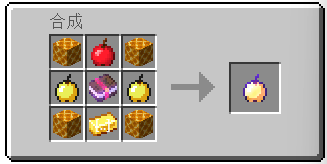
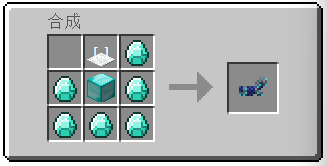

linkage:
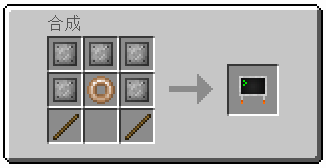
Bedrock Edition:[https://www.mcmod.cn/download/13261.html](https://www.mcmod.cn/download/13261.html)
Ears (+ Snouts/Muzzles, Tails, Horns, Wings, and More)

Faithful fancy fashion features for fuzzy folk.
Created due to a lack of the Tails mod for 1.16, Ears is a mod that adds ears, snouts, tails, horns, wings, and more to the player. Eventually, it also became a complete lightweight open source 1.9 skin backport for many old versions, which works even if you aren’t using its special features.
Ears has a more vanilla-faithful appearance than Tails, with a lot of 2D regions but a few 3D ones too. There are a wide variety of possible configurations and it can all be customized.

Why use Ears instead of Tails? Because Ears is easy to port to other versions, based on a multi-version abstraction allowing the mod to even run in web browsers. The Tails mod has wonderful 3D models and animations, but it’s a burden to update it to any version due to its large rendering system and all the data syncing code, causing it to be tightly coupled with the version of the game and mod loader it was designed for. Ears stores all data as pixels in the player’s skin.
However, Ears requires you to draw your own additions, and does not come with easy recolorable prefabs like Tails. Additionally, unlike CPM or Figura, Ears has a limited number of customization options. (Note that if you have a simple idea, I may add it. Open an issue on GitHub or hop in Discord.) Ears offers a good middle-ground that will work in almost any version you wish to play. It also does not and never will use external servers, just Mojang’s skin server, so there’s no concerns about a third-party server going down (be it temporarily or for good).
Why use Ears instead of other skin fixes? Ears provides a lot of new features to customize your skin, and is a much more lightweight patch with no usage of third-party servers and is completely open source. Additionally, Ears backports translucent secondary layer support to 1.8 and 1.7.
Come discuss this mod and any of my others on Discord or Matrix, or send me an email.
