YetAnother0ptimisationModpack
# Introducing YetAnother0ptimisationModpack!
Are you tired of lag, stuttering, and low FPS? This modpack is here to optimize your Minecraft experience! It is extremely lightweight and has helped a lot of people to double or even TRIPLES Minecraft performance. Whether you’re playing on an RTX graphics card or an integrated graphics card, this modpack will give you the smoothest gameplay possible.
### **🚀 Features:**
✅ **FPS Boosting Mods** – Say goodbye to lag with top-tier performance-enhancing mods like Sodium, Lithium, and more.
✅ **Better World Loading** – Faster chunk rendering and improved terrain generation for seamless exploration.
✅ **Memory Optimization** – Reduced RAM usage with smart allocation and garbage collection tweaks.
✅ **Smooth Animations** – No more stutters! Improved entity and block animations for fluid gameplay.
✅ **Low-End PC Friendly** – Perfect for both powerful and weaker computers, with adjustable settings for maximum customization.
✅ **Fully Compatible** – Works with shaders and resource packs
**We also didn’t just add optimisation mods**. That’s just too boring! Instead, we add a lot of server-sided mods to make Minecraft better, like Appleskin or 3D Skin Layers, so you don’t need to manually download mods yourself.
Boost your FPS and enjoy a lag-free Minecraft experience today! Download this modpack for free now and feel the difference! **Our goal isn’t to be the best optimisation modpack out there but to help people have a more happier experience in Minecraft.**
More supported versions will be released soon.
**PLEASE NOTE THAT THIS MODPACK IS STILL IN BETA AND IT’S MODE BY A SOLO DEVELOPER.**
My YouTube: [https://www.youtube.com/@spjay75](https://www.youtube.com/@spjay75)
Y2K4’s Data Pack
### A collection of all my data pack creations.
More features to be added in the future!
—
Features List
### Current features
– Fast Hopper (Transfers one item each game tick)
### Planned features
– Fast Furnace (Smelts one item each game tick)
Crafting Recipes
#### Fast Hopper
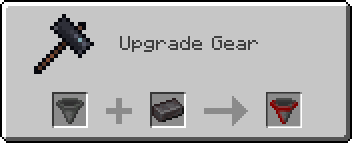
*Craft in a Smithing Table with a hopper and a netherite ingot.*
XXL Packets
**[](https://www.curseforge.com/minecraft/mc-mods/xxl-packets “Click here to download on curseforge!. “)**
DISCLAIMER: This is a fork of the original XL Packets mod, This fork extends the packet limit to the Java Integer limit
Fixes https://bugs.mojang.com/browse/MC-185901 by raising the packet size limit from 2MB to 2.14GB (2147483647), so that servers with large datapacks, packets, etc don’t kick the client.
This mod is needed clientside for any connecting clients.
**[](https://bh.lazuline.xyz “Click here for 25% off a minecraft server by BisectHosting. (if you use code ‘Ultimate’). “)**
Xtra Arrows
## The Arrows
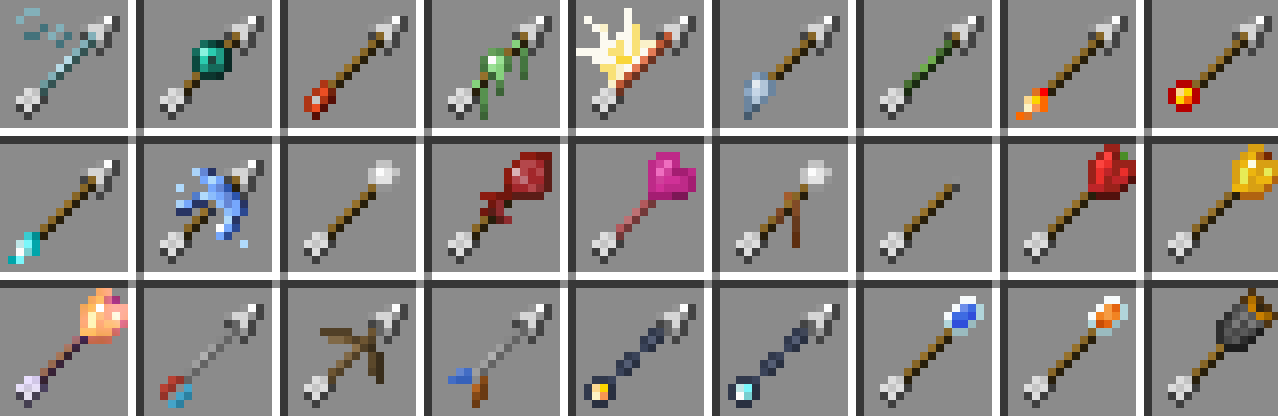
**There are currently 95 new arrows. These arrows come in 27 new types and 5 tiers.**
## Server Hosting Discount
**Follow the link below and use code “JACKBUSTERS” at checkout for 25% off server hosting.**
[](https://bisecthosting.com/jackbusters?r=Xtra-Arrows-Modrinth)
## Media
xtex’s MP Pack
# xtex’s MP Pack
> Minecraft modpack focusing on multiplayer (Survival, Creative or PvP) performance and experience optimization.
[](https://codeberg.org/xtex/xtex-mp-pack/src/branch/main/LICENSE)   [](https://modrinth.com/modpack/xtex-mp-pack) [](https://git.exozy.me/xtex/xtex-mp-pack-staging) [](https://codeberg.org/xtex/xtex-mp-pack)
This Fabric-modpack is client-only.
Get more tips from [the wiki](https://codeberg.org/xtex/xtex-mp-pack/wiki/Home).
## Download
### Stable
The stable versions are available at [Modrinth](https://modrinth.com/modpack/xtex-mp-pack).
### Staging (recommended)
> Use **at your own risk**. Some of your customized configurations may be erased during the update.
The staging version is the delayed version of the dev. It is hosted on [exogit](https://exozy.me) and will be synchronized with dev every 24h, so some temporary bugs may be fixed in time.
[packwiz bootstrap URL](https://git.pub.solar/xtex/xtex-mp-pack-staging/raw/branch/main/pack.toml) | [MultiMC / PrismLauncher Pack](https://xtex.envs.net/xmpp/XMPP-staging.zip)
> Note that you may need to restart the game twice to apply latest updates when using PrismLauncher 9.4+.
### Dev: packwiz installer
> Using this bootstrap URL means your client will always be in sync with the latest development branch **at your own risk**.
>
> To keep your own customized configurations, disable custom pre-launch command after first launch.
[packwiz bootstrap URL](https://codeberg.org/xtex/xtex-mp-pack/raw/branch/main/pack.toml) | [MultiMC / PrismLauncher Pack](https://xtex.envs.net/xmpp/XMPP-dev.zip)
> Note that you may need to restart the game twice to apply latest updates when using PrismLauncher 9.4+.
## Credits
Credits
# Credits
Thanks to everyone who contributed to xtex’s MP Pack and the parts it uses.
## Credit Links
– [Xaero’s Minimap](https://modrinth.com/mod/xaeros-minimap) & [Xaero’s World Map](https://modrinth.com/mod/xaeros-world-map)
– [XeKr Square Pattern](https://modrinth.com/resourcepack/xekrsquarepattern)
## Direct Contributors
– xtex
## Content List
This is a complete list of all mods, resource packs and shaders included in this pack.
– 3D Skin Layers
– AdvancementInfo Reloaded
– AppleSkin
– Architectury API
– AudioShutdown
– bad packets
– BetterF3
– Better Ping Display [Fabric]
– Better Sky
– Carpet
– Carpet Extra
– Chat Heads
– Chest Tracker
– Chunky
– ClickThrough Plus
– Cloth Config API
– Concurrent Chunk Management Engine (Fabric)
– Custom Crosshair Mod
– Debugify
– Default Dark Mode
– Durability Tooltip
– Dynamic FPS
– e4mc
– Entity Culling
– Fabric API
– Fabric Language Kotlin
– FerriteCore
– FlightHelper
– Foliage+
– IMBlocker
– ImmediatelyFast
– Indium
– Inventory HUD+
– Inventory Profiles Next
– Iris Shaders
– Key Language Pack
– Krypton
– LambDynamicLights
– Language Reload
– LAN World Plug-n-Play
– lazy-language-loader
– libIPN
– Litematica
– Litematica Printer
– Lithium
– Log Cleaner
– MakeUp – Ultra Fast
– MaLiLib
– MixinTrace
– Mod Menu
– More Culling
– No Chat Reports
– ObsidianUI
– Pseudo-localization Language Pack
– Redstone Tweaks
– Reese’s Sodium Options
– ReplayMod
– Roughly Enough Items (REI)
– Screenshot to Clipboard
– Shiny Ores
– Sodium
– Sodium Extra
– Sofron oCd
– spark
– StackDeobfuscator
– SuperMartijn642’s Config Lib
– ThreadTweak
– TweakerMore
– Tweakeroo
– Twemojis In Minecraft
– Very Many Players (Fabric)
– ViaFabricPlus
– Who am I?
– WTHIT
– Xaero’s Minimap
– Xaero’s World Map
– XeKrSquarePattern
– YetAnotherConfigLib
## Modrinth Links
– [3D Skin Layers](https://modrinth.com/mod/zV5r3pPn)
– [AdvancementInfo Reloaded](https://modrinth.com/mod/tLuRLqpa)
– [AppleSkin](https://modrinth.com/mod/EsAfCjCV)
– [Architectury API](https://modrinth.com/mod/lhGA9TYQ)
– [AudioShutdown](https://modrinth.com/mod/cSJudN5h)
– [bad packets](https://modrinth.com/mod/ftdbN0KK)
– [BetterF3](https://modrinth.com/mod/8shC1gFX)
– [Better Ping Display [Fabric]](https://modrinth.com/mod/MS1ZMyR7)
– [Concurrent Chunk Management Engine (Fabric)](https://modrinth.com/mod/VSNURh3q)
– [Carpet Extra](https://modrinth.com/mod/VX3TgwQh)
– [Chat Heads](https://modrinth.com/mod/Wb5oqrBJ)
– [Chest Tracker](https://modrinth.com/mod/ni4SrKmq)
– [Chunky](https://modrinth.com/mod/fALzjamp)
– [ClickThrough Plus](https://modrinth.com/mod/fJi8nm80)
– [Cloth Config API](https://modrinth.com/mod/9s6osm5g)
– [Custom Crosshair Mod](https://modrinth.com/mod/o1tyE5vJ)
– [Debugify](https://modrinth.com/mod/QwxR6Gcd)
– [Durability Tooltip](https://modrinth.com/mod/smUP7V3r)
– [Dynamic FPS](https://modrinth.com/mod/LQ3K71Q1)
– [e4mc](https://modrinth.com/mod/qANg5Jrr)
– [Entity Culling](https://modrinth.com/mod/NNAgCjsB)
– [Fabric API](https://modrinth.com/mod/P7dR8mSH)
– [Fabric Language Kotlin](https://modrinth.com/mod/Ha28R6CL)
– [FerriteCore](https://modrinth.com/mod/uXXizFIs)
– [FlightHelper](https://modrinth.com/mod/1yyNJogn)
– [IMBlocker](https://modrinth.com/mod/WMDesFsZ)
– [ImmediatelyFast](https://modrinth.com/mod/5ZwdcRci)
– [Indium](https://modrinth.com/mod/Orvt0mRa)
– [Inventory Profiles Next](https://modrinth.com/mod/O7RBXm3n)
– [Iris Shaders](https://modrinth.com/mod/YL57xq9U)
– [Krypton](https://modrinth.com/mod/fQEb0iXm)
– [LambDynamicLights](https://modrinth.com/mod/yBW8D80W)
– [Language Reload](https://modrinth.com/mod/uLbm7CG6)
– [lazy-language-loader](https://modrinth.com/mod/Nz0RSWrF)
– [libIPN](https://modrinth.com/mod/onSQdWhM)
– [Litematica Printer](https://modrinth.com/mod/3llatzyE)
– [Litematica](https://modrinth.com/mod/bEpr0Arc)
– [Lithium](https://modrinth.com/mod/gvQqBUqZ)
– [Log Cleaner](https://modrinth.com/mod/hwRo6mwQ)
– [MaLiLib](https://modrinth.com/mod/GcWjdA9I)
– [MixinTrace](https://modrinth.com/mod/sGmHWmeL)
– [Mod Menu](https://modrinth.com/mod/mOgUt4GM)
– [More Culling](https://modrinth.com/mod/51shyZVL)
– [No Chat Reports](https://modrinth.com/mod/qQyHxfxd)
– [ObsidianUI](https://modrinth.com/mod/E0L8mfJZ)
– [Reese’s Sodium Options](https://modrinth.com/mod/Bh37bMuy)
– [Roughly Enough Items (REI)](https://modrinth.com/mod/nfn13YXA)
– [ReplayMod](https://modrinth.com/mod/Nv2fQJo5)
– [Screenshot to Clipboard](https://modrinth.com/mod/1KiJRrTg)
– [Sodium Extra](https://modrinth.com/mod/PtjYWJkn)
– [Sodium](https://modrinth.com/mod/AANobbMI)
– [spark](https://modrinth.com/mod/l6YH9Als)
– [StackDeobfuscator](https://modrinth.com/mod/NusMqsjF)
– [SuperMartijn642’s Config Lib](https://modrinth.com/mod/LN9BxssP)
– [ThreadTweak](https://modrinth.com/mod/vSEH1ERy)
– [TweakerMore](https://modrinth.com/mod/GBeCx05I)
– [Tweakeroo](https://modrinth.com/mod/t5wuYk45)
– [ViaFabricPlus](https://modrinth.com/mod/rIC2XJV4)
– [Very Many Players (Fabric)](https://modrinth.com/mod/wnEe9KBa)
– [Who am I?](https://modrinth.com/mod/CcxcmoLQ)
– [WTHIT](https://modrinth.com/mod/6AQIaxuO)
– [Xaero’s Minimap](https://modrinth.com/mod/1bokaNcj)
– [Xaero’s World Map](https://modrinth.com/mod/NcUtCpym)
– [YetAnotherConfigLib](https://modrinth.com/mod/1eAoo2KR)
– [Better Sky](https://modrinth.com/mod/Zrixe2pD)
– [Default Dark Mode](https://modrinth.com/mod/6SLU7tS5)
– [Foliage+](https://modrinth.com/mod/kXiPMJsD)
– [Key Language Pack](https://modrinth.com/mod/QCLPvYpB)
– [Pseudo-localization Language Pack](https://modrinth.com/mod/oZcsj8Sx)
– [Redstone Tweaks](https://modrinth.com/mod/RvfAlf4Z)
– [Shiny Ores](https://modrinth.com/mod/oYrEfh82)
– [Twemojis In Minecraft](https://modrinth.com/mod/WdYcUVh8)
– [XeKrSquarePattern](https://modrinth.com/mod/rq4lDGdf)
– [MakeUp – Ultra Fast](https://modrinth.com/mod/izsIPI7a)
## License
This modpack is released under the Apache-2.0 license.
> Copyright 2023-2025 xtex
>
> Licensed under the Apache License, Version 2.0 (the “License”);
> you may not use this file except in compliance with the License.
> You may obtain a copy of the License at
>
> http://www.apache.org/licenses/LICENSE-2.0
Xtabay’s Villager Creator
This datapack will help you create custom villagers very easily. Meant for server administrators or map creators. Trades are infinite and unblockable.
**Get the Villager Creator Kit**
/function vg.xtabay:give/villager_creator_kit
USE.
**Villager Creator Stick**
Put all the items you want your villager to trade in a chest in this order, from left to right: 1st buy item, 2nd buy item, sell item. This means every 3 slots are used for a single trade row, up to a maximum of 9 trades per chest. Every trade must have this structure: [Required Item] [Required Item](optional) [Offered Item], if they don’t have this structure, the items will be ignored and the trade won’t be added.
Once you’re done filling a chest with this structure, right click it with a Villager Creator Stick and the villager will be created.
All villagers created by Villager Creator have 40 heart containers, are leatherworkers and snow villagers by default. They’re also riding a block display so they can’t move or be moved.
**Add Trade Stick**
Put a chest next to a villager created with the Villager Creator datapack and repeat the same process as with the Villager Creator Stick but using the Add Trade Stick this time. Once done, all the trades in the chest will be added to the nearest villager and the chest will be deleted.
**Villager’s Properties Stick**
This stick allows you to fully customize your villagers.
These are the values you can modify:
– Profession
– Type
– Name (custom name, styling, color, visibility)
– Invulnerability
– Health
– Silent
**Villager Eraser Stick**
Kill any villager created by the Villager Creator datapack by right clicking it.
Experienced Powers
> This data pack is now discontinued.
> This means that it will no longer receive any more updates.
This data pack gives another use for experience, Magical powers!
You can use this experience points to trade for magical powers (well, effects in other words). For example, You can use 10 experience levels to get fire resistance for 30 seconds, or 7 experience levels to heal yourself.
Yeah I know, it can be a bit overpowered.
To use this data pack, simply use this Command: `/trigger `
Here is a full list of all “powers” and “power_id”:
| Name | Id | Description | XP level required | XP cost
|—————-|—————|—————————————|——|—–|
| Fire resistance | xpower.fire_resistance | Gives 30 seconds of fire resistance. | 25 | 12
| Fire resistance+ | xpower.fire_resistance+ | Gives 2 minutes of fire resistance. | 30 | 18
| Fire resistance++ | xpower.fire_resistance++ | Gives 10 minutes of fire resistance. | 40 | 25
| Slow falling | xpower.slow_falling | Gives 30 seconds of slow falling. | 15 | 5
| Water Breathing | xpower.water_breathing | Gives 1 minutes of water breathing. | 15 | 8
| Water Breathing+ | xpower.water_breathing+ | Gives 5 minutes of water breathing. | 20 | 15
| Water Breathing++ | xpower.water_breathing++ | Gives 20 minutes of water breathing. | 25 | 25
| Heal | xpower.heal | Gives 4 seconds of regeneration V, enough to fill your health bar. | 15 | 5
| Strength+ | xpower.strength+ | Gives 5 minutes of strength I. | 30 | 10
| Strength++ | xpower.strength++ | Gives 10 minutes of strength I. | 35 | 15
| Haste | xpower.haste | Gives 30 seconds of haste I. | 20 | 10
| Haste+ | xpower.haste+ | Gives 2 minutes of haste I. | 30 | 20
| Haste++ | xpower.haste++ | Gives 10 minutes of haste I. | 40 | 25
| Night vision | xpower.night_vision | Gives 2 minutes of night vision | 15 | 4
XP Vial

# 🧪 About
**XP Vial** adds magical glass bottles that allow you to safely store and retrieve your experience points.
This mod is designed to be lightweight and highly configurable in order to enhance any existing gameplay experience of your choosing and to not interfere with any of your other modifications.
For more details, refer to the image gallery, the wiki below, or the following quick summary:
– ‘Xp Vial’ item
– Can store player’s collected xp points
– Three different sizes (500 Xp, 1500 Xp, 3000 Xp)
– ‘Orb Vial’ item
– Special XP Vial item
– Stores player’s collected xp points as experience orbs
– Useful for repairing items with mending
– Items play interactive sounds
– Items have detailed and dynamic texture models (see gallery)
– Highly configurable for individual players and admins through config menus (see below)
– Powered by datapack, configurable through own datapacks
## 🌐 Wiki
If you are looking for a wiki of sorts or just a more detailed walkthrough of the content of this mod, then you can find quick and easy introductions to all the added features of this project below.
If you find no answers to your questions here or want to suggest improvements for the project, then feel free to leave a comment on the CurseForge site ([here](https://www.curseforge.com/minecraft/mc-mods/xp-vial)).
XP Vial
### Description:
XP vials are able to store a limited amount of your collected experience points, preventing you from losing them upon death.
### Usage:
**Right-click** to retrieve stored experience points. Whenever possible, the retrieved amount will match the number of missing experience points needed to reach the next level.
**Shift+Right-click** to store collected experience points. The vial stores the experience points of the player by removing one level at a time.
One can hold down the required buttons for each action to perform the task continuously. Additionally, all vials can be used in both mainhand and offhand.
The fill level of each vial is displayed roughly through the item’s different texture models and denoted exactly in the item’s tooltip.
Small Xp Vial | Medium XP Vial | Large XP Vial
:————————-:|:————————-:|:————————-:
 |  | 
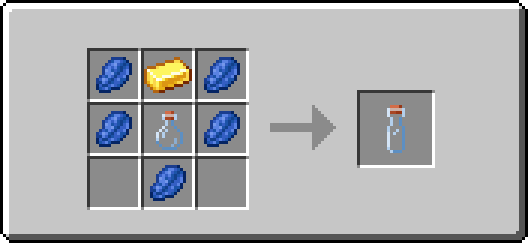
### Recipes:

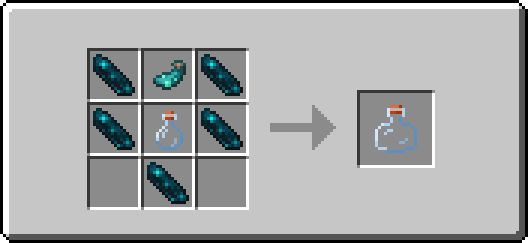
Orb Vial
### Description:
An orb vial is a special variant of an XP vial. It is able to store a limited amount of your collected experience points, preventing you from losing them upon death, and allows you to retrieve experience points in the form of experience orbs.
This enables you to repair items enchanted with mending on the spot and without having to carry large amounts of experience bottles!
### Usage:
**Right-click** to retrieve stored experience points. The retrieved amount will match the minimum of the vial’s remaining fill level and a constant of 100 experience points. The retrieved experience points are then combined into one experience orb that is summoned at the player’s position.
**Shift+Right-click** to store collected experience points. The vial stores the experience points of the player by removing one level at a time.
One can hold down the required buttons for each action to perform the task continuously. Additionally, the vial can be used in both mainhand and offhand.
The fill level of the vial is displayed roughly through the item’s different texture models and denoted exactly in the item’s tooltip.

### Recipe:
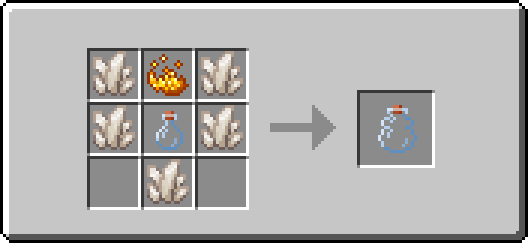
## 🔧 Configuration
If you’re looking for a detailed description of the configuration options and how to access them, you’ll find brief introductions to all available menus and their default values, grouped by privilege class, below.
Admin
### Access method:
Run the following command: **/function xp_vial:.menu/admin**
### Features:
– Toggle sound events of all items
– Set the use cooldown of the “XP Vial” item
– Set the use cooldown of the “Orb Vial” item
Player
### Access method:
Run the following command: **/trigger XP_VIAL.CONFIG_MENU**
### Features:
– Toggle sound events of all items
# 📬 Remarks
Please keep in mind that at any given time vast amounts of the mod may be edited or completely overhauled! These changes should not, but may leave existing worlds on older versions corrupted. Creating backups before updating to a new version is advised!
I want to reiterate that this is simply a passion project. It may occur that for longer periods no updates or bug fixes are being developed/released simply because I do not want to.
Skelun’s XP Reward System

_It’s unfair for players who likes to chill and gather materials to not get any XP while tryharders are building a thousand mob farms getting loads of experience to enchant everything._
_This is why I created this Mod/Datapack_
## ✨ NEW WAYS TO EARN XP


—
## 📝 RULES
* To receive XP by **Mining**, **Cutting**, **Digging** or **Farming** you must be using the appropriate tool;
* You receive less XP for “**Ice Boating**” or for using the “**Rail Bug**”;
* You receive less XP for **Traveling** if you are using something that speeds you up;
* You receive less XP for certain enchantments in specific conditions (e.g.: having *Depth Strider* and walking underwater).
## 🛠️ Mod Support
It supports any _*”Right-Click Harvest”*_ mod or data pack.
It supports any mod or data pack that allows you to break multiple blocks, like _*”vein mine”*_ or _*”timber”*_.
I have not included support for any modded tool, but if you want any, just ask!
## 📖 Settings
As of `version 2.6.1` you can now change some settings in-game.
> You need to be in creative mode (and if in a server, be an OP)
Type this command in chat to give yourself a written book:
“`/function sklps:config“`
It allows you to change some settings once you open it.
—
#### 🔢 *Detailed Information on the numbers I used:* [**Google Sheets File**](https://docs.google.com/spreadsheets/d/1ja2UrwOSQU-HuBbu5GjIAst3xkR4ZdJTHHQBmAlbfy0/edit?usp=sharing)
—
💖 Feel free to give any feedback, trash talk or ask for anything.
**You can contact me on [PlanetMinecraft](https://www.planetminecraft.com/member/skelun/)**
**Or [create an issue on Github](https://github.com/Skelun/xp-reward-system/issues)**

Psitadditions – XP Plus
**Experience Plus** is a datapack allowing you to collect, store and manage your experience using new blocks, items and game mechanics. What’s better than being able to securely store your experience!
## **- New Blocks:**
**Added unique blocks and 3d models**
– Experience Crystal –
_Animated block dedicated to storing experience_
– Experience crystal Filler –
_Animated block dedicated to the transfer of the player’s xp to the crystal_
– Experience crystal Drainer –
_Animated block dedicated to the transfer of the crystal xp to the player_
– Experience Player Pad –
_Block allowing you to activate the transfer of experience_
– **Experience Crystal Setup:**
_Use all Xp Plus custom blocks for create the Experience Crystal Setup and transfert your experience_
## **- New enchantments:**
**Compatible with vanilla enchantments**
– Experience Bottler –
_Allows you to bottle experience recovering on entities_
– Experience Sword I-II-III –
_Increases the amount of experience gained from killing mobs_
– Experience Pickaxe I-II-III –
_Increases the amount of experience gained from mining blocks_
_Obtainable with the enchantment table and trade with villagers_
## **- New advancement page**
– Find 6 new achievements and challenges to complete
### **More information**
This datapack is **Multiplayer friendly** !
Minecraft versions supporteds: 1.21.1
**IMPORTANT:** [Psitadditions resource pack](https://modrinth.com/resourcepack/psitadditions-resource-pack) is required for 3D models and custom items ! ! !
